Problems? See this thread at archive.org.
Nope. Same vBios but with different set TDP. I expect 200w target is too high vs temp.
http://forum.notebookreview.com/thr...1-owners-lounge.826831/page-702#post-10893064
-
-
Temperatures with the vbios 200w are manageable, the problem is that going from 190W to 200W I result in fewer points in the benchmarks, less capacity of undervolt at the same frequency and consequently also higher temps, in my opinion the 190W is the best vbios
-
Very likely that this is why you were having contact issues @Korben_Dallas, adding those 1mm pads messed up the pressure distribution.Papusan, etern4l and Korben_Dallas like this.
-
Thanks for your feedback jc! I only did what SK recommended in his tutorial. Later I take everything down and keep you updated
jc_denton likes this. -
Hi....... The Area 51m in that video, the reviewer mentions that it's an early review sample.. And I have to further wonder if this reviewer just slapped it back togeather after the tear down without a re-paste.. That's my take as he's complaining about fan noise!Last edited: Jul 26, 2020Fire Tiger and jc_denton like this.
-
-
See also...
![[IMG]](images/storyImages/9d0d33f33a87e950175e3c0d1f385343fbf2b417.jpg)
Both heatsink doesn't have the pad located there. The two pipe for 2060 neither.
![[IMG]](images/storyImages/99f64a166d224f4a8a0c0b7506f790529922d1c8.jpg) raz8020, jc_denton and Fire Tiger like this.
raz8020, jc_denton and Fire Tiger like this. -
Thank you... That's the same BIOS I'm on... I think I heard something about dell using ADATA sticks for their higher speed memory? I might order a pair and see if it gets recognized.
 Last edited: Jul 26, 2020Fire Tiger likes this.
 -
No it won't work, there is no 3rd party solution that will give you higher speed on 51m, except you can find the exact specific ADATA modules (AO1P32MCST2-BW4S) which is exclusive to Dell for now.
There is another work around is to follow this route if you are desperate for a higher RAM speed (like me)
That is how I managed to have 2933Mhz Ram on my 51m.
Yeah I noticed that too, my theory is those inductors does not generate too much heat hence they does not need pads. In fact it may causes negative impact with thermal pads, those inductors may get hot because of heat from the heatsink near CPU may transfer backward.echterion, Fire Tiger, Papusan and 2 others like this. -
Ok, Thank you...
-
Could you please run 3DM Fire Strike with same settings?
Thanks
http://forum.notebookreview.com/thr...r2-owners-lounge.832848/page-92#post-11035025jc_denton likes this. -
So with more testing (a few quick rounds in Apex Legends) I'm settling it somewhere in the high 1800's/low 1900's for GPU clocks at hitting 84/85 (where I have the max set in Command Center) after half a round or so. Is that normal with what everyone else is seeing for clocks and temps or is mine running too hot?
-
What do you mean by "same settings"? is that the default 3Dmark setting?
This is my score with the i7 9700k (-0.130v UV, 4.7Ghz) and the external 2080Ti (+161 Core +1000 Mem) in AGA
Papusan likes this. -
That's a good score for going through an external GPU.. What do you think the new Area 51M / R2 scores will be?Last edited: Jul 27, 2020
-
What I meant... Use same settings from the link I posted http://forum.notebookreview.com/thr...r2-owners-lounge.832848/page-92#post-11035025
From the post...
Just for comparison, here is my Fire Strike on my Area-51m R1 with a 9700K/RTX 2080
Fire Strike (Driver 442.23-BIOS 1.3.2) OC 20 MHz Core/150 MHz Mem
You run 2933Mhz ram settings on your 51m. The 3DM Fire Strike results from the link is done with 2400MHz ram (same Cpu and Gpu). It looks like the faster ram kit Dell use for R2 ands a few R1 kill the Combined Score in 3DM Fire strike. Hence I asked if you could run Firestrike with same/equal Graphics settings to compare the results. Apples vs. Apples.
From your FS results with 2080 ti, your combined score is also low vs slower running 2400MHz ram sticks.
Edit. I saw you have the RTX 2070. Maybe others with 9700K and 2080 combined with +2933MHz ram sticks could run the 3DM bench test.Last edited: Jul 26, 2020Rei Fukai likes this. -
Does you're workaround give you an almost exact replica of the Dell RAM with high CL?
I think that run was done with a 2080Ti in the external enclosure (AGA). -
My combine score wasn't good either with 2133Mhz RAM.
https://www.3dmark.com/fs/19316903 -
Hi everyone, I've noticed the lower left side of my A51m R1 keyboard (just below the CTRL and Fn keys) getting warm I've looked here and I've read about the sound card problems in other models, is this it? if yes is there something I should be worried about and should be doing?
Fire Tiger likes this. -
I'd contact Dell if you are concerned or are having sound related issues, especially if you don't have a great deal of warranty left.
-
everything is fine no sound problems, the system works great, but sometimes it does get warm, I've still got a year of warranty left.Fire Tiger likes this.
-
I have the same "issue". It comes from the sound card I think, because I don't have anything else there (I have only nvme ssd). No problem with my card so I don't care it now.uugui shi likes this.
-
Same "issue" on mine. I am pretty sure it's just the sound card heating up. I have swapped to a spare sound card and it has not solved it at all, same with swapping speakers. Unless the newer models have an upgraded sound card then I am pretty sure this is considered normal.
If you use a USB headset the heat will go away completely, because the sound card isn't being used.
I could be wrong, but I don't really think it's an issue, it's just a component getting warm when being used.uugui shi and Spartan@HIDevolution like this. -
Its not just the hard drive heating?
-
I have an hard drive but It’s not that, I also have a jack to usb converter that counts as a separate audio device, I’ll try to use that in the future.
-
Bit of a strange one guys, just wondering if anybody can help.
When I shut down the 51M i notice it's powering off almost within 3 seconds, but the lights stay on for around 8-9 seconds before shutting off, pretty sure it wasn't like this on the clean OS i installed a while back, wondering if there is a driver etc hanging the system until it force shuts itself down.
Anybody else experienced this?jc_denton and Fire Tiger like this. -
Do you have 'Fast Startup' enabled? Maybe this is the cause? I've disabled it, and mine doesn't have the same symptoms.jclausius, cope123abc and Papusan like this.
-
BANG ON THE MONEY !!
Thanks bud !!Papusan, Fire Tiger and jclausius like this. -
What does the FN + F1 key combo do? It has three double lines that look like a triangle.
-
It Disconnects the Alienware Graphics Amplifier;
https://www.dell.com/support/manual...670eb2-1815-429e-9dd9-45e3c0588edf&lang=en-us
*And here's the link for your R2;
https://www.dell.com/support/manual...9ca2f5-8ffb-41da-8f47-fa09fa3663a7&lang=en-usLast edited: Jul 28, 2020Spartan@HIDevolution likes this. -
![[IMG]](images/storyImages/giphy.gif_cid=ecf05e47uic8ygq2eevovxebqrcp686jjdpl5zo7gjywvdvf&rid=giphy.gif)
How many times do you need to ask?
http://forum.notebookreview.com/thr...-owners-lounge.826831/page-2003#post-11001590Last edited: Jul 28, 2020 -
have you the time to look for my old posts? I see you had an overdose of fish oil to boost your memory
![[IMG]](images/storyImages/OYN4bUY.gif)
-
From my experience yes. Had a SC short and it was hot EXACTLY where you are describinguugui shi, Fire Tiger and Spartan@HIDevolution like this.
-
I receveid my replacement 8gb memory stick, and its a... Micron technology. My the original 2*8gigs sticks were from Hynix.
So now i have 2 sticks of 2 different brands lel, on a 11months old 4k€ PC.
But its working, no epsa error and im doing some SA stress test.
![[IMG]](images/storyImages/Screen-Hunter-3501-Jul-29-11-38.jpg)
![[IMG]](images/storyImages/Screen-Hunter-3502-Jul-29-11-38.jpg) Last edited: Jul 29, 2020Fire Tiger likes this.
Last edited: Jul 29, 2020Fire Tiger likes this. -
My Area-51m R1 also has that exact same model from Micron. It has a higher CAS Latency though so I assume that would cause the slightly faster SK Hynix memory to also match it in terms of latency
Fire Tiger likes this. -
@Spartan@HIDevolution @Timoonn
Is your RAM running at 2666mhz? Or am I just reading these screenshots wrongly? -
No that's the SPD speed rating, the actual speed is 2400 MHz as shown in HWiNFO and AWCCFire Tiger likes this.
-
Thanks bro, I thought you'd found the magic recipe.Spartan@HIDevolution likes this.
-
Nope. And you don’t see current speed in that Cpu-Z tab.
Btw. What a mess. Not fun be in this Dell memory rabbit hole. Matching pairs, LOL
With the need for new sticks you newer know what you’ll get as replacement. Ram sticks should be swapped in pairs.Last edited: Jul 29, 2020c69k, Docsteel, Spartan@HIDevolution and 1 other person like this. -
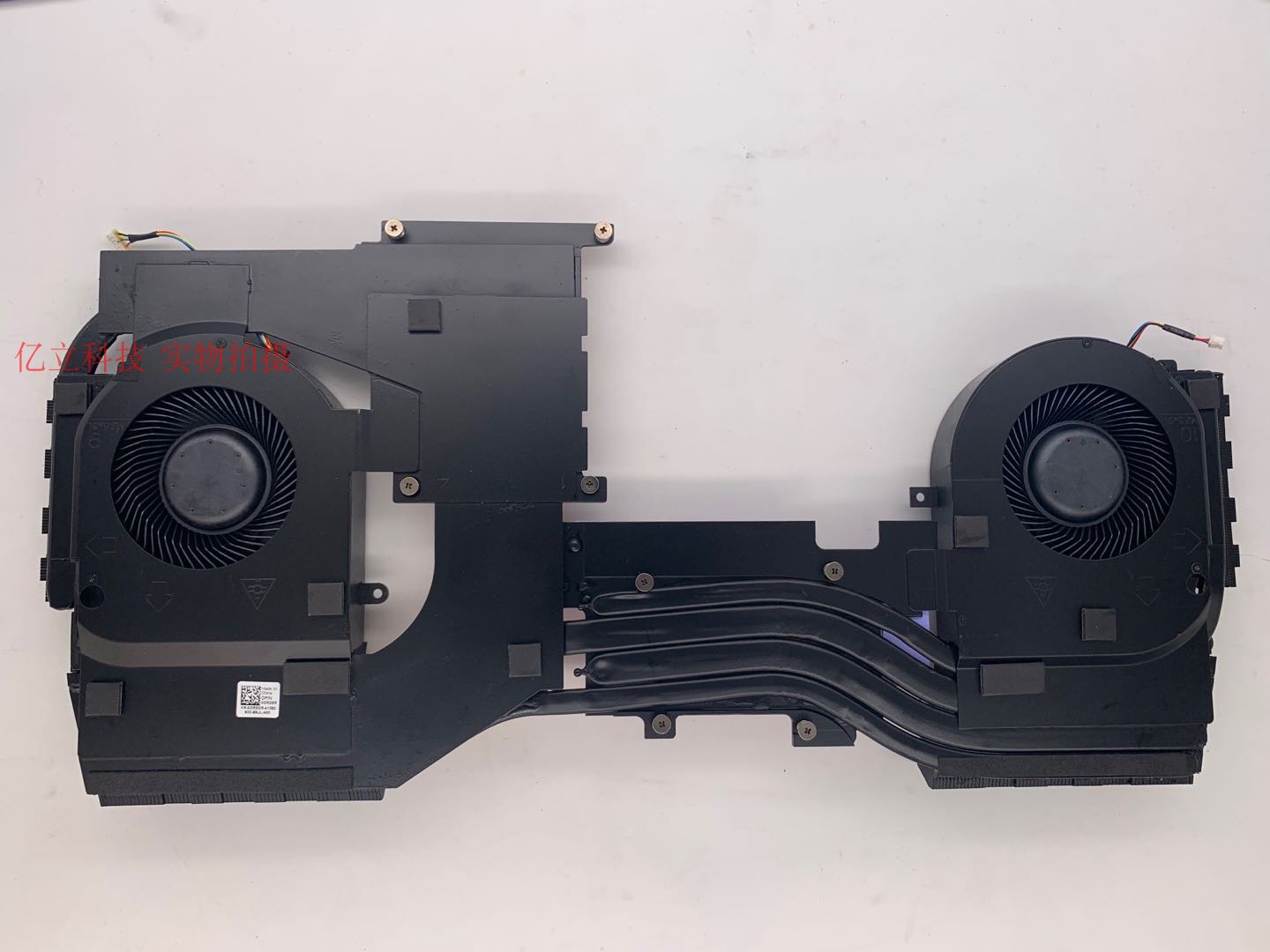
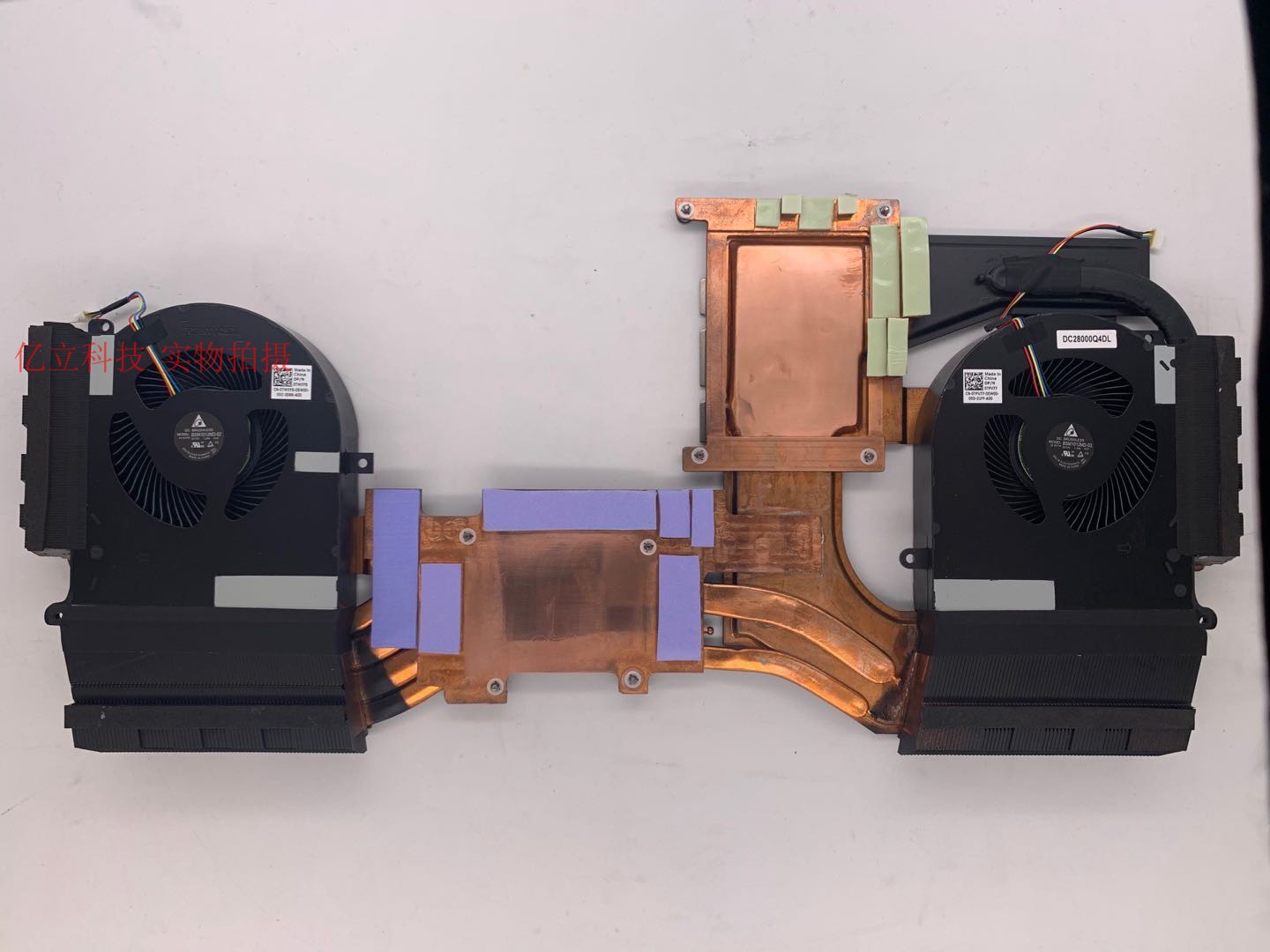
Well, I ordered an adapted cooling system from R2 made by cicichen594.
Attached Files:
-
-
I look forward to some benchmarks/thermal testing. I had his cooler for the 17R5 and it might have made some difference but I never thought it worked wonders. That one wasn't a vapor chamber though, so I could see how this one could really be beneficial. If it is, I might be interested also.Silentfan and Fire Tiger like this.
-
I also contacted cicichen594 (on eBay) about a month back... Looking forward to your results.. The Thermals and the Fitment.
Btw.... What CPU / GPU combo do you have?Last edited: Jul 29, 2020Fire Tiger likes this. -
9700 (but I'm going to replace it with 9900K) + 2080
I ordered from his taobao store - price: CNY 1600 (~ $ 228). Delivery to my country will take a couple of weeks...Last edited: Jul 29, 2020phusy likes this. -
As an FYI for anyone who may not know, you should really be undervolting the core and the cache on these chips. I never had really messed with the cache before, I just assumed it didn't really matter. Well, let me tell you, it does. I was able to go from 4.3Ghz or so under load (cinebench r20) sustained and touching 100c to 4.7Ghz in the same scenario and staying in the mid to upper 90's. I had a .150v undervolt on just the core, even .160 was stable for my test runs but it didn't do too much to help the heat situation, I was hitting pretty much the same temps. Undervolting the core and the cache by -.130 however made all the difference.
-
If you don't mind, could you share the taobao link please? Thanks a lot!
-
Oh cool.... Please post a few comparison photos during the installation.
I'm also upgrading from a 9700K (PO stepping).. Although, a great CPU.. As it ran 5.2ghz all day long with low voltage / core temps.. It lacks the Multi-Threading HP I'm looking for as I'm not just gaming.
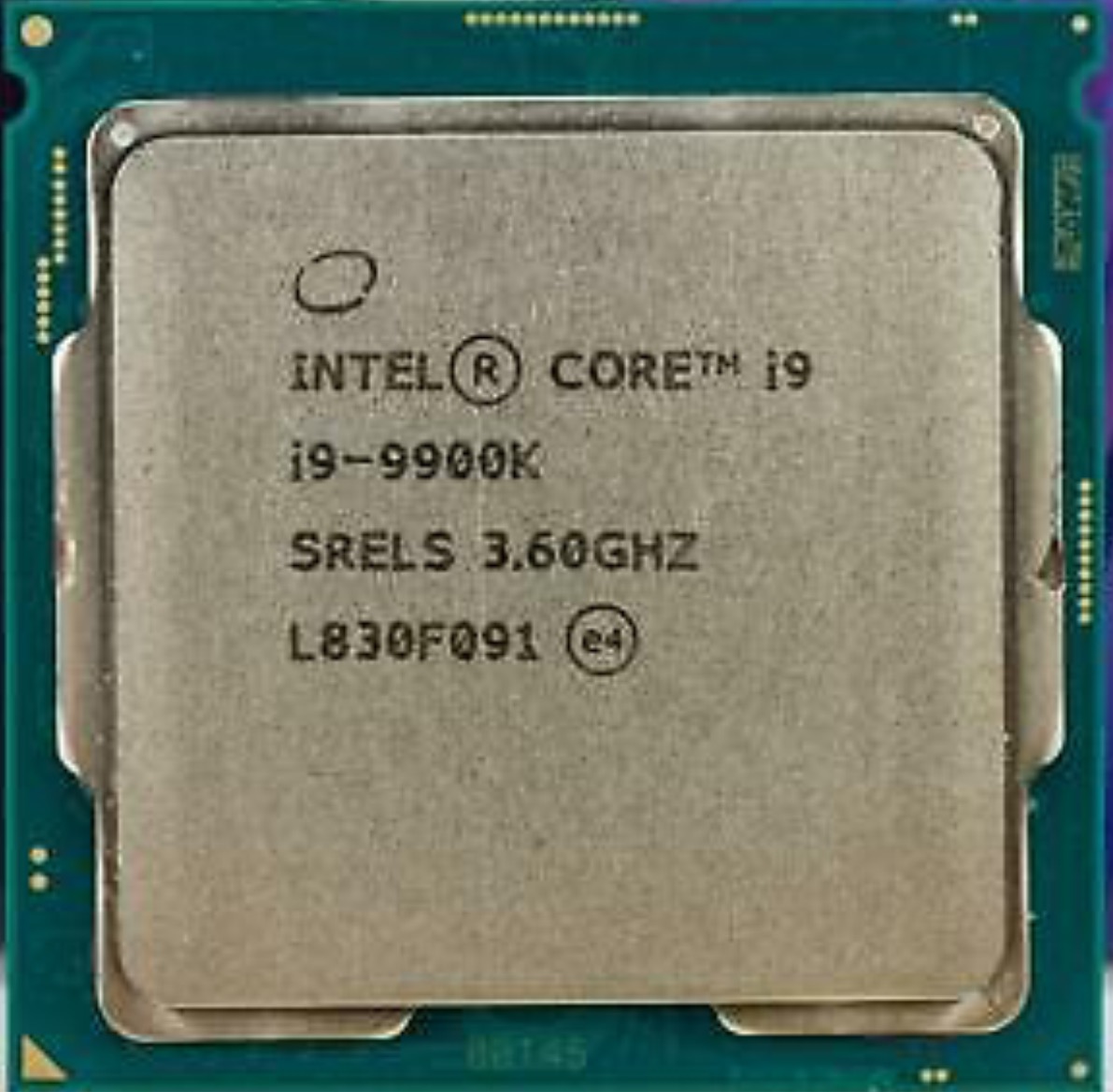
So I searched around and got lucky.. I found a 9900K "SRELS" (PO stepping).. The seller said it was a good bin having low voltage at higher clock speeds and good thermals.. It will be arriving today.
I'm also going from a RTX-2070 to a RTX-2080 (already purchased).
In case anyone is wondering about the differences between a 9900K having PO vs RO stepping.. After researching this for the past week.. These are my conclusions.
The 9900K manufactured in 2018 to early 2019 are PO stepping.. They can be identified with the wording of "SRELS" printed on the box & cpu.
Now fast forward in time... Due to the security risk of Meltdown & Spectre.. Intel released a 2nd revision of the 9900K which was manufactured from 2019 to today.
This 2nd revision of the 9900K is labeled RO stepping and can be identified by the wording of "SRG19" printed on the box & cpu.
It is rumored the 9900K PO versions overclock better and run "slightly" cooler over their RO counterparts (despite the 9900K RO running at a lower voltage).
It has been said that the 9900K RO takes a performance hit from the security patches being added in at the silicone chip level.
You can run CPUID to see which version you have.. This PO to RO manufacturing switch also pertains to the 9700K as well.
*Your mileage may also vary depending on certain factors such as the Silicone Lottery.Attached Files:
Last edited: Jul 30, 2020 -
-
Yes, the S-Spec is the easiest way to identify what revision 9900K is.
SRELS are P0
SRG19 are R0
![[IMG]](images/storyImages/0beNdFk.jpg)
http://www.cpu-world.com/sspec/SR/SRELS.htmlc69k, Papusan, Fire Tiger and 1 other person like this. -
Someone in one of the other threads mentioned swapping the GPU screws for some non-spring loaded ones. I did this for both the GPU and CPU, just to test, and the CPU improvements are marginal but the GPU improvements are significant. I used m2x6 screws to replace them (I take no responsibility if you do and crack your GPU die or something, be sure to tighten slowly and not one screw all the way and then the next) and I went from 1700Mhz or so (between about 1650 and 1770) in games and hitting 84c, to about 82c or so and maintaining about 1960Mhz. Very happy with that improvement.
Silentfan, ratchetnclank, Fire Tiger and 1 other person like this. -
Hi... Are you looking for the 2nd revision of the Alienware 51M R1's fan/heatsink assembly.. If so, this seller has them in stock.. If not, i'm sorry! I misread your post.
This one in the link below is for an Alienware Area 51m "R2" ...but you can use this link to contact the seller about purchasing a modified "R2" version that will supposedly fit the "R1".
https://www.ebay.com/itm/254651043682Last edited: Aug 1, 2020phusy likes this.
*OFFICIAL* Alienware Area-51M R1 Owner's Lounge
Discussion in '2015+ Alienware 13 / 15 / 17' started by ssj92, Jan 8, 2019.