 Problems? See this thread at archive.org.
Yes but i am not certain this is an issue with my laptop only.
I have eliminated support assist as possible cause (i disintalled and problem persist)
I have updated prime 95 and tested with both OCCT and Prime 95 and computer shut down after 5 minutes (battery disabled). I think around 65C for CPU is the shutdown thrigger...not sure at all.
I guess if i was to do some video editing while on battery power, same thing would happened, and that would be a disaster.
-
-
yep) new graphics cards send R1-R2 to the trash (I think we will get the same performance as 3060M-3050Ti) at the beginning of 2021...
2900Mhz just pretty number in the settings and nothing else
My battery was swollen and stopped working in early summer (14 months of use). After that, the computer needed to replace the motherboard, it began to freeze at random times.Last edited: Sep 28, 2020 -
Did you keep the original SPD profile (or do you have another same RAM to read it)? Write me a private message, I will try to help you. My SPD Works only with 16Gb Ram.
TB dangerous software. Wrong SPD profile can be destructive for your RAM.
P.S. Update my post it should get easier nowLast edited: Sep 28, 2020Fire Tiger likes this. -
A small screenshot from the Chinese AW-fans forum:
In this screenshot, you can see the BIOS in the debug program. Here you can clearly see that there are only 4 RAM models that support memory overclocking.
It doesn't matter what profiles are stored in your memory, BIOS starts overclocking simply by the part number in the SPD profile.Supported memory:
AO1P32MC8T1-BW3S 3200MHz (2800-2900 on R1) 8Gb
AO1P32MCST2-BW4S 3200MHz (2800-2900 on R1) 16GB
AO1P32MC8T1-BZOS 3200MHz (2800-2900 on R1) 32GB
AO1P32MC8T1-BZPS 3200MHz (2800-2900 on R1) 64GBLast edited: Sep 29, 2020devilhunter, echterion and Fire Tiger like this. -
Last edited: Sep 28, 2020Fire Tiger likes this.
-
This battery swelling thing has me spooked.... what are the signs of this, it just goes bad one day and you open to a battery that looks like a Jiffy Pop?
-
Follow the Battery wear level in Hwinfo or similar software. The higher wear level the bigger chance for it to happen....
http://forum.notebookreview.com/thr...-owners-lounge.826831/page-2218#post-11023965
Djadit, jclausius, Docsteel and 1 other person like this. -
Have you found anywhere that sells these models outside Dell?
-
Thank you! I have read if its bad enough *boom*.... mine showed 6.8%.... I guess I am safe... for now
 Papusan, Fire Tiger and Normimb like this.
 -
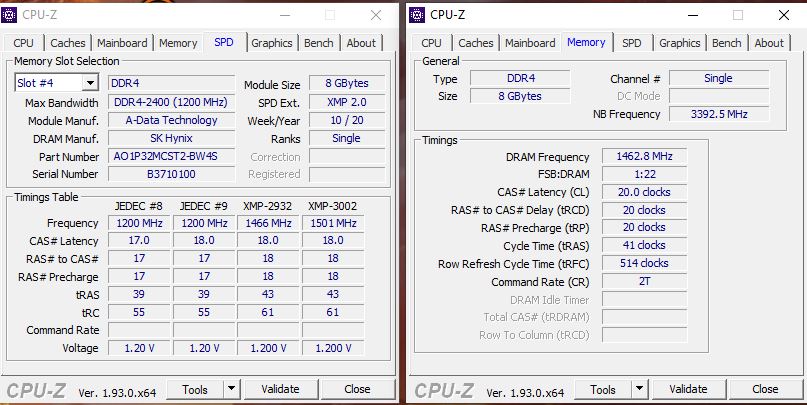
Thank you for your help last evening. Now my ram module work on 2933.The only strange thing is that I cannot get under 20 with the CAS Latency. I tried to overwrite with thaiphoon, it worked but the latency didn't changed. Is it possible to decrease this? This module can handle with the CL16 on 3000 MHz, if neccessary.
Edit: Another question: is it possible to work with another type of memory? I have 2 pcs 4 GB Kingston memory modules and I am a little curious.
Attached Files:
Last edited: Sep 29, 2020Papusan, Fire Tiger and c69k like this. -
-
What memory did you use initially? This interests me but no doubt I'd break something.Papusan and Spartan@HIDevolution like this.
-
It doesn't matter what XMP/JEDEC profiles are stored in your RAM, BIOS starts overclocking by the part number in the SPD profile.
Overclocking settings are stored in the BIOS and cannot be changed:
2800Mhz 19-19-19-39 if 64Gb (4x16Gb) RAM
2900 20-20-20-41 if 32Gb (2x16Gb)Last edited: Sep 29, 2020 -
I have this module: G.SKILL Ripjaws 3000MHz CL16 (F4-3000C16S-8GRS). It is little chance to break it, it was my fault, because I flashed a 16GB model's file into it.Fire Tiger likes this.
-
Yeah, I see. Thanks.
I ordered another ram module from the same type what I can use until I am waiting for the RMA, I hope it will arrive during this week. After that I will measue the speed improvement (if I get something ).
Fire Tiger likes this. -
Thanks for sharing. Were you not able to recover it with the original file? Or even re-flashing the correct file or is it dead now?
Spartan@HIDevolution likes this.
-
No, unfortunately my PC didn't start with that module anymore. My laptop's alien head flashing 2x then 4x contunuously when it put this module into it. This means memory failure.Fire Tiger likes this.
-
I don't think I have seen a single Area-51m battery that has swollen yet. Maybe someone here has, I am not sure, I am less active here.
-
With time, you'll forget. The nature of humans
http://forum.notebookreview.com/thr...-owners-lounge.826831/page-2218#post-11024008
-
This gives me nightmares... why the hell are batteries suddenly an issue after all these years? Was there a change in battery chemistry or something wrong in the manufacturing process?
-
Did you ever mod your heatsink? I did the same thing as well. Got a heatsink off of aliexpress for modding purposes.
Fire Tiger likes this. -
That's the question isn't it...
We did go to Lithium Ion over the years, so that might have something to do with it. We're also sticking batteries inside the chassis now where they used to be a separate entity that you could remove without disassembly. Keeping them inside the chassis also adds to the heat they are subject to and batteries hate heat, so that's likely not helping.
It's happening with every brand and type of device, so if it's a manufacturing process issue then they are all suffering from it
Phones, tablets, laptops...they all do it to some degree. Most articles seem to point to some form of improper care of the battery, overcharging etc.Aroc likes this. -
I think the point about them being separate is a lot of it quite frankly, along with the chemical change. Annoying af...
-
These batteries are called lithium polymer batteries. Before the were lithium ion batteries. This happens to all of the newer macbooks after 2008. It ends up swelling and then bending the whole unit ruining the keyboard touchpad, the aluminum body for sure. This happens to the batteries when moistures in the air rapidly changes or the temperature or the cable is not plugged in all the way etc.
Beware that if this happens REMOVE IT ASAP from you laptop and leave it where direct sunlight does not hit it amc where the environment is at constant stable room temp temperature or if you have a lipo charging bag put it in that.
These lithium polymer batteries also know as LIPo batteries are basically a napalm bomb. Also never piece it hazard gases will release.
I don't know if you guys have had any experience with airsoft guns and upgrading to a lipo battery it is the same thing. The REALLY smoke as well. It will keep bloating remove it ASAP
-
Polymer as in plastic powder instead of ionic acid. That is what makes them so light in weight
-
And what's your plan? What do you want to modify on the heatsink?
-
You ordered an adapted version from R2?
I got one of these modifications, but the quality of its manufacturing is not very high. -
How the hell are these things even legal today to be sold? They sound like disasters waiting to happen... this all sounds like good cooling is not _ optional_, its a _ must_....
-
Hey plz help
What alienware m51 have cpu temp issue?
Sent from my iPhone using Tapatalk -
I've been having an issue with my fans and I'm wondering if anyone else has encountered this/ has a solution.
I think it started when I let AWCC update a couple weeks ago. For some reason the laptop has been activating the wrong fan from time to time. For instance, I had a couple times where my CPU temps would be at 90 degrees but the CPU fan wouldn't be pushing any air out. However the GPU fan would be pushing a ton of air out... but only be at 46 degrees. I would have to change the fan profile (I'll usually either be using a custom one, or balanced) to full performance and then back to get it to work normally again for a while.
Today I noticed everything started to stutter a lot and I checked the temps. Somehow my GPU hit 98 degrees!! But the GPU fan wasn't blowing any air out! But the CPU fan was blowing air like crazy... when the CPU was only at 50 degrees! Changed it to full performance and back and then it was okay again.
Has anyone encountered this before? I feel like if I don't find a solution soon, my laptop is destined to eventually kill itself... again. -
Ar u have running stress test using aida ?
I plan to buy this laptop
Sent from my iPhone using Tapatalk -
I own (and am mostly happy) with my Area 51M R1; that being said, if I were buying today, I would get a 15" or 17" Lenovo Yp740.... its incredible for the money.... and looks good to boot. Bought my daughter a 15" Yp740 with 2070 (Max-q but hey), 144hz Gsync, 16gb RAM, SSD 512+HDD1 TB with 9750H for like 1499.00..... a steal for the quality with good thermals. I would strongly advise at least checking some reviews on the 17" in comparison.... and this from someone who has had around 8 laptops from Alienware since 2010.Normimb, Djadit and Fire Tiger like this.
-
I have been using this machine since April of this year, and have noticed a strange event happening.
I do a lot of blender and 3d work, and a few simple older games.
If I start up the laptop and wait 5 minutes, things load and move a bit more sluggishly. Not too bad, but enough to be noticeable.
On the other hand if I immediately start up a program that program will be zippy snappy and have no delays anywhere. If I restart the same program it will have a bit of delay here and there.
Has anyone experienced such a thing? AWCC is set to a 87 c throttle and never gets the gpu over 45. The cpu as well undervolted to 4.2. Whether I use AWCC at startup or not there is no change. My 2015 mid level MacBook can start blender or Maya faster almost. Just seems off somehow.Fire Tiger likes this. -
Turn off program compatibility assistant. That is a useless service that was only beneficial when Windows 10 first came out and it sometimes causes very high CPU usage.Vanya, Normimb, Fire Tiger and 1 other person like this.
-
Alienware m51 can^t upgrade cpu / gpu right??
I read they can’t put a new processor or gpu on m51
Just can update with same generation only
Is that right ?
Sent from my iPhone using TapatalkFire Tiger likes this. -
Yes you can only upgrade within the same generation so 9th gen CPU and 2060/2070/2080 GPUs.Djadit and Spartan@HIDevolution like this.
-
You forgot 9900KS. So the answer has to be no Yoo see... Extra letters behind as a S is a no go..
Last edited: Oct 1, 2020Djadit, DreDre, c69k and 1 other person like this.
-
I thought it worked but just not to its full potential? Or am I getting mixed up one of the other CPUs?Papusan and Spartan@HIDevolution like this.
-
The question was if Dell offered upgrade path within the same generation or not. As you can see from the link, this depends on the luck of draw, or better say it doesn't.
I expect that the no upgrade paths within same gen hardware as showed above also will be used aginst them under the trial if the Class Action Investigation become reality.
Dell hate upgrade paths bro Fire. Doesn't fits their philosophy or image. Regardless if its their notebook or their gaming desktops.
-
Good point bro, I was looking at it from the wrong angle. Definitely agree, steer clear of the KS.Spartan@HIDevolution and Normimb like this.
-
Who cares that it is not supported by the junk software from Dell? KS Works great and overclocking available via TS
 Last edited: Oct 1, 2020
 -
And how does it function if you run +5.0GHz? Bios still limit the max PL1 and PL2 way below the supported processors.
http://forum.notebookreview.com/thr...-owners-lounge.826831/page-1692#post-10971574 -
The cooling system cannot cool 5.0+ GHz on all cores and threads (I'm not very lucky in the silicone lottery). I'm fine with 4.7 (-140mV) and 89 °C in stress testing (OCCT).
9900K with such settings could not even exceed 4.4-4.5 (100+ °C).
I don't want to use liquid metal after it destroyed my 17R4 heatsink.Last edited: Oct 1, 2020 -
I understand it will run cooler with underclocking and maxed undervolt. This is normal. But saying KS works great and that you can overclock it with TS isn't correct. You simply can't utilize the performance from KS due the reduced power limit (power cap) for this unsupported chips in bios. You can't even run it with stock clocks regardless if you had thermal headroom or not. Dell easily killed that option with their upgradeability practice.etern4l, DreDre, Normimb and 1 other person like this.
-
According to Dell support, everything above 3.6 GHz is already overclocking
But you are right, even with a modified cooling system I will not be able to overclock it higher than 4.7-4.9.
In other matters, this is no longer important because overclocking won't save him from turning into trash after the release of the mobile 3080Last edited: Oct 1, 2020 -
-
The support service in the countries of the ex-USSR 99°C on CPU at default settings it's normal you don't need to replace heatsink
Last edited: Oct 1, 2020Normimb, Papusan and Spartan@HIDevolution like this.
-
*OFFICIAL* Alienware Area-51M R1 Owner's Lounge
Discussion in '2015+ Alienware 13 / 15 / 17' started by ssj92, Jan 8, 2019.




![[IMG]](images/storyImages/8Yb0Sav.gif)