Problems? See this thread at archive.org.
@normand668 @Normimb @Fire Tiger
-
-
My laptop turned off suddenly while browsing and turning on no mattery how many time I tried.

-
Howdy folks.
Been gone for a bit. Hope everyone is well and COVID free!
A question. Downloaded squadrons today...says needs updated driver. Any reports of issues with the latest nvidia driver's? Hate to go through the driver rollback nightmare again...Fire Tiger likes this. -
Wow that sucks. Dumb question, but have you confirmed your power is good, wall, plugs connected well, power supplies in good shape? Are you getting a light at all on the system when attempting to turn it on?
-
i haven't had any issues with the updated driver or Squadrons. the only issue i had is i couldn't put it down and played it till 2 am last night in VR with a Hotas flight stick and had to go to work at 6am this morning. lol. that game runs really well with everything on ultra. probably one of the smoothest running VR games i have played.
-
Very good guide @Spartan@HIDevolution. This will help a lot of people with this software.
I think you forgot this one. I always delete this one also.
Still you have made a great job. Much better then Dell's procedure.
Thanks a lot!
But i think you should also delete this regestry:jclausius, Fire Tiger, DreDre and 1 other person like this. -
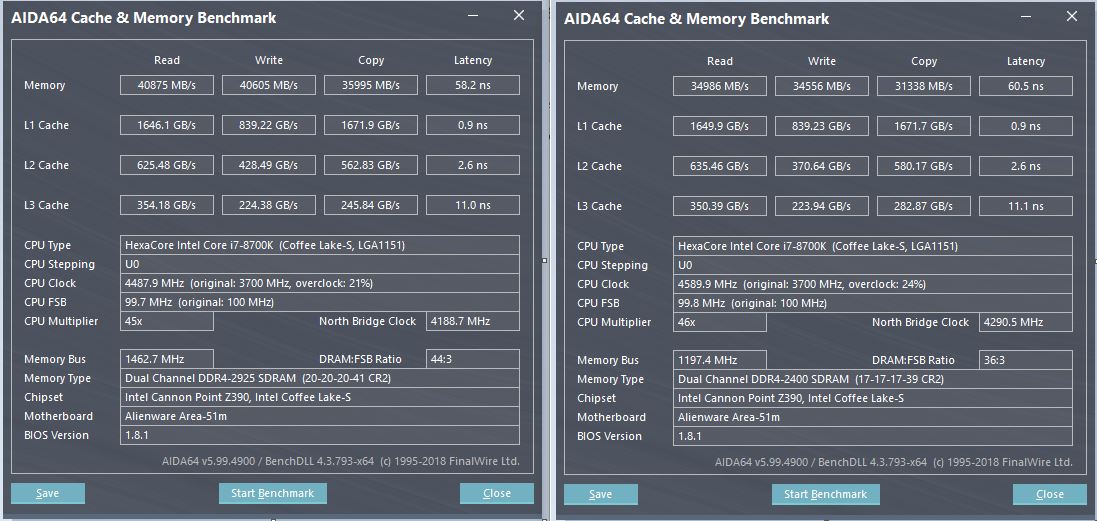
I got my new ram stick and after some complications now works my two ram sticks together on 2933 MHz, in DC mode.
A little comparison with Aida64, what changed with this modification:Attached Files:
-
-
Just a rehash, what memory did you end up using and what was the trick for the R1?Fire Tiger likes this.
-
G.Skill Ripjaws F4-3000C16S-8GRS. After I have overwrote the SPD data in the sticks, I made a couple of restarts, slot-combinations and bios resets. Then one night rest, and next day morning there was the correct speed and the DC. And I didn't need to reflash my bios (fortunately, because I am delighted with the 1.8.1, and I didn't want to use the 1.12 version).Docsteel likes this.
-
sup buddy? i also found a major issue w/ this vid (but noticed it's old, so you might have fixed this already)...
that wallpaper, bro! (lol.)
Looks too basic for that beast you're wielding...
I am currently using the one attached..

if anyone has a really cool wallpaper, please share (really cool. otherwise, we are just wasting valuable forum space. k. thanks.)jclausius likes this. -
Goes well with my Lunar light laptop
Alienware Customization - Wallpapers, OEM Info, Start Menu
Fire Tiger and aeffect like this. -
Sad seeing cheapo 2133 clocked 2666 in an +5 years old Clevo perform better than sticks running 2933 in what was called Worlds fastest 2019/20. High ram bandwidt doesn't mean much if the timings is put too high.
![[IMG]](images/storyImages/2189733.jpg)
Same cheapo 2133 sticks but running 2800MHz
jclausius, etern4l, Docsteel and 1 other person like this. -
lol. much better find than the handful of options on the official Dell/Alienware support page... nice share. thanks.
Aroc, Fire Tiger and Spartan@HIDevolution like this. -
Not sure I am that hardcore (thought not having 2666 is annoying), but I am happy you got it working!echterion and Fire Tiger like this.
-
This is exactly how I feel, we shouldn't have to do all this either to be honest. Dell / Alienware should have lived up to their promises of providing the bios update that was mentioned by Azor.etern4l and Spartan@HIDevolution like this.
-
-
Yes, it was very disappointing when I relaize than I cannot change the timings because stupid Dell implemented it into theit ****ty bios. My ram sticks can work in 3000 MHz with CL16, but not in this machine...doesn't matter what numbers are in the ram sticks.
BTW, another question for all: I found a good deal here for an KF processor (yesterday I sold my 8700k). Is it works in our machine or the Intel gpu is neccessary here?Papusan, Fire Tiger and etern4l like this. -
My guess is by @echterion saying, "I have overwrote the SPD data in the sticks," means something like Thaipoon Burner was used to overwrite the memory timing or other memory attributes that are programmed into the memory modules.
Papusan and Fire Tiger like this. -
From a friend:
TLDR: The RTX 30XX Series is NOT compatible with the Alienware Graphics Amplifier
@jclausius @normand668 @Normimb @Papusan @Fire Tiger @saturnotaku @iunlock @ratchetnclank @Docsteel @MogRules @custom90gt @RMLJDBiker Gremling, MogRules, Aroc and 4 others like this. -
Yes, I mentioned in an earlier post that I used Thaiphoon Burner to overwrite the SPD data.jclausius likes this.
-
Thats my next upgrade cancelled
Biker Gremling, Vasudev, Aroc and 4 others like this.
-
I think they will release a new amp with the legend design and a bigger psu with more space to fit the bigger cards instead. The current one can't support them off the shelf so i don't expect any updates to fix it.
-
You can wait for AMD's answer to Nvidia, at the end of this month before you get all gloomy on us now!Fire Tiger likes this.
-
Gave you an answer here.... http://forum.notebookreview.com/thr...ll-13-15-and-17.770323/page-465#post-11050591
And same time say the smaller custom cards or 3070 also won't fit? What with 3060? Will they say the same for this one as well? Several reasons they can't stop support newer cards. But it's Dell and the proprietary design and everything can happen. But you all will lose the old bios advantages once you have to upgrade the bios to try make it to works.
Edit.
Which GPUs are qualified and which graphics cards are compatible?
We provide deeper backwards compatibility for available GPUs compared to TBT3 options and offer support for a single full-length, dual-wide, PCI-Express x16 graphics card. This system can support graphic cards of up to 375W and NVIDIA® GeForce® RTX 2080 Ti as well as AMD Radeon RX series and newer. This means it can power a 3090 Founders Edition.
Alienware Graphics Amplifier
Should work.... https://www.3dmark.com/spy/13864673Last edited: Oct 6, 2020 -
Correct me if I am wrong - wasn't there an issue with BIOS support of some kind needing to be in place on the systems themselves to allow the AGA to actually use the card? I mean you could slot it in and connect it, power it but unless the BIOS was upgraded on the PC it still wouldn't see it properly?
-
I believe this was the case in the past. I even remember a previous launch having similar issues because support wasn't in place yet. If the GPU fits then I don't see why they wouldn't add support for it.
-
Back at the launch of the AGA, there were issues with certain Nvidia cards working in the AGA but then disabling the internal Nvidia GPU. The solution was an official Nvidia driver that included support for the AGA (which really was just Dell IDs for each card, but modded drivers didn't fix the issue). I don't remember a BIOS update or a driver update for the AGA was necessary, though. But that's one instance I remember very well.
So long as the GPU driver was installed, the computer should recognize it, but I've seen occasions (really, my own) where the computer can't detect it (both AMD and Nvidia).
Hilariously, some GPUs, like the GTX Titan Z and R9 Fury X, did work despite not really fitting in the AGA. I wouldn't be surprised if 3-wide GPUs like the RTX 3090 will work once support is added.Vasudev, Fire Tiger, twin snakes and 2 others like this. -
There have been some pretty creative solutions to getting around the physical limitations of the case itself. It was really impossible for them to know 6 years ago that GPU's would get this large, I really can't blame them there. There are always solutions if people are willing to tinker and mod it themselves.Fire Tiger, twin snakes and Aroc like this.
-
What adapter did you use? I have the JET-5608 nothing is soldered but on the fuses. Am I using the right adapter?Last edited by a moderator: Oct 9, 2020
-
yep)
-
Some think an updated AGA app will make wonders. But from reading this link below I wonder how much mess it will create before it may work for all. One thing for sure. It looks like the Golden days with use of older bios for the Area-51M to stop Dell's GPU throttling madness will soon be history if you also want a working Ampere graphics in the AGA. The choice beteween Plague and Cholera ain't nice.
m17 R3 + Vega 64 in Alienware Graphics Amplifier gone after 1.5 BIOS update -
What in the hell is wrong with these people? Do they really think it is acceptable to break products that their customers purchase and leave them high and dry with no means of correcting it? So evil, incompetent, and inconsiderate, they are. At least that person with the Vega 64 was able to use an unofficial process to undo their mess.Vasudev, electrosoft, etern4l and 3 others like this.
-
-
Yeah, the lovely with non-proprietary solutions. It just works for all. I wonder why Dell's own tech support personal can't answer in a simple way and not cover it into PM. This is too dumb.
Just say it won't work. Then put it sticky on top of the AW forum page for all others who will ask same questions again and again. Yeah, this is too stupid!
AGA, Nvidia RTX 30xx series issues
But as usual. Dell Tech support avoid replying on topics they want to avoid. No problem answer other questions.Last edited: Oct 13, 2020 -
https://www.ebay.com/itm/264882164884
17th october 2020 arrival timesasman1964, Fire Tiger, Normimb and 2 others like this. -
I still could not use this modification normally and am waiting for a better quality version from another seller.
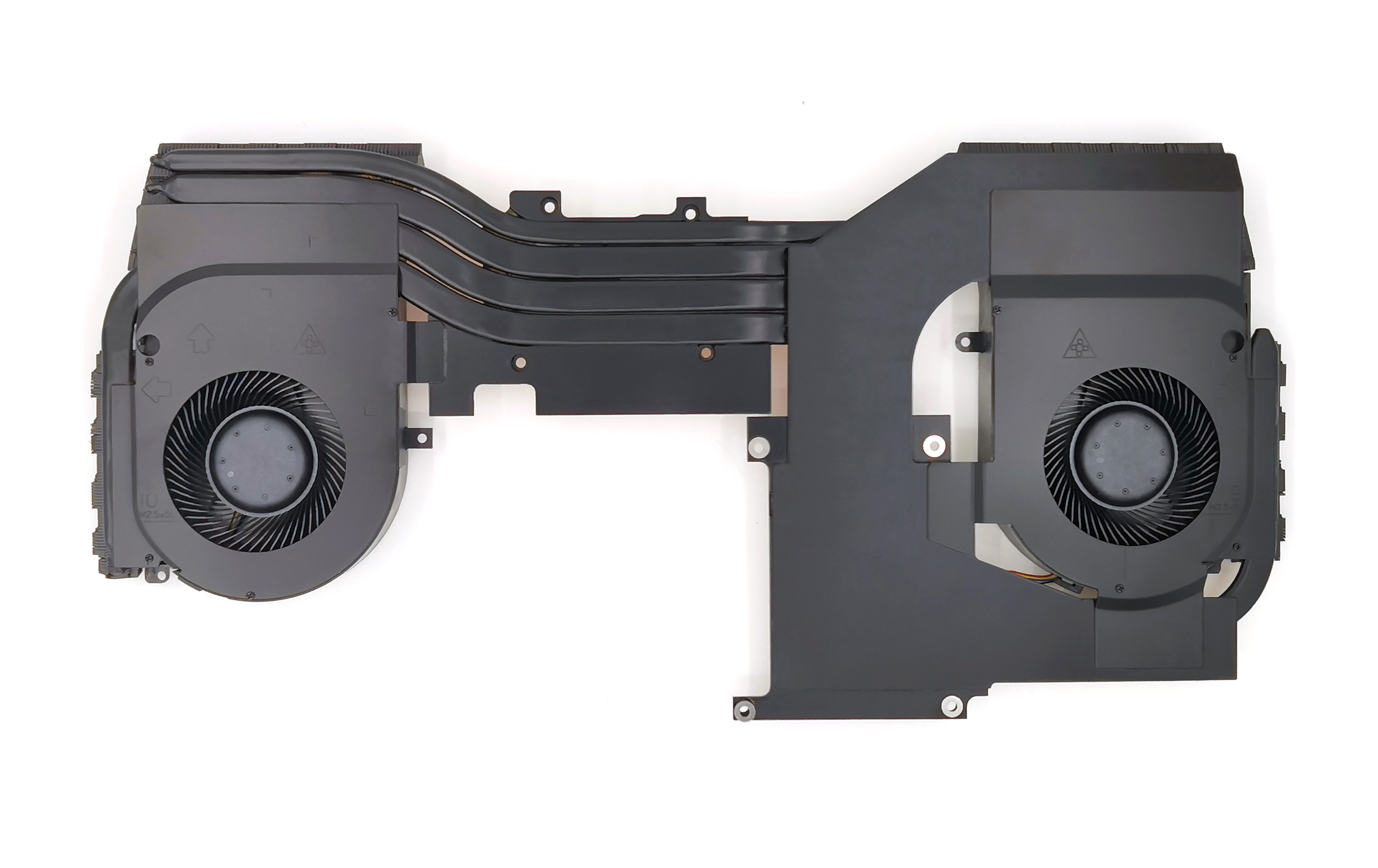
P.S. Perhaps the seller to fix this problem. But the clamp on the video chip is too weak. I needed to replace the mounting screws, which made me disassemble the standard cooling system.
Attached Files:
Last edited: Oct 12, 2020Normimb, Fire Tiger, Papusan and 1 other person like this. -
-
-
Unfortunately, I could not find the optimal length and clamping force of the screws and thickness of the thermal pads. As a result, the temperatures on the video chip were terrible, but the cpu worked 10-15 degrees colder during the stress test.
After all, I ordered a better quality mod from another seller.Attached Files:
Last edited: Oct 12, 2020jclausius, Normimb, sasman1964 and 3 others like this. -
-
This is interesting for me. Can you share with us that heatsink's link? I have only an RTX2070, maybe this can be much more colder than the 2080 under this modded heasink.Fire Tiger likes this.
-
I asked here and Spartan responded the best for money drive to put in the Area 51m is the HP EX950 not the Samsung Pro....yet I'm was informed this recently:
HP EX950 are not in the same tier as Samsung Pro or Samsung EVO Plus line up. I'd classify them in the "mid-tier", along the lines of the XPG SX8200 (In fact, the HP EX950 might as well be the exact same drive, it uses the same Flash and Flash controller as the SX8200).
It's probably placed above the Kingston A2000 but below the Evo Plus line-ups. That said, there is very little practical difference between the SX8200/EX950 and the 970 EVO Plus, at that point, it's all down objective facts and figures (eg. X drive is faster in Y benchmark).
Which is the BEST for speed and quality?
Looking at 2TB or is it better to get 4TB?
Any Prime Day deals guys?c69k likes this. -
-
Thanks for the deals but PRO is still better?
-
Yes, but is it 2x better? For most people the answer is: lol, no.Papusan, Spartan@HIDevolution and Fire Tiger like this.
-
So prime day here selling Samsung 1tb evo plus for $176AU after cashback
That good value?
Should replace all 3 drives with these? -
Do what you want, it's your system/your money. I wouldn't let a Samsung drive near any of my machines. This coming from someone who has owned the legendary 840 PRO (best sustained/real world performance MLC NAND SSD), 840 EVO, 850 PRO/ EVO/ 960 PRO..... the m.2 drives always overheat even with a heatsink and thermal throttle after a while. Sure they're designed to destroy other drives in synthetic benchmarks but I've seen other drives like the WD PC SN730 that I am using in my Area-51m R2 and the HP EX950 being much snappier. as the SSD Dr. @tilleroftheearth always taught me, don't always trust the benchmarks, trust your feelings (snappiness beats everything)Last edited: Oct 14, 2020DreDre, pathfindercod, MogRules and 5 others like this.
-
I have had no issues with Samsung drives, even my old 940 or 950, don't remember. My 1TB 970 plus is indeed 5-10C hotter that my secondary 2TB Corsair MP 510, but still very reasonable. Haven't observed any throttling or lack of snapiness. I guess experiences with older models don't necessarily apply to newer iterations. It could also be that your usage is heavier on I/O than mine.
-
Yeah, it's not about fancy bench numbers, but more about sustained performance/reliablity. Not much come close to Samsung's Pro disks with MLC nand. And if you had overheating problems, then you bought the wrong machine for the job
Regarding snapiness. You know there is something called Placebo effect Syndrome?
I can't remember how many times you run into the same trap. Don't always trust your feelings, bruh.c69k, Fire Tiger, Aroc and 3 others like this. -
IT liveessssssss!!!!!!!!! i have 2933 mhz!!!!!echterion, MogRules and Fire Tiger like this.
-
Which RAM did you use to mod? I wonder if HyperX can be modded.
*OFFICIAL* Alienware Area-51M R1 Owner's Lounge
Discussion in '2015+ Alienware 13 / 15 / 17' started by ssj92, Jan 8, 2019.




-preview.png)
-preview.png)