 Problems? See this thread at archive.org.
I will receive this mod the day after tomorrow and if everything is ok, then I will give a link to this seller.
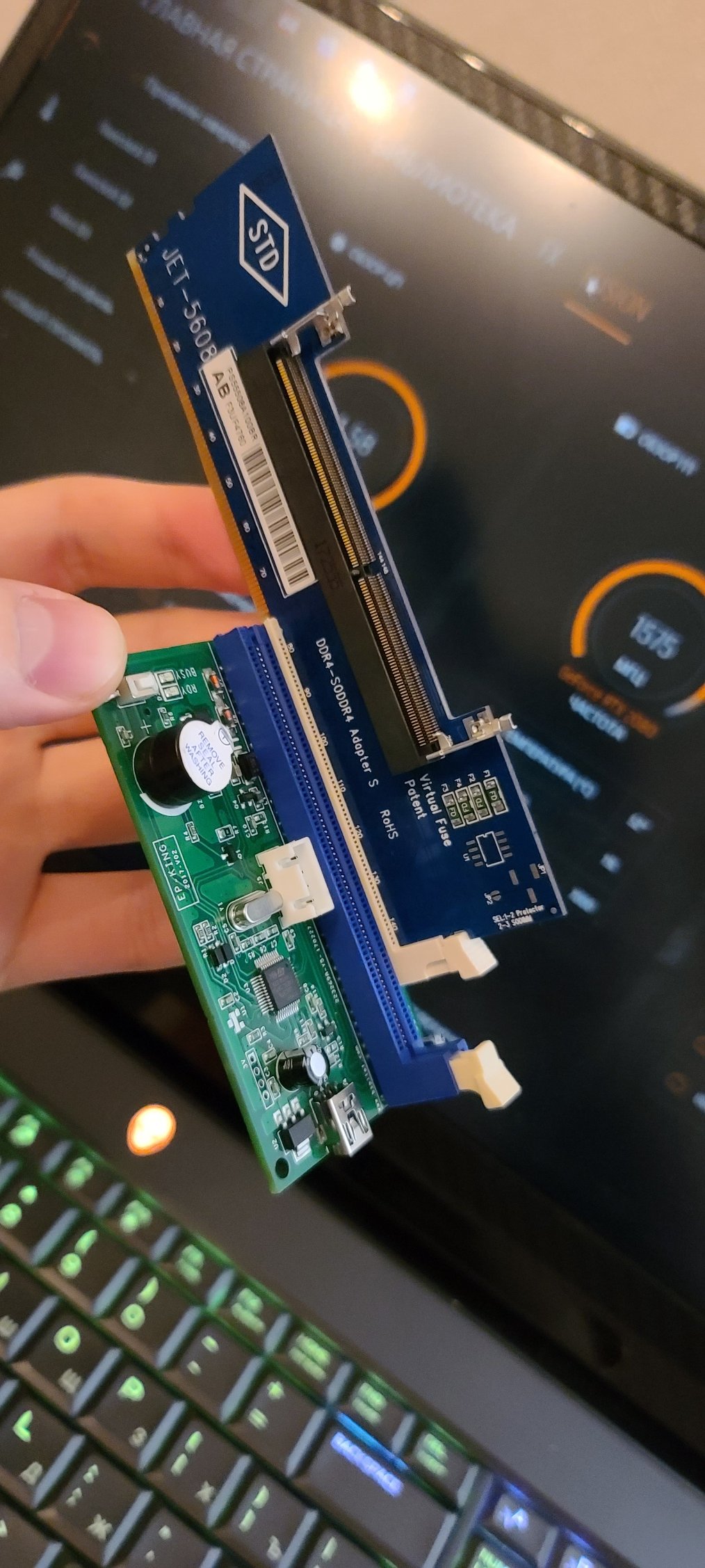
Speaking of writing SPD firmware. If you have problems to finding computer with write permission, our Chinese friends have a solution.
This system allows SPD flash via USB. Works great
-
Attached Files:
Fire Tiger likes this. -
-
Thank.
I like these Chinese guys. They have a solution for everything.
Fire Tiger likes this. -
Sorry if it's tagged somewhere and I've missed it. But does anyone know the model of 2933mhz ram that works for the area 51m and where I could get it? Everything I've seen so far makes it seem like it's machine specific.
-
Yes it is hardcoded so that only specific model is supported, you either:1. Stick with 2400 speed. 2. Buy a 3000/3200 kit and flash it to 2933 kit. 3. Buy it pre-flashed from someone
-
-
Normimb likes this.
-
I know it has been recommended before but can I have an update on HOW to change the battery settings to charge to 80/90%.
Do I then use off AC power until down below 80% after changing settings and then plug in AC power again?
What is recommended battery saving wear settings?
(My old Sony just went from excellent to good and always had it 100% on AC power.... just changed to 50% on AC power to hopefully keep it going) -
So how good is dell with their warranty/damage insurance? I got 3 years left on mine......
Had a bit of a mishap, and it seems my 4 year old managed to crush the top right corner, cracking my screen in a small spiderweb. Bent the corner a bit too. Thinking he knocked it off the table when he was home with mom and she says she doesn’t know.etern4l likes this. -
Thank you, a lifesaver that~
Now just hoping their accident coverage will cover my 4 year old cracking my screen lol.Spartan@HIDevolution likes this. -
All you need to do is change the battery mode from Adaptive to Custom, touch nothing else, it is set to stop charging at 90% by default and start charging at 50%
![[IMG]](images/storyImages/RHNMYwO.gif) MogRules likes this.
MogRules likes this. -
You can order from dell the specific A-Data modules for your machine (for a lot of money). Or try your luck and modify your own memory module's SPD data and use them. There is no big improvement in practice but it is a good feeling when you maxed out your machine. If you are interested in this mod, then first read back in this forum, we have a couple of description here and if you have more question just feel free to ask us.
Here you can find the changes in memory speed: http://forum.notebookreview.com/attachments/aidacachemem_compare-jpg.188449/Last edited: Oct 18, 2020 -
Here is the results of mine
Paste:
Gelid Extreme , No delid default pads
![[IMG]](images/storyImages/Capture.png)
CineBench 5035 Points vs 4850 on OEM heatsink
GPU temp rarely crosses 75C and Im using 200 W vBios and on 1.5 Bios. In fact you dont need to downgrade Alienware with this cooler.
The heatsink in my case makes a good connection on GPU side, not really sure on CPU as it still throttles at Cinebench stress 4.9 Ghz @ -0.130V (it throttles at the second run)
Cons:
Screw #3 on CPU doesnt go all the way through Less than 0.5 mm offset is required & weird clicking noise coming from Vapor chamber if GPU temp cross 70C, the noise is coming at the intersection of the two gpu heat pipes with vapor chamber, not sure how to resolve this.
overall its a good upgrade for those with RTX 2060 or 2070. -
Well I was also able to install this monster designed by Mr. Chen.
1. Installation is not easy and if you do not want to damage laptop covers, then this solution is not for you.
2. The main problem is that the new cooling system is 3mm higher than the old one and the decorative frame does not fit properly.
3. I recommend replacing screws from the old cooling system.
4. Hooray, using BIOS 1.12, I no longer see throttling of the 200w vbios video card. 72-75 degrees Celsius is the maximum I've seen in games and stress tests. I confirm that the heat dissipation from the processor is not as good as I expected.
5. The laptop is quieter, new fans are working fine.
6. There is a small problem that I could not fix
Result: Excellent for the video card and low efficiency for the processor (there are still problems with pressure on the processor).
P.S. An alternative modification from another person arrived yesterday, but there are no mounting screws on it at all + it requires a deep modification of the case frame. It should be noted that the surface and pressure to the processor are much better there.Last edited: Oct 28, 2020c69k likes this. -
Hi all,
If I created a Windows 10 USB backup\recover of for Area 51m(How do you do that again?).....
Does the USB when plugged in show 0 bytes and 0 files.
Or should it show the file created when plugged in?
It is required to be plugged in from a cold start to actually go into Windows Restore? -
Yes I need the basics reinforced. Why does the Sony Have 50% option and should that be used while mostly on AC power?
-
Is it really that difficult to read the threads in this forum which are very well laid out and right on the main pages?
Macrium Reflect Installation/Usage Guide
Sony? I dunno ask Sony![[IMG]](images/storyImages/8Yb0Sav.gif)
-
Can anyone confirm if we can get ahold of the preflashed memory if its possible to obtain the higher speed with both modules inserted without having to reflash the bios? I dont want to mess with the bios on my machine as I have had bad luck with previous machines.
-
Can't find this...... is it in the bios settings?
Not in windows anywhere I can see? -
I replaced the 2933mhz modules without reflash the bios, all I did is powering drain the system by holding down power button for 45 seconds, pop in new kit and that’s it.
Sent from my iPad using Tapatalk -
-
Im going to test it out with liquid metal tomorrow, are you sure its pressure problem?
-
yes, the vapor chamber does not fit well with the top screws on the motherboard. All mods with a vapor chamber that I have (early prototype with ebay, current revision with ebay and modification from northern blade with taobao) have this problem.
Funny, but I got even worse results (in idle) with CPU temperatures than when using a factory cooling system.
Last edited: Oct 19, 2020devilhunter likes this. -
core frequency is more 4.8 Ghz, vs 4.6 Ghz
-
yes, but idle temperatures increased from 47-50 to 56-60. I think that the evaporation chamber starts to work effectively at temperatures around 60-70 degrees.
-
mine at Alienware balanced fan profile - Power mode : balanced stay at 30s and at worst 40 -41 C
P.S
How you order from Taobao?Last edited: Oct 19, 2020 -
I mean if you have the accidental damage, they should with no problem effect repairs. Please let us know how this goes.
-
Guys, can someone reposte the profile.zip file? I formatted my pc yesterday and i lost the file...
I doing a search in the forum, but I am not finding
To OC Controls -
Download Old Profiles.zip
Make sure to right click on the file you just downloaded, go to Properties, then hit Unblock from the bottom right as it may be blocked since it was downloaded from the internet, if you don't do this before you run the file or extract it, then it may not install correctly.
To prevent this automatic blocking of files in the future so you don't have to go unblocking every file you download to ensure it runs properly, follow the guide in this thread:
http://forum.notebookreview.com/threads/are-you-sure-you-want-to-run-this-file-yes-or-no.825668/
Guide: How to unlock the GPU Thermal Limit Slider in Alienware Command CenterMogRules likes this. -
Thank`s!!! Worked!!
-
Hey all! It's been a looong time since I've been here, but have run into a problem recently and hoping someone might have some suggestions.
I have had my launch Area 51M and other than the annoyance of BIOS updates and throttling that required a wipe and restore and the HDCP issues with the Index that's annoying, things have been relatively smooth (knock on wood). But lately I've noticed something with work from home.
When video chatting with Teams, like... every ~20 minutes or so, but at random, my connection will drop for 5-10 seconds, Teams will lock up, and then of course all is fine. Not a HUGE deal, but being on calls all day, it gets annoying... fast. Especially since my internet seemed to work fine on other devices at those times.
I kinda just set aside the troubleshooting until this week, when I just can't get over it. Here are the facts:
Happens at random, but typically several times a day. Most noticeable with Teams, though I do notice slight... 3-4 second delays when loading web pages a few times a day, so I think it may be same issue.
Happens when plugged in direct from PC to modem, or when connected to WiFi 5Ghz or 2.4Ghz - typically on Google Mesh Network and with super strong connection.
I have fiber gigabit internet, great connection otherwise.
... here's where it gets interesting. I've reset all my devices. Ensured no weird cable issues. Everything looks good.
Yesterday. I took out my Surface Book 2 and used Wifi all day... ... ... no issues at all.
Today, I tried my 2016 Macbook Pro wired (TB3 to ethernet)... no issues.
Tonight... was on a Teams call for 45 minutes and it happened twice on my Area 51M.
Surprised, I think it's my device (Area 51M), and I'm gonna guess Killer network card being a pain in the butt. Wouldn't be the first time.
Is there a recommended avenue to avoid Killer software altogether, or otherwise improve the performance of the NIC? Any other thoughts? -
Are you running the Killer suite along with the drivers? If so get rid of the software suite and see if that makes any difference. You might have to remove all of the Killer software completely and install from scratch but install only the drivers. Also I presume your using the latest drivers from www.killernetworking.com ?Spartan@HIDevolution, c69k and Papusan like this.
-
-
I changed my setting to above but noted "Primary AC usage" option?
Is that not better if constantly attached to power 90%? -
Why not give the notebook owners same love? None of the Awbooks is upgradeable, hence Dell throw out the GA amplifier for the masses. Why wait with proper compatibility support now as they are out with own custom cards? Because they are in shortage for own cards?
Alienware Aurora R11 Review: The RTX 3090 Engine tomshardware.com
Alienware’s Custom RTX 3090
-
Will this custom 3090 be available as a separate purchase, or do you think other OEMs will follow suit, ignoring NVIDIA's design blueprint?
-
One can only imagine the ridiculous price Dell is going to put on this....
EDIT: I am so impressed with the Lenovo Legions I am pretty sure if I ever need to buy a gaming laptop again (my new job I don't travel), I will try them for a change. Sick of Dell's nonsense and I have supported them for a long time.Last edited: Oct 23, 2020 -
One thing for sure... You won't get any answers from AW Umar on Twitter
https://twitter.com/aw_umar
First Azor, then Umar. When will be the next on the chiefs list? Eddy or Ernie?
Edit.
But thats probably ok for all. He never bothered reply back on why Dell Alienware prefered to kill undervolt on their gamingbooks.... http://forum.notebookreview.com/thr...-win-update-bios.831450/page-13#post-11004757Last edited: Oct 23, 2020cfe, pathfindercod, raz8020 and 5 others like this. -
Wow. Any successors? We know Frank's replacement is no fan of Twitter, and, by extension, possibly no fan of the Community, so that doesn't bode well...
They could at least formally appoint our own @MogRules. He would do/does better than Umar, I'm sure. -
I'm sure there is someone who will follow / share Dell's philosophy in thin and thick. Maybe one from own organization. From Dell corp. Not from the sub division as Alienware.
Maybe we will see more focus on Dell as brand. Not only as the mothership. We will see what happening. We have also the unsolved Class action investigation.
Edit. For those who don't know Class Action Investigation
If you have tried to receive a refund and were denied or have any information regarding Dell’s sales and marketing practices regarding the Area-51M R1 product line, please contact us online, by email [email protected]. We cannot accept phone calls on consumer class action cases.
What a wonderful upgrade experience. No Ampere for the AGA, no upgrade paths to Super and finally problems upgrade to same graphics generation. Can't beat this. Where is the quality qontrol and the adverticed full upgrade package? Area 51m 2080 gpu, no thermal solution sent
Yeah, @MogRules shuld fit well. But Dell is the real brand name now. Dell Alienware. With weight on the for-name. Not the the surname as in this sentence.Last edited: Oct 23, 2020 -
Are there any other changes that Dell has made to the M17 R3 / A15M R2 following the release of the 360Hz G-Sync panel? Does said panel also have Advanced Optimus for the A51M like the 144hz panel had for the M15 & M17?
-
Their community Involvment is and was a joke. The only thing they Usenet for is advertising. They didn’t gather real fact or carry on conversations with enthusiast to try to resolve issues for get real answers for anything.
-
At least you all got proper help via twitter, confirming that their advertised/promoted upgradeability was a scam. Without the community Involvement on twitter you all would never got it confirmed.
Edit.
Dell's own support would probably never answered properly on this.
It seems Dell Alienware really hate upgradeability... Even in their desktops. Only own custom cards or the weaker 3070 has a chance.Last edited: Oct 24, 2020 -
lets pray someone can reengineer dell form factor for RTX 3080
Docsteel likes this. -
400W work load , wow this gpu surely is crazy
lets stick to 2080 TI or 3070
-
AMD 6000 Series
-
Hey guys....
I did some windows updates today and afterwards i noticed my laptop seems to be going into hibernation mode or something like that.. The small alienware logo on the keybord wont stop rotating through the colors of Green, Orange... How do i get back to a regular shutdown where the alienware logo turns completely off. Tnx
Btw. . I changed what does the power button do to "shutdown" for both the cover and button.. The light is still rotating through the colors?
And i also tried.. powercfg.exe / hibernate off keeps saying error function failed...Last edited: Oct 26, 2020 -
-
*OFFICIAL* Alienware Area-51M R1 Owner's Lounge
Discussion in '2015+ Alienware 13 / 15 / 17' started by ssj92, Jan 8, 2019.


![[IMG]](images/storyImages/LHOZI8S.gif)