Problems? See this thread at archive.org.
Is anyone playing Starcraft 2 on this puppy? What settings?
-
when you close the lid on the 1410 when connected to HDMI and when set to external display only, is there any app/hack that prevents the 1410 from flipping to 1440 resolution and blanking out? I used to be able to close the lid of my ancient dell c610 via S-Video when connected to TV... would think we could at least do the same with the 1410. As it stands, the only way to keep everything proper is to leave the 1410 ajar when connected to my Sharp Aquos, in order to keep it at 1920x1080p.
-
You can try and make the HDTV your primary display in the settings. Why is so important to close the lid anyway, I think it would run hotter that way while playing HD video.
-
1810Tz Su4100, Running on latest intel video driver, with Cas 5-5-5 DDR2 800Mhz 4GB... lowest settings... it will run slow, something between 10 to 23 fps...
-
Don't clone, and then set the external display as active correct? If so, I tried that but it still happens.
It's nice to get it to fit under the lip of my LCD; I think heat would be negligible in a ULV while playing xvid and probably DXVA HD video too.
Any other ideas? Also, I would assume that everyone has this problem? I also used to do this with notebook workstations too, whereby when plugged into monitors via RGB, everything was fine... and I believe... one time, it did a bunch of flipping between resolutions and began to work ok @ native res while shut. Weird... as there has to be a science to it and/or way around this. -
If I remember correctly, not just active, but make sure you set your HDTV as primary, not secondary, display. I think you can even deactivate you lappy screen at that point
-
Hi,
v.3310 is still thee latest bios, correct?
or is there a newer which I am unaware of?
Thanks. -
There's a modded driver out there you can try to improve performance.
YouTube - Starcraft 2 on intel GMA 4500MHD
Link is in vid description. -
Thanks, i will give a try tonight

-
Acer 1810TZ Graphic Driver: v14.42.5.[64].5284 (WinXP x86-x64) ~ Official GS45 driver.
Changelog-x86: Intel® Graphics Media Accelerato
Changelog-x64: Intel® Graphics Media Accelerato
Code:x86: http://downloadmirror.intel.com/19249/a08/winxp_14425.exe http://downloadmirror.intel.com/19250/a08/winxp_14425.zip x64: http://downloadmirror.intel.com/19251/a08/winxp64_14425.exe http://downloadmirror.intel.com/19253/eng/winxp64_14425.zip
-
doesn't seem to matter, although... setting as primary and then starting 1410 from cold boot, seems to automatically activate the external monitor and proper res, but when you close the lid, kapooooot. Gotta be some pioneering individuals that have solved this yes? I'm thinking people still use HDMI lappies like VGA lappies in that many leave closed when using as a workstation connected to external monitor.
Hmmm....
-
Well, if it only happens when you close the lid, I suggest you tinker with the Power Options setting, and select "Do nothing" when you close the lid for some of the options. If my boy goes to sleep early, I'll try some things, since I wanna play a movie on my HDTV from the lappy
-
Using Acer 1810T as a HTPC at pixel perfect 1080p over HDMI with the lid closed...
SUCCESSFUL.
I solved my HDMI overscan problem, finally, with the Acer Timeline 1810T. Normally nVidia graphics card that has an option to disable HDMI overscan when outputting 1920x1080 to a 1080p HDTV.... however, I had a devil of a time getting my Acer Aspire 1810T to output native non-scaled 1080p from its Intel graphics (GMA4500HD)
Assumes Windows 7, with the Acer software installed for managing Fn+ key combinations for adjustments.
1. Ensure your Power Settings for "Close Lid of Computer" is set to "Do Nothing"
2. Plug in the HDMI cable.
3. Press Fn+F5 until projector 1024x768 is highlighted. (TV should now show 1024x768)
4. Press Fn+F5 until laptop screen only is highlighted. (TV should go blank)
5. Press Fn+F5 until the HDMI setting is highlighted (HDMI only, laptop screen should go blank)
6. It is now safe to close the lid of the computer and park the laptop aside, using your favourite Bluetooth wireless mouse and keyboard, to use it like a home theater PC. Step number 1 is critical for the laptop to behave properly on HDMI with the laptop lid closed.
Be careful. As soon as you open the laptop lid you will lose your 1080p setting until you repeat steps 2 through 6 again.
I wish Intel or Acer would fix their damned drivers to display 1080p in pixel perfect manner properly. -
Hey all,
If this has been covered my bad, I have not read all 157 pages.
The most annoying happens on this 1810T when i'm typing. The cursor will always jump back a line or two while I type.
Lol, it happened 4 times in just typing this small post.
I have a feeling this has been discussed and or fixed.
Could anyone guide me in the right direction?
EDIT:
After further googling, some have suggested to use touch freeze, which freezes the Touchpad while typing.
I hope that works. If someone knows of a better fix, please share.
TIA -
Unfortunately it doesn't support W7 64bit...
-
Fn-F7 turns off the mouse pad in my 1810.
-
Well somehow I must have got lucky cause it worked for me. Though I must admit that when I installed it, it installed in the Program Files (x86) cause i'm assuming it's a 32bit program.
But so far so good, so far it seems to be working. I've knocked on wood.
For example by now, in just typing this reply the cursor would have skipped back up at least 5 times. So far it seems to have worked
Yea, I read about that too, before I installed the program, but I could not tell or no indication whether it was active or not? Perhaps thats what fixed it and here I am thinking it was that program I installed.
Why, can you tell whether its active or not? If so you must do this everytime it reboots.
Edit: I rebooted and did not press the FN F7 keys and still the cursor seems fixed For now I would have to make the educated guess that the program did indeed fix it. Though, I could be wrong since a member stated that the program was not compatible for 64bit. But, it appeared to install just fine when I tried it.
Edit 2: Not sure if it makes a difference, but I'm not running the Win7 that came stock. I replaced that with Win7 Ultimate so I could add XP Mode via virtualization.
Also, I have done plenty of other typing with other programs like Word and the cursor no longer jumps. My whole issue was that if i'm writing a college paper, I tend not look at the screen or keypad, so I can't have the cursor jump all over the place while i'm looking away.
If it fails or acts up, I will repost. -
I have a question
for 1410 user, how many user use 1810tray to reduce voltage?
Now I am using RightMark CPU clock utility.
but the max it can lower is 0.9v and i look at the 1810tray, it can go a lot lower
and can control the fan speed which seem good -
I do and would not think about using my 1410T without 1810tray. It is a wonderful program.
-
how much voltage did you reduce
I use RMclock to reduce to 0.9v and it seem my laptop can go lower than .9, i guess -
1810tz WLAN tweak:
I discovered a tweak during my first night that doubles signal strength for WLAN.
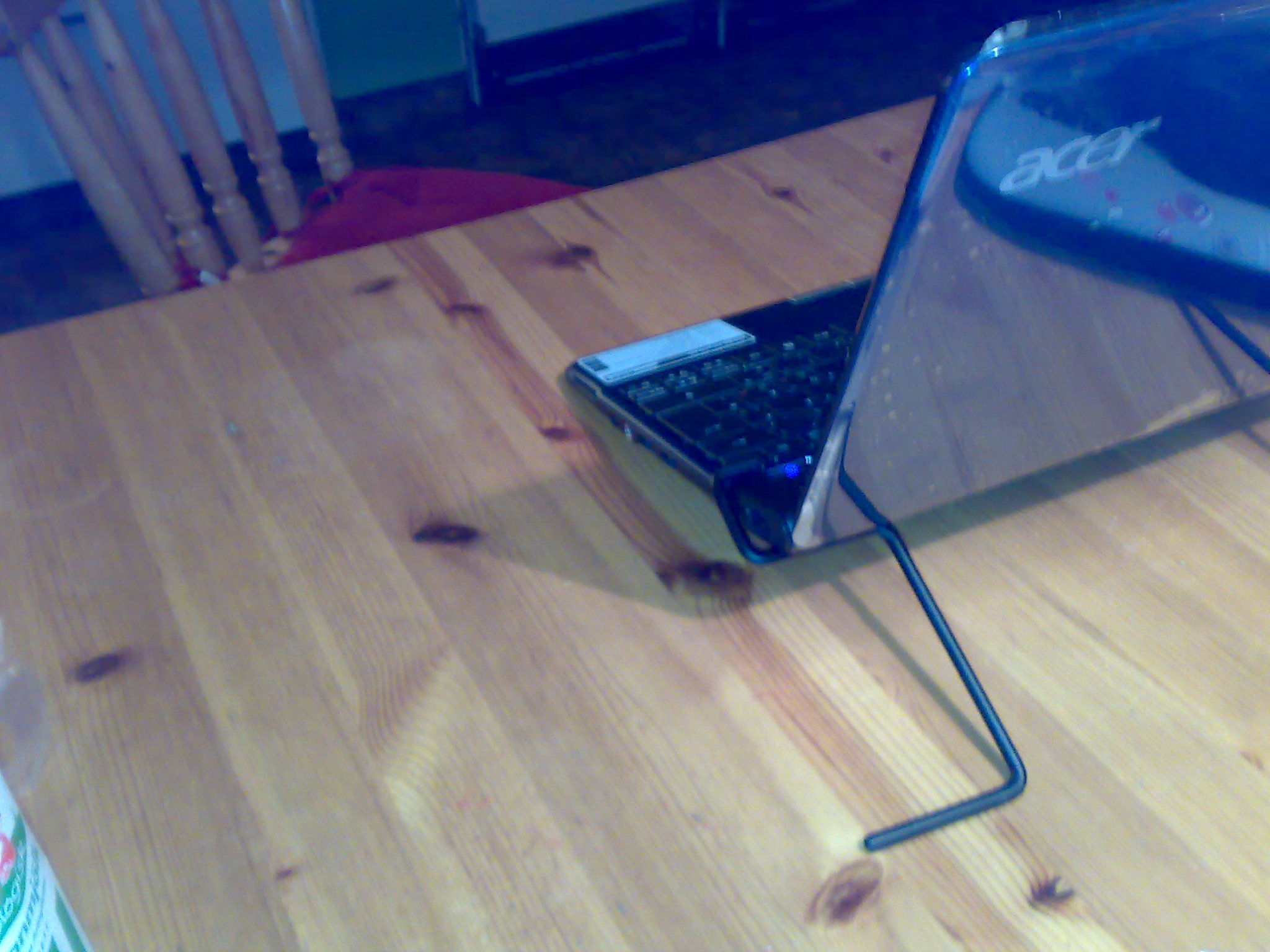
I ordered a stand made of a metalic rod, which feels like aluminum. It only works on the right stand, when it is placed close to the on button. It elevates the pc by 2 inches.
How do I know it works?
I have very weak signal in my house and this helped me to go from 2 of 5 bars, to 4 of 5. If I remove it, it goes down to 3 of 5 within a minute in the windows 7 WLAN signal measurer.
Edit:
But now it did the opposite. Most of the times it becomes stronger and not weaker. WLAN works in strange ways. And it makes you sterile. I don't know why we bother about it.Attached Files:
-
-
I think I gotta call up Acer, the stupid headphone jack issue with releasing sound through speaker is really bugging me. I tried the solution of turning the volume to 0 and plugging the headphones in, but no dice. How can I check if my audio driver is updated to the latest?
thanks -
Acer 1810TZ Graphic Driver (Intel GS45): 15.17.10.[64].2189 (Win7/Vista x86-x64) ~ From Intel HD Graphics Driver.
-
I have an acer 1410 laptop, the version with 3G modem purchased from T-mobile. With all the other bloatware from Acer, it had a T-mobile Internet Manager, used to connect to the 3G network.
After a clean Win 7 install, I had difficulties connecting to T-mobile's 3G network, as I didn't had T-mobile's application. After lots of phone calls and pulling some strings, I managed to get it from T-mobile IT department. I uploaded it here
It works with Win 7 Home Premium 64bit - haven't tested it with other versions. I hope it will be useful to someone. -
Hello.
I have an Acer Aspire 1810TZ with U4100 and 4GB and i tried to undervolt it.
I unlocked the VIDs, but no matter what i chose (and the profile is activated) the VCore still is 0,925.
Other Problem is that the only Multiplicator i can chose is 6.
Sometimes when i start RMClock and i watch CPUZ the Frequency jumps to 1,4 Ghz. How can that be without Hardware MOD?
But for now the most important thing: How can i lower the Voltage? And how can i get more than only 1 PStat (which is 6)
Thank you very much
-
What hardware is your internal 3G modem?
In case you have a built-in Huawei device, getting the Huawei software (for the Acer Aspire 1810, not sure if it is also availabe for the 1410) and simply entering the access data from your provider is the much better and easier option.
Michael -
http://forum.notebookreview.com/5370489-post88.html
http://forum.notebookreview.com/acer/419117-acer-aspire-1410-1810t-1810tz-timeline-tweaks-2-a.html
You need a hardware mod to achieve that. -
I have Huawei 3G, Model EM770W. I tried with some Huawei apps, but the connection was breaking and slowing. Can you give me a link which software are you using?
TIA
Tomi -
This is most likely a problem of antanna reception.I am using the software provided by Acer for 1410/1810. It's available on Acer support website.
Michael
P.S.: http://forum.notebookreview.com/acer/482532-enabling-ussd-voice-support-em770w-3g-module.html
-
Well, maybe it is a reception problem... Anyway, my 1410 didn't come with Acer 3G software, there was only T-mobile's... Before I got it from a friend of mine working in T-mobile, I was using Win 7's build-in utility.
And I can't find anything on Acer's support page, where the drivers, BIOS etc is located. There is only LaunchManager application (which I believe is for the keyboard?).
I'd really appreciate it if you can provide me with a link to ACER's software, as I can see you managed to enable USSD and voice support on it. I can't do anything on my T-mobile software.
Thanks! -
Simply select Windows 7 (64 bit) as operating system on the drivers download site. Don't worry, the software will also work with 32 bit OS, including XP.
Attached Files:
-
-
Great! Thanks a lot Michael! I'll be trying the USSD and voice fix
-
Hello all,
On my old laptop (it had Win XP SP3) there was an option to choose from Shutdown/Standby/Restart when I press the Power button. I really liked the "ask what to do" option there
However, on Win 7, there is no "ask what to do" option, so the Power button only Shutdowns or Restarts or put the laptop to Sleep/Hibernate...
Anybody knows a workaround for this?
TIA
Tomi -
Go to the start button.Don't press it.Right click on it.then click Properties.Then "Power button action"and set it to do whatever you want.
Just in case you didn't mean that, next to the ''shut down button'' there is a little arrow.press it and you will see many choices. -
I guess I wasn't very clear: I'm talking about the hardware power button on the laptop, the physical one..
-
People, I have a problem in time to use the HDMI. Simply connect
it on my TV and nothing appears. Already tested with several cables and had no
success. With the VGA mode works normally. I wonder if there is any configuration to make it work. The notebook of a friend of mine does not work as well. Sorry for my poor english. Thanks! -
Do you have COMODO Firewall installed with Defense+ active? or anything similar? Because for me whenever I add a new device it adds a registry key which COMODO asks confirmation for, but the LCD turns off when connected to HDMI, so the popup is there but I cannot see it on the screen.
You would have to disable Defense+ the first time, connect the cable, then re-enable Defense+.
If not, try using Fn+F5 to switch displays. -
I've tested all kinds of shortcuts possible. I'm using BIOS 3310. What is your BIOS version?
-
Seems to be a new "feature": http://windows.microsoft.com/en-US/...n-you-press-the-power-button-on-your-computer
Perhaps there is some 3rd party software which can help, but I am not aware of any.
Michael -
sorry - wrong section
-
Hi guys,
Any help is much appreciated here.
I have the 1810tz and when I press the return key in the top left hand corner, it is unpressable (like I get no response if i press the return key in the middle, and no press registers)
Is this normal? To other owners experience the same problem? -
What is the best video driver for the Acer 1410?
I had problems using the last drive available on the intel site: no sound through the hdmi and other issues in playing mkv on TV.
Thanks. -
The best version with the no bugs was 8.10.15.1986
-
I experienced that with my 1810TZ and with a netbook.In the 1810TZ when I vaccumed the keybord it went away(that's not why i vaccumed it)and in my netbook it went away by itself.I think it's caused by little rubish that goes underneath because is a big key.Don't do anything drastic.It will probably go away.
-
But pag. n1 says: "Update: 1986 Drivers are buggy, better use older ones."
-
Ι am speaking from personal experience.I use them and I have no problems whatsoever while I hear people with other drivers complain about all sorts of nagging little problems.
-
Hi @all,
from my Dell I was used to klick both touchpad keys to have a "middle-klick" event. I really missed that feature, so I installed the drivers from Dell. These gave me that feature, but there were other drawbacks
But before I uninstalled them, I checked the registry if I could find anything useful - with success
Copy the stuff above into a new text file and save it as middleclick.reg (or similar. Then import this into your registry (Admin permissions needed). Log off and back to enable the new featureCode:Windows Registry Editor Version 5.00 [HKEY_LOCAL_MACHINE\SOFTWARE\Synaptics\SynTP\Defaults] "HasBothButtonFeature"=dword:00000001 "ButtonModePlugInID"="SynTP" "ButtonModePlugInActionID"=dword:00000027
Michael -
Hey, this worked! Thanks again, Michael!!
Still, two fingers tap or even three fingers tap is a no-go for me... I'll write back if I find a solution! -
My notebok is restarting when I plug the HDMI cable. I tried installing other drivers. What's the problem?
-
Got some HDMI Problems too: blank screen on high resolutions (up from 1600x...)
I think Acer has some issues with EMC, so from time to time some of the books show different symptomes. its just a theory thou.
didn't find a solution, i just accepted it.
[Acer Aspire 1410/1810t/1810tz] Timeline Tweaks (2)
Discussion in 'Acer' started by der_mali, Sep 19, 2009.