Problems? See this thread at archive.org.
One more reason to be extra nice to your wife.Your ''anywhere" internet depends on her.
-
-
This is the bluetooth module I purchased:
2.1 Bluetooth Module + Cable for Acer AS1810 AS1810T - eBay (item 170409921534 end time May-20-10 06:16:28 PDT)
Installed it last night and have a bluetooth mouse paired now. The light on mine blinks constantly. -
Thanks for the link. Nice!
I picked up a Palm Pre Plus on Verizon with the wireless Hot Spot. Service is included and up to 5 devices can use it at once. I like it. -
Hi,
My 1810TZ came with BT and 3G module preinstalled. All stock, nothing added by 3rd party
Michael -
The blinking version is more common on eBay as I've seen reports about them back to last year. Wasn't aware of the issue until I bought mine -- and lucky enough to get a non-blinking one which I prefer more.
-
Anyone have a link to a bt2.1 module that doesn't constantly blink?
-
I'm frustrated now with this bluetooth module knowing that there are some that don't exhibit the constant blinking "problem".
-
Hi,
I wouldn't consider this a problem, seriously. The MSI USB dongle, I have lying around, is permanently blinking. Faster if data are transmitted. But fortunately, I don't see that if plugged into a connector on the rear of the computer
Michael -
Hello there guys.
I have a friend of mine, that told me that when he tried to link the 1810TZ to the LCD, throught the HDMI port, but when he tried to get the image on the LCD, the LCD of 1810TZ gets black and so the LCD TV. He says that thinks he's doing everything well, but I'd like to ask you some help. If you could make some kind of tutorial, with print screen showing how to configure the HDMI port. Can you guys do something like that? Get some print screen and tell me the procedure to do that?
Is needed some kind of drivers for the HDMI port to work? (now I'm asking this for me, because I've formated the laptop and installed the windows 7, and I'd like to try my HDMI port to see if I get that problem too, if is that a problem.
Best regards -
Anybody encountering problems with sound when using the HDMI?
I tried to hookup my 1810T (WXP Prof.) and got finally a fine picture but no sound. Any ideas?
Hansoon -
Right click on speaker icon and change default output to Intel HDMI Audio
-
Try this:
http://redirect.hardwareluxx.de/clickGate.php?u=Ha2Rd3xX&m=1&p=9yUI69TI8b&s=&url=http%3A%2F%2Fcgi.ebay.de%2F2-1-Bluetooth-Module-Cable-for-Acer-Aspire-1810-1810T_W0QQitemZ120496118732QQcmdZViewItemQQptZLH_DefaultDomain_0%3Fhash%3Ditem1c0e20dbcc
for a non blinking Module. It is on ebay Germany, but shipped from Texas ;-). -
I bought an iStyles custom cut; turned out fine, but you can get better at cretouch.com, for less shipping costs. would have gone there first had I known.
-
direct link:
2.1 Bluetooth Module + Cable for Acer Aspire 1810 1810T - eBay (item 120496118732 end time May-20-10 06:27:19 PDT)
its a US seller in eBay US site, however, that's the same seller mentioned few posts back who seems to sell blinking modules. -
Anyone had success playing Rome Total War on an 1810T? I'm curious to try out this Europa Barbarorum modification I found.
-
Total Rome should work, I had the demo once, and was quite fluid
-
The blue BT LED does not appear to blink on my factory equipped 1810T, the wifi LED seems to blink in some relation to BT activity, however.
-
I'm sorry if this has been covered already, but are there any other model numbers (internationally?) that share the 1410/1810 chassis? I want to buy a leather book-style case like PDair sells ($90!!!!), but I've only seen them for a "751h", a "D250", and a "D150".
Are any of those close enough? -
The 751h is the same size but the battery sticks out a little so it's actually a little larger than the 1410/1810. I doubt it would make a big difference and I think all/most of the ports/lights are in the same location so the case should match up pretty close to the 1410/1810. Good luck.
-
Hi guys,
got the acer 1810T.
i installed the Acer ePower Management for win7 64 bit from acer support website but can't see any way to launch it.... It's not showing up on desktop or in start-all programs.
However it shows up in uninstall programs in control panel.....
I tried uninstalling and reinstalling many times but no luck....
Could anyone help...??
Thanks... -
I can only give you some general ideas (sorry if any of them seem obvious, just trying to cover all the bases):
You're *sure* you have a 64-bit OS and the app is 64-bit?
Look in Program Files and Program Files (x86) and see if it appears in either directory. If so, which one?
When you find it, right-click and choose "Run as Administrator". Does that help?
Start Task Manager, and look under the process list, and see if there's anything listed there that correlates to the ePower Management program.
Let me know if any of that helps. -
Thanks, I'll let you guys know how it goes.
Does anyone have any experience with using these type of cases?
Also, is anyone else interested in getting one (obviously much cheaper than $90!)? -
I'm traveling to Europe... The wall plug-in cable that came with my adapter says "7A 125V" on it.
So, does this mean that I must buy a 240V plug-in cable???
Like this (matches where I'm traveling): UPH European Power Cord - 2 Wire
-
Hello there guys,
I was wondering if I can buy a GPS BT reciver and, then, throught my ACER, via BT, I can run something like TOMTOM? The ideia would be using my 1810TZ as a GPS. Is this possible? Does anyone tried yet?
Best regards -
hi...
yes my windows is 64bit. and app i got from acer canada is also 64bit.
i can see it in Program files
I tried right-click and clicked "run as administrator"
it says do you want to allow this program to make changes to your computer ? i click yes then nothing happens....
this is the programs available in the folder...
epowerevt, epowermsg, epower svc, epowertray, defaultpower option.... i clicked on all but nothing works... it just say...
"do you want to allow this program to make changes to your computer ?"
i click yes then nothing happens....
i started Task manager and it shows up in processses and services but i can see any options in taskbar or a icon near battery icon in tack bar...
it seems epower is running in the backgraound but i cant access any interface to control its settings....
Any help....?!?
Thanks... -
Hi frens,
I got a 1810T from canada…. It comes with a single hdd partition called C:
I was wondering if it was a better idea to create a separate partition D for data and keep only Program files on C.
1. When I got a Acer 5760 earlier it came with a C & D from factory settings and I remember one time when my hdd crashed and I had to restore it to factory settings then all the data on C was deleted but the Data I had on D was preserved.
2. However since this laptop has only come with a C drive from factory settings then even if I do create a D drive for data and if one day my hdd crashes and I do a factory restore then the laptop will delete both C & D and to back to original setting with just a C Drive…. Am I correct ???
or will the factory restore only delete C and keep my Data intact in D….? Or will it delete the D partition and go back to original factory setting of only C ?
3. I’m really confused on this…. Do you guys recommend I keep everything on C or should I make a partition and keep data on D ?
4. Which is better and why ??
“C with program files & Data”
or
“C for program files & D for Data”
What are most of the Owners of 1810T choosing from the above mentioned options ?
5. I have a 320GB hdd. If I do create a D drive for data then how much is the optimum drive size I should keep in C drive for windows 7 64bit & all installed programs to work smoothly ??
Thanks… ;-) -
Hi,
Hm. We have twice the voltage here (approximately).
The 2 wire cables don't fit to the PSU. You need a 3 wire cable like this: UPH CEE 7/7 Power Cord - 3 Wire (The stock cable that came with my 1810TZ looks similar). Depending to the country you are traveling to, you may also need some inexpensive adapter: http://www.reichelt.de/?ARTICLE=44897 (just to give you an idea what you are looking for).
Michael -
Hi,
I simply got rid of it. My experience (with the preinstalled version) was exactly the same, there wasn't even any "Acer recommended" power setting or something like that.
The built-in power configuration of Win7 can be adjusted very detailled, so there is no need for such a (IMO) useless tool.
I have no experience with Acer's recovery process, but I guess it will restore C: (and leave a data partition alone). Repeat: a guess.
While I divided the Windows (XP) installation of my desktop into C: for Windows and Software, D: for the user profiles (plus some additional partitions for other stuff), I decided to keep the things "as is" on the laptop. Important data is backed up on external drives and systems, so I don't mind. Apart from that, all my Windows installations have very long lifespans
Michael -
The site linked below has reviews of GPS software/receivers that run on a laptop. I have liked DeLorme products. There are many BT GPS receivers out there , with corresponding software for the PC.
List of laptop GPS navigation software programs and reviews
This is the DeLorme BT receiver and software
http://www.amazon.com/dp/B002MFW1CG/?tag=ddcomp-20
Garmin has mapping programs that run on a PC and then downloads your route to the GPS unit. Although BT is OK for receiver to PC connection, it is generally too slow for connecting a Garmin or TomTom, most use USB connections. -
i ve decided to go for a separate D drive for data.
I have a question. i want to shrink the C drive to exact 50gb.
1. Would this be enough for windows 7 64bit ?
"When i open Shrink this is the info that shows up..."
Total size before shrink in mb: 292855
Size of available shrik space in mb: 132972
Enter the amount os space to shrink in mb: Blank
Total size after shrink in mb : Blank
I want to shrink it so that it makes the C drive 50 GB. and then the rest i can make D.
However it wont let me fill in more than 132972 to fill in the "Enter the amount of space to shrink to MB"
if i fill in that amount then i get a "Total size after shrink in MB at 159883. which would be 159 gb for the C drive which i want to be a 50gb.
1. How do i get around this ?
Thanks. -
Hello everyone,
I have a problem with my brand new AS1810TZ, which I was loving, and I am hoping the collective wisdom here can help.
The two USB ports on the right side have stopped working. They were fine, and then suddenly, nothing.
They are still there and detected by Windows 7, Device Manager says they're working fine. When I plug any device into either of them, nothing happens. No power, no detection by Windows. These devices all work fine with the third USB port on the other side of the machine.
Not sure why this happened, only thing I can think of was it was after I installed driver for Brother printer. I did a system restore to before that point, also nothing.
I've searched forums and the interweb and tried a number of things:
1. deleted all USB-associated stuff from the Device Manager, restarted - they reinstalled but no change.
2. updated chip driver (even though it warned me I was reverting to an older version). Nothing.
3. Changed power saver settings for USB ports, nothing.
I've had the computer for a little more than a week, so is certainly under warranty, but I really don't want to have to go through the hassle of sending it back. Can any of you please help?
Cheers. -
Hi,
could you prepare a bootable USB stick with Linux? (see here: UNetbootin - Homepage and Downloads)
This would be the best way to find out if there is a hardware problem or only a software issue.
Michael -
Hi,
I guess, Windows has put the MFT directly into the middle of the drive. Please read this: Shrink a Basic Volume (was one of the first results I obtained with the search on microsoft.com website )
Michael -
FYI!
I was having some minor issues with my screen not always waking up after having the lid closed. This has been going on for about a week, but I've been so busy working on an project, I didn't want to mess with it.
This while I was working my project my track pad stopped working. I ended up rebooting and the cursor was stuck in the center of the screen and wouldn't do anything. I tested with Ubuntu 9.10, Windows 7 and then with an Ubuntu 10.04 Live usb. Same result with all I was thinking hardware failure! I don't carry a mouse with me so I was down for the day.
Then I had an idea! Someone had mentioned that an Acer support tech to them that it is normal for the battery to drain while the unit is powered off and that this was because the power switch was controlled by software. So even when the unit is off, it's not really 100% off, (just 99.9999999999998% off ). So I pulled the battery, rebooted and all is well!!! Even the minor issue with the screen is gone.
So when it looks like there is not hope, cross your fingers and pull the battery. Maybe you'll get lucky!
-
My 1410T just paid for itself last week. An entire excavating crew was standing around with geologists looking for the results of a previous investigation to know where to dig. Since everything in my office gets scanned, I have a lot of active files on my 1410T. Damn if I didn't have the old study in a PDF. 5 minutes at the kitchen table and the project manager had the excavators digging. Having that file in my notebook probably saved about $1k in labor/equipment time. The only thing that would have been cooler would have been if I had a tablet and took it out to the site like a clipboard.
Bronsky
-
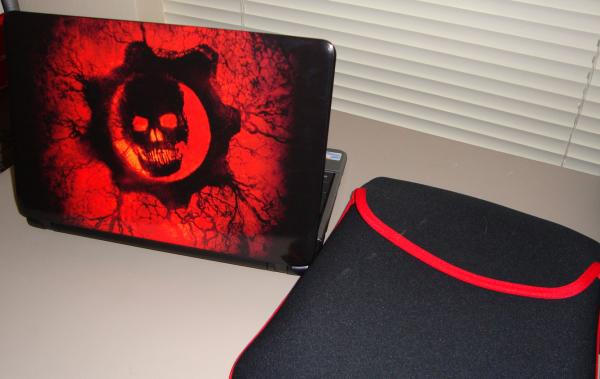
I really want to thank you guys for convincing me to get the 1810T. I'm loving it so far and haven't touched my W500 Thinkpad since I got it! It runs everything I need plus I can play some games on it too. I choose games that are more processor than video card intensive like UT2004. The lid on the black model was too much of a fingerprint magnet so I got a custom skin from Unique Skins. I love how it came out!
Big thanks to instantcoffee, bronsky and thundercat...er thundernet I'm so in love with my notebook!
Attached Files:
-
-
Hey guys...
Can we make of list of games that are playable on the 1810T.....?!?
Thanks -
[nevermind]
-
There's already a topic for that :
http://forum.notebookreview.com/ace...-notebooks-su3500-su2300-celeron-m-743-a.html -
Your notebook looks baaaaad and meaaaan!!!!!!!!!!!We have the same sleeve.When I got it it had a very bad smell but it went away!!!Glad you are enjoying your passionate affair with your 1810.
thundercat...er thundernet
-
People are so jealous and I'm afraid someone is going to steal it lol! Funny we have the same sleeve with the same bad smell hahah.
-
Nice, here is mine, from skinit.com, and if that's the Case Logic sleve, I also have the same one. My lappy also gets a lot of attention, especially with the ladies
![[IMG]](images/storyImages/49779d1273107100-acer-aspire-1410-1810t-1810tz-timeline-tweaks-2-may2010-021-small-.jpg)
-
Hi guys...
i'm a brand new owner of the lovely 1810T SE...
Wondering if anyone Over Clocked this baby yet...??
Would there be any benefits by doing so...?!? -
Rana....about time eheheh. Overclocking can only be done through hardware soldering.
-
I posted this elsewhere but try here too... I quoted this guy because I didn't ever see a response for him and his question is along mine....
So I'm looking heavily at getting an Acer Aspire AS1410-2039 "netbook" and have really only one question left before I pull the trigger.
Can it stream video to a TV? Generally the answer is yes, but I have an issue that my of my stuff is outdated so my only option is to buy an adapter cord.
I know VGA to s-video cords exist and I think HDMI to S-Video exist but I've heard that the VGA out has to support a TV Out option or I'd need to buy some digital converter box.
So if I just buy a VGA to s-video cord will this 1410 stream video to a TV for me or will I need to buy the box??
I believe the AS1410-2039 has an Intel GMA 4500M Graphics Processor if that helps. I've looked around but have not found anything that mentions a tv out function. -
Hi,
in either case you need some converter box. A simple adapter cable will most likely not work.
The old S-Video (or composite) TV-out connectors that have allowed to connect old TV screens without digital connectors or VGA input are getting extinct these days.
Michael -
CFRTim That's pretty hot!
-
Hi everyone,
The 1410 and the 1810 look pretty much to be exactly what I'm looking for atm. 11", portable with an HDMI out. However, looking at these two I'm getting a little confused by the ridiculous number of different models the 1410 (for example) has. Is there a site somewhere that summarizes what the newest ones are and what the differences are between the models?
Also, is the 1810 basically just the same comp with better specs? I'm really looking for a ~400-500 USD laptop at most, so I'm thinking the 1410 is looking the best, but I havne't been able to figure out which models are the latest/best ones at the moment. -
Hi,
The main difference is:
CPU, amount of RAM, size of HDD plus some extras like Bluetooth or WWAN.
For example my 1810TZ has this additional code: 41 3G 32n.
41 is the SU4100 CPU
3= 3 GB RAM
32= 320 GB HDD.
My laptop is also equipped with Bluetooth and WWAN, but these are apparently not part of the code above.
Additionally, the 1810 has a bigger battery than the 1410.
US/CA models have some different product code. No idea how to interpret them.
In short - yes.
Michael -
Thanks for that. In addition, is there an easy way to tell what each model of the 1410s mean? There seem to be like 10 of them start with a 2 and one starting with an 8, but looking at the acer site most of them seem near identical except for the processor. Which processor is currently the best one?
Acer Aspire 1410 and 1810 Timeline 11.6" Thread
Discussion in 'Acer' started by ohiomoto, Oct 9, 2009.