Problems? See this thread at archive.org.
Damn sand them down eh? Need to find somewhere to buy large grain sandpaper here haha. I've spent so much freaking time (and money) on this laptop, I regret not just spending another 500 and buying a top-of-the-line 15" for home and then a separate netbook for travel.
I can't seem to find where the pics were posted, can you re-link them on this page of the sinks, specifically the ones on the underside? Did you attach them with something special or did you use regular TIM?
-
Haha yeah you only sand them down like 2 mm it took me like 10 minutes. I think the CPU is not really necessary but I think the heatsinks are worth it 100% especially for $8.
I think I dipped around $200 into it and if I knew I was gonna do that I would have just got the Sony Vaio SA 13" or built a PC and got a tablet for class or something. But then again I got a free xbox out of it too.
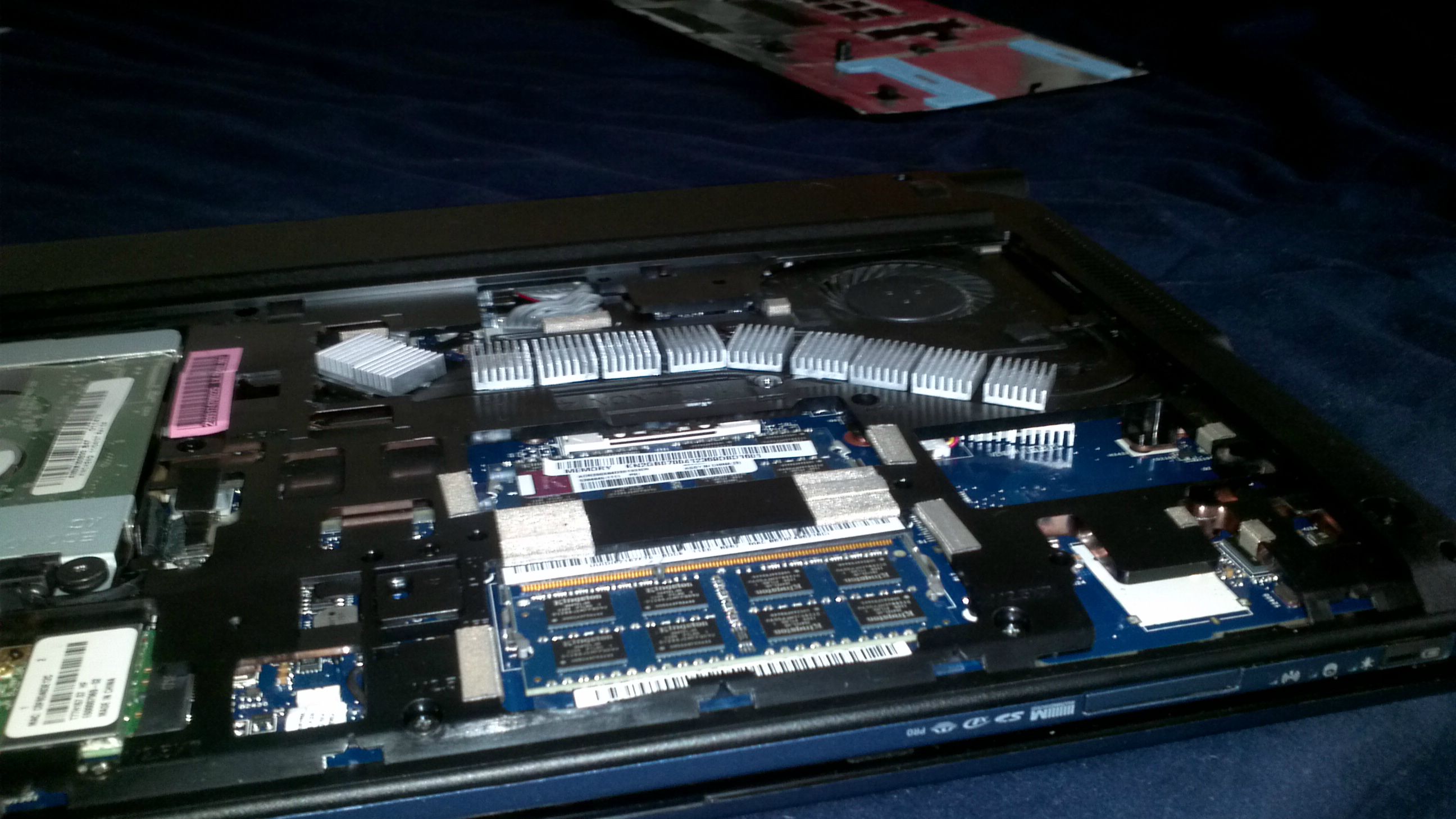
I attached a picture of my setup
-
Yeah I didn't get a free xbox so what the hell did I do it for haha...
edit: thanks, did you just use TIM for those? And I remember rbl said that the two on the underside were actually most important, more so than the ones along the exposed piping. Did you attach sinks there? -
They come with thermal pad/tape type things. Yeah I have two under there. I just sanded them two down and put the pads on and used tweezers to slide them into place.
-
Ummm anyone ???
-
would it be worth it to purchase the 3830tg for 479$ from staples and add the modifications ( cpu, heatsink ) which would come out to roughly 600$ or is there a better buy for that price?
-
I think you don't need to buy the CPU just get the heatsinks. You have all the knowledge in this thread so do it! Knowledge is power!!!
wait don't forget the battery might suck and you might need to rma it to get a sanyo.
-
I've never had any issues with mine personally. It depends on how you use it, I disabled the Nvidia card the moment I got it and installed Arch Linix with a light WM. Even when I compiling the kernel I don't have any noticeable heat issues, but I've never really checked.
-
I'm just wondering if you have any problems with the back panel bulging. From what I can tell, it looks like I sanded my heatsinks down further, and also used less of them. I had an issue for a while where if I was on an imperfectly flat surface, the bottom right of the laptop wouldn't touch the table and it would annoy the hell out of me. Ended up removing one of the rubber feet near the middle of the panel and it went away. With mine the bulge is very minor, but having a rubber foot thing on the panel made the bottom right very slightly elevated.
I like that spot simply because adding heat sinks there requires no sanding, can be removed, and fit perfect. I would say the most important spot is over the GPU. Cutting away that small bit of plastic and adding just 2 heat sinks there dropped load temps by over 8C.
The throttling is only apparent during gaming. If you do not intend on gaming, you wont experience any throttling. At the same time, you may as well just get the 3830T if you don't want to game.
I think even with spending the extra money to get a better CPU this notebook cannot be touched at that price. It's really not that difficult to add the heat sinks either. Maybe I'm just a nerd, but I actually enjoyed tearing it apart and modding it. -
I saw that theres picture how to mod the heat sink, but is there a video ?
Video give confidence to people like
-
has anyone tried playing battlefield 3 on a 4830tg? so far i have played in medium settings and it runs well. when textures were set to ultra, i experienced freezing 2 or 3 times. I don't know if it's because the gpu and cpu can't handle the game or there are other causes. has anyone tried running this at high or ultra settings?
-
It's really the easiest thing you can do.
1. Acquire heatsinks from Gelid Solutions by sending them an inquiry stating that you need replacement heatsinks for 'Gelid Icy Vision Rev.2.'
2. Wait for the heat absorbing sinks.
3. When the sinks are acquired, line them up along the heatpipe and see how many you can fit. It's good to get as many as you can over the CPU, I got 5. sand them down to about 3-4mm in height (I used 100 grit paper). You'll get a little bulge when you put the cover back on but it's no big deal.
4. They come with thermal tape, put them on the sinks and line them up along the heatpipe like in the picture (or however you want).
5. If you want to put sinks over the gpu, cut/saw the little plastic area out above it. You don't need to sand them down. I highly recommend this.
6. To get the sinks under the heatpipe, put the tape on 2 sinks and kind of guide the sinks under the pipe with tweezers or something.
It's not that bad. I took it to class yesterday and it didn't bother me. But for some reason theres a bulge in the left side of my keyboard since I put the computer back together. That's bothering me a little.
I thought I sanded them enough but I should have went another mm, its fine for now though. I tried putting one on the end of that right side of the heatpipe but I wasn't able to get the cover on.
I played a few round of BF3 last night again and throttlestop stayed at 29x the whole time and cpu maxed at 90c and gpu 80c. -
Nice temps. I'm getting pretty close to 100C when I play GTA 4 at 26x. Time to add some more heat sinks.
I also came up with a couple more potential modifications. I noticed that the keyboard has a metal back to it. Well, there are some of the graphics memory chips facing this, but there is a gap between them and the metal backing of the keyboard. What I'm thinking, is get some thermal pads, place them on the memory chips, then place a dime on each memory chip, followed by another thermal pad. Should cause heat to transfer to the dime and keyboard plate. Also, I was thinking about pasting some coins over the underside of the CPU socket, followed by thermal pads to transfer some heat from the CPU onto the metal plate underneath the keyboard. This would provide even more heat absorption and dissipation. Plus, if done correctly, it wouldn't bulge the keyboard and would pretty much eliminate keyboard flex entirely at the same time.
I'm also debating cutting away the plastic over the chipset and adding heat sinks there, similarly to what I did with the GPU.
Might be getting a 2720QM, so it will be necessary for me to make further improvements for sure. -
In the 13" range there is no competition at this price / performance ratio. If you're willing to double the cost you can look at the Sony SA and a few other machines like that.
The 14" Lenovo Y470 seems to perform well without throttling, but is gonna be $200 more.
For a similiar price and performance you have to go to 15.6" machines. The HP DV6z-6135dx on sale as a reconditioned at newegg is $549 and has an AMD 6750M and the A8 APU can overclock right to 1st gen core i7 range performance wise. I score 9200 3DMark06 and P1746 3dMark11 with the CPU overclocked and the GPU at stock clocks. -
For those interested in upgrading the LCD panel here's my progress report on this project. As previously discussed, I'm trying to replace the original panel with a 13.3'' 1600x900 screen with model # CLAA133UA01. The new screen's backlight turns on fine but there is no picture. I was able to hook my laptop to my external 24" monitor via a HDMI to DVI cable and at least see that the 24'' turns on fine. It seems that the 3830tg does recognize the new panel and I can set the resolution to 1600x900 in clone mode. However, there is nothing comes on the screen of the new LCD. I tried setting the resolution to 1366x768 and 800x600 clone mode but it still stays black.
One can conclude that perhaps the LCD data cable is not up to par with the new panel. I've purchased two LVDS cable on ebay that matches up with the resolution of 1600x900 and supports LED backlight but they are physically incompatible with the motherboard. The 3830tg LVDS connection on the motherboard side is a "snap-on" type of connector similar to the way the wi-fi antenna cables connect to the card whereas the two cables I bought are "slide-in" types that do not fit the 3830tg.
They sure are making it hard to do a seemingly simple LCD upgrade. Not sure if I want to spend more money on cables at this point. -
That's too bad man. I hadn't even really thought of swapping displays until you posted. You tried a cable out of a 17" 1600x900 Acer correct?
-
How long did it take them to reply to you about the heatsinks? I emailed them 2 days ago and no response, not sure if I should reword my request and send again.
Also, when you say cut out a part over the GPU- does this require breaking down the laptop to do? The laptop is a nightmare to take apart. -
They replied in under 4 hours for me. I emailed in the evening so maybe it was the middle of the day in HK. Could be wrong though.
If you are careful you could probably cut away that piece without taking the whole thing apart. I did it when I had the entire notebook apart though.
Edit: If I end up getting another new CPU (lol) I'm going to do a How-to video with my D3100. -
a friend of mine helped me with some info.
a special _hd_ cable must be used here, to switch some signal lanes. practically, this cable [shown in attachment] will continue the original one, not replacing it.Attached Files:
-
-
Is that assuming that the original cable can drive the 1600x900 panel? Or will this special cable automatically convert the signal to work with the 1600x900 resolution? If so, please let us know where we can find it.
-
hi to all you experienced & great guys there!
i was just wondering that if i3 2310m in Acer 3830TG can be replaced with i7 2620m. thanks in advance
-
It would help if there were detailed pictures for the connectors and parts you're mentioning, I have no way of knowing what you mean by slide-in and snap-on.
Perhaps try this, http://forum.notebookreview.com/del...ps-l501x-lcd-display-swap-35.html#post8018725 -
Yes.
10 char -
Hi guys, I was wondering if someone could help me out.
For over three years I’ve had the timeline 4810tz, I love this computer, I have never had any issues with it and even after three years I can still get seven hours out of the battery. However, three years of having my laptop in my schoolbag and bringing it back and forth from university five days a week has finally caught up with it. The screen connections have become loose causing the screen to be unstable and resetting the connections is no good because after a week the connection becomes loose again. Also, I think the fact that my cousin dropped her 60 pound schoolbag on top of my laptop could also be a contributing factor...
So I’m thinking of buying the 4830tg as a replacement because I need something that can last 8 plus hours on campus. I do not play video games at all. I use my laptop for typing, intense internet use, video streaming, downloading torrents, watching movies/documentaries, for class presentations, and sometime a use ArcGIS software, such as Arcmap... and that’s about it.
So my question for you guys is whether or not I should buy this laptop? Because what I’ve been reading about the new timeline models on this forum is not too reassuring. Would I ever encounter a throttling problem? Is it likely that the 4830 could last as long as the 4810?
Thanks!
Cheers, -
If you're not gaming, the 4830T will probably suffice. The HD 3000 in the Sandybridge CPU will perform the functions you list with no problem. The throttling issues with the Timeline units are associated with the dedicated GPU. The T version doesn't have those problems.
-
Thanks Bronsky. But now I have another question. There are two 4830t models on the Canadian Acer website, the 4830T-6401 (Intel Core i5, i5-2430M, 2.40 GHz) and the 4830T-6872 (Intel Core i3, i3-2330M, 2.20 GHz). The only different between the two models is the processor. So... which model is the better choice? I’m guessing the one with the Core i5, right?
Thanks!
Cheers, -
Yeah I'd get the i5, as long as it isn't a lot more expensive than the i3.
-
Hey if it's possible, could you take a picture of the back with the cut-out plastic above the GPU highlighted?
-
There ya go. You can see how the heat sinks over the CPU had to be sanded down a lot in comparison to the ones over the GPU, which didn't need to be sanded down at all. I'm likely going to cut away more plastic and add more. It's a great spot to add them, tons of clearance height wise.
![[IMG]](images/storyImages/spot.jpg)
-
Thank you sir! After my emails were ignored I went out and bought 16 very small copper heat sinks. I don't know if it's going to be possible to sand them, my fingers already hurt. -_-
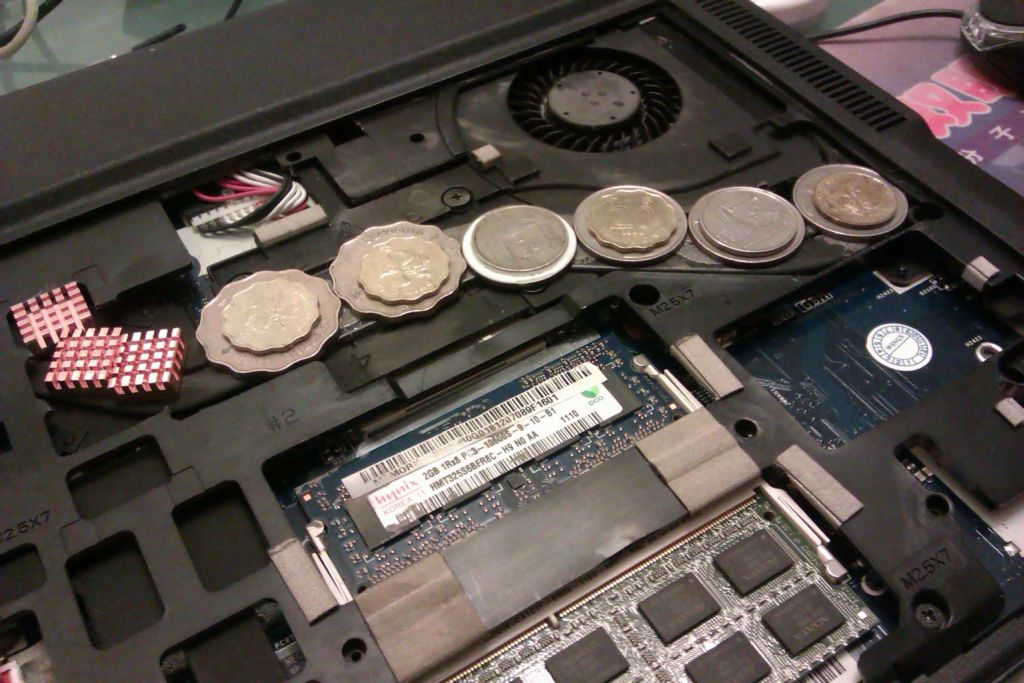
Can't sand down the others, I get to use my foreign coins
I haven't been able to find the place you said you used tweezers to put the RAM sinks on the bottom, though? -
3830t should be fine. It's the 3830tg that overheats.
-
The I5 version of the 4830T sells at NCIX for $680. At that price, I would go with the I5.
Your work on this problem is impressive. Passive cooling seems to cure this notebook's greatest flaw. -
I used scissors to cut away that area, it was so easy it's like it was designed to be clipped with them. Cutting further along, however, is not going to be as easy.
-
today i was really surprised to see that the "Core Temp 1.0" on my i3-3830TG was showing me the Clock speed of 2.4 Ghz for i3 !!!
But my euphoria soon ended when i finally check with CPU-Z and it was back at 2.1 GHz
i hope there could have been some miscalculation on the software part though..but it was really great to see a 2.1Mhz i3 displayed as 2.4 Ghz.Attached Files:
-
-
How are your temps? You should certainly be able to run near max turbo boost during games now with all those coins and the heat sinks over the GPU. Here is the spot where the heat sinks under the heat pipes go. You can see them in between the motherboard and the heat pipe. Hopefully your copper sinks fit.
![[IMG]](images/storyImages/DSC_0449.jpg)
Thanks Bronsky, I appreciate the compliment coming from a prominent member such as yourself. When I got this notebook I was committed to finding a solution. The 3830TG will never be able to do Furmark + Prime95 without throttling, but much progress has been made. -
Oooooh ok. No I don't want to take it apart again, every time I do I break something important. :'(
With the coins and the heat sinks I can run x23 flat on my glass table without hitting my safety-throttle point of 93C with DX:HR. Elevated I can run at x25.
OH btw- do you think sanding the heat-pipe and re-setting the heatsinks+coins will help? I never sanded before using thermal paste.
edit: FYI, after I cut out the rest of the plastic over the GPU, there still wasn't enough space for one more sink (unsanded). This would be different if I had sandable sinks, which I will get soon as GELID just responded to me and will send me a kit of sinks + TIM for 5 USD
I DID, however, utilize some of the space on top of the plate covering the GPU itself (next to the thermal piping but not on it). I stuck on one there just for fun, will run some tests to see if it made a difference.
Any recommendations on which will be better to use, once I get the GELID replacements? Copper or the GELID ones? -
Hi, I have a small problem with my Acer 4830TG.
The first time i used it, there was this nice icon and level indicator whenever I adjust the screen brightness and sound using the function+arrow keys. Also, there was a nice wifi and bluetooth toggler when i use fn+F3.
Now they are all gone.
I may have accidentally installed something that is related with those features. What can i do to get them back?
Thankss -
Install back Launch Manager.
-
oooh. that worked! thanks!
-
I'm not 100%, or anywhere near it, but from my recollection, copper holds heat better than aluminum. And whatever sinks have more surface area would be better. It looks like the copper heatsinks you have might have the slight edge over the Gelid ones. You can always experiment with the two though.
-
Hey I'm in the market for a 3830tg. Is the new generation of 3830tg (6424) any different than the old? (6431)
I think I read that battery life is a bit longer, but what about the throttling issues, or anything else? -
So I finally caved in and bought this laptop.
So far so good.
Overclocked the gpu to 800/1600/1000 and bought a laptop cooler for $15 bucks.
Played BF3 without any problems for hours without throttling and even ran prime95 for hours also.
My temp on full load is only at 65-70c and not sure if it's just the winter chill coming to Vancouver or my laptop cpu cooler is doing a great job.
Going to swap a seagate hybrid momentus on it soon to speed up the HD. -
The problem with the copper ones is that they can't be sanded (well maybe they could but my fingers would get sanded down first) so I'm very limited on where I can put them. The aluminum ones can apparently be sanded down and they'll definitely be better than my stupid coins.
-
I ended up not exchanging/returning the laptop. Ugh, now my sanyo better is at 4.6% wear. Got the laptop on the 24th of September so about a month. .
-
i'd suggest u remove the optical drive and buy an SSD. unless u bought a 3830T
-
Hi all,
I've been reading this thread since the beginning and finally had a chance to purchase a 3830TG-6424 two weeks ago.
Pros:
* It is pretty, the design reminds me of some Sony models.
* It is very fast, the 2430M uses it's turbo very frequently and for long periods of time, unless games are played. In this case, throttlestop really helps- I only had the chance to test Dirt 3 for about half an hour, with X26 multiplier and staying on about 72C steady.
* The promised battery life is fantastic, the laptop is very frugal on idle.
* I recieved an Intel Wifi card inside, and it's reception is admirable. Couldn't find any laptop that comes close to it.
Cons:
* Build quality and materials are cheap. the whole computer flexes, and the inside blue and silver plastic parts are no better than a Chinese toy.
* The touchpad is good, but left click squeaks annoyingly.
* The power brick is quite large and heavy, but I'm used to a netbook so it's a little unfair to compare.
* The screen was probably screwed too firmly to place in one corner, so there is a nice cloud of bright pixels near the corner. The screen is also very glossy but I can tolerate it - otherwise it's OK.
* And finally... Battery wear. Got a panasonic, with 5% to begin with. soon became 8 and 15%, and declined a little after some irregular charging. Then rose to 25%, and declined a little to 21% after calibration. I've sent a mail to Acer, and waiting for their response.
All in all, I'm quite pleased, especially with the laptop's performance, but Acer will have to solve those battery problems. -
Hi, i have a 4830TG and the manual says that small opening on the rear side of the laptop is a sim card slot. but i can't find a way to open it. has anyone tried inserting a sim there?
thanks!! -
As far as I know, no model supports sim cards yet. The opening is there, but the current models do not have a sim card reader on the board.
-
Real interested to discover how the 4830tg holds up to the predecessors, my girlfriend just got one and she loves it, regardless of the aforementioned *bugs*
-
my battery after 30discharges, battery wear at 0%, 68735mwh out of 64800mwh
it did go down about 1000mwh ish from when the battery was new
Acer TimelineX 3830/4830/5830 T/G
Discussion in 'Acer' started by lee_what2004, Feb 6, 2011.