Problems? See this thread at archive.org.
your question have been answered?? undervolt using any software and follow multiplier setting indicated by forum users on this thread
-
My question is not answered.
You speaking about underCLOCKING, not underVOLTING.
I still have not found a way to decrease CPU vCore voltage. -
I may be wrong, but sandy bridge cpus handle voltages internally, so it seems there's not much to do.
@coldxfire: when you load a fresh (and, normally, any) win7 system, your fan should just be hearable, not loud (like, 30% full). -
Perhaps you meant mobile CPUs, cos in Desktop CPU from SB we can percfectly do fine tuning...
-
I read SB cpu's have a internal multi/voltage table and can't be modified without a P/Z chipset (you modify offset voltage over/under stock voltage shown in this table). This method is used to avoid manual modifications of stock voltage and sell cpu's LV/ULV at higher price.
-
I have had the 4830tg for around 3 weeks now and love it!!!! Its only having 1 problem? Every so ofter the touchpad stops working and I have to reboot for it to work again? Anyone else have this problem? Any fix? thanks in advance

-
So!! I joined the forums because this thread helped me decide to get the AS4830TG-6808!! I managed to get the notebook @amazon for ~588, after the acer2012 coupon expired - i got lucky that a rep advised me badly in chat, and lucky that i had used my real email for the chat and it had been archived.
Ive purchased a couple parts for the laptop:
ssd newegg/amazon
Newegg.com - SAMSUNG 830 Series MZ-7PC256N/AM 2.5" 256GB SATA III MLC Internal Solid State Drive (SSD) Notebook Upgrade Kit
Amazon.com: Samsung 830 - Series MZ-7PC256N/AM 256 GB 2.5 Inch SATA III MLC Internal SSD Laptop Kit with Norton Ghost 15: Electronics
ram newegg/amazon
Newegg.com - CORSAIR 16GB (2 x 8G) 204-Pin DDR3 SO-DIMM DDR3 1333 Laptop Memory Model CMSO16GX3M2A1333C9
Amazon.com: Corsair 16GB Dual Channel DDR3 SODIMM Memory Kit (CMSO16GX3M2A1333C9): Computers & Accessories
CORSAIR 16GB (2 x 8G) 204-Pin DDR3 SO-DIMM DDR3 1333 Laptop Memory Model
amazon: 107.99 no tax/shipping
SAMSUNG 830 Series MZ-7PC256N/AM 2.5" 256GB SATA III MLC Internal Solid State Drive (SSD) Notebook Upgrade Kit
amazon: 309.99 no tax/shipping
Mfr: SAMSUNG Model: MZ-7PC256N/AM
FRYS.com #6848026 UPC: 036725604766
Mfr: Corsair Model: CMSO16GX3M2A1333C9
FRYS.com #6932057 UPC: 843591016131
Got fry's to price match amazon, making the cost of these parts $454.55.
Total cost = $454.55+$588.49 = $1043.04
I may upgrade the screen to 1080p in a few months if I can find one; not too concerned with bluray.
Questions:
Does the hdmi support true 1080p 3d playback? (my TV does)
Does the widi support true 1080p 3d playback?
Can I use the laptop + dual monitors?
( laptop + vga -> monitor + hdmi ->dvi -> monitor )
What's the best 'dock' to use?
Any other upgrades I should be considering?
(other than destructive mods like for heat)
Finally, and i searched long and hard, has anyone found a replacement fan for the included unit?
I hear the norton ghost coming with the SSD sucks, so I'm going to try to use acronis server to image; if that fails, then I'll try another tool - i'm open to suggestions.
Thanks in advance for all assistance, sardonic and otherwise ~_^
Last edited by a moderator: May 8, 2015 -
I joined the forums because this thread has been incredibly useful to me in sorting out ways in with to make my recently acquired 3830TG-6864 run cooler.
My issue now is that there are so many pages of information that I am finding it difficult to find clear information on which solutions work best.
I've already replaced the TIM with Arctic Silver 5 but am curious if there is something better than this TIM. I also removed the mesh from the vents.
I've seen solutions where people have placed memory coolers on the heat-pipes and or coins or copper slugs. How much of an improvement can one expect from this? Whats the best way to place them on the heat-pipes without having them move around like crazy.
I've also read post in which some people have lowered the voltage of the GPU in the bios. What kind of difference does this make? Is there any easy ways to modify the firmware or at least an outlined way of doing such?
Does anyone know of a way to possibly increase the fan speed by maybe supplying it more voltage? I realize this would lower the lifetime of the fan.
I had an idea actually to drill some holes in the case beneath the fan to allow for more airflow. I've been slightly hesitant but may still do this.
I look forward to what replies I might receive and hopefully I can contribute some useful input as well. Thank you! -
I just have one wquestion: Does the 3830 also support adding a second SSD half slim drive like the 3810?? I see it has a pci slot but not sure one for a second ssd
-
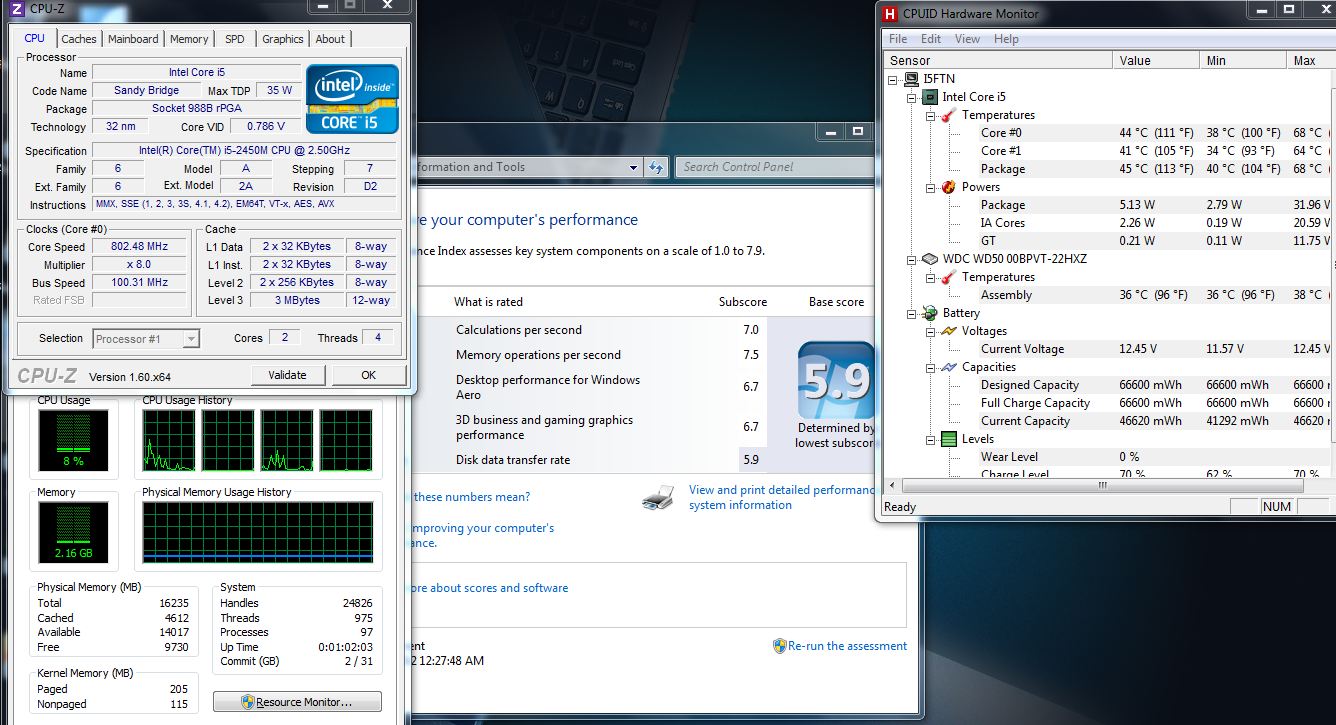
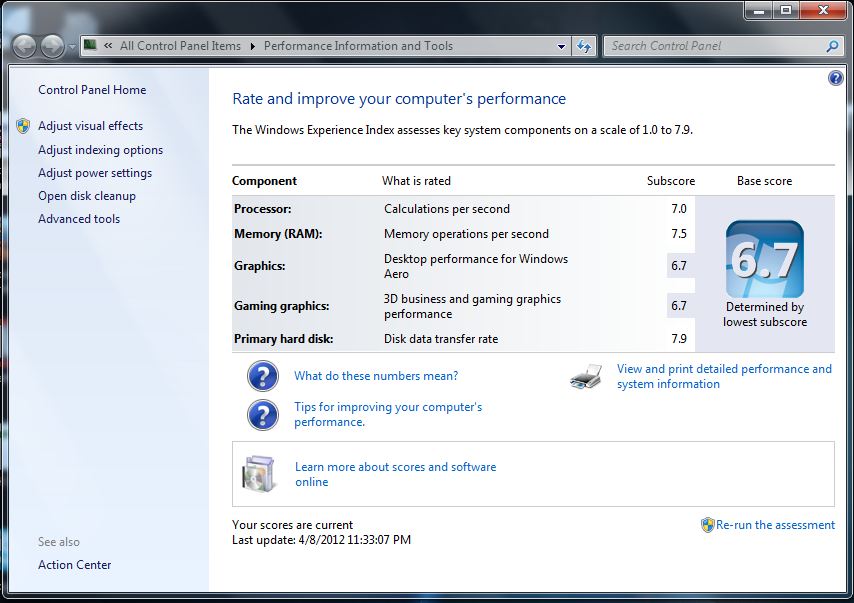
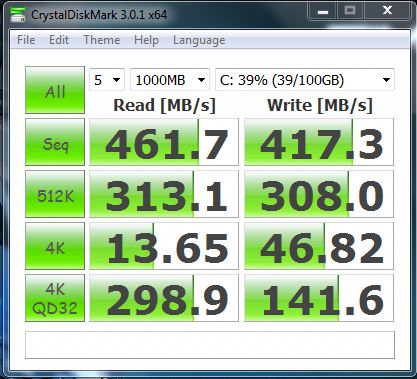
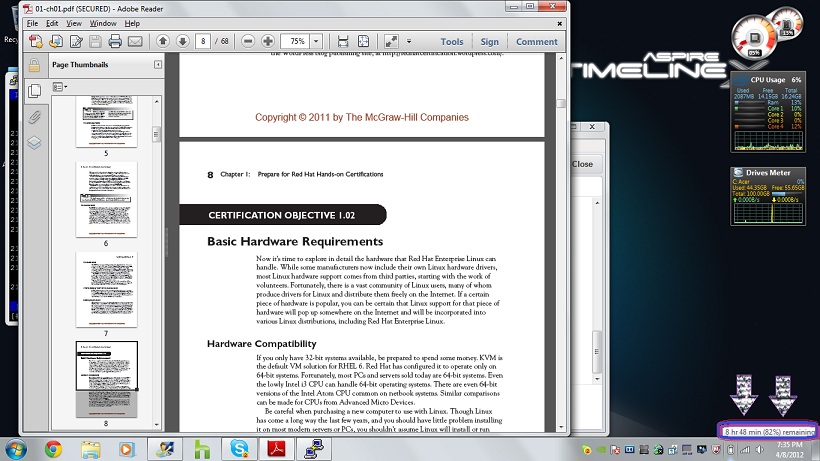
bit disappointed with the ssd results; the partitions look aligned, but speeds seem about half or a bit less on the 4k than they should be:
-
whatissixbynine yea 4k readings a bit low. but don't worry cdm is not the best tool for you. try atto you'll get much more realistic results. and i have a question for you. did you really install 16 gb ram to 4830tg? because i thought that cpu doesn't support more than 8 gb. if you did so then i would expect 7.9 from windows to memory but it says 7.5. i don't get it.
-
Hi guys,
I'm thinking of buying 3830tg as I love its sexy design and light weight, I have went through some reviews and I know it is not the best laptop in the world and there are huge problems with throttling but I have some questions to the users who have this laptop from a longer time.
Basically, I do not need laptop for gaming, I won't play the most recent games, I need light and small laptop with long battery life in order it to carry it every day to University and I will mainly use it to browse and sometimes process photos, what can require better performance.
But I would like to buy a laptop for 2-3 years and be sure it won't die after one year so that is why I'm asking for an advice from users who have it from a longer time.
I'm considering i5-2450m or i7-2620m.
Could you please give me the answers to the following questions:
1. The battery life is really great at the beginning but how does it change over the time? What is the battery life after half a year or year of usage? Is it durable? What is your wear level and how long you use it?
2. Do the new versions of BIOS, for example 1.08 fix the problem with throttling or makes it less inconvenient?
3. Are there problems with throttling in the i7 model? Are they bigger or smaller?
4. Where is the battery life longer - on i5 or i7 model?
5. What about the quality of the materials used? How does it look like after some time of using? Does anyone broke something?
6. The reviews show that the screen display is really poor, it has got brightness, contrast and black level. Is it inconvenient? What about using this device in the sunny room?
7. Is it noisy?
8. The reviews show that it can be really hot - even keyboard. How does it look like? Is it possible to lie with this laptop in bed or is it too hot?
9. What is the quality of the speakers?
10. Would you recommend to buy this laptop? If yes - i5 or i7?
I went through reviews but it is always better to ask someone who is using this laptop daily. I'm considering also ASUS U36SD (but has worse processor, graphic card and camera) Dell Vostro 3350 and MSI X460DX (is bigger).
Thanks very much! -
1. ~8 months, 30% level wear, their batteries suck.
2. Not for me.
3. I guess it happens faster with i7, not sure though.
4. i5 of course.
5. Nothing special.
6. I switched it for a mat screen, much better but still really poor display, especially viewing angles.
7. Nope
8. How does "hot" looks like ? You won't get burned.
9. Poor, as any laptop. They're loud enough for me, more than 3810tzg which was really not.
10. Yep, if you can't wait for Ivy bridge. -
@Konrey
1-5 months and %3 wear level i still got 6 to 8 hours of uptime
2-doesn't realy have any effect v1.08 undervolts gpu but that's all
3-i'm not sure but throttle may kick in sooner with i7 besides i5 does a very good job.
4-of course i5 is better with battery.
5-being a light laptop, materials look quite bendable/breakable. but so far no problems with it.
6-well i don't think it is that bad but in the sun it can turn into a mirror
7-i use throttlestop to fix my multiplier at 8 when i'm surfing and disable it when playing games. while surfing there is no sound except hdd. hdd is pretty loud though. i noticed that when i upgraded my laptop to ssd. so overall it's pretty silent.
8-no that reviews are misleading. back can get pretty hot around where cpu is located. but vents are pretty quick to throw the heat out. i use my laptop on my lap all the time and highest temperature i've seen is 75 celcius(playing codmw3,nfstr,lotrwitn tried skyrim too)
9-yeah about that.. acer is quite stupid with sound systems. it is supposed to be good i think, with dolby. it is not. average at most. it has two speakers in the back and the front speaker, well it is not that good but not really really bad.
10-i would definetly recommend it as long as you're going to play hardcore games with it. gt540m is definetly up for it. but if you're looking for portable, lightweight, long battery time and playing games for amusement(if you're not really a gamer) i would recommend you samsung's 14" ultrabook with ati gpu.
yeah after your edit i strongly recommend you samsung's new ultrabook. i don't have any using experience with it but from specs it looks really good. you should check it out yourself. i don't have exact model number bu it has an ati gpu and 14" screen.
i think this is what i'm talking about: http://www.newegg.com/Product/Product.aspx?Item=N82E16834131259 -
guys i have posted this on ssd thread but nobody seems to care about it so i'm asking here once more
i recently bought my sandisk extreme 120gb ssd and i wanted to show you my benchmarks. are they any good? i have an acer as4830tg i5 cpu with gt540m gpu and 4 gb ram.
![[IMG]](images/storyImages/43snu.png)
![[IMG]](images/storyImages/43sjd.png)
but i have an issue. when i run hdtune program it says my ssd is ok

but when it refreshes, it says my ssd is failed

i just don't get it. is my ssd ok or not?
thanks for your help. -
I feel as if my post got ignored, no worries though... I managed to mod the 1.08 Firmware for the 3830TG to show the advanced menus as well as undervoltaging the GPU to 0.80v
Along with disabling Turbo, redoing the TIM with Artic Silver 5 and removing the mesh grills from the case I have managed to get an average peak CPU temperature of 75C and average peak GPU of 69C. (While gaming Skyrim, WoW etc...)
I would love to find where in the firmwarethe setting to cause the CPU to throttle when the GPU hits 75C is... anyone have an ideas? -
doing the same for the 4830 is my goal.. good luck
-
@luckythedog
This Samsung which you have mentioned is too expensive for me, however there is one - 530u4b - it has i5-2467M (weaker, however it won't be laptop for gaming) and AMD Radeon™ HD7550M with 1GB memory. It has got good screen and everything what I need basically, however it lacks very much with its battery life and this is crucial for me as I want to carry it every day to university so I want it to be 5-6 hours with Wifi turned on. -
I believe it's under "CPU Thermal Something". You can change when the CPU throttles but I'm not sure if you can make it throttle based on the GPU's temp. You can also change the fan speed from there but I tried this with 1.04 and didn't seem to change anything.
One more thing, I'd appreciate it if you posted a link to the modded 1.08 bios. -
yeah the one you mentioned was the one i was trying to tell you. my bad.
well okay then
i suggest you buy 3830tg it is smaller and it will be more durable i think because it lacks a dvd driver. also buy a ssd it will improve your battery life and performance dramatically. i have one installed and i get 6-8 hours of surfing. -
everyone acer released a new bios
does anyone know what changes with it? -
My Modded 1.08 Bios can be found here;
Modded 1.08 Bios
*** DISCLAIMER *** - I claim no responsibility whatsoever for whatever issue may arise using these files.
I have tested and verified that all of these files work on a 3830TG-6864 Acer TimelineX laptop.
Mileage may vary.
USE AT OWN RISK!!!
You get three flavors to choose from.
Menus - unlocks menus and doesn't touch the vbios
Menus VGA 0.85v - GPU at full load will only reach 0.85v
Menus VGA 0.80v - GPU at full load will only reach 0.80v
Extract everything into its own folder.
Copy the proper file in to P4LJ0108 and click InsydeFlash.exe.
Wait for it to finish, reboot, have fun!
Please let me know if any issues arise so I can sort out and fix them if they do. I am still learning myself. -
Edited: I guess Acer updates their worldwide site before the regional ones (e.g. US), there was nothing on the US site when I checked last, but it is up now, with no changelog as usual.
If at least some of those options work, a lot of the people here would be ecstatic!
Also, as feedback, on my 4830TG, the GPU undervolt is not working. If you go back a few pages in this thread, there was another contributor that corrected his BIOS GPU undervolt to work in my 4830TG. I posted a screenshot of either NVIDIA Inspector or GPU-Z or both as well to guide him what device ID was necessary to modify. If you can either modify the BIOS he posted to unlock the menus, or add the undervolt for my device ID (10DE-0DF4), I'd appreciate that. =) Would be nice if you based the edits from the new 1.10 BIOS that is now out.
BTW, the rest of my 4830TG-6450 NVIDIA GT 540m's string matches whatissixbynine's post below.
For anyone interested, I found a tutorial on how to enable hidden menus, although it's a slightly tedious procedure: Link
Here are some screenshots of the unlocked settings, apologies in advance for the mediocre image quality, used my cellphone to take these:
![[IMG]](images/storyImages/platformthermalconfig2.th.jpg)
![[IMG]](images/storyImages/advancedcpucontrol.th.jpg)
![[IMG]](images/storyImages/bootuefi.th.jpg)
![[IMG]](images/storyImages/platformthermalconfig1.th.jpg)
Finally, my own disclaimer: if you are tinkering with these advanced settings, make sure you know how to restore the BIOS in case settings that are changed cause the system not to boot up/display anything. -
+1 for modded bios for as4830tg-6808 - PCI\VEN_10DE&DEV_0DF4&SUBSYS_05501025&REV_A1
p.s. i seem to have the elan pad :/
However there's like NO flex, and typing on this keyboard is Awesome.
STILL LOVE IT!!


-
Hi there, thanks for sharing. What's the default value ?
Is it rock stable for both of them for you ? Did you try to o/c the gpu?
I'd appreciate a 4830tg version as well =) -
![[IMG]](images/storyImages/48ylt.png)
i tried it on 4830tg and it works.
but i am not sure whether it functions right or not. -
i'm also curious about that 1.10 bios...i wish there was a changelog.
btw i love my new 13 inch 3830TG. outfitted with an i3 2310m /8gb of corsair 1333mhz ram, a shiny new intel 510 120gb ( staying away from sandforce.),
the gt 540m and using the original included 750gb scorpio blue as an external usb drive...it completely obliterates my now dead asus c90s. -
I see that the 1.10 Bios has been released for my model as well... I will look into modding it tonight.
I will also look into the vbios for the 4830TG. -
please if you find one post it here. the last one you posted was very useful. thanks for that.
-
Latest bios seems to change stuff regarding cooling and throttling.
Throttlestop now reports 2.1Ghz when set to 23x, 1.8Ghz when set to 21x, etc. Seems weird.
And I could play more without throttling much, didn't log but max gpu temp was 74° and cpu was in turbo mode after 1/2h - 1h nfs the run !
GTA4 didn't seem to show much of an improvement, but I wonder what's the new trick. -
Okay just looking now it would appear that I could do the same trick I did last time to unlock the Bios menus and am in the process of doing such for 1.10.
@lastnikita the default voltage for the GPU when under full load was 0.98. I was able to run WoW, minecraft and Skyrim stably for extended times on 0.80v and with a temperature drop to boot!
@vacaloca that link for modding the bios is what I used however I ended up having to change my approach since the tools didn't work all too properly for me.
As for the 4830TG it would appear to use a different copy/version of the vbios, which the bios strangely enough has more then one copy/version of the vbios inside of it... was wondering what that was about...
If anyone is interested I've been spending time figuring out the EC as well... so far managed to turn off/on lights as well as turn the fan on and off completely... not so much control it however. -
My Modded 1.10 Bios can be found here;
1.10 Modded
*** DISCLAIMER *** - I claim no responsibility whatsoever for whatever issue may arise using these files.
I have tested and verified that all of these files work on a 3830TG-6864 Acer TimelineX laptop.
Mileage may vary.
USE AT OWN RISK!!!
You get three flavors to choose from.
Menus - unlocks menus and doesn't touch the vbios
Menus VGA 0.85v - GPU at full load will only reach 0.85v
Menus VGA 0.80v - GPU at full load will only reach 0.80v
As far as I know the VGA mods should work on a 4830TG now... I do not have one to test on however so please let me know once again. -
thank you very much!!! i tried it immediately. but i get 0.90v at vga not 0.80v. no worries though, i am more than happy
here's a screenshot
![[IMG]](images/storyImages/49vtd.png)
thank you nedemai
-
I decided to check out AIDA64 on my machine to see what was going on. It also shows the exact same values of 0.90v so it leads me to believe it is not reporting correctly.
Try GPU-Z or nvidiaInspector. They seem a little more reliable in reporting the voltages. -
I did not try the other BIOS versions yet, but this one works w/ GPU max voltage @ 0.8V with a full load under FurMark w/ my 4830TG (I used NVIDIA Inspector). To make things interesting, I set the Throttle On Temperature setting to 90 deg C, and indeed the setting took, as the CPU did not throttle to the ~1100 MHz range until then. I also set the Thermal Device to Enabled, and when I booted to Windows, it detected the device on the picture attached.
Nice work Nedemai. Thanks!Attached Files:
-
-
Tonight I'm going to sort out the equation for TC1, TC2 and TSP so one can change the speed at which the machine throttles down to.
-
what does thermal device do exactly?
-
Thank you the unlocked bios.
Did you try overclocking the GPU under the modded voltages? I can overclock the Core Clock to 780Mhz easily using the default voltage so I was wondering how lowering the voltage might affect overclockability?
Also, is it just me or do fan controls still not change the fan speed in any way? -
I have not but apparently its possible to get 550m speeds doing so. Im not interested in speed as much as reducing heat. -
I need BIOS without Menus, but only with a VGA 0.80v! Can you help me?
-
Yes I can do this however I am unsure why you wouldn't want the extra bios menus... I'll post a link when I get off work.
-
No idea yet... I'm assuming it could be monitored by software at the very least.
-
works perfectly on 5830tg. maybe we should open a new thread, documenting all those options
-
What version of the vbios does the 5830TG use? The first page in the bios menu will say as well as GPU-Z and Nvidia Inspector.
-
1.10 VGA Mods No Menus
*** USE AT OWN RISK! ***
VGA Bios modded to 0.80v and 0.85v. Choose the one you wish and follow the same instructions as before.
The rest of the Bios has been untouched and the Advanced and Power Menus do not appear in the bios. -
on MY 5830TG modded bios don't work ,
![[IMG]](images/storyImages/10v.png)
v is 1.0 Volt, why ? -
@jabel
The version of the vbios is 70.08.45.00.37 on the 3830TG and 70.08.45.00.34 on the 4830TG.... the 5830TG is 70.08.45.00.42.... and I have no modified this file in the least yet... I shall do that tonight if I have time... -
great ! great ! great !
-
Okay the only Vbios not covered by this update is 70.08.45.00.3A... if you happen to have this Vbios let me know.
All 5 flavors are in this update and remember kiddies
*** USE AT OWN RISK ***
1.10 Mods for 3830TG/4830TG/5830TG etc...
Please any and all feedback is welcome and please let me know how this works. Screenshots are appreciated! -
Has anyone installed an SSD in the Timeline X AS4830t-6841? I've seen the descriptions for other models of the x830 series but this model has a very different installation with the hard drive very recessed.
Acer TimelineX 3830/4830/5830 T/G
Discussion in 'Acer' started by lee_what2004, Feb 6, 2011.


![[IMG]](http://img689.imageshack.us/i/platformthermalconfig2.jpg/)
![[IMG]](http://img6.imageshack.us/i/advancedcpucontrol.jpg/)
![[IMG]](http://img513.imageshack.us/i/bootuefi.jpg/)
![[IMG]](http://img201.imageshack.us/i/platformthermalconfig1.jpg/)