Problems? See this thread at archive.org.
Have a look @ link.From what you said go for i5 & dual 5870's
http://forum.notebookreview.com/alienware/482539-i7-620m.html#post6232836
-
FAKE
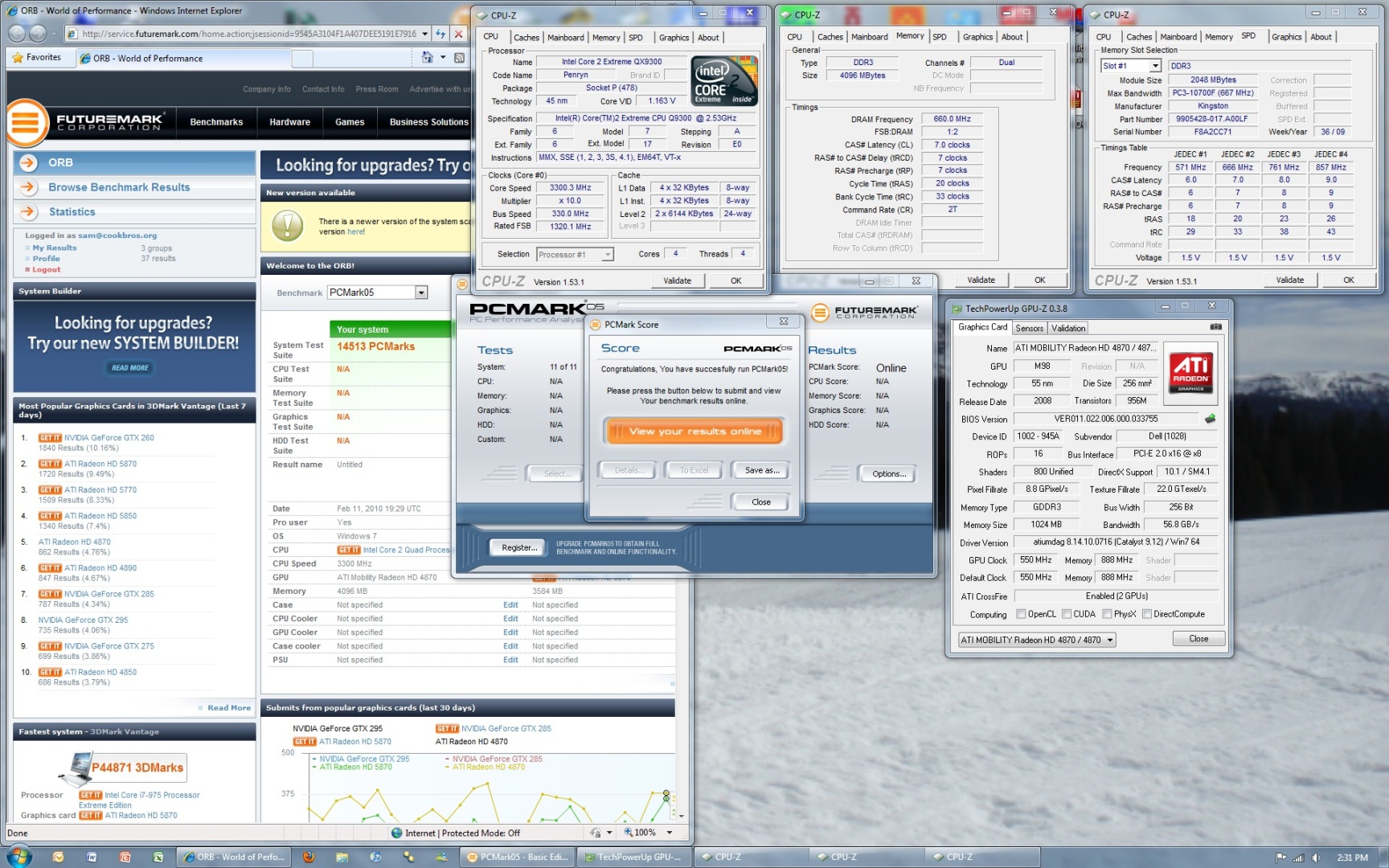
look at the cpu, probably just copied "mobility radeon" from another pic and ran the test on a stationary pc -
There you go. That's more what we've been expecting. Minor tweaking (w/o O/C) should take it above 14K, then no telling where the benchies end up. Good run, very nice machine.
@Alexbalbinder -- There is nothing fake about Achilleus' post. That CPU score (and the total P score) is exactly where it should be for a 920XM with 5870CF. The public side of Futuremark has mislabeled the i7-920XM as an i7-950 since the mobile i7's were introduced. An apology is owed to Achilleus immediately. -
Thanks for the replies. My last question is how much better is the RGB LED screen vs the 1440 x 900 screen? Is it considered one of the best displays on a laptop?
-
opps double post
-
You absolutely need the CF5870 and the RGB LED screen... No hesitation, the rest you can take as is.
Also, you can get about 12% off by contacting this person:[email protected]
Just tell him you are from notebookreview. -
You are a complete id1ot. I know exactly where I would stick my foot if I were standing in front of you.
-
This screen is amazing compared to the R1. I would not want to go back.
-
I would not go near the 1440 x 900 personally. RGB definitely is good but i can only compare it to what i have previously owned & its best i have had 100%.
-
if you are serious i'm sorry it migth have been a glitch in the futuremark webpage (i thought it was more likely a troll) but if you look at your own pic you can clearly see that that is an i7 950 cpu
-
Does the 920XM show up as an i7 950? 950 is a desktop CPU with a 130W TDP, way different than a laptop CPU
-
Don't worry about the noobs around here. Do you have your GPU-Z screen to see the frequencies?
-
i'm noot that noobish, but if you think of it, it's more likely that a troll (from the interwebs) fake a picture than the fact that the futuremark showing the wrong cpu.
not that i am any longer applaying that achilleus is a troll, just that i THOUGHT he was becouse of the cpu description in the pic
-
<param name="movie" value="http://www.youtube.com/v/1sONfxPCTU0&hl=en_US&fs=1&"></param><param name="allowFullScreen" value="true"></param><param name="allowscriptaccess" value="always"></param><embed src="http://www.youtube.com/v/1sONfxPCTU0&hl=en_US&fs=1&" type="application/x-shockwave-flash" allowscriptaccess="always" allowfullscreen="true" width='480' height="385"></embed></object>Last edited by a moderator: May 6, 2015 -
I am sure there is an explanation for the wrong CPU.
-
Here are my 3dmark06 (free version) results. Again program is at default settings and stock clocks.
![[IMG]](images/storyImages/Achilleus3dmark06.jpg)
-
probably a glitch in 3dmark/on the futuremark page (i have never seen wrong info on futuremark before that is why i reacted like i did)
achilleus are you going to try some gaming benchmarks ?
-
Again with the processor thing? I don't know what to think anymore...
. All i know is i got some crappy 5k score on that
-
I'm not sure why the 920xm shows as a 950. Maybe it has something to do with turbo boost.
-
Here is gpu-z
![[IMG]](images/storyImages/achilleusgpuz.jpg)
-
nice scores achilles. That's what i'm talking about
-
I didn't do anything special. Just a clean install of win7 and the drivers from the dell site. I also disabled my antivirus.
-
My 920XM always shows a 950 doing the runs...why don't they fix that...
-
AMD GPU Tool 0.9.26 is giving me problems reading both GPU's. It only detects one of them so far using the Dell drivers. When I switch to Cat 10.5 and set the clocks, it bsod's. Gonna keep working on it.
-
Cat 10.5 is working real well in mine so far...
-
When does the dx11 benchmark from Futuremark come out?
-
GPU Clock Tool still works fine under 10.5 with a single 5870, so it has to be the crossfire screwing it up. Did you have any problem with the 4870CF?
-
@Joker, do you have the whole evening to get some benches in...priority's you know...
-
No problems with AMD GPU Tool with the 4870's Xfire see's both cards & works great.
-
Has anyone ran Battlefield: Bad Company 2 yet in dx11? I'm thinking about buying it on Steam.
-
It works fine with my other system that has Crossfire 4870. However, it only recognizes one card with the dual 5870s. If I disable crossfire and re-enable it, it picks up both cards but doesn't let me adjust the clocks. I'm going to check if there's an ini file I can modify. -
What a pain in the . You don't need that kind of distraction with a new powerhouse to put through its paces. Good luck finding the cure.
-
It is better i would say on DX11 but not too noticeable.... u will feel more difference at times and at times u won't feel a difference it will depend on the map which u are playin on... its a good game though...
-
You can just flash the VBIOS for now.....
futuremark makes all sorts of errors like that in their database, like the GTX 280m being a GTX 180m....the GTX 260m shows as a GTX 170m
and these scores coming in look GOOD
People, when you screenshot a score, include in the same screen GPU-z and CPU-z so we can eliminate any guessing as to whether thing are stock or not....example belowAttached Files:
-
-
Ok I did some research on the AMD GPU Tool issue a bit and figured out the cause. The GPU's go into an ultra low power state during idle and GPU tool doesn't pick both of them up. In order to get around it, turn on a program like furmark, then open up GPU Tool and it will detect both cards and you can set the clock. Right now I'm doing a run in vantage at 800+ on both cards, I'll post the results here soon. BTW, I still can't break 12.8k GPU on stock clocks, I don't know how that other guy got 13.5k.
-
Do you folks with Alienware 5870's have ATI Power Play working in CCC? Power Play, and the ability for the 5870 to shift into low power clocks at idle or during 2d use has been disabled on the Clevo and some other sourced 5870's, resulting in the clocks being at 3d rates (700/1000) at all times. That causes higher idle temps which has required the downclocking work-arounds widely used in that world. If AW has avoided all that, we need to learn how they did it. What are your clocks at idle?
-
Hello Jocker!
One silly question from a dummy:
Why the GPU-z seems to recognize that there are (2 GPUs) but it shows as the memory only 1024 and not 1024x2 (or dual 1GB)?
Thanks 4 your answers! -
Powerplay seems to be working for me. It drops the clocks down to 100ish core during idle.
-
Very cool. Others need to learn from AW.
-
2 cards in SLI or xfire doesn't mean you will see double the RAM.
-
Im getting bluescreens when i use HWiNFO32, id stay away from that any other suggestiong gpu z i suppose.
-
Dell definitely modded the 5870m bios that makes it super picky. I've tried 10.3, 10.4, 10.5 and none of them work reliably. They install using the manual method but then BSOD during a 3d program. The stock dell drivers work just fine though.
The problem is the dell drivers give abysmal performance, I'm talking 14.3k GPU with an 830/1000 OC. With that kind of OC I was expecting something in the neighborhood of 15k+. My OC ceiling seems to be about 880 mhz.
I'm going to go walmart and grab a usb key and flash the video cards because I've found that a flashed OC seems to score substantially better than one done through GPU tool for some odd reason. -
If Crossfire is like SLI, your second card might not be getting the OC or it may be reverting, regardless of what tools say it's running at. The only way I've found to OC both NVidia cards in an SLI setup is to flash them.
-
this is my second stock run 3d 06
-
That's not good news. Is there any risk flashing the GPU bios?
-
sure...you can black screen the card....
-
Minimal risk as long as you know what you're doing or can follow instructions. You shouldn't have any probs with it. I just got the 10.6 Cat installed so I'm running a test at 850/1000 to see how it fares. I also turned on throttlestop just in case Dell decided to get clever again like they did with the M15x.
-
How are you going about manually installing the catalyst drivers? I did a fresh install of windows 7 on my unit as well.
-
I'm using the have disk method through the control panel. -
That's strange. I got a 13.8k score on vantage and the only difference in our systems is the processor, right? My settings were all default in vantage and stock clocks.
M17x-R2 - out with HD5870
Discussion in 'Alienware 17 and M17x' started by ThaDutchy, Apr 22, 2010.