 Problems? See this thread at archive.org.
I just wanted to point out that I don't think you've read his posts in detail. While his stance is absolutely correct, I don't think the way he's going about it is ideal, but that's me. However, I don't think he's flaming. Threatening isn't flaming.
I think he just feels a bit more passionate about these issues, even if it's a bit extreme.
-
-
He is referring to the aweful Dragon Edition review at Anandtech. I may have gone a bit overboard with my comments there but rightfully so because the reviewer defended all those flaws I pointed out in the review. He said something like "MSI engineered the system so its expected that the CPU will run at 98C".

I am always passionate about new hardware. Always been and im not afraid to voice my opinion although like you say, i might be a bit extreme sometimes
-
So now as I enter nvflash -6 780moc.rom I am getting a "need newer version of nvflash". I just downloaded 5.128.1 which I bie e is the newest.
Nvm found it. -
sorry for being a nub but are these the new m17 series? Amazon.com: Alienware ALW17-4682sLV 17-Inch Laptop (Silver): Computers & Accessories
edit qvc has them to ship but it cost more on that site -
Yeah, I ended up having to use the newest version from inside Windows. Nothing else would work for me.
-
-
Yes, yes they are.
-
I just got mine and I powered it on and I see a lot of dead pixels or half dead ones. Anyway, flickering dots and such. Also for a split second, there's a white rectangle on the bottom screen. Since this will be given to my friend, I was worried, didn't want to give him a busted laptop. I didn't go through the windows setup and stuff.
-
Well, I am a Ripley M17x owner. Matter of fact it was one of the first systems off the production line, so you know how old it is. Served me well for close to six years. Bought the flagship configuration so that it would last. Set me back about 5k, but it was worth it. Still works, but it is getting dated (for me).
Just ordered the 17 decked out config. set me back about 4100. Looking forward to the true 3d, but I can't find any reviews of it.
Looking forward to the new one, but I am gonna miss my Ripley, were practically family. :sniff: -
Latest 3DMark11 with the highest OC I've verified as stable *(+160/350). Nearly a 20% improvement over the stock graphics score of ~7200.
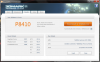
-
Once I complete the flash how do I get into the vbios to change settings?
-
You cant go in to vbios. Its not a software you can play around with. Its information stored about how the GPU will operate, clocks, voltage, steps, temperature etc
You have to use MSI afterburner or EVGA PrecisionX to overclock
Great score. Now we are talking. Lots of potential left of course but atleast overclocking is working
-
You download Nvidia inspector. It has the tools you need
-
I hope the stock cooling is enough for 10k+ GPU scores. The m17x r4, m18x r2, and 18 have good enough cooling for those. Maybe the fan profiles need tweaking.
-
Yea, I've still got more headroom to play with, and the ambient temps here in DFW are stupid hot. Plus I'm running the stock drivers, which are old as balls.
-
Oh yea, was thinking this earlier. The fan profile from Dell seems to be geared towards low noise at the expense of airflow. Definitely something to play with in the future.
-
Hey man I was wondering what were the 160/350 numbers?
-
Core/memory offset in MSI Afterburner.
-
Well lets give dell a piece of our minds and report this rediculous throttling issue! Eventually they will cave, kinda like Microsoft and the Xbox one.
-
What should the power limit and core voltage be at on msi?
-
I'm still wondering if they WERE going to fix the issue, must we send it back, or could we update it online?
-
Can fix it with an update, easily.
-
That's great news to hear since my Alienware hasn't arrived yet and I need to edit some stuff. Now the only problem is if they are willing to fix it or not.
-
After mmolteratx's claim of stability at 160/350 I decided to be a bit more adventurous myself, although I like staying conservative.
Clocked in a P8000 flat w/ Optimus & +120/+240 85C.
GPU Hit Max Temp: 87C
Tomb Raider 1080 Ultra vSync Off:
Min: 52
Max: 80
Avg: 65 -
Looks like yours runs a bit hotter than mine. My high temp was 84C when benching in 3DMark11. Only time I hit 87C (and actually wound up hitting 89C) was in Furmark.
EDIT: Oh, I'm using a notebook cooler when running through mine. -
One of alienware reps here.. Luis asked in the 17 forum for people who detected this problem to send him a log file where it appears..
He said that dell/alienware is not aware of any throttling and if i turn out to be true he will look into it ASAP...
So .. If you can prove the throttling problem.. Send him a PM and make us noticed.. At least then they cant say they are not aware of this BS...
I bought the A17 with the 765m .. No money at the moment so i suspect i will not have this problem -
Trying to run 3D mark 11 I get workload single init returned error message: initialising process failed. Anyone know why?
-
I sent Luis my tracking info for my return. He said they'll try to intercept it and take a look. Not sure why they need one in particular as it seems reproducible on any aw17 with a non-3d screen, but whatever.
-
I believe you get that error message when you have something else running in the background. Make sure any unnecessary background processes are closed.
-
Thanks I'll try to close some.
Also has anyone else had an issue with wireless jumping around? My steam download seems to keep going from like 300kbps down to 100 back up to 300 etc. -
Good news for those of you that are interested in Linux, I got it running tonight. Everything works. (Except WiFi card as I noted earlier.)
I swapped out the Broadcom card in my AW17 for a Killer 1103 and got Ubuntu up and running initially just to quickly check what worked / what didn't.
I was able to get everything working with pretty much just an extra kernel parameter so the backlight would turn on for installation. (acpi_backlight=vendor)
Suspend/Hibernate both work, even with Optimus/Bumblebee.
Sound works.
Battery life is reporting ~3 hours, basically the same as what I see on Windows.
Optimus is working.
NVIDIA card is working with bumblebee, using Primus to run games on the NVIDIA card instead of the Intel card.
If anyone else has questions about Linux on the AW17 let me know. -
Has anyone confirmed the model and/or quality of the non 3D display? I feel like the discussion back on page 22 wasn't resolved.
Also, has anyone tested if the mSATA is actually SATA3? If anyone could post the manual for the 17, that would be nice. I'm curious how much work putting in an mSATA card is going to be. -
If you're certain they're dead pixels, I'd just go ahead & return it, get a replacement, no point in putting up with that.
-
Has anyone ever tried using the Clevo bios instead of the Dell ones?
-
You still don't seem to understand how boost works, especially on the 780m... stock vbios in an unrestricted system will result in a card running always at 850MHz, i.e. always "full boost". You won't notice any overclocking, the only time you will notice dynamic clock is when your card starts to downclock when it hits the thermal or power threshold. Exactly the same as with any other GPU, Fermi or even AMD card... they all throttle at a certain point to prevent overheating.
The point is that "boost" is non-sense, a 780m in a well designed system must run at 850MHz all the time, else it throttles, it's that simple.
So much about "boost". It should be called "super throttle 2.0" cause that's what it is.
"Default clock" for most 780m is 771MHz but it is perfectly able to run at max "boost" (850MHz) all the time unless the notebook comes with a poor cooling system or additional artificial software limits. The "default clock" is nothing more than a way to justify throttling -> "it doesn't throttle, you just don't get full boost anymore" Yeah, sure... tell this thM17x R3 users with the 580m, that's the same thing, but it wasn't called "boost" so it was a problem.
Obviously the downclocking was more severe on those machines, but the problem is essentially the same. A system has to be designed to run at full clocks all the time, else it throttles.
There's absolutely no point in having variable 3d clocks, a system has to be designed in a way that it can sustain the performance clock state all the time.
Increasing the clocks when the temps allow it will simply lead to too much heat / power draw resulting in a clock drop soon after the increase, what you get is a fluctuating performance which is completely unnecessary.
Once more in other words...
People should look at it this way: "Boost" is just a clever naming scheme... the "max boost" is just the 3d clock in disguise. "default clock" is just an euphemism for the highest clocked throttling state. The only difference that boost brought besides the deceiving naming scheme is that the throttle clocks are much finer graduated which certainly is better than just one pretty low throttle clock, but it's still throttling and at least I don't want to see this in a high-end system. Actually I don't want to see it in any system. It's just a proof of a bad system design, may it be software-wise, power-wise or cooling-wise.
;tldr
You don't loose anything when you don't have boost, the opposite is true. The card will perform better without it. -
tried running MSI kombustor on it to see how it performs. FPS was jumping between 56 and 89
-
For any having wireless issues I had to mess around with my router (b/g/n settings) to get it to stop being intermittent.
I got a 256gb SSD and 750gb HDD - is it easy to install an SSD in the spare slot of the 17? Does it have housing etc. or is that something that needs to be bought? I noticed the Samsung 840's don't come with anything like that.
Also, for driver updates - I don't need to rely on the dell support area do I? I can just install new drivers etc. myself? -
There are 2 screws to remove the bottom cover. Inside the 2nd HDD/SSD caddy is screwed in with 4 screws and it has 4 other screws to attach the HDD/SSD to the caddy taped to it. It doesn't need a spacer or anything else
-
When will xoticpc have the haswell models ready? Or are there any other resellers that can customize it with that scale surfaces?
-
HIDevolution sells them: Alienware 17 Enhanced Custom Built to Order Gaming Laptop
-
I like the quality of the non-3D display. looks great for a TN panel. my opinion.
Haven't tested if the mSATA is SATA3 yet but the slot is easy to get to, way easier than the M17X. You have to remove palm rest still but it's one assembly that doesn't require the screen to be removed, pretty easy.
Edit: the mSATA drive is reporting SATA-III 6.0Gb/s -
Yup. But I don't see an option like an alligator wrap. Something like this:
![[IMG]](images/storyImages/NP6350_alligator_brown_01.jpg)
-
Please Respond:
Loving my 17 so far, but am a little worried about the throttling issues I've heard regarding the 780. Hope they fix this asap!
Having difficulty making a decision about a secondary hard drive and could use some sound advice. I originally was just going to add a 128GB MSATA for OS and caching, but that seems super hard to get to in the machine.Alternately, I love the idea of just buying the Samsung 840 Pro 256GB and using it as my primary (with the 700GB for big storage), however I do have a spare Samsung pm800 256GB ssd from my 17X R1 that's just laying around.
Should I just use the pm800 and save the money, or is it REALLY worth getting the 840 Pro since it's a lot newer? Would it be a big upgrade?
My pm800 is listed at 90% Good by Crystal Disk and has a power on count of 3000, with 9500 hours on, and it does have TRIM.
What should I do? Many thanks for your thoughts! -
Use the pm800, you won't notice a difference between that and a new 840 pro.
The only thing you'd have to be careful of is that drive is old enough it might only support sata2, in which case it's still leaps and bounds faster than a normal HDD, I'd still use it and save the cash. -
Oh, ok, I didn't understand what you meant by scales in your first post. You should be able to get that online and install yourself if you wish (in a few weeks to months as the systems are very new, and someone has to make new skins). But why would you want to cover over the premium look and lighting of the AW 17? Just get a cheaper Clevo or MSI if your going to wrap the thing. BTW XOTIC now offers lazer engraving on the lid and palm rests for pretty cheap, of any image/ design you desire. Its a much more premium look than sticky skins. You should wait till XOTIC offers the new AW systems in a maybe a month.
-
I have just been trying to play CoH 2 on my AW 17 (4900mq, 16gb and 780m). With optimus, it seems to never pick the NVidia card regardless of if I bypass steam and run the app directly. With optimus disabled, I get horrible fps unless I have very low settings. Surely something is not right here? Does anyone have any suggestions?
-
Yep, right click on the desktop to get into the NVidia Control Panel. Then 'Manage 3D Setting', then 'Program Settings'. Then choose your game that you're having issues with, and then tell it to use the NVidia Display Adapter rather than the Integrated. Some games you just have to tell it to use the right one.
-
Nah, it's not for me. It's for the kid of my colleague. He's just 11 and he cares more for the appearance than the functionality and what's inside
-
Thank you this helped. (Though if I run with optimus disabled it gives me a warning saying the drivers aren't up to date?) It still didn't change the auto detect from putting everything on low. I seem to have to turn PhysX off completely and AA to low to get 40 average FPS. Does this sound normal to you? Could this be because of 311.48?
-
The words of frank Azor vice president of Alienware taken from this review..
http://www.pcworld.com/article/2041...its-all-new-gaming-notebook-lineup-at-e3.html
“Every part can run at its full TDP (thermal design power). A lot of manufacturers will throttle down the GPU when the CPU ramps up, and vice versa, thinking only one component needs to run full out at once. Our notebooks can run everything full tilt without anything needing to back off."
What a BS!!!!
*OFFICIAL* Alienware 17 Ranger (2013) Owner's Lounge Thread
Discussion in 'Alienware 17 and M17x' started by Mr. Fox, Jun 12, 2013.


