 Problems? See this thread at archive.org.
I was just reading an article on Toms Hardware about CoH 2 and it's graphics performance. At the highest settings it's really demanding on GPUs, even high end desktop GPUs. So, you won't be able to max it out at your native resolution. If you're doubting that it's running on the dedicated GPU as opposed to the integrated GPU, you could use a program called GPUz to monitor the clocks/GPU usage/temperatures of your GPU while you're playing the game. That way you can see if the GPU is being used or not, and to what extent (GPU usage).
The latest drivers from NVidia will pretty much always give the best performance (well, if they don't contain new bugs!). I don't know if the latest drivers support the A17 yet, you could try.
-
-
Anyone having low wifi reception? All of my other laptops and computers had high wifi reception in my room on the other side of the house opposite my router. My AW17 gets low wifi connectivity. Its still there, its just much lower than usual, and it's affecting my ability to download games from steam and origin. Any driver updates or any advice?
-
Thanks for your thoughts.
Just a little confused though; "careful the drive is old enough it might only support sata2"? Are you saying that it might not be compatible if it is sata2? I'm not sure if it is or not, only know I've been using it on my M17X R1 without issue..... Also, do you think the hard drive has been used too much? ie- do they have a certain expected lifespan that I should be worried about??
Lastly, what steps do I need to go through to completely erase my pm800 ssd and put all the AW and OS on it? Any good method to do this right? I dont know how to make my ssd a blank slate and what the order is for installing all the current software on it..... opinions would be greatly appreciated!
Thanks so much! -
Thanks much appreciated. I tried 320.49 but it cannot detect when I try to install. I think I have acceptable performance now just took a lot of tweaking! Problem is it was the only game I had on my laptop to test it with - unlucky it is one that has problems across the board
-
If you do a speedtest does your graph look like a zigzag? If so I may be able to help you
-
how do i do a speedtest?
-
Visit this site, the rest is self explanatory.

Speedtest.net - The Global Broadband Speed Test -
Snap LOL.
-
ya i quickly looked it up right after. okay here was my result
![[IMG]](images/storyImages/2835000647.png)
-
i normally have very fast wifi, high reception. never had wifi issues
-
It would also be worth plugging directly into your router and running the test again. Then we can isolate that it is the wifi.
-
i'll do that in a few min. i just checked my toshiba laptop, 4 bars wifi vs the 2 bars wifi on the AW17
-
difference in speed is night and day when plugged into modem thru ethernet cable.
![[IMG]](images/storyImages/2835045738.png)
-
Seems the same as my issue then. The way I fixed it was go into my router menu and change the "mode" around (originally it was a/g/n and I had to change it to a/g). If you do this and run a speedtest after each change then hopefully you will fix it.
-
sorry i dont know how to do that. how do i go to router menu? is that on the laptop? i'm on windows 8
-
What kind of router do you have?
-
well this is embarrassing. it happens to be a no name router. My service provider is Brighthouse
if this is a dead end for you, i definitely appreciate all the help so far. i can try and look up the rest -
you might need to call them to ask if you can't find it on the router itself. Try typing 192.168.1.1 into internet explorer and if that works your username/password will probably be admin/admin, or admin/password, or admin/1234.
Think that is as far as I can go to help! -
i'm assuming that is is a linksys router from what i've been seeing online
just ran speed test again on wifi got it a little better, i dont know why it fluctuates
![[IMG]](images/storyImages/2835078726.png)
-
Does anyone know if the 17 has a subwoofer? I have attempted to run a few simple bass tests and cannot seem to get any bass out of it....
FYI - I am running on a fresh install of windows. Not the Alienware image
I assume it is a software/driver issue of some sort. -
Nope. Speedtest is the same as on my other systems.
![[IMG]](images/storyImages/2835285628.png)
-
A noob question here, I just want to confirm this the right svl7 vBios from techinferno for my AW17 780m as it doesn't reference dell like some of the others...

I don't want to kill my card straight away -
You might be best off asking in the forum that you got it from, svl7 would be able to answer your question. (I don't know if it's the right one)
-
been looking around the net for the GPUboost 2.0 temperature adjustment and most of them state that the threshold temperature before throttling is at 80c. I'm now thinking that aside from dell, Nvidia might have also thought that it was a good idea for the 780m to have a temp limit of at least 77c. bad move for both companies and I hope they fix it soon or better yet, give us a chance to manually adjust the temperature threshold
-
Personally I believe it is nVidia's doing. nVidia over the last years is becoming one of the worse tech companies out there imo....
-
Then explain why neither Clevo or MSI have this limit?
It is Dell that decided to put this damper on the Alienware. Not Nvidia -
Is there a Removable Battery on the Alienware 17 ?I saw a photo of it from the under part of it but i didnt noticed any battery .
-
NVIDIA GeForce GTX TITAN Preview - GK110, GPU Boost 2.0, Overclocking and GPGPU | GPU Boost 2.0
Default by Nvidia to throttle down is 80c at least on Titan anyway. though I think it is still up to dell to adjust the thermal limit since I see MSI GTX 780Ms hit 90c.
Has anyone tried using EVGA precision to adjust Temp limit? it says that they can adjust temp target on EVGA precision. -
That is desktop. Mobile hardware (CPU and GPU) are rated for higher temperatures. Look at the newest notebooks from Clevo and MSI. None of them have thermal throttling until you either hit the power limit or very high temperatures
-
I know it's a desktop but it does not mean that they also did not apply the same to the mobile GPU. but as I said before, it's also up to dell to set the thermal limit on this things. I'm going to try using the EVGA precision X nextweek. I'll see if I can adjust thermal limits there.
I still do hope that dell changes the stock bios and set the limit to at least 85c. 77c is too low -
@Cloudfire. Do you know the specific throttle point on clevo/msi laptops with 780m?
-
I dont know. I dont think i have heard any of the owners have experienced throttling during gaming with GT70
-
So I presume nobody in clevo/msi forums even mentioned this? Must mean this problem don't exist on their machines then. I think Dell did this thinking it would save them money for warranty problems etc.
But we all know that once one maximizes profits in one end the other end will have maximum loses. -
Excellent NEWS! to anyone who doesn't want to flash vBIOS. EVGA works perfectly. Was able to hit 83 C without throttling (I had to block my fan to get the temps that high)
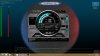
EDIT: I will try it in Optimus Mode next -
What system did you test this on? I haven't blocked fan or used EVGA Precision before. Is it straight forward to do?
-
I have the new AW 17, with i7 4700qm and GTX780m. EVGA is easy to use (you have to register to download it). As in the pic there is just a slider for temp control. To block the GPU fan I just put a glasses case up against the vent on the right
-
Wait a sec. I don't understand why you need to block the GPU fan. Shouldn't one want the chips to run as cool as possible?
-
For testing. He wanted to raise the temps to see if throttling occurs.
-
Why didn't he just do it the natural way? I.e. game for a while and run a few 3DMark benchmarks etc
-
Because it wouldn't go above 75 C for me and I was impatient
-
Please can you explain what to do once you get EVGA so this works? thank you
-
This is good news! Did it hold when you restarted the machine or EVGA Precision needs to be reloaded?
-
Okay if this works it certainly is great news. Once one receives their AW17 with 780m for example, all one would need to do is download EVGA Precision X and set the temp target to 85 degrees? Will the temp target one set stay there even after system reboot (saved profile)? Thus when one manually switches between iGPU and dGPU the temp target settings don't need to adjusted again?
Thx -
Is there a way to make nvidia inspector save the temp control? Everytime im in optimus and i restart the temp is set back to 66 degrees. I did a fresh install on my ssd and all drivers though and i am finally able to disable optimus and when i run only the 780m the temp is saved at 91 degrees because of the vbios i believe. Just wondering if theres a way to get the temp to save higher for optimus.
-
is 85 degrees the max safe temp?
-
If it was me I would just set it to 80 degrees then game/benchmark for the day. If there is throttle then raise it to 85 degrees. Always play it safe since it's your investment.
-
After you download EVGA Percision. You launch it and there are 4 sliders. Power %, Temp Target (91 c by default), CPU clock, and Memory Clock. All I did was slide the Temp target to 86 C and hit apply. Then I ran MSI Kombuster to see if I could get over 77 C without throttling, which it did.
On a somewhat related note... I cant get Optimums to Work! I hit f5 1 day after getting the machine and been using it that way since. When I hit it this time to try testing EVGA it rebooted to an Integrated only mode and said it couldn't find NVIDIA card when I launched the control panel. I hit f5 again and it rebooted back into NVIDIA only mode again. What gives? I'm Almost 99% positive its unrelated to EVGA as that should have no connection with NVIDIA Optimums.
There is a little box I checked that said launch EVGA on startup (you save your profile) -
Correct me if I'm wrong but it should be iGPU working with dGPU by default and fn+f5+reboot will make it dGPU only and vice versa everytime one fn+f5+reboots correct?
Also will MSI AB work in conjunction when using EVGA Precision and vice versa?
*OFFICIAL* Alienware 17 Ranger (2013) Owner's Lounge Thread
Discussion in 'Alienware 17 and M17x' started by Mr. Fox, Jun 12, 2013.


