 Problems? See this thread at archive.org.
Haven't tried dell's drivers for Nvidia. I just download straight from Nvidia's site.
-
-
Bad idea. People are having issues with that. There's no reason to downgrade, lol. That's like going back to an HDD from an SSD - why sacrifice performance?
The latest WHQL driver from NVIDIA is always going to be better than Dell's. -
Hello everyone. Just wondering if any of you have problems with alienfx. My alienfx have not been working for the past few weeks. Everything lights up when the laptop is turning on then it immediately switches off. It also lights up temporarily when I change the colors or themes in the command center and then it switches off again.
-
Dspboys
I updated to the 327.45 and it wouldn't even let me play bf4. So I downgraded to the stock 311.45 dell driver then upgraded to invidia 331.65 and now everything works sweet.
Like dre said don't mess with the dell driver just update to the 331.65 been working great for me so far.
Question
I'm downloading my first ever steam game ever and it looks like it's going to take a while. I'm 2 gigs in and I can't see where it's putting the file. When it's done will it install it on my hard drive of my choice or does it put it on c:/.
Will it make a shortcut on my desktop or will I have to go into steam just to play it . That would suck to have to go into steam every time just to play a game .
Anyway thanks
One more thing what does whql driver mean -
A WHQL (Windows Hardware Quality Labs) driver is one that was thoroughly tested and passed all tests. WHQL and Beta are the two types - Beta is not WHQL certified.
As for the Steam game: Every Steam game requires you to log into Steam. It should make a desktop icon, and will likely make a start menu entry as well. -
It's too bad for me you have to have internet connection to play games now a days. I'm leaving today to go back to Yosemite . We are replacing 3 miles of phone cable for at@t that the rim fire burnt up and I am staying in a motel that doesn't have internet connection and cell phones don't work there until we get all the cables replaced . Will be living up there for three weeks . What to do.
I guess I could buy a sattelite phone that costs 40 dollars a minute and use that for internet connection lol.
I just want to say thanks to everyone on here for helping me out . Thumbs up to everyone. -
It will install at C:\Program Files(x86)\Steam unless you go into the menu and add a new one (steam - downloads - steam library folders - add library folder)
Depending on the game you are installing you can login to steam offline and still play -
Once it downloads I can just move it to my d drive right or will it not work that way. Or do I need to stop download and switch it to d location then re download.
Thanks vortex 127 .
I created a new folder on my d drive for steam downloads . I will just let it finish downloading to c drive for now then try to move it to my d drive . If won't work then I will redownload to d drive.
Then delete it from c drive. -
So how long are you going to have to wait for your replacement? Mine is in its final stage of production and was told Friday that it will ship in 72hrs.
-
I think you may need to redownload as I have never been able to successfully move all the game files!
-
The easiest way is to move the steam folder containing your games to a different drive and then symlink it back to the correct position - which does not require redownloading. It just messes with Steam's space calculations

-
@acerarchie, J.Dre, player2 - Thank you for the valuable comments. But yeah, I just wanted to make sure that optimus is running properly. Some games do not run at all (just loading halfway and crashes) when I'm using the latest drivers from the Nvidia site but run fine when using the Dell ones. It seems that optimus needs to be sacrificed for newer games to work. Oh well
-
A lot of people here should also consider rollbacks before installing the latest graphics driver. From my experience, I've always found that rolling back to the stock driver than came with my PC and then updating was easiest and worked every time. I have no idea why, but it just did.
So, basically, when you get your AW PC, it should have 311.48. Update this to the latest WHQL driver available, and when the next driver is released, rollback to 311.48 and update to the latest again.
Don't ask why, it just works better for me that way.
-
I had to roll back to 311.48 to install latest driver from invidia. As far as Optimus the first game I tried to play on my new 17 would only use integrated graphics and not the nvidia . Some games would use nvidia and some wouldn't . So I just turned dedicated graphics on and left it and everything works great . If ever I decide to use computer without cord I will turn it back off but my computer seems to act the same wether it's in dedicated or not . No fans run in dedicated mode unless I'm playing a game or doing a lot of stuff anyway.
-
Thanks for response . Yea that's what I was afraid of .
-
Just read a few posts recently that recommend the "Roll Back Driver" function in Device Manager for the NVidia Graphics Driver. I remember reading some time ago on the NVidia website (or in driver release notes) that they don't recommend using the "Roll Back Driver" function for going back to an older driver. If my memory serves me rightly, they recommend uninstalling in control panel and then installing the older driver, or using the "Clean Install" function within the NVidia driver setup program. For installing a newer version of NVidia drivers they recommend using Express Install or Clean Install, no need to manually remove older drivers beforehand. I always use the clean install option, as it is deemed to create the least amount of potential problems when installing graphics drivers.
EDIT: Yes, my memory served me correctly, this an excerpt from the latest Driver Release Notes:
Do not Use Windows Rollback for Graphics Drivers
To reinstall a previous or older NVIDIA graphics driver, do not use the Windows
rollback feature. This method will not reliably restore all the previous driver files.
Instead, use the Windows Add and Remove programs to remove the current driver, and
then install the older driver using setup.exe.
Uninstalling Drivers Using Device Manager is not Supported
Issue
On all supported versions of Microsoft Windows, uninstalling the NVIDIA driver using
the Windows Device Manager may not remove associated files or applications.
Explanation
Microsoft has confirmed that this behavior is by design. If you wish to uninstall the
NVIDIA driver, it is recommended that you do so using Add and Remove programs. -
anyone here currently playing BF4 with the GTX 780m? what FPS do you usually get and on what settings? I'm currently playing on High settings and get around 60+FPS, however when I switch to ULTRA my FPS dips tp 35-55fps
-
Does anyone have a new alienware m17-R1 and do they have the factory wallpapers that came with it? I have lost mine and i desperately need them.
-
Got it for you
This is the one that came with mine: https://dl.dropboxusercontent.com/u/1557352/AW_ChromeHead_72dpi.jpgarslanaj likes this. -
Thankyou can you send me the other ones as well? please
i will be extremely grateful -
There you go... This is all I have in my folder
https://dl.dropboxusercontent.com/u/1557352/AW-CO8.ziparslanaj likes this. -
You don't even know how thankful i am
These are all that come with the laptop from the factory
-
Ran the Prime 95 torture test to have one last look at my CPU temps using HWiNFO64. First I ran it without my laptop cooler. 82⁰C average with a quick scary spike to 95⁰ on one of the cores which then went back to normal.
Then I ran the test with the NC2000 cooler. This one usually get my temperatures down about 5⁰C on both the CPU and GPU. But now I saw the temperatures on two of the cores rise steadily from 92⁰ to 97⁰ at which point I quit the test for fear of damaging my system. I'm gonna repaste the CPU for sure now, but wonder if there might be something more seriously wrong with the computer. I should say, it has worked like a charm when it comes to stability since I bought it in August, but those temperatures are scary. The highest I've seen previously was 90⁰ core max when stress testing the system running the Heaven benchmark all maxed out. -
There's nothing wrong with your PC. That test is torture for any CPU and is testing an unrealistic amount of stress on the CPU. If your CPU hangs around 85C - 90C while gaming over extended periods of time, it's fine.
However, I re-pasted my CPU and it never went past 85C during Prime95. But, I was basically forced to re-paste, as the factory paste wasn't working well for an extreme edition CPU. I was seeing 93C during Windows Experience Index (WEI). I wouldn't have even considered letting Prime95 finish with those temperatures.
EDIT: If anyone missed my earlier post, the M17x sleeve fits the AW 17 ( seen here).jflax likes this. -
I have the same build as you (minus the ssd) and I get pretty much the same FPS. So far Ive only tried it in Optimus and i'm using stock vbios and latest nvidia drivers. With ultra settings i'm getting between 37-61 (I have frame rate limited to 61 in game) but averages out around 50. High settings I get almost 61 constant, minus a few drops down to 55 at times. Game runs smooth on ultra though even with fps drops. I turned off the 'showfps' command because I see no need to worry about it as long as its running smooth.archerarchie likes this.
-
Battlefield 4 discussion has been here: http://forum.notebookreview.com/ali...l-soldiers-battle-reports-alienware-17-a.html
archerarchie and SteveMonk like this. -
Once again you have my thanks J.Dre. Was gonna check my temps during WEI, just for reference, but it seems Microsoft removed it from Windows 8.1. Usually when gaming I see around 85⁰.
Anyhow, I'm gonna repaste the CPU just to be safe. Then definitely the GPU as well soon so I can start overclocking properly and get her to really sing
-
Has anybody else had the intel display driver stop working? I left my computer downloading (with the lid close option set to do nothing) and when I opened the lid again the screen flashed and it said it had recovered the intel display driver. If I update my intel driver will it mess up optimus? Not sure if it has been sorted now where it doesn't matter the order you do things.
After this happened I left my laptop on overnight to download and when I woke up the CPU fan was blasting and I needed to force shutdown - not sure why that is either or if it is related to the above -
I know there is a replacement being built as I can see it in "Recent Orders" but beyond that I have no idea. It had the EDD at Oct. 31st but Nov 1st it changed to N/A.
3D is working now on my original laptop though.... -
Hi Guys, my laptop has been manufactured and now waiting for shipment from China to UK since Sunday when I had a look at my order status. how long does it normally take to receive laptop and is there anyway I can speed up the shipment process by speaking to dell.
-
Mine shipped on a Thursday and I received it the following Monday (I think..?!) Im in the UK as well
-
That's good 5 working days Steve then ?
-
Ive just looked back at my delivery update from dell and it was actually shipped on the Friday and I received it the following Monday, so 4 days total. Once your tracking number is live you can see the curriers delivery date and where your package is currently. There should also be a planned delivery date on the delivery update email from dell when you get it too.
-
Hello Guys,
Can I ask for a favor please? Currently, the OS that came with my AW17 is Win 7 Professional. It did not have the wallpapers (just the default Win 7 Pro wallpaper with Dell Icon) and icons that came with my R3. If it would be possible to share your default wallpapers for the Win7 Premium version of AW17, it would be greatly appreciated!
-
Following up on this, I've now repasted the CPU using Arctic Silver 5. First time doing a repaste and it was a fun learning experience. Idle temperatures are not significantly better so far, maybe a 3-4 degree improvement which is fine for me really. Stress testing the computer though, first running 3DMarks11, then Heaven then a 10 minute Prime 95 torture test the highest I've seen under load is 74 C, compared to the awful 95+ temperatures I reached earlier. Even during the torture test average temp was about 70 degrees at most. This is just an early indication and I might see higher temps later, but it definitely feels worth the hassle for me. Of course cleaning out my CPU fan with compressed air probably helped quite a bit too.
Supposedly the burn in period is 200 hours on AC5, but don't know whether to expect further improvements.
Now I want to repaste the GPU, but have read that AC5 isn't fit for the cause because of electrical conductivity which could ruin a GPU. Is this a real worry or not? Seems like AC5 might be okay as long as you don't use excessive amount of paste. -
Alienware Color Wallpapers Photos by AlienwareSocialTeam | Photobucket
Here are the wall papers
dspboys likes this. -
I have the tracking number on dell order status page. I can click on it and it shows location as China and under activity section it says departed manufacturing facility and pending.
-
Thanks man!
-
That's a good result you got on your CPU, especially seeing as you've never done it before! I have Arctic Silver 5 on my CPU & GPU. AS5 is actually not conductive, but slightly capacitive, so it can still cause problems if it ends up oozing all over the board, but not as much as if it was conductive. I used the spread method on my GPU, so hardly any would have been squeezed out of the sides - working fine for me. I've not noticed any lowering of temperatures over the 200 hour curing time.
-
Thanks Robbo! That's good to know . Not that paste is very expensive, but I'd have to order the fancier ones like IC Diamond online and already have this one here so I think I'm gonna try to repaste the GPU with what I've got.
-
Yeah, I think you'll be fine with the AS5. The best thermal compounds can only make maybe 3-5degC difference, and that's in comparison to a pretty poor thermal paste, and AS5 is still pretty good.
-
Well, that didn't go as expected.
Re-pasted the GPU and my temps are actually higher. Idle temp is lower than before but quickly escalates and seems to climb to 90 C+ when trying any 3D benchmark (at which point I quickly cancelled). Why oh why.. Think the problem is a combination of adding too much paste and maybe reusing the same thermal pads (..?)
I was planning on doing a small blob in the middle, but chickened out in the middle of it as I mistakenly added too much.
Used: AC5, Akasa Tim Clean, compressed air, couple of coffee filters, a million ear buds.
My most recent failure in pictures:
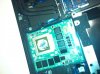
Quick snap of what the GPU looked like before I got started. Won't criticize the paste job though, as they obviously had done a better job than I managed to :/
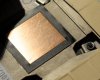
Clean, but scratchy heatsink surface. Took ages cleaning the old paste away.
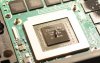
Some believe in the rice / pea / line / X methods. Personally, I'm more into the humongous dog turd method. Actually, I'm not, I almost had a heart attack after making this beauty thinking WHAT HAVE I DONE.
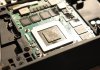
Plan B. Too lazy to restart it all. This is my feeble attempt at getting an even surface out of the stuff. I tried making it as thin as possible without seeing the surface. This was probably a bad idea. Also managed to get some outside of the surface and had to clean and then try and dry it.. sigh.
But I honestly thought I would get away with this one, seeing how much of the old paste that was there before and I've seen loads of paste on other CPU / GPUs.
As you can probably tell, I'm new at this and probably shouldn't be messing with things I don't fully understand.. but I will.
Anyone has any suggestions on what to do? Guess give it another shot, small dot in the middle style? And do I really need to get other thermal pads? I just left them there as they were before, greasy and all, which seems to have worked for others. -
Hi man, sorry to hear about those issues you were having. I used the spread method on GPU as outlined here on the Arctic Silver website:
http://www.arcticsilver.com/pdf/appmeth/int/ss/intel_app_method_surface_spread_v1.1.pdf
The above are the instructions for an intel mobile CPU, but the same principles apply. If I was you I'd give that method a go, after re-cleaning your GPU & heatsink again. Good luck, should work, those were the exact instructions that I followed.
EDIT: no reason why you can't re-use the thermal pads that are attached to the heatsink, as long as they're not damaged or become misplaced. If they've become misplaced, then just re-align them. The temperature measurement that you see listed for the GPU is the temperature of the GPU core that you're pasting, so it's not reading the temperature of the VRAM chips or VRMs - so thermal pad placement won't affect the temperature you see on the GPU unless the thermal pad placement is preventing the heatsink from sitting flat on the GPU core. -
I thought you were meant to just put a pea sized dot in the middle and then you were done rather than spreading or is that just a different method to the one you used?
-
Thanks for the tips! I'll give it another go tomorrow. That thermal pad bit is very helpful and makes sense. Good to know I can leave them there. One less thing for me to mess up!
I'm wondering if I didn't attach the heatsink correctly, I've read people online claim that that can be an issue for these kinds of heat spikes.
So tired of the fresh lemon smell of Akasa Tim clean. Looking forward to getting this one right so I can just enjoy my gaming, Might be wishful thinking mind. -
Yep, definitely try the spread method listed in those instructions I gave you, that way you guarantee you don't put too much on, and you get an even spread over the whole chip. If I remember rightly from those instructions, they say the thickness of the spread on the chip should be about sheet of paper thick (check the instructions though, because my memory isn't always reliable!). (I used a cut section of credit card to spread the paste, cut to just a little wider than the width of the GPU chip, and tried to get the surface of the spread as even and smooth as possible - takes some concentration and can be a bit fiddly, but it worked for me). Also do the tinting of the heatsink that is described in the instructions.
You say you're worried that you didn't attach the heatsink correctly. I did a quick google just now and found the Alienware 17 Owner's Manual for you, which details the service procedures you're referring to on Page 41 & 42 (have a look at the other sections too, it's useful):
ftp://ftp.dell.com/Manuals/all-prod...laptops/alienware-17_Owner's Manual_en-us.pdf
Let us know how it goes!
-
It's possible that the dot method would work better for pastes that are not as stiff & thick as Arctic Silver 5. Also, if there is quite a high mounting pressure of the heatsink, as is often the case with desktop heatsinks (not laptop heatsinks), then a dot can sometimes be better. I posted a link to the spread method in post #2802 if you're interested in knowing the details.
-
You shouldn't spread the paste. That method is much more likely to result in air bubbles.
-
Swings & Roundabouts, the dollop method didn't work for him, so probably worth trying another method - one which worked really well for me (my temps don't go over 65 degC, even when overvolted & overclocked, fans don't even need to spin up to 100%): the spread method (also because AS5 is quite thick, so doesn't spread out so easily when doing the dollop method when mounting the heatsink on top to squash/spread it out.). Worth trying the spread method in my eyes, that will remain my recommendation for him. And yes, there's a greater possibility of air bubbles with the spread method, but it works well if you spread it nice & even and smooth without ridges or grooves in it, but those drawbacks are probably outweighed by the drawbacks I've mentioned that are associated with doing the dollop method when talking about AS5 applications on laptop heatsinks specifically.
-
I've always used the cross-method for GPU's and it has always worked very well the first time. Thin lines in the shape of an X on the GPU, lay the heat sink down slowly and evenly, evenly screw the heat sink down in a diagonal pattern (cross-method again with screws), and slowly tighten it down. I've watched videos on this "cross-method" and it spreads exactly like the "dot" method, but covers more of the GPU, and very rarely creates bubbles. Each paste spreads a little different, but if your paste is thick, just get some warm water from the sink and let it soak for a few minutes. I've always used IC Diamond and have never had any issues whatsoever... First time is a charm with this method and ICD, as long as you don't use too much or too little paste.
*OFFICIAL* Alienware 17 Ranger (2013) Owner's Lounge Thread
Discussion in 'Alienware 17 and M17x' started by Mr. Fox, Jun 12, 2013.


