 Problems? See this thread at archive.org.
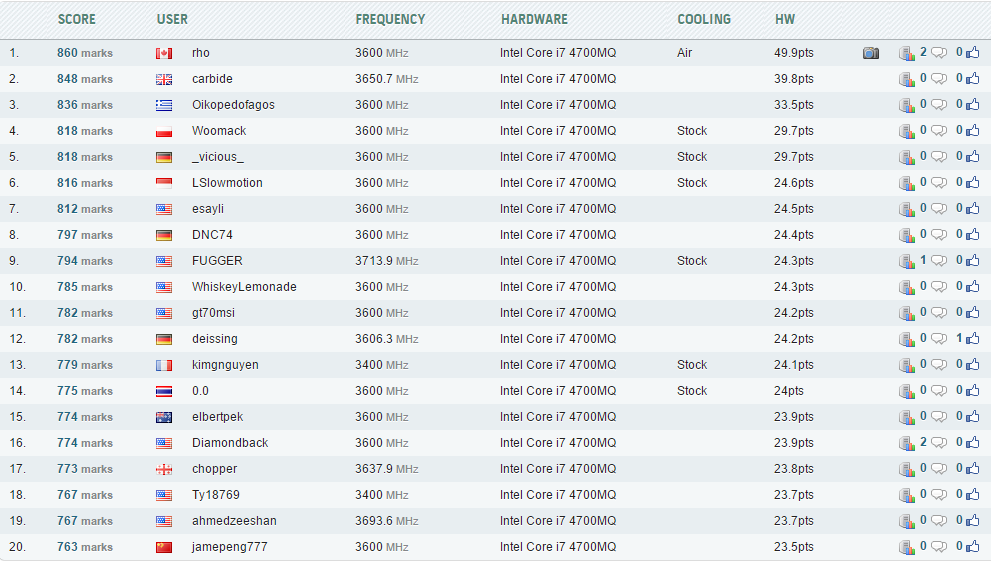
I think no one has gone higher than 101.5 MHz reference clock on an i7 4700MQ .. Overclocking is art as well as trial and error. HaHa. Load Xtu utilities and run Xtu bench test. Here are references (i7-4700mq) you can compare with .. http://hwbot.org/benchmark/xtu/rankings?hardwareTypeId=processor_2839&cores=4#start=0#interval=20
https://downloadcenter.intel.com/download/24075/Intel-Extreme-Tuning-Utility-Intel-XTU-version-5-1-1
-
-
Been running my GTX770m at 967 core and 2604 memory with no issues. I think I'm pretty close to the memory cap...although, so far I have yet to have any artifacting; the driver just stops and resets itself above 2700MHz memory. Temp maxed out at 159(71) F(C)
-
New 3DMark Fire Strike score P6360 http://www.3dmark.com/fs/4233421
-preview.png)
-preview.png)
A quick summation; Now it's just Mr Fox who is in front of my AW17R1 Ranger in 3DMark Fire Strike with all kinds of Hotwell processors and a single gtx780m. And it is only 16 laptops in front of me with all sorts of processors and single gtx780m in 3DMark Fire Strike ranking. Most of the 16's in front of my AW 17 has tested two or more times with the laptop. Last edited: Mar 5, 2015
 -
I got to run a benchmark with 3dmark11 and totally exhausted power supply. I must add a bag ice up on the power supply to cool it down so it will not power down.
The power supply is unstable now sometimes shuts down under maximum load in 3Dmark11. Got a score of P9382. Should maybe start to run benchmark tests with win 7 so that benchmark scores will be higher.
Dell should also deliver Alienware 17R1 Ranger with 330W power supply such as AW 18. It is quite perverse to deliver with a weak 240W power supply for an AW 17 Ranger.
http://www.3dmark.com/3dm11/9521962
-preview.png)
Edit: My AW 17 Ranger has now passed P9400 with a 3Dmark11 benchmark score of P9401 ..
http://www.3dmark.com/3dm11/9528727
-preview.png) Last edited: Mar 8, 2015Ashtrix likes this.
Last edited: Mar 8, 2015Ashtrix likes this. -
Now I have passed P6400. Exactly P6408 in 3DMark Fire Strike... http://www.3dmark.com/fs/4274699
-preview.png)
 Last edited: Mar 10, 2015Mr. Fox likes this.
Last edited: Mar 10, 2015Mr. Fox likes this. -
Do a run with FS Extreme man.. Just want to compare the Physics scores with 4930MX and 3940XM
-
This used to be a common method of overclocking Intel CPUs, but it's not the best approach any more. Increasing base clock affects many other things and instability can result from memory, PCI, PCIe and SATA speeds getting out of whack. Too much base clock can cause games and other programs to crash. It can also often create audio subsystem problems, system lockups and BSOD problems.
A really small bump, like 100.3, is quite nice because it is still stable and the CPU clock speed is slightly above (instead of below) the target speed. For example, 4.989GHz is not 5.0GHz using 50x core ratio with 99.9 base clock. At 100.3 is it a tiny bit over 5.0GHz. "Almost" doesn't count except in a game of horseshoes, LOL. -
You wanted to compare the Physics scores in 3DMark Fire Strike extreme with 4930MX and 3940XM .. Physics score 11,848 and total scores P3176.
It looks like I'm on top of all Fire strike extreme ranking with single gtx780m. Does Mr Fox forgotten this benchmark test? http://www.3dmark.com/fs/4295476
During similar benchmark tests I must turn off all fx lighting and turn off all screen brightness, and then the wattage Lowering with 11-12 watt .. Had I not done this would the power supply BEEN fried .. LoL
-preview.png)
 Last edited: Mar 13, 2015TomJGX likes this.
Last edited: Mar 13, 2015TomJGX likes this. -
Stock (Max Boost) 970M + CPU @4.3GHz: http://www.3dmark.com/fs/4349226
CPU @4.2GHz + 970M +400/500: http://www.3dmark.com/fs/4349261
Dammations can't beat your Physics score.... I'm seriously considering flashing unlocked BIOS to get rid off CPU TDP throttle and I know then your'e screwed
@Papusan
Papusan likes this. -
Wish I had a 330W power supply then I could turned up power, then would the physics scores, graphics score and total score increased... Maybe I had managed your Stock FIRE STRIKE EXTREME score? What do you think about that?
3402-3176=
--P226 Maybe or maybe not..
Last edited: Mar 19, 2015TomJGX likes this.
-
New Cinebench 11.5 benchmark score of 9.40
This is something else than the junk that is in the new AW 17R2 .. Certainly known as i7-4710/4980BGA .. The new high end laptop processor from Intel...........

http://hwbot.org/submission/2804601....5_core_i7_4930mx_9.4_points?recalculate=trueLast edited: Mar 24, 2015 -
-
Did a 3Dmark benchmark and got this score with stock and no overclocking. Max temps were 76 C so I got some room to OC.
![[IMG]](images/storyImages/82cc756ed1.jpg)
-
It's nice that someone finally chasing numbers in this thread ..
Run a Cinebench 11.5 and Wprime 1024 (8 threads) benchmark test and check the stability of your processor .. Okay to get checked that everything is in order ..
http://downloads.guru3d.com/CineBENCH-11.5-download-2475.html and http://www.putme.net/wPrime155.zip
What is the temperature of the graphics card under 3DMark Fire Strike test ? Also run 3dmark11 which is a more real bencmark test .. -
Here we go ...
New Wprime 1024 score .. 169.127 sec With Hwinfo64 to monitor the test...
Missing only 128 milli seconds to reach the 168 sec ...
Stable 4.3ghz throughout the Wprime 1024 stability test .. The max temp 89/90 degrees .. It depends on whether you look at max package temperature or other sensors. Remember my AW17R1 Ranger has processor heatsink with only
2 pipes..
AW 18 has 3 pipes...
New Wprime 32 score 5.391 sec
http://www.uk.hwbot.org/submission/2810334_papusan_wprime___1024m_core_i7_4930mx_2min_49sec_127ms
http://hwbot.org/submission/2810393_papusan_wprime___32m_core_i7_4930mx_5sec_391ms
-preview.png)

http://hwbot.org/submission/2804601_papusan_cinebench___r11.5_core_i7_4930mx_9.4_points
Edit: New 3Dmark Fire strike score with P6486. Almost P6500 now And the physics score is over 12000p
Near 2500 higher physics score in 3Dmark Fire strike than the new high end processor from Intel the famouse i7-4980bga...
http://www.3dmark.com/fs/4489017
-preview.png)
Here are Wprime 32 and 1024, Cinebench 11.5 benchmark tests run with the new Intel's BGA laptop processors. Is this woeful reading? Intel's new high end laptop processors perform perhaps almost as good as the previous generation laptop processors.Maybe
Last edited: Apr 3, 2015Ashtrix likes this. -
Hi
My Alienware 17 R5
http://www.3dmark.com/3dm11/9648203Papusan likes this. -
I ran 3Dmark 11 and got this score, this is without any overclocking. With cinebench i got the score below but I have gotten higher scores almost close to 8.00 points. The max CPU temps got up to 90 C because of 2 cores being hotter than the others. For the GPU my temps never went beyond 80 C. Also I was running custom fan profiles with Hwinfo but had some shutdowns when running some CPU benchmarks which made me revert back to the normal fan profiles. So how do my benchmarks look?
![[IMG]](images/storyImages/b87e95a80b.jpg)
![[IMG]](images/storyImages/c5fec91a40.jpg)
![[IMG]](images/storyImages/4266601641.jpg) Last edited: Apr 4, 2015Papusan likes this.
Last edited: Apr 4, 2015Papusan likes this. -
So I ran 3DMARK on this new (refurbished) R1 I picked up. It pretty much has the exact same specs as the one I "borrowed" from Best Buy earlier this year. However, the benchmarks are worse on this refurb unit, specifically the physics scores.
3DMARK
Best Buy R1
Refurbished R1
3DMARK11
Best Buy R1
Refurbished R1
Any ideas? I had XTU open (not running, just used it for monitoring) and didn't see any throttling. CPU temps at max were 66C.
That being said, considering I paid $1150 CAD ($900 US) for this machine, I can't really complain about the performance.Last edited: Apr 4, 2015Papusan likes this. -
Nice that more people want chasing numbers Your score is fine. Better benchmark scores than Aw17r1 become launched by Dell with gtx880m.
There is only one core which reaches 90 degrees and not two. Do not bring the one core which has a maximum temperature along with all your 4 cores. (88-90-85-84 = total of 4 cores) Time to overclock? Why not run the processor at maximum performance in power options?
@Ramzay
Maybe your physics score's are affected by using another graphics driver or a weaker Power Supply?
The 3Dmark11 test with physics score 4582 is significantly lower than the others that have 7528 ... There's something not right. Did you use the same type power supply (240 or 180w?) in both Laptop during test's? Something is very strange also with Sky diver benchmark test ... 3420 vs over 14000. Are you sure you have a strong enough power supply? This is so that 3DMark Sky diver benchmark test using + 25w more than 3DMark Fire Strike. Also 3Dmark11 use more wattage than Fire strike...
-
Yes, I'm using a 240w PSU. That's the PSU that ships with the R9 M290X.
I tried running the benchmarks with the older driver (the Dell default, which is what the BB machine was using), but got pretty much the same results as with this newer driver.
So it's not the driver, it's not the PSU, not the RAM.
Well, unless the PSU itself is faulty. But if anything, my graphics scores area actually better this time around.Papusan likes this. -
Something is very strange with Sky diver benchmark test ... 3420 vs over 14000. What happened? Can you test the whole 3DMark again ... And double check Sky diver. Remember Sky diver pulls most watts off all.
-
the processor is at maximum performance in power options but I don't have it overclocked because the temps get even hotter and the fan spins a lot more. I've thought about overclocking the GTX 880M since the temps have been good and I haven't experienced any throttling so far.
-
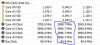
If the processor run on maximum performance in power options, why are the clock frequency at 2896.7 ghz in Hwinfo64? It should not go down to the base frequency when processor is in high performance in power options .. The processor should run 24/7 on max turbo bins.
-
hmm not sure... right now my hwinfo says the minimum is 3695.7 mhz on each core.
-
3695.7-3700 mhz is the standard turbo bin for 4 cores when all cores are in work. Your processor shouldn't go under that speed anyway with use of all 4 cores.
-
He should run the test again .. and followed well with the clock frequency. The processor should normally not throttled due to only 90 degrees. Rather lack of watts to keep the pressure up.
Last edited: Apr 5, 2015
-
I have already repasted with IC Diamond. I've noticed my 4910 does run rather hot even with a Notepal U3.
I've noticed also that my cores do drop to around 3500 MHz sometimes. I'm really puzzled why my cores fluctuate so much even while idle. I don't have my CPU overclocked but it still has boosted to 4.1 which makes me even more confused.
https://puu.sh/h3ijC/dcc61fc74a.pngLast edited: Apr 6, 2015 -
Like Papusan said, I think the problem might be a lack of watts... install XTU and post a screenshot of how the CPU settings look like... We need to tweak them a bit to reduce temps and increase performance...Klk450 likes this.
-
Ok, I installed the program and here's a pic of the settings. https://puu.sh/h3vSl/115d155e8e.png
I also ran the XTU benchmark and saw some interesting things, while in the benchmark my mhz were from 3.29-3.5 mhz.![[IMG]](images/storyImages/7a86e5260a.png) Last edited: Apr 6, 2015
Last edited: Apr 6, 2015 -
I remember my i7-4900mq just Fluctuat equally. It can also go the other way. I complained about this, and processor also became too hot under windows virus scan. The processor clocked down to the base frequency during this virus scan and was on base frequency anyway until I rebooted my AW17. I got finally updated my Mq processor to the Mx I have now because of my complaints on Dell technicians who did not understand that there was something wrong with the processor. It was simply a processor fault ... Can you test with windows virus scan? Monitor with Hwinfo ..
Most standard Hotwell processors fluctuates under Xtu bench if you do not change the power settings. It is simply the lack of watts.
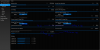
Most standard Hotwell processors fluctuates under Xtu bench if you do not change the power settings. It is simply the lack of watts. Disable Package turbo power lock and increase turbo boost short power max and turbo boost power max. Increase also CPU current limit and core current limit. -
Thank you and it is true that this processor fluctuates a lot, I have also noticed that while running a virus scan the CPU temps get really hot which i found odd.
-
What temperature and clock frequency did you get during virus scan? See the xtu settings picture I made of your xtu profile ... I do not know if you can adjust the core current limit, but if you can then increase similar as the processor current limit.
Edit: Remember to Always run the fans on max during benchmark tests and hevy work loads. Hotwell and Dell fan profiles are not so good .. -
I was able to adjust the core current limit to the settings you showed. These are the readings from the virus scan. http://puu.sh/h44lS/ad4842c4b7.jpgPapusan likes this.
-
You can at least keep the processor speed over processor base clock. This could not my former i7-4900mq .. Remember also that Xtu bench is not an optimal and good benchmark test. Use either Wprime and Cinebench 11.5
Last edited: Apr 6, 2015
-
I've noticed after the setting changes that my cores sometimes go below the turbo boost and scores are a bit worst. https://puu.sh/h49UF/5eb20c65ee.jpg
-
Can you also post a pict of the advanced settings in the bios?
I'm not familiar with the functionality of iGPU vs dGPU as my AW17 has disabled iGPU due to 3D screen. Can you deactivate iGPU and only use Nvidia? Maybe the iGPU is in operation when there is no need for Nvidia in Wprime. iGPU and processor cores using the same TDP of the processor. If this is so; The current draw might be higher than the packaging can handle. I also see that your processor runs on base clock after the Wprime test(the pict).
The processor frequency shall return to the max turbo bins immediately, if it has throttled and finish the job or benchmark test.. I also think that your AW use Nvidia under the Cinebench 11.5 test and the clock speed is ok after this test.
Note: Intel Turbo Boost Technology 2.0 allows the processor to operate at a power level that is higher than its TDP configuration and data sheet specified power for short durations to maximize performance.. Therefore, you must increase turbo boost short power max, Turbo boost power max and if it is possible in the bios or xtu; increase the turbo boost power time windows. Maybe your i7-4910mq can have 56sec or higher(standard is 28sec). The processor need also moore Amp.
http://www.intel.com/content/www/us...ology/turbo-boost/turbo-boost-technology.html
What version of Xtu are you using by the way?
You may well read through the thread "How to Overclock the Alienware 18 and Haswell CPU" so you will find some useful tips. It is not very big difference between a Mx vs Mq processor, only slightly different settings and a higher tdp on mx processors. Test it out with a moderate Overclock (maybe 4x39)
http://forum.notebookreview.com/thr...ly-have-it-run-full-stock-turbo-speed.734696/
See the suggestion from Mr Fox in the same thread .. http://forum.notebookreview.com/thr...-stock-turbo-speed.734696/page-2#post-9409321Last edited: Apr 7, 2015 -
New 3Dmark11 benchmark scores P9456 with Gtx780m and the new Nvidia driver 350.12
Several have complaints that they can not overclock gtx780m with this driver ...
-preview.png)
http://www.3dmark.com/3dm11/9745494 -
New 3Dmark11 score single gtx780m. P9509
-preview.png)
http://www.3dmark.com/3dm11/9753192 -
New 3Dmark11 score: P9528 This goes forward...
-preview.png)
http://www.3dmark.com/3dm11/9761352 -
New Cinebench 11.5 score ... 9.41 A small but important improvement in Cinebench 11.5
This Cinebench 11.5 benchmark test score is not from a disgusting Intel Bga filth (Garbage)...
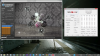
This score comes from the last real Intel laptop processor...
http://hwbot.org/submission/2847375...5_core_i7_4930mx_9.41_points?recalculate=trueLast edited: May 4, 2015 -
New Wprime 1024 benchmark score... 167.756
This just gets better and better... Of course is this Wprime 1024 stability test, not run with a throttled BGA processor. LoL
-preview.png)
http://hwbot.org/submission/2849827...e_i7_4930mx_2min_47sec_657ms?recalculate=trueLast edited: May 6, 2015Mr. Fox likes this. -
Great score.
I would take a Haswell Extreme blast furnace CPU over a throttled BGA turd any day of the week. You can tune and tweak a bunch, but a BGA CPU is a hopeless cause that cannot be fixed. -
Here is a i7-4970K @ 4.4ghz compared with my [email protected] .. Not all desktop Hotwell processors work equally well. It has the same score but with higher voltage and clock speed. Although Hotwell extreme processors are of variable quality, they are much much better than the trottled Bga garbage being sold right now in almost all new gaming laptop's.
http://hwbot.org/submission/2642229_sumonpathak_wprime___1024m_core_i7_4770k_2min_47sec_683ms/Ashtrix likes this. -
Other than having a socket, I really fail to see the value of having a 4970K CPU in a laptop. It's just a quad core CPU and you're gaining little or nothing over a mobile Extreme CPU. Well, OK, it's cheaper, so it has that going for it, but not really any kind of remarkable performance gain from what I can see. Unless you can overclock much higher, (many of which do not,) or increase core/thread count, it's kind of silly as a "performance" move. But, I'll take any CPU in a socket before BGA. Heck, at this point I am so mad about it that I would even downgrade to a crappy wimpy AMD CPU in a socket before I would go with an Intel BGA CPU. I would rather lose performance than contribute to the problems we are having now with Intel only offering us garbage.
-
Tested just now Cinebench R15 benchmark test .. 852 points
This is maybe a weaker test than Cinebench 11.5. Had to test anyway I can put it this way; Liquid Ultra is a quality product. Have used exactly this for over 1 year now ... No change.
http://hwbot.org/submission/2851693_papusan_cinebench___r15_core_i7_4930mx_852_cb
The difference between a socket laptop processor you can overclock in a thick laptop vs the new modern Intel BGA processor intended for a thin laptop in Cinebench R15 ... The numbers speak for themselves
-preview.png) Socket processor vs a whole bunch BGA garbage
Socket processor vs a whole bunch BGA garbage

-
Liquid Ultra is very wonderful stuff.
That is a nice Cinebench 15 score. Good job.Papusan likes this. -
New Cinebench 11.5 and R15 benchmark tests and scores
Run without Trottlestop and Xtu
Cinebench 11.5 9.42 points - Cinebench R15 857 cb
 vs BGA processor's

http://hwbot.org/submission/2852931...5_core_i7_4930mx_9.42_points?recalculate=true
http://hwbot.org/submission/2852892_papusan_cinebench___r15_core_i7_4930mx_857_cb
Wprime 1024 score. 167.460 sec http://hwbot.org/submission/3005419...e_i7_4930mx_2min_47sec_460ms?recalculate=trueLast edited: Jan 10, 2016 -
New 3Dmark11 score P9566
-preview.png)
2x Gtx780m sli vs single gtx780m (Papusan). LoL. Know that the gtx780m sli score is low; but but.
http://www.3dmark.com/compare/3dm11/9093173/3dm11/9835196/3dm11/9093195TomJGX likes this.
*OFFICIAL* Alienware 17 and M17x Benchmark Thread - Part 4
Discussion in 'Alienware 17 and M17x' started by BatBoy, Mar 11, 2011.


