Problems? See this thread at archive.org.
ey guys i was wondering if my temps for my i7 3820qm in m17x were to high. Like i idle around 49-53 or so degrees C and during temp test on my cup some cores run hotter then others is that normal? Like i know i7 3820qm is the best cup offered on m17x but like how hot should they run and how hot can cups run till they fail. Cause i wanna October my cp from 3.7 ghz to 3.9 or 4 if i can
-
I'm trying to decide which GPU to get in the R4. If I stick to the GTX660m to start with, can I upgrade to a 680 later (perhaps when it becomes cheaper), or is the chip soldered on..?
ponx -
yes you can upgrade later, however its quite expensive to upgrade afterwards, good CPU+GPU is the main things you get in the laptop, the rest are generally quite cheap to upgrade
-
hi i have a m18x r2(duel 7970ms) and it is plagued by problems and i am getting my money back is the m17x more reliable or should i just get something else
-
Just wait for the fix!

-
Can some one post the steps to make the mSATA 32GB caching ssd in to a usable drive to install windows on if I have done the same thing that someone posts then I'm sure my msata is fried of some sort and I don't even think bits catching as it shows to only have one GB of space even in raid screen when I boot
Sent From My Rooted E3D -
Caching ssd wont show up in the os, not sure about bios. 32gb is too small for windows.
Sent from my GT-I9300 using Tapatalk 2 -
As a £430 option, it's pretty expensive now, lol...
-
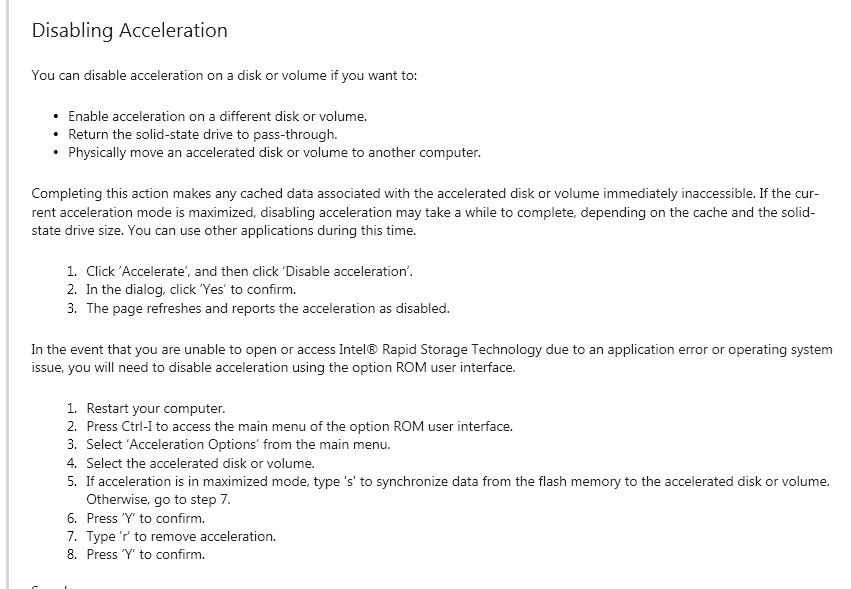
buellersdayoff is correct, it will not show up as a drive in windows. You use the 'intel rapid storage technology' icon on your task bar to configure and see if it is there. Image taken from the help file. If it is there and working then you you can de-configure it and reinstall windows to it (win 7 needs around 9gb for a base install). But if the caching is working then you will probably not see any improvement AND you'll be having to change the installation destination every time you add a program to avoid filling it up.
Good luck!
Edit: after turning it off you'll need to go into disk manager to create a volume on the SSD.Attached Files:
-
-
Yea that's not true my school puts windows on 16gb ssd's
Sent From My Rooted E3D -
M$ state: 20 GB (64-bit) ( Windows 7 system requirements - Microsoft Windows) so not a lot left for games or apps but easily possible
-
Sorry...just my opinion, i have the 64gb ssd and with backup partition, a few apps and games... its full. Yes windows will fit
Sent from my GT-I9300 using Tapatalk 2 -
Hello. I've just received my m17x r4 with the following specs: 3610QM, 16GB, 7970M.
I am wondering what tests should I run to see if it's running in tip-top condition as it is second hand?
Also, when you use the volume controls on the top right corner is there a way to hide the icon that pops up on screen?
Any information/feedback will be greatly appreciated. -
You can download and run 3dmark and see if your scores are matching what others are hitting. Aside from that i would say just use it and see what you think. As for the OSD icons I did a quick google search and it would appear that others have attempted this but the only way they found to get rid of it was to either disable it in the msconfig startup options or to ctrl alt del and close it after the computer started up, nothing that I could find for a setting however just disable it.
-
Congrats on your new rig!
Here's a list of the most common tests we use to diagnose Alienware Systems -
Anyone playing Guild Wars 2 on their 7970M? Can you please tell me your GPU Temps? I'm getting like 70c peak when playing GW 2, with just the NotePal Infinite Evo Cooler on, no air condition unit working in my room right now. I believe that's quite good? Also, when I play Sleeping Dogs my GPU temp reaches 78c? I assume that's alright?
-
It's finally arrived!!! Happy to be a part of this group now.
Making my restore USB drive and then installing my SSD. So exciting! -
Congrats anseio! Our laptops are beast!
EDIT: I just got my first dead pixel on my Alienware M17x, hopefully this would be the last It saddens me as I cannot do anything about it (Thank goodness though it's just one small dead pixel) I don't really want to bother sending it back to US from the Philippines as it will cost me a fortune just to fix this dead pixel.
Sad day for me :|
-
Here's what I do when I get a new laptop:
-Visually check notebook, make sure there are no imperfections
-Run memtest86+ over night (12+ hr) - this will ensure the RAM has no errors that will affect daily operation: Memtest86+ - Advanced Memory Diagnostic Tool
-Run 3DMark and make sure you're getting an expected/normal score (you will have to research what similar machines score) - www.futuremark.com
Congrats! What kind of SSD?
My R4 review unit has the 750GB 7200RPM + SSD booster but that's not the setup I would choose. In my HP EliteBook 8740w I have a 120GB Intel SSD primary, and a secondary 500GB 5400RPM Western Digital. I mapped all my documents, pictures, etc over to the hard drive and it's really worked out well for me. I have only used about 20GB of the SSD (should have gotten the 80GB version in hindsight). -
Overclocked my 3720qm and now the dimmer seems to be working for 120Hz all the time LOL.
-
Weird, but a result nevertheless. Good to hear
-
Let me just say that I'm really loving my new baby. I'm really getting into the Killer Wireless settings, now that I understand it a bit more. I get the majority of my interent through smartphone tethering. i can't have certain things hogging up my limited bandwidth. So nice to be able to limit things so that my gaming/browsing/other things can still function optimally.
I do have a question for anyone who may know. I live in a small studio apt, and my lappy is right next to my couch/bed. I haven't found any way to actually turn the display off w/o making it go to sleep. Is there a button I'm missing over somewhere?
Thanks! -
master, i have a question, can i add this memory to my alienware with stock RAM? (alienware m17x r3)
G.Skill (1 x 4GB) 204-Pin DDR3 SO-DIMM DDR3 1066
Specifications
System - Notebook Memory
System Type - For Pc
CAS Latency - 9-9-9-24
Capacity - 4GB (4GB x 1)
Speed - DDR3-1333 (PC3-10666)
Test Voltage - 1.5Volts
PCB - 6 Layers
Unbuffered
Error - Checking - Non - ECC
Type - 204-pin SO-DIMM
I need an enlightenment as a grasshopper
thank you masta -
look for the battery icon on the right in your taskbar, right click on it and choose "power options". From there click on "change power settings" on whichever plan you're using. On the next screen it's pretty much self-explanatory.
-
Got it, thanks!
Never quite had to look that up. The VAIO F11 has a "dispay off" button. Very nice, indeed. -
Does anyone consider the M17X screen glare a deal breaker? I'm looking for a model that I can use outside often.
-
For me it's the single worst thing about mine. In natural light I am always looking back at my own reflection. Outside it's almost unusable. I go back to my old D430 with a matte screen for surfing on the deck. An anti-glare screen would be a must but since I use it in the same place I've got used to the reflections and haven't gone into what is available yet. Everything else is just what I was looking for so not a deal breaker as such but annoying for sure.
-
I'm going to agree that the M17x's glass display is unusable outdoors. You could look at buying an anti-glare screen protector if outdoor usage is that important.
-
I received my brand spankin new m17xR4 about 4 hours ago.
It's just sitting there on my kitchen table..unopened!! I am so intimidated by it. I have never owned a laptop or played pc games. I remember watching Neil Armstrong walk on the moon & buying tubes for my black & white T.V. (yes..I'm old). I hope I got some laughs out there.
How do I tame the Beast on my table?? Good news... I have a game for it. I just need help going from unopened box to game. -
It should be ready to go out of the box. I would go into the Alienware Command Center right away, change the touchpad to turn off when you plug in a mouse and get gaming!
Which video card did you go with? I got the 7970M, the first thing I did was disable the integrated graphics (FN+F7). If you have nVidia, don't worry about that.
What are the rest of your specs? Did you get an SSD? -
Benchmark it up. Run 3DMark11 to check FPS if you're going to game with it. I'd also get hwinfo64 to watch the temperature and RAM usage as well...
-
It has the 7970 & 500gb 7200 drive
-
Can I use wet wipes to clean the smudges on the rubber touch and finishes on the M17x?
-
I would say so, I have on my systems without a problem. Though, I usually just use a damp cloth.
-
yup as Mr.Prime has said it should be ok.
-
Hello all, I'm new here so be gentle
I have my eyes set on a m17x r4 and I would like to know if someone has some advice on how to reduce somewhat of the price and limiting the region of buy to EU, sadly the customs cost would be impracticable to get it coming from anywhere else.
I live in Portugal, which is pretty limited when it comes to custom built Alienware system, I've found a eBay store in eBay from Ireland which seems to have decent enough prices, but I registered to get some help the experts. So any feedback/tips you might for my situation I would be really grateful.
(By the way, MadLaptopis the store if anyone know anything about it)
Thanks :thumbsup: -
-edit-
You're buying second hand from a reseller?
I would be very cautious about that. Ask what the return policy is up front if you have problems. -
From what I could tell they are new, it's listed on the laptop information as new, and not refurbished or 2nd hand, but I'll ask just to be sure.
Didn't know about the layoffs, so I guess discounts will probably be impossible to get right now.
Thanks for the feedback -
By second hand I mean, not directly from dell. I'm sure the dell warranty will carry over to you, but make sure they are clear about whether or not if it does.
And if it does have problems, make sure they are very clear on their return policy. Get it in writiing if possible. -
If you got the giftcard with the system and don't need it for anything, sell it on Ebay and get yourself an SSD. They are much cheaper elsewhere from Dell and it will make the computer so much faster.
Don't forget to turn AHCI on in the bios if you get one though. -
Welcome to NBR PRasko. I am moving your post to the Owner's Lounge for the M17x R4.
We are glad you joined the community. Below are a couple of links that should be of interest to you as a new member of our community.
Help! I am new to the forum... what should I know?
Forum Rules - *PLEASE READ BEFORE POSTING* -
Hi all, looking for some assistance if anyone has any experience with this issue. I have a M17X Alienware laptop and I am trying to get 2560 x 1600 resolution with my Dell 3007 WFP 30'' external monitor. The monitor only has a DVI-D port. Alienware / Dell told me it was possible with the NVDIA GTX 560 graphics card that I have to get this resolution, but I have tried both the DVI-D to miniport (with an adaptor) on my M17X with no success. Highest resolution it gave me was 1280 x 800. In addition, tried just the DVI-D to HDMI port with a different cable to see if I could even get normal 1980 x 1200 HD but even that did not work. Once again, only 1280 x 800. Very weird because I have a small 24 inch dell monitor that came with a VGA to VGA on the Alienware and I get 1980 x 800 very easily, so didnt get why I cant even get that with the better monitor. Any ideas? Alienware pay-for external monitor support said that they think they have to disable the Intel graphics card and run with just the NVDIA card and I will get up to the correct resolution, but that it will likely lead to blue screens and other issues.....not sure if I should let them after this warning??? Thanks again for anyones response!
-
Hi guys,
Just ordered my first Alienware (M17x R4). I want to get a sleeve - just for those odd occasions where I actually attempt to move it. So - I'm not interested in spending "ouch" amounts on branded Alienware bags etc. Just a simple Neoprene sleeve would do.
However - the 17" sleeves I've seen are too small for this beast machine.
System Dimensions
Height: 44.5 mm (1.75 inches)
Depth: 304.30 mm (11.97 inches)
Width: 410 mm (16.14 inches)
Starting at weight: 4.26 kg (9.39 lbs)*
Most sleeves are OK Width wise, but are about 2.5cm short in depth and usually 1.5 cm short in height.
Any of you guys recommend a sleeve that actually fits the M17x R4 without needing rubber bands to hold it all in
I saw from another thread that someone mentioned you get a suede cover with the system, but others said no. Can anyone confirm that at all?
Icey.
PS: Edited post and formatting went wrong - sigh. I did have line breaks and stuff to start - honest
-
The laptop does come with a cloth pouch that is nice but doesn't give a crazy amount of protection.
Are you talking about Dell layoffs? -
Yes, the m17x r4 comes with a cloth (velvet-ish) sleeve. I just recieved mine on Wednesday. Lucky for me, the lappy fits in my existing backpack, with no room for anything else really. Anyway, I put it in the sleeve first to prevent scratches.
-
I just ordered an m17xr4 with the following specs:
i7-3720qm
16GB Ram
2x256GB SSD (Raid 0)
1080p 60hz screen
Nvidia 680m
Centrino 6250 wireless
Blu Ray drive
I am interested in hooking this up to my Samsung D8000 240hz 3D LCD tv for gaming. I was wondering if playing 3d games on my tv was possible as I did not opt for the 3d display on my laptop. I have 3d already working via a ps3 on this tv but thought I would try batman or another 3d game on PC.
Are there any other setup suggestions for connecting the laptop to the TV? I assume the tv is just considered another LCD screen and running at 1920x1080 would be the default resolution in windows as its the tv panel resolution.
I am excited to get the laptop, edd is 9/21! -
Bought a new keyboard!
Razer Blackwidow 2013 Tournament Edition. I bought it for portability's sake!
I can't wait for this keyboard that I can finally fit at ease inside my Alienware Orion M17x Tactical Laptop Briefcase!
-
Hello again, My M17x R4 (Stealth Black) is coming in about 1 and a half weeks.
i7 3610qm
2GB AMD 7970m
8gb ddr3 1600mhz
750gb 7200rpm HD
17.3" Full HD WLED
Killer Wireless 1103
Blue Ray Drive
3 Years Warranty
3 Years Accidental Damage
Also Ordered
Coolermaster Notepal u3
Compressed Air
Screen Wipes
Razer Imperator 4g + Sphex mat
I was wondering, what would be the best way to ensure my laptop is issue free? Do I just keep it clean using a microfibre cloth, possibly very slightly dampened. How do i clean the fans? Do I have to open the laptop up when I clean the vents to ensure the fans don't move whilst using the compressed air? How do I keep the laptop grease free - do you recommend any pc cleaning solutions apart from a cloth + water?
Since my last XPS experience has been terrible, and an engineer has been round at least 7/8 times in the past 2 years to repeatedly replace crucial parts like the motherboard, screen and hard drive, should I from now on watch the engineer if one was to actually come to replace something, and are the part that are replaced in Alienware laptops usually refurbs?
And those with 7970m's in their r4's (with enduro disabled of course!), what sort of fps do you experience at fully maxed settings with, lets say BF3, GTA 4 or Crysis 2?
Thanks in advance
Edit - Now Should I upgrade the memory? I chose 8gb 1600mhz. Shall I buy 2 x 4gb 1600mhz memory chips? And if so please could you send me a link to a decent pair which isn't too expensive? I use my laptop for work, browsing the web, gaming, and I open quite a few tabs! (100+)
Thanks Again! -
Very nice system. Generally a dry microfiber will be plenty for most parts of the system/screen once every few weeks. A wet solution to apply on a microfiber can also work really well.
Once a month or every two months I presonally like to take a can of air to my bottom vents and heatsink vents (Not a M17x r4 but should be applicable). I remove my bottom panel and spray air through there. As long as you periodically prevent dust from heavily accumulating, you shouldn't need to take out the heatsinks to spray out most of the time.
You'll be able to play each of those games maxed out at 60fps Awesome system btw!
-
Just got my new Alienware lappy....Whats good firewall that's compatible with Malwarebytes?
*OFFICIAL* Alienware M17x R3/R4 Owner's Lounge Thread
Discussion in 'Alienware 17 and M17x' started by katalin_2003, May 4, 2012.