Problems? See this thread at archive.org.
well my blank screen issue is fixedthe cards run flawlessly in games. Split second runs perfect on 1900x1200 dx11 and high settings. on very high fps drop dramatically. maybe its just a games lag because i saw many people reporting this (not on M17X but other desktop machines as well)
-
-
Yeh I noticed the game is exceptionally hard to run on very high settings. Runs super well on High settings and everything else maxed out. I didn't notice it was a DX 11 game.
It seems to be not a very well optimised game. No biggy though as it still looks very good. It is after all a Disney game eheheheh.
Glad to hear everything is running well now. Enjoy.
-
yeah i wouldnt notice its a dx11 game if i wouldnt read it. not well optimized as you said. I was also impressed when i saw the disney logo. i am playing mickey or something? loool. maybe we should wait for a patch. huge lag on very high settings is not normal i would say regarding the speed on high settings.
i read this somewhere
-
Ah true trues. Nice find.
I thought that Disney just added in every setting when we set it to Very High. No option for us to manual tweak each setting unfortunately. I would have instantly lowered or turned off the AA. Also would have disabled VSYNC if that was enabled too.
I've just about finished BFC2 again now, hmmsss wonder what to try next.
Cheers. -
Hey,
Below is my HWinfo alongside GPU-Z for both cards after running 3dmark06. I am now on the beta drivers and new vbios so I think driver issues can be all but ruled out...Attached Files:
-
-
Hmmsss just had a look at your pics. Something very odd indeed going on there. Especially with your GPUs. They should of both been running at 99% utilisation if not 100% full load. The CPU seems to be running fine but the GPUs hmmmssssss......
I wonder if its a power issue or something. Seems odd. You got the 240v AC adapter with your system right? Hopefully dell didn't ship out the wrong lower one. Hmmssss.
-
It says INPUT 100 - 240v~ 50-60Hz 3.5A
When I first booted up it came up saying it was a non dell adapter but after going into the BIOS and a quick reboot I never saw it again... -
Oh I just re-read your msg from above. You had the GPU-z and HWiNFO32 sensors running during the 3d mark 06 test right? Also try running a few different games and see if the output is the same or similar.
Only thing I can suggest really is to uninstall the GPU drivers cc cleaner driver sweeper in safe mode and then re-install the drivers clean again. Open up CCC settings and set to default factory settings. Check crossfire is enabled. Disabled it and then re-enable.
Try running tests again. If its still bad then the only thing I can think of is you have a bad crossfire cable or defective cards. Will have to call dell for replacement cards. Hopefully its not that though.
Cheers. -
try metro 2033 if you havent already. well this is demanding dx11 game.
-
Yeh I've tried it. Haven't played it too much though. Might get back into it again later.
The main games I'm waiting for are FIFA11, Black ops, FEAR 3, and I can't wait for Crysis 2, but thats been pushed back to next year now. -
Thank you, thank you, thank you!
I did everything you suggested, and something must have worked! Finally got some good performance out of the graphics cards!
So my first official 3dMark06 Score with functional graphics cards is:
3dMark06: 19402
SM 2.0: 7880
SM 3.0: 9748
CPU Score: 4628
That seems a bit more like it! -
Oh wow awesomes.
That certainly is more like it. Good stuff.
Try out some games and more testing if you like. Hopefully they all run well now as well.
Enjoy your new notebook system.
Cheers.
-
All working very smoothly now! Can finally start doing some benchmarking.
I do seem to have hit a bit of an issue with OCing the GPUs. One of them will overclock fine but the other one refuses to budge from it's stock clocks.
I'm using AMD GPU Clock Tool and it says "SetClock Failed Please Check Device Configuration" -
Ah cool cool.
Ah yups about the OCing of the GPUs. You hit the nail on the head. I have the exact same problem as you.
I just wanted to try OCing them both to 800/1100 clocks however the 2nd card doesn't want to budge.
I too was using AMD gpu clock tool.
Cheers. -
I take it that is just a flaw of the program at the moment then?
Do I need to use Rivatuner instead to get these things OCd because I could never quite work that program out lol. -
Yeh it seems that some can get AMD GPU CLOCK TOOL to work for them. You and I can't. lol.
Yeh rivatuner would be the next best way to give it a shot. I still haven't really given it too much testing or tried to OC it with rivatuner yet. I know there should be some info on here about OCing our GPUs. I remember reading that the best way was to flash the vbios clocks or something to OC the 5870s. They certainly aren't the easiest to OC thats for sure. Maybe some others who have been successful might be able to chime in and give us some assistance.
Cheers. -
I always recommend just flashing the vbios. It is really not that daunting of a task and can be done easily from either windows or dos (I use both)
It will give you the best stability and the ability to alter GPU voltage as well -
I'm tempted to give it a try, is there a guide available here?
I'm a little bit trepidatious because of the problems I've had with these cards over the last 24 hours, but since I've done so much work to get them operational I guess they can do some work for me now! -
I am sure there is a guide around, just search for M17x overclocking.
As a starting point though, I use Radeon Bios Editor coupled with WinPhlash to edit the bios files (which can be pulled with GPU-z) -
watch the Jokers signature. its the guide i used too. i ve done it using the dos method
-
Here is a good guide... Good Guide Written by "Mandrake" aka NWGuru on that other forum.
-
Mandrake's guide is outstanding. You can trust him.
I personally always enjoyed the learn as you go approach haha. People say it is risky, but I have not bricked a single computer part in my life so far (aside from physical damage I have done being stupid
- not overclocking related though)
-
Have you tried reflashing the vbios? and if so, have you overvolted to 1.10v or 1.15v? Can you do so on the G73? I've run Vantage at GPU clocks of 950/1276 on both GPU's. Bummer if the G73 can't even push to 850Mhz
-
Haha, I agree with you, learn the basics, then get creative! Also, at least one occasion was overclocking related although that was just a bricked SSD
-
I actually was not even counting the ssd lol
I crushed the NB on my first x58 motherboard replacing the nb cooler and chipped the die on a laptop cpu I was benching on a desktop board. And yes....I fried an SSD benching it in the Wyoming winter lo -
Hahaha, Good stuff. I'm sure I'll brick something sooner or later. I'm just waiting for it to happen. I thought I would fry the 920XM the way I was pushing it.
-
I just happened across that guide on these forums as it happens, but thanks for the confirmation that it was good advice!
I just did a pretty pedestrian vBIOS flash to get my feet wet. Changed both cards clock speeds up to 750 now.
3dMark06 Score: 20451
SM 2.0 Score: 8415
SM 3.0 Score: 10221
CPU Score: 4835
Thinking my stock clocked CPU might be a bottleneck so I guess I'll boost that next! -
yes as always. Jokers guide is inspired by this guide i guess.
-
For 06 you will see boosts much more from CPU overclocks. GPU overclocks are beneficial more for Vantage.
-
Just did a little CPU overclock, Eleet multipliers to 28 and a vCore increase by 75 for stability.
My 3dMark06 score went up by almost 1000, but paradoxically my CPU score came down....Not quite sure why increasing the processing power by 400Mhz would lead to a lower score. Unless it was thermal throttling or something....
Will probably mess about with Set FSB OCing tomorrow, just glad to have my driver issues sorted for today! -
Run RealTemp. If your temps hit around 95-97, it will thermal throttle during the CPU test, but not the GPU tests as the GPU is less stressful on the CPU
-
i am still searching for a good guide in this forum on how to use throttlestop, setfsb and realtemp
-
Android: There's no use increasing the turbo multipliers unless you also increase the turbo TDP/TDC settings. ThrottleStop will let you do that but I don't think ELEET will. Just right click on TS and you will see a couple of menu items that will let you fully unlock the Extreme CPUs.
Increasing the Vcore and increasing the turbo multipliers will consume more power and lead to turbo throttling sooner so the average speed of your CPU probably got slower when you tried to overclock this way. Some users here are getting incredible performance and they are not running a 28 multiplier.
The best way to learn about what the ThrottleStop settings do is to run 8 threads of wPrime and do some quick 32M benchmarks. Play around with the turbo multipliers and play around with the TDP/TDC values and go into the bios and add some more core voltage and let your bench times, ThrottleStop reported multipliers and core temperature guide you. -
ReaTemp just open, and it should report temps. Easy.
ThrottleStop, just open, and right click in the program and you can adjust the Turbo Multiplier, and Power (don't remember what it's called) it's the TDP.
Set FSB, check out the SetFSB 920/940 thread. I'm using the version that is registered through a $5 donation to Abo. There are two registers that you can change. once you change them hit apply, and then update.
I don't remember without look which registers they are, but I know one changes from 18 to 98. Only those two numbers. The other changes from 30something and higher.
so to increase it would step like this
32/18
32/98
33/18
33/98
34/18
34/98
and so on and so forth. Each increase going down the list is a slight increase in FSB.
I attached a pic of SetFSB with the registers highlighted that you need to change. The settings here should give you a 5% increase on the 920XM. This is what the BIOS changes when you OC. Experiment till you BSOD. You will eventually find the upper limits. Know you'll have to increase voltage to get the max top limit.
When I open the App, I just hit "Get FSB" and then change the registers. It's not on the Asus G73 PLL that I know of.
Also you change the registers by clicking on them, and the number should appear in the "Hex" box. Then Change them by typing in the numbers, and clicking update, then apply.
Hope this helps. I tried to explain it as simply as I can for being sleep deprived and 1am
Also just remembered, Run CPU-Z while your changing the registers, so when you hit "Apply" you should see the change in FSB speed. I like to write down a chart, and go through and change the registers little by little, using each change I mentioned in the list above. I'll write down the register nuumbers, what FSB it gives me, and over all CPU speed. That way I have a chart next to me with all details. I'll increase till I hit the limit and crash. I'll also try and go as low as I can, just to see what I can do
![[IMG]](images/storyImages/525oc.jpg)
-
it is already running at 1.15V or so it says.
of operation..
same here..the learn as you go method
try the g73jh pll and see if you can use the slider. it uses the exact same two numbers as the mx17x r2..same spots and all. -
ok heres my 3dmark06 results....
hopefully that's all the information you need.
![[IMG]](images/storyImages/3dmark06jpg.th.png)
and this seems really strange only 6000 in vantage!
![[IMG]](images/storyImages/vantage.th.png)
shouldn't this score be somewhere in the mid 10,000's
thanks for taking a look, any advice or tips would be appreciated. -
ok thanks. i ve started looking deeply into this as i am sure my cpu is crazy throttling during benchmarks.
-
Is it normal for one graphics card to get much hotter than the other? I was just doing some BFBC2 and one card went up to 75C the other shot up to 96C! I figure maybe I haven't got the heatsink quite back on right with that card maybe...
It runs hotter in benchmarks as well, maybe 83 where the other card is in the early 70s... -
Its quite normal for both cards to differ in temps from a few degs to less than around 10. However I'd recommend that you redo your thermal paste. Seems theres some issue with contact or heat spreading there. I had a similar issue with the temps the other day when under gaming or benching load.
So I had to redo my pastes to get a better temp ratio. Also after the initial thermal paste redo the temps need a break in period where you use the notebook switch it off cool down and on again another time. The break in period for the thermal paste will and should lower the temps a few degs more over a week or 2.
Cheers. -
Thanks, I'll try that. Will probably have to do both cards as I've no idea how you tell which is which.
Is OCZ Freeze a suitable GPU paste or shall I use the old failsafe AS5?
Already got an open OCZ freeze so if there is no real difference I'd rather use that. -
I've been using AS5. Thats mainly because thats all they seem to sell here in stores. All the other good stuff I will have to order in. I hate waiting LOL.
It should be fine. See how you go with the temps. If there still isn't any improvement then give the AS5 a go.
Cheers. -
Has anyone tried benching a pair of Crucial SSDs in the M17x? I know some of you have SSDs in RAID 0 and I'm interested to see how it affects load times compared to a single setup or HDs in RAID 0.
Also, OT but:
Doesn't the Asus use the HM55 chipset? If so, then there should be a way to run off the integrated GPU in an Arrandale chip (i7 620m, i5, etc.) That would act as a back up in case the flashing fails. Only problem would be if the Asus allows it. -
It is not enabled in the bios unfortunately ichime
Fail on Asus part really.... -
yep, a big fail there.
i even went as far as trying to see what options can be uncovered in there. and that's a no go. -
Reapplied thermal paste on one card (the one I suspected it was [and I was right]) and I haven't seen it's temps go above 75 yet so I am pretty content with it now!
Well, GPU-Z is reporting 75, for some reason HWinfo32 was saying that it was at 90. I'm not quite sure about why that's so different...
EDIT: Scratch that, just pushed the second card to 92 while gaming, the other card never went over 73....Guess it must be the other card that needed the paste. My bad! Better get my screwdrivers back out!
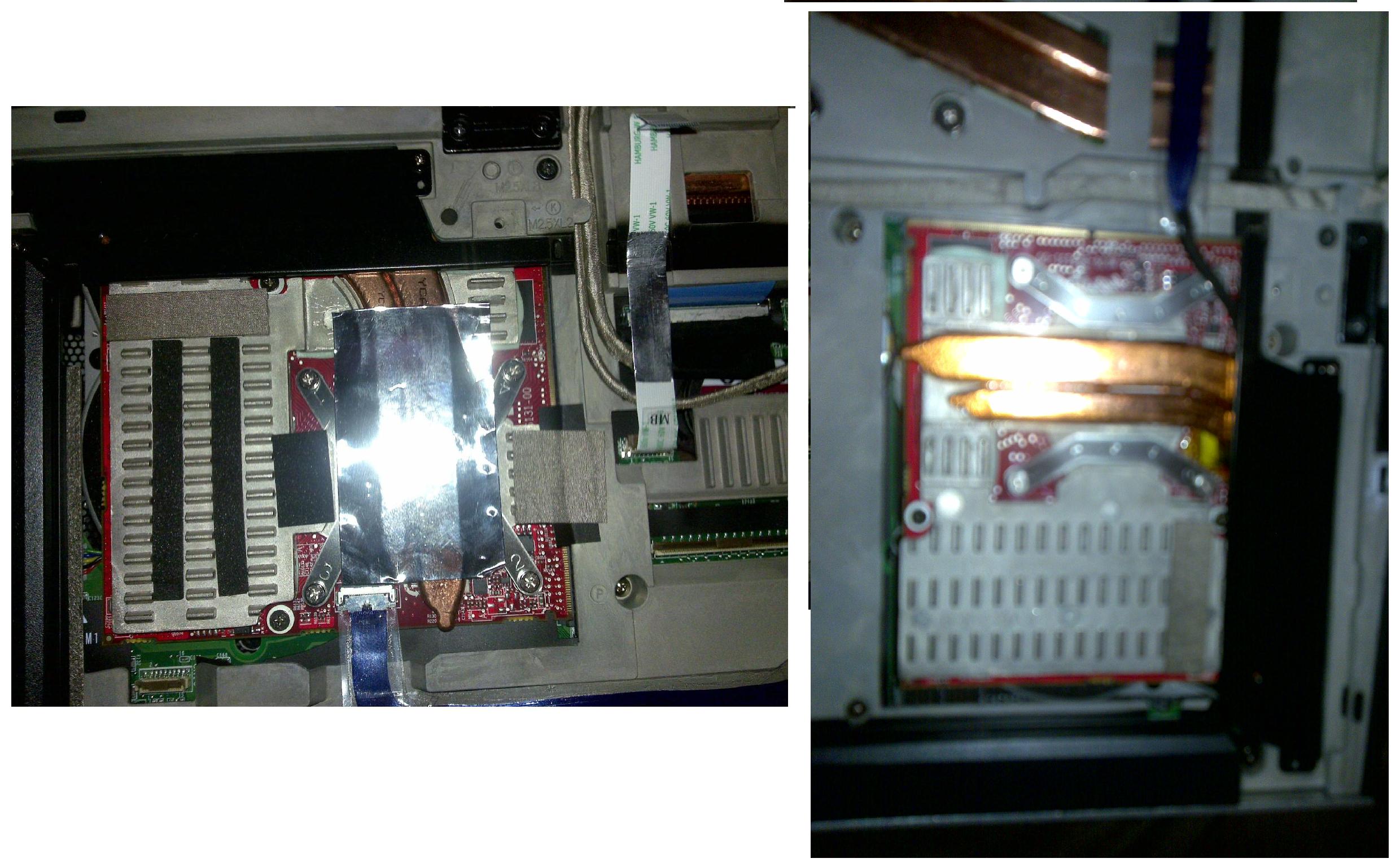
EDIT2: Have replaced the thermal paste on the other card now but I noticed something that I hadn't noticed before when looking at both cards. There is a sort of sheet of foil on top of the heatsink of one card, but not in the other. See the attached pictures for what I'm getting at. Is this supposed to be like that or might that lack of foil be leading to increased temperatures?Attached Files:
-
-
Ah yups yeh thats normal. Thats exactly how it looks like in my machine. I have seen a few machines out there now and it always seems that the left GPU stays a little cooler than the right one. So I've been mainly trying to get the right one cooler lately. I also noticed that there was some tape linking the left GPU heatsink to the motherboard chasis cover. That can also eliviate a little heat off of the GPUs. The right sided GPU doesn't have any of that lol.
How are your temps now after the 2nd fix.
I check gpu-z sometimes but it doesn't really seem to be all that accurate sometimes, there may be bugs so I just use HWiNFO to check my temps and fan RPMs. Use the 3 fan readings up top and not the ones stated in the GPUs. Also for comparison you could use Everest for temps as well.
Cheers. -
That little sheet of foil is there to insulate the main gaming keys "wasd" to prevent them from heating up more then they have to.
-
you start benching your 720 yet, dr650se?
-
Not yet, probably in about two hours I'll get it installed. Then after the 920M, Brian has requested 3DMark06 and Vantage numbers using an old BIOS and new A08 Bios due to the crippled xm CPUs so I'll be doing that for him as well
-
Is a 3dMark06 score of 15600 about right for the following specs stock no overclock ?
Specs - M17x-R2 i7-820qm, A08 Bios, 8GB RAM 1333, CF 5870 with VBios beta and Reference 10.8 drivers, 1920 RGBLED, 120GB OCZ Vertex 2 SSD, Win 7 Pro 64 Bit.
If it is on the low side, what can be done to improve it without overclocking. Eg any settings to adjust?
*OFFICIAL* M17x Benchmark Thread - Part 3
Discussion in 'Alienware 17 and M17x' started by BatBoy, Jan 30, 2010.




![[IMG]](http://img831.imageshack.us/i/3dmark06jpg.png/)
![[IMG]](http://img835.imageshack.us/i/vantage.png/)