Problems? See this thread at archive.org.
At work still
Given that standard 1333 ram is Cas 9, I think they hacked it down as much as they could to make it "HyperX" fast lol
I know that if I boot at 1066 Cas 6 and use NST to raise it up towards 1333 that it freezes around 1280 consistently. I do not know if that is just NST not letting me go to far from within windows or my ram limiting me but I am starting to think that 1280 Cas 6 was too much for the ram now.....
Maybe I just need to get me some "budget" ram that will boot somewhere like cas 8 at 1066 then raise it up that way (NST). If that works I will be a HAPPY camper as it will allow me to FSB overclock like I so much desire vs just pumping the multi (and destroying my memory bandwidth for some reason)
-
-
what about 1066 cas7?
-
that would work probably
Think 1066 cas 7 or 1333 cas 9 would be better for overclocking? I would test with the ram from my Asus UL80vt but it is unstable at 1333 (think it is rated ddr3-800 though...lol) -
run it at 800 and see how high she can go.
-
run which at 800? And the lower it starts, the lower the CL meaning the lower the OC will be right?
-
should be about the same, however some modules just like to run at a lower frequency, so it's worth a try.
-
Here is a good review comparing the x7200 and M17x directly
http://forum.notebookreview.com/6853397-post4385.html -
those 480Ms look quite fast. 1 480M is almost 5870 Crossfire? those tests must be using the first 5870 vbios and drivers.
-
They are newer and use more power, they should be faster! Plus those are desktop CPU's they are paired with not mobile CPU's. The good news is with the m17x overclocking potential we can close the gap a little bit, and from the research I've done overclocking is no good on those systems (BIOS limitations, heat problems, power problems).
I used to be a die hard nvidia fan, always had good luck with overclocking and great drivers. However over the last year I have switched sides due to nvidia driver problems I've had, plus heat problems. I owned an Asus with a 5870 and was very impressed with the overclocking potential of the card and how cool they ran. So I decided on the m17x (over the 7200), which I'm about to fire up a game with for the first time
-
Oles chiefs,
Oh koolos.
Which game is that?
Cheers.
-
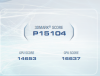
this was completely factory out of the box:
![[IMG]](images/storyImages/3dmark06stockscore.jpg)
this was after bios A09, Vbios A01, 10.10 ccc, but with dell drivers
![[IMG]](images/storyImages/3dmark06stockscorevbios.jpg)
and same in vantage:
![[IMG]](images/storyImages/vantagescore.jpg)
no overclocking, all factory settings.
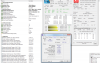
![[IMG]](images/storyImages/cpuzandgpuz.jpg)
-
Here is mine with the new extreme drivers.
Attached Files:
-
-
looking good! "thumbs up"
-
Thanks buddy
-
Is that out of the box no tweaks or OC?
-
I'm curious too. I'm going to have to try those drivers. On my way out the door to drop off my M17x R2 for shipping now! That was the motivation I needed. Then I"m stopping by Best Buy to pick up COD: Black Ops. M11x willhave to do for now.
-
Looks like the GTX 580 is out today John, new toy for you? It actually looks promising, especially at the price it is released (for once!)
-
what are these extreme drivers you're talking about?
-
Howdies,
These ones chief.
http://forum.notebookreview.com/alienware-m17x/530688-xtreme-g-10-10m.html
tweakforce.com - Downloads
Cheers.
-
Hey there benchmarking chiefs,
Our buddy cplluther was running everything with normal settings except for the CPU which was OC in the system bios to 5%. No GPU OC.
http://forum.notebookreview.com/alienware-m17x/529383-anyone-920-940xm-cpu-played-fifa-11-a-7.html
Check out his last post at the very bottom of the page.
They are pretty good drivers I must also say.
Worth a shot for a few extra points
Cheers.
-
Can't wait, going to test them when my system returns. Just shipped it out this morning back to the Depot for repairs. Most likely going to get a replacement.
-
Yup, OC'ed 5% in bios
-
tested the extreme drivers. didn't see any improvements in Vantage.
-
All they will have different is a modded inf file, just like the dox drivers for nvidia cards.
The gain from them will be minimal if you already know how to tweak your setup. -
i see one other major up with that card.....i dont have to buy a new 150 dollar water block..haha.
been playing that game all day.
hope all goes well with the rma.
mx11 can still pull weight..lol
that is correct.
side note:
no one is writing drivers other than nvidia and amd.
i could be wrong though...you never know. -
How can I tweak my system????
-
Try minimizing an processes and services that are unneccessary. They eat up CPU cycles in the background, and can pull a score down because there is less cpu activitiy directed toward the benchmark.
-
The 580 is appealing to me because no heatpipes....means it would fit in my setup hehe
Although I have absolutely no business upgrading the components in my desktop lol....it is not exactly weak - that being said.....Microcenter has a wicked deal on the Corsair 700d this month and I have started eye balling 3x120mm rads lol -
Since i trust the judgment of those who post in this thread, i have an opportunity to Upgrade from my 640m to a 740qm for virtually zero. does anyone think its worth it? i play a moderate amount of games ( SWFU II, Black ops,Dragon age, will prob get Fallout new vegas..etc) i do some small video editing. Im just wondering of its a totally lateral move and isn't worth the time of pulling the computer apart to do.
-
since you do the video editing I would keep the quad
otherwise the 640 is better for games generally but not by much -
yea dude ones a dual core, ones a quad. For apps/games that fully utilize multi-core systems, the 740 will walk all over the 640. I wouldn't think twice. get the 740!!
-
i realize the practical difference between the two. i just didnt feel like drugging up lame examples of "benchmarks" for each one since the 640 is somewhat rarer. and for examples sake the 640m dual core stomps the 720qm by around 20% across the board. so i am concerned that the performance gain will be nill.
-
^^^^ you're talking about in apps that aren't multi-core optimized... thats obvious.
using 1 core : the 740 clocks to 2.93 vs the 640m clocks to 3.46
using 2 cores: the 740 clocks to 2.6 vs the 640m clocks to 2.8
So it's obvious that in apps/programs/encoders/benchmarks/games etc that can't take advantage of quads, the 640m will score better.
but try running apps/benchmarks/games that CAN use multi-cores. the 740 will be running at 4 x 1.73 = 6.92GHZ vz the 640m @ 2x 2.8 = 5.6 GHZ
Thats 1320 Mhz faster than the 640... no need for a benchmark to figure out which one will perform better...
As programs/games are continuously optimized and released to support multi-core systems, the 740 is better suited to "future-proof" your set-up... and will actually get faster with time because of this...
-
i use Reaper & Pro tools alot, and my 640 smoked the the 720 while using those programs.
the 640 uses 2 cores @ 3.33ghz, in real time. in theory your 100% spot on but my 640 runs @ 24-25 multipliers no matter what im doing. so its negligible one thing though i think the 640 isn't using my ram @ 1333mhz. so i wonder if the memory controller is worth having in the 740 -
Only the extremes will use 1333. Both clarksdale and arrandale use 1066 natively. They should do an extreme dual core though
-
what programs you using to monitor the clocks? TMonitor64 is a good one. ThrottleStop is another. Very few apps give you real-time clock speeds..
according to Intel and notebookcheck... it runs at 2.8 with 2 cores... anyways regardless the 720/740 will win in mutli-threaded apps, and the 640 will win in non multi-threaded apps. Up to you to decide which you prefer bro
Intel® Core? i7-640M Processor (4M Cache, 2.80 GHz) with SPEC Code(s) SLBTN, SLBZU
Intel Core i7 640M Notebook Processor - Notebookcheck.net Tech
EDIT: Scook my 720 uses 1333mhz...? -
i use throttle stop & HWinfo32 to monitor the clocks, which have it @ 3.32mhz when im recording using reaper,as for the memory i was using cpu-z to monitor the ram & it stays @ 533mhz the ram itself is rated @ 1333mhz cas7, but it runs cas6 @ 1066
-
can you confirm that your ram is running at 1333 speeds Jstar?
-
hmmm that's really odd actually... cpu-z is a good program but isn't as "real-time" as hwinfo32 ... did you check hwinfo32 on the main page? what's it say under memory? same thing? Can you post a snippet?
Sure bro. Check the attached pic
DDR3 ram sends data both on the rising and falling side of the clock cycle so dual channel DDR3 1333MHz ram has a 667MHz clock (2x 667 = 1333mhz) . At the time i took this snippet it actually read over 667mhz... but this fluctuates constantly from 648mhz to 687mhz.
Thanks to Abo for developing SetFSB, i was able to manipulate the fsb on my M15x and Overclock my 720, and was able to get it to run @ 3.3ghz and the mem just under 1600mhz stable, since the fsb affects both mem n cpu. Actually i have to contact him to see if i can get it working with my M17x (it uses the PLL of the motherboard, and it basically works on some motherboards, and doesn't on others... and basically comes down to luck)Attached Files:
-
-
for the pll for the m17x just look @ the thread joker made. we have been using Setfsb in the m17x for months =).. pretty interesting about the ram though, ad yeah HWinfo32 says the same as yours says 667, but in cpuz says 533 / timings are 6-6-6-18. well see when i get the 740 in here.
thanks for the input. EDIT: heres the Pll fpr the m17x-r2
ICS9LPRS365BGLF..... but read the thread it will explain how to do it using the registers, as opposed to the slider ,which is really unstable IMo.(the slider) i have been able to get my 640 up to 4.2ghz without insta crashing... -
WOW
nice chiefs! 4.2Ghz.
For setFSB. The settings I use are 29, 20, 98, 38.
Sometimes I also use 29, 20, 98, 39.
I've tried setting the last digit in the registers to 40 but each time the screen will just go black and BSOD on me. The rest of the settings are rock solid stable. I too have been using them for a while now.
Its good to have something like this to OC our CPUs since we don't have the XMs unlocked multipliers or unlocked BIOS.
Cheers.
-
Man....what I would give to have a better BIOS on my R1
If I raise it to just 345 FSB from 333 it hard locks the computer.....the bios is so tight with the chipset settings that it has no headroom
-
i usually leave the 30 register alone and focus on the 98 and lower, once i get around 95 i may move the 33 to 34 and such.
as for the RAM, i would have to agree with Starino that now my ram is clocked @ 669.6 in hwinfo since the change from the 640m to the 740m. -
Oh can you explain a little more about moving the 98 and lower? So you use a setting of 95 is it and then set the other to 33 and 34. I only just found out about the 98 setting a couple weeks ago so I never knew it could be set to a different number as well. Cool.
Interesting.
I will have to give this a go. Does it yield better OC results or something?
Cheers.
-
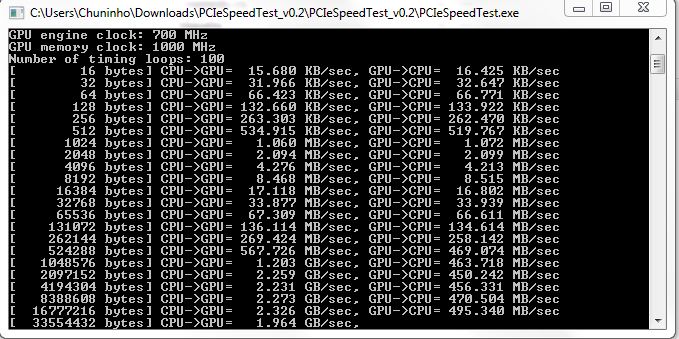
ok fellas...anyone with a m17 r2...can you run this quick pcie test. thanks.
actually, anyone with an amd gpu can run it also. and post the results here.
let it run for about 2 seconds, then stop it. snip a picture then upload as an attachment. thanks.
http://developer.amd.com/gpu/ATISTREAMPOWERTOY/Pages/default.aspx
actually, let it run for about 5 seconds or so and snap the picture fast. then stop it..
and the run file name is pciespeedtest. -
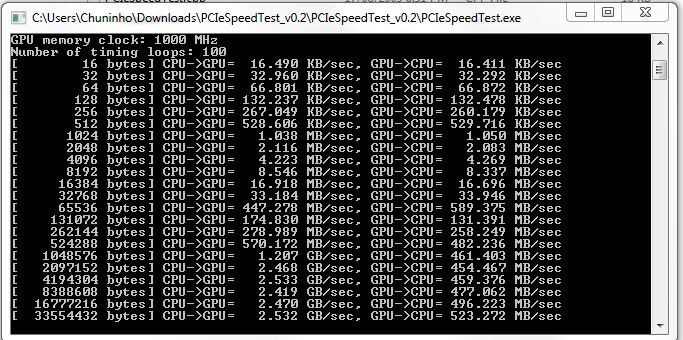
Ran it for a few seconds, it's definitely not maxing out when going from GPU-->CPU when using Crossfire but is 3 GB/s when Xfire is disabled. -
Hey theres John,
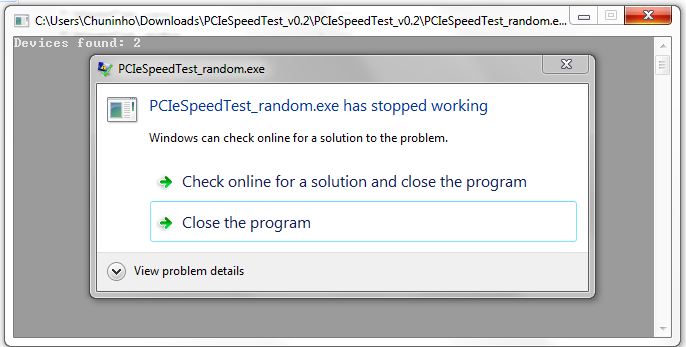
Okay just ran the test. When I tried the random one the program crashed.
How are my results?
Cheers.
-
wow. i was thinking you would be up in the 4 gb range...this is interesting...
it doesn't show on that test, but in games these systems crank out th fps.
im seriously starting to wonder about that test now.... -
Keep in mind that most single gpu designed laptops will have x16 for the gpu while the M17x is hard wired x8 x8
-
i knew that.
it was one of the reasons why i wanted to try dropping down to 8x link to ee if anything was different, but......i have to look for the data sheet...lol
*OFFICIAL* M17x Benchmark Thread - Part 3
Discussion in 'Alienware 17 and M17x' started by BatBoy, Jan 30, 2010.