Problems? See this thread at archive.org.
I've got the same setup and that's about right. I oc'd my cpu to 3.7 and got 20690
-
-
oki im happpy now =) cheers guys,
@ cuellarm if u mean the fan going up and down no its not as near as loud as start up lol, its just veryyy suble increase then decrease you can barely hear it , i think im just being parranoid, regarding the clicking it only happens in game sometimes , and others it doesnt.
BUt i hope this flickering in game textures , so far only knoticed it in splinter cell, CF farcry 2 and split second dont do it! -
running AVG virus scan atm, fans going up and down - but seems like in gear, not just high low hig low, like high - medium- low etc =/ shouldnt it stay more constant? cpu going from 10-70 then back down to 20 also is that normal for a virus scan lol?
__________________ -
I doubt the 940XM would be alot better than the 920XM. it uses 1 more multiplier than the 920XM, and they have the same TDP limit, maybe 200 extra in 3dmark06

-
Should still be enough to takeout the leaderboard on the Benchmark scores.
-
you have a 920xm and 2 gpus the fans are going to kick on and off, that machine will run hot. Its the nature of it if you had gotten a smaller proc a 720 or 820 you would notice the fans less but just having all that power expect to hear your fans quite often i had to get a laptop cooler before the fans would stop revving everyso often. Also the alienware has an excellent cooling system as is so when the fans do kick on they cool your laptop fast so it will seem like its revving and stopping and revving alot. get a laptop cooler and you will notice it alot less.
-
with the 940 could you even overclock it because as is the 920 runs pretty warm and im guessing the 940 will run warmer. wont that impede peoples benchmarking for stability reasons?
-
I would like to see an improvement but only time will tell
-
Can you post some bench of your Vertex LE?
-
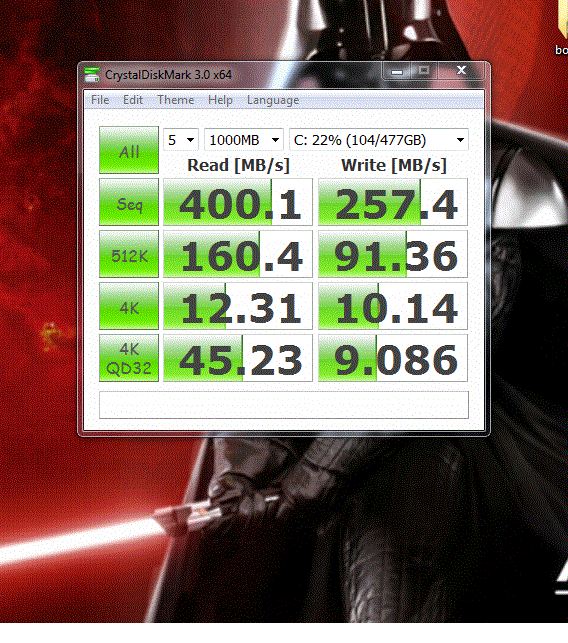
for comparison sake, I can give some for my Intel G2 160GB
This was after I finished loading windows and all my programs with some usual SSD tweaks
![[IMG]](images/storyImages/s2uw6q.jpg)
-
Thanks Scook that is going to be very useful to compare with the Vertex LE once Mandrake can post his bench.
-
scook, can you tell me which driver are you using? i get half the 4k write speeds than you and i am on Intel Rapid Storage
-
Heaven benchmark.
Attached Files:
-
-
Hey,
claxdog, Thank You for the benchmark! -
Since this is in an R1, I am using the Standard AHCI 1.0 Serial ATA Controller since the nvidia storage controller driver does not pass TRIM
-
hmm.. thanks, i'll give it a go.
-
The intel storage drivers are supposed to be good though, they even pass trim with RAID is what I have heard
-
I use the intel rapid storage manager here is my benchmark after about a month after fresh windows install.My 4k still looks low?
Attached Files:
-
-
Your write speeds all look real low...do you have write cache enabled?
-
here's a screenshot of my speeds after a fresh windows install on a fresh drive with Rapid Storage : http://forum.notebookreview.com/ali...g-ssd-tips-tricks-benchmarks-post6127614.html
-
My sequential reads were down around 210. I think I still need to flash it but haven't bothered yet.
-
is this good?
![[IMG]](images/storyImages/35mfplk.jpg)
![[IMG]](images/storyImages/23jqttd.jpg)
-
That seems quite low for the Vertex LE. Which bios are you going to flash your drive with?
-
i got 500k with 120gb vertex in raid0. dont forget it doesnt support trim for now on raid enabled volumes meaning you are going to lose performance as you use it
-
what about mine?
-
I am not sure because I have no frame of reference for the 120GB and yours does not use the sandforce controller.
-
i asked if its good in general. no reference.
-
I did not realize we were doing windows boot times as well, I got a good one for you to try to beat
![[IMG]](images/storyImages/4izdj8.jpg)
This was my Intel 160GB G2 right after I got it
-
and after fresh format i guess.
-
Yep, the drive was very fresh
-
hows ur boot up soo fast lol? im probs like 50-1 min boot times, with about 200gigs of data on my hard drives? i know ssd is fast but that fast?
-
You can achieve those times disabling just about every service and startup program possible plus some more windows tweaks. This leaves you with a system that is kind of unusable for everyday use but for benching purposes this is cool
-
Yeah it's not bad.
-
That run of mine was a system tweaked specifically for a fast boot time, it is not representative of my regular use haha
my regular use is 16s boot time for those wondering -
I still wait for someone to beat that 7.378 sec boot time...
http://forum.notebookreview.com/6266277-post171.html -
Who boots Windows these days... I just use hibernate all the time
-
That's because you use an HDD, with an SSD the first think to deactivate is the hibernation feature.
-
I'm going to try and beat it, but does an SSD RAID setup count? It'll be on the M17x R2 when it finally arrives.
-
i reached something like that during the first boot after a fresh format. the boot time i posted is with full services-apps loading.
anyone notices slow read speeds with hd tune 4.01 in the R2? hd tune reports 150mb/sec read speed while aa ssd 235mb/sec. i think its an issue of hd tune -
guys how to you run 3dmark vantage on R2? i always get stuck on cpu physx test loading for hours. if i dont select this test to be run the test is completed but i hit 0 on cpu score and a P0 on final score. so only gpu score
-
It will take a while to finish the test. Do you literally mean hours, because if you look closely it moves slowly. Also, have you overclocked?
-
of course and it counts, the only thing is that I don't believe that RAID will improve the boot time, maybe I'm wrong. I really want to see the results
-
You can always post a screenshot with the something like that
-
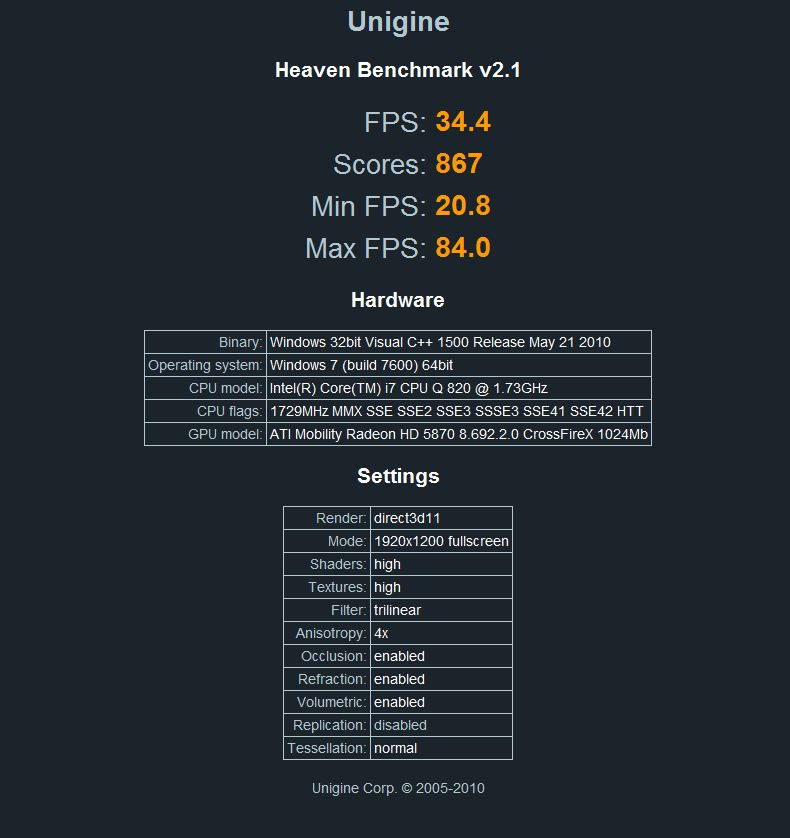
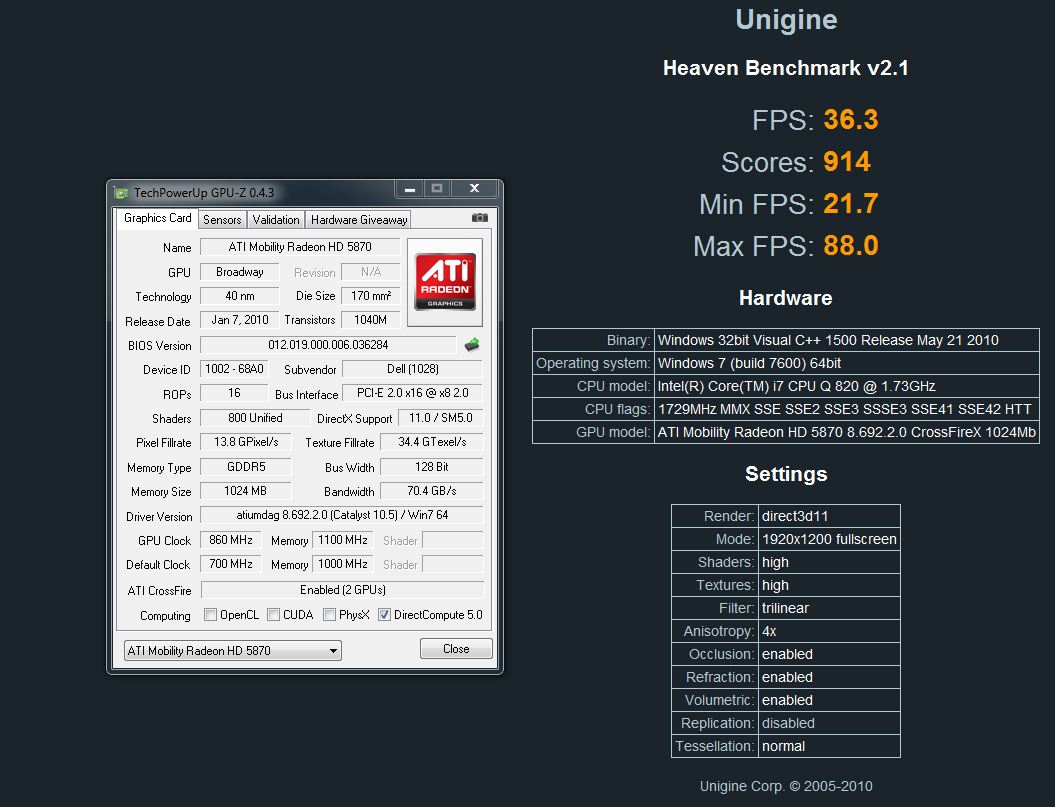
Got two benchmark runs in DX 11 using Unigine 2.1: 830/1000 and 860/1100 both at the stock 1.05V. No throttling observed in this benchmark. I think these scores match a desktop 5870 or come very close. This seems like a much better GPU benchmark than Vantage, I think it should be the de facto one instead of Crapmark's software.
Attached Files:
-
-
of course when i do a fresh format. i have done three of them in one day due to some issues with my tv tuner. i dont plan to do it agan soon
-
i mean it was keeping loading of the cpu test 2 which is for physx. ok i havent waited for hours but it was around 10 minutes at least. it was still at loading. cpu is only overclocked
all other tests and cpu test 1 run normally. take only a while to load -
my record is 8 formats in one day
-
Try it without overclocking or use just the 5% in the bios. I had the same problem, sometimes it would even get stuck with the 5% oc.
-
on the same computer
-
Yeah, I was trying different settings for the SSD and I was performing secure erases so I could have as accurate benchmark results as possible
*OFFICIAL* M17x Benchmark Thread - Part 3
Discussion in 'Alienware 17 and M17x' started by BatBoy, Jan 30, 2010.