Problems? See this thread at archive.org.
I'll be more specific next time. But, that was what I meant.
-
-
Scook, you're the man, but I gotta throw this in here. A few years ago in my M1710 days I subscribed to a benchmark forum somewhere I don't remember anymore. ALL we did was FRAPS benchmarks, no one even cared about 3Dmark scores. We were very specific as to which level in the game, what graphics settings, what part of the level, etc, regarding the game we were benching. With this information another person could closely replicate the same circumstances to see what kind of FPS they were pulling. No, it wasn't as controlled. You could tell the BSers a mile away though, because they'd be pulling 50FPS where everyone else was pulling 35 (for example). I would like to see more of this, and would be more willing to post stuff. My X9100 kind of knocks me out of the 3DMark race due to the much better scores guys are getting with a quad core. That in itself is another reason why I'm not a big fan of synthetic benchmarks for anything other than troubleshooting. Just my two cents.
-
FRAPS benchmarks are okay for games that don't have built in benchmarking modes (e.g. bad company 2) but it's hard to compare between machines because everything is highly variable.
-
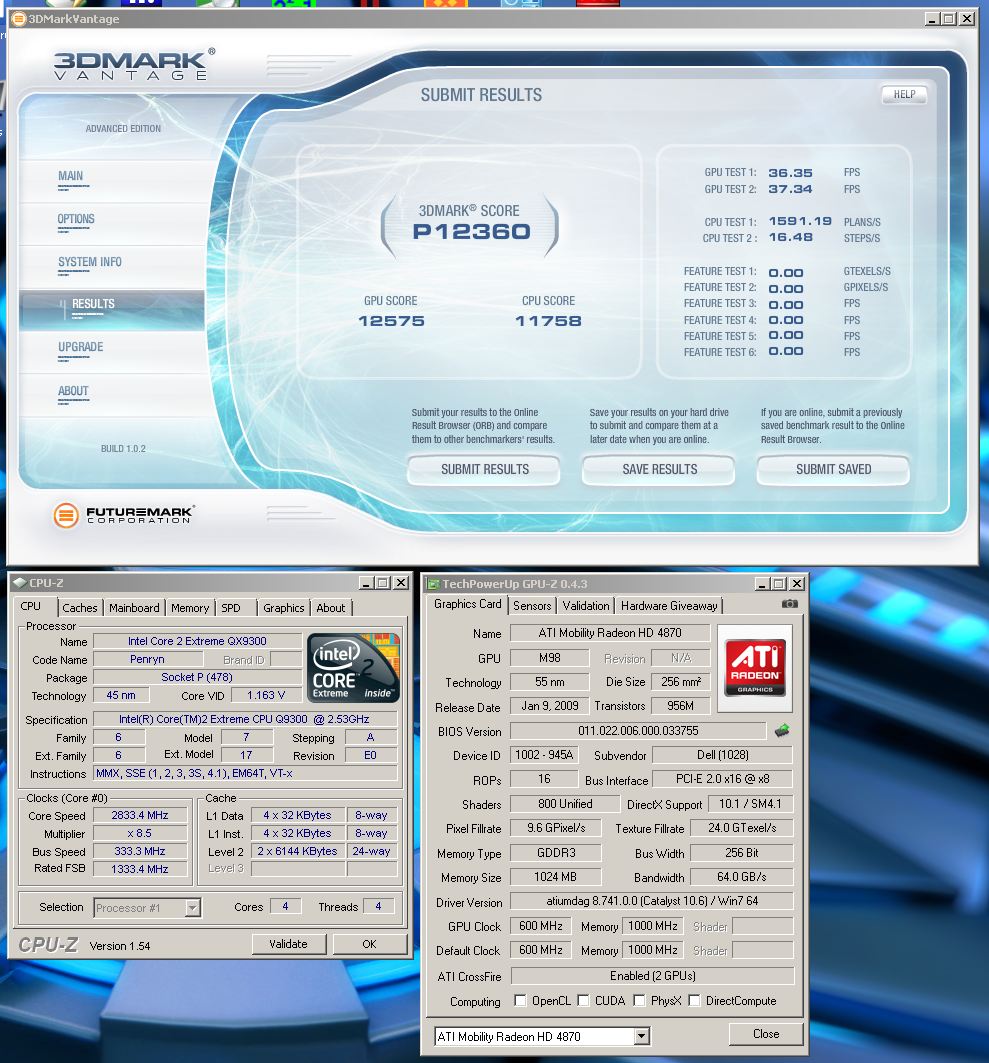
For anyone interested, this is what I am using as my 24/7 overclocks
Passed both cpu and gpu tests in OCCT with 0 errors so I am fine. Do not want to take the GPU higher as it would need overvolting and therefore lead to stuttering. Still can pull some numbers
Attached Files:
-
-
Pics or it didn't happen! XD
I didn't really see any difference in vantage so far, although I didn't expect a lot of difference with only a 21mhz FSB increase.Attached Files:
-
-
Got 20.7K with no fridge I'll see if i can get 22K
-
GL , and let me know when you get 22K
-
20K for which benchmark?
-
i asked you a while ago joker if you try ati tools and the different rendering schemes they had, but you never answered that one. that might be what helps ati. it helped me with my 5970
-
I've tried it before, it didn't help. Plus GPU OC'ing isn't supported with it. -
are we talking about the same part?
you dont use it for over clocking, only to change the rendering.
it's under advanced over clocking
you have like 4 to choose from
1 2 3 4
its the same thing as nvidia has when choosing between single gpu mode or afr or sfr or whatever that last one ati uses...
one of them made my screen colors go wacky, but from time to time, the others would work....you kind of have to play with it. -
ATi tray tools right? I tried it awhile back and messed with the advanced d3d rendering options but it never helped. I'm not sure about the 1 2 3 4 part though, never messed with that I think?
-
you have to put the numbers in. the spaces are blank.
there are two places with long blank boxes with short explanations i think.
is this where your talking about?
sounds like a very noble gesture! -
We'll I was just about to show Abo what the moo and others were willing to do.. but it looks like the thread has been swept through.
-
Please move discussion related to Joker's OC method here:
http://forum.notebookreview.com/alienware-m17x/495203-how-oc-m17x-r2s-920xm-940xm-using-setfsb.html
Thanks. -
Hi,,,
I just Bencmark my new ALIENWARE M17X R2
My system is :
i7-920xm
5870 crossfire...
6 GB memory..
Ati catalyst 10.6
and profile 10.6
But my BENCHMARK score is
3D MARKS 06
3D SCORE = 18889 3Dmarks
SM 2.0 = 7703
SM 3.0 = 9660
CPU SCORE =4355
and the result of FPS
Return of Proxycon = 64.04 FPS
Firefly forest = 63.35 fps
CPU test 1 = 1.44
cpu test 2 = 2.1
HDR test
Canyon Flight = 111.26
deep freeze = 81.93
But the others people who do Benchmark shows score above 20000 over
(the ones i quote above) while my score 3d marks 06 is 18889 is this NORMAL for my ALIENWARE ...??
and WHAT SHOULD I DO TO HAVE THE SAME SCORE AT THEM...????
and i check the GPU Z
it says : crossfire = enable (2 GPUS)
NOTE :
I install HMinfo32 and i play a DVD..
I forgot that i was running the HMinfo 32...
So it got crush...
and my alienware sent me a message that the system will shut down to prevent the damage. IS THIS INFLUENCE MY SYSTEM OR MY GPU (DUAL 1 GB 5870) to score the 3D MARKS 06 ...???
and will the crush will affect the hardware...
or alienware will recover it..???
Please let me know...
Thanks... -
You are not doing anything wrong. That score is correct. You need to overclock CPU and GPU to get high scores
-
hurray! I finally managed to surpass my old R1 score and break 12K
all it took were some 5870s and a 156mhz fsb
ORB - Compare
Imageshack - 64488537.jpg -
Is that stock Lozz?
-
I'm pretty sure it is. I get nearly 15k gpu with my i520 m17x after ocing the CPU and gpu.
-
yeah, stock GPU clocks, overclocked processor. I have oc'd the primary to 880 /1050mhz, but I didn't quite figure out how to overclock the second card without it freezing. I'll figure it out after top gear season 15 episode 1
-
deleted post
-
what kind of vantage scores should i be getting with my 4870s oc'd? they seem...to not be scoring very well when overclocked. i get artifacting @ 630/1135. is it more stable to flash the bios with these cards?.. or is amd clock tool fine..
-
1135 is too high for GDDR3. Don't go over 1100 on those.
-
Well you probably need to raise the voltage on your cards to be stable at those core clocks.
-
using amd tool , i raised it to 1.1, is there anyway to go higher?
Heres the best Wprime 155 i could get, i got it run one with a 186 bclk/FSB, but i bsod while i was saving the pic =(
http://img189.imageshack.us/img189/791/wprime1.png -
That's a pretty good WPrime run. You should donate to Abo and get his latest SetFSB release. It has the Asus G73 PLL in it that works with the sliders. It also has command line options you can set in a shortcut. I have mine set to 150 fsb for 24/7 use with my 940xm. It starts automatically in the background each time I turn on my computer so it's very painless.
-
i did donate to him, but i never got a key for the FSB i downloaded. we exchanged emails, but i never got a key. but its cool, i used setfsb for almost every other computer ive owned so i don't mind giving the guy some money =)
-
Did you send him the id? He sent me the key immediatley. -
yeah i did. no worries though im sure hell send it.
EDIT: i just realized that only my master card is being overclocked. the second one wont allow me to adjust anything on it. everything points to it being functional, but now when i use amd tool, it says that the clock settings didnt take, but the mater overclocks to whatever i set it at ans the second cards stays @ stock settings, i can adjust the voltage either. any idea why that might be?
EDIT#@ ABO just sent me the key..he must have saw my post lol. -
To get around the 2nd card not taking the clocks: Turn on a program like Furmark MultiGPU first and let it run in windowed mode at like 640x480. Then fire up AMD GPU Tool and it will recognize both cards. Click the checkbox that says, "same clock settings for all devices" and adjust your clocks while furmark is running. Once you change them and click apply, you can close furmark. Open up GPU-Z and you'll now see both cards have their clocks adjusted.
-
still have the same issue, says "setclock failed" check device configuration. both cards are recognized...shoudl i re-install amd tool? both are being utilized, both show 85% & 98% utilization respectively
-
For what it is worth....I do all my GPU overclocks by flashing the vBios
-
for what it's worth, that method doesn't work for me either. Flashing Vbios and hoping you don't 'over' overclock them or the flash fails isn't too appealing to me, which is why I haven't gotten into it yet.
-
Its telling me the same thing, "setclock failed", or something to that extent. Would it be ok for me to run the primary card slightly overclocked then the secondary card at stock clocks? Or will the difference in clock speeds mess up with the crossfire configuration?
-
It's not going to make a difference, Crossfire will only render frames as fast as the slowest card in the array can render them.
-
oh ok I see. Thanks Lozz
-
It sounds like this method is not working for you only because you are too scared to try it.....you can flash a card more than once
This is the only way to overclock a GPU and have it stick with out having to go into windows and set a program each time. It also can guarantee the same speeds on each card if they are both flashed with the same vBios
You simply test different speeds to find the right overclock without over overclocking them -
hey scook, just curious here.. can u recover from over-overclocked card ?
-
Yes you can just flash the original
-
i am asking because if the master card fails to start how can you flash it ?
-
Run on superPi not a serious one as had heaps of stuff running in background.Noticed throughout run multiplier was mostly on x23 3387 Mhz but jumping to x24 3534 Mhz & x25 3682 Mhz.i7 620M temps remained below 50c.
Attached Files:
-
-
You use a usb stick that has been formatted so you can boot off of it.And always save a copy of the original vbios someplace other than on the pc you are flashing.
-
Right... too scared to flash a vbios, but ripping apart a M17x(several times) and handling the mainboard.. that's totally less involved. I don't want to do it because I'd rather play games for the moment, and finding a stable overclock by flashing the bios is time consuming. Also, I'm pretty sure I quoted the AMD GPU tool method, not overclocking via BIOS flashing, so I don't know where you're coming from saying that it (bios overclocking) isn't working for me. Also, I can't software overclock the secondary card, so I'd have to flash the secondary a dozen times or more to find it's stable overclock. I'll do it, just not right now
-
I don't know why it's not working for you guys. If I have time later on, I'll get a desktop recording program and make a short video. -
The only difference in the device ID that I can see is the number in parenthesis right before the name BROADWAY
one is (02:00:00)
the other is (03:00:00)
is this right?
if I set (03:00:00) 1mhz higher over stock, the system freezes instantly. -
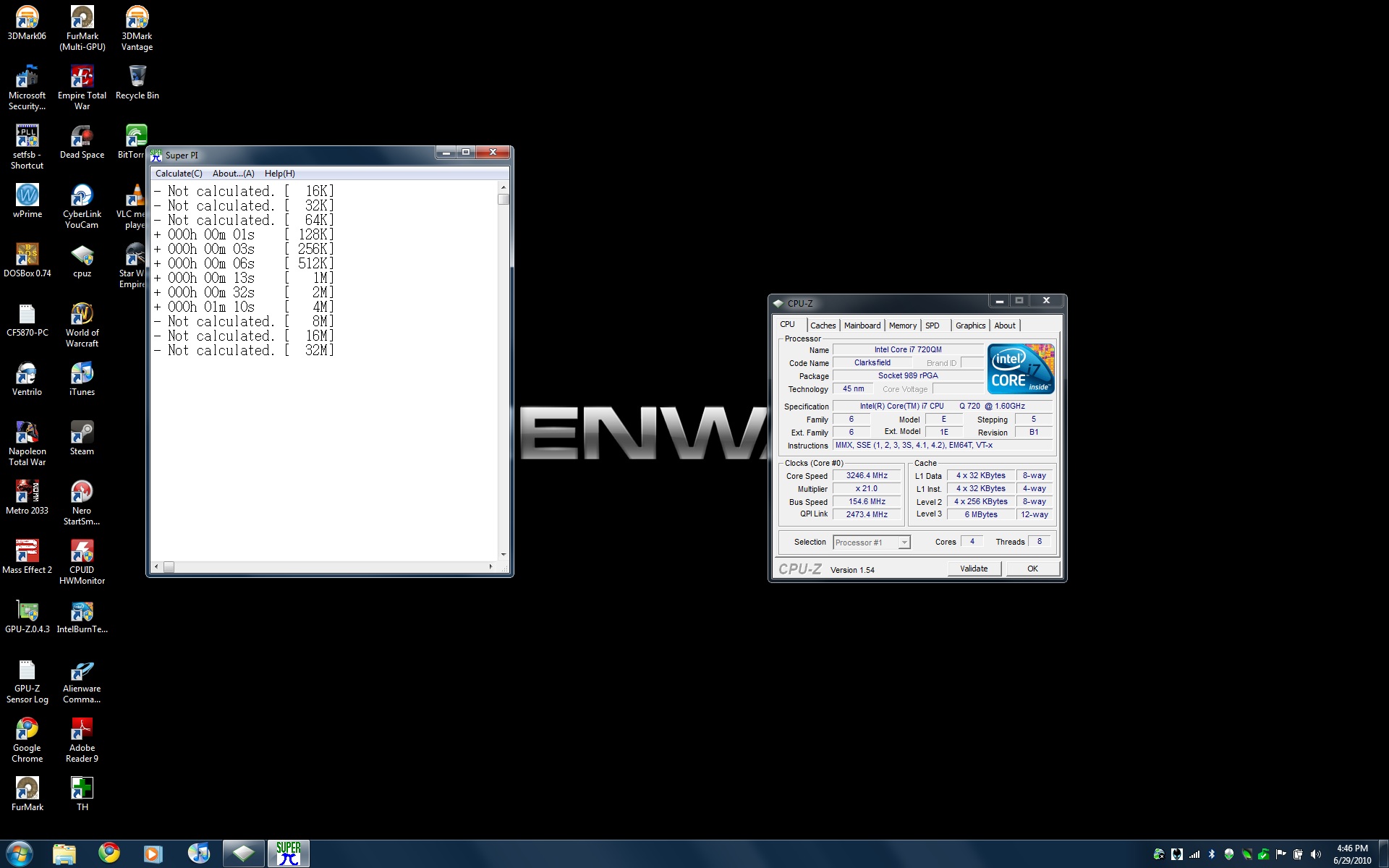
Joker/or anyone could you run a superPi say 16k to 4m so i can compare results.
-
sure!
top dis!
not calculated = results </= 0 seconds that are under 4MAttached Files:
-
-
Very similar results to my own.
-
idk what the issues is now it was working then all of a sudden it started giving me the error. i tried re-installing it, but it does the same thing now. and bios flashing is to time consuming imo, id rather do it in windows so i can just turn it off. when im done benching.if i have to i will, but id rather not.
*OFFICIAL* M17x Benchmark Thread - Part 3
Discussion in 'Alienware 17 and M17x' started by BatBoy, Jan 30, 2010.