Problems? See this thread at archive.org.
Attached are 1.png and 2.png, both number coinciding with each of my 4870 Xfire cards
Should both settings be the same? There is a huge disparity between the setting , according to that program...
-
-
I believe its 1.15
I used to say the same thing but flashing the cards is alot more stable IMO. I didnt have the guts to flash the cards but then i was like what the heck worth a try and i can always flash back to the default clocks
-
yeah you need to click the box that says " same clock settings for both devices" you also need to change the voltage on both cards..
-
There is a little checkbox that says same clock for both devices
-
Works for one, not the other :/
Attached Files:
-
-
Its most likely because it was already set to that clock, try increasing it a bit more and mark the check box and click set clocks.
-
Make sure u got Xfire enabled
-
Same problem as above.
The second video card defaulted to like 400 less than the first card. Still can't change it. -
i had this issue what driver are you using? 10.6? AMD tool doesnt work properly with 10.6, i went back to 10.4 and it worked fine. it maynot work right with 10.5 either.
also in one of the threads joker showed a workaround for this situation so you might want to look for it. if i can find it ill link it for you.
i guess i dont mind just flashing the voltage,and using amd tool to bumo the clocks. ill probably do that. -
Proof: 10char
Attached Files:
-
-
Yes, 10.6
I may go back to 10.4, then, we'll see. I was having some flickering issues yesterday with SC:C, but I ended up updating the bios to A05 and it ended up smoothing that at for the most part. Hopefully the older drivers won't negatively affect performance. -
Hdd's actually use more power than ssd's. The ssd's. Use like 2W at most.
-
My CPU chews up around 75+W when overclocked with 1.4 V
As for the power supply, I get throttling before ever getting to stress it
-
well if your goal is to overclock the machine then 10.6 wont work unless you flash the bios afaik, but stock vs stock the 10.6 is much better, im going back to them when im done benching.. i recorded a 800 pt gain in vantage & 400 points i believe in 3do6 over 5 runs on each @ stock, so i think the 10.6 is better but if your trying to software overclock then i just don't think they will work
-
I am on 10.5 & AMD tool works fine but with our systems what works with one setup is different sometimes on another.Just give it a go.
-
For what it is worth, the original Dell drivers gave me the best score of any tested in 06 for my 4870s
-
Where is the place to get 10.5 drivers? I can't find anything but 10.6
-
I got mine up to 98W but I remember with my Asus I hit 110W. I think I need a better PS or a better way to keep it cool.
-
ATI Mobility Radeon 10.5 Drivers Direct Links - Guru3D.com Forums
2 sec search on google. -
I may not have been clear. That is JUST the CPU. The system power draw was 150 watts when under CPU only load up from about 75 at idle.
-
Yes I'm referring to just the CPU.
-
Just "updated" to 10.5 and I still can't set the settings for the second card :/
-
well like i said i had to roll back to 10.4 to get AMD tool to work properly, but 5150joker posted a workaround in a thread i cant remember which one, use the search function, it didnt work for me but he claims it worked.
also you can try uninstalling it and downloading it again & reinstalling it. -
Oh, ok. I am going to flash back to A02 in hopes that it has a higher power threshold compared to A03. I remember being able to take the psu further before throttling back when I had the nvidia gpus
-
10.5 worked, thanks!
-
cool.
@ anyone who is here, when using RBE am i trying to set all my clocks to higher voltages or just the initial clock 00? -
The initial one is the 3d clocks and is all you should change. It is good to leave the others so that the card goes into lower power states when not needed
-
sent you a pm, disregard. thanks!
-
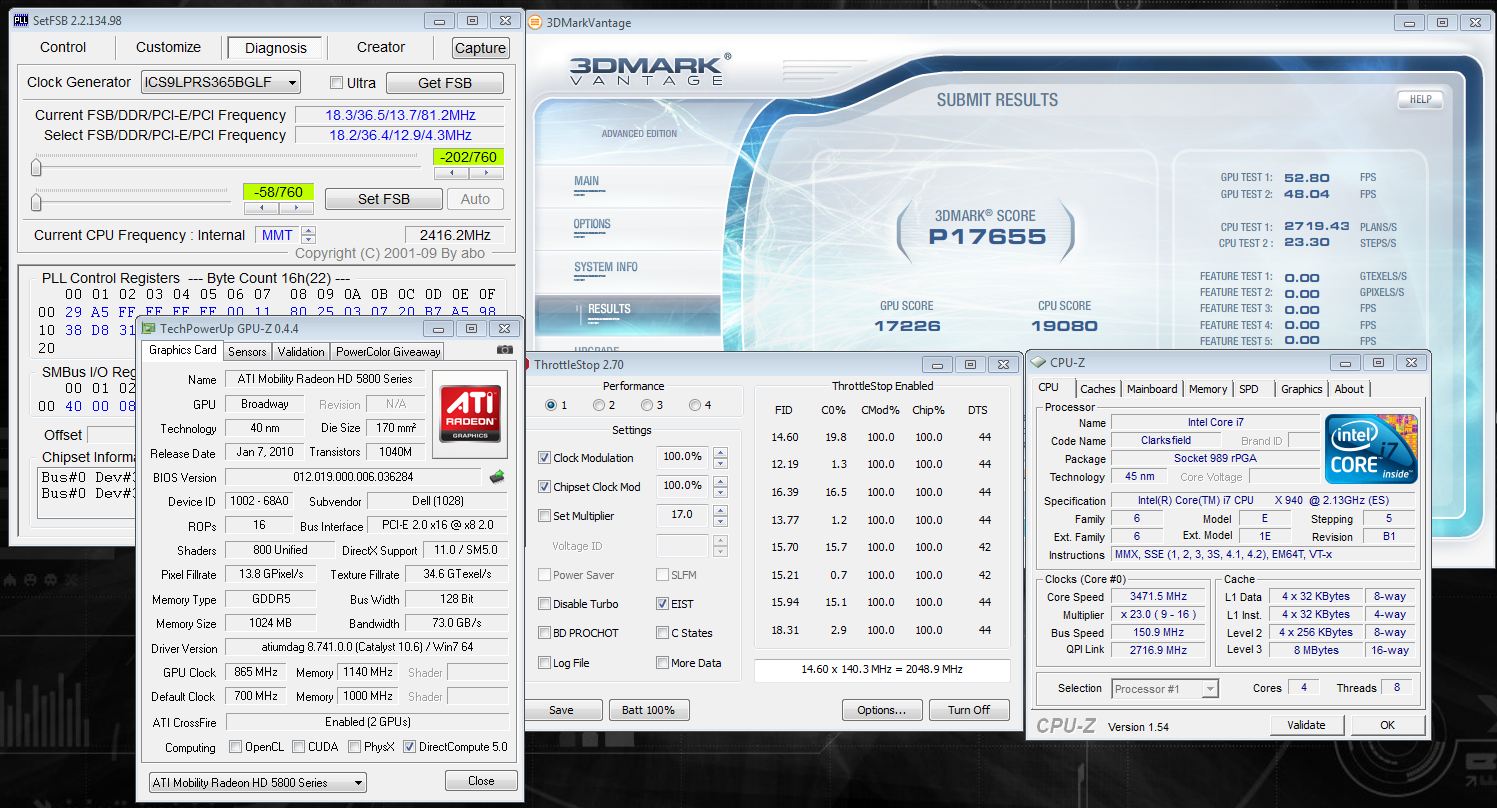
It is literally marginal, only 4 points higher than yours, but it was also my second try with throttle stop
![[IMG]](images/storyImages/secondrunthrottlestop.th.png)
Throttle stop is an excellent piece of software -
Good job! My benchmarking itch for now is dying down, I may do a final vantage run tonight with some OC'ing just to see how it goes but with no external cooling so I won't be hitting 20k CPU. I want to do a "real world" scenario run where the settings could be used 24/7. -
I wish I could give a real world senario score, simply because everyday the temperature is different but my estimate is a range between 15900-16000, according to my room ambient temperature
-
Unless I find a way to increase my GPU score, there is no need for me to push the CPU any further, I can break the 21K with the CPU and that without too much effort.
![[IMG]](images/storyImages/thirdrunthrottlestop.th.png)
-
That CPU is definitely helping the overall vantage numbers. I think you still have room to increase the GPU score through better cooling and/or overvolting it to 1.15v. Also switch over to Cat 10.6, you will hit 17k+ easily. -
I am at 1.05 with the GPU using AMD GPU clock tool and it seems that you are right, 1.15V & 10.6 are the only way...
Here is a 21.248 CPU score, just one click higher settings... really easy
Now I believe that I can hit 22K+
![[IMG]](images/storyImages/fourthrunthrottlestop.th.png)
How can I keep this damn monitor brightness low? Everytime while benching the brightness goes to the maximum.... -
set it using the power options in windows and it will stay there after reboots and so on
-
That's how I have it, it does stay that way after reboots but during vantage it goes all the way up and stays this way until I lower it again...
-
14kgpu vantage from my i5 core & 4870s
![[IMG]](images/storyImages/2ndvantage.th.png)
-
This run was done with NO external cooling and the bottom plate was kept on the system. This is 100% stable and I can game on it 24/7:
Attached Files:
-
-
Looks good man ... What are your temps on the CPU under those conditions ?... I asked before but you must have missed it
...
-
It maxes out around 86C with the TDP I have set. A bit toasty but well within the DTS/TJMax. -
if that's your stable score I don't want to imagine what would be with some serious cooling...
-
These 5870s should be able to do 1000 core
-
I doubt much better since these GPU's even when I cool them with an external fan barely do over 900. I used to have a pair of golden samples that hit 940 mhz..how I wish I still had those. Anyway, I really hate ATi and their lousy drivers, this flickering in some games is really annoying. If I could trade this for a 480M SLi setup I'd do it in a heart beat.
-
With those you would have and a bigger PSU as well...
Way more fun.... LOL
It's time for me then to try to install the 10.6 and set the GPU voltage to 1.15... -
I dont have any flickering on my desktop so it seems more related to the mobile cards ?..
-
There's threads about it on desktop cards too. I didn't have much of it with my 4870s but so far every single 5870 xfire system I've been through (total of 5 between me and Jubbing) has had it. ATi drivers blow, just like I've always said.
-
I cant say i have any issues at all with Xfire and my desktop ... It works exactly like it should truthfully...
Laptops and SLI/Xfire just dont mix as well as we would like sad as it to say... Thats why i keep getting single card machines after my M17x's fiasco ... I think it took a year off my life just trying to get the R1 and 280s to work right before i gave up.... By the time i got the R2 i just lost interest and the 920 was flickering lol... That was before the bios fix though...
Hopefully the M18x or whatever they will call it has less issues but i am certainly not holding my breath and even less since it should have 480SLI.... Hopefully i will have the control to not be an early adopter (i doubt it though lol)... -
So with the AMD Clock Tool do those settings hold true even after you reboot? I restarted a few times since then and I've since checked my speeds and they were back to default clock speeds.
Just wondering if anyone else has any insight on this
-
No you will have to adjust them everytime you reboot...
Thats why most people flash there cards once they find some clocks they want to run everyday...
Flashing the cards is pretty painless and Mandrake has a great guide for just such a thing... -
Deltawing, to keep the settings you need to flash the VBIOS. The AMD GPU Clock Tool will force those speeds until the next reboot. That's why it's convenient because if you crash, you don't have to reflash the VBIOS with more stable clocks
*OFFICIAL* M17x Benchmark Thread - Part 3
Discussion in 'Alienware 17 and M17x' started by BatBoy, Jan 30, 2010.




![[IMG]](http://img809.imageshack.us/i/secondrunthrottlestop.png/)

![[IMG]](http://img13.imageshack.us/i/thirdrunthrottlestop.png/)
![[IMG]](http://img651.imageshack.us/i/fourthrunthrottlestop.png/)
![[IMG]](http://img683.imageshack.us/i/2ndvantage.png/)