 Problems? See this thread at archive.org.
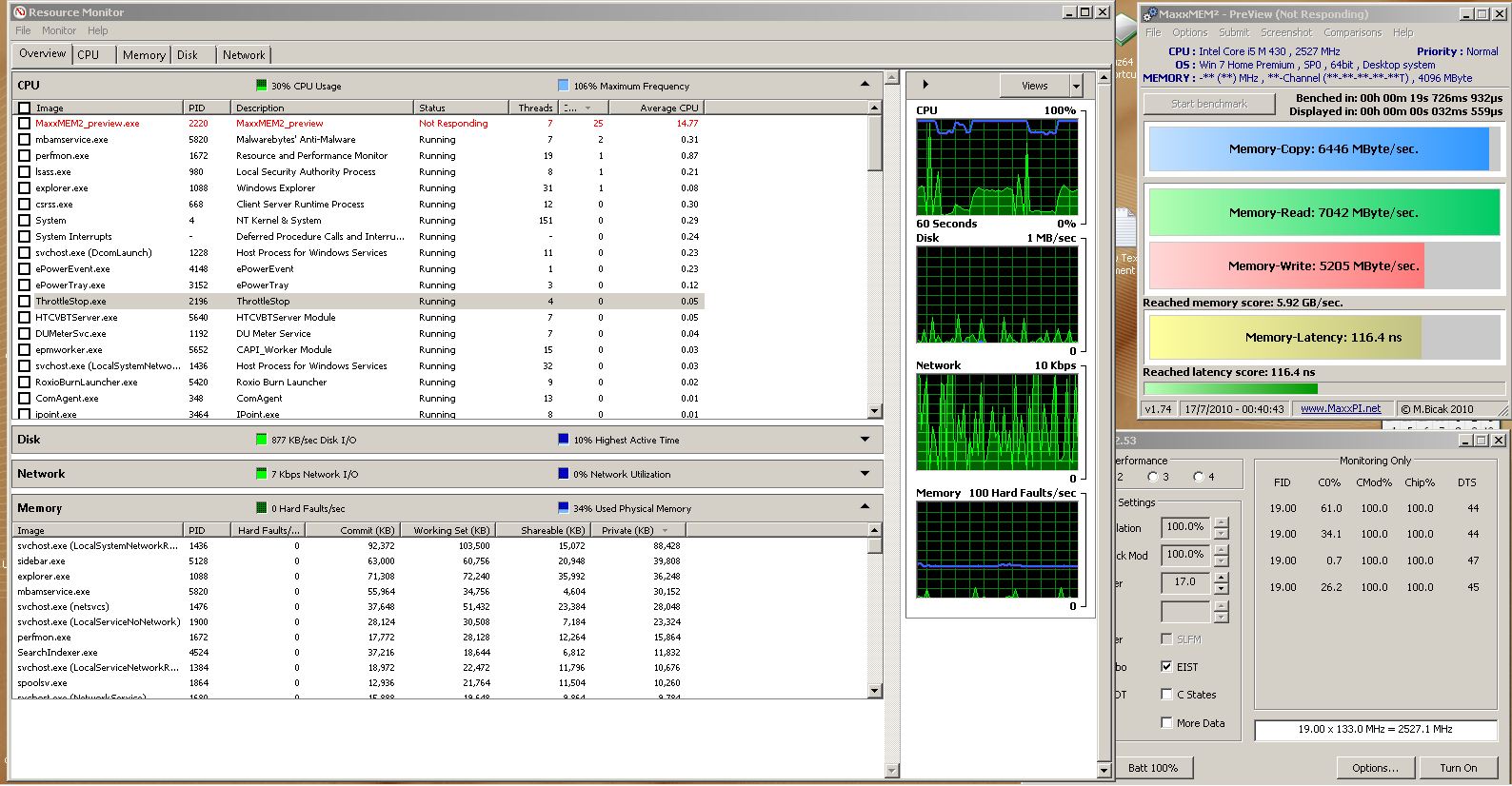
now open the task manager and then click on resource monitor.
open cpu and memory so you can see them.
open throttle stop and cpuz or any program monitoring cpu voltage
then run maxmem and see if anything jumps out at you
my throttle stop did nothing, but it also says my ram was at 106 percent memory freq. whatever that means
-
Attached Files:
-
-
I booted at 1200 FSB with the mem still at 1333 (so 9:20 instead of 1:2) and raising the multi still drops the performance. And both numbers are lower then the same multi at 1333 FSB. Furthermore, once the ratio is set in BIOS (9:20) I cannot take it up from 1200 to 1333 in windows because the Ram becomes unstable (I was able to raise it but could not finish MaxxMEM). This would put the ram at 1480 MHz for those interested. It is NOT stable at 1.5V so far lol (stock 7-7-7-20-33 timings)
-
I am getting tired, so throw me a hint here, what am I looking for
And your CPU (not RAM) is shown as 106%, is it overclocked? -
somehting is up.
when i turn it on, ram drops to 99 percent, when i turn it off it shoots up to 107
ram is stock and cpu is stock with turbo enabled.
not exactly sure what we are looking for but there is something there.
so in theory...it's forcing my ram back down to 99 percent...when off...the ram runs at 107 percent. -
Sounds like you have a different problem then haha
My ram stays right where it should the whole time (at least according to monitoring programs). Same for CPU. All the clocks check out just not the performance of the ram.
Given the somewhat linear nature of the drop in performance with a higher discrepancy between current and BIOS set multiplier I am heavily inclined to point to the system BIOS and something to do with the Chipset. Mainly because it is the biggest unknown for me and is where the memory controller actually resides. -
and right where it should is what?
it might help me then -
I never at any point see the ram show as anything other than 1333 MHz. The CPU stays where I set it as I have speedstep disabled and am not utilizing power saver mode in ThrottleStop for these tests. This is verified using HWInfo32 which shows active core speeds (as does ThrottleStop)
-
take a look at the picture and look at the top of it. that is what i was talking about....what percentage is yours reading? or are you talking about something different?
-
Quick question while I'm setting up my benching SSD. Since ATI doesn't use physx, can I just removed that (Physx Runtime) from the installation process for Vantage? Or is it needed with ATI Cards? I thought only nvidia cards used physx. Thanks for the help guys.
-
that's a big 10/4 negative! do that and you mess up the installation.
-
Got it, Thanks, I installed it anyway figuring if I didn't need it, easier to remove just that later on. Now I won't mess with it. Thanks +1
-
Ya you cannot run the PhysX test without physx installed, even though you are not really utilizing it
-
One last question, CCC reports crossfire is enabled, yet GPU-Z says disabled. Do I need to install command center to turn stealth mode off, if it's on?
-
Hmmm, can't help you there. Have you tried just restarting the computer? lol
-
if you do not have CC, then stealth mode can not be enabled. Sometimes Crossfire just gets stuck in the off position. I would disable it through the CCC and re enable it. This corrects the problem for me 95% of the time.
-
for ati not doing physx, it sure was doing something while i was playing batman...probably all cpu though..but still...for a split second.....i felt like i was king...lol
-
Well, tested with FurMark and crossfire is definately not on. Tried disabling and enabling didn't seem to help. I'll keep toying with it.
-
For what it is worth, try installing the Dell drivers (they usually enable crossfire properly) and THEN install 10.6 OVER them. That is what I always have had to do with my 4870s
-
Hmm, resource disk says Video: AMD Mobility Radeon HD 4870 Drivers.
 Dell... Oh, well worth a shot
I had Catalyst 10.6 installed, which I know there were problems but stamatisx had them in his benches so I figured I'd give them a shot. I know there were problems with them as far as gaming, but figured maybe theyd work for benching.
Dell... Oh, well worth a shot
I had Catalyst 10.6 installed, which I know there were problems but stamatisx had them in his benches so I figured I'd give them a shot. I know there were problems with them as far as gaming, but figured maybe theyd work for benching.
-
try doing the have disk method.
but update the second card first, then update the first card...reboot...and just maybe...crossfire will enable..... -
or just go online and download the 5870 drivers....those were actually the only I could get to enable crossfire on my R1 after flashing the 4870s to the R2 vbios
-
I'm downloading the stock dell drivers now. Dell put the wrong ones (4870 drivers) on the resource disk and they quit installing and just sit there. Might as well call it a night as the drivers won't be done downloading for the next 2.5 hrs Anyone know where I can get the 10.5 drivers? I can only seem to find 10.6 which I coudnt get crossfire working on. Maybe it'll work after I install over the stock drivers.
-
Dell ones for the 5870s are the 10.5 so if you install them you will be fine
-
Gotcha, should be done tommorrow and I can get some numbers up with the 520 CPU.
-
If you manage to complete all the benchmarks with all three CPUs you will provide us with more reliable info since all will be performed on the same laptop instead of different ones
(eliminate the factor of MOBO, chipset, GPUs, RAM, etc...)
-
Yea, it should be interesting. Especially with the 920 and 940. Only differance there will be. So far as far as setting it up, I've done the clean install, installing only display and chipset drivers. I also disabled quite a bit of services and ran through the whole SSD optimization process. Than I disabled a bunch of devices in the device manager like the optical drive and the webcam as well as all the audio services and drivers. It also prevents me from listening to that stupid BIOS beep due to my power adaptor. Trying to decide what else I can disable permanantly. A lot of them will be killed prior to the benchmark runs, but the real unneccesary ones are being disabled now.
I'm going to be doing runs on 3DMark05, 3DMark06, Vantage, and possibly PCMark Vantage full runs. They take 1.5hrs to run, so those runs might just be stock.
I'm tryng to figure out the best config to do PCMark Vantage full runs since the full run is more about the full system abilities. I'm thinking once I set up the dual intels in RAID 0, I'll do a 520, 920 and 940 run on each. Not sure if I'll overclock it for PCMark. -
Not many people bench pcmark vantage (is not even used in hwbot) so you may be able to save time skipping it. Also do the rest of the CPU benches as used in hwbot (also mentioned in post 1)
-
Wow, that's going to take a while... +rep from now
-
Yea, looking at it, only PCMark05 is used for points. I'm downloading the other CPU tests now from HWBot. Can't seem to get the wPrimes though, invalid files
Might set it up to download some more GPU tests before I go to sleep too. Doing most of the downloading and web browsing from the M11x. Not much else around here to do but work and bench.
-
pcmark vantage is worth a trophy though
-
Hmm, so true. Thats a good point. Downloading now, along with Aquamark3, 3DMark01 and 3DMark03. Any other decent benching programs I should pick up?
-
Just get some score's up
-
Well I think I'm just about done setting up my M17x Benchmarking SSD. It's a pretty sweet piece of work. And awesome login screen, nice avatar and plenty of programs to use. Here is what I got so far. I attached a pic of my desktop, and as it stands, the only program I can't get to install at the moment is 3DMark03. I get some funky message when the installer opens up. Scook? jonkiss, any ideas?
Also couldn't get either wprime to work.
Benching SSD Desktop
![[IMG]](images/storyImages/benchmarkingssddesktop.th.jpg)
Last thing, when benching fro hwbot, what settings do you use in the super pi programs? -
Superpi is 1M and 32M. As for wprime, try a different do? No clue on 03..that installer works fine for me
-
Ahh, thanks, At the moment I'm downloading 03 from futuremark. The installer for the one i got off Guru_3d gave me issues. Also Unigine Heaven gave me issues too. Might be because I have so much stuff disabled.
-
that might be closer to right....with all the things disabled or the installer is corupted.
wprime, you will need to set it every time you start a new instance of it.
it has to be set to the correct number of threads.
click advanced then set it to right number of threads for the cpu you are benching.
click save..then bench away.
just as mr cook said
the only ones that count are 1M and 32M for super pi...none of this off the wall 2M 4M 8M 16M stuff..lol -
Looks like some tinkering is in order in the future. Got a bunch of features turned off, and when I went to use the login background changer (I'm) running installers from a thumbdrive) I had to turn .Net back on in order to get it to run and change the login background
-
hummmm, you can do a system restore back to before you started turning stuff off....then start turning them off slowly...
-
I'll need to do some trial and error. System restore is turned off
-
hummmm, you guys sure do turn off allot of stuff!
-
Wow what a headache, I had stuff way outta wack messing with the services. Had to go back and set each one to thier default settings so that I can start over
lol
I like to think of it as continuing education...
-
Yeah, before start messing with services you need to have everything installed and then disable the unnecessary ones. Didn't my list work for you?
-
It did, I just tried taking it a few steps further
-
Yeap, that's why I left the guide with those.
Btw how do you plan to cool your laptop for the benchmarks? -
When I really get into it, it's going to be sitting directly in front of an A/C on full blast with the back cover off probably. It'll be sitting on it's side so the A/C blows directly into the bottom of the notebook.
Question, did you reflash you GPUs? Thats what I used to do with the 4870's but I was going to try a software overclock and when I apply settings through "AMD GPU Clock Tool v0.9.26.0 For HD 5870" the M17x freezes. Thinking I'm going to call it a night at this point, but I'll get back to it tommorrow
EDIT: Just read about the furmark trick. I'll give that a shot tommorrow.
-
Yeah remove the cover, otherwise the air flow won't be enough
I did reflash the GPUs but only with higher voltage. I had to restore them back to default because I didn't have enough cooling and it was overheating. (1.15V) So my highest scores were with stock voltage.
I used the riva tuner and the 10.6 drivers for vantage. For 3DMark06 If I remember correctly I used the AMG GPU tool. The furmark trick applies on that case as well.
TIP
Try not to go directly to the highest frequencies your CPU or GPUS can handle, that will depend on how low temperatures you can achieve because if you push for instance the CPU too high it will throttle all the time and you won't achieve anything. Start from low and keep rising. Also try to run each test separately because it's really annoying to find out in the middle of the benchmark that you can't complete it and crash with those settings.
Personally I found my highest stable GPU clocks first and started playing with the CPU afterwards -
don't feel bad, I did the same thing. I settled for black viper's 'tweaked' list, It didn't really help too much, I think I averaged another 100 points or so in 06. The only way it's going to make any sort of big difference is if you *really* hack it all the way. I'm not willing to go that far for an extra 300 points though :/
-
i took it down to 18 processes but i have a decent knowledge of what each one is tied to so i know whats going to work and not work..... it did look like it was helping in 3d06, i was getting higher fps, like during the canyon flight i was hitting 195 occasionally instead of the 175 it was usually hitting but i bsod 4 times during the snow filled scene and started having issues with my gPUS so i called it a night. i have to wait for my new 4870 slave to get here( yay for 2 days of warranty left) to continue benching, i likely wont push the fsb to 180 again though considering tomorrow is my last day of warranty. =(
-
I took 20 services off line and scored~ 47 additional points. 18 is a far cry from 63-70 however, and most of the ones I touched were in manual mode anyway.
-
essentially it netted me the same as the difference between oc'ing to 177 & oc'ing to 171 FSb ( an average of 300 points on the final score) which gives me some added stability but it is painstaking to go through them all and decipher what they are actually doing. its fine with 2 separate drives though, as you don't need anything really when benching, save the Wifi card, if you have a bench drive & you are serious about getting High scores, this would be the optimal setup IMO
*OFFICIAL* M17x Benchmark Thread - Part 3
Discussion in 'Alienware 17 and M17x' started by BatBoy, Jan 30, 2010.


![[IMG]](http://img541.imageshack.us/i/benchmarkingssddesktop.jpg/)
