 Problems? See this thread at archive.org.
I can play around all I want, but I can't go above about 845Mhz on the core at that voltage. How are you getting those GPU clocks DR650?Wow! Congratulations!
-
-
I was using 1.15v GPU, straight a/c cooling, and flashing the bios. Increasing the TDP/TDC. Saying a prayer it makes it through the run, offering a sacrifice to the throttle gods too. I guess I must have good cards, because I can book all day long at those clocks, I just can't always make it through a run. I just tried some lower clocks with it sitting on my Cryo and it wouldn't get more than 5 sec into Vantage.
I literally worked on it for 6 straight days from about 7pm-2am trying differant things. -
the temps help a lot for stability - that is unavoidable physics
-
when you try to set a higher voltage...it changes the registers and the os cant translate them correctly..because these mobile cards are suppose to be hard codded on the board for the voltage, so software mods above spec, usually causes bsod's. although, ichime was able to boost his voltage up on the 4870's....
-
Like I said, if we can find a way to edit the voltage table the way I did on the GTX 280m's in NiBiTor I think there are improvements to be made!
-
I was able to hit 1.15v, but couldn't clock any higher than whan I've done. It'd be nice tpo be able to up the clock more, although I have yet to try 1.2v. Though doubtful it'll work.
-
I was using A/C as well. The laptop was ice-cold to the touch, and my fingers were so cold I was starting to lose coordination in them. Up until this point, I've had very good GPUs that OC'd well, so one laptop outta four ain't bad! Is Throttlestop applicable to everyday gaming, or just super-high OC for benchmarking?
-
Got a chest freezer?
lol -
I was just reading a forum today where 5150Joker had some good things to say about ThrottleStop's TDP/TDC feature and how it has improved his gaming.
http://forum.notebookreview.com/6483542-post241.html -
Thanks Unclewebb. Your program is very useful, and I don't think anyone could achieve the kind of scores they're getting without it. Do you take paypal donations or anything?
-
I deleted the PayPal button from ThrottleStop to keep it nice and lean.
If anyone wants to buy me a beer then you can download RealTemp, right click on the title bar, select the About... menu option and there's a PayPal button there that you can use to make a donation.
RealTemp 3.59.3
http://www.fileden.com/files/2008/3/3/1794507/RealTempBeta.zip
There's not much money to be made writing free software. I get my reward from seeing the record setting performance in this thread and a few others with the help of ThrottleStop. -
Alright. RealTemp is nice and lightweight. You don't have anything written that monitors GPU temperatures, do you?
-
I think you should take ThrottleStop to the next level when you have another breakthrough feature like TDP/TDC unlocking again by doing what Abo does and issue keys to people that pay. I think the work you put in merits payment. With the TDP/TDC unlock alone you could've made a cool grand based on how many people I'm seeing use it. We gotta get you onboard the M17x train with us.
-
How about ThrottleStop? Try adding GPU=2 to the ThrottleStop.ini configuration file to monitor ATI GPUs. If you're using CrossFire, it should read both GPUs and report the highest temperature it finds. I left this as an optional feature for ThrottleStop so you can turn off the features you don't need when benching.
Good suggestion 5150Joker but I don't think I'll be able to top the unlock TDP/TDC feature. That's been the key to finally letting the M17x reach its full potential. Glad I could help. I'm sure everyone appreciates that you originally asked me to try and figure this TDP/TDC stuff out.
-
Sheesh I'm falling behind here huh. I guess I'll do a run later so I don't get knocked out of the top 5. My biggest issue is CPU temps since it's so hot here, I think I've got a pair of nicely OC'ing cards though.
Well you'll be getting a small donation from me shortly. It's been an immensely helpful feature. -
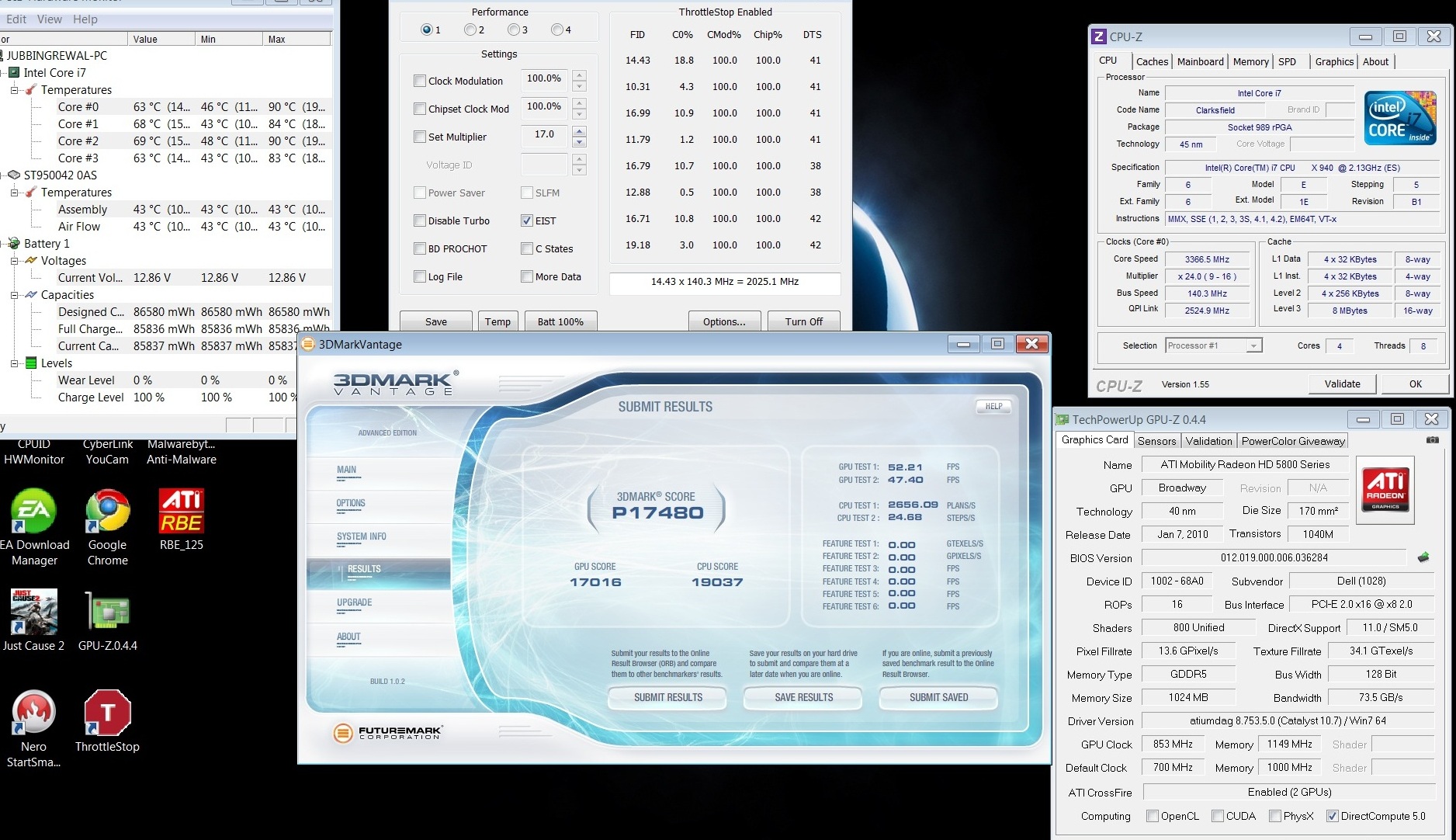
Yup just like I thought, CPU is being limited by heat:
Attached Files:
-
-
Now you see why we are using chest freezers and AC units lol
-
If you guys want fast updates for benchmark results, you can add yours here and modify them each time you beat your or someone else's score. It can be difficult for a single guy to update multiple scores so this should make it easier: Benchmarks - Alienware M17x Wiki
It follows the same layout as here, you post your score here and link to it in the Wiki. This prevents any kind of score fraud but as far as tampering goes, Wiki changes can be rolled back with abusive IP's banned from the site. -
I'll be doing some basic testing today on this. No pure overclocking as I'm not even sure 100% what I need to do, nor do I care to find out yet. I've got all the programs I'll ever need, its just a matter of setting. Stock score's is all I want at the moment.
-
Could someone explain what TDC is concerning a CPU? I'm reading around and I keep seeing Thermal Design Current, but current is measured in amps. My CPU obviously isn't pulling that much amperage. And when adjusting those, I'm just monitoring my CPU temps, right?
-
Well I said I'd get a stock clock out of the way, and here it is.
No Overclocking, no external cooling, just a simple straightforward test.
So in other words, nothing spectacular (Although ironically enough its better than all the R1 scores
)
Attached Files:
-
-
Well technically your cpu is overclocked lol. I will have to try 10.7 it seems to be boosting your gpu score
-
Lol yea, but you know what I meant
It's 10.7a (which just came out about 24 hours ago), which makes me afraid to unplug my laptop now. -
Jubbing, here is a direct link to my score. I also added my screen name in it as well. It's the same run but this just takes you directly to the pic it's self rather then the imageshack site. Next time you go back if you don't mind slipping that in there I'd appreciate it. I know tracking the scores is a lot of work bu we all certainly appreciate it.
http://img691.imageshack.us/img691/6994/92026mgpuoc10dr650se.jpg -
Done and Done DR
I must say your score's are tempting me to start up my benchmarks soon. -
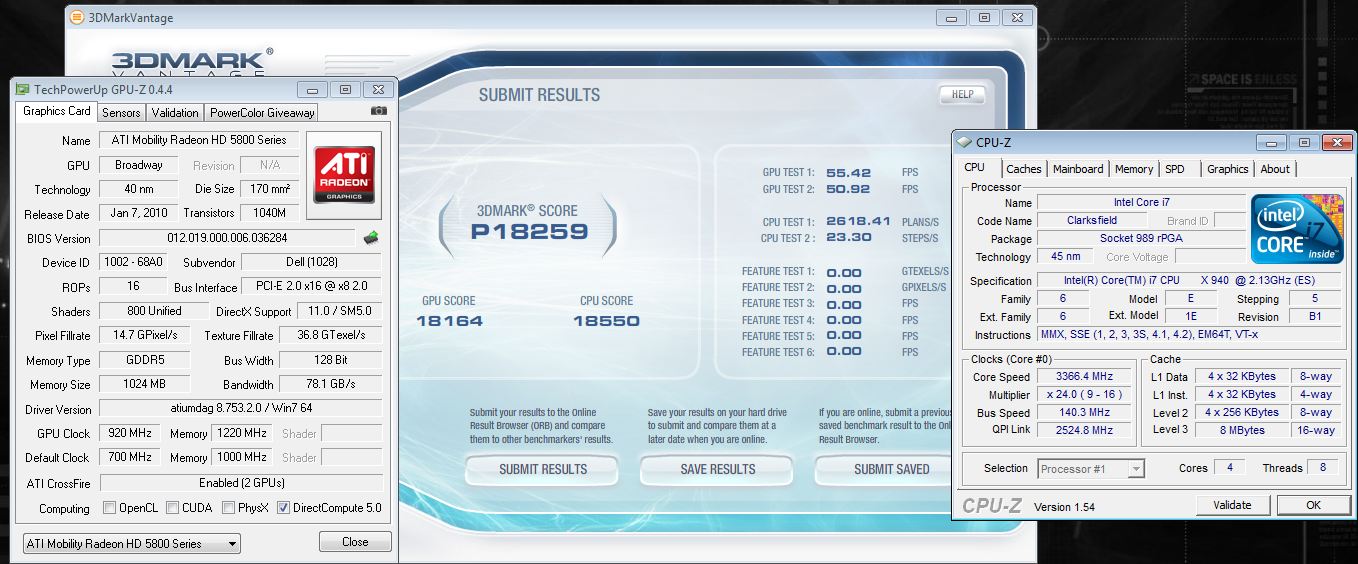
My memory was too high, so I lowered it and got the core up quite a bit.
Attached Files:
-
-
TurbodTalon: That's right. TDC is Thermal Design Current and your CPU really is drawing that many amps. No wonder these things get so hot.
Here's a page from the Intel datasheet.
http://download.intel.com/design/processor/datashts/320765.pdf
![[IMG]](images/storyImages/920xmdatasheet.png)
When the multiplier is increased on all 4 cores and all 4 cores are fully loaded, you are definitely going a little beyond Intel's design current spec.
The TDC number that ThrottleStop is showing you is the number of amps that controls Intel® Turbo Boost. By raising this number, you are increasing the number of amps that can flow through your CPU while still getting Intel® Turbo Boost. When you go beyond this number then Turbo Boost will start to cycle off and on rapidly and will decrease performance.
Increasing Performance with Intel® Turbo Boost Technology -
I think I may have setup something wrong as it won't let me overclock my core clock in rivatuner above 850mhz. Plus its really annoying how I have to open Furmark everytime I want to change my clock settings, otherwise is BSODs
-
Just reflash your vbios.
-
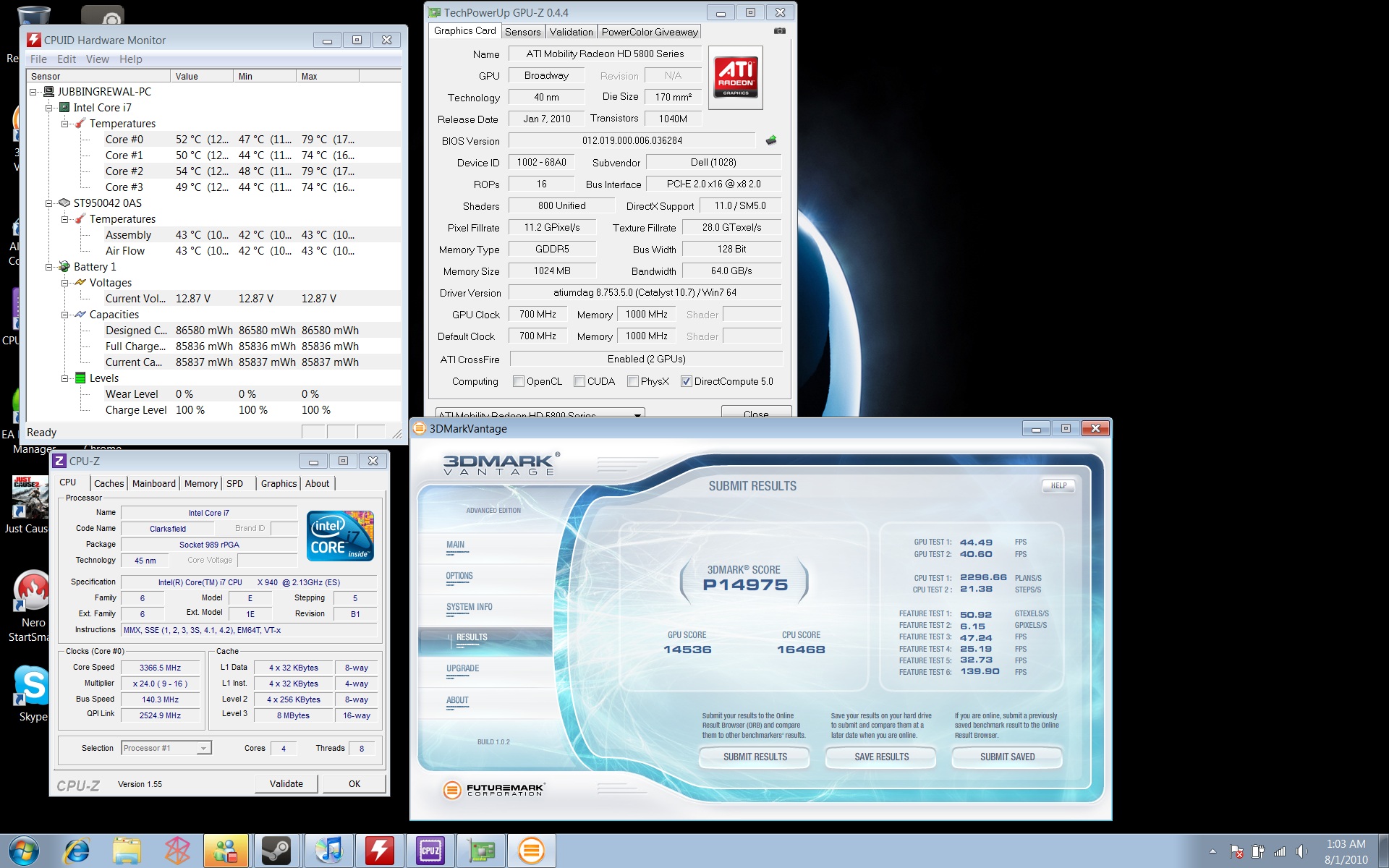
Ok So I did my first benchmark test. Once again, no external cooling at all (which would probably explain the really high temps).
First run after flashing the vbios, and having a dodgy 10.7a driver. So this was a clean run.
Not bad, but not great. More to come.Attached Files:
-
-
HP Pavilion dv5t $580 Shipped Link to Product Deal
HP Home & Home Office has the Pavilion dv5t notebook for $579.99 after $120 instant rebate with free shipping.
Includes 14.5" display (1366x768), Intel Pentium P6000 dual-core processor, 4GB RAM, 500GB 7200RPM hard drive, DVD burner, 1-yr warranty.
$699.99 - $120 instant = $579.99 w/ free shipping![[IMG]](images/storyImages/button_buyNow.png)
[added 8/1/2010 | expires 8/8/2010 11:59:59 PM ]Attached Files:
Last edited by a moderator: May 7, 2015 -
-
I'm just gonna put it out there.. I have nothing to do with the name of the thread being changed! Mod Please correct it!
Edit: Thanks Turbo, I can't say your runs aren't too shabby either
As far as cooling goes, I DO have to parts to help me cool, but I didn't want to because it takes some fair effort to set it up, perhaps tuesday when I have more time. Plus its winter here so I figured it *would* help... clearly not cold enough. -
NIce scores guys.
Turbo, hows it going as far as clocking higher than that on the GPU scores? Your CPU scores are difinately looking good.
Just wanted to throw something out there. I thought it was funny. I checked the Crystal Disk info for my Benchmarking SSD. Check out the "Power on Count" vs. "Power on Hours"
![[IMG]](images/storyImages/benchmarkingssd.jpg)
Thats what you get when your benchmarking. Just goes to show how much trial and error was put into getting that Vantage score. I didn't mess with any other benchmarks much yet. -
Hey DR650, thanks for asking. I actually cannot go even 5Mhz higher on either the core or memory without a lockup somewhere during Jane Nash. The only thing I haven't tried yet is SetFSB, but I don't know if that's going to give me what I need to get near your score.
I think I could do a bit more CPU tweaking, as it seems to take the punishment well. Another testimony that ES chips can hang. If I go 150 over on the Vcore in the BIOS, she heats up and throttles really fast. 75 over is OK, and where I typically run. I don't know much theory behind all of the settings you can alter between the BIOS and Throttlestop.
As for my cooling, I don't know if setting my laptop on the AC vent for our central air is going to cut it. I don't have any other means of cooling it. I have a love/hate relationship with benchmarking, which I'm sure you understand. It consumes me. I go to bed thinking of ways I can tweak stuff for the next chance I have to bench again. I wake up thinking the same thing. My wife just laughs at me.
-
Hahaha, yea thats what my fiance says. She calls me a nerd. Whatever, I get into it. As you can tell from my bench SSD i've crased and restarted hundreds of times. As for my cooling, the A/C I have now isn't that great so I'm not sure it's going to do what I need. As for the CPU, I never tried messing with it much except for throttle stop. I always had it at 75mV and 5% OC. I might get into messing with it more. I didn't realize you were able to pull off those CPU scores with just 75mV. I suppose that explains how you've consistantly hit that 21K score. I always struggled with it. Might be another reason for me to put in the 940 and test more with it. I have the 920 in. I'm gettin ready to watch a movie and waiting for a buddy to return, so I quickly ran this. Old school.
3DMark2001 SE
49454 3D marks
![[IMG]](images/storyImages/gpuoc1.th.jpg)
-
Damn! The oldest one I have is 2005! My GPU scores are keeping my overall score low. The cards aren't getting too hot or anything, they just won't OC any further without lockups. I'd like to see you hit a 20K overall score.
One could really take something like this to the extreme. Like removing the motherboard and only having necessary items hooked to it. Big nasty heatsinks instead of the heat pipes. All kinds of stuff. -
Yea, I'd love to get into that. Maybe when I get home I'll give it a shot. I had it pretty cold, and the highest I could go was 935/1270 which isn't bad, but I wanted to hit 20K overall too. Still want to.
-
Yeah, I'd say you have a good shot at it. It really depends on how crazy you want to get with it. It would be nice to get some more voltage on the GPUs and some extreme type of cooling on the CPU to keep it from throttling. Who knows what kind of scores we'd see.
-
That woulde be good. I bet that if I could keep the CPU really cold, I could hit 23K. That would take a little stress off the GPUs too. I need to try and see if I can up the voltage on the GPU's to 1.2. though I doubt I can hit that. Maybe I'll pull apart the entire system on friday since it's my day off. Sit it in front of the AC, and just run a bare motherboard. Hmm... Thats a thought.
-
great score there! that gives you a gold cup.
who knows?...i knew..
-
Yea that is true, John did call it a ways back. Especially with the 18K GPU score. I had a brain fart and forgot that I could type the voltage into RBE since it's not on the drop down menu. Any ideas for added benching performace John?
I've been meaning to set up a HWBot account. I've been saving all my scores in screen shots and in file format. That was a quick run with a software GPU OC. I'll try it with a reflashed vbios and increased voltage in a few days when I get more time. Last few days I've been lazy. I just know that when I get a taste of the gold cup, I won't be able to quick
-
and just start when you know you have some nice long quality ours to spend.
your first set of runs, will just be to get you on board. then you come back around and see where you need to better your scores.
the thing about the bot is...you will be competing against people who have no problem with getting a machine colder for the sake of a higher score....and they are slowly starting to filter in. you get in now...you get your achievements in faster. and a bunch of free gold cups as well. check out scook, he is up to 23 now..
and they do have mods to keep the scores legit..
-
I'm curious, which would work better for a laptop. A strong aircon blowing right into the fans in order to have optimal cooling/putting the laptop in a freezer/have a aircon blowing onto the keyboards.
It'd be interesting to see with the same clocks... -
Here is a 3dmark05 benchmark
![[IMG]](images/storyImages/05run1.th.png)
-
1: that's no girl..lol
2: run your cpu as a dual or single core..best to run dual core so as everything else can run off the other core.
3: 01 is a cpu speed test with dual cores winning.(the faster the core, the faster the gpu runs..or something like that).this is why i say bench them all..this is where you try to make that 1000 dollar chip play catch up here.. you should be able to match his speed.
4: and look at his scores at each test. take only one of those test and try to beat it, once you get past that part...then you can start running the other test.
this saves you from having to wait 8 minutes to find out your not even close...lol. settings play a nice decent role in this test as well.
the higher the cpu the better your chances at winning./ and running in dual core...you shouldn't be anywhere near that tdp max or heat.(speculation of course) -
LOL you saw that before i edited it
I tried changing the amount of cores to 2 cores and 4 threads but that doesnt provide for more stability on higher frequencies. i can get it stable at 3.7 using 27 multipliers but when its at 3.9 using 28 multipliers it crashes on the last test. Ill try to play around with it more. Got all the others easily except for this one... 4 gold today
what kind of settings did you mean, OS or the benchmark? -
well...that's because i know him..
try 2 cores and 2 threads.
os settings
and os for the job...
they go back and forth between win 7 and xp -
Tried it on 2/4 and it failed and now its running on 1/2 going good so far. Will see the results in the end. Should i be using the fridge for 01/03/05 too? I didnt see the reason too but now i might need the freezer too
to disable a thread should i select to boot with 3 processors instead? -
all test start with normal over clock perimeter. nothing to fancy...you want to see where you stack up...then if that fails...then you start going extreme.
not sure what you mean by 3 processors?
if your bios does not allow you to turn off ht, then use msconfig/advanced settings and set processors to 2. then reboot.
you can leave this as is to bench superpi as well. -
I meant if i set it to the 3 boot using 3 processors in msconfig would that make it 2 cores with 2 threads or 2 cores with 3 threads... being even and all.. i dunno
The bios doesnt have an option for hyper threading so i am stuck with msconfig. The weird thing is thati set it to 28 multipliers and at the end of the run its back to 26 multipliers, tried using both e-leet and TS lol Tried it with the save feature in TS and will see what happens. Should i overclock the cores that are not in use too?
*OFFICIAL* M17x Benchmark Thread - Part 3
Discussion in 'Alienware 17 and M17x' started by BatBoy, Jan 30, 2010.



![[IMG]](http://img192.imageshack.us/i/gpuoc1.jpg/)

![[IMG]](http://img62.imageshack.us/i/05run1.png/)