Problems? See this thread at archive.org.
I'm not sure it matters a lot, I can manage 155mhz FSB on no Vcore or VDIMM increases, I'm sure I could get another 10-20mhz if the samsung ram didn't give out first.
-
can you make the ram slower in the bios? if you did that (effectively lowering the multiplier) you could then up the blck from windows and not strain the ram too much
-
Well, I've done it. Three more CPU's on the way for some more benching. Also picked up a 12gm AS5 tube, and 14gm Arctic silver. Figured since I'm not going to keep the CPU's in very long, I might as well get the cheaper stuff. I can keep the system cool anyway.
Also had to cancel the order on my Kill a watt meter. I didn't pay attention and I need one that can run on 110V and 240V. I run my M17x straight off the wall and don't use any of the crappy converters that are sold here.
Edit: Quick question. In the M17x R2 the default voltage for the memory is 1.5v, but you also have the option to raise it to 1.6V, and 1.7V. When would this actually be helpful? To date I have yet to find myself in a situation where I needed to raise it, and have not seen any postive results from doing so. Wouldn't this be better suited for the R1 where you can seperately manipulate the RAM? Granted I havn't messed with tweaking the RAM as I know very little about it. -
Scook check out the aquamark score

![[IMG]](images/storyImages/aquamarkrun2.th.png)
Using the dell beta drivers.
BTW, what happened to the single 4870 section? Did you talk to them, I tried to find someone to email but i didnt find any on there site. -
TheCodeBreaker, how do you get the screenshot like that? I can't get out of fullscreen mode to get a screenshot of aquamark.
-
I just clicked on the print screen key next to F12. Exited aquamark, And pasted it in paint.
Maybe you have the numlock on or scroll lock on... -
Hmm possible, but when I took the screenshot all it would paste is a solid black square. I'll give it another shot soon.
-
That is pretty high
I got some work to do (maybe?). Have not ran that once yet haha
We will see how it does at 4.16 GHz
-
what do you mean "what happen to it?" it's right there. you keep submitting in single card mode. you need to click the video card drop down menu for how many gpus you are running.
that's a damn good score by the way.
wehen you hit print screen, you need to check if your function lock is on or off. or if you have to hit ctrl+print screen or something like that.
then you alt tab out of the bench.
open paint then control V. -
That 4.16GHz OC is killing me in 3dmark06
lol, scook said the scores werent supposed to go in the 2X 4870X2 section, so maybe hwbot can solve it by adding a single 4870 section or making the one right now as a single 4870 section.
I submitted my scores in both anyway, although no one else removed the daul card scores from the single section yet. -
To be exact, my thoughts were that it should be 1x and 2x 4870 as having a 4870x2 option at all makes it quite confusing since it is clearly not 2x 4870x2 when we have crossfire enabled -
ill ask massman about it. but in the mean time...quit making hard out of something simple...lol
-
heaven has just been added to the list of benching software for the bot.
get your bench on..
-
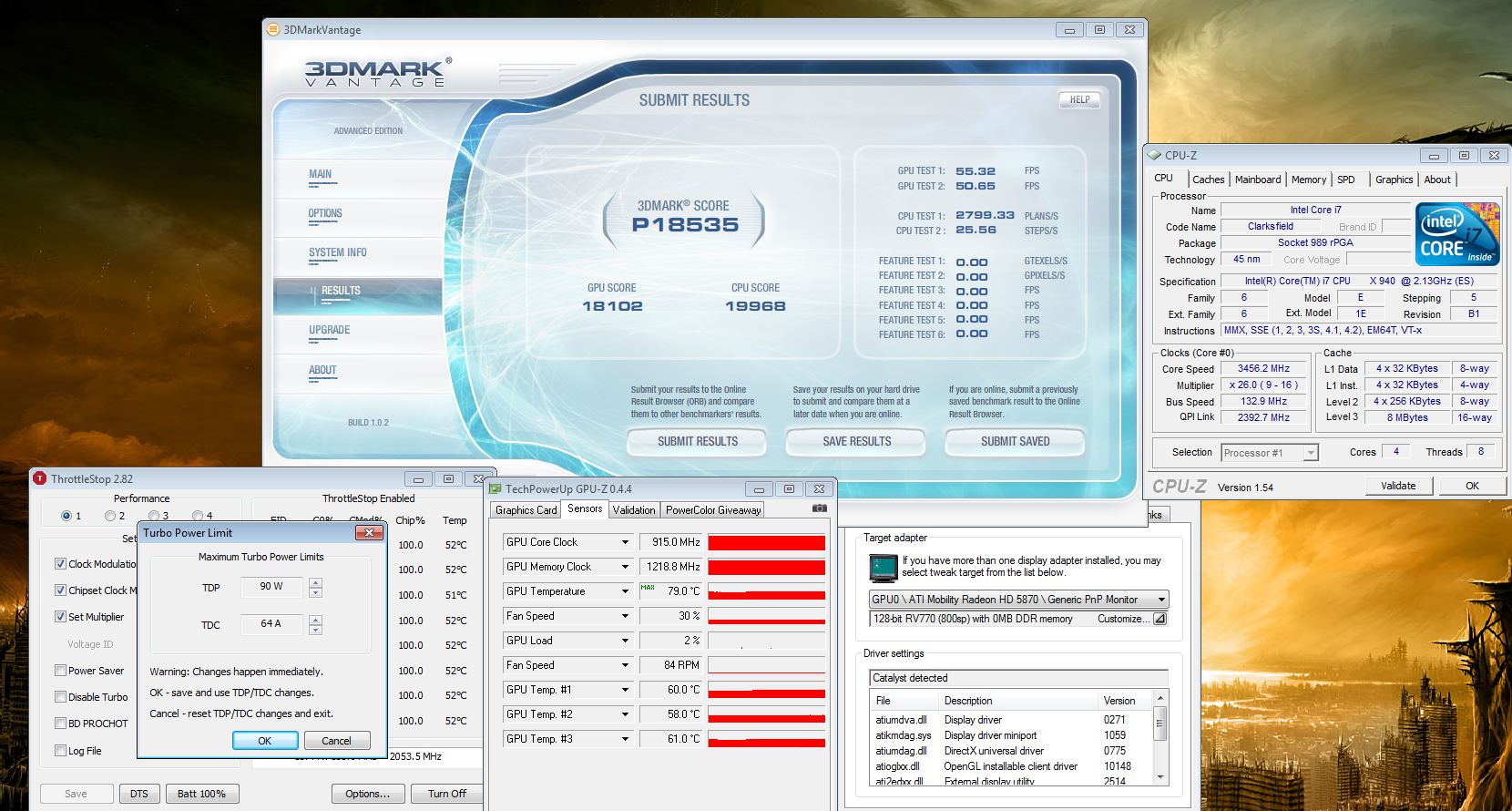
Well CPU + GPU mods are done and the temp drops are phenomenal for me. My CPU was always giving me temperature issues and I managed to drop load temps close to 20C using a combination of retention mod + copper tape. The GPU temps also dropped about 20C with the retention mod.
I did a vantage run on air and it seems the efficiency isn't there unless the PSU is actively cooled since the system wants more watts than the PSU can provide at ambient temps. Still, these are settings I could theoretically use 24/7 if I wanted:Attached Files:
-
-
looking good joker!!
i was checking out that thread..very good stuff over there. -
20C difference Thats really impressive. Can you post the max temps when under full load without ocing or TDP/TDC adjustments. under prime95 or something to really stress the cpu?
-
With new levels of cooling to coutner the throttling, lets see what these processors can do!
-
These are the max temps at stock TDP with all 4 core/8 threads active. I posted pics + discussion about the CPU mod here: http://m17x.freeforums.org/retention-mod-more-on-cpu-great-temps-at-least-for-me-t17.html Keep in mind my ambient temp is pretty high since it's hot here in California right now. My room temp is always 75F and above.Attached Files:
-
-
nice wirte up there! The copper tape mod looks pretty simple but will it decrease the temps much?
-
I think maybe 2C or around there. Not a huge amount but every bit helps in my case.
-
I've been using my M17x for over a week now and am loving it. Should I use throttlestop for gaming? Does it actually make it more powerful? How would I use it? What settings? Could it potentially make my system worse?
Thanks. -
Joker, any idea where your CPU temps max out? I havn't had much time to hop online, internets been down here for days, and I don't have much time at the MWR. Did you simply remove the CPU heatsink springs and manually adjust the retaining screws for the heatsink? I see that the heat sink was wrapped in copper tape as well. This would definately help out with my benching
-
I discovered the strangest thing last night, it actually left me a bit unsettled:
I removed the keyboard last night to get to the CPU heatsink screws and as I was further adjusting them, my load temps dropped by another 2-3C (5C on 2 of the cores) by simply removing the top two screws and only leaving the bottom two screws in tightly. Keep in mind, my heatsink was always messed up so I had to bend it a little and I guess I probably bent it a bit too much so it didn't need those two back screws for optimum contact. My temps are great, I did a measurement against Jubbing and his 940xm (and he's in the middle of winter right now in Australia) using Prime 95 small TFT and 72W TDP and my max temps never exceeded 81C while his hit >90C on core 1 and the others were in the high 80s on their way to the 90s. I didn't even have the air conditioning running and it's the middle of the afternoon in northern Cali!
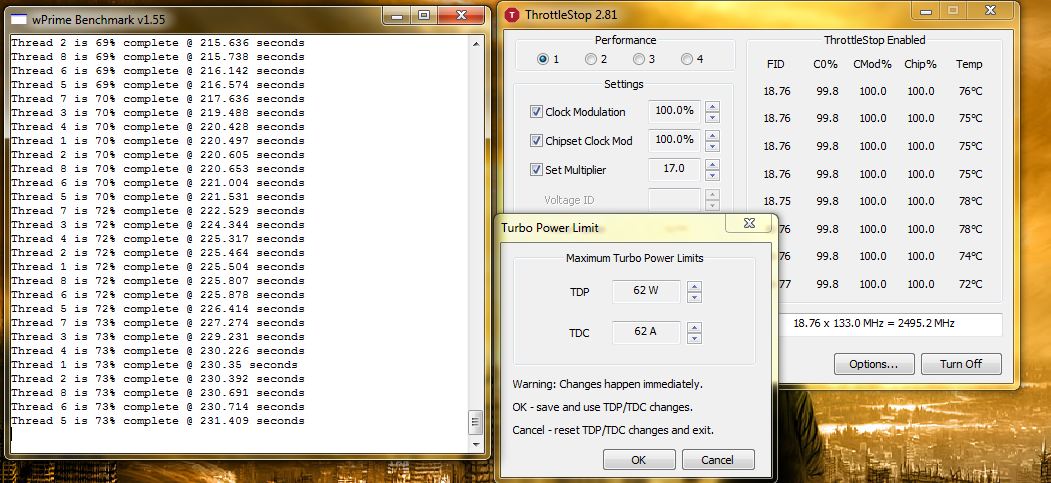
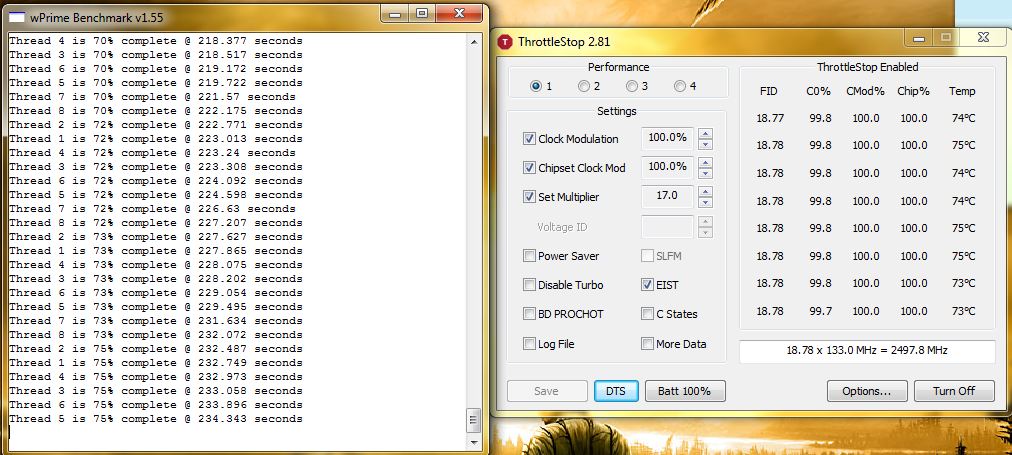
Edit: Check out my stock TDP (62W) run against the one I put up earlier. When TDP is raised to around 82W, the difference in load temps goes as high as 5C versus what I posted before. That's simply from removing two screws.Attached Files:
-
-
Some OCCT graphs at stock (62 W) tdp vs 82w tdp: M17x-R2 Wikia Forum • View topic - Retention mod + more on CPU = great temps (at least for me)
-
Nice temps there joker keep modding that thing
I think you can do a copper plat mod too, not quite sure how it would work out with the cpu and gpu in the m17x. It has worked in the past for the m1330 with the dedicated GPU. They put a copper sheet between the heat sink and GPU die, with thermal paste on both the heatsink and the die. Better explained here
http://forum.notebookreview.com/del...m1330-nvidia-geforce-8400m-gs-copper-mod.html
BTW joker, i decided to overclock my gpus the other day using amd gpu clock tool, and it said setclock failed, check device configuration. I know it is a driver issue, but i cant get anything that isnt dell drivers to install with the new bios(es) -
Throttlestop will give you more FPS in games that depend on the cpu alot, other than that probably 5 FPS(?)
Yes, it can make your system more powerful! It no longer throttles your cpu, which makes you use it at full performance.
Download the program, run the program and right click in the center, and you will find two options:
1. Turbo power limit- it will increase the TDP/TDC
The TDP, is the power limit, the TDC is the amount of amps that can flow through the CPU. Out of experience the second will heat up the CPU more. I would recommend something like 75/65 for day to day use.
2.Turbo ratio limit- is the multipliers the CPU can use, unless you intend on overclocking the CPU dont play with this, as youll need more voltage which can be gained through the bios.
You can increase them beyond that point but be aware that the CPU WILL heat up! Be careful when testing with it as you can damage your CPU and/motherboard if you dont know what your doing. Small increments should be good, as well as the setting i recommended.
It will not decrease performance, it can only get better.
I put that warning of damaging the CPU/motherboard so i am not one to blame, but in general out of experience the system would either BSOD or restart. Hope i answered everything
-
Funny you mention that, I was thinking of that today. I'll probably order a sheet of 100% (or close) copper that's 0.5mm thick and then cut a custom piece and use the heatsink with the retention mod. I also plan on locating some thicker springs that have more resistance to use in conjunction with it. I think the cooling in the M17x is more than sufficient to handle anything, the problem is Dell didn't take the extra few steps to make it work correctly.
I haven't tried bios a07 and don't plan to but I haven't heard of anyone else having a problem like that. Don't use AMD GPU tool, it sucks. Stick to Rivatuner, it's very easy and straightforward. Go to your registry, look for "Enableulps" and change it from 1 to 0. Then go to the M17x Wiki (in my sig) and look up the guide for OC'ing the 4870 with Rivatuner. Except now you will no longer need furmark to do it since it will change it on the fly thanks to the registry changes. -
That copper mode will most likely work with even better result in the m17x, as it doesnt share the heatsink with the CPU and GPU. And i agree with you there, the design of the m17x is by far the greatest, and most efficient, but dell needed to do a few adjustments, for the i7 version, as they run really hot! I guess thats why we didnt get better overclocking options
LOL I saw that the second gpu was not overclockingthe other day so i kept an eye on it using GPU-Z, and it said ulps, so i decided to google it and find a solution, and indeed i did the registry edit, for 2 files i believe. and i decided to check on it again but it still used ulps (ultra low power state i believe), so i just gave up on it eventaully. I will try out the rivatuner method although i remember using it, and it not working, even though it did before. Will check out the guide on the wiki tomorrow morning.
EDIT: BTW, i am using the A06 bios. -
Downloaded throttlestop 2.81 and the only things checked are clock / chipset clock mod @ 100% each and set multiplier @ 16. Also EIST is checked.
I ran 3dmark 06 and it didn't alter my score at all. Any thoughts? -
You need to do a bulk reg search as there are many entries for enableulps.
-Ash -
If you want ThrottleStop to improve the performance of your computer then you need to right click on ThrottleStop and increase the turbo multipliers or the turbo TDP/TDC settings or both. Keep an eye on temperatures.
If your laptop doesn't have throttling issues then the anti-throttling abilities of ThrottleStop aren't going to do anything for you. -
can someone run an re5 bench. with two 5870m cf? I'm curious @ 1920x1080 all settings highest? Can't find one in all these 160 pages of posts..
-
im thinking your searching skills are broke...lol
http://forum.notebookreview.com/ali...benchmark-thread-part-3-a-53.html#post5993875
a short list of possibles..
http://forum.notebookreview.com/search.php?searchid=5113620 -
I answered your question here.
-
Much appreciated dude. Honestly, I think I may look into it a little bit, but my ingame performance is so damn good already I may not need it.
-
Overclocking for everyday use is pretty much not needed and only introduces instability. These machines are beyond fast enough for virtually all the games out at the moment at stock speeds. And they will run 24/7 at stock where that may not be the case with even a mild overclock
-
Totally agreed. The only thing I use for day to day use is the 5% bios OC and the 150mV increase. Other than that everything stays stock.
-
I think my machine is already set @ turbo mode from stock. I leave it on there.
-
stock.
...just because you own a Bugatti..... doesn't mean you have to drive it beyond its standard limits.... every time you jump in it...
normal is good with these machines. -
We always hear of how you can get more perfomance what about battery life LOL. Did an underclock, btw its just as powerful as a netbook
http://valid.canardpc.com/show_oc.php?id=1358818 -
hey. submit that as a reference clock benchmark...good for a gold if they have that category for you.
-
hmmmmmm...that is.....not alot....lol
-
LOL, got it down to one multi but it submitted with two
BTW, what this Intel Turbo Boost Technology Driver there talking about? Does it help with performance? -
Ignore that driver. There is a thread on it and the conclusion is it does nothing
-
Ahem, so anyone have the slightest clue when we'll get a driver which changes things? Like 10.8 officials or 10.9s?
-
well after 10.5 everything is crap at least for the 4870s. only the dell beta driver (i think its 10.7) (which they removed already from ther website) is relatively good and the one i use for now
-
Joker tells me the latest build that came out yesterday or day before is perfect so far.
-
I have 4870's and with the ATI's official 10.8 + App profiles + App profiles 10.8a, I can say these are the best drivers of all the ones I've had. The installation was painless. Literally all I did was uninstall the current drivers from Control Panel, reboot, CCleaner, install drivers (double clicking only, no modding, everything installed with no errors), reboot, and install profiles sets.
There are no sleep issues, I gained a little over a hundred points on Vantage, and my games run better.
No complains. My only hope is that ATI doesn't break these with the next release. -
You gained in vantage compared to what? I may have to go back in my freezer if there is a vantage gain
P15k is calling to me! -
Lol. Don't even worry about it. I've run about 3 Vantage runs total since getting my machine just to know if everything is working OK. I haven't even overclocked my system yet. I just compare to my previous points. So, I wouldn't get my hopes up if I were you bro since my scores are already so low compared to you guys' scores.
My games do run better though.
*OFFICIAL* M17x Benchmark Thread - Part 3
Discussion in 'Alienware 17 and M17x' started by BatBoy, Jan 30, 2010.


![[IMG]](http://img689.imageshack.us/i/aquamarkrun2.png/)