 Problems? See this thread at archive.org.
Correct, however AMD's lead was even higher before the drivers we got last week... you would have been looking at a 12-15% better performance last week over Nvidia 580M
-
Ok, so I have the video, just ran out of batteries on the camera.... I will upload tonight. I also OC 15% to keep things even (713Mhz) I was between 80-88 at the same spot you were.
-
im eagerly awaiting that too.

-
92-99 FPS ... looks like avg around 95 ???
And I trust Xen's 80-88 ... guessing he averages somewhere in teh middle as well ... 84 FPS ???
If thats the case ... 13% difference. -
sounds about right. if you have the game please provide your numbers.
i am also epsecially awaiting numbers from 6790 owners! -
I can post Crysis, Crysis Warhead, Metro 2033, 3D Mark suits if you wish. But my scores are not comparable to newer 6970Ms since the stepping is much much older.
-
Ok here ya go stock settings on everything.
3D Mark 11 stock clock run.
AMD Radeon HD 6970M video card benchmark result - Intel Core i7-2720QM Processor,Alienware M18xR1 score: P5802 3DMarks
Stock Vantage run
![[IMG]](images/storyImages/3dmarkvantagestockrun.png)
Crysis Stock run 0xAA
![[IMG]](images/storyImages/crysisnoxaastockrunvery.png)
Crysis Stock run 4xAA
![[IMG]](images/storyImages/crysis4xaastockrunveryh.png)
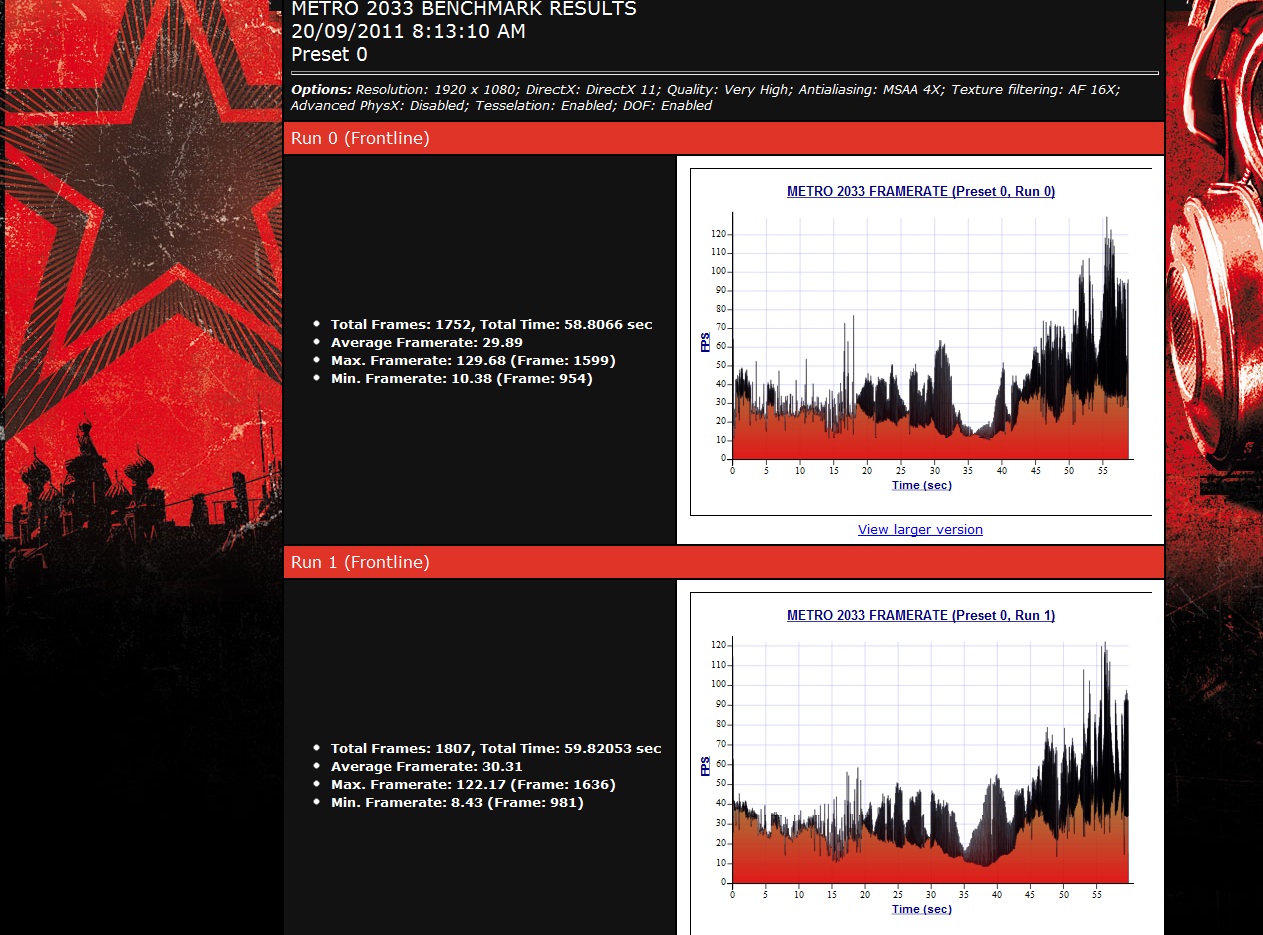
Metro 2033 AAA DOF disabled
![[IMG]](images/storyImages/metro2033aaaaf16xstockd.png)
Metro 2033 AAA DOF enabled
MSAA 4X simply crashes before it even goes into the benchmark. It seems to be a common problem for AMD GPU users.Last edited by a moderator: May 8, 2015 -
are your 6970m specs different or something? not sure if there is any newer stepping or if it makes a difference.
you should run the crysis benchmark using the 32bit benchmark file provided in the 32bit folder of the game and not that 3rd party tool. simple run the 32bit game version to set graphics settings and then run the 32bit benchmark. 64 bit version for me runs the game slower. -
here's a Metro run with everything maxed out (MSAA 4x, AF 16X, DOF, etc)
Attached Files:
-
-
That looks like it Ties Xen's where he had a 20% GPU OC ...
-
Now, to eliminate confusion, what are the correct tessellation settings in CCC? I'm using everything stock/unchanged, BTW.
-
The correct tessellation settings to be "stock" would be to leave it as 'AMD optimized'.
-
I'd love to know what that means....
-
It means the standard default settings for AMD's catalyst is the 'AMD optimized' option'
![[IMG]](images/storyImages/unledsvp.png)
-
technically...the run should look like this...technically
everything is really suppose to be set to application controlled.
![[IMG]](images/storyImages/unled4dz.th.jpg)
-
disregarding overclocking, if you were to game, what options should you have checked and such in CCC? im guessing itll always be use application settings?
-
Everything usually is but just this bit always has been set to AMD optimized so if someone doesn't change it they would be running it in that mode.
This setting from AMD is seen to be dynamic like for example in Crysis 2, regardless if you put application controlled or AMD optimized, it giving the same results as it would for a tessellation factor of 64. In another game it would behave differently. Some kind of weighted system within the driver based on some estimations perhaps -
as it should since it can't force it's version of tessellation..but other apps like heaven or 3dmark11..it can. that's why if your looking for legit scores in gaming..it needs to be set to use application:
side note:
the whole purpose of seeing eye candy in games is to use the game settings and not ccc. -
Its obviously AMD's attempts to reduce the weakness it has in tessellation.
-
dont get me wrong..im not against what your saying...but this tessellation is the next issue in the line of complaints...before it was AA. where amd got higher scores with it enabled. (which is suppose to virtually impossible to do) physx and lod, but now since that has been conquered...it's tessellation....once nvidia figures out how to over ride the game settings with it's own..that one will fall like the rest as well.
-
That perfectly justified it should be application controlled on everything. But I am not sure if most review sites out there care to change this from AMD's setting to application controlled especially when they say 'stock' driver settings. So when we try to compare with their results we too have to do some runs on that setting to check for differences.
-
that's pretty much what i do...a bunch of runs a bunch of different ways to get an idea how something was done.
-
Ok, looks like all my runs were done with AMD Optimized settings. Tried changing to Application and got pretty much the same results in everything except Unigine where it falls significantly.
-
What about Metro 2044 or Crysis 2?
-
Is there a benchmark tool for Crysis 2? Played an hour on all settings set to absolute max and never saw a dip below 35FPS but it's hard to tell the average - above 40 for sure...
Metro 2044? I only have the 2033 and am getting 30FPS average all maxed out including DOF,MSAA4X and AF16X. -
Aikimox did you ever face MSAA 4X crashes? I don't seem to be able to even get to run the game for a bench when I enable MSAA 4X.
-
Dunno... no crashes so far. What if you run stock clocks?
-
http://adrenaline.uol.com.br/tecnologia/downloads/229/adrenaline-crysis-2-benchmark-tool.html
Edit:Can't get the english version of the site to show but the tool works fine. -
getting a 404 file not found error when attempting to download
-
Am running stock clocks, the game freezes on the loading screen and crashes to desktop if I ever enabled MSAA4X. Did a little search and people are having this random issue with Metro 2033
-
See we Nvidia users are 11 years ahead of you guys hahah... no it was a typo Metro 2033
Can you run the Argh Crysis 2 test?
"Originally Posted by ARGH
lets finish this right here right now, crysis 2. this is a manual bench test. do exactly as shown in the video. post a video link on youtube.
begin a new game or load at this point. once loaded you will see the very first door in front of you. show your in-game settings! when you go up to this door and open it a sequence will play out. observe your fps once the door is opened. do not move your character or mouse.
right before i opened the door i ensured that xfire was properly scaling. you might want to do the same by checking a gpu monitoring program.
http://www.youtube.com/watch?v=Vwh0K1hEcC8
2720qm stock
6990m xfire overclocked to 825 core 1000 mem.
11.8 drivers with CAP3
edit; this is very simple. i believe this is the very first save / checkpoint allowed in the game" -
^^ Gotcha. BTW, I downloaded the Adrenaline Crysis 2 benchmark tool but it doesn't let me change to DX11
pretty pointless.
-
or..you guys can run the first scene while recording fraps to your second hard drive/flash drive or different partition. this will give everyone a chance to show action as well as standing around doing nothing with high fps. this is what we did before.
-
Weird, it should read the dx11 + Texture pack. I was using it when overclocking last nite and it seemed to pick it up fine. There might be a config if you downloaded it from steam/EA that might be the issue.
-
John I am not sure about that Filter Texture Quality set to high ??/ Why that ?
The rest I agree with completely -
Lol, was going to record the Crysis 2 run but got so distracted by the game, 4 hours of play so far, can't stop.
-
Hahahaha Aiki ... nice though ... bench damn you !
-
BTW, after installing the full version of Just Cause 2 it unlocked the second benchmark map (Concrete Jungle) and now it makes sense as I'm getting around the same score as the 580M SLI. Can someone with these cards run JC2 (concrete jungle) bench with all settings set to absolute max?
-
I'm guessing you need the full game to run the benches?
-
yes, unfortunately. the Demo version on Steam has a different becnhmark map, I'm getting 2x FPS there.
-
I challenge anyone to use a single card, not SLi and beat my 18k GPU score done in my R3:
http://forum.notebookreview.com/7927589-post1243.html -
A worthy challenge. Impressive clocks there on that 580M slightly higher than a desktop 560 Ti.
Are those clocks long duration gaming stable? -
No of course not. I get black screens when I used reference 560 Ti clocks (although that was with a previous driver) after about 10 mins of Crysis 2 DX11 maxed. Hopefully new drivers and optimizations will get me even higher. I may even hit the 19k GPU spot with a 2860QM. I have 10 more Mhz on the core to push to reach my target of 850Mhz before I stop benching.
-
Hey bud, I challenge you to get the throttling back and level set the field
-
unstable overclocks are pointless.
-
If he can run Vantage it isn't unstable..... give credit when credit is due. The man has the world record for a single 580M....
-
Meh Still neat to see, its a great run all in all, but yur right, no practicle purpose. Still neat though
-
Benches are for pushing your system to the max no matter what the cost. If I wanted to show practical results, I would have posted frame rates and in game shots. Don't even get me started on my 3DMark11 run that was glitchy as hell but it still completed with P4558.
-
3dmark11 = my domain
-
For sure! Your benches are insane! Auxiliary cooling or no? AC unit? Dry ice? Freezer?
580m vs 6990m Benches
Discussion in 'Alienware 18 and M18x' started by Shaden, Jul 12, 2011.



![[IMG]](http://imageshack.us/photo/my-images/823/unled4dz.jpg/)

