 Problems? See this thread at archive.org.
This is the whole problem with this. Having to down clock & under volt and just flat out baby a high end gaming machine is just ridiculous!
Personal opinion only.
-
"HAVING TO" I'm fairly sure is not opinion. High end/enthusiast machines were meant to stretch their legs. Not hating on anyone who wants to downclock or downvolt for any specific reason, but it should never be required.
-
Well you would expect to have it behave how you want it and tweak it up or down depending on your tolerance for noise and power really, having to do one or the other is not ideal.
Cloudfire likes this. -
When youre dealing with 3700RPM you sort of have to yes

Very interesting man. Will read about it tomorrow. I wont do anything that requires me to drill holes or otherwise wreck the original design of my notebook though. Thats a big no-no. Then I rather use software and downclock
LOL I do not disagree with you.
The 44x settings Dell put on this 4940MX as stock was way too much though. Even with automatic speed it was loud and hot.
But yeah, shame on Dell for locking EC support.
Exactly Meaker. Everyone have their own opinions. I try to make it balanced in terms of performance and noise, which is why I bought 970M instead of 980M. Reborn`s trick disabling turbo boost wasnt a bad idea -
Cloud I can confirm that after installing the new driver with SLi off the MFAA option is there and I can enable it. However after enabling SLi and restarting the option is gone. So it doesn't seem to work with SLi on the mobile platform.
Also yes 3700 RPM on the CPU fan is a bit much. I would have liked to have more RPM speeds to control and choose from. Also for me the CPU fan is the most annoying. The GPU fans even when they speed up don't seem to sound as loud or annoying.Cloudfire, pathfindercod, TBoneSan and 1 other person like this. -
Yes.. I was trying 345.xx and MFAA was there.. Then black screens when enabling SLI. Infact I'm now wasting time reloading a windows image because all the screwing around stuffed up this crappy windows uefi installation
-
You do realize you're talking to "Mr. Max Fans" here right? XD
-
Fan noise, at least at the moderate level my laptops are capable of creating at full speed, has never been a big deal to me either. Uncontrollable temps were a HUGE problem before we had manual fan controls on the Alienware 17 and 18 because the fans have never ramped up when they needed to and always spinning too slow and too long to react when they eventually did work. Running full blast by force (at their EC gimped max RPM) the Alienware 18 is not very loud IMHO. The M18xR1/R2 with fans that run 500 RPM higher are not much louder. It would be annoying to have them running full blast when doing nothing but web browsing, but with gaming I never notice anything. The fan noise is drowned out by the gameplay.
-
^ in my case I always wear a headset and I have a big fan next to me that is far louder than my system fans will ever become. Fn + 1 for a game/streaming/etc, Fn + 1 again when I'm done. Simple switch between max and auto =D.
Also, Mr. Fox, I discovered that when stressing both CPU and GPU with 780M SLI (even at stock) I can't let my CPU run free. I was streaming yesterday with my CPU at 3.9GHz (GPUs weren't even heavily under load either) and it just up and off'd itself after about 2 hours. I think I need a second brick. I had 120W allowance and 112A and it never had a problem when pure gaming or pure rendering etc, but it's interesting to note. I think the frugal-at-stock 980Ms allow people more headroom than they understand XD.
Until then I'm gonna have to be changing my settings between gaming and streaming it seems XD. -
Max fans here. With the tv going and the desktop going and everything else in between.... Whats a little fan noise from the laptop.
Edit:
And since destiny is on my xbox one, no fan noise at all right now.
reborn2003, Mr. Fox, D2 Ultima and 1 other person like this. -
Better with high fan noise than high temperature on hardware. Remember you use a laptop.
-
I have stayed in hotels with air conditioners and bathroom exhaust fans that make max fans on my laptops sound like a whisper, LOL.
johnksss and Kade Storm like this. -
Then it becomes better cooling for your laptop. You can utilize the cooling at the hotel room, then you can reduce the speed of the fans on the laptop. Win win situation.
-
Seems we are devided about what is noisy or not. I respect your opinions as well.
Maybe I live in a more quiet environment, I dont know
papusan likes this. -
Yeah I noticed that as well with the new driver
http://forum.notebookreview.com/gaming-software-graphics-cards/769766-geforce-347-25-driver-released-whql-4.html#post9901007
I hope they add support for MFAA with SLI soon.
Also DSR (Dynamic Super Resolution) isnt available for mobile users yet either. Thats a must for me and I really hope they get their behinds in gear and add support for it. -
Just wondering, but has anybody attempted to flash their 980M MXM card with the Dell BGA 980M vBIOS? Its not like we can't recover the vBIOS if it goes south.
TBoneSan likes this. -
Mr Fox did already. If I recall it was slightly modified to suit and almost soft bricked his card.
I was hoping that would be the solution too. -
You may or may not know I had to do a image restore last night from (because Windows 8 and Nvidia drivers suck).
Anyway...nothing was particularly special about my previous image other than it had no Nvidia drivers installed. Installed 344.91 ..
+115/315 get's this
 reborn2003, Cloudfire, Mr. Fox and 1 other person like this.
 -
Question to you Alienware junkies:
Alienware M18X R2 CPU fan
5V 0.5A - 11.7CFM
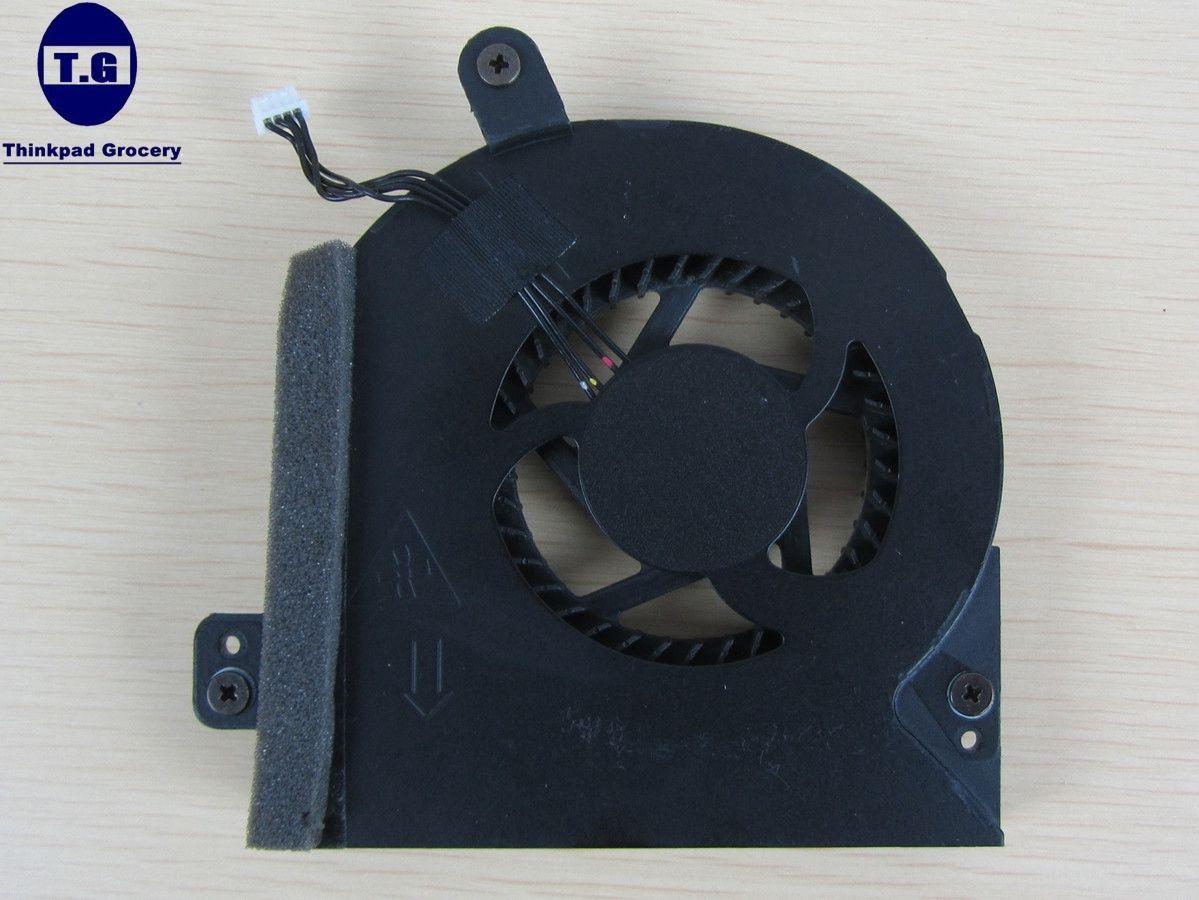
Alienware 18 CPU fan
5V 0.5 A - 5.6CFM
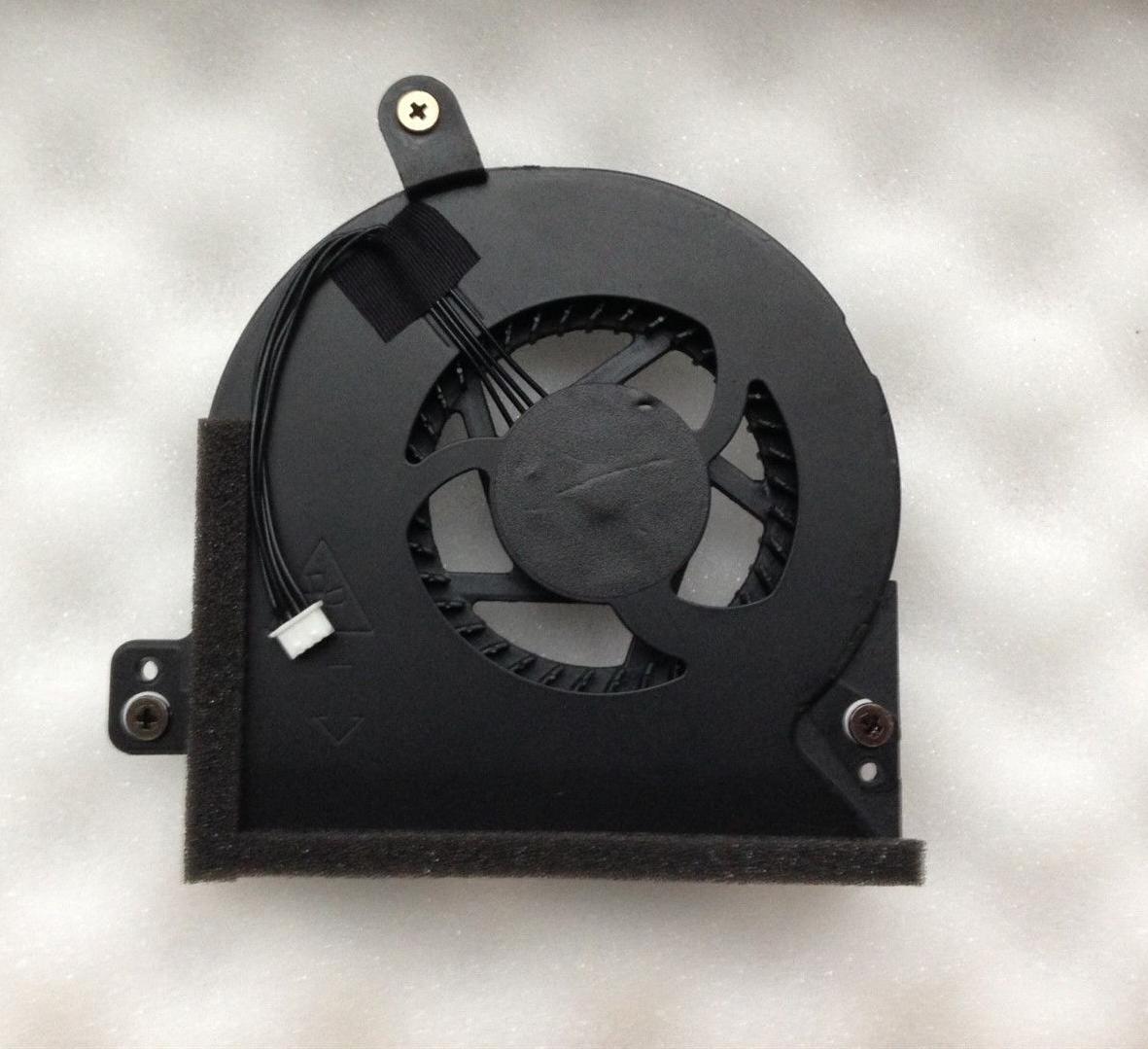
Alienware M18X R2
3920XM 7970M CF
Alienware 18
4930XM 880M SLI
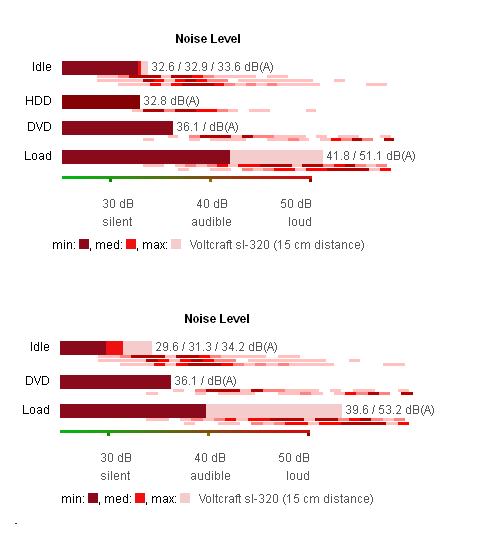
M18X R2 on top, AW18 on the bottom
Is it me or doesnt it look like its a 5 second job to switch the two CPU fan`s since they have identical screw assembly?
And the M18x R2 can move 2x more air than the AW18 fan?
The GPU fans on the two models are identical though. No point switching themreborn2003 likes this. -
Visually they look exactly the same in terms of screw placement, do you know if the case dimensions of the fans are the same?
-
I wanted to use an 11.7 CFM M18xR2 fan in the Alienware 18. It should fit fine, but the wiring is too short. You will need to length them for the connection to reach the fan header on the motherboard. Otherwise, it should work. Not sure if the difference in CFM is due to higher RPM or what. You may not see a benefit if the higher CFM is due to higher max RPM (it maxes out at around 4500 RPM) if you are attempting to reduce fan noise. I cannot see a difference in the fan blades. The number of paddles and pitch looks the same to the naked eye.
The other thing to consider, if the higher CFM is primarily due to higher RPM, the fan tables in the EC might prevent any benefit from being realized because the fan will not be allowed to spin fast enough. This is why I decided not to waste my time modding an 11.7 CFM fan. -
I don't have heat issues? You will never hear me complain about having heat issues.
Either it's meant to be or it isn't meant to run at what im trying to set it for.
I'm a noisy guy and it's a noisy environment here. So noise will never be an issue for me.
I think a few members have done this already. Not sure about links at the moment. The AW18 uses the "quiet fan" approach with lower cfm to keep noise level lower.
Edit: Thanks Brother Fox. There was something about the wiring .Last edited: Jan 23, 2015Kade Storm and Mr. Fox like this. -
Solder on 5cm longer wires should be piece of cake. Dont even need to do that. Just cut the cables in half, use plastic connection thingy (not sure about the english term) and thats that. Its only 5V that goes through that cable anyway so no danger there.
So we have M18x R2 CPU fan that maxes out at 4700RPM. We have AW18 CPU fan that maxes out at 3500RPM. CFM for the M18x is 11.7CFM while its 5.6CFM for AW18.
11.7/5.6 = 2.1
4700/3500RPM = 1.3
I`m not math genious but that CFM increase from the M18x fan can`t because of the increased RPM. The two fans do look identical but why so much difference in the ability to move air?
Did you notice the noise measurements I also posted? M18x R2 maxed out is a tiny bit more quiet than AW18 when the two machines was running Furmark+Prime95 at the same time
I have no idea. They look the same size though. Will see what I can findRobbo99999 and papusan like this. -
Fan blade design, fan blade surface as well as the number of blade used has a role in how much volume of air a fan can pull/push.
For example, the AF 120 corsair fan has only 1650 rpm, but due to the blade design and the blade surface, it is rated at 63 - 64 CFM.Cloudfire likes this. -
That was exactly my point. Which means its able to move more air on the same RPM to cool off the CPU better than the AW18 fan. Right?
Robbo99999 likes this. -
Likely only if the pan blade design is more efficient...
Which I think no one really knows -
I like noise, don't bother me.. I kinda expect it from high performance machines.
-
Here is a Gamer-Boy Alien vs Alien Grudge Match - M18xR1 780M SLI vs AW18 780M SLI vs M18xR2 980M SLI...
<iframe class='imgur-album' width='100%' height="850" frameborder='0' src="//imgur.com/a/arRf2/embed"></iframe>Last edited by a moderator: May 6, 2015reborn2003, GTO_PAO11, Ashtrix and 2 others like this. -
Hey that's great work Brother Fox. It's a really nice way to show people what they might be able to expect if they upgrade to 980m SLI for gaming at this moment :thumbsup:
Mr. Fox likes this. -
Thanks. It also shows the maxed out M18xR1 is still a beast that absolutely holds its own against the maxed out Alienware 18. Both with an XM CPU and 780M SLI, not a dime's worth of difference in gaming performance and the M18xR1 has way more features. Also, great example of why BGA sucks. An M18xR1 owner can match the performance of the best spec'd Alienware 18 for about 1/3 of the cost by simply upgrading some parts. Unfortunately, the M18xR1 can't use 980M SLI, but as the numbers show, buying 980M SLI to enhance the gaming experience if you already have 780M SLI is probably not a very smart move. To be blunt, a waste of money if all you want to do is play games. The 980M SLI would merely be a numbers-chasing endeavor, minus all the throttling crap and NVIDIA driver goof-ball stuff that is happening. 780M SLI FTW if you are not a bencher.
All of those benchmark runs are with a single AC adapter and the CPU and GPU on each machine runs as cool as a cucumber. All 3 CPUs have Liquid Ultra, and the GPUs are running IC Diamond or Gelid GC Extreme paste. (Gelid is on the 980M cards, both 780M SLI setups are running IC Diamond.)reborn2003 likes this. -
^ or have a 120Hz screen and like max graphics. 780M SLI is a beast I have no need for more power out of... but I'll be damned 980Ms don't keep near 120fps much more. Mmmm.
-
With a 120Hz screen it would be worth it for a pure gamer-boy. I also like having a framerate that is 150-200% (or more) greater than necessary for a nice gaming experience just for pure vanity. Point is though, 780M SLI stomps the family jewels off of any single 980M laptop setup.
I have been using the M18xR1 quite a bit since I have been farting around with 980M SLI throttling crap and, man... I forgot how much I love this old beast and the 2920XM CPU. It's so stinking awesome. It's a real shame whatever NVIDIA did to screw up 980M that prevents it from working in the M18xR1.
reborn2003, D2 Ultima and TBoneSan like this. -
I agree. And now the new drivers don't even allow OCing? What's the point of allowing OCing in a stock vBIOS if you can't do it because of driver locks? *sigh*.
Either way, 780M SLI chews through half the single Titan Black setups out there, let alone a single 980M. So yeah. 780M SLI is indeed quite strong still. My only desires for updating are literally heat, power consumption and the desire for the better CPU heatsink (and more CPU OCing that is streaming stable). The 120fps benefits are actually secondary to me XD. -
If there is a difference cfm it may be so. But no one knows which of these two fans who have the highest static pressure .. High static pressure of the fans can be even more important, because the air must be forced through the heatsink fins. :thumbsup:
-
It was a hideous high Vcore voltage (1.4V) you have on i7-4930mx@ 4.3ghz .. worse than the oc profile in bios from Dellienware ..
Last edited by a moderator: May 6, 2015Mr. Fox likes this.
-
I leave it set there all the time (static). It's perfectly fine, still runs cool, and it is enough voltage for about 4.7GHz without having to change it.papusan likes this.
-
Make Sense When it comes to several oc profiles. What effect does the volts have below benchmark tests with 4.3ghz compared to your normal lower volts ? Thinking of temperature. How much increase temp and wattage?
-
I get very depressed by reading about the new Alienware laptop.
 Makes me sick. This is more enjoyable reading ..
-
No problems with temps and performance is very good. I've been running it this way for so long, it do not remember how much change from before.
-
I wondered more on the increased wattage under benh tests. That roughly. Not that I care about the environment.
-
Hey guys, some people at GeForce Community are complaining about Maxwell not using all of its vRAM and running slower than it should. A guy over there gave me a link to a tool to test.
Here is a link to it in my Google Drive: [ DOWNLOAD vRAM TESTER]
Things seems like they might be OK with these 980M cards, but let's compare results.
I am curious how the memory handling is on the new BGA models in comparison. Especially since that stuff is permanently mounted.
Results are in the spoiler... no GPU overclock, as that can skew the test results if we are attempting to compare GPUs and see if they are consistent.
GTX 780M vRAM Test GTX 980M vRAM Test Nai's Benchmark
Allocating Memory . . .
Chunk Size: 128 MiByte
Allocated 30 Chunks
Allocated 3840 MiByte
Benchmarking DRAM
DRAM-Bandwidth of Chunk no. 0 (0 MiByte to 128 MiByte):118.31 GByte/s
DRAM-Bandwidth of Chunk no. 1 (128 MiByte to 256 MiByte):118.62 GByte/s
DRAM-Bandwidth of Chunk no. 2 (256 MiByte to 384 MiByte):118.37 GByte/s
DRAM-Bandwidth of Chunk no. 3 (384 MiByte to 512 MiByte):118.37 GByte/s
DRAM-Bandwidth of Chunk no. 4 (512 MiByte to 640 MiByte):118.58 GByte/s
DRAM-Bandwidth of Chunk no. 5 (640 MiByte to 768 MiByte):118.31 GByte/s
DRAM-Bandwidth of Chunk no. 6 (768 MiByte to 896 MiByte):118.50 GByte/s
DRAM-Bandwidth of Chunk no. 7 (896 MiByte to 1024 MiByte):118.44 GByte/s
DRAM-Bandwidth of Chunk no. 8 (1024 MiByte to 1152 MiByte):118.32 GByte/s
DRAM-Bandwidth of Chunk no. 9 (1152 MiByte to 1280 MiByte):118.60 GByte/s
DRAM-Bandwidth of Chunk no. 10 (1280 MiByte to 1408 MiByte):118.32 GByte/s
DRAM-Bandwidth of Chunk no. 11 (1408 MiByte to 1536 MiByte):118.44 GByte/s
DRAM-Bandwidth of Chunk no. 12 (1536 MiByte to 1664 MiByte):118.51 GByte/s
DRAM-Bandwidth of Chunk no. 13 (1664 MiByte to 1792 MiByte):118.26 GByte/s
DRAM-Bandwidth of Chunk no. 14 (1792 MiByte to 1920 MiByte):118.52 GByte/s
DRAM-Bandwidth of Chunk no. 15 (1920 MiByte to 2048 MiByte):118.39 GByte/s
DRAM-Bandwidth of Chunk no. 16 (2048 MiByte to 2176 MiByte):118.40 GByte/s
DRAM-Bandwidth of Chunk no. 17 (2176 MiByte to 2304 MiByte):118.54 GByte/s
DRAM-Bandwidth of Chunk no. 18 (2304 MiByte to 2432 MiByte):118.32 GByte/s
DRAM-Bandwidth of Chunk no. 19 (2432 MiByte to 2560 MiByte):118.52 GByte/s
DRAM-Bandwidth of Chunk no. 20 (2560 MiByte to 2688 MiByte):118.43 GByte/s
DRAM-Bandwidth of Chunk no. 21 (2688 MiByte to 2816 MiByte):118.34 GByte/s
DRAM-Bandwidth of Chunk no. 22 (2816 MiByte to 2944 MiByte):118.56 GByte/s
DRAM-Bandwidth of Chunk no. 23 (2944 MiByte to 3072 MiByte):118.36 GByte/s
DRAM-Bandwidth of Chunk no. 24 (3072 MiByte to 3200 MiByte):118.46 GByte/s
DRAM-Bandwidth of Chunk no. 25 (3200 MiByte to 3328 MiByte):118.53 GByte/s
DRAM-Bandwidth of Chunk no. 26 (3328 MiByte to 3456 MiByte):118.30 GByte/s
DRAM-Bandwidth of Chunk no. 27 (3456 MiByte to 3584 MiByte):118.52 GByte/s
DRAM-Bandwidth of Chunk no. 28 (3584 MiByte to 3712 MiByte):118.42 GByte/s
DRAM-Bandwidth of Chunk no. 29 (3712 MiByte to 3840 MiByte):118.41 GByte/s
Benchmarking L2-Cache
L2-Cache-Bandwidth of Chunk no. 0 (0 MiByte to 128 MiByte):217.34 GByte/s
L2-Cache-Bandwidth of Chunk no. 1 (128 MiByte to 256 MiByte):217.35 GByte/s
L2-Cache-Bandwidth of Chunk no. 2 (256 MiByte to 384 MiByte):217.34 GByte/s
L2-Cache-Bandwidth of Chunk no. 3 (384 MiByte to 512 MiByte):217.34 GByte/s
L2-Cache-Bandwidth of Chunk no. 4 (512 MiByte to 640 MiByte):217.35 GByte/s
L2-Cache-Bandwidth of Chunk no. 5 (640 MiByte to 768 MiByte):217.35 GByte/s
L2-Cache-Bandwidth of Chunk no. 6 (768 MiByte to 896 MiByte):217.36 GByte/s
L2-Cache-Bandwidth of Chunk no. 7 (896 MiByte to 1024 MiByte):217.35 GByte/s
L2-Cache-Bandwidth of Chunk no. 8 (1024 MiByte to 1152 MiByte):217.36 GByte/s
L2-Cache-Bandwidth of Chunk no. 9 (1152 MiByte to 1280 MiByte):217.34 GByte/s
L2-Cache-Bandwidth of Chunk no. 10 (1280 MiByte to 1408 MiByte):217.35 GByte/s
L2-Cache-Bandwidth of Chunk no. 11 (1408 MiByte to 1536 MiByte):217.36 GByte/s
L2-Cache-Bandwidth of Chunk no. 12 (1536 MiByte to 1664 MiByte):217.35 GByte/s
L2-Cache-Bandwidth of Chunk no. 13 (1664 MiByte to 1792 MiByte):217.35 GByte/s
L2-Cache-Bandwidth of Chunk no. 14 (1792 MiByte to 1920 MiByte):217.35 GByte/s
L2-Cache-Bandwidth of Chunk no. 15 (1920 MiByte to 2048 MiByte):217.35 GByte/s
L2-Cache-Bandwidth of Chunk no. 16 (2048 MiByte to 2176 MiByte):217.35 GByte/s
L2-Cache-Bandwidth of Chunk no. 17 (2176 MiByte to 2304 MiByte):217.35 GByte/s
L2-Cache-Bandwidth of Chunk no. 18 (2304 MiByte to 2432 MiByte):217.34 GByte/s
L2-Cache-Bandwidth of Chunk no. 19 (2432 MiByte to 2560 MiByte):217.34 GByte/s
L2-Cache-Bandwidth of Chunk no. 20 (2560 MiByte to 2688 MiByte):217.34 GByte/s
L2-Cache-Bandwidth of Chunk no. 21 (2688 MiByte to 2816 MiByte):217.34 GByte/s
L2-Cache-Bandwidth of Chunk no. 22 (2816 MiByte to 2944 MiByte):217.35 GByte/s
L2-Cache-Bandwidth of Chunk no. 23 (2944 MiByte to 3072 MiByte):217.34 GByte/s
L2-Cache-Bandwidth of Chunk no. 24 (3072 MiByte to 3200 MiByte):217.35 GByte/s
L2-Cache-Bandwidth of Chunk no. 25 (3200 MiByte to 3328 MiByte):217.34 GByte/s
L2-Cache-Bandwidth of Chunk no. 26 (3328 MiByte to 3456 MiByte):217.35 GByte/s
L2-Cache-Bandwidth of Chunk no. 27 (3456 MiByte to 3584 MiByte):217.35 GByte/s
L2-Cache-Bandwidth of Chunk no. 28 (3584 MiByte to 3712 MiByte):217.34 GByte/s
L2-Cache-Bandwidth of Chunk no. 29 (3712 MiByte to 3840 MiByte):217.36 GByte/s
Press any key to continue . . .Nai's Benchmark
Allocating Memory . . .
Chunk Size: 128 MiByte
Allocated 61 Chunks
Allocated 7808 MiByte
Benchmarking DRAM
DRAM-Bandwidth of Chunk no. 0 (0 MiByte to 128 MiByte):127.24 GByte/s
DRAM-Bandwidth of Chunk no. 1 (128 MiByte to 256 MiByte):127.22 GByte/s
DRAM-Bandwidth of Chunk no. 2 (256 MiByte to 384 MiByte):128.98 GByte/s
DRAM-Bandwidth of Chunk no. 3 (384 MiByte to 512 MiByte):129.02 GByte/s
DRAM-Bandwidth of Chunk no. 4 (512 MiByte to 640 MiByte):129.00 GByte/s
DRAM-Bandwidth of Chunk no. 5 (640 MiByte to 768 MiByte):128.83 GByte/s
DRAM-Bandwidth of Chunk no. 6 (768 MiByte to 896 MiByte):129.01 GByte/s
DRAM-Bandwidth of Chunk no. 7 (896 MiByte to 1024 MiByte):128.86 GByte/s
DRAM-Bandwidth of Chunk no. 8 (1024 MiByte to 1152 MiByte):129.05 GByte/s
DRAM-Bandwidth of Chunk no. 9 (1152 MiByte to 1280 MiByte):128.90 GByte/s
DRAM-Bandwidth of Chunk no. 10 (1280 MiByte to 1408 MiByte):128.96 GByte/s
DRAM-Bandwidth of Chunk no. 11 (1408 MiByte to 1536 MiByte):128.86 GByte/s
DRAM-Bandwidth of Chunk no. 12 (1536 MiByte to 1664 MiByte):129.05 GByte/s
DRAM-Bandwidth of Chunk no. 13 (1664 MiByte to 1792 MiByte):129.16 GByte/s
DRAM-Bandwidth of Chunk no. 14 (1792 MiByte to 1920 MiByte):129.10 GByte/s
DRAM-Bandwidth of Chunk no. 15 (1920 MiByte to 2048 MiByte):129.13 GByte/s
DRAM-Bandwidth of Chunk no. 16 (2048 MiByte to 2176 MiByte):128.80 GByte/s
DRAM-Bandwidth of Chunk no. 17 (2176 MiByte to 2304 MiByte):128.89 GByte/s
DRAM-Bandwidth of Chunk no. 18 (2304 MiByte to 2432 MiByte):128.97 GByte/s
DRAM-Bandwidth of Chunk no. 19 (2432 MiByte to 2560 MiByte):129.09 GByte/s
DRAM-Bandwidth of Chunk no. 20 (2560 MiByte to 2688 MiByte):128.87 GByte/s
DRAM-Bandwidth of Chunk no. 21 (2688 MiByte to 2816 MiByte):128.89 GByte/s
DRAM-Bandwidth of Chunk no. 22 (2816 MiByte to 2944 MiByte):128.91 GByte/s
DRAM-Bandwidth of Chunk no. 23 (2944 MiByte to 3072 MiByte):128.98 GByte/s
DRAM-Bandwidth of Chunk no. 24 (3072 MiByte to 3200 MiByte):129.13 GByte/s
DRAM-Bandwidth of Chunk no. 25 (3200 MiByte to 3328 MiByte):128.97 GByte/s
DRAM-Bandwidth of Chunk no. 26 (3328 MiByte to 3456 MiByte):129.05 GByte/s
DRAM-Bandwidth of Chunk no. 27 (3456 MiByte to 3584 MiByte):128.87 GByte/s
DRAM-Bandwidth of Chunk no. 28 (3584 MiByte to 3712 MiByte):129.02 GByte/s
DRAM-Bandwidth of Chunk no. 29 (3712 MiByte to 3840 MiByte):129.12 GByte/s
DRAM-Bandwidth of Chunk no. 30 (3840 MiByte to 3968 MiByte):129.04 GByte/s
DRAM-Bandwidth of Chunk no. 31 (3968 MiByte to 4096 MiByte):129.04 GByte/s
DRAM-Bandwidth of Chunk no. 32 (4096 MiByte to 4224 MiByte):128.81 GByte/s
DRAM-Bandwidth of Chunk no. 33 (4224 MiByte to 4352 MiByte):129.01 GByte/s
DRAM-Bandwidth of Chunk no. 34 (4352 MiByte to 4480 MiByte):128.82 GByte/s
DRAM-Bandwidth of Chunk no. 35 (4480 MiByte to 4608 MiByte):128.95 GByte/s
DRAM-Bandwidth of Chunk no. 36 (4608 MiByte to 4736 MiByte):129.02 GByte/s
DRAM-Bandwidth of Chunk no. 37 (4736 MiByte to 4864 MiByte):128.93 GByte/s
DRAM-Bandwidth of Chunk no. 38 (4864 MiByte to 4992 MiByte):129.04 GByte/s
DRAM-Bandwidth of Chunk no. 39 (4992 MiByte to 5120 MiByte):129.00 GByte/s
DRAM-Bandwidth of Chunk no. 40 (5120 MiByte to 5248 MiByte):128.99 GByte/s
DRAM-Bandwidth of Chunk no. 41 (5248 MiByte to 5376 MiByte):129.02 GByte/s
DRAM-Bandwidth of Chunk no. 42 (5376 MiByte to 5504 MiByte):128.97 GByte/s
DRAM-Bandwidth of Chunk no. 43 (5504 MiByte to 5632 MiByte):128.87 GByte/s
DRAM-Bandwidth of Chunk no. 44 (5632 MiByte to 5760 MiByte):128.92 GByte/s
DRAM-Bandwidth of Chunk no. 45 (5760 MiByte to 5888 MiByte):129.10 GByte/s
DRAM-Bandwidth of Chunk no. 46 (5888 MiByte to 6016 MiByte):128.86 GByte/s
DRAM-Bandwidth of Chunk no. 47 (6016 MiByte to 6144 MiByte):129.13 GByte/s
DRAM-Bandwidth of Chunk no. 48 (6144 MiByte to 6272 MiByte):128.83 GByte/s
DRAM-Bandwidth of Chunk no. 49 (6272 MiByte to 6400 MiByte):128.78 GByte/s
DRAM-Bandwidth of Chunk no. 50 (6400 MiByte to 6528 MiByte):128.87 GByte/s
DRAM-Bandwidth of Chunk no. 51 (6528 MiByte to 6656 MiByte):129.09 GByte/s
DRAM-Bandwidth of Chunk no. 52 (6656 MiByte to 6784 MiByte):129.06 GByte/s
DRAM-Bandwidth of Chunk no. 53 (6784 MiByte to 6912 MiByte):128.90 GByte/s
DRAM-Bandwidth of Chunk no. 54 (6912 MiByte to 7040 MiByte):128.88 GByte/s
DRAM-Bandwidth of Chunk no. 55 (7040 MiByte to 7168 MiByte):128.90 GByte/s
DRAM-Bandwidth of Chunk no. 56 (7168 MiByte to 7296 MiByte):129.12 GByte/s
DRAM-Bandwidth of Chunk no. 57 (7296 MiByte to 7424 MiByte):128.98 GByte/s
DRAM-Bandwidth of Chunk no. 58 (7424 MiByte to 7552 MiByte):128.90 GByte/s
DRAM-Bandwidth of Chunk no. 59 (7552 MiByte to 7680 MiByte):15.17 GByte/s
DRAM-Bandwidth of Chunk no. 60 (7680 MiByte to 7808 MiByte): 6.35 GByte/s
Benchmarking L2-Cache
L2-Cache-Bandwidth of Chunk no. 0 (0 MiByte to 128 MiByte):347.17 GByte/s
L2-Cache-Bandwidth of Chunk no. 1 (128 MiByte to 256 MiByte):347.13 GByte/s
L2-Cache-Bandwidth of Chunk no. 2 (256 MiByte to 384 MiByte):347.22 GByte/s
L2-Cache-Bandwidth of Chunk no. 3 (384 MiByte to 512 MiByte):347.20 GByte/s
L2-Cache-Bandwidth of Chunk no. 4 (512 MiByte to 640 MiByte):347.18 GByte/s
L2-Cache-Bandwidth of Chunk no. 5 (640 MiByte to 768 MiByte):347.14 GByte/s
L2-Cache-Bandwidth of Chunk no. 6 (768 MiByte to 896 MiByte):347.11 GByte/s
L2-Cache-Bandwidth of Chunk no. 7 (896 MiByte to 1024 MiByte):347.02 GByte/s
L2-Cache-Bandwidth of Chunk no. 8 (1024 MiByte to 1152 MiByte):347.10 GByte/s
L2-Cache-Bandwidth of Chunk no. 9 (1152 MiByte to 1280 MiByte):347.11 GByte/s
L2-Cache-Bandwidth of Chunk no. 10 (1280 MiByte to 1408 MiByte):347.06 GByte/s
L2-Cache-Bandwidth of Chunk no. 11 (1408 MiByte to 1536 MiByte):347.12 GByte/s
L2-Cache-Bandwidth of Chunk no. 12 (1536 MiByte to 1664 MiByte):347.17 GByte/s
L2-Cache-Bandwidth of Chunk no. 13 (1664 MiByte to 1792 MiByte):347.03 GByte/s
L2-Cache-Bandwidth of Chunk no. 14 (1792 MiByte to 1920 MiByte):347.03 GByte/s
L2-Cache-Bandwidth of Chunk no. 15 (1920 MiByte to 2048 MiByte):347.11 GByte/s
L2-Cache-Bandwidth of Chunk no. 16 (2048 MiByte to 2176 MiByte):346.97 GByte/s
L2-Cache-Bandwidth of Chunk no. 17 (2176 MiByte to 2304 MiByte):347.09 GByte/s
L2-Cache-Bandwidth of Chunk no. 18 (2304 MiByte to 2432 MiByte):347.00 GByte/s
L2-Cache-Bandwidth of Chunk no. 19 (2432 MiByte to 2560 MiByte):347.09 GByte/s
L2-Cache-Bandwidth of Chunk no. 20 (2560 MiByte to 2688 MiByte):347.14 GByte/s
L2-Cache-Bandwidth of Chunk no. 21 (2688 MiByte to 2816 MiByte):347.11 GByte/s
L2-Cache-Bandwidth of Chunk no. 22 (2816 MiByte to 2944 MiByte):347.22 GByte/s
L2-Cache-Bandwidth of Chunk no. 23 (2944 MiByte to 3072 MiByte):347.11 GByte/s
L2-Cache-Bandwidth of Chunk no. 24 (3072 MiByte to 3200 MiByte):347.21 GByte/s
L2-Cache-Bandwidth of Chunk no. 25 (3200 MiByte to 3328 MiByte):347.20 GByte/s
L2-Cache-Bandwidth of Chunk no. 26 (3328 MiByte to 3456 MiByte):347.09 GByte/s
L2-Cache-Bandwidth of Chunk no. 27 (3456 MiByte to 3584 MiByte):347.12 GByte/s
L2-Cache-Bandwidth of Chunk no. 28 (3584 MiByte to 3712 MiByte):347.16 GByte/s
L2-Cache-Bandwidth of Chunk no. 29 (3712 MiByte to 3840 MiByte):347.00 GByte/s
L2-Cache-Bandwidth of Chunk no. 30 (3840 MiByte to 3968 MiByte):347.18 GByte/s
L2-Cache-Bandwidth of Chunk no. 31 (3968 MiByte to 4096 MiByte):347.01 GByte/s
L2-Cache-Bandwidth of Chunk no. 32 (4096 MiByte to 4224 MiByte):347.10 GByte/s
L2-Cache-Bandwidth of Chunk no. 33 (4224 MiByte to 4352 MiByte):347.00 GByte/s
L2-Cache-Bandwidth of Chunk no. 34 (4352 MiByte to 4480 MiByte):347.04 GByte/s
L2-Cache-Bandwidth of Chunk no. 35 (4480 MiByte to 4608 MiByte):347.03 GByte/s
L2-Cache-Bandwidth of Chunk no. 36 (4608 MiByte to 4736 MiByte):347.09 GByte/s
L2-Cache-Bandwidth of Chunk no. 37 (4736 MiByte to 4864 MiByte):347.14 GByte/s
L2-Cache-Bandwidth of Chunk no. 38 (4864 MiByte to 4992 MiByte):347.05 GByte/s
L2-Cache-Bandwidth of Chunk no. 39 (4992 MiByte to 5120 MiByte):347.03 GByte/s
L2-Cache-Bandwidth of Chunk no. 40 (5120 MiByte to 5248 MiByte):347.08 GByte/s
L2-Cache-Bandwidth of Chunk no. 41 (5248 MiByte to 5376 MiByte):347.19 GByte/s
L2-Cache-Bandwidth of Chunk no. 42 (5376 MiByte to 5504 MiByte):346.90 GByte/s
L2-Cache-Bandwidth of Chunk no. 43 (5504 MiByte to 5632 MiByte):347.05 GByte/s
L2-Cache-Bandwidth of Chunk no. 44 (5632 MiByte to 5760 MiByte):347.11 GByte/s
L2-Cache-Bandwidth of Chunk no. 45 (5760 MiByte to 5888 MiByte):347.04 GByte/s
L2-Cache-Bandwidth of Chunk no. 46 (5888 MiByte to 6016 MiByte):347.08 GByte/s
L2-Cache-Bandwidth of Chunk no. 47 (6016 MiByte to 6144 MiByte):347.21 GByte/s
L2-Cache-Bandwidth of Chunk no. 48 (6144 MiByte to 6272 MiByte):347.20 GByte/s
L2-Cache-Bandwidth of Chunk no. 49 (6272 MiByte to 6400 MiByte):347.08 GByte/s
L2-Cache-Bandwidth of Chunk no. 50 (6400 MiByte to 6528 MiByte):347.11 GByte/s
L2-Cache-Bandwidth of Chunk no. 51 (6528 MiByte to 6656 MiByte):346.95 GByte/s
L2-Cache-Bandwidth of Chunk no. 52 (6656 MiByte to 6784 MiByte):347.07 GByte/s
L2-Cache-Bandwidth of Chunk no. 53 (6784 MiByte to 6912 MiByte):347.01 GByte/s
L2-Cache-Bandwidth of Chunk no. 54 (6912 MiByte to 7040 MiByte):347.14 GByte/s
L2-Cache-Bandwidth of Chunk no. 55 (7040 MiByte to 7168 MiByte):347.12 GByte/s
L2-Cache-Bandwidth of Chunk no. 56 (7168 MiByte to 7296 MiByte):347.00 GByte/s
L2-Cache-Bandwidth of Chunk no. 57 (7296 MiByte to 7424 MiByte):347.06 GByte/s
L2-Cache-Bandwidth of Chunk no. 58 (7424 MiByte to 7552 MiByte):15.67 GByte/s
L2-Cache-Bandwidth of Chunk no. 59 (7552 MiByte to 7680 MiByte):15.67 GByte/s
L2-Cache-Bandwidth of Chunk no. 60 (7680 MiByte to 7808 MiByte):347.26 GByte/s
Press any key to continue . . .Last edited by a moderator: May 6, 2015reborn2003 likes this. -
Yeah, you're losing on the 980M at the bottom because windows is using up a decent chunk. The reason it's not on your 780M is because you're on Win 7 which uses less vRAM for aero etc, so most of the vRAM is still free. My PC uses about 400MB normally so I use okay up until the ~3500 mark, then it starts to get sticky, but that's understandable as GPU-Z shows the memory is fully used up.
Only desktop 970s give the issue, and the issue starts at around 3200MB of vRAM being used if a card is affected. No idea why only 970s do it, but it's only some of them, and I will attribute it to nVidia not releasing a reference 970 card at the start.
Cakefish's 980M (soldered, 4GB vRAM on P650SG) passes that test fine. The vRAM is taken up on his iGPU in windows too.
http://forum.notebookreview.com/gam...k-whether-your-card-can-use-all-its-vram.html I give a bigger explanation over here and a long rant about stupidity as well XD.reborn2003, Kade Storm, Mr. Fox and 2 others like this. -
Fair enough. Thanks for the link. I learned something new. +1 Rep.
I still think it would be interesting to see what kind of vRAM performance the BGA garbage is putting out compared to MXM. Being stuck with whatever gets soldered to the motherboard could have a sad ending if the results are not consisent. It will also be interesting to see if results are consistent among BGA systems. It would also be good to compare results among MXM modules and systems that use them to see if there is much variance.
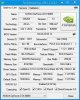
It's good that the new version of GPU-Z finally has all the empty blanks filled in. It might just be my not remembering clearly, but it seems to have taken longer for an update for Maxwell then it did with 780M... probably since Kepler was well established and Maxwell is not. But, all things considered the update was reasonably fast.
 pathfindercod likes this.
 -
I think your conclusion and maths that the M18xR2 fan is actually more efficient at any given RPM is correct. In fact, if anything it's probably more efficient than your maths indicates, because I believe that as RPM increases then efficiency of cfm/rpm decreases. To me it looks like it could be worth a try.
-
Glad to see GPU-Z is finally supporting Maxwell fully. I got the update for it today showing up.
But you're right; it DID take much longer for it to show up. It's been what, four months since desktop maxwell was released? And three months since laptop maxwell? I don't remember it being so long in the past. -
actually would like to know, the amount of cubic air flow carried by AW18 fan vs M18x R2 fan. i'd think they use same fan makes little sense why dell would switch it up as it may cost more and its more hassle but who knows. anyone got pictures?
-
These are my results. :thumbsup:
Do these look good, bad or just right?
Nai's Benchmark
Allocating Memory . . .
Chunk Size: 128 MiByte
Allocated 61 Chunks
Allocated 7808 MiByte
Benchmarking DRAM
DRAM-Bandwidth of Chunk no. 0 (0 MiByte to 128 MiByte):127.35 GByte/s
DRAM-Bandwidth of Chunk no. 1 (128 MiByte to 256 MiByte):127.01 GByte/s
DRAM-Bandwidth of Chunk no. 2 (256 MiByte to 384 MiByte):127.34 GByte/s
DRAM-Bandwidth of Chunk no. 3 (384 MiByte to 512 MiByte):127.46 GByte/s
DRAM-Bandwidth of Chunk no. 4 (512 MiByte to 640 MiByte):127.35 GByte/s
DRAM-Bandwidth of Chunk no. 5 (640 MiByte to 768 MiByte):128.64 GByte/s
DRAM-Bandwidth of Chunk no. 6 (768 MiByte to 896 MiByte):128.63 GByte/s
DRAM-Bandwidth of Chunk no. 7 (896 MiByte to 1024 MiByte):128.74 GByte/s
DRAM-Bandwidth of Chunk no. 8 (1024 MiByte to 1152 MiByte):128.90 GByte/s
DRAM-Bandwidth of Chunk no. 9 (1152 MiByte to 1280 MiByte):128.98 GByte/s
DRAM-Bandwidth of Chunk no. 10 (1280 MiByte to 1408 MiByte):128.83 GByte/s
DRAM-Bandwidth of Chunk no. 11 (1408 MiByte to 1536 MiByte):128.96 GByte/s
DRAM-Bandwidth of Chunk no. 12 (1536 MiByte to 1664 MiByte):128.39 GByte/s
DRAM-Bandwidth of Chunk no. 13 (1664 MiByte to 1792 MiByte):128.76 GByte/s
DRAM-Bandwidth of Chunk no. 14 (1792 MiByte to 1920 MiByte):128.62 GByte/s
DRAM-Bandwidth of Chunk no. 15 (1920 MiByte to 2048 MiByte):128.72 GByte/s
DRAM-Bandwidth of Chunk no. 16 (2048 MiByte to 2176 MiByte):128.45 GByte/s
DRAM-Bandwidth of Chunk no. 17 (2176 MiByte to 2304 MiByte):128.50 GByte/s
DRAM-Bandwidth of Chunk no. 18 (2304 MiByte to 2432 MiByte):128.83 GByte/s
DRAM-Bandwidth of Chunk no. 19 (2432 MiByte to 2560 MiByte):128.89 GByte/s
DRAM-Bandwidth of Chunk no. 20 (2560 MiByte to 2688 MiByte):128.73 GByte/s
DRAM-Bandwidth of Chunk no. 21 (2688 MiByte to 2816 MiByte):128.35 GByte/s
DRAM-Bandwidth of Chunk no. 22 (2816 MiByte to 2944 MiByte):128.44 GByte/s
DRAM-Bandwidth of Chunk no. 23 (2944 MiByte to 3072 MiByte):128.63 GByte/s
DRAM-Bandwidth of Chunk no. 24 (3072 MiByte to 3200 MiByte):129.05 GByte/s
DRAM-Bandwidth of Chunk no. 25 (3200 MiByte to 3328 MiByte):128.72 GByte/s
DRAM-Bandwidth of Chunk no. 26 (3328 MiByte to 3456 MiByte):128.60 GByte/s
DRAM-Bandwidth of Chunk no. 27 (3456 MiByte to 3584 MiByte):128.86 GByte/s
DRAM-Bandwidth of Chunk no. 28 (3584 MiByte to 3712 MiByte):128.91 GByte/s
DRAM-Bandwidth of Chunk no. 29 (3712 MiByte to 3840 MiByte):128.79 GByte/s
DRAM-Bandwidth of Chunk no. 30 (3840 MiByte to 3968 MiByte):128.84 GByte/s
DRAM-Bandwidth of Chunk no. 31 (3968 MiByte to 4096 MiByte):128.67 GByte/s
DRAM-Bandwidth of Chunk no. 32 (4096 MiByte to 4224 MiByte):128.42 GByte/s
DRAM-Bandwidth of Chunk no. 33 (4224 MiByte to 4352 MiByte):128.90 GByte/s
DRAM-Bandwidth of Chunk no. 34 (4352 MiByte to 4480 MiByte):128.99 GByte/s
DRAM-Bandwidth of Chunk no. 35 (4480 MiByte to 4608 MiByte):128.88 GByte/s
DRAM-Bandwidth of Chunk no. 36 (4608 MiByte to 4736 MiByte):128.67 GByte/s
DRAM-Bandwidth of Chunk no. 37 (4736 MiByte to 4864 MiByte):128.99 GByte/s
DRAM-Bandwidth of Chunk no. 38 (4864 MiByte to 4992 MiByte):128.76 GByte/s
DRAM-Bandwidth of Chunk no. 39 (4992 MiByte to 5120 MiByte):128.50 GByte/s
DRAM-Bandwidth of Chunk no. 40 (5120 MiByte to 5248 MiByte):128.26 GByte/s
DRAM-Bandwidth of Chunk no. 41 (5248 MiByte to 5376 MiByte):128.91 GByte/s
DRAM-Bandwidth of Chunk no. 42 (5376 MiByte to 5504 MiByte):128.99 GByte/s
DRAM-Bandwidth of Chunk no. 43 (5504 MiByte to 5632 MiByte):128.94 GByte/s
DRAM-Bandwidth of Chunk no. 44 (5632 MiByte to 5760 MiByte):128.67 GByte/s
DRAM-Bandwidth of Chunk no. 45 (5760 MiByte to 5888 MiByte):128.39 GByte/s
DRAM-Bandwidth of Chunk no. 46 (5888 MiByte to 6016 MiByte):128.72 GByte/s
DRAM-Bandwidth of Chunk no. 47 (6016 MiByte to 6144 MiByte):129.10 GByte/s
DRAM-Bandwidth of Chunk no. 48 (6144 MiByte to 6272 MiByte):128.90 GByte/s
DRAM-Bandwidth of Chunk no. 49 (6272 MiByte to 6400 MiByte):128.79 GByte/s
DRAM-Bandwidth of Chunk no. 50 (6400 MiByte to 6528 MiByte):128.86 GByte/s
DRAM-Bandwidth of Chunk no. 51 (6528 MiByte to 6656 MiByte):128.77 GByte/s
DRAM-Bandwidth of Chunk no. 52 (6656 MiByte to 6784 MiByte):129.01 GByte/s
DRAM-Bandwidth of Chunk no. 53 (6784 MiByte to 6912 MiByte):128.90 GByte/s
DRAM-Bandwidth of Chunk no. 54 (6912 MiByte to 7040 MiByte):128.61 GByte/s
DRAM-Bandwidth of Chunk no. 55 (7040 MiByte to 7168 MiByte): 8.00 GByte/s
DRAM-Bandwidth of Chunk no. 56 (7168 MiByte to 7296 MiByte): 8.00 GByte/s
DRAM-Bandwidth of Chunk no. 57 (7296 MiByte to 7424 MiByte): 6.34 GByte/s
DRAM-Bandwidth of Chunk no. 58 (7424 MiByte to 7552 MiByte): 6.34 GByte/s
DRAM-Bandwidth of Chunk no. 59 (7552 MiByte to 7680 MiByte): 6.34 GByte/s
DRAM-Bandwidth of Chunk no. 60 (7680 MiByte to 7808 MiByte):10.07 GByte/s
Benchmarking L2-Cache
L2-Cache-Bandwidth of Chunk no. 0 (0 MiByte to 128 MiByte):346.60 GByte/s
L2-Cache-Bandwidth of Chunk no. 1 (128 MiByte to 256 MiByte):346.79 GByte/s
L2-Cache-Bandwidth of Chunk no. 2 (256 MiByte to 384 MiByte):346.72 GByte/s
L2-Cache-Bandwidth of Chunk no. 3 (384 MiByte to 512 MiByte):346.79 GByte/s
L2-Cache-Bandwidth of Chunk no. 4 (512 MiByte to 640 MiByte):346.38 GByte/s
L2-Cache-Bandwidth of Chunk no. 5 (640 MiByte to 768 MiByte):346.76 GByte/s
L2-Cache-Bandwidth of Chunk no. 6 (768 MiByte to 896 MiByte):346.32 GByte/s
L2-Cache-Bandwidth of Chunk no. 7 (896 MiByte to 1024 MiByte):346.80 GByte/s
L2-Cache-Bandwidth of Chunk no. 8 (1024 MiByte to 1152 MiByte):346.53 GByte/s
L2-Cache-Bandwidth of Chunk no. 9 (1152 MiByte to 1280 MiByte):346.82 GByte/s
L2-Cache-Bandwidth of Chunk no. 10 (1280 MiByte to 1408 MiByte):346.78 GByte/s
L2-Cache-Bandwidth of Chunk no. 11 (1408 MiByte to 1536 MiByte):346.75 GByte/s
L2-Cache-Bandwidth of Chunk no. 12 (1536 MiByte to 1664 MiByte):346.71 GByte/s
L2-Cache-Bandwidth of Chunk no. 13 (1664 MiByte to 1792 MiByte):346.77 GByte/s
L2-Cache-Bandwidth of Chunk no. 14 (1792 MiByte to 1920 MiByte):346.78 GByte/s
L2-Cache-Bandwidth of Chunk no. 15 (1920 MiByte to 2048 MiByte):346.56 GByte/s
L2-Cache-Bandwidth of Chunk no. 16 (2048 MiByte to 2176 MiByte):346.87 GByte/s
L2-Cache-Bandwidth of Chunk no. 17 (2176 MiByte to 2304 MiByte):346.65 GByte/s
L2-Cache-Bandwidth of Chunk no. 18 (2304 MiByte to 2432 MiByte):346.78 GByte/s
L2-Cache-Bandwidth of Chunk no. 19 (2432 MiByte to 2560 MiByte):346.32 GByte/s
L2-Cache-Bandwidth of Chunk no. 20 (2560 MiByte to 2688 MiByte):346.92 GByte/s
L2-Cache-Bandwidth of Chunk no. 21 (2688 MiByte to 2816 MiByte):346.50 GByte/s
L2-Cache-Bandwidth of Chunk no. 22 (2816 MiByte to 2944 MiByte):346.76 GByte/s
L2-Cache-Bandwidth of Chunk no. 23 (2944 MiByte to 3072 MiByte):346.63 GByte/s
L2-Cache-Bandwidth of Chunk no. 24 (3072 MiByte to 3200 MiByte):346.76 GByte/s
L2-Cache-Bandwidth of Chunk no. 25 (3200 MiByte to 3328 MiByte):346.28 GByte/s
L2-Cache-Bandwidth of Chunk no. 26 (3328 MiByte to 3456 MiByte):346.71 GByte/s
L2-Cache-Bandwidth of Chunk no. 27 (3456 MiByte to 3584 MiByte):346.48 GByte/s
L2-Cache-Bandwidth of Chunk no. 28 (3584 MiByte to 3712 MiByte):346.78 GByte/s
L2-Cache-Bandwidth of Chunk no. 29 (3712 MiByte to 3840 MiByte):346.82 GByte/s
L2-Cache-Bandwidth of Chunk no. 30 (3840 MiByte to 3968 MiByte):346.45 GByte/s
L2-Cache-Bandwidth of Chunk no. 31 (3968 MiByte to 4096 MiByte):346.79 GByte/s
L2-Cache-Bandwidth of Chunk no. 32 (4096 MiByte to 4224 MiByte):346.73 GByte/s
L2-Cache-Bandwidth of Chunk no. 33 (4224 MiByte to 4352 MiByte):346.59 GByte/s
L2-Cache-Bandwidth of Chunk no. 34 (4352 MiByte to 4480 MiByte):346.79 GByte/s
L2-Cache-Bandwidth of Chunk no. 35 (4480 MiByte to 4608 MiByte):346.68 GByte/s
L2-Cache-Bandwidth of Chunk no. 36 (4608 MiByte to 4736 MiByte):346.70 GByte/s
L2-Cache-Bandwidth of Chunk no. 37 (4736 MiByte to 4864 MiByte):346.79 GByte/s
L2-Cache-Bandwidth of Chunk no. 38 (4864 MiByte to 4992 MiByte):346.79 GByte/s
L2-Cache-Bandwidth of Chunk no. 39 (4992 MiByte to 5120 MiByte):346.77 GByte/s
L2-Cache-Bandwidth of Chunk no. 40 (5120 MiByte to 5248 MiByte):346.32 GByte/s
L2-Cache-Bandwidth of Chunk no. 41 (5248 MiByte to 5376 MiByte):346.37 GByte/s
L2-Cache-Bandwidth of Chunk no. 42 (5376 MiByte to 5504 MiByte):346.78 GByte/s
L2-Cache-Bandwidth of Chunk no. 43 (5504 MiByte to 5632 MiByte):346.38 GByte/s
L2-Cache-Bandwidth of Chunk no. 44 (5632 MiByte to 5760 MiByte):346.72 GByte/s
L2-Cache-Bandwidth of Chunk no. 45 (5760 MiByte to 5888 MiByte):346.50 GByte/s
L2-Cache-Bandwidth of Chunk no. 46 (5888 MiByte to 6016 MiByte):346.75 GByte/s
L2-Cache-Bandwidth of Chunk no. 47 (6016 MiByte to 6144 MiByte):346.44 GByte/s
L2-Cache-Bandwidth of Chunk no. 48 (6144 MiByte to 6272 MiByte):346.60 GByte/s
L2-Cache-Bandwidth of Chunk no. 49 (6272 MiByte to 6400 MiByte):346.68 GByte/s
L2-Cache-Bandwidth of Chunk no. 50 (6400 MiByte to 6528 MiByte):346.76 GByte/s
L2-Cache-Bandwidth of Chunk no. 51 (6528 MiByte to 6656 MiByte):346.81 GByte/s
L2-Cache-Bandwidth of Chunk no. 52 (6656 MiByte to 6784 MiByte):346.58 GByte/s
L2-Cache-Bandwidth of Chunk no. 53 (6784 MiByte to 6912 MiByte):346.73 GByte/s
L2-Cache-Bandwidth of Chunk no. 54 (6912 MiByte to 7040 MiByte):346.71 GByte/s
L2-Cache-Bandwidth of Chunk no. 55 (7040 MiByte to 7168 MiByte): 7.94 GByte/s
L2-Cache-Bandwidth of Chunk no. 56 (7168 MiByte to 7296 MiByte): 8.02 GByte/s
L2-Cache-Bandwidth of Chunk no. 57 (7296 MiByte to 7424 MiByte): 6.30 GByte/s
L2-Cache-Bandwidth of Chunk no. 58 (7424 MiByte to 7552 MiByte): 6.30 GByte/s
L2-Cache-Bandwidth of Chunk no. 59 (7552 MiByte to 7680 MiByte): 6.30 GByte/s
L2-Cache-Bandwidth of Chunk no. 60 (7680 MiByte to 7808 MiByte):10.21 GByte/s
Press any key to continue . . .Last edited: Jan 24, 2015 -
And what would be the explanation for advanced warfare and it's method of using memory?Mr. Fox likes this.
-
Looks like this driver mod helped a bit. Still throttling, but not as bad. At least I was able to use ThrottleStop without things acting all goofy. I was also able to force NVWMI to install by moving code from Quadro to Titan and then putting my 980M hardware ID where Titan's code is. I just left the GPU name alone under [Strings] for testing. Not sure if that NVWMI helped or not. NVIDIA's definitely doing something stupid to limit power utilization... at least I think they are. I hope I can get that P570WM in a couple of weeks or less so I can really put these GPUs to work. If this keep holding clocks after several days, I may try a vBIOS mod again to see what happens. This is with the stock vBIOS.
NVIDIA GeForce GTX 980M video card benchmark result - Intel Core i7-3920XM Processor Extreme Edition,Alienware M18xR2
 reborn2003, Zero989, Ashtrix and 1 other person like this.
 -
See how it is losing speed at the end of each test. Ideally, it should not be doing that. It should hold until the end if it were acting right. Might be Windows 8 causing as D2 Ultima mentioned. Wouldn't be the first example of Windows 8 crippling stuff, LOL.Ashtrix likes this.
Aw m18x R2 Dual 980m SLI upgrade!!
Discussion in 'Alienware 18 and M18x' started by Peter, Nov 12, 2014.


