Problems? See this thread at archive.org.
no tool except the BIOS. I just upped my bclk to 105 and rebooted. RAM speeds overclocked from 931 to 978 and I received blue screens. 1.55v fixed that.
-
So you left Long Term duration pwr limit at 45? This video explains OC'ing a 2630 and the effects it has.
[HD] Alienware M14X - Nebula Red with Soft Touch Finish - How to Overclock CPU.wmv - YouTube.
It says by changing the Short duration power limit of 55 to 99 will keep the CPU running 24/7 instead of in short duration. However, in our system the "short term duration limit" (there are two of them) is set at a value of 28 while in the video it says "enabled" and "disabled." So I am unsure what to do with the value of 28.
When I did leave the values completely stock and upped the bus to 106. I did get a good Vantage bump but I would really like to find the optimum settings to run. -
I have short power duratoin set to 99 and my base at 106 ... seems to be rockin out.
-
erg stuck in traffic on the way home from the cottage and all I want to do is BENCH !!!!
Shoulda gotten a car adaptor
-
True that's what I did, but there are two short durations and the one above where you set to 99, on the 2720 is another one. On the 2630 it says "enabled" and on the 2720 it says "28." So I don't know what to do with that value! that is the only difference in the BIOS that I can tell from those chips. I'm about to go give it a go again, maybe leave the '28' and then see how it performs stability wise. I know when I ran at 106 my Vantage gave me like a
21K CPU
24,500 for GPU at 1030/1100 (but I am only running the 6970s and not 6990s). The CPU bump was nice because stock I was around 19K. So it brought the overall vantage up to 23,8xxx. Makes me want a 2920 but will wait for the others to come out before deciding if I even want to upgrade. Plus I know "logically" that the 2720 is more than enough for any game not to be a bottleneck outside of benching. heck even the old i7 line is still great for gaming; even non extreme CPU's. My 2720 is running better than my 920xm from my old R2 and running almost on par with the 920xm using throttlestop. However it destroys it with other benchmarking tasks that aren't even gaming related. I'll probably just keep the 2720 since I am mostly just into gaming for the moment. -
I feel the same way actually, I didn't think I would care about benching, and only started because I wanted to make sure my systems weren't flawed. Was comparing to other systems like mine and seeing that mine met up to par .... but its grown on me (thanks Johnk ) and I find it fun, still not TOO worried about getting the 2920 or 60 ... I am enjoying squeezing everything I can out of the system I have ... its like a game in itself ... but maybe if I hit the wall with the CPU I have I might upgrade, but hell I am getting 3Ghz out of this processor ... and I don't see a need for more for gaming....
You wanna throw your system in your signiture btw ? Makes it easier to know what you have and advise/compare. -
Is 4683.1MHz prime95 stable single core a record at > long duration power limit (i.e. holding that speed indefinitely?)
![[IMG]](images/storyImages/69881d1314553876-m18x-a03-bios-modification-infos-2920xm-4-7ghz.png)
-
I hear ya. even in perspective the "old" 740qm at 1.6 is a pretty good gaming processor paired with a good GPU. a stock 2630 I think is 2.0ghz which is what my "old" 920xm was. The new architecture makes ours even more efficient. Your system is beastly with the 6990s.
-
now instead of running prime..run superpi and see what that nets you...do 1m and 32m
lol so you have the benching bug do ya...lol -
Here you go!
![[IMG]](images/storyImages/69882d1314555032-official-alienware-m18x-benchmark-thread-wprime-130a.png)
Attached Files:
-
-
that's looking like wprime..
i said superpi which is a single thread app..
but that is looking damn spectacular!! -
Oops, I wasn't paying much attention
![[IMG]](images/storyImages/69883d1314557648-official-alienware-m18x-benchmark-thread-super-pi-4-7-ghz.png)
Attached Files:
-
-
Can you guys help me understand temps and when to be concerned regarding GPU's. I am monitoring using HW info64. I use the temp sensor for the full readout. After full gaming I get something like the following on my 6970s:
GPU thermal Diode: 80ish
GPU TS0 (DisplIO)-80ish
GPU TS1 (MemIO)-90-94.
GPU TS2 (Shader)-80ish.
So while my thermal diode is well within what I expect for gaming GPU temps: 80s. The memoryIO is what concerns me when I OC. 90's I thought is very bad. I am making an assumption that if that fails..my chip in it's entirety will. I don't run a heavy OC, 800/1000 from 680/900. I have heard some people say their TS1 usually goes that high when OC'ing. However is that safe or am I just waiting to fry my card. There is no downclocking, no artifacting, etc. Is this normal?
I dont mind risking OC and frying a CPU as they are dirt cheap on ebay. But GPU's are expensive and don't want to just blow out my system for the sake of a few FPS. However, I think the m18x has great cooling and mobile cards have a pretty high failsafe on them regarding temps. But that 90-94 on the memory diode has me concerned. Thanks for the help in advance. -
concentrate on doing just 1m this time.
-
Have you repasted the gpu's at all? - chances are that if you havent, you can reduce those temps a good bit.
-
You going to pickup a 2960 chip when they come out John?
-
more than likely...yes.
but with what da_g has done with this one...maybe not...
-
Repaste is done. Again, I think my temps are fine. It's just that one memIO that has me concerned. Do other people that run OC on 6970/6990 get that high one that one specific part? I have heard that in particular gets hot. I just dont know if that is "too hot." Obviously my overall temps are low. OC 800/1000 or even 830/1100 shows the same Thermal Temp diode at 80-82 degrees. It's only the memory that goes hot. Which i don't think is from the pasting.
-
I can't cancel my system because it's already being built. I've been talking with Dell reps everyday to see if they could put it on hold to wait for the 2960xm, but they keep telling me no and they have no idea about the 2960.
-
play with it for a week then send it back.
are there even any es 2960's out? they usually come well before the oem/retail chips do...
side note:
this is probably what intel did...lol.... but instead of 50 bucks it's a $1000.
http://www.gev.com/2010/09/intel-improves-your-processor-for-50-extra/# -
Available on Ebay 2960xm
slightly better than Engineering Sample as its Quality Sample. Still, I would prefer the OEM at that price....
Man, that article really takes the biscuit....money grabbing sods... -
still to much for a qs.
-
Yeah, especially when 2920xm ES are under £200gbp / $300usd
-
AAAAAAAAAAAAAAAAAAHHHHHHHHHHHHHHHHHHHHHH.....
yes that was a scream !!!!
!!!!
OK ... so I bring the system home from the cottage where with a modest OC on the GPUs I get this:
AMD Radeon HD 6970M video card benchmark result - Intel Core i7-2630QM Processor,Alienware M18xR1 score: P7933 3DMarks
Pretty nice considering I was in a relatively hot cottage and didn't push the machine with clocks. (Except maybe the CPU @ 3GHz) ....
Get back to my house, plug it in, set it up in the A/C room to push it ... and I am getting like 20FPS in 3dmark 11 tests, tried Vantage same thing like 30 fps ... Reboot, try again, same thing. Not running Anything other then my OC with trixx ... no Hwinfo, or game booster, Nothing.
Could this be because my battery is charging ?!?!?! since i was online on the way home ??? someone help ! -
Are you running on iGPU by any chance??? - thats the obvious thing to check first....
-
UUUGHGHGHGHGH GRRRRRRRRRRRRRR For F!_!CK's sake ... its because I switched between IGP and then back to Discrete is switched off Crossfire ....
Fixed it ...
now to play -
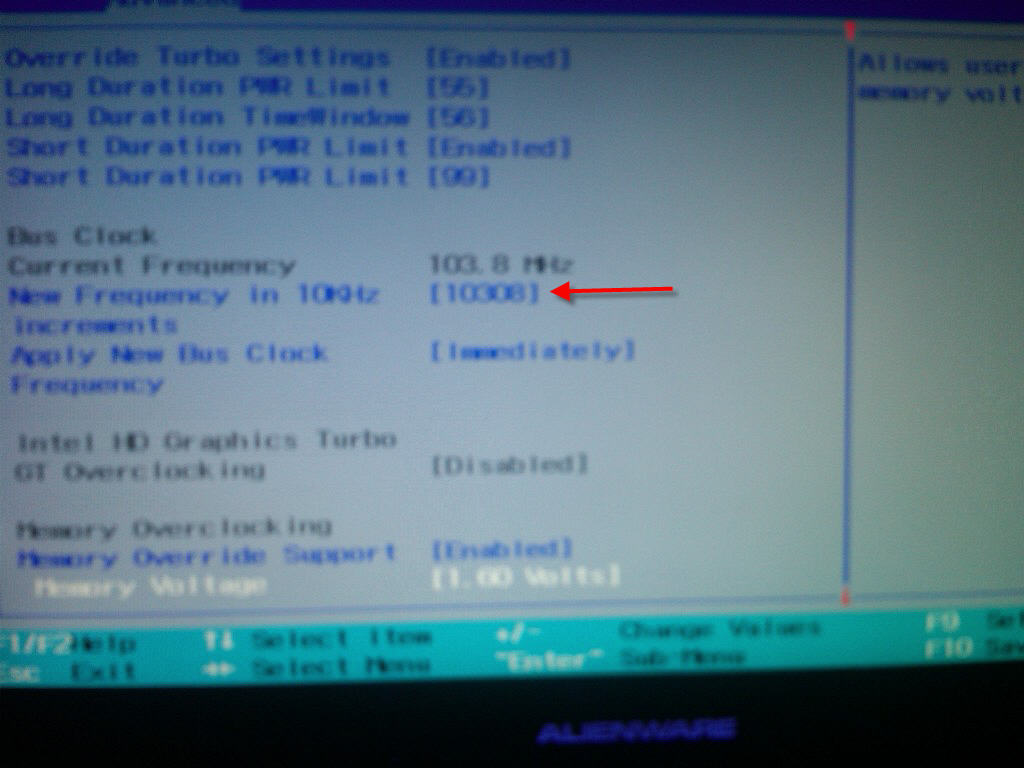
I see how to overvolt to 1.55v, but I'm not seeing the bclk adjustment
-
DUAL MILESTONES (one for me, and one I think for the community !!!)
Firstly I Broke 8k total score 3dmark 11...
But most importantly ... 9013 GPU Score !!!
The big 9K been broken. A brave new world...
Clocks, Core: 870 Memory: 1210
AMD Radeon HD 6970M video card benchmark result - Intel Core i7-2630QM Processor,Alienware M18xR1 score: P8008 3DMarks
and
AMD Radeon HD 6970M video card benchmark result - Intel Core i7-2630QM Processor,Alienware M18xR1 score: P8022 3DMarks -
Very nice Shaden
-
-
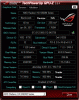
The setting you are looking for is just a little above the memory voltage setting and settings for the IGP overclocking. Sorry for the lousy quality smartphone photo, but I think it will do in a pinch. Use the +/- keys to change CPU BCLK, then select permanent from the menu below the BCLK settings.
Attached Files:
-
-
way to go! i knew you could do it!!
-
That's crazy you didn't need the 2920 to brake 9000gpu on 3dmark11 congrats
-
no, because dx11 is pretty much...all gpu
but be ready speedy next weekend....because im going to show how all extremes can break the 46/47/48/49x barriers...
-
That's cool i am just afraid how we going to manage the temps lol
-
THanks John ... am a little disappointed, I mean I am very happy to have broken the 9k ... and I am happy with the nice jump in my overall 3dmark 11 score, but I am surprised that the GPU score didn't scale upwards at all really with the increased CPU speeds, I guess I was just hoping it would. Still it added quite a few hundred points to jump me over 8K total score, but really I think it was the extra 10 in the mem clocks which pushed the GPU higher.
Also I still can't do anything over 875 ... Its not a heat issue. 3d mark11 simply will not start. even at 870 1210 my highest temp was 75C ...
Anyway moving on to some vantage runs ...
-
Those are crazy low temps Shaden, what'd you do to keep them so low?
-
not much honestly, haven't repasted, just used it in my AC room and used HwINFO to blast the fans at full.
It sucks because it creates lockups on the computer, if we could crack the damn fan control soooo much would be simpler... or if HwINFO gets fixed, and I know its being worked on ... -
I really can't wait to see this ... is it possible to burn out your adaptor hahaha should be some amazing output.
Are you going to run it with Dice again ? -
Yea but look at those Dual GTX 580s .... yummmmmm
-
will try with it on the desk first and see what happens.
and shaden...you are at about your max on voltage...that's probably why. -
grrrr voltage ...
-
John, when I have free time again after Tuesday we need to chat on MSN and get my bench on
I have some catching up to do!
And Shaden, that is awesome! You are making the people with extreme cooling look silly lol -
Dice helped me take my 5870s from 950mhz core to 1010mhz core...stock clock was 700mhz... Just sayin...
It makes your voltage go further when you freeze the cards. Max temp was something like 40°C -
Thanks Fox, this is addictive
-
Explains why sometimes I can get 865, sometimes 870, and sometimes 875 ...
Question, if I lower the mem clocks, should I be able to up the Core clock ??? -
looking like not really
-
Congrats man that is awesome! 9k +
Looks like you have the best 6990M GPUs around.
Cheers.
-
Hey man,
Yep try and lower your MEM clocks and then you should be able to increase the core clock some more. However you might be already hitting the 6990m Voltage stock limits atm.
I can't wait to see your Vantage runs.
Cheers.
-
Time for the Chief to get in on the action.
Cheers.
Attached Files:
-
*OFFICIAL* Alienware M18x Benchmark Thread
Discussion in 'Alienware 18 and M18x' started by BatBoy, Apr 30, 2011.