 Problems? See this thread at archive.org.
Nice scores Fox!! I haven't played Just Cause 2 since I owned a G73JH(5870M). On the G73JH I would encounter massive slow dows during lush scenery. Maybe it's time I revisit this game on my M18x.
-
-
ugh... no real luck ... @ 44x 105.2 bclk 25 flex ... 8 core or 4 core ... on 4 core it boots but doing anything bsods.
44x 102 and 100 bclk same deal ... I can start vantage but it locks and or bsods ...
I just don't get whats going on ... my testing today was SO extensive ... and I really just couldn't get anything to work. Where it did... max cpu score I could roll was a 26K ....
Last night best I got was the 26.2K cpu which gave a 29.3K gpu.
I can only imagine what I might be able to pull if I could get a 29K or 30K gpu (don't know if thats even possible on this es2 chip) ... can't afford to grab and OEM chip though....
maybe another teamviewer session ... but I can't imagine what I could be doing wrong. -
we'll hit up teamviewer maybe in an hour or so. im at work right now.
and your just doing this off the desk or out side? -
outside, super chilly ... but don't think I can Teamview it tonight actually
 ... maybe, but probably not ... will chekc back here in a while to see what yur up to.
-
ok. sounds good.
side note:
what was the highest you and i got together? -
AMD Radeon HD 6970M / 6990M video card benchmark result - Genuine Intel(R) CPU 0 @ 2.40GHz,Alienware M18xR1 score: P28491 3DMarks
I wanna say thats it ... its listed in my bookmarks as 45 45 44 44x ...
But it doesn't quite look right. Considering the 29.3k gpu I just got with a 26K cpu ... but whatever ... I am guessing thats the best we had done. Assuming that was with you
-
then we need to get back to basics then.
-
scratch that ... that run was at 42x across the board I thinks ...
But either way, it may be back to basics since I seem to be hung -
that was happening to me the other day...crash after crash after crash.
then i found out there is something going on with how the heat sink sits on the cpu..*major facepalm* seems like if you tighten down screw 4 it off sets the whole heat sink and gives high temps on one core. if you don't full tighten it down..you get more even temps across the boards...wt-heck going on there! -
anyway I wont be able to run tonight, heading to bed, been a long day, wife just got in. Maybe over the weekend, or next week or ... at some point
-
-
^ Nice score Fox,
Hey PEEPS!
Any settings I need to set in the BIOS to OC my 2820 CPU?
I would like to boost it a bit to do some benching.
Any quick numbers I can set in the system bios would be helpful and much appreciated.
Cheers.
-
Hey reborn... happy Saturday my friend. Yes, Heaven runs nicely with the 580M SLI. Due to throttling, not quite as high as the 6990M, but the enhancements in visual quality have made up for the minor drop in the benchmark score. With the throttling, benchmark scores are not as spectacular, (especially 3DMark 11,) but with the current vBIOS update from Dell I'm not experiencing any throttling issues playing games.
For your question, try adjusting the Turboboost settings to their maximums and set your CPU BCLK to 105. Select "Permanent" to save the BCLK settings. This seems to work well for just about everyone that does not have an XM CPU. (I got this tip from Speedy several months ago, posted in this thread.) -
Thanks Foxxy!! Happy Saturday to you too!
So where do I adjust these max Turboboost settings? For the BCLK its is just setting the default 9980Mhz to 10500Mhz yeh?
I'll give it a go again now. I was trying to set it to 10300 before but it would never stick.
I'll try the permanent setting, Thanks Speedy as well.
Cheers.
-
Those settings are in the BIOS, immediately above the CPU BCLK settings. You have to enable that menu to see them.Yes, that is correct. Some folks could go to 106Mhz, but my system would not not work above 105Mhz. You may have to go a bit beyond (say like 10510) to get the final setting to be 105. Otherwise, it will look end up 104.9 or something similar... not enough difference to matter, mind you, but I like the way whole numbers look better, LOL.
-
Cool it worked. Thanks for the info FOX!
So for those turbo number settings. What should I have them set too?
ATM I have them set to 75, 56, Enabled and 94.
Now we can go head to head in a little bench off ey
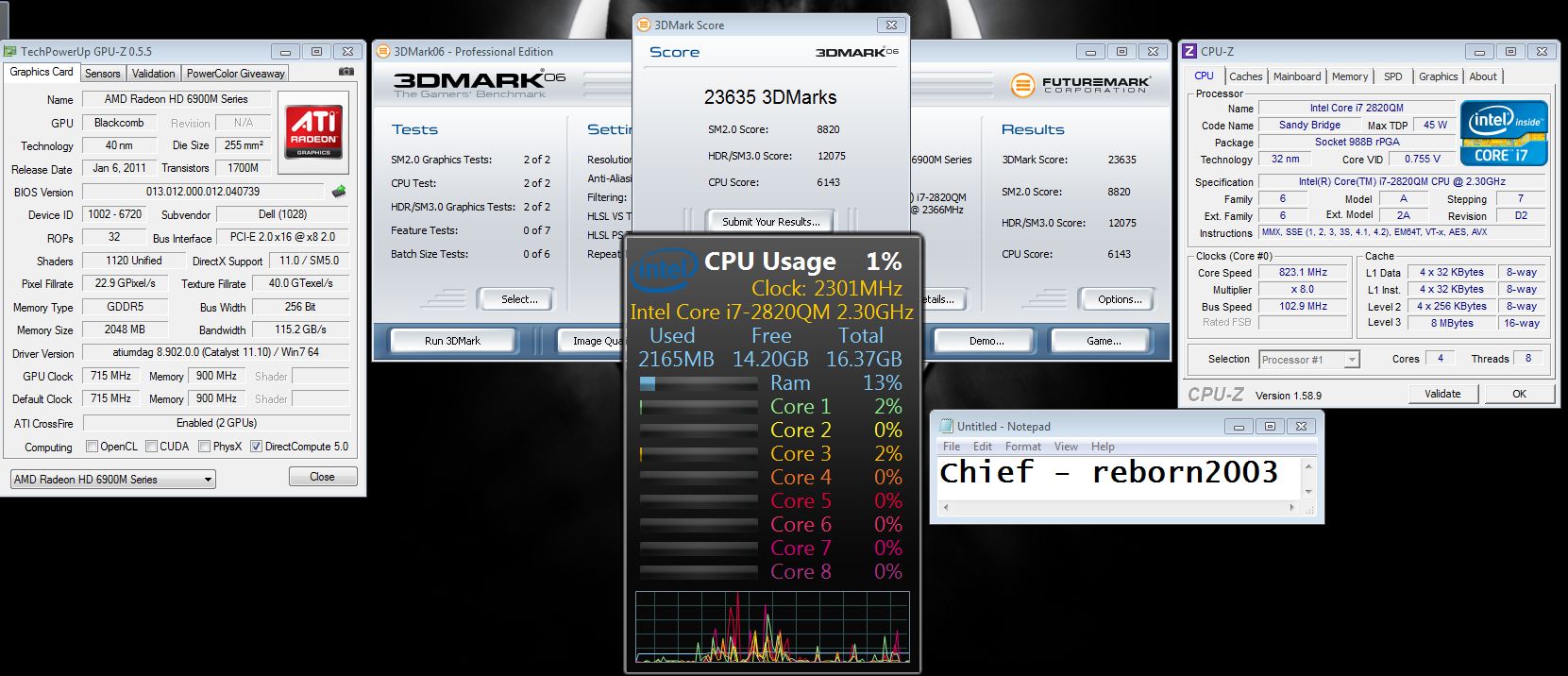
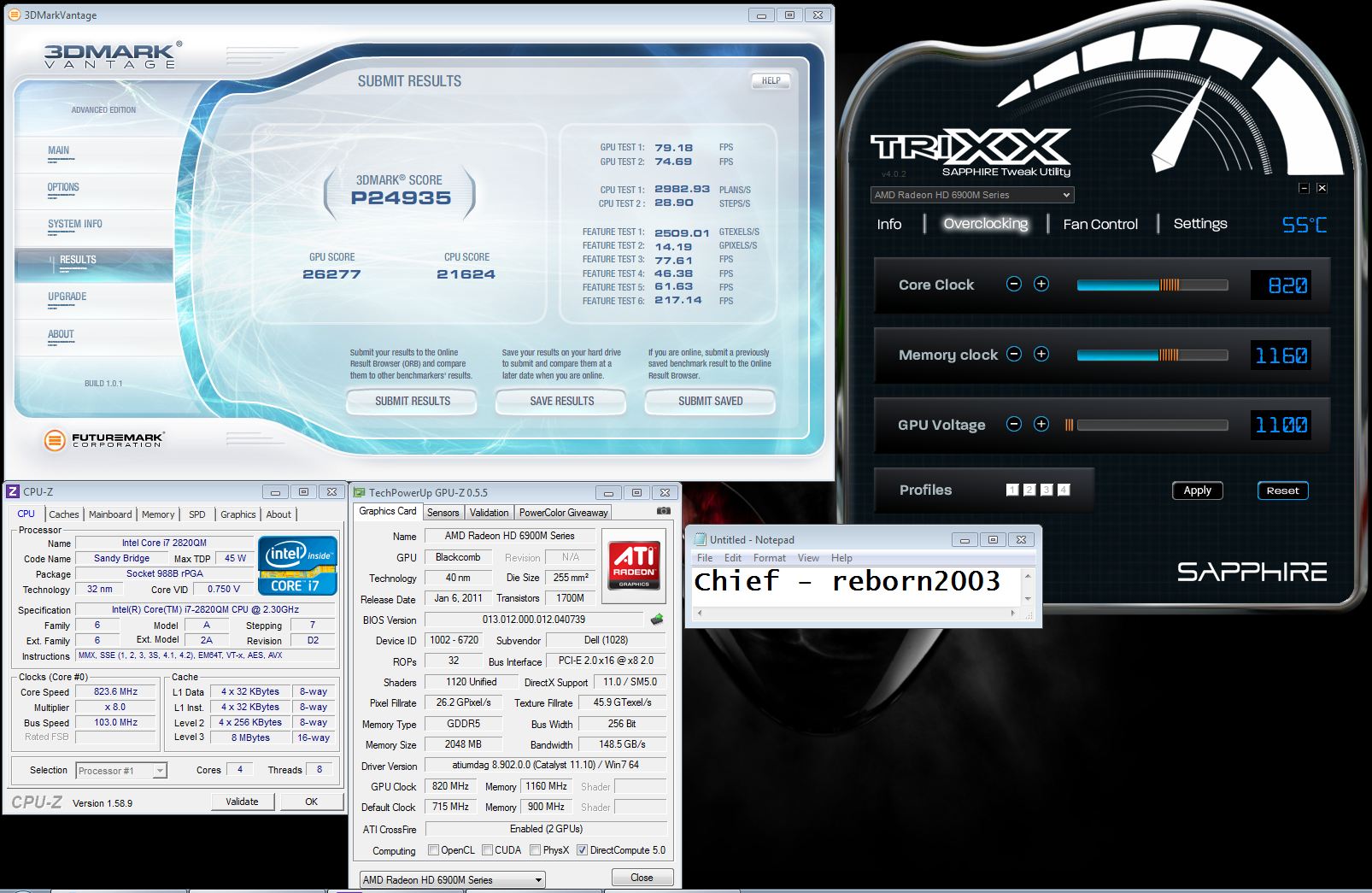
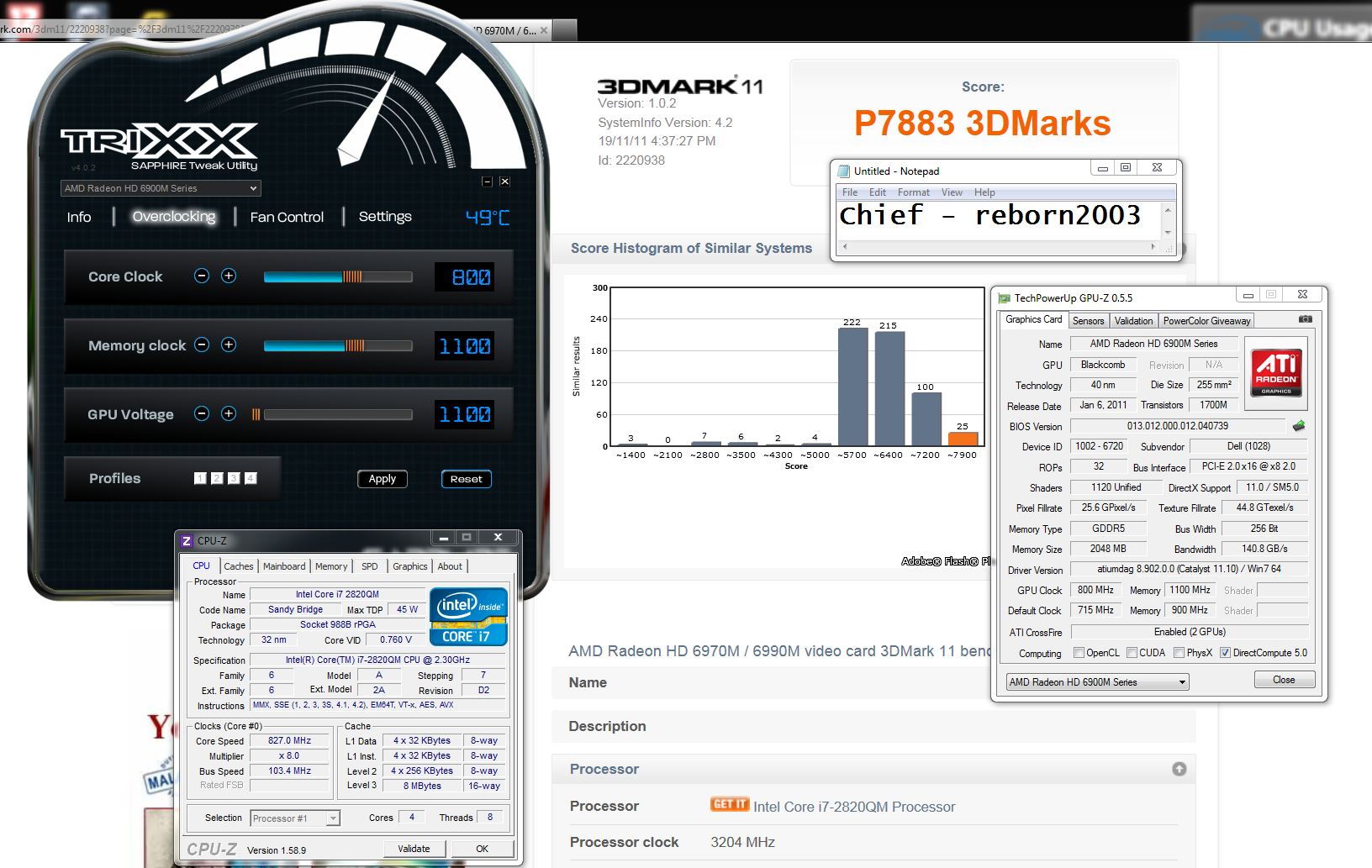
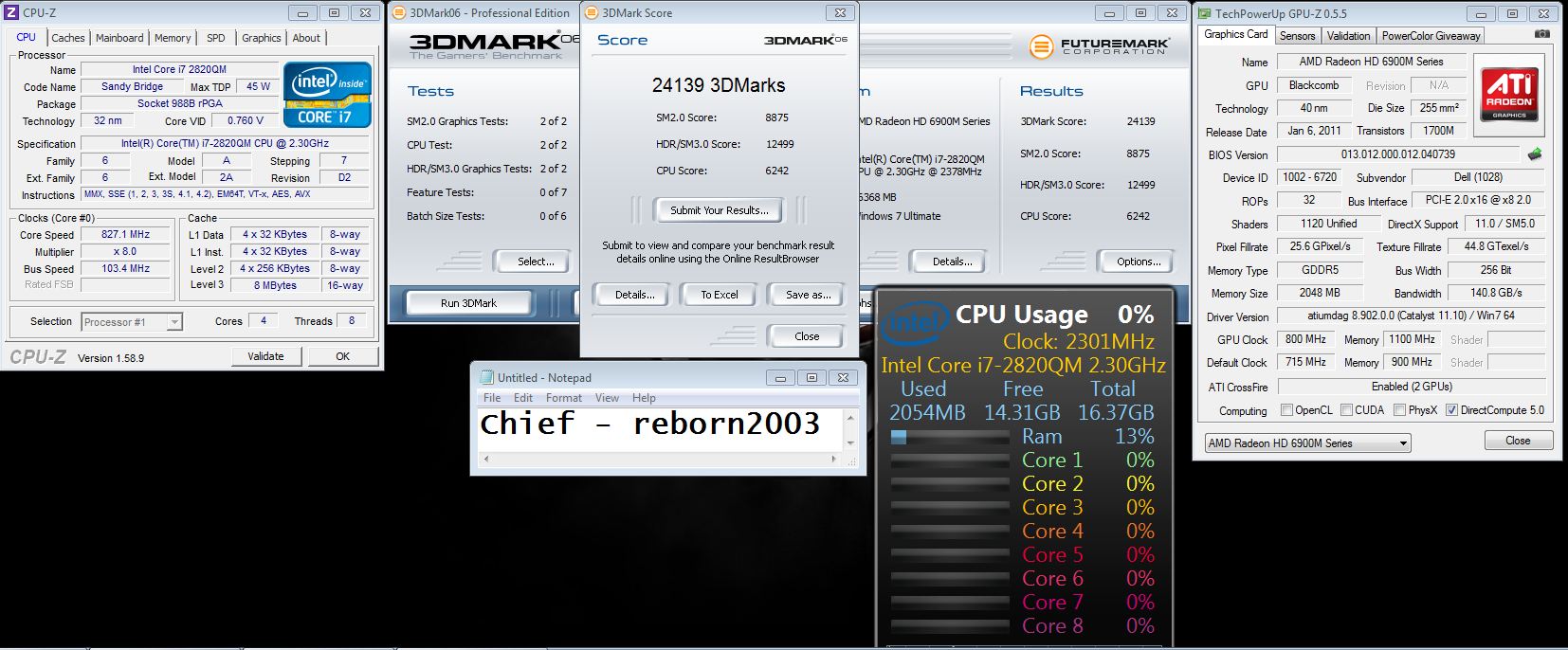
Whats your best 3d mark 06 score so far?
+ other bench scores?
Just a little something to kick start things off below
Cheers.
Attached Files:
-
-
I set the turbo settings at their maximums. You have me beat on the bench. I concede the win to you mate, as I don't want to push these 580M's too hard, LOL. I had to do a mild OC to get closer to your score, but the small nudge in clocks had very little effect (less than 500 points) versus stock speeds. Doesn't seem to throttle though, or at least I am not seeing it because the GPU core clocks never drop.
I'm using MSI Afterburner OSD to watch both GPU clocks and temps and generally under 70°C with zero fluctuation in core or memory clocks during most benchmarks and games. The exception is 3DMark 11 and it throttles like crazy with that benchmark like it does with Furmark. Must be on the blacklist like Furmark. (Also used Afterburner for the monster screenshot... nifty tool. Couldn't really use it with AMD... never worked for me.)
![[IMG]](images/storyImages/3dmark0622692.th.png)
![[IMG]](images/storyImages/3dmark06201111191057383.th.png)
Edit: Reborn - for my other benchmark scores with 580M SLI, look on this thread starting back on Wednesday of this week and you'll find them.
Last edited by a moderator: Feb 6, 2015 -
don't take that mr fox!!
![[IMG]](images/storyImages/3dmark06580m2960xmsingl.th.jpg)
-
Thanks for defending "The Green" John
Unless there is some secret sauce (as I suspect there might be in your case) I can only account for the difference being the XM CPU horsepower under your hood. -
Hi folks:
I'm playing with turboboost settings of my 2960XM, at the moment I have them set on 42, 42, 40, 40.
Which settings I can change to make the cpu speed get higher? Not turbo boost, I mean regular frequency.
Also I have speedstep enabled Do I need to change that?
Thank you for helping me
-
no secret sauce here...only cpu horse's and a single stock gtx580m is all...
well...since 27x is the highest non turbo setting you can get. and any thing above that is turbo boost.
your better off running the level 3 over clock first and then start experimenting from there.
which it appears you have...but the only way you'll get higher and stable is from an unlocked version of the bios. -
Thank you!
I have set overclock level on 3 as you guess. I will be able to get higher speeds if I play with BCLK option? It's set by default, how far is safe to play with this value?
Thank you again -
I think I'll stick with what I have versus using a modded BIOS... it's as close to perfect for gaming as I need. I'll try to work an XM CPU into the budget in 2012. I did manage to pull a bit higher score by forcing the fans to 100% which kept GPU temps to a max of 60°C under full load. So, given the slight drop in temp helped more than I expected, I'm guessing something is throttling behind the scenes even though it does not appear that clock speeds change.
![[IMG]](images/storyImages/3dmark0623285111911.th.png) Last edited by a moderator: Feb 6, 2015
Last edited by a moderator: Feb 6, 2015 -
no problem
you guys are killing me with this modded bios stuff. all he did was show you the menu you would see on a desktop bios. and it installs exactly, word for word click for click max fan for max fan shut down and reboot on it's own...just like the factory bios you download from dell.
you guys are killing me!
side note:
your cpu is not running fast enough. just by looking at your low 73 fps with dual cards tell's me this...
the first gpu test is base on how fast your cpu is running...more so across 2 cores.
the second gpu test is based on how high your over clock.Last edited by a moderator: Feb 6, 2015 -
John - so maybe I am just not understanding correctly. On a non-XM CPU, I did not think the multipliers could be increased beyond their factory-set limits. Does the 2760QM actually have the ability for the multipliers to be unlocked through the BIOS? I've not been a pro at the overclocking thing, so I approach everything with a great deal of caution to avoid causing problems due to my own ignorance, LOL.
-
brother fox...
no worries.
in your case...you can only over clock cpu bclk and memory.(by way of bclk)
you can probably pull off a 106.2 or a 105.4 and be fine for that.
and since 06 test 1 through 4 needs a very fast cpu. (test 1 and 2 need at least a high speed dual core - test 3 and 4 need more cores and speed - test 5 and 6 need a super over clocked gpu and high speed dual core) this is why sandy bridge can do well here with moving worked across any two cores at any given time. then jump to full blown 4 core mode. (which of course...a dual core cant - old school) -
Hey nice scores Foxxy! Hey you got me beat hands down in the Heaven Bench!
We should try Vantage since your 3d mark 11 throttles. Have you got Vantage? I sure hope none of your games are throttling at least.
Ah don't give up yet lol!
Truth be told I would rather have your Greens in my system LOL! I just couldn't afford them before lol. Curse these Red rubbish drivers. I sure hope Dells driver update surfaces soon for us to try. Thanks for all the work in the other thread man! Keep it up. Superb stuff.
Hmmmm its quite fun tinkering with the OC options and trying to squeeze out a few extra points in the bench.
I tell you I love how quiet these systems are when they aren't being pushed hard. It's totally awesome. My R2 when at the slightest increase in usage, no matter what I am doing the Fans seem to REV up to such a loud decibel as if they were shouting HEY Look at me OVER HERE
HAHA! (temps are fine and everything but it does life to REV the fans).
I'm gonna tinker some more and see if I can get a little more higher with some of these benches. I do have an issue though. These GPUs OC like *****well lets just say no where as close as Shaden's or Johnkkkss!!
Thanks for the info once again guys.
I might try and run my fans maxed out too and see if that helps.
Geeee I also need to work on my M17x R2 benches, I only have one score left on DR's entire TOP 5 leader board.
Cheers.
Last edited by a moderator: Feb 6, 2015 -
Thanks, reborn
I posted Vantage and 3DMark 11 scores two days ago... here's a link to the post. I may run a couple more now that I have some performance optimizations in place. I ran those on a clean install with default Windows services and no system tweaks of any kind. I has been about 3 years since I had an SLI system (XPS M1730), so I am having to brush up on new information and tap my memory out on what used to work best for me.
The reds have been great for a lot of folks, but 6900 series has not proven itself as being very reliable for me. I had no problems whatsoever with the 4870 or 5870 CrossFire systems in the R2. They were real workhorses. The latest AMD drivers are pretty sad, as you've noted. Someone at AMD seems to be asleep at the wheel. I'm really happy with the green cards. I also like the NVIDIA application profiles a lot better than the lame implementation that AMD uses.
In my opinion, the M18x is an incredibly awesome machine. I love mine even more than the R2 (which was also awesome). Overclocking is fun and addictive. I'm trying to not let it become a distraction... I'd rather be gaming. The 580's have not throttled in gaming that I have noticed.
Speedfan works pretty well for maxing out the fans. I don't allow Speedfan to run at startup and only plan to use it for benching. The M18x (with red or green) needs no help at all in cooling for gaming or normal use. Mine was running super cool in benching without cranking up the fans full blast, but an 8° to 10°C drop in temps does seem to make a difference in benching performance. I'm a bit leery of whether or not I should rely on the native systems to take back control as it should after I kill Speedfan, so I've been rebooting my system just to be certain that nothing interferes with the normal operation of the fans when I am done using it. -
Oh Cheers man, I totally forgot about them.
I just did a bit of benching. I kept freezing and the screen kept going dark/dimmed. So I guess I am hitting some sort of limit.
Cheers.
-
Uh-oh, I don't like hearing this, bro. This is exactly what my last M18x started doing about a week before it refused to boot with the AMD cards installed. Mine was doing that while playing games like Crysis, Bulletstorm, Left4Dead 2 and Metro2033 at stock clock speeds. Since you commented about how quiet your system is, I am wondering if your system has the overheating issue. You are supposed to hear the fans spin up now and then, even during times there's no load to speak of. Are you monitoring the GPU temps even while not benching? I am 99.9% sure the current issue is what killed my cards and I did not hear the fans running most of the time. This was before the overheating issue and the reboot workaround came to light here on the forum. My cards were as dead as a door nail about the time that became common knowledge. Have you had any thermal shutdowns? I used to leave the M18x running on a small table by my desk running all day while I worked (as I have done with previous systems) and numerous times I found it turned off all by itself. Not trying to scare you, man... just a heads up.
-
I don't even have 6990M CF and that scares me.
-
Hey Fox,
Thanks indeed for the heads up. Really Appreciated it.
So far so good. No thermal shutdowns.
My temps seem to be around the 50s high 50s when not benching or gaming. So not too bad. Not that low either but I'm okay with them.
Yeah I too leave my system running 24/7. Most of the time it is downloading or just sitting there with all my NBR URLs open lol! So far I can't recall any odd glitches or shutdowns.
The only time I have seen the system do funky things is when I have played with the BLCK in the system bios or OC the GPUs to high and tried to bench.
Other then that so far so good. Fingers crossed.
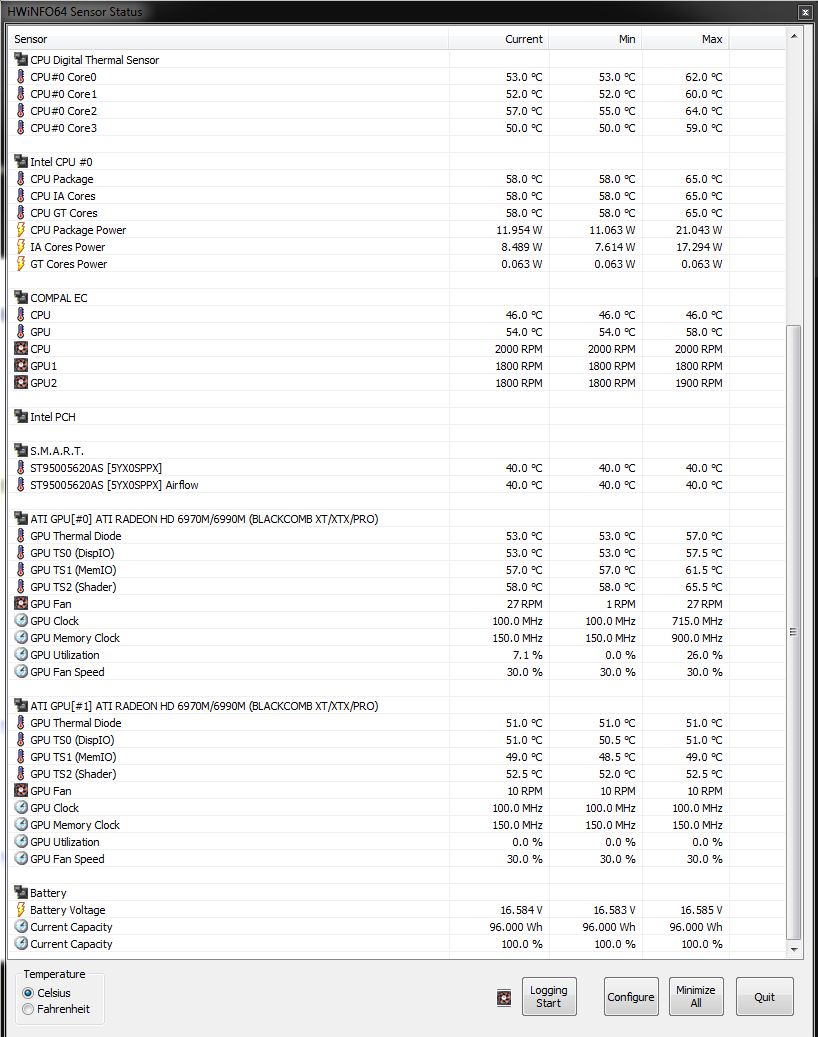
I'm gonna monitor some temps now and will post the pics up soon. I'm just chatting on GTALK and surfing atm, so nothing too taxing.
I'm gonna be playing MW3 and BF3 soon now too, so I will monitor temps during then too. Hopefully no thermal shutdowns.
Cheers.
Attached Files:
-
-
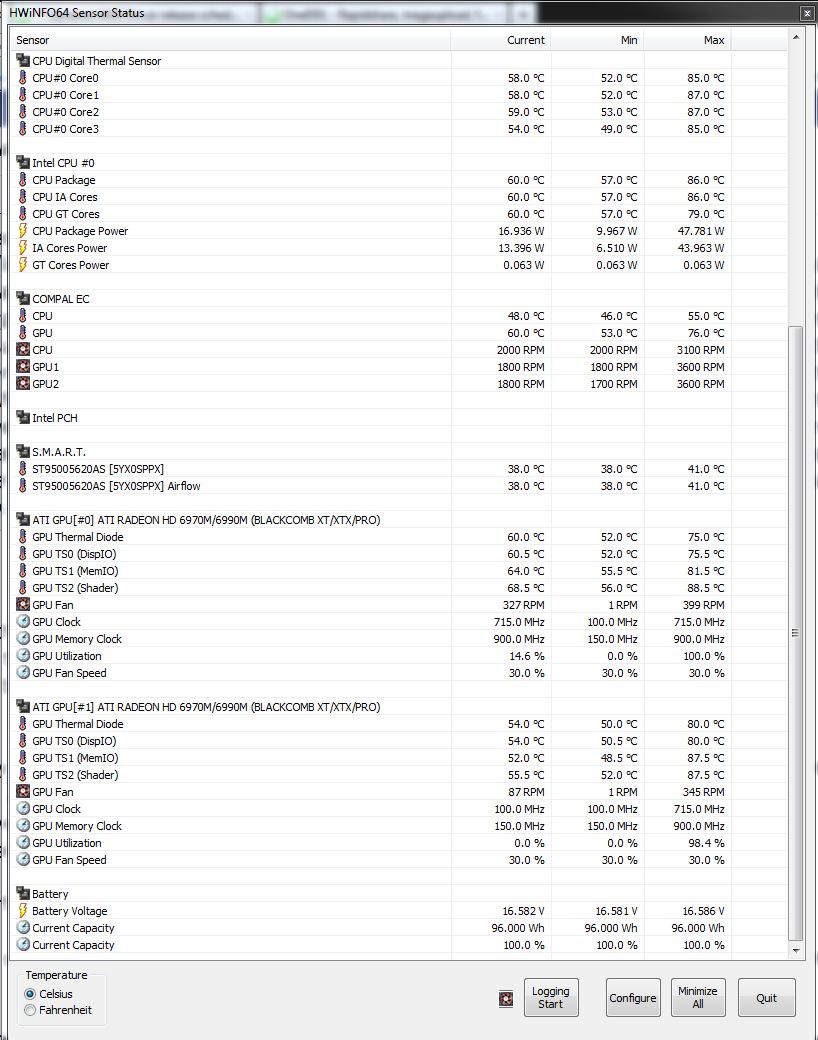
Well, a few users have noted that some of the more recently released AMD cards are prone to give false readings (or no readings) at times. My dead ones would often (for no explainable reason) start showing all zeros for sensor readings while they were still working. This makes me question whether the temp reading might not be totally accurate with the AMD cards. They are rather temperamental about being probed by HWiNFO if the settings are not just right. I was not monitoring temps on a regular basis with my AMD cards because they never seemed too hot when I did monitor them. I will not make that mistake again. I am monitoring temps 24/7 on my new M18x, no matter what I am using it for. I'm not going to let my GPUs break a sweat without me knowing about it right away.
Louis touched on the subject of zero sensor readings in our call. I don't have notes on that specifically, but it was in the context of the signal interruption he mentioned if I am not mistaken. -
I just played a quick game of BF3 co op. FUN FUN FUN lol!
Cheers.
Attached Files:
-
-
I have a replacement that has the overheating problem, I see that the themperature was going up to 85c on idle!!!
-
bumbo - are you using Speedfan or HWiNFO64 to manually spin up your fans? Under the circumstances it is recommended that you do so until a fix for the overheating problem is released. Even Dell has indicated this is advisable under the circumstances. A number of us have experience this type of high idle temp on the AMD cards with the current defect.
-
Nope, fox I'm sending it back and keeping the original one tha work perfect but it has the flicker,
-
Good idea... Might want to check to be sure the Crossfire cable is securely connected if you haven't already. Even if it looks as though it is, disconnecting and reseating it at each end might resolve that flickering thing for you. Also might not hurt to disconnect and reseat the display cable at its connection to the motherboard.
-
The two machine has flicker, I have a video that I will uploads tu YouTube soon.
-
Here are Metro 2033 runs comparing Depth of Field enabled versus disabled. This is running at stock GPU speeds with the GTX 580M SLI.
![[IMG]](images/storyImages/metro2033580m.th.png)
If steviejones133's results with 6990M CrossFire is representative of the standard, the AMD cards perform better than NVIDIA with this game. -
Could be true Mr Fox....its one of those games that does sway to AMD for some reason. Although, saying that, its also a heavily cpu dependant game so maybe my xm cpu could be a factor between my results and yours? - possibly. If you had an extreme under the hood, maybe you would be closer to the bench I put up? - not sure but it will be interesting for me to compare........
It certainly was flagged up on NotebookCheck's review of 580's vs 6990's as being one of the titles in which AMD outperforms Nvidia on.
Quoted:
Metro 2033
The Ego shooter game, Metro 2033 (based on a novel with the same name) can overtax almost every available notebook at maximum settings. Very high details, DirectX 11 mode, AAA (Analytical Anti-Aliasing), 4x AF and 1920 x 1080 pixels make both the GeForce GTX 580M SLI (32.4 fps) and the Radeon HD 6990M CF (37.6 fps, +16%) to break a sweat.
Even though the test rigs had the same desktop cpu, the AMD setup still pipped the Nvidia setup by about 5 fps......
Although maybe not the most accurate source, I think its pretty much a good call on this one. I guess we will always get games that perform better on one or the other.... -
I had read that also. Having an XM CPU would certainly be advantageous on any gaming system. I wish I had one. I offered it up in case folks with a 2760QM or 2960XM CPU like either of ours would like to post some comparison runs with their AMD and NVIDIA GPUs.
-
Good idea.
After re-reading that article, and considering both setups had desktop 990's, the AMD setup still won over the Nvidia. If I recall my benches correctly, I did a run with DOF disabled as well as PhysX disabled and the FPS went up considerably....to almost about 40fps.....gimme a few and I will see if I can post it up.
EDIT:
Metro 2033 DOF disabled - PhysX disabled:
Metro 2033 DOF enabled - PhysX enabled:![[IMG]](images/storyImages/metronodof.png)
As you can see, I drop quite a bit by enabling both PhysX and DOF but the benefit of dropping DOF whilst PhysX is disabled bumps my FPS up to 38fps from 30fps![[IMG]](images/storyImages/metrodofphysxenabled.png)
The other option was PhysX enabled and DOF disabled which resulted in this:
DOF disabled & PhysX enabled:![[IMG]](images/storyImages/metrophysxenableddofdis.png)
Metro 2033 DOF enabled - PhysX Disabled:
![[IMG]](images/storyImages/metronophysxdofenabled.png)
Anyway, thats enough for me tonight !
You can see that the game can be maxed out but fps is around 27-28 which rises to a healthier 38fps if Depth of Field and PhysX are not used. -
Johnk, anyone else with a 2920 or 2960 ...
Standard lvl 3 OC.... what kind of temps to you get on your cpu at idle sitting flat on a desk ?
I am thinking my cpu needs to be reseated/pasted.... -
when idle, it's not uncommon to see high 50s, and that's ok, the fan is not spinning till low 60s I think. It's the load temps you should worry about. My CPU gets up to 85c under load @lvl3 without forcing the fans.
-
same here. high 80's on the regular.
-
hrm I am seeing 85s .... idling for the most sitting flat on the desk ... running like Internet explorer ...
-
My 2960xm level 3 is idling right now at 46c with IE9 open and 3 tabs - nothing else. Max temp has been 56c. Its elevated on the U3 and its not exactly warm here but no where near 85c....
![[IMG]](images/storyImages/cpuidle.png)
-
85c On idle!, something is cocono with that machine.
-
Long time no see man!
*OFFICIAL* Alienware M18x Benchmark Thread
Discussion in 'Alienware 18 and M18x' started by BatBoy, Apr 30, 2011.


![[IMG]](http://img593.imageshack.us/img593/1959/heaven1509111811.png)

![[IMG]](http://img687.imageshack.us/img687/8229/3dmark0622692.png)
![[IMG]](http://img35.imageshack.us/img35/2948/3dmark06201111191057383.png)
![[IMG]](http://imageshack.us/photo/my-images/829/3dmark06580m2960xmsingl.jpg/)
![[Nikos]](images/avatars/[Nikos])
![[IMG]](http://img6.imageshack.us/img6/3500/3dmark0623285111911.png)

![[IMG]](http://img85.imageshack.us/img85/1904/metro2033580m.png)

![[IMG]](http://img4.imageshack.us/i/metronodof.png/)
![[IMG]](http://img703.imageshack.us/i/metrodofphysxenabled.png/)
![[IMG]](http://img811.imageshack.us/i/metrophysxenableddofdis.png/)
![[IMG]](http://img510.imageshack.us/i/metronophysxdofenabled.png/)

![[IMG]](http://img412.imageshack.us/i/cpuidle.png/)