Problems? See this thread at archive.org.
Oh yeah to answer that question above about those 3 white lighted buttons on top... maybe you should've just tried pressing each one like I did to figure out what they are lolfar left is for display mode e.g. theater, soft,etc., middle button is for performance mode,office mode etc., right button toggles the touchpad on and off. Hope that helps. Bye.
-
Thanks
I asked in the forum best buy by size, but did not know which were
So better ask in the forum -
The ASUS box is not sufficient for shipping. You will need a larger more padded box to put it inside. Here are the dimensions of the box.
Manufactured by: Asus
Mfg Part No: RB-G60VX-RBBX05
UPC No: 890552679892
Box Size: ( Length: 21, Width: 15, Depth: 4 )
Shipping Weight: 10.4000 pound(s)
Cheers, -
Far left (Asus ROG logo): DirectConsole, an old program used on the G50 models to handle CPU overclocking and customization of the OLED display. Now defunct.
Middle (Lightning bolt man thing, should be on the space bar as well): Power4Gear, handles power settings like battery saver and high performance as well as some CPU overclocking. The button just let's you toggle between individual power settings. I believed this somewhat replaced DirectConsole for G51s and newer.
Far right (two rectangles under a bigger rectangle that's been crossed out, looks like *shockingly* a trackpad!): Shouldn't be too hard to figure out, just toggles your trackpad.
O with a lightning bolt (left of power button): Asus Express Gate, don't know how to explain it so go here. -
Thanks for the information
-
With the newest SETFSB Tool its able to overclock the G60.
I only get 146 MHz FSB at maximum before bluescreen...
4 x 3360 MHz / DDR3-1460 (730 MHz) @ CL6-6-6-18.
with 145 MHz FSB:
http://valid.canardpc.com/show_oc.php?id=1215826 -
GDDR5 extends the G90 another generation! LOL I love it.
-
Bought my Asus G60JX yesterday, and it's a pretty good laptop. Lucky me, online it said it was $999, when I arrived it was $899 and at the cash register it appeared with a discount at a total of $805!
But, i'm not entirely happy with my purchase. Windows 7 while faster and prettier than Vista, is a pain in the []. The games are not entirely compatible, like Age of Empires III running very glitchy and Medieval II not working at all. Also, my network card stopped working. I only used it once and then just doesn't work. It appears the problem is with ethernet connections but i'm not entirely sure.
Regarding the heat, size and display people constantly complain I have no problem at all, but what's with the network problem? Is there any fix for that? -
I would try to power cycle the high speed modem and the router. You would do this by pulling the power cord from each unit unless they are a combo unit in that both the modem and the wifi unit are one unit. Just pull the plug wait a minute or so, plug back in, wait until all the lights are back to normal and then you should be good to go. I would also download the lastest drivers from
asus or the makers of the wifi and network card and install those if the power cycle does not work. you would need to use another computer to download them. also download the latest bios and save it to a usb thumb drive and unzip it to that usb thumb drive and then enter the bios from the post screen and then install the new bios and point it to the usb thumb drive for the file of the new bios. -
Was that from Best Buy? I just bought mine last week and getting $94 back on a price match would be SWEET!!
-
Yeah, besbuy... and on top of that I got $40 back in a reward zone card.
-
I just so mad right know!
Something here is not working, I did what you said and also uninstalled the Creative drivers. Disabled and enabled Realtek drivers to see what happens, nothing works! So F*ING MAD! -
You didn't happen to accidentally turn off the wifi switch on the front left of the computer did you?
-
Got this thing a few days ago, and I have to say I love it so far! Sold my G73JH-RBBX05 and bought this for 800$ (1 week used off ebay). The keyboard and display is better than the ones on the G73JH (I had the one with crap LCD..).
The heat gets pushed out very well from the single fan. Luckily I'm not left handed. There is a little fan-noise under load, but I can barely hear the fan when NOT playing. But to justify some fan noise under load; who the hell plays games with no sound?
GPU temp reaches 86-87C under load (Just Cause 2/StarCraft 2 maxxed). My left hand gets a little sweaty but I don't mind, gaming = blood, sweat and tears. No problem having it on my lap when typing, browsing the net or watching a movie, would however, not recommend gaming without having something in between.
The build quality is similar to that of the G73, but I miss the rubber padding on the G73's armrest, much better than the plastic found on G60 and all other notebooks. What I don't miss is the huge mousepad + weird buttons on the G73, I prefer the "traditional" pad/buttons on the G60.
Also a shame that they have chipped off the top corners of the screen, but then again, you don't really notice it when using the computer..
If anyone is wondering why I jumped down a notch I'll tell you why;
- I sold the G73 for 1900$ when I went back to my country
- My friends i5 430M whipped the i7 720Q's when loading StarCraft 2 (the game is optimized for 2 core CPU's, so I started asking myself "do I really need all this power..?" answer: No I don't.)
- I could not find a bag for the G73 without paying 100$+...
- The fact that I got the AUO display in my G73 slowly choked me mentally. (I could not go to BB and trade it for one with LG as I live in Japan now..)
- I needed some money.
Love this thing! Now if I only can find a webcam driver that works with Win 7 Ultimate 64bit... -
Umm anyone else notice that when you touch the left edge (towards middle) of the LCD screen it clicks. loudly... For a second I thought It was supposed to be like that but then I checked the right side and its firmly in place... Looks like the factory didn't Glue/fasten the 2 pieces together leaving a space to Click. If Anyone else has this problem I gotta swap it out with best buy preferably before the 2 weeks is up. Other than that very happy, cranks out Counter-Strike Source at max settings with 4x AA on at 151 FPS. Let me know if any with the AsusG60JX from best buy has this CLICK issue... if its a defect its a pretty big one lol.
-
Oh yea, one more thing, I called Asus tech support and told them my issue with the G60 getting uncomfortably hot where my left hand is especially playing games like dragon age: Origins at max and SC2 on High. Interestingly, she said the G60's they sell Don't seem to get very hot anymore (implying that there was an issue before) So she recommended I go back to bestbuy and have the computer tested and see if its a defect in hardware... I'm going to do it because I'd much rather have the more stable/less hot version of the G60JX so it doesn't break down sooner in the future (e.g. fried motherboard or GPU.) Tell me you know more about this or if you have a G60 that doesn't have the heat problem. If a cooling pad fixes it completely i'll get that but i'm not gonna lug a cooling pad to class everyday lol PEACE.
-
Because of the not-so-good airflow through the machine and the fact that there is only 1 fan doing all the work all G60's will get hot, so I'm afraid it's not just your machine there is something wrong with. Have you tried pulling out the plastic cards of the express / SD slot? Express is on the left side (over the USB ports), the SD is next to the Wlan switch on the front, left side. I don't have a cooling pad, and I haven't read anything about using one with the G60 so I'll refrain myself from commenting on that. It should help though.
-
These do not get extremely hot, but the GPU can get cooking a little bit. As long as it is under 90C I think it is safe.
-
I have the clicking sound too on the left hand side, does not bother me/
-
These laptops have 2 HD bays if I recall? I am thinking of getting a SSD drive for the OS
...anyone else do this?
-
What's better? the 5850m or the 360m? Considering that both have gddr5 memory.
-
5850 will beat the pants off a 360GTS!
-
still unable the underclock to 135MHz the video card..
rivatuner doesn't know the 360M..
and the powermizer also doesn't help
any ideas? -
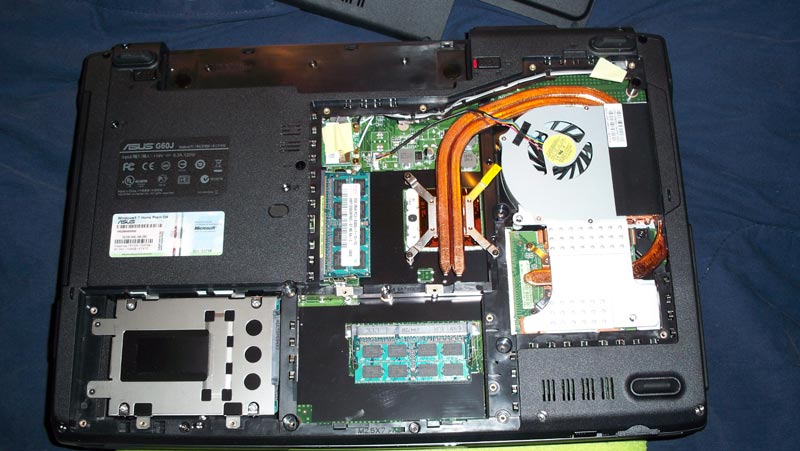
The Best Buy G60Jx does not have the 2nd HD bay. Well it does but it's being used by a system memory stick. So, in other words, no second hard drive for the G60jx from best buy. Pic below of the bottom opened up on the G60JX from Best Buy.Attached Files:
-
-
Wierd how they setup the memory on G60, the G51 has stacked slots, and dual drives, this imo was one of the best assets of the asus 15'', and seems they want to bring it back with G53.
-
GPU-TOOL @ Google
-
Check the following threads you might find something,
[How To] Use Rivatuner as a better "Powermizer" alternative
PowerMizer Switch - get the most out of your video card
An Optimization Guide for the G51 -
I got my G60JX less than a week ago and it was 809$. They had G60VX on display and it was 899$. Strange. Everything is fine with my laptop, but the only thing that bugs me is the screen. I can see how it is grained in left and right bottom corners from usual viewing angle, sitting right in front of the laptop, literally I can see the grid. Is anyone else experiences the same problem or it's just my particular laptop? Should I give a try to exchange for another unit? There should be no 15% restocking fee, right? Thanks in advance!
-
Hey same with mine... clicking at the same position... not minding it though.. hehe!
-
I just got this laptop about a week ago and i'm contemplating about returning it. But i have a few questions to people that has bought it before i make my decision. it does have that clicking sound on the left side of the screen which is very annoying.
I mainly bought this laptop to play World of Warcraft and Starcraft 2, but when i installed World of Warcraft onto this computer, i turn it onto Ultra settings and i'm only getting 30fps, does anyone know why?
Also when i am in the middle of a game (world of warcraft, warcraft 3), and i turn up the volume via FN key, the middle of the screen will start to flicker like crazy for like 4 seconds.
i have tried the following to fix the problem
- Updated the bios to 206
- Updated the graphics card driver via Nvidia's website
neither of these have helped the problem.
thanks -
Are you gaming on battery power?
If so that hampers performance and if the power settings are not set to performance adjust them accordingly. -
I just bought one of these bad boys yesterday (Father's Day present). I'm an avid gamer, computer hardware specialist, etc., etc.. As I'm moving, I needed something power on the go, without splurging for a G73.
So far, I'm impressed. Best Buy had it knocked down in the store to $809.99 ($999.99 online though .. odd). I debated for awhile between this and the G72, but in the end, the i5 got the better of me.
The only thing that slightly irked me was the native resolution. It prevented me from running the free version of 3D Mark Vantage (the newest one) because of the resolution.
The first thing I did was pry off the little decals below the keyboard. On the textured surface, they came off fairly easily, and I used a dishtowel to rub the left-over glue off.
So far, I'm a happy gamer here.
-
what games do you play? what kinda fps are you getting on what settings? does the middle of your screen flicker as your turning the volume up and down while in game? cause i'm having problems with mine
-
Well, I opened up Darkfall last night and on medium settings, it ran perfect. As I spent so much time taking off all the Asus/Best Buy crap programs and updating drivers, Windows, etc., I didn't have much time to put it to the test yet.
As for the flickering, this is probably caused by the Asus Control Panel program that comes installed with the laptop. When you change the volume (and other keyboard-shortcut settings), it brings up an overlay menu that looks all pretty and such. This 'menu' could be interfering with the game graphics. I would either look into disabling or uninstalling the Asus control panel program - be careful though, this may disable certain keyboard shortcuts. I can't say for sure as I haven't tried it myself.
Let me know if this works, if you have more questions. I'm currently not and home and therefore not on the laptop, but I'll do what I can until I get home. -
I am not home either haha but thanks for the insight. What drivers did you update? I updated the bios to 206 viz EZflash and the graphics card driver from Nvidia's website to the latest. But the FPS is still poor. Maybe i didn't update some other graphics? I also ran a driver searcher and updated every driver in my laptop and that also didn't work. Any way to get it back to a fresh install? i didn't do the boot disc, i did a system recovery to the earliet date though
-
I updated my graphics drivers from nVidia's website. I also ran Windows Update and installed all of the needed updates.
I'm not sure about the boot disk if you didn't make one. I'd have to look into that to get you a proper response.
I would suggest getting a program called GPU-Z. This will give you all the detailed information about your card including clock speeds, memory, temperatures, etc. This may give you an indication if something is off with the graphics. You can compare the settings GPU-Z pulls up to the factory defaults for the card.
Also, what is the full model number of your G60? This may help narrow down issues.
What game did you say you got low FPS on? I can try that game at home (I probably have it already, hah..). -
I got the Asus G60JX from best buy i5 core/4gb mem/1g gpu. But i paid 899.99 for it instead of 809 lol. i might go back to best buy tomorrow and ask them why it wasn't 809, i think they have a 2 weeks price guard? Where do i get the GPU-Z?
i was playing World of Warcraft on ultra setting and was getting 30fps, my brother which just got a Alienware m11x is getting 60fps on ultra setting. -
I just bought this laptop a couple of days again and I am loving it. The screen is beautiful, and I love the keyboard and the overall design. It is a little bigger than I would have liked and the speakers are not so great but it's powerful enough. At first my temperatures were pretty high but after using it for a couple of days the temperature has been dropping, probably due to the thermal paste setting. I bought the laptop for $731 brand new from Best Buy after 20% from Bing.
-
how are you guys getting all these good prices? lol what is 20% from bing?
-
bing.com had a promotion for 20% cash back. That promotion is over now. I thought the laptop cost me 899.99 but I got some money credited back to me. I didn't even know I got it for a lower price until I checked my credit card statement.
-
Whoa...is $800 in stores a normal price?!? I might just have to get it for that, I mean that's just too tempting to pass up.
Regarding the hard drive issue-get a Seagate Momentus XT when that hits shortly. 500GB, so it's much larger than an SSD, for $140ish, and a high end SSD (that would be half the cost of the laptop!) is only about 40% faster on stuff that matters-booting Windows, intial program loads, etc. It usually beats out a current gen Velociraptor. REALLY impressive drive that IMO is perfect for single bay notebooks! -
Wolfpup, I have had mine for about a week and love it. I had two G73's but returned them due to various/quality issues. The G60 has been a dream. Also, I just ordered an i7 820qm cpu to pop in, so it should scream! Can't go wrong for $800.00.
-
That discount rebate of $ 899 to $ 800, paid in cash or in any store are doing this. I want to buy in New York the other week, also anyone know if there are any discount or charge extra tax
Excuse my English -
I've read through this entire thread, I must say, lots of good info. I just picked up a G60JX this week at Best Buy for 854.99$.
So far I love the laptop but I would like to mod the back panel without voiding my warranty so I'm looking at buying a new back panel and I was wondering if a G60VX back will fit the laptop or if anyone has one they would like to sell
thanks in advance -
Hi!
This might help you
I don't know if it will fit. Maybe you can try and let us know
-
Thanks for the response but I meant the CPU door, not the back of the LCD cover.
-
Whoa, I missed this before...dang, that's cool you actually returned G73s and got this!
Dang dang dang...still very tempted.
I'd have to get it from my local Best Buy, and unfortunately that may mean it's been "helpfully" pre-opened (BOOOO!) -
why would it be pre-opened? JW
And I love the G60JX, mine runs great, I re-applied thermal paste and it runs at a good tempurature. And for the price BB has them at right now you cant go wrong. -
I think Best Buy opens a lot of them to "inspect" them, or "optimize" them and other nonsense. The seals on most of the notebooks I've seen there are broken...and they often try to CHARGE for that "service", though at least that I could get around by ordering online...
-
That makes sense, I got mine without having it molested by BB thankfully, if one is in store not opened I say go for it though. In my area there are only a couple left in stores so if you are thinking about getting one I say jump on it quick.
Asus G60-JX @ BestBuy fir $999.99
Discussion in 'ASUS Gaming Notebook Forum' started by theholyangel, Mar 7, 2010.