Problems? See this thread at archive.org.
well i will have to take a look once its out then
-
A friend of mine has posted vids of the system running the RE5 benchmark and Mirror's Edge, you can see them here. It is for the G51Jx so it has a better CPU, but the same GPU and aside from more RAM slots and FHD screen, it's the same other mobo and other hardware (GTS360M, etc...). Can be useful for comparisons when G60Jx benches come out at the very least.
I like having the G51Jx laptop since it allows me to take it with me on trips and use the computer comfortably there (such as to Greece and Newfoundland which I visit often) as well as being able to take it to work or hook it up for a presentation and know for sure how it will react, along with just using it as a laptop computer I can hook up to my 42" HD Screen to watch Movies and so on. If it wasn't my main PC - I don't know, I got rid of my last desktop in 2003 right after I got my first laptop (as opposed to the work 486 Win3.1 laptop in 1994) - so I have to say I like the laptops much better and find them much more useful. Wish they were more upgradable (hoping someone will do a good study on the MMX slot and test out the next gen cards eventually and make sure the hardware and BIOS accept it) - but aside from price they are much better than desktops - and are much more energy efficient (even this monster 120W vs. 600W+ on a typical Desktop Gaming PSU). Not to mention portability - in every way it's better for me.
However, if you know you'll still use your Desktop as your main system and already have a netbook and a cell phone and have a 'big mortgage'... lots to consider there...
Peter -
Damn voice of reason lol.... mortgage is 400k, paid over 100k down for my new house lol..got it at 5.125% interest rate last october during that housing market drop and I got mine at an unbelievable price at location voted top 10 cities best to raise children in USA last 2 years. It's quite steep even for my salary but you get what you pay for and it's totally worth it.
Appreciate your opinion, I have thought about what you mentioned, just never reasoned to myself as clear as you, so thank you for the reply, I shall think it over very very carefully
Howard -
Enjoy life... that did occur to me after watching 2012 lmao -
i think id rather have a g51, but bestbuy doesnt sell one. (not saying thats the only place but i dont like ordering online)
looking at the specs of your system. id much rather have that. -
Just played some bad company 2 and my unit artifacts alot. Poop guess its going back!
-
I can honestly say my GPU never artifacted on my G60jx... I never even experienced any slowdown in BC2 or MW2 when the GPU was hitting 89c ... It got pretty darn hot but it didnt hinder its performance.
What settings are you running BC2 and are you overclocking anything on your JX? Are you somehow restricting air flow from beneath the lappy? Are you somehow recirculating hot air back into the unit? Thanks! -
Can i take your pics? I need to make sure about the cooler...
-
ive been searching for review of ASUS g60JX also and never had a chance to find one... The G73jh is on the loose and it may seem that they forgot the g60jx already.... too bad ive already bought a G60jx...
-
If you're premier silver reward zone Darth, you can return within 45 days.. no restocking fees...
although I'm not saying you should, I think the JX is an awesome laptop
-
Feel free, I posted them to share with you guys.
-
I was playing on default settings since I just installed the game. And i didn't mess with any overclocking. Plus was playing on the kitchen table with nothing to constrict airflow. The HW monitor reported 87c when it was happening.
-
oh thats interesting, thanks for sharing that... I played with the jx almost 90% of the time on the kitchen table.... what are your ambient air temps? Just curious thanks
-
No problem at all howard
.
What drivers are you using? Some people were getting artifacting until upgrading to the 196.86 drivers and others reported problems when they upgraded to 197+.
Peter -
I returned the computer today. Air temp is 68f since its still winter here in WI lol. I was using the factory drivers.
-
not sure how hard it is to get to the GPU, but the manufactures all to often screw up the thermal paste on the heat sink. Try re applying it with IDC7 and that should help.. i hope.
I still havn't made up my mind. Now im actually thinking about buying a i7 m17x with just the 920 processor upgrade and swapping the hardware.... URGH DECISIONS! -
Sounds to me like you werent happy with it from the moment you laid eyes on it.
Maybe try an HP or Dell.
-
Oh well, someone had said specifically that they were getting artifacts until upgrading the driver - might have been the same game, I can't recall exactly off the top of my head, but it came up sometime in the past couple of weeks. it would have been good to know if it solved your case, but seems its too late now. Good luck in your search.
Oh and for the record: http://www.engadget.com/2009/11/17/laptop-reliability-survey-asus-and-toshiba-win-hp-fails/
Peter -
http://www.nvidia.com/object/notebook_winvista_win7_x64_197.16_whql.html
Official 300M drivers out! -
Im sure this driver is ok to use, but is asus's drivers better
when they do release it? -
Has ANYONE had the BSOD the G51j/x models have/had, or is this one 100% stable?
Dang...I like the size and lower resolution, but it's only got one drive bay (I think), and no Blu Ray
I'd also like the Nvidia GPU...ATi is finally a choice because of their official (though hidden) drivers, but their drivers are still worse (even has Dragon Age problems...and forget about older games since they don't bother with regression testing...)
No. Might be worse though, if it ever comes out. -
If you have problems with a certain game, you could complain to the OEM and they will complain to ATI/nVidia to get it fixed. They don't want people to not buy their systems because of that sort of thing - it might not be top priority, but it'll be on the lit. The release department tested a sample of games (1 per each major type of gaming engine minimum) but me as an Applications Engineer, I tested quite a few older games when I was working at ATi - but only if the OEM reported the problem to us - if they did and it was a problem with our driver, then we tried to fix it ASAP.
About regression testing, do you mean new drivers break games that older drivers had fixes for or that new cards come with drivers that don't work with old games. For them to thoroughly test every game on the market with every driver release (which happen more than you'd think) with every single card and with every single laptop from every single OEM - well, I don't think there are nearly enough people working at either company for that.
If you want a driver that was fully tested with your specific computer, wait for the OEM releases. We were very careful with those, we made just the changes needed to fix bugs since they were otherwise tested thoroughly on the systems. The mainline builds though, it's up to you if you want to risk it - the OEMs would rather you stick with the drivers they approved - that's why the drivers are hidden, not because ATi wants that - not at all... If you and others seeing them report the issues to the OEM though, or complain enough online you'd be surprised what might happen.
The G60Jx has the exact same BIOS as the G51Jx. Also only has one HDD, but instead of 4 RAM slots, it only has 2. No Blu-Ray unless you upgrade it yourself is true.
Peter -
Hey bro, so would you recommend the Bestbuy G60JX
With I5-430M. 4 GB DDR 3, 500GB HD 1366 x 768 1GB GTS 360M
or the Amazon G51j
http://www.amazon.com/Republic-Game...ref=sr_1_1?ie=UTF8&s=pc&qid=1270085051&sr=1-1
Pretty much same thing cept for 1920 x 1080 on G51 vs 1366 x 768 on G60. I was kinda leaning toward G60 cause lower resolution will be more future proof, less stress on video card faster frame rate and also the numerous forum posted G51's BSOD and heat issue (even though I know they have the same mobo) On bestbuy site there are no report of BSOD on any G60 at all... whether VX or JX
PS: I'm also partially thinking if lots of the G51 overheat BSOD is due to the 1080p resolution causing video card to heat up more than G60 variant. -
Can't really comment, I know the G51JX well. You can compare my results and power settings with 3DMark and other tests in my review and with this thread. Note that the G60JX can't do the default resolution of 3DMark06 (1280x1024) so often times it runs at a lower resolution and therefore a higher score (and less stress based on your theory).
I like having the extra space to display content - and you can reduce the resolution if you have a higher one - but if it's lower then you can't. Some people have been replacing the LCD with higher resolution ones - worth noting.
Do a search for BSODs with the G60J as well and see if you find any results - the VX was more of a different system and I don't know if it had the BSOD issue - only the G51J (and it's relative possibly) had it that I know for sure. I think the M60 might have had it... but can't remember for sure.
Peter -
Has yours eve BSOD? if so often?
-
As mentioned previously - I spent about 25 hours trying to get the BSOD, but never did. I've had about 4 BSODs at various times in the past 2 months - I haven't uninstalled any of the sound card drivers that people reported causing BSODs because I've never gotten the same BSOD twice.
Considering how much I use this laptop, and that I use it often overclocked both GPU and CPU and with no laptop cooler - I think it's doing quite well.
Peter -
4 BSOD in 2 months is nothing, good to hear! cheers~
Time to consider
1080p
or
frame rate.... -
4 BSOD in two months is HORRIBLE
Systems should NEVER be BSODing.
That said, I don't know if the X3 has the same issues, given it's a different CPU and not entirely impossible that it's somehow a power draw thing causing them on the better models. I guess people aren't reporting issues with the G60jx though (?) so I'd lean towards that (plus personally I'd prefer the screen). -
a couple of questions about - G60JX-RBBX05
Does it have bluetooth?
I own an older model Asus F3T 15.4 inch at 1280x800 and i liked the wide xga screen on it, will 1366 x 768 from G60JX look even better than the screen of Asus F3T?
Where are the speakers and how does it sound like on G60JX?
Thanks -
No Blutooth
never seen the other screen so ..... but 1366x768 is a good res for gaming
Speakers are not that great -
Now that I've had this laptop for a few weeks I can say it is excellent. So far it's taken every game I've thrown at it and ran it excellent. I've had no bsods, I should also add that I did a fresh install of win 7 ultimate the day I got it. The gpu has never gone above 85c while playing games for over an hour. I also do not have a cooler and I am usually playing games with it sitting on my lap.
The screen resolution is perfectly fine for me. I don't really understand why everyone complains about the resolution. Honestly you aren't even getting the full effect of 1080p on a 15.6" screen. I do understand that it will lessen the jaggies but that's also why there is multiple different anti alaisment options.
I hope this helps anybody that is on the fence about this laptop. -
G51JX does have Bluetooth - didn't realize they cut that out with the G60JX, so anyone in this thread that asked me about differences, that's one I probably missed, sorry about that.
The resolution is mostly useful when you are working, surfing, reading, that sort of thing - you can display much more content on screen at at time. In some old games that would give you a huge advantage since the camera would be able to zoom out more and therefore see more units and terrain at a time which can be a huge advantage (think Age of Empires I and II for example) - there might be other games out there still that give such an edge still but I don't know for sure. In AOE II/AOC though, if you don't have 1280x1024, it's not worth even trying to play the game vs. other online players - they will murder you (demonstrations available if you want to see).
Most games though do support the lower res, so you should be ok - it's anything lower than 1024x768 that you might not be able to play modern games at all (think N10J).
So, certainly or work and in some games, having the extra resolution helps. Not all the time though, but certainly things are sharper since the pixels are themselves smaller so depending on how far away you view the screen, it can definitely make a difference (G51JX has more than 2x the pixels of a G60JX screen).
As mentioned before, you can make the pixels bigger if you have a display with more than you want, but you can't make them smaller than the hardware permits on a lower res screen.
Peter -
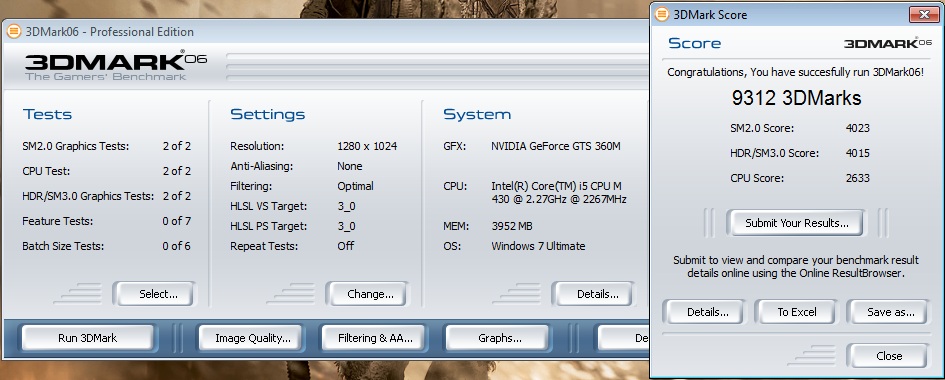
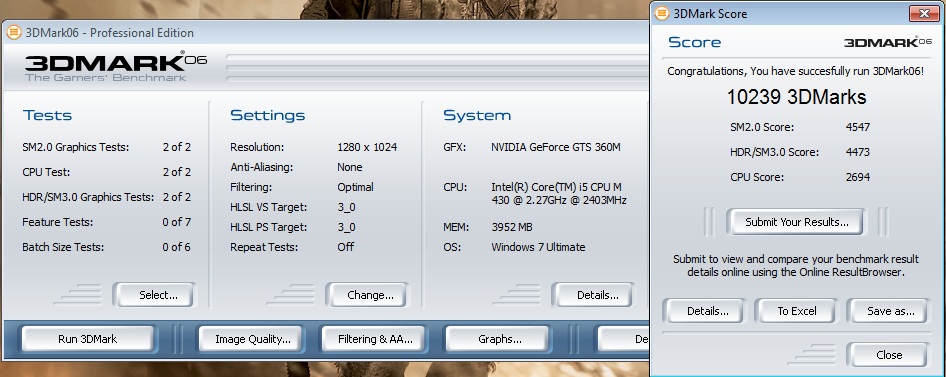
I hooked my g60jx up to an external monitor and ran 3dmark06 at it's default resolution. Figured I'd post it up for comparison and such.
Edit: I also added a default resolution benchmark with the gpu overclocked to 650/1900/1423.Attached Files:
-
-
But all old games that I can remember(and tested it), cannot suport high resolution to have any benefict of a 1080P display, some exemples that I tested was Diablo 2(pretty old game, but became a legend suports only 800x600 res), Need For Speed Underground 1(not so old, but stills only suport 1024x768), and for surfing on the web, most sites just don't use all the area of a 1080 display =X(ok, depends the navegator you are using, and their settings).
I'm not saying you're not gonna have any advantage of a full hd display(to work with image editing like photoshop cs4, corel draw and etc ) of course it will be very usefull, but cannot be applied to all games and utilities of a laptop. but, for me... a HD resolutin as a 1366x768 seems pretty good for gaming and other things in a mobile computer, and if you need more.. can plug the hdmi out on a LCD/Plasma TV. -
Thanks for posting those viper - your normal score looks about right, 4000 or so points below mine, as is your overclock score - but that would be because my CPU is getting those extra points over yours. Otherwise identical it seems - so confirmed GPUs are the same
. It might be that your overclock can go even higher, but the #s do make sense at this point.
Depends what games you play - for AOE2 (a pretty old game) - 1280x1024 was the max and it gave a huge advantage. I did a search today after posting that and someone made a patch so you can actually play that game at 1080P resolution - it's awesome. Games still play on the HD display at their lower resolutions and still look good to me. Newer games though, like Civ4 for example, support 1080P out of the box and it can add to the game.
For gaming I'm basically saying it's a draw - but for movies and work I find it to be a big improvement. Especially my programming and graphics work, where seeing the big picture helps, having that 2x content area makes a huge difference for me. And if I want it to be bigger/have a secondary monitor I can hook up my lower definition 720p 19" external monitor through HDMI.
My point is that the higher res can't be bad - but can be useful. Your point is that you don't need it, and I respect that. I don't suppose I need it - but then again I don't technically need a car - but it certainly makes my quality of life better and transportation easier and quicker. I'd apply that same principal to the monitor - it lets me do my work easier and faster with less scrolling - heck I can even read twice the # of posts in this forum since it stretches to fit the width and I have twice the height. Definitely not a disadvantage
Peter -
Just got the g60jx-rb version and i'm loving it, runs so quiet and looks sleek and sexy
got 1 question though, what is the icon or the button next to the power button because i press it and nothing happened and press and held it for a few sec and still nothing happened. Thanks -
Sounds great! Great that this one doesn't have the BSOD problems.
I just saw one in person today. Really looks like a nice laptop-just really solid, non-gimicky design, nice hardware mix, etc. I'd die had something like that been available for $1000 a couple of years ago!
I'm still kind of tempted by this...would for sure if it had Blu Ray. I'm just more comfortable with Nvidia since I know they're actually going to support their GPUs for sure, etc. The smaller size means it MIGHT even fit in my current bag...
(Do wish it still had the second drive bay, 'cause I was getting excited about the idea of having an SSD :-D ) -
a couple of years ago in 2007, when a T5250 1.5ghz laptop costed about 1000 dollars :|
anyways I'm going to get this laptop soon, are there major issues with the cooling?
http://www.youtube.com/watch?v=1nSv-2m_eFc heres a gameplay vid of Bad Company 2. Looks amazing on High. -
Need some help/advice Guys...
the grey thing on the top right side of the webcam/grill is popping out a little like it is not glued tightly , i don't think it is going to affect the cam and the microphone at all so it might be minor just cosmetics, Everything else is fine, keypad etc.. no other cosmetic defects..
Should I go back to BestBuy and get it replace with another g60jx or should i just fix it and put some glue on it? The reason i'm asking is that if i get a new replacement g60jx there is another risk of it having some cosmetic defect somewhere and since I already checked this current one i have right now and everything is 100% except for that grey thingy on top of the grill/camera.
Thanks -
It's up to you. If it were me I'd bring it back and exchange it. For $999 I would expect it to not have any flaws.
-
I can't live with such defect knowing I could have exchange it. Once you exxchanged it you have another 14 days with the new one.
Your call bro.
HOward -
after much debate. I think im going to to opt for the G60vx due to the slightly better temps and the better GPU. I am also going to modify the bottom of the machine with mesh to create better cooling.
-
I had G60VX its a fin emachine, only one con, when I owned it back in thanksgiving, the wireless had problems. Whatever came with notebook was perfect. DO NOT, I REPEAT, DO NOT UPDATE THE INTEL WIRELESS DRIVE VIA MICROSOFT UPDATE, do a research, tons of G60VX can not go onlin anymore after updating wireless driver via MS update. It is a system bug, not sure if there's a solution yet, but everything else is fine, just do not update wireless driver.
-
I have never had a problem with my wireless, worked great from day 1.
I never updated the wireless driver either( if it's not broke....) but i will vouch for the G60VX also, great laptop for the price.
No choice know anyway BB stopped selling them. -
-
http://www.newegg.com/Product/Product.aspx?Item=N82E16834220715
HEY CHECK THIS OUT!
If u dont mind refurb not bad, 30 days return policy. -
What the bloody hell.
Egad! Best Buy is being bought out by Newegg! -
anyone tried the new 197.16 driver WHQL yet from nvidia website that came out 3/29/10?
-
Yes. It is slightly faster. No crashes yet.
-
Great imma try it tomorrow
Anyway i got a question guys, in Plugged In mode, i get around 9-10k pts score in 3dmark06, and i get more fps from Crysis and that is in High Performance Plugged in at 100% min and max, but then if I do the same thing on battery mode with cpu power still at 100% min and max and High Performance, I get almost 50% reduce in FPS in Crysis and only 4-5k pts in 3dmark06
Asus G60-JX @ BestBuy fir $999.99
Discussion in 'ASUS Gaming Notebook Forum' started by theholyangel, Mar 7, 2010.


![stella[r]](images/avatars/stella[r])