 Problems? See this thread at archive.org.
I just picked up the G60-JX today guys. I am burning the recovery disk right now. I like it so far! I will prob. end up applying some IC diamond compound to it after I get everything set up. I want to see the temp difference with stock and the IC diamond. I currently have a n61 but it is being repaired right now. I will prob end up giving that one to my GF.
-
Gaming on just the battery always lowers FPS.
-
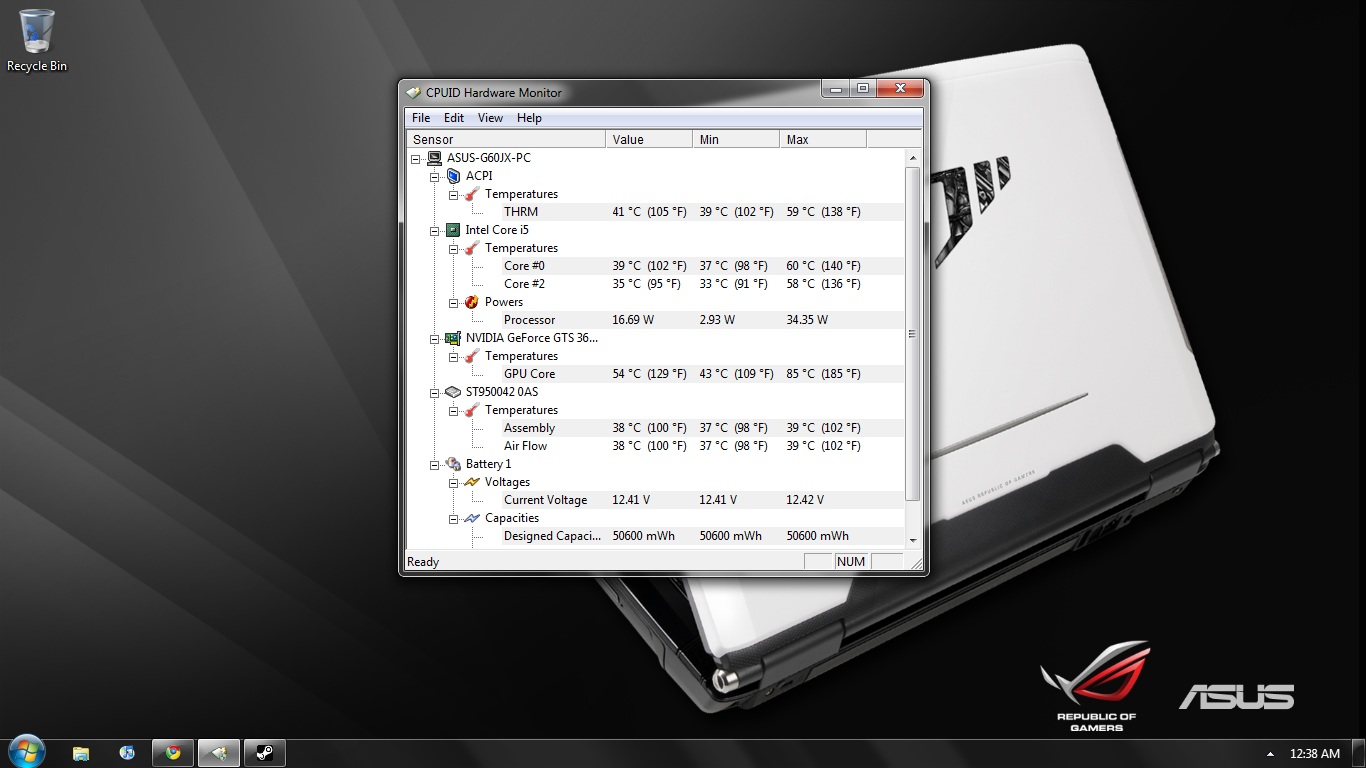
Max I hit with no IC Diamond Paste was 85C. I am going to apply the paste in the next couple days and show the temp difference.
Attached Files:
-
-
What trial did you use to hit 85C?
-
I was playing Dragon Age Origins
-
Hmm.
Try a 20 minute trial of Furmark at 1366x768 resolution, no AA, Xtreme burning, Post-Processing, and Displacement Mapping.
It'll go a lot higher than 85C, haha. -
What is it capable of handling ? I just used Dragon Age as a base. I still should be able to see how much the temps drop after applying the paste.
-
Furmark is a stress program who's sole purpose is to make your GPU cry (or sweat) for mercy. It'll make your GPU run hotter than anything you throw at it, period, so if you can keep good temperatures you're safe for any game you can think of.
For reference, twenty minutes will max my GTX 260m--a hotter-running card, by the way--at about 94, but with normal games I only hit 86C. -
You can just run it for a few minutes just to see how high temps get, no need to run it for 20 minutes.
My VX was the same, always ran cooler when gaming. -
Hey Forge, what settings are u using with Ntools to Oc You Gpu?
Mine are 600/920/1400 and i hit 90-95 C While Playing Crysis
Also im using 186.82. -
I don't use NST. I overclocked/underclocked/undervolted my card through vBIOS.
Anyway, my 3D clocks are 550/1375/825, and my other clocks and voltages are lowered. (A big reason why my idle temps are low compared to most others). I'd actually like to clock the 3D clocks a bit higher, since I know it can handle them, but for some reason I can't.
And don't listen to Angry-Kratos guy there. 20 minutes gives you the best idea of what your card can do. Well, okay, if you're getting past 95C, abort immediately, but don't do it for less than five minutes.
EDIT: Wut wut. I just made a new bootable USB and flashed to 580/1450/870. I guess I just had to make the boot disk in Win7, since my previous one had been in Vista. -
Who you calling angry €%^£*+%ole....lol
Just saying you don't have to run it for that long to see how long it takes for temps to spike at there peak.
FYI I'm very happy today, I already have eaten a Easter Bunny.
And some peeps
-
Like I said, don't listen to Angry-Kratos-Guy. Anyone who eats peeps shouldn't be taken seriously. But seriously, you might be able to find your spike, but a short trial won't show your level-off temperature, which is important too.
Happy Easter, by the way. -
Anyone have any issues with coming out of hibernation and computer crashing ?
-
http://www.newegg.com/Product/Product.aspx?Item=N82E16834220700
You guys see this review? supposedly all the G51 X1 line comes with DDR 3 GTS 360M instead of DDR 5, I wonder if this is the case with bestbuy model too..
Just before picking this one up, I saw the release of G73JH 1199.99 model at bb, now I want that one. damn.. -
No that doesn't appear to be the case. My g60jx scores identical on the gpu portion in 3dmark06 to another users g51jx-a1.
-
Does this laptop have an express card slot?
-
What picture mode are you guys using from splendid utility, because normal mode looks perfectly fine and natural to me on my last asus notebook but on g60jx the color is quite wash out on the normal mode.
-
Bah can someone who has this laptop PLEASE run the RE5 benchmark tool? It won't take long. I want to see how the i5 copes with a CPU intensive game like RE5 with settings maxed.
As you can see with the G60VX, the P7450 brings the fps to around 30fps average but the i5 should do much better.
You can download it here.
I get 60fps with a T9600 so the game is definitely CPU dependent. Is the i5-430m better than the T9600? Some benchmark tests say so.. -
U are Right My Bro, with the stock p7450 i get 30-32Fps on RE5 Maxed Out
but ocd to 2.6 Ghz i Get somewhere betwen 39-41 FPS. -
bboy, did you run the tests with AA, vsync, and motion blur on?
-
Yep all on. My fps kept fluctuating between 58-60fps with my T9600.
-
What AA setting did you have it set to? 2x?
-
Uh I can't remember. What does it go up to? I think I just had it on 2x.
-
I ran it with all settings on high with 2x AA on the variable benchmark and got an average of 54fps
-
Awesome. Thanks heaps for that viper. Guess the Core i5 is about on par with the T9600. Of course it's hard to tell exactly since the lower fps could be due to the slightly weaker GTS 360m (vs GTX 260m). Either way, the i5 is much better than the P7450 found in the G60vx.
-
No problem. I'd like to see how the game runs on the core i7.
-
i ran it with AA @ 16CXQ, Motion blur enable, all on and maxed out..
-
I don't think AA that high is worth it. I can't remember exactly what I had my AA on (prob 2x or 4x) and I can't check since my G51's being repaired atm..
-
Would you guys suggest G60jx or G73JH? I have a powerful desktop and a netbook already...looking for something in between...
-
Comparing the two Best Buy models? Either seems to be a good system. The G60jx has driver updates that are a sure thing (supposedly ATi is now also supporting their mobile drivers, but their first release last month is hidden, which doesn't bode well). The resolutions are different, not necessarily better or worse. The G73 has a second drive bay, but the Best Buy one doesn't come with a second caddy, and Asus is perpetually out of stock.
So basically drivers are a surer thing on the G60, but the G73 buys you two more cores and a more powerful GPU. -
Well you have had the G50VT/G60VX so the G60JX would be very similar, very little upgrade, more in terms of cpu, but still should be very similar, then the G73jh is imo a beast, with 5870 + i7 + dual cooler setup + 1600x900, seems a much better deal imo, if you can live with 17'', but most consider 17'' as desktop replacement and you want something in between your desktop n netbook, i would consider something like the Asus N82 a good in between, but then again i dont mind 17'' so i would go there.
-
Oh yeah, if you've got a G60vx already I'd just keep that. Wait a few years for an upgrade.
-
I updated to better Memory. (KHX1600C7 4GB Kit)
Now with super turbo mode, the memory in my G60JX clocks with 704 MHz.
Does anybody know, how to load the XMP Memory Profiles?
Because i have Timings of 9-9-9-24 at 667 MHz. But the memory can perform better in XMP-Mode with 6-6-6-18 at 685 MHz.
EDIT:
Bandwidth with DDR3-1128 CL7-7-7-20 @ G60JX: ~ 14.300 MB/s Read. (stock settings with old memorys)
Bandwidth with DDR3-1410 CL9-5-5-16 @ G60JX: ~ 15.600 MB/s Read. (new memory, timings set with CPU-Tweaker)
*ggg*
EDIT2:
Bandwidth with DDR3-1410 CL6-5-5-18 @ G60JX: 16.505 MB/s Read. (Edited with Thaiphoon Burner
)
http://valid.canardpc.com/show_oc.php?id=1123559 -
Screen resolution is fine and it's not the problem. The problem is the picture color quality, even after adjusting the splendid utility, nvidia color settings, the color production of G60jx lcd really looks too grainy and unnatural, my 2 yr old Asus G1S screen compared to this is way better after comparing it for days, like my G1S unedited untouch color settings at natural mode in Splendid Utility the video images and games on it looks sharper with more natural blue/purple color compared to G60JX
I'm sad that it is going back to best buy even though im getting hit with the 15% restocking fee and I really liked it but the screen quality/ lack of Bluetooth, only 1 yr warranty (compared to 2 yr warranty, and 1yr accidental warranty ), no bag/mouse, and since BestBuy model is a watered down version of the Fully loaded Asus notebooks that comes from Newegg, Xoticpc etc..
Overall I'm impressed with the system though and I still recommend it to any gamers out there that doesn't care about the flaws i mentioned.
Cooling - 9/10
Performance - 9/10
Screen Resolution - 8/10
Screen LCD Quality - 2/10
Design/Built - 10/10 -
hey guys, do you know where i can get an LCD Rubber for my g60vx or g60jx, i thing they are quite similar or equal, i lost the top left lcd cover rubber, and now my baby looks so horrible!
-
Its probably cause its 1366 x 768 lol....what was your resolution on the G1s? 1680 x 1050 right?
-
what driver are you guys using for GTS 360? I changed my driver into 187.16 and I heard some strange noises and temps increasing (maybe, because i didnt have hwmonitor before i changed my driver) into 60 C when idling...
Any suggestion? -
I would just use Nvidia's newest driver.
-
Ok I have a question guys. What would you do in my situation? I just sold my old laptop to a friend for $200. I was thinking of maybe upgrading to the g73jh. Should I go for it? Is it worth the upgrade? Thanks for any input.
-
Definitely Viper if you don't mind a 17" laptop.
-
Ok here's a good question for you guys. I may be able to get my hands on a gtx 260m for pretty cheap. Do you think it would work in the g60jx?
Edit: The gtx 260m would be from a g51vx, I know that asus' mxm cards are backwards from most other company's. -
If it's from a similar Asus, I'd say the odds aren't absolutely zero, but there's still an excellent chance it won't work...and why? They're almost the same thing.
-
Just bought this laptop yesterday, my old one broke and was eyeballing this one. Build quality is very good . A bit flex when typing, especially around the 3 key. Does not bother me too much.
Fan is quit, when running a game the left side heats up a bit.
Screen is very mediocre, colors are a bit flat and don't seem very vibrant. In some way that is nice, it is very easy on teh eyes. Love the resolution, it will future proof the machine for 2 years, when it comes to playing new games. It will be just my road warrior. it won't be seeing that much use.
Is there a work around having to push Fn for adjusting volume. That is realy annoying. As you can tell I am happy with it. That really is my biggest gripe. -
If that's your only gripe!
Just press the FN key or adjust it in the volume on the desktop.
Really it's that bad! -
I guess I have to live with it, if problems or praise araise, updates will be coming this way.
-
OK the left handrest gets uncomfortably hot while gaming.
I used some shallow notepads to beat the heat, that worked fine. -
The gripe about the heat is legit, gets way hotter than it should.
-
Hi all,
I have had this laptop about a week. Other than being a tad heavy it's pretty nice. Plays most games at either max settings or high. Couple things... Firefox tends to hang alot and I'm not sure what it is. Also I tried to hook it up to my LCD TV (46xv645u) and while the computer see's the tv in the options i can't get it to out put any picture. It is going through HDMI. Also I understand the other models come with a 1920x1080 screen (not sure if it is led backlit or not) and since I have replaced screens before I was wondering if one could. Right now I like what I have because I am not sure if the gpu could even handle 1080p gaming. Thanks for any help with any questions I had. -
The GPU would be fine with that resolution, framerates will suffer of course. What games do you usually play?
Did you try to get the picture after hitting Fn and F8?
Over the years FF has been getting buggier and bloated. I hate to say it, give IE8 a try. It is actually a really nice browser.
Asus G60-JX @ BestBuy fir $999.99
Discussion in 'ASUS Gaming Notebook Forum' started by theholyangel, Mar 7, 2010.



![stella[r]](images/avatars/stella[r])

