 Problems? See this thread at archive.org.
My G1S is dead now, the MB is the problem of overheating, asus warranty service gives me my money back
-
Hi ! It's maybe the same question over and over but with which notebook cooler could you get the best temp (with LID removed) ? Zalman Notebook Cooler NC 2000 or Cradia-flex ? I can't make my own decision

-
serious? - it just died?
ive got problems with even default clocks today because of heat wave. ambient temp 20-30, - default clock max load gets to the magic ****in 95c where shuttering occurs and thats with all lids off and placed on my NC 2000 cooler...
during winter time i used to run heavy OC with 85c as max temp ... -
Can i ask how you got your money back? Did you send the Laptop to Asus themselves and did they give you your money back or how did it work. Thinking of taking mine back also.
-
If you're located in the US, the process is slightly different. Asus will send you a prepaid box for your laptop and you just drop it off at your closest shipping center. You won't have to deal with paying any shipping costs upfront.
-
I'm located in Canada. Edmonton to be exact. Is the process still the same?
Also, will they really give you full money back? I bought my laptop in November of 2007 and its not even a year old. No damage on it either :/ -
Canada is the same. In fact, Asus CS is best in Canada from what I heard from friends.
Why would they give you full money back? You don't pay a penny for shipping or repairs. -
So basically they don't give you your money back Talking, if i bought my Lappy for 2K, they give you the refund.
-
What are they giving your money back for? Are you expecting some compensation from Asus because you're using their product?
Like I said, if your system needs repairing, you DO NOT pay for anything if it's under warranty. If the laptop is broken to the point they can't repair it, they will send you a new laptop with similar specs. -
Anyone got the particle effects / spell effects to work in Age of Conan? I used 175.16 and 175.5 , both do not show the effects....
-
I experienced some slowdown on my 175.80 drivers...
on another note, does anyone know the best bios for the g1s? -
I feel like i gotta post this...
I just got some new ram, idea was to allow higher OC.
http://www.newegg.com/Product/Product.aspx?Item=N82E16820227251
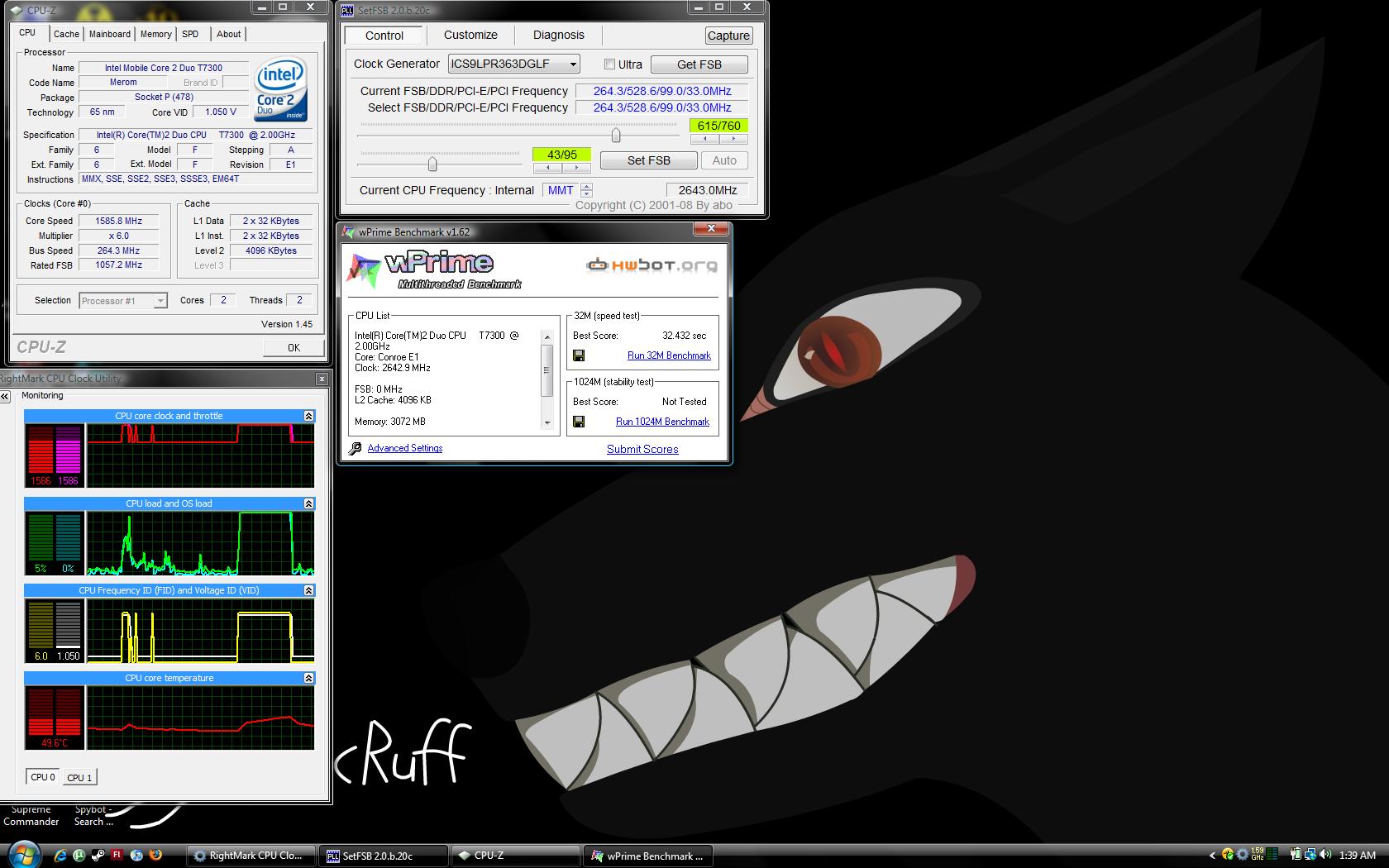
I currently got a t7300. With the stock ram i could only raise the FSB to 240mhz. This allowed my t7300 to be clocked at 10 x 240 = 2.4ghz at 1.225 volts.(Stable) With the new ram i could get the fsb at 264 which allowed 2.64 ghz at 1.3v. (stable) The max temps where 64-65c @ 2ghz and 69-70@ 2.64ghz. (cpu case open) Very please with the results. Heck some of you with with t7500 might be able to get it to 2.9 ghz. (260 x 11 = 2.86 ghz) Although i figure with, the great cooling system on g1s, that this might be hard to achieve.
I got the ram to 881mhz and the timings where 5,5,5,15. When the ram is down clocked to 667mhz the timings are still 5,5,5,15. If theirs a way to change the timings please pm on how to do it.Attached Files:
-
-
ok this is an interesting approach I haven't thought about yet - you basically think that it's the RAM that limits the OC potential...maybe I'm gonna try that myself as long as RAM price is quite low.
-
Has anyone done any GPU folding with the newest GPU2 client that was released recently. I tried it with 177.35 drivers, but even in battery saving mode, the GPU would run at max speed to the point where it would start throttling itself to reduce heat.
Just wondering if anyone else had found some nice CUDA drivers that kept the GPU happy while folding. I don't need it to run at full tilt while not in high performance mode. Perhaps I just need a program like ATITool to make my own custom profiles? -
This is caused by the Powermizer automatically adjusting the GPU frequency according to the load. Personally, I have found no way to control the power profile of the GPU in Windows Vista except downclocking -- and that didn't help much temperatures (it was a W7S).
Even in XP, the power options are very limited with newer drivers. You only get the choice whether to throttle down the GPU on battery, when it is idle (it will go up when pushed, in any case). -
Hmm, I figured it was something like that.
I had downclocked the GPU a bit with RivaTuner, but that was a hassle when it came time to game and I had to manually return the clocks back to high-performance spec. Battery life isn't all that important to me, and I'd probably just leave it at full steam if it didn't get so damned hot. -
Is there a possibility to buy the back lid of the g1s somewhere? i want to have a replacement, in case i mess it up
-
How to disable powermizer :
http://www.laptopvideo2go.com/forum/index.php?showtopic=19134 -
at what temp does the 8600 gt automatically downclock? Is there a noticeable drop in frame rate?
Kinda skeptical about disabling powermizer...dont wanna damage the g1s. =) -
what downclocks the 8600 Gt it's powermizer not the temps ... the 8600 gt for g1s will only slowdown when the temps reach 111 º , and by slowdown i mean fps around 1/10 .
So if you don't want the graphic card to downclock disable powermizer , the only consequences for that is higher temps in idle . -
Not entirely correct. The 8600GT card will down clock when it reaches 96c, this does somewhat vary between drivers. If you want more details go to
" -=10=-
OverClocking/Performance;
Stuttering due to High temperatures and its effect"
on the first page of this thread.
There is no doubt that the card will clock down when it reaches high temperatures, it has been documented to occur at 95/96c. i don't know the effect of disabling powermizer. You don't want your graph card to go above 95/100c. So if powermizer is the one that down clock the card at 95, then that's a good thing. However if it down clock your card at only, say 70-85, then i agree its best to disable it.
to save you time i copy pasted it here now:
Stuttering due to High temperatures and its effect
I made this test really simple, i ran AtiTool, overclocked the gpu to 580/820 and had it show me the 3dwiev which forces the GPU to use its maximum potential. The results are very easy to understand as you see the AVG frames rise until the temp hits 95/96 then they decline again. On low temp the avg was 344 frames at max and when the temp got to high it declined to 269. I could never get the temperature above 96c.
At first here you see the frames at 340 AVG and the temperature increasing steadily. At the top it was 344 and 95c.
![[IMG]](images/storyImages/1Beginning.jpg)
On the second image here we see the temp when its reached 96/97c and that the AVG frames is starting to decline.
![[IMG]](images/storyImages/2DecliningFrame.jpg)
On the third image it is quite clear that it will continue to decline until it reaches lower temp levels.
![[IMG]](images/storyImages/3DecliningStableTemp.jpg)
And on this last image i have reset the AVG counter to show the real-time effect and not the avg from when the test started like the above shows.
![[IMG]](images/storyImages/4ResetFinished.jpg)
-
hmmm , for me 96 º is very normal when I’m playing games that really stress the gpu , I’ve read many people saying the same .
I'm sure that it isn’t the powermizer that does the downclock , it must be the driver that was conceived for a desktop gpu that won't achieve the elevated temps of a notebook , particularly the g1s that must be the hottest notebook in the market .
And I repeat the only function of powermizer is to provide lower temps in idle , and to save some battery , and will often cause troubles while playing cause sometimes it won't detect that your needing that extra power .
that happens to me when I’m playing trackmania , so I disabled powermizer and the problems stopped , but I created two profiles in rivatuner , one downclocked and the other normal so i can have my hot pc 3º cooler
In idle with clocks normal 72 º , and downlclocked 69 º -
Your g1s should go between 2D, 3D low power and 3D perfect. Depending on what application you are using, 2D will be the "idle" one. 3D low if you don't need full power and 3D perfect when you play a game. The different clocks are 169/100, 275/301, 475/700 by default. I noticed sometimes while playing AoC the GPU will suddenly downclock from 3D perfect to 3D low power without the temps being high.
Here is an image of the recording as it happens:
![[IMG]](images/storyImages/AoCfuxx.jpg)
Could this be powermizer that suddenly stops recognizing AoC as a "3D perf" mode game?
*edit* - also after downclocking like this i have to reboot my PC to get the clock back up to 3D perfect, thats the most odd thing really. I can't force it back up after the downclock when i play AoC. I tried restarting a game and simply just OC, but neither works, has to restart. It has forced me to play the game in windowed mode and i always run riva tuner with the logging on so i can see when it occurs.
96c is a normal temp indeed, mine was the same. I've however done everything in my power to lower this temperature. I have a notebook cooler, i replaced all the paste on CPU / GPU, i also run the laptop with all the lids open, this makes it never go above 92-95 in max. A very easy way to notice the "shuttering" that occurs when it reaches higher temps then 95c is to play CoD4. When it gets to 95c it starts "lagging" in game, not the ping, rather the fps. It will move smooth for 2 seconds, then hang for 1/4 of a second, then smooth again etc etc. Really ruins games. -
both my G1s tried really hard to stay at 96-97 degrees but after some time they gave out and sat at a comfortable 110
-
does anyone know why I cant install the driver for intel storage manager? it is said that my spec is below the requirement.. its weird tough
-
help help..
-
hello everyone , i tried using life frame today and wenever i took a pic or video or sound record it kept crashing! i reinstalled rebooted and intalled tried agian
it still did the same thing. is anyone expierencing this? maybe someone might help? if so please leave a mssage here on pm me much appreciated thanks
-
Hello, does anyone have any newly updated windows xp 64bit drivers for the G1S? The one on the this forum thread is old and most of the drivers doesnt work.
-
Hey gurus, I'm having a problem enabling enhanced disk mode in xp. I've been trying the method provided by the wiki, and it appears to work each time, and even says "all files have been extracted successfully," but when I navigate to the temporary folder "c:\sata-driver\" there is nothing new there
. The only thing I can think of that might be affecting the process is that the link provided by the wiki for the driver gets me "iata82_enu.exe" and the guide refers to "iata78_enu.exe", but this should just mean that I am downloading a more current driver, right? I'm stumped. Any help would be appreciated.
-
just a side-note, why is it that when I use my webcam the picture is upside down? Has anyone else had this issue?
-
alright i figured it out
but does anyone know where lifeframe saves images and videos to?
i cant find it for the life of me -
I never used LifeFrame, but try something along the following lines (I don't get the folder names properly of course since I don't have it, but you get the general idea I hope):
C:\ProgramFiles\LifeFrame
My Documents\LifeFrame
My Pictures\LifeFrame
C:\LifeFrame
and even
C:\Documents and Settings\{current user}\Application Data\LifeFrame
(the last may be different for Vista, I think it is) -
go to here
C:\Program Files\ASUS\LifeFrame2\LifeFrame
u will find all the images and videos u captured with LifeFrame -
OMG!!! I ran right away to get a drill and put some holes in the system fan cover cap! GPU max temps down by 9C, max CPU down by 8C and max hdd down by 6C!!! I was able to OC a little more and get to 575/900 for 4937 3DMark06 STOCK SETTINGS!!!!!
WOOOT!!!! -
I have a G1Sn, OC'ed most of the time to the values below, and the 9500M GS will downclock at 96C or above, just like everyone else here, which is probably a good thing. But, the only way I have been able to recover my clocks, is to restart just like everyone else. Is there any way to restore/recover the clocks after a gpu downclock, besides restarting?
3DMARK06
177.79: 5962 Overclocked: 655-1524-488 Maximum Overclock (Stable)
3DMARK VANTAGE
177.41: P1684 Overclocked: 655-1524-488 Maximum Overclock (Stable)
GPU SCORE: 1377
CPU SCORE: 5055 -
I just go to "Device Manager" and disable the display adapter (for me it's the 8600m GT), then I enable it again and the clocks are restored. I thought everyone did it that way.
You scored 5962 at 1280x1024? -
*bump*
Any new info mods etc, or questions regarding the g1s.
Or even more exciting, which laptop will you get to replace the G1S, is it aobut time now with the ati 4780 series / nVidia gtx280
Is our 8600 lagging behind? xD -
lol hey Irathi long time, I was just checking this thread yesterday for the vent mod
For me, the G1s is doing fine, thinking about sending it to get a 9500M GS Replacement :S what do you think? -
I would definitely do it if I had the opportunity. Slightly slower or defective is an easy choice for me.
-
I think i would do so if i hadn't violated my warranty 2 days after i bought the laptop xD
I haven't really looked to much into the performance difference between the 86 and 95. In summary of what little i've read the 86 scores better, but gets steaming hot and then looses. The 95 scores some lower, but never gets to warm and always perform 100%.
So i would think the 95 is the lesser of the two evils here
I've also modified my laptop so much now that i no longer have the over heating problem to the same degree as you. Today i was running it at 600/1400/887 at 88c for about 5 minutes. This was without the built in fan spinning up. Just my notebook cooler from Zalman and some "minor" modding.
Of course my gpu did get unstable after the 5 minutes, but i think that's because its just overclocked to high and not the temperature's fault.
So my G1S who used to run 475/950/700 at 95-115c now can theoreticly run 600/1400/887 at 88c. I say theoreticaly because it gets unstable
I am also considering getting the G50 with the 9700 card, but il wait for the new farcry/crysis, Diablo3, Starcraft2 etc
Also:
considering these numbers on the 95 GS and 86 i would have to say the 95 definitively. It's got the same hz's on core/shader/mem, but better arcitechture
http://www.notebookcheck.net/NVIDIA-GeForce-9500M-GS.8167.0.html
http://www.notebookcheck.net/NVIDIA-GeForce-8600M-GT.3986.0.html
im far from decided tho. Only scores about 700 points more in vista stock clocks then i do with over clocks. Which probably means we could squeeze another 300-400 points out of it with a decent OC, but still..
http://forum.notebookreview.com/showthread.php?t=282100
xD - just tested out CoD4 at 575/1304/872 for about 45 minutes, gpu never went above 84 c
-
:O pics and instructions for your mod please
I think I'll decide after seeing if I can mod my G1s to get the same temps as yours since what I really need is performance out of my lappy for now
And I keep reading that the GDDR3s are better at OCing :S
-
Well as mentioned before, i changed all the paste on cpu/gpu to artic silver. I also run my g1s with all the covers underneath open. Its sat on top of the Zalman Notebook Cooler NC 2000 and recently ive cut out (melted to be true) a square right over the GPU to allow the notebook cooler to cool the GPU better. The square is 20x20mm (approx). Drops the temp a lot. Cover the hole with some grid (pantyhose works to xD).
-
Could you post pics please? I'm particularly interested in the GPU opening...
-
I took the cover off, not it's idleing at 65C compared to the 73C when the cover was still on..good results
I dont think I have enough craftmen skills to pull something like that off xD I guess I'll just run with the cover off for a while
Edit:
eek, Ran for about 30 min with OC@580/1160/820 and reached peak of 103, 4C higher then what I usually get these days :S maybe I need the copper of the bottom of the case? :S -
People,
I have a problem with Nvidia driver(s) with version number higher than 175.19
Sleep mode no longer works to eliminate the stuttering in my G1s. Anyone with the same problem here? Can anyone help?
Thanks -
google "powermizer switch"
It will allow you to manually toggle the downclocking that results in stuttering.
Use at your own risk though! There's a reason your driver is programmed to downclock. It gets really hot, and it COULD be dangerous. Yes, even the sleep trick can be fatal to your GPU.
I still do it though, lol. No problems here. -
I tried using the powermizer switch and even went as far as changing the registry value manually but the stutter still occurs for driver(s) above 175.19
I guess I have not told you the complete story... when the stutter occurs, my GPU actually stays on 475/700 (no sign of downclock at all). I confirmed this using GPU-Z and Nvidia Ntune. I did this by alt-tabbing to Windows when playing games and checked the log that those two programs created.
I am still using the sleep mode trick for my G1S to remedy this, but I can only go as far as 175.19 -
Ntune will not show you the current clocks only the "preset". Download RivaTuner and use monitor, it should show you what clocks it runs on even if its set to run on 475/700
-
ZOMG post nr 200!
Asus.G1S.Resource.Thread
Discussion in 'ASUS Gaming Notebook Forum' started by Irathi, Jul 25, 2007.




![[IMG]](images/storyImages/opening.jpg)