 Problems? See this thread at archive.org.
Almost identical. Besides having a 1600x900 panel vs. the 1920x1080 panel on the Ax and Xx versions, the Best Buy RBBX05 only has 6GB of RAM, 1 500GB HDD (as does the X1), no bluetooth, a lower resolution webcam (1.3M vs 2.0M, I believe), and a lesser warranty. The Best Buy RBBX09 adds a second 500GB HDD and has a total of 8GB of RAM, but for a very steep price increase.
Opinions about the lower vs higher resolution panel are mixed. Some say the 1920 is far superior, some say not so much. The only thing driving me towards the BB RBBX05 is that I'm flat broke except for some Best Buy credit and their 18 months same as cash financing, otherwise I'd be getting an A1...
-
I thought you were selling a G73 from BB? -
I just tried exchanging my BB G73 to get an LG screen but they didn't have of the LG's in stock (stickers on the right.) He said they have been getting 1 per week. The latest one he checked was delivered on April 16th and still had the AUO screen. Another one is supposed to be coming in tomorrow from the warehouse and I'm hoping it is an LG screen.
I really wish there was a way to know without opening the box. They won't open the box just to find out. I checked 2 other BB's and they don't have any of the LG's either.
I may be S.O.L.
Any advice? -
I was. I was going to use the cash towards an A1, but figured that would probably screw up my impending bankruptcy, so I returned it, but this thing is just like crack - can't put it down... Now I'm contemplating getting one and paying it off over the 4-5 months I have left on my contract...crazy, huh?
How do you know which screen it is if you can't tell without opening the box? I'm so confused...but that's nothing new! -
If your really set on the LG screen, keep trying. If your already to close the the 14days(unless you have the members card to extend it to 45 days) I'd just return it now.
And try back later, if you can't stand to lose it, then you'll just have to accept it. I'm super OCD about a good screen, so I understand the feeling, but I guess there will always be give and take when purchasing gaming laptops. -
Here is my AUO screen G73 Sticker on the box. Maybe someone with another AUO can confirm which numbers are the same and someone with an LG screen can say which numbers are different.
![[IMG]](images/storyImages/4564996138_4b8644fe16.jpg) Last edited by a moderator: May 6, 2015
Last edited by a moderator: May 6, 2015 -
Can you take a pic of your box to show what's different. I would like to know the difference before I go into Best Buy tomorrow to get mine exchanged.
-
The ones at the other stores were opened because of "GeekSquad Optimization" or whatever that crap is called.
-
Thought I would add a little info on my purchase.
After looking at the g73 demo at one of the local BestBuy stores on several trips, I finally decided to buy one. The screen really impressed me on the demo model and at that time, the AUO vs LG panel issue had not yet come out. I then spent the next week working on my G73 wondering why it seemed almost impossible to get a good viewing angle on it especially considering how well the screen looked at the store. I later found out about the panel issue (thanks NBR!) and of course it turns out I had an AUO panel.
I decided to go back to BestBuy and check the display model at the store to see if it was the lighting that made it look good or if the demo model had a different panel. Of course when I got to the store and looked at the screen, I knew right away that panel looked a lot better than the one I had. I then verified that the demo had an LG panel in it. At that point I had decided that I would rather not have the g73, at least not the BestBuy version, if it meant having the AUO panel so I went back home, reloaded via recovery discs and took it back.
When I got to the return counter, I explained to them that the panel on display was an LG panel and the one I got was a lower quality AUO panel. I told them that I could simply keep buying and returning g73's until I got one with an LG panel or they could open them up right there using the demo model power supply to prevent having to open the cables, discs and such. I got really lucky that the first one had an LG panel. When I got home I immediately noticed how much of an improvement the LG panel was over the AUO panel. I have had other laptops with much better screens than either panel (MacBook Pro for example) but the LG panel was such a big improvement over the AUO panel that it made the hassle well worth going through.
I did find something that may eliminate the sticker placement in detecting the panel type.
My AUO panel g73 had the stickers on the left and the LG panel I got as a replacement had the stickers on the right just like everyone has been saying. However, both local BestBuy stores have demos out with LG panels and one has the stickers on the left while the other store had the stickers on the right. So unfortunately I wouldn't suggest relying completely on sticker placement.
Here's a tip for those that are returning an AUO panel hoping to get an LG panel. Check the demo model to see if it is using an LG panel. If it is then you have all of the argument you need to justify swapping your G73/AUO for a G73/LG since the one they are showing is not what they sold to you.
I hope this helps!
-Aliasop -
Guys please put up the labels outside the units with the LG panels also.This could well be a life saver!
-
In my situation, all the Best Buy's put out their first received G73's which were the AUO screen. It is unlikely I will find one on display with the LG screen.
-
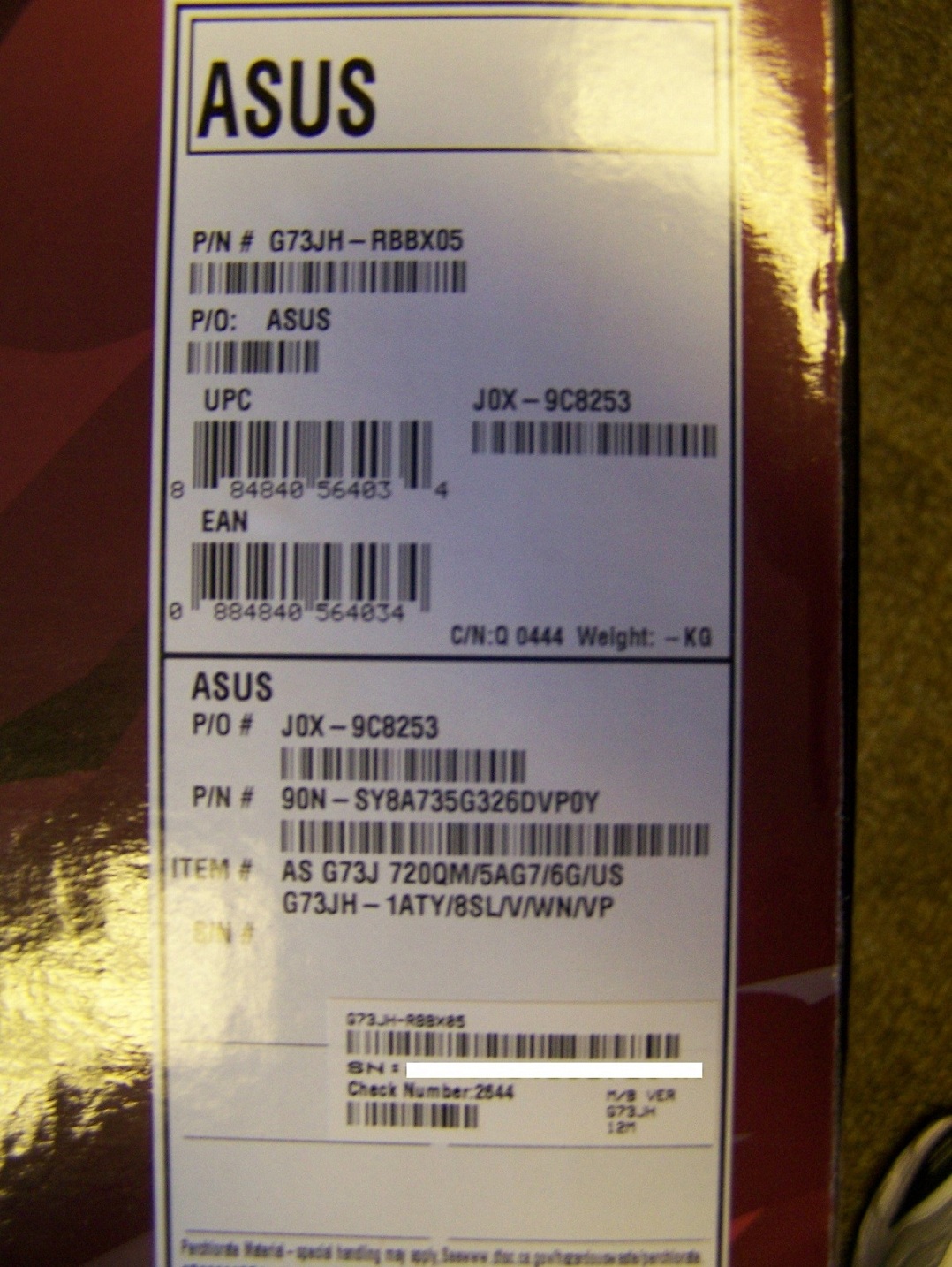
Here's a pic of the side of my box that has the LG screen.
Attached Files:
-
-
Here is the pic of my box. (AUO) Does yours look the same?
![[IMG]](images/storyImages/4565576151_abc995e90a.jpg) Last edited by a moderator: May 6, 2015
Last edited by a moderator: May 6, 2015 -
Yes it does.
-
Awesome. Thanks!
Now we just need someone with another AUO screen to compare numbers. -
Did you have to pay a restocking fee? Or was simply explaining to them that the screen viewing angle was unusable enough to get you a free exchange?
-
I noticed that mine(LG screen) has a blue label as opposed to your yellow label.....hmmmm.....
![[IMG]](images/storyImages/100_3311.jpg) Last edited by a moderator: May 6, 2015
Last edited by a moderator: May 6, 2015 -
Those labels you're referring to are part of the Best Buy truck receiving process and has nothing to do with Asus Inc. It's just a shipping label they put on most merchandise that shows the shipment info. They're color-coded to let inventory know which truck the item was shipped in.
-
Interesting...thanks for clearing that up. What else can you tells US about the labels on the side of the G73's that would help with determining what screen's inside the box.
Thanks. -
No restocking fee. I have a Premier Silver card but they never even asked. I went in with the attitude that they pulled a bait and switch showing a good screen (LG panel) on the demo model and then selling me a lower quality (AUO panel) screen. I was nice about it though

-
For the idea of cross referencing "side-box" details, would need at least 3 of each for a good cross reference to see if there is any real notable difference between the BB g73's with AUO and LG screens.
-
Just got back from best buy with my replacement. AUO with 1333 RAM.
-
Nothing. WE'RE in the same boat. The side label is manufacturer info that I can't decipher other than the model number. Keith1341 already posted a pic of his LG's side label, maybe if someone with the AUO screen can post theirs to compare as thauch suggested on the previous page.
-
Ok guys here is a side by side of the two labels posted in this thread:
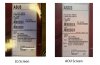
The only difference are in the JOX number
LG-9C8253
AUO-021979
The other difference is in the weight codes:
LG-0444
AUO-122
So from whats available the only stand out seems to be the alpha-numeral JOX code on the LG and the numeral JOX code on the AUO.
Other users can pitch in with their labels-there should be something to differentiate the two!
p.s-guys could you confirm that there is a working subwoofer(as in physically present!) in the BB models-thanks -
Just to clarify, it is AUO, not AOU.
-
my LG has the following
JOX-9C6078
weight code Q 0441
cheers,
-
So far, it looks like J0X-9Cxxxx is a LG screen.
-
My LG panel box:
JOX-9C6078
C/N: Q 1606
-Aliasop -
Yes, there's a sub.
-
Thanks Keith for the clarification:
So it seems:
LG screen come with JOX-9Cxxxx(alpha-numerals)
&
AUO screen with the JOX-xxxxx(numerals alone).
Owners please pitch in to resolve this confusion once and for all! Thanks -
hey those who posted the box pictures, you guys are awesome +1!
-
![[IMG]](images/storyImages/jacaih.jpg)
LG screen + 1333 ram also -
Anyone know if the 1-year warranty is global or international? I ordered my G73JH-RBBX05 through HID Evolution.com and the product page says 1-year global limited warranty but not sure if this is true. If I knew that it does not have a 1-year global warranty I would not have bought it.
-
Ask HIDEvolution.com.
As far as I know the BB version does not. -
LG :
JOX-9C8253 - Has 1333 memory
JOX-9C6078 - Has 1066 memory confirmed
JOX-9C6078 - Has 1066 memory confirmed
JOX-9C8253 - Has 1333 memory *needs to be confirmed (on the hunch the 9C8xxx have 1333 memory)
AUO:
JOX-0211993
JOX-021979
EDIT: So far the results above seem to be quite solid to support the fact that the LG screens are 9Cxxx and the AUO 02xxx
just realized that the same number was there twice thanks for confirmation non the less. -
Mine is 9C6078 and 1066 RAM
-
Mine is also 9C6078 and came with 1066 ram. But I upgraded to 8GB of DDR3 10600.
So far these numbers are correct. -
If this guy's info is accurate it could throw the whole identity matrix out the window.
http://forum.notebookreview.com/asu...73jh-we-may-have-found-way-2.html#post6209391
Cheers, -
yea i checked that post panzer that really threw a wrench into the mix of things i responded accordingly on that thread should edit my post or reply but yeah let me just copy and paste the response here.
"maybe not since there is not a report of an auo having the jox-9cxxxx number type so it may just mean its a higher chance of getting a lg screen with the jox-9cxxxx number than the jox-0xxxxx number.
not trying to bring up anyone's hopes though" -
I'm torn between this and G60-JX at bestbuy , the one with i5, 4GB ddr 3 and GTS 360m. I have a core i7 desktop 6 gb ddr 3 and ati 5870. I am planning to get a 10 inches netbook to carry around to school and stuff. Besides the 200 bucks difference, the G73 is also 1 in wider and 2 in deeper and 2 lbs heavier. I wont be taking it everywhere but so far it feels G60 is at least a little bit more mobile. however G73 is much more powerful and sleek.......I might take whichever one i choose out in a while for gaming or to sister's house when i go stay and baby sit. Not sure about school tho, might crush the 13 inches wide desk.
Any suggestions?
PS: Its a want not need, i'm still thinking if its an overkill with one of these since I have my powerful desktop.... -
I updated my thread with all the info coming in.
There doesn't seem to be many AUO people reporting their numbers on here.
I'd like to confirm the differences between J0X-01xxxx and J0X-02xxxx. -
They probably returned them.
Cheers, -
I was thinking the same thing
-
Hahaha man I got lucky. I didn't even know there were two different screen types, and one was better than the other. I'm glad because I really don't want to return this child!
-
Best Buy is in UK now.. i live quite near it... but getting there's a problem... i hope they have G73 lol...
-
Same here, 1066 RAM and LG screen
-
I just checked mine which i haven't opened yet. I have one with the LG screen. I want to try and find out as much info as I can before opening it about the issues everyone is having. It might be as simple as doing a clean windows install or updating the drivers. Feel free to weigh in. Maybe I should take a poll and ask if anyone regrets buying theirs.
-
i noticed in your sig you have the BB G73 with a SSD + HDD, would like to know where and how much did you pay for the bracket to fit it?
The G73 Best Buy info thread
Discussion in 'ASUS Gaming Notebook Forum' started by trulsrohk, Feb 24, 2010.




![[IMG]](images/storyImages/4566421019_00fd9e345e.jpg)


