Problems? See this thread at archive.org.
That would make sense since the LCD would do a 1:1 pixel ratio. I take it you are using a DVI cable since the digital signal would make things exact. I am not sure if the Analog signal from the VGA cable would matter much, but there can be fluctuations.
I also think I read that the monitor handles its own scaling so having the underscan active could also just not mesh well with the monitor.
Anyway, thanks for the fix information.
DISCLAIMER: LordDavon is not an expert in anything. Most of his knowledge has been gained from sticking protruding body pieces into electrical outlets, tripping and getting dropped on his head as a child. Due to this acquired knowledge, LordDavon is a major contributor to Wikipedia and a published author of the best selling, "I know computers! Why won't it start?!" and the followup best seller, "Oh, I forget to plug it in...".
HA!
-
I've been having a slight problem with HWMonitor version 1.16
It doesn't pick up the GPU temps. I've tried the ATI 10.7 and V8.692 updates from the driver thread, but it doesn't recognize it. A search of this thread said that it recognizes the temperature if you use the ATI 10.3 drivers, but is that the only way to get HWMonitor to show the GPU temperature? -
I'm using 10.7 with HWMonitor 1.16, and I see the GPU core temp. I'm not sure what the secret is to get the sensor working. You might have to do a complete uninstall of the driver using a tool (I've been using DriverCleaner.NET). I noticed some of the registry entries and files don't get deleted with the normal uninstall. Once you get a clean install, you can probably just install subsequent updates on top, but if you've been going back and forth, it might be worth a clean sweep.
-
Thanks stevedogg. Under scalling options full screen is selected with no option to change it.
-
I leave HWMonitor open on my laptop screen and lately I noticed while playing SC2 the temperature goes into the 90's, last night all the way to 95C with my AC on. So I put it back on my notebook cooler and took off the bottom plate covering the CPU/GPU/memory. Shaved off 15C! TF2 was down to 78C.
From now on when I play games it'll be with the bottom cover off... -
I am rather seriously considering purchasing a N61JQ-A1 from a local reseller and was wondering what's the maximum amount of life you can get out of a battery charge on this model? Running it in Power Saver mode and everything?
-
those temps sounds really high for sc2. is this before or after you applied the fix from the first page?
-
What is everyone's idle CPU temps? Mine hovers between 50-60 which I feel is pretty high for not a lot of load... Anyone have any tips for keeping it cooler (aside from cooling stands)?
When I'm playing SC2, it gets to the 80s as well. -
These temperatures are quiet normal for this notebook. The 720qm runs hotter than it's dual core brothers.
The N71JQ which is basically same machine but with larger screen and one more HDD has similar temperatures. -
I recently checked some of my temps. After playing a couple FPSers for a couple hours I hit 81 C on processor & 84 C on GPU. Since my laptop was repaired and all kind of stuff got changed out...I will need to apply IC 7 Diamond again. I will report back with my new temps once I reapply the paste. BTW I am using a laptop cooler.
-
This is after the fix.
-
Hi,
I recently bought the ASUS N61jq from Amazon, and when I was doing all the driver updates I decided to update the BIOS as well. Well, I bricked it, and so I sent it up to Indiana for RMA. This wasn't a problem, because I was going hiking for two weeks and didn't need a laptop. So I get back, get my computer, and now the wireless card isn't working. I press the function key and it just says Wireless LAN Off/Bluetooth Off. I have to sit here with ethernet plugged in just to access the web, and I'm about to go back to college where wireless access is almost a necessity, and sending it back to RMA isn't too appetizing. The device manager says that all of the drivers are installed and working properly, so I'm a bit confused.
I called up my local computer repair store where I usually go because they are a bit more knowledgeable than a place like Best Buy, and they said I should do something regarding checking the pins on the wireless card... I'm not too comfortable with opening up laptops, so if anybody else has had this problem or knows what to do, could you give me some tips on what they're talking about? Or maybe there is an update to the driver that I'm unaware of (Google doesn't really help me and neither does the ASUS website in terms of Atheros driver updates). Thanks for the help! -
I don't have the technical expertise to help you with this. But check out this thread by lounge member Stevedogg for updates for the N61JQ. http://forum.notebookreview.com/asu...250-asus-n61jq-driver-thread.html#post6388295 This should be the first place you go to for updates as he is our resident update wizard. There is an update to your wireless card listed on this thread.
Good luck and welcome to the lounge.
-
for the latest driver updates go to stevedogg's thread. he has done a great job of sourcing all the latest drivers for the N61JQ
http://forum.notebookreview.com/asus-reviews-owners-lounges/494250-asus-n61jq-driver-thread.html
and for any other information regarding this laptop please visit this page:
http://forum.notebookreview.com/asus-reviews-owners-lounges/456659-asus-n61jq-owners-lounge.html
it would be nice if you could tell us how you ended up bricking the system, what method did you use ? and which bios version ? and so on. thanks
EDIT: oh Greg you beat me to it
-
To get the wireless working there are two things you need to look at. First is the hardware lock. It's on the left side of the laptop near the front. To be switched on the switch needs to be closest to the front of the laptop. Next you need to enable it using the Fn + F2. I'm going to guess that the hardware lock is on.
-
I got my laptop back yesterday! They replaced the Motherboard and the hard drive. I wonder if my lockups that I got when I first bought the laptop were due to a faulty hard drive that the Intel Matrix drivers covered up.
-
Oh my god thank you so much Adamal... I called ASUS yesterday and nobody even mentioned that hardware lock!
-
Everyone forgets about that. I spent 30 minutes debugging my wifi one time, then I remembered the lock (egg on my face).
-
So now that I have the wireless on should I re-lock it?
-
It's actually a switch, not a lock. It says "on" and "off." If you need to quickly turn off wireless, switch it off.
-
Thanks guys, you're lifesavers
-
Yes I chose a bad choice of words, it is a switch.
-
What's the battery life on this comp? With battery saver and lowest screen brightness?
-
I'd say max battery life is about 2 hours assuming that you're not doing anything too intense on it. Definitely somewhere in the 90-120 minute range.
-
I've been able to squeeze out about 2:30-2:45 on max battery with the wireless on and brightness all the way down with some web browsing and note taking in one note. This is a pretty rough number though, I just get this number from taking notes in class.
-
Wow. Once the thread slowed down, we really are looking for things to talk about. HA!
DISCLAIMER: LordDavon is not an expert in anything. Most of his knowledge has been gained from sticking protruding body pieces into electrical outlets, tripping and getting dropped on his head as a child. Due to this acquired knowledge, LordDavon is a major contributor to Wikipedia and a published author of the best selling, "I know computers! Why won't it start?!" and the followup best seller, "Oh, I forget to plug it in...". -
Darn you caught on!
-
As far as battery life, before my hardware issues I was getting around 2:15-2:30. I'll have to test it out again when I have a chance. I've been installing software and drivers that last two days. I almost have everything important back up and running.
-
Great news Adamal! All is well again in the N61JQ lounge.
Wait what about Risco?
If it has passed away may your N61 rest in peace Risco.
-
New Adobe Flash Player version (10.1.82.76) may or may not help with flash-related (Youtube, etc.) BSODs:
ActiveX version (Internet Explorer): http://fpdownload.adobe.com/get/flashplayer/current/install_flash_player_ax.exe
Firefox, etc.: http://fpdownload.adobe.com/get/flashplayer/current/install_flash_player.exe -
Thanks stevedogg.
I got this update automatically 2 days ago. -
Yeah, I'm all squared away. Even my issues with booting into Linux seem to be resolved. Hopefully Risco has or will have as good or better results than me.
-
Just an update on the performance of this laptop. We are nearing the completion of the cut for consideration of our feature length film for Sundance and so far this laptop is handling the workflow as it gets it. My only complaint is the lack of proper support for ATI drivers for Premiere and Magic Bullet Looks but say what, the original Asus drivers are working just fine for that.
However, I can now see why editors say they uses Asus motherboards to do their stuff (once they are editing on non-mac platforms), these things really hold up.
On a site note: I don't think many features have been done on Premiere or on Windows 7 OS, anyone think I should talk to Adobe or Microsoft for a plug?
-
Did you do anything special to fix issues booting into Linux? I've got mine configured dual boot with Ubuntu, but it only boots half the time, I can't figure it out, because it hangs in different places when I turn on the logs during boot.
-
I used Driver Cleaner Pro and did a reinstall of both v8.692.1.0 and 10.7
The former was the only one to recognize the gpu. Thanks for the help. -
I spoke too soon. The last time I rebooted from windows to linux it wouldn't boot again. I had to shut it down for 20 seconds and start it back up to boot. I'm running Ubuntu 10.04 32-bit. I wonder if it's an issues going from windows 7 64bit to a 32bit OS.
Is anyone else using a Linux flavor not having this issue? -
What hardware monitoring software is everyone using these days. I want to get that all setup before I start pushing this thing hard again.
-
I've heard that 64-bit Ubuntu isn't as stable as 32-bit, so I didn't install it, but you bring up a caveat that might be the problem. I'm running 32-bit as well.
-
What are peoples Starcraft 2 settings/frame rate? I play high/medium depending on what monitor I am using. (The computer can't seem to handle high settings on 1080p). I have my frame rate capped at 60 and it generally stays there. Later in the game, though, it falls down to the 30-40s.
-
64-bit Ubuntu is stable, however some applications might be more difficult to get working. I've switched back and forth every couple of years. My only major issue last time was the VPN client. Most major software works well at this point.
-
Got a BSOD watching a Flash video with the new version, so it does not fix the issue with Radeon cards.
-
Maybe the problem is with the ATI drivers.
I am experiencing BSOD while playing different games (especially shooter like GTA IV, Bad Company 2) with ATI 10.6 and 10.7 on my desktop pc on ATI HD5850 GPU. The BSODs appears randomly after about 10 to 15 minutes into a game and always complains about ATIKMDAG.SYS.
The 10.5 driver seems to be working fine. -
I only use the laptop screen, so I run SC2 at highest settings. I wasn't logging framerates with FRAPS, but it seems smooth. I applied the fix, but still notice 80-90C temps after a few hours of play, no laptop cooler.
EDIT: Ran FRAPS All Ultra Native res= 30fps peak Temp= 88C -
Yikes. The GPU is surpassing 100 degrees and the processor is hitting 95 degrees Fahrenheit after a couple hours of Borderlands and STALKER on medium settings.
Anyone else experiencing such high system temps? -
If it really is Fahrenheit then it is a great temp. If you mean Celsius then that does seem a little hot.
-
Theres an in-game FPS monitor. Hold ctrl and alt and press f
-
100 Degrees / 95 Degrees FAHRENHEIT is not bad AT ALL. You must have your temps confused some kind of way.
-
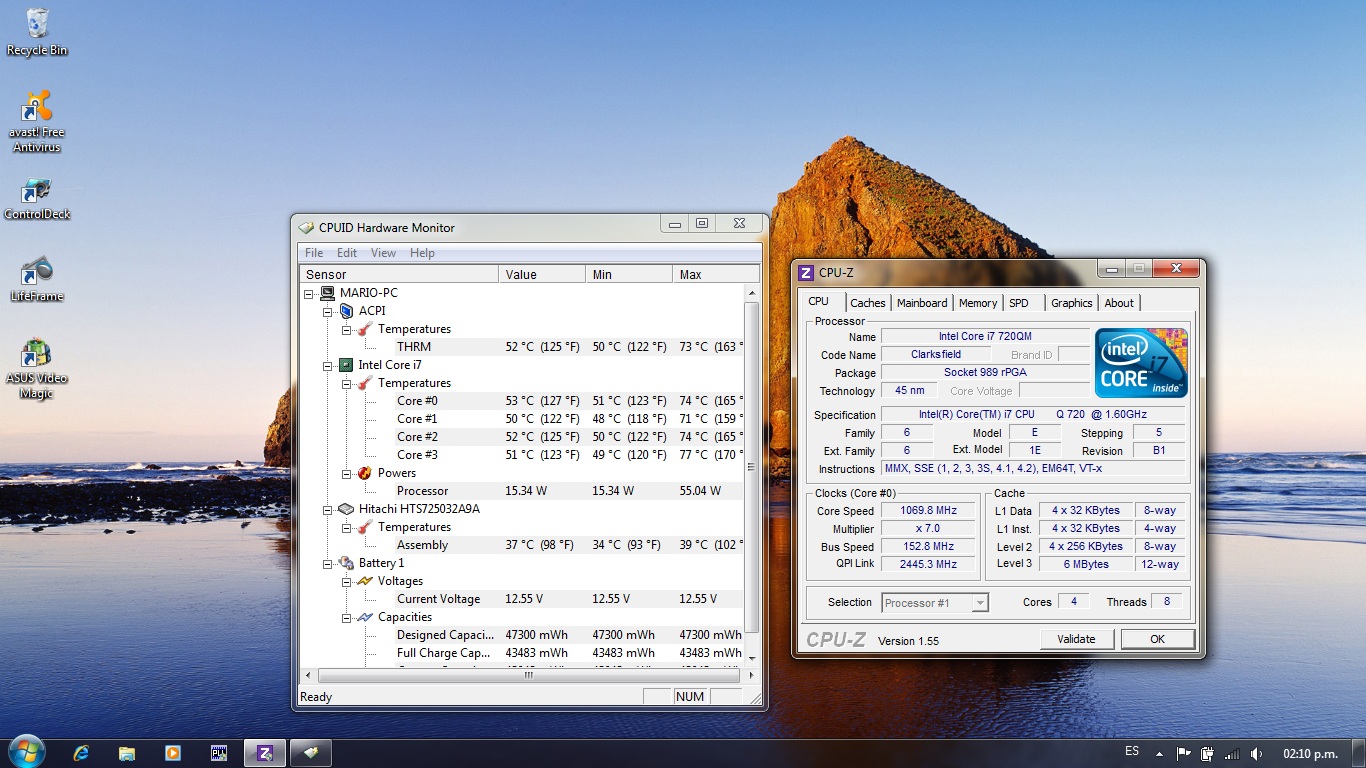
Is there someone interested on overclocking 720qm CPU?
This is what i got last night:Attached Files:
-
-
I have been running the 64Bit version and haven't had any issues. I have all the features of the laptop running. Everything has been pretty smooth. There were some issues in the beginning but got those ironed out with the N61 instructions that you can find on the web.
DISCLAIMER: LordDavon is not an expert in anything. Most of his knowledge has been gained from sticking protruding body pieces into electrical outlets, tripping and getting dropped on his head as a child. Due to this acquired knowledge, LordDavon is a major contributor to Wikipedia and a published author of the best selling, "I know computers! Why won't it start?!" and the followup best seller, "Oh, I forget to plug it in...". -
My latest one included ATIKMPAG.SYS. Disabling hardware acceleration seems to fix the problem with Flash. It wouldn't surprise me if it's a driver issue though; people were complaining of it starting with the 10.6 driver. Hopefully it's fixed in this month's update.
* Asus N61JQ Owners Lounge *
Discussion in 'ASUS Reviews and Owners' Lounges' started by GregW, Feb 3, 2010.