Problems? See this thread at archive.org.
Nice. Setfsb ?
-
Oh yes, but manually edited, cause I don't have paypal acount...so for free...
Using 210 bios.
I would like to share how to do this but Its dificult to me to write in english (Spanish It's my first languaje). -
I have a registered Setfsb but unfortunately my N61Jq have a different clockgen PLL.. so Setfsb do NOT run for my laptop. you can show your diagnosis setfsb picture here for interested people if you want...
-
what do you guys think about these temperatures? they seem really high don't they? 95-98 degrees...
this is all with an zalman notebook cooler nc2000 too (which doesnt even do anything for this laptop...)Attached Files:
-
-
your version is it with a brown lid or black?
-
Mario please take screenshot of your setfsb when you are in diagnosis mode (full) to see what is your PLL CONTROL REGISTER settings. thanks. may be you have the same pll than me..
-
I've never had problems booting Lucid 64bit but I have 2 drives in my notebook and use the chameleon boot loader to triple boot my system. The windows and linux boot loaders are on separate drives.
-
The cpu temps seem a bit high to me. What is the ambient room temperature when you took those readings. Also application(s)/game(s) were you using when you got those max temps.
-
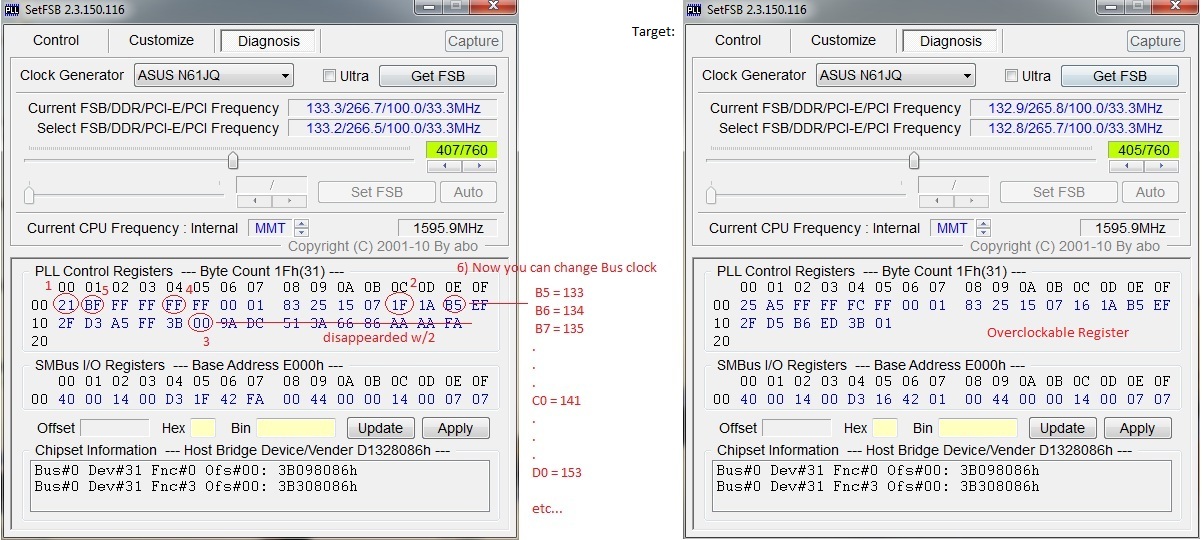
Here's my register and there are also the changes needed to control the Bus Speed. In my case I needed to do a lot of changes untill I get an OC'able Register that enables you to change the bus speed (so I spended a few hours,cause It's like finding a secret combination).
Maybe you should try different combinations to get the Register above:
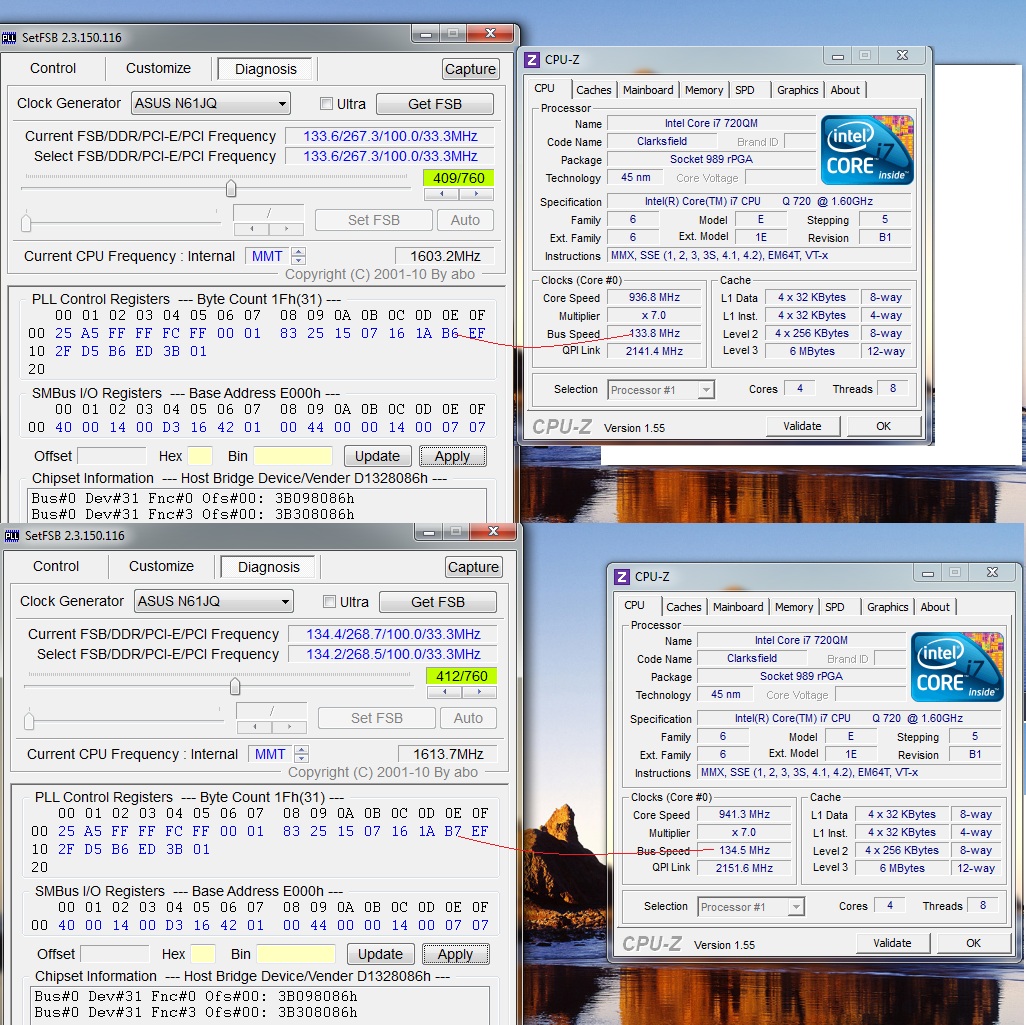
...Check out what I did (steps in order to avoid BSOD or computer stop responding)...Attached Files:
-
-
brown that looks pretty much like a black lol
not sure but it's definitely not room temp issues because i have the AC running all day. i was playing starcraft 2 on med/low settings at the time. -
Hey all, I just received this laptop a few days ago, and while I'm certainly impressed, I had a question about the gaming performance.
It seems that, in comparison to the gaming videos on the internet, my laptop is considerably slower. Using FRAPS, I compared my performance against the youtube video with the crysis demo. The user has an average of 30 seconds on high setting, while I have an average of 15 on high settings. Not only that, but other games, such as starcraft 2, run considerably worse than the benchmarks I'm seeing online. Is there something I can do? -
Well I'm finally going to have some time this weekend for startcraft 2. I'll post my temps after a couple of hours of gaming.
-
Make sure you've updated your drivers, specifically the ATI drivers. You can check the N61 Driver Thread for the latest and greatest. Also you can check all the start up processes and kill anything running in the background you're not using.
-
Let's hope so.

-
If updating the "Catalyst Center" updates the ATI drivers, then yes, I have already done that. I took the time to end unnecessary processes, etc... but still no luck. A game that used to run at 60 FPS now runs around 40. I even tried playing around with the power saver settings, but nothing seems to work...
-
Not necessarily. Go to device manager > Display adapters > right click ATI Mobility Radeon HD5700 Series.
Go to the driver tab and make sure the driver version is listed as 8.753.0.0.
I know for myself I had to uninstall the ASUS driver and reboot first before the drivers from ATI's site would correctly update. -
thanks so much . unfortunately I do not hve the same PLL as yours... see my pic - your tweak may be good for some other here... but too bad for me !
![[IMG]](images/storyImages/ilbps8.jpg)
-
My screen looks the same but I can't get any changes to stick.
DISCLAIMER: LordDavon is not an expert in anything. Most of his knowledge has been gained from sticking protruding body pieces into electrical outlets, tripping and getting dropped on his head as a child. Due to this acquired knowledge, LordDavon is a major contributor to Wikipedia and a published author of the best selling, "I know computers! Why won't it start?!" and the followup best seller, "Oh, I forget to plug it in...". -
Make sure your Windows 7 Power Profile (or Power4Gear Hybrid, if you use that) has proper settings for performance. Maximum processor speed should be set to 100%, otherwise Turbo Boost will not kick in. ATI Power Play should be set for maximum performance.
To check your CPU, download and run Fritz Chess Benchmark (standalone exe) with 8 processors selected. With proper performance settings, my "relative speed" is about 12.2. With my customized battery-saving profile (unplugged), the CPU scores only 8.10. You should be getting around 12.2.
For the GPU, you can try 3DMark06 GPU benchmark (installer). If you can score between 7500 and 8000, your GPU should be up to par. -
You have something not setup correctly. Check in msconfig and see what you have in startup..and like people above posted...make sure you have your power options correct. The ATI 5730 is a good card...decent for overclocking 2!
-
I had my first BSOD since I received my laptop back....it was something to do with flash that crashed the card. I am using 10.7 drivers. I have not had any BSODs since but flash does mess up at times. I do not know if it is due to slow internet out here offshore or something with the drivers.
-
Huh. You know, after a restart of the computer, all troublesome games received a 15-20 Frame rate boost. I have no idea why this happened.
Rather than simply dismiss it as "Something that just happened", would anybody happen to know the cause of something like this? I really don't want this to occur again, or to have the need to constantly restart my computer to get decent FPS rates. -
There must be something running in the background. Make sure to check your startup items using msconfig and uncheck anything unnecessary. I know adobe and apple love putting a few apps in your startup every time you do an update on them.
-
hi guys..!!
am i going to have a faster and better wireless card if i update it to the latest version?WLAN Atheros V9.1.0.100 (07/31/2010) tnx!!! -
It's a known issue. Turn off hardware acceleration (in Flash settings) to fix it, or revert to 10.5 drivers or earlier.
-
For me the Flashplayer seems to run stable at this moment. I have very rarely BSODs with hardware acceleration on.
What I did was reset the internet explorer to default settings and then reinstalled the Flashplayer. I was getting much more BSODs with flashplayer before.
What is very annoying at the moment is that I have received many BSODs with ati 10.7 and 10.6 on my desktop PC with many games on my ATI HD5850. I went back to 10.5 and the BSODs disappear. -
this drivers is the more stable and faster than ever but I have to connect manualy when I boot Win7ows, I don't know why but the automatic connection process is broken. If you update it, give us your feedback here.
-
Heya guys. As you know, I have been in this thread, well, forever. I think I am going to do something that I rarely ever do. I am going to ask for help! Yes, I know. I am one of the helpers here and it feels a little strange to be asking but, screw it, I know where the best knowledge pool on the net is. I haven't yet scoured the Internet looking for answers because I know where the best people on the Internet are already. ;-)
Anyway, I have the N61 connected to my Viewsonic VX2250wm-LED and have the LCD on the laptop turned off. I wanted a good RPG single-player game and got one called The Witcher Enhanced Edition for $20 at GameStop. So far, the game is everything I was looking for. The problem is that during the loading of certain levels, (this happens randomly) the game will freeze after the load bar hits 100%. I installed the 10.7 ATI drivers and the latest (1.5) patch for the game.
During the lockups, the mouse will move across the screen but that is all I get. Control-Alt-Del doesn't do anything as does Alt-Tab. The only recourse I have is to shut down to system and reboot.
Anyone else have this game and this problem? I have tried disabling the Antivirus and about everything else that is running. The temps are not too bad (still in the 70s), so it isn't a thermal issue. Sorry Thermal Geeks -- Greg loves them so!
Any ideas? I will be looking into this more later today, but I was hoping that someone here may also be playing the game and have bypassed this issue already.
Thanks guys!
DISCLAIMER: LordDavon is not an expert in anything. Most of his knowledge has been gained from sticking protruding body pieces into electrical outlets, tripping and getting dropped on his head as a child. Due to this acquired knowledge, LordDavon is a major contributor to Wikipedia and a published author of the best selling, "I know computers! Why won't it start?!" and the followup best seller, "Oh, I forget to plug it in...". -
Are there any tutorials anywhere on how to overclock this laptop?
-
I don't have that game but I did find this FAQ:
FAQ About The Enhanced Edition
The first thing I would try is to run it in Administrator mode. Are there errors in your windows event log? -
Hi guys, quick question!
I hear some laptops when you connect them via HDMI to a monitor (mine is an LG 23" HD Monitor), that you don't get the full 1920 x 1080 resolution filling out the whole screen unless you close the lid to the laptop!
It happens on my Acer 3820TG and I was wondering if it's the same for this one?
So if you could let me know, thanks! -
sorry double post...
-
You need to download "Setfsb" 2.3.150 first for the CPU and AMD GPU Clock Tool v0.9.26.0 for graphics.
CPU OVERCLOCKING:
http://www.youtube.com/watch?v=CGAUadARmsE -
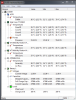
Here are my temps after playing Starcraft II for about an hour. I had the settings on Medium on my 1680x1050 monitor. The room temp was 76F/24.4C. The temps I've been seeing since I got my laptop back have been lower than before the repair.
-
Out of curiosity, I followed your steps on my A1. I was able to get the same bus speed as you were (15% overclock) and verified a 15% improvement in my benchmark (Fritz Chess Benchmark). I ran a couple of Intel Burn Test passes to see temps; they were roughly 6 degrees higher (got up to 92 C with 2 passes, and 86 C without the overclock).
-
Some of us are getting lower temps on the same scenarios, on my X1 I'm getting 83-85°C vs 79-80°C w/2 passes on maximum for example, using D0-153Bclk value; setting that I don't also recommend cause RAM will be near 1530Mhz.
So overclocking CPU will depend on each one desition and configuration.
All in all, I'm glad to hear the metod it's working!!!
Be careful and good luck! -
Same temps I get after playing some FPSers...I am going to apply IC 7 and post some results...see what I can get !
-
I wonder if it is some type of bug with the game ??? I have never played that game before so..I am not much help. Another RPG you may want to look into that is really fun is Torchlight.
-
I have no issues with the laptop and my HDTV's resolution. I did have the issue with my HP DV2.
-
I went through the FAQ this afternoon. It wasn't much help. No errors in the event log.
-
I was looking at Torchlight. I may try that one next.
-
Other things I've tried with older games to get them work is changing compatibility mode of the executable (Vista or WinXP), installing the latest Direct X 9 runtimes from Microsoft's site. If you do development make sure you haven't loaded the debug runtime for direct X. Changing screen resolution (I had to do this for oblivion on my ASUS G1S).
If it's a networked and you're using the windows firewall make sure to add the game.
Other than that I'd say it's a game bug, where the game is locking the windows key as well as ctrl-alt-del, since you're not seeing anything in the event log. -
David, Have you tried reverting your ATI to 10.5 as people are reporting flash problems with 10.6 and 10.7. I know its a longshot but what the hell.
And please don't stir up the thermal geeks !
-
Why don't you just try it and let us know what you think!! You can always change it back if you don't like it !! :wink:
-
Lorddavon, stevedogg has posted a new ASUS-specific driver from ATI/AMD.
ATI V8.752.0.0 (08/21/2010)
http://forum.notebookreview.com/asus-reviews-owners-lounges/494250-asus-n61jq-driver-thread.html -
I am starting to agree with you that it is a game bug. I installed the "Directors Cut" patch which puts the gore and back into the North American version and didn't get a lockup tonight. Prior to installing the patch, I would get a lockup at least once an hour. I played for 3 hours tonight.
-
I have been considering trying the old ASUS drivers again but after installing the "Directors Cut" the game seems more stable, so far. I wouldn't call it a "long shot" though. Usually after the load process finishes (where it locks up) there is a cut scene or movie that happens. It could be the transition that is freaking out the drivers, if it does turn out to be a driver issue.
Oh, I'm gonna stir! Oh yes, stir I will! HA!
I think we should trade mark "thermal geeks" and get some money every time someone uses it. While we are at it, "driver geeks" and "mod geeks" too! ;-) -
That's the non-generic (ASUS-specific) driver, based on Catalyst 10.7. Honestly, I doubt there are any differences between that one and the generic version released by AMD, except that this properly labels the card as "HD 5730" instead of "5700 series". (EDIT: this one also contains the HDMI audio driver, which, for some reason, is omitted in the generic release. In the driver thread, I posted how to manually install it using the desktop package.)
Look out for Catalyst 10.8 (generic); it should be released this week. I will post it when I see it. -
I unfortunately won't be updating my ATI drivers from the base configuration until ATI or RedGiant gets their act together any fixes the crashing bug for Magic Bullet Looks which has been evident since 10.5
Almost makes me want to get the NVidia version of this laptop
-
Thought I'd share an interesting thread for those who haven't seen it: http://forum.notebookreview.com/asus-gaming-notebook-forum/508322-updates-asus.html
The first post gives some insight on ATI GPU operating temps:
(Quote)
1. According to ATI spec sheet, working temperatures under 111C are considered as normal before shutdown occurs at 114C.
2. ATI also pre-set additional protection mechanisms to down clock the GPU at 105C and then again at 108C depending on load conditions.
3. Running Furmark is dangerous on both the mobile and desktop GPUS, it shortens the life of the components and to be honest, does it really tell you anything about stability if the system turns around and crashes in a game.
* Asus N61JQ Owners Lounge *
Discussion in 'ASUS Reviews and Owners' Lounges' started by GregW, Feb 3, 2010.