 Problems? See this thread at archive.org.
Hi!
My modded bios "permanently" overclocks the G210m, without any software modification. That means it will be overclocke even in linux, for instance.
You don't have to bother yourself with buggy softwares etc.
The new clocks are 750/1700/850Mhz. It's a pretty good overclock, so, BEFORE you flash this bios, you HAVE TO test these clocks with an overclock software and test them in game to make sure your computer can handle them.
It made my ul30vt go from 3100pts in 3dmark06 to 4200.
I can play L4D2 with max settings.
I would flash it before formatting, but it shouldn't really matter. But if you've never flashed a bios before, don't do it. You could brick your laptop.
As for the ram, the speed (for ddr3) doesnt not really matter, you will hit other bottlenecks way before! You should let the black filmy strip, it has something to do with dust, heat and waves cover.
-
You should also define "shuts down". Does it go through the shut down process of the Operating System or does it just *poof* no power (even while plugged in). A couple months ago after 1.5 years of perfect operation mine started going *poof*=>off and it turned out to be a shorted motherboard that had to be replaced. The lappy would work for about 10-30 minutes before turning off.
-
Hi i'm looking to buy an ASUS UL30Vt-X1 in EXCELLENT condition to use for school.
Is anyone interested in parting ways with one, or have an extra one in good condition? Please contact me. Thanks -
Hello hungdizzle,
there's a used ul30vt-a1 on ebay going for ~$250 w/ an upgraded SSD.
i'd offer my x-1 for sale, but i cant part with it for only 250 or 300$. it's worth more than that to me.
best part about this laptop is its ability to run diablo3 and even PCSX2 in acceptable framerates. -
@ hungdizzle
I realize this thread is a little old, but I have one listed on EBAY with upgraded backlit keyboard mod // upgraded 120gb ssd // brand new battery // refurbished to excellent condition. The price is negotiable .. I was going to keep and give to my wife but she wants a mac .. meh go figure ... -
How you guys doing with W8?
I see several posts concerning drivers. I need to see if asus is going to support W8 or let her slide into oblivion.
As far as true Optimus, I like the UL30 over my Optimus notebooks. I switch only when I need or want it, but guess that's just me. -
For everyone trying to run Windows 8 on this laptop, I will just post this link here:
Windows 8 and ASUS UL80VT (Hybrid NVIDIA - INTEL Graphics laptops) - Drivers - Windows 8
Followed this instructions now Im able to switch graphics in Windows 8
-
For several days I used my UL30vt for HTPC duty. I used the HDMI, with discrete GPU, to receiver then on to TV.
Today, I went back to old WDTV. I had problems with micro stutter with my H.264 encoded mp4, MKV and straight ISO video. I was able to improve this by using a modified version of Media Player Classic. Alas, I then started overheating GPU and laptop begins repeated hibernating.
Note that this is running 1080P and nVidia; no problems running 720P in the past with internal screen with either GPU.
With nVidia, 1080P and MPC, the GPU was sitting around 60% to 75% as the GPU was set for all the heavy lifting. Note that lid was closed so controlled all from 52” TV via mouse and on screen keyboard for testing. No OC, no Turbo needed for CPU.
The WDTV uses an embedded Sigma Designs TangoX that plays back perfect except for a range of bugs and limitations.
So, anyone else now or ever use theirs for HTPC duty?
TIA -
I just upgraded to W8.1 and I gotta say the old driver from 2009 is much more stable than in W8. It had a bit of difficulty installing at first but the visual bugs are gone! I am guessing it has something to do with microsoft redoing the start screen to allow the use of the desktop wallpaper.
Good find! I've been checking the old P4GH page ( ASUSTeK Computer Inc. -Support- Drivers and Download P4GHybrid) and wondering if the software was depreciated. I guess they moved it to a new page.
ASUS is notorious for not updating product pages with new software version so I recommend bookmarking the page for P4GH Win 8 ( ASUSTeK Computer Inc. -Support- Drivers and Download Power4Gear Hybrid)
And for ATKPackage ( ASUSTeK Computer Inc. -Support- Drivers and Download ATKPackage)
I'm confused as to what is going on in that guide. It sounds like it is using the old graphics drivers. Can you elaborate on what installing the old drivers separately accomplishes? -
My UL30VT is running a bit hot...in the mid 50 Celsius range at idle or just word processing. Is it worth the trouble to disassemble the laptop and do something about the heatsink? With my previous netbook, I disassembled it and replaced the thermal pad with some Arctic Silver and it dropped the temp by at least 3 celsius.
Thanks! -
I can't find my old thermal screen shots. 5 months or so ago, I first repaste with IDC7 and got pretty much what you have. Thinking this is high I repasted again with AS5. Same temps. At first I thought one core was better with ICD7 but that leveled out. To me this is hotter that it used to run but can't compare old temps at idle.
Right now back to driving 1080P screen with NVidia and just iTunes/IE running I sit around 55/56 CPU and GPU @ 59C using Turbo settings. If I use modified version of Media Player Classic for ISO video, I will have the Gpu around 80C with CPU hanging around 76C. I now use small cooler to maintain those temps. With no cooler and with lid closed, it will shut down sitting on small no ventilated shelf by hibernating.
Post back if you do repaste. -
Im not sure what it actually does, but its seems that Windows 8 are always trying to install newer drivers, so by removing this folder with driver, you got no driver and simply install whatever you want. Installed 3 times for now W8 with this method, and also once on W8.1 and it work flawlessly. Once it happned that I wasnt able to use button for graphics switching (it simply didnt react to anything), but I was still able to switch graphics with P4GH in advanced options.
-
While this would work for keeping the stock drivers off your system, I believe Windows 8/8.1 will try to install newer Nvidia drivers that are pushed through Windows Update regardless of the existence of the folder. The only way to prevent this from occurring in the future to restrict the OS to only allow core updates to auto-install OR hide nvidia updates as they come (I may be wrong, haven't used Windows Update for graphics updates in a long time).
Occasionally the hybrid graphics software crashes out but a quick log-out/log-in restores the function. It seems like Windows 8.1 is keeping core metro apps pre-loaded to speed up future load times. "Closing" the apps doesn't necessarily end the process which can make switching graphics a pain. Regardless, I am very happy with the stability of this ancient driver on Windows 8.1. Lets hope this is maintained through its official release!
Thanks again for sharing this info!
EDIT:
I just reread the TomsHardware Post. Is the intel driver that "was installed automatically" the old version of the new intel driver that comes bundled with the graphics driver? The old driver should have the date 8/28/2009 and version 8.15.11.8688.
Also, Power4Gear Hybrid Utility V3.0.4 and ATKPackage V1.0.0030 were just released on the 11th. -
Hi Forum,
I just bought myself a second hand Asus UL30VT, it came without hdd so I need to do a complete reinstall.
Was very happy to see hydra had uploaded the driver disk for this notebook on Skydrive (thanks).
However, I'm not able to download one of the files, DRIVER_CD_WIN7_20.zip.001 , I get this message from Skydrive:
SkyDrive is unable to scan DRIVER_CD_WIN7_20.zip.001 for viruses.
All other files downloads fine.
Probably the zip file got corrupted somehow. Would it be possible that some one could re-upload this file?
I would appreciate it very much, thanks!
/vipw
-
I just setup the torrent for you. It's the complete .iso which I've held onto even though I don't have the UL30VT anymore
Torrent Details: AsusUL30VT-A1driverDVD | Legit Torrents -
Thank you very much micman!! You're a life saver!
I'm downloading right now and will post again when finished.
thanks again
/vipw
-
micman,
I have finished downloading the torrent now.
Again, thank you very much for your help!! :thumbsup:
/vipw
-
I checked and same error found as reported. There is a check box to give permission to download anyway. I checked it and downloaded then scanned for virus, nothing found. AFAIK an online glitch?
micman, did you have any problems in the past?
Thx -
No I never had a problem downloading, but I haven't tried it since Microsoft changed some of their skydrive tech. Maybe when they did the upgrade it screwed with the hash on your file and kicked out an error. Who knows? Either way if it still works anyway its all good. The .iso I have on torrent was created from your split .zip files in the first place, so I know the files are good.
-
Hi there !
After three years and three months of loyal service, I decided to entirely disassemble my Asus ul30vt so I can clean everything and above all remove all the dust which transformed my fan into a jet fighter (at least for the noise and heat it generate). I found an Asus disassembly guide pdf (you can click the link if you're looking for it) and worked on that for 2 hours.
Well I reassembled everything and guess what, almost everything works. I'm am now the proud owner of a touchpadless UL30VT :-D. Despite that, the cleaning went okay and my laptop is now way more cool and silent than before. So I was wondering if anybody could help me with touchpad problem or have an idea how to solve it. Explanations of what I did in the paragraph below
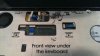
So when you remove the keyboard there is three cables : the power switch FPC, the hotkey FPC and the touchpad FPC (which also came to be the LED indicators cable).
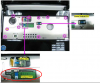
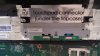
I had no problem removing the touchpad FPC and of course no problem putting it back (it's pretty flexible and there is no resistance). But the touchpad never worked again since (neither click buttons or mouse), the weirdest part is that the front LED indicators are working perfectly meaning that the cable is connected (I guess)... I tried everything even switching the laptop on and holding the cable to see if there was any reaction. But nothing did work so far.
Here are some pictures I took from the disassembly.
 -
-
 -
-
 -
-
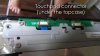
If you got any idea how I could resolve that I'm very interested !
p.s. : of course the laptop does not detect touchpad =>
-
Not sure it will help you but I had a problem with my touchpad (not detected in windows) that I solved by simply removing the charger and battery, press the power button a couple of times to emty capacitors and then put back the battery and the charger.
Hope it works for you too!
-
Well thanks for the tips but it did not work :-(. I tried to reinstall drivers also but with no success either. I think I'm condemned to use an external mouse.
-
Couple of things; Clean contacts with contact cleaner or 100% pure alcohol, make sure the connector pads slides fully into the connector. I had to wiggle and back out a few times, like foreplay. The edges wants to catch sometimes. If you have a meter, ring out one end to the other for cracked cable wire. You may find replacement on ebay if broken, not sure from Asus.
-
Any of you guys having trouble Office 2013 with the Nividia gpu? Heres the error:
Problem signature:
Problem Event Name: APPCRASH
Application Name: WINWORD.EXE
Application Version: 15.0.4517.1003
Application Timestamp: 51a7523e
Fault Module Name: nvwgf2umx.dll
Fault Module Version: 8.15.11.8688
Fault Module Timestamp: 4a983728
Exception Code: c0000005
Exception Offset: 000000000006aa8f
OS Version: 6.1.7601.2.1.0.256.1
Locale ID: 1033
Additional information about the problem:
LCID: 1033
skulcid: 1033
Read our privacy statement online:
Windows 7 Privacy Statement - Microsoft Windows
If the online privacy statement is not available, please read our privacy statement offline:
C:\Windows\system32\en-US\erofflps.txt
Running the intel chipset works but what the hell?! -
It happens across the whole suite. I gave up trying to fix the error. Instead, disable hardware acceleration under settings->advanced->display. Checking the box in one app disables it across the entire suite. Disabling has not affected performance on complex documents.
EDIT: Doing this also allows switching between integrated and dedicated graphics without having to close office applications. A big plus for me! -
I had problems like that with the Preview release of Office 2013 but not the final version. Although, I did a complete wipe of laptop + reinstall Win8. Not sure if that means anything. Good to know about the hardware acceleration switch regardless, thanks!
-
Good stuff. You saved me a lot of annoyance. I just installed a Samsung Evo 250 gb SSD. What a difference. Wish we had the Sata 3 though
-
I know! I had my SSD from my other comp in for a few days. It was so hard to switch back haha
I did a fresh install of Win8+updates,office+updates, and apps in under 2 hours :O. HDD is truly the bottleneck for my system. -
I've been using ul30vt for 3 years already, and as the beginning I was ultra happy with its performance, now I am really disappointed. I wander what is your experience after years, but I find that it works much slower than at the beginning. I did full format and reinstalled windows, drivers and software correctly, but it didn't help (some time ago I have disassembled it and cleaned thoroughly).
I can say that movies on youtube work better on my smartphone than on ul30vt, and when thinking about buying new one I am not sure whether I will choose ASUS. It seems that this model was not really robust, we have also ACER one which after years shows exactly the same performance.
I have only one explanation for this and it is 'planned obsolescence'. Do you have similar experience? -
Not at all. I've had this laptop for 3+ years and counting. It went through college completely, the battery is the best part about this beast. I play league of legends on it all the damn time, hooked up to a 24 in monitor @ 1920x1080. Although the hard drive started messing up which is normal. I wouldn't hesitate another laptop like this. I would compare this to a macbook air if you're looking that way.
-
So maybe I am just not lucky, as mine has sometimes troubles when playing youtube videos with few tabs opened in chrome.
-
I also have not had the extreme performance issues that flaterik mentions. Sure, I wish the hard disk were a little faster (which gets more noticeable the more stuff I put on) but short of installing my own SSD, that's a problem with all PCs. I recently did a clean install of Windows 8.1 & it's snappier than when I got it 3 years ago.
-
Just wanted to chime in, i've had this laptop since 2010 and upgraded it to an SSD about a year ago. best investment and completely worth it. this laptop still runs like a champ on what it needs to do and it's been reliable like always. just fixed the upside down camera issue, while trying to do a three way chat to discuss some black friday plans. just bought a surface pro, and i just cant get myself to get rid of this laptop. she's served with me sooo faithfully.
-
Howd you manage fixing the upside down camera?
This laptop has been good to me too. Can't decide whether to build a new PC for gaming/office use or go to San Fran/EDC Vegas in June. Decisions, decisions. -
Do you get the turbo boost for the CPU to work? I updated to win 8 and got the graphics to work fine, but I don't have the turbo bost button in P4G so it runs on 1.3 GHz.
-
Hey fendora can you mod a bios or someone post the modded bios. The links are down.
-
It is "turbo boosted" automatically with the new versions. Don't let win8 task manager deceive you (it will just report the intel rated clock). Use a program such as cpuz to show your actual (current) clock speed.
EDIT: Just noticed you linked to the old win 7 software... ASUS continued developing ATK and Power4Gear Hybrid for windows 8/8.1 I would highly recommend using those files instead. 8.1 also removes the desktop freeze bug the graphics driver driver had on windows 8
-
Can somebody post the modded bios please? All the links are down.
-
Sorry for the late reply. i got my camera fix online but i dont remember where. this was the name of the file however.
CMOS_Camera_Chicony_CNF7050_CNF6131_VT_080701
if you need me to send you the file, just let me know. It's around 1.5MB zipped up
Thanks. -
Hi all,
I am currently having problems convincing my UL30VT to use its Geforce G210M instead of the on-board Intel GPU.
Two days ago I mistakenly pressed the Graphix Boost button on the top left side of the keyboard to turn on the computer, and ever since the display resolution will only go up to 1024x768. I am using Windows 7 64bit.
I have installed the latest NVIDIA drivers, but the NVIDIA control panel is not available, as it says 'You are not currently using a display attached to an NVIDIA GPU'. The NVIDIA GPU shows up in Device Manager. I have tried disabling and enabling it, and uninstalling and reinstalling it. It claims to be working properly. I have also tried disabling and reinstalling the Intel GPU, which does not seem to make a difference. It claims to have the latest drivers it can get.
I have tried pressing the button again, which switches between modes of ASUS Power4Gear hybrid (version 1.25). The High Performance mode is set to use the NVIDIA GPU (not the motherboard GPU), and that mode claims to be active. Apart from changing the desktop background, none of the modes seem to make a difference. The laptop is currently plugged in.
I have tried resetting the BIOS to manufacturer default settings, which doesn't appear to have done anything (except make startup longer).
I have tried turning it off and on, several times. It does not seem to make a difference.
Help much appreciated. Happy New Year's Eve.
Regards,
Buzko -
This laptop predates optimus graphics switching technology meaning you can not use any of the latest drivers for intel/NVIDIA. In order to use the NVIDIA GPU you must use the only official hybrid graphics driver created for this model or one of the modded (and slightly unstable) versions created by the community. First uninstall the NVIDIA driver from programs and features (uninstall programs), then uninstall & delete the NVIDIA and intel drivers through device manager and check the box to delete the drivers along with uninstallation.
I tried using a driver sweeper recently and had great success with Guru3D on windows 8. I have no doubt it will work well under windows 7. ( Guru3D - Driver Sweeper)
Restart then install the official hybrid graphics driver from the support page ( http://www.asus.com/support/Download/3/208/UL30VT/). Sometimes I have to install it twice back to back to get the whole driver functioning properly. I haven't touched win 7 in nearly two years so I may be slightly off on my instructions! Best of luck! -
Hello Fendora!
Do you still have the modded bios for the UL30VT? The link in your profile doesn't work anymore. Me and two other guys would be really happy if you got 'em. I have tried afterburner for the GPU clocks 750 and 850 (shaders clock automatically?) stability test with OCCT and got zero errors after a couple of hours (is that enough to say its stable?). I also have CPU clocked to 1,9 GHz with setFSB temps are max 75 degC for system/gpu and 65 degC for CPU according to HWmonitor after cleaning fan and replacing thermalpaste.
I am currently on bios 210 and was thinking to upgrade to 211. If i got it right, i will not have to do that update before flashing your custom bios onto the computer? And i will have the 211 bios with your extra "feature"?
Also, I read in an earlier comment from you that you don't like setFSB for CPU overclocking, why is that?
Regards Erik from Sweden -
I would like the same info.
I recently decided to breathe new life into my lappy and used SetFSB to overclock to 1.9 GHz. My 3DMark 11 score went from 8451 to 9331 with just that tweak, not overclocking the GPU yet. I haven't done any cleaning of the fan or replacing thermal paste, do I need to worry about overheating? I suppose I should grab HWmonitor & see what it says after a 3DMark test. -
Hi Erik,
I no have HWMonitor & msi Afterburner installed. Regarding Afterburner, my default clocks are:
Core: 606
Memory: 790
Like you, I don't see a setting for shader clock.
When you say you tried "for the GPU clocks 750 and 850" do you mean you set core to 750 and memory to 850? I would be grateful if you could clarify that.
Thanks!
Ryan -
Yes that is correct, core clock 750 and memory 850. The shaders is automatically increased (guess it depends on one of the two).
What temperatures do you get in hwmonitor? -
I used setfsb & msi Afterburner to set these values:
CPU: 1.9 GHz
GPU core: 707 MHz
GPU shader: 1713 MHz (visible in Afterburner graph, believed to be linked to GPU core)
GPU memory: 922
Then I played Diablo III for a while. Here are some max temperature results:
GPU: 77°C (visible in Afterburner graph)
system: 75°C
system fan: 5700 RPM
CPU: 67°C
Seems stable enough and my 3DMark scores are about 10% better than without overclocking. -
922 is high for memory, lucky you to get that high But why so low on core? Is it not stable? Can you get it stable by lowering the memory clock? I don't know which yields the most performance but try to see if higher core clock and lower memoryclock is better...
The temperatures should not be a problem more than the sound level they give rise to due to higher fan speed. -
Hello guys. Not sure if anyone has any ideas left, but my beloved ul30vt is starting to give me wifi issues. problem started about a month ago. i'm unable to stay connected on wifi with a solid connection. Windows doesnt ever show the connection dropping, but certain websites won't load occasionally, diablo 3 gets disconnected every time, and i just cant play. there has been no changes to my wifi settings on the router or to my ul30vt laptop. when i connect the laptop directly by cat5 cable, the internet works fine. i'm able to get on the internet and play diablo just fine on the macbook air and my desktop. even if i sit next to the router and use wifi, the connection still has problems.
as far as solutions go, i assume the next thing to try is to uninstall and reinstall either the network drivers or the OS itself. anyone ever encounter this? is it a virus of some sort? the strange thing is that task manager shows a wireless connection 1 and a wireless connection 2. was it supposed to show 2? -
Good day to you, fellow Asus sufferers.
I just installed a fresh Win 7 Enterprise x64 on an UL30VT (upgraded hard drive to Crucial MX100 SSD). I believe I generally followed the advice in the initial post, but I must have screwed something up...
First off, what are those "ATK drivers"? Besides the graphics and audio driver, I installed (from the Asus website for Win 7 x64):
> ASUS ATKOSD2 Utility
> ATK Media Utility
> ATK Hotkey Utility
Here are my results: Power4Gear installer quits, ASUS Config utility claims the machine is not ASUS, only some of the hotkeys work (brightness control, wireless on/off) without displaying animations. At some point, touchpad quit working, brought back by loading user defaults in BIOS. The graphics switch does work, but only on power state (battery/AC) change. The top left switch button is dead.
On top of this (probably unrelated to ASUS), woke up from sleep on its own displaying "insert boot device" message. Hard reset > booted up normally.
Final note: I installed all the drivers/utilities after installing windows updates.
Any help? Thanks! -
As soon as I figured out the issue with hotkeys, installing Intel Matrix Manager (either from Asus or Intel) immediately disables windows update and UAC reports all executables as "unknown publisher" (even the ones from Microsoft). Uninstalling Intel's AHCI driver brings things back to normal on that end, but the machine 'loses' the SSD during sleep. Freaking nightmare.
Asus UL30VT FAQ / Official Owners Lounge redux
Discussion in 'ASUS Reviews and Owners' Lounges' started by belzebutt, Apr 21, 2010.


