Problems? See this thread at archive.org.
I saw that Quatro said the lowest discharge rate he's seen on a U35Jc is 7.2W. Mine's run as low as 6W - using BatteryMon, P4G battery saver, lowest brightness, wifi off but one Microsoft Word window open.
When the discharge rate is that low BatteryMon's total time quotes it as some ridiculous near 14 hour mark. Am I just on more underpowered settings than everyone else?
-
-
QUESTION:
this never happened before but I was in class, after lecture I closed the lid and drove home. After I got home and took out the U35, first thing I notice was the whole thing was steaming hot then I realized the fan was running crazy cause apparently the computer didnt go to sleep or at least did not sleep properly.
I had to manually shut down and restart the computer let it sit a while for it to be ok.
Would you guys think this was a one time random event or something's wrong? I have let it gone to sleep before and it was ok. -
6 watts?? Wow. That is really impressive. And with one Word Doc open.
Again, in that exact scenario on my U30Jc, the lowest I can get to is 7.8-8.2W, so congrats for your excellent battery drain.
6W ... incredible. -
My discharge rate was 10.11h. I ran it for 10 minutes with wifi off, muted and volume off, on the lowest brightness. My estimated time remaining was 10.00.37 hours.
Little confused with the discharge rate values now. During the test over the line graph, I saw that my discharge rate was in the low 8000s most of the time with the units as mW. I even saw spikes in to 7k and momentarily 10k. Doesn't seem to have an average.
With wifi on, and typing this msg...I'm still getting between 8-10 hours remaining, but now my discharge rate shows 8.37h. It fluctuates This test seems a little fishy to me. But none the less it's fun.
Will do nvidia OC later. BTW...I tried youtube videos at different resolutions. I noticed the gpu doesn't kick in till the HD and 300s resolution. Never had issues with the fuzzy picture on the dre murray videos "too classy" -
What can I say? Mine's done that before too several times. Just didn't shut down or go to sleep when I closed the lid. Got incredibly hot in my bag (no way to breathe.)
It's only happened occasionally but each time there was an active app that was preventing it from sleeping or hibernating.
It's not been the same app each time so I can't predict it. So I watch to be sure it's asleep before I plop it in its bag. -
Sounds about right, thanks... just hope I didn't do any permanent damage.
-
This isn't an issue specific to this model (or Asus). Even Macs sometimes get hung up by a rogue app/process trying to sleep and end up never actually sleeping which results in their getting super hot in a bag, etc. It's just important to make sure that your machine is actually sleeping before you pack it up.
-
Wise advice indeed.
I just wish I thought of it every time I closed the lid. But sometimes I'm in a hurry or talking to a friend, etc and don't realize that I hadn't checked.
The first time I did it, Howard911s, I feared I'd burned it out, it was soooo hot! It took it a while to cool down (I'd not only put it in the bag, but I stuck the bag in the trunk of my car where it got even hotter. Scary. -
I guess today is my day with question.
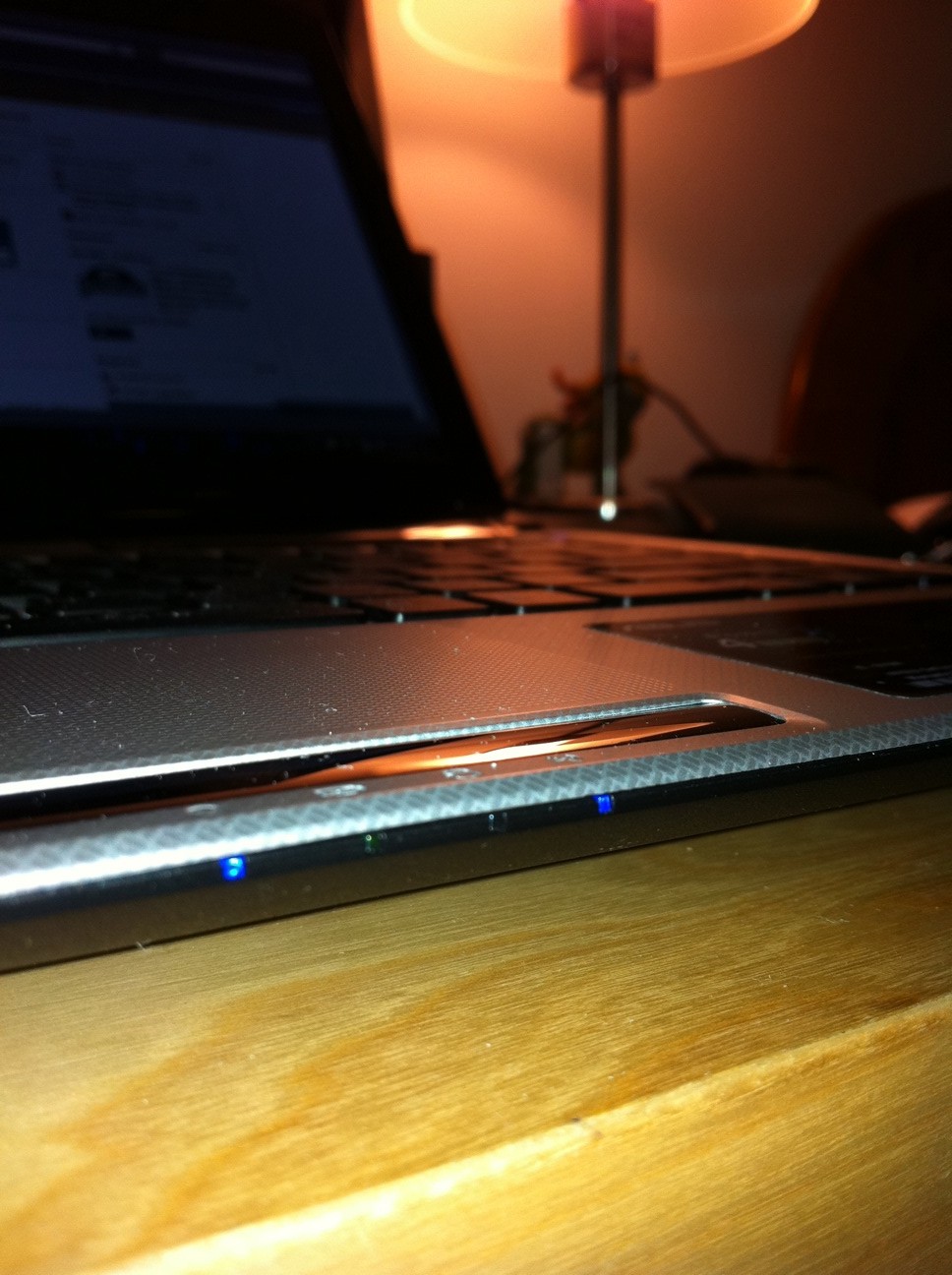
After the heating episode, I looked around my laptop and found a small gap between the silver and black seal just below the mouse button and above the indicator lights (see picture) I know this is not from the heat, just want to get that out of the way.
The seals around laptop fit and finish are perfect except for this part where right in the middle below the mouse button and above the indicator light there is a small gap between the two. While not big but you can see a small arch and if I press on the silver part, it would seal completely but let go as soon as I let my finger go.
It is not very apparent and there are no flex and no noises while I do it and go about day to day life. I have Until Oct 5 to return to amazon if needed, what would you guys suggest?Attached Files:
-
-
My start up is sometimes stalled by the Control Deck program and so I would like to disable this program from running at start up. Can anyone tell me how to do this? I tried going to system configurations and looking for it under the startup and services tab, but I don't see it.
-
Bummer. Will Amazon charge you for an exchange?
-
Should I exchange for same one or request return an get a different model? if so which one?
-
They were a bit harsh...

ASUS U35Jc: Jogging in Place - AnandTech :: Your Source for Hardware Analysis and News -
eh wasnt too bad
they focused more about the crappy 310 with 1 gb on a 64 bit bus
but then 512 mb doesnt make much change
what really pisses me off is how Asus nvidia underclock the gpu specs -
I think they were pretty fair. ASUS, 5 mo later, should have more improvements in the U35Jc (over the U30Jc) than just 150MHz in the CPU and a thinner design due to no ODD. To me, with the U-series line, ASUS does seem to be running in place.
And the speeds of ALL THREE of the U35Jc's clocks (core, memory & shaders) are lower than on the U30Jc. He quotes the memory speed as being lower but not the other two.
But I don't get why the AnandTech reviewer didn't run the battery test with SHE on. He wonders if it would help (duh!) but never tests the battery & discharge rate with it on. I think he'd find the U35 getting better battery life then the U30Jc, IMO.
Depends. Do you like your U35Jc except for that little warp/separation? If so, then get another of the same model. If not, then get something else.
I still think the 3820TG looks very inviting, if one could fit it with a larger battery (which one user did). It seems to have a lot to commend it (except warranty & buying it abroad since it's not sold in the US.) -
It seems they were mostly looking at it as an update to the U30JC instead of on its own. I never really considered it an update... just basically a U30JC without an optical drive. There are some other minor differences of course, but I don't think the U35 was ever meant to replace the U30JC. I guess the one thing I would like to have seen... especially since its in the 1018P which has been out for a short while now... would have been USB 3.0. It'd be nice to have a faster external drive option... but I've lived with USB 2.0 for years now and I've never had a problem. I think the jump from USB 1.2 to 2.0 had a greater impact.
-
Folks. Did someone find a fix for the keyboard typing issue ? When I keep typing suddely the cursor jumps to different location. This is the only nagging issue for me.
Also, I sit in a cross legged position and keep my u35jc on lap. Sometimes the side vent gives hot air (Not a big issue, though). Any good sleeve that can be attached to the laptop ? -
The first week I had the laptop, I noticed it was waking up on its own. Turned out that there's a power setting that allows the laptop to turn on for scheduled events (task manager). I don't know why that would be set to allow by default! I disabled that option and also checked out the task manager entries. It looks like it was Google Updater that was turning on the laptop every 24 hours even when I'd put the machine in Hibernate mode.
-
On the cursor, that's probably not a keyboard issue but a touchpad-and-your-palms issue. Look in your touchpad configuration settings and see if you have an area called "PalmTracking". If so, this sets the sensitivity of the touchpad to accidental touches by your palms (so that the cursor doesn't jump while typing.) Just lower the sensitivity on it.
The vent gives hot air because that's what it's supposed to do to keep the insides cool. So everyone's vent air is warm to hot. But this should keep your notebook's BOTTOM cool, which is what's important. -
Besides Chrome, I found it makes the "whine" in FF 3.6 only when gmail is loaded.
Does everyone who has U35JC/U45JC have this "high pitched whine" problem with Google Chrome, Firefox w/ Gmail, etc. Or is just a few of us?
I found when a Youtube video is playing, the high pitched sound stops, but I'm not sure if that's due to CPU processing or something else...
I really wish some who knew more about hardware could look into and give an ASUS U35JC/U45JC specific solution.
Thanks again in advance. -
IS the U35JC available in silver in the UK? if so where?
-
Mine has cpu whine, doesnt bug me too much, I'm 37 and deaf lol..
just that center piece below the mouse pad bugs me.. haven't filled out return yet.. -
well, if you brother to read the topic, youd find out that there is no specific solution
alot of other laptops do it and its not just the i3 series C2D did it too
and Asus is not very Some have sent theirs to asus repair and came back with the same issue -
I have had the laptop for almost a month now and I have to say I am very happy with it. The battery life has been GREAT since I did the OS restore. I easily get 8 hours on a full charge. I also had an instance today where I got a discharge rate of 5.5k at idle!
The touch pad is excellent in my opinion! It is so smooth and comfortable to use. I don't know why the reviewer had a problem with it. My sister's HP has a HORRIBLE touch pad that was extremely resistant and not smooth at all. Using it was a nightmare.
The chiclet keyboard is a joy to type on. It makes for a VERY quiet and comfortable typing experience.
I REALLY love the brushed (aluminum?) lid of this laptop! I wish the inner part (where the keyboard is) had this brushed finish.
This laptop is also VERY quick and snappy. Programs open so quickly. My Win XP Dual Core desktop feels like a slug compared to this laptop. I would have to wait 4-5 minutes sometimes on my XP machine for it to feel normal after booting it up otherwise it would take forever to launch programs. I have no problem booting up Chrome within seconds of logging in!
I would have to say the only faults with the laptop are the high pitched whine and some minor build quality issues. If I touch around the area right below the "Right Arrow" button just right I can hear and feel a very faint creak. Another issue is the area right along the front edge when the laptop is open. Where the silver face meets the black face at the front edge (the edge where the indicator lights are). On the right side if I put my thumb on the silver part edge and my index finger on the black part edge and squeeze together I can sometimes feel it overlap and I hear a small creak. I have to squeeze it an exact position on the right side to hear it. I noticed this because I remember when I was pushing down on the right side near the edge it made a creak noise so I experimented further. There is also a spot right above the exhaust port on the thin piece between the keyboard and exhaust port. I wish these areas were more solid, but its not TOO big of a deal. Is it possible to fix this at all? Anyone else have these small build issues?
Overall, I am very happy with this laptop! I wanted something with a GREAT battery life, light weight/thin, and powerful. This laptop fits my needs perfectly. Also, I sometimes am still in awe when I see how thin this laptop really is. I would highly recommend this laptop to anyone looking for a powerful thin & light notebook! -
An excellent review! Thanks for sharing your experiences.
-
so up till today no one really knows the root cause of the high pitch whine, i thought it came from the HDD but it seems it could possibly come from the CPu as well...
gosh..anyway...i have the same problem...it just come and go and i can't really find way to duplicate the incidence, so i can't send my laptop back for warranty claim.... sheesh...
other than this, i love this laptop...it rocks! -
In the UK i'm comparing the U35JC-RX080 ( http://www.lambda-tek.com/componentshop/index.pl?prodID=2019921&relatedprods=y&showold=#productTop) to the U33JC (Bamboo) and there isnt much difference spec wise that i can see.
U33JC has i5 430M and 500Gb HDD were as the U35JC has i3 370M and 320Gb....or am i overlooking something?!
Is the i5 much better than the i3?
Do both of the laptops come with a 2yr warranty as standard in the UK? -
In the UK specs:
U33Jc / U35Jc
BT / no BT
USB 3.0 / 2.0 only
WiDi / no WiDi card
i5 turbo / i3 no turbo (UK)
500GB / 320GB (UK)
Bamboo veneer / plastic w/ aluminum lid
All aluminum around keyboard / plastic
Those are a fair number of differences. I can't be sure about the WiDi wireless card in the U35 (UK) version. The US ver of the U35 does not have a WiDi card (Intel Wireless-N 1000, 6200, 6250 or 6300). The US ver U35 also does not have bluetooth. I'm not sure about the UK ver. For sure, only the U33 has USB 3.0.
The U35Jc is also thinner & lighter than the U33Jc. -
Thanks.
Not bothered about the USB3 or WiDi, BT probably rarely use it.
Is the i5 turbo alot quicker than the i3 no turbo....i guess this is kinda a hard question to quantify?! -
It is not the hard drive. Though, a 5400RPM drive would definitely be holding back the whole system so a 7200 or SSD would be my first upgrade.
The whine is caused by the frequency at which electrical current cycles through capacitors on the motherboard when the CPU enters certain sleep states. Asus techs in Europe and the US have received these laptops with complaints of the whine, only to return the computers saying that it's unfixable (but not necessarily unknown!) so anyone who is considering the U35/45 models should know it is something they'll have to live with. BUT...
All electronics make noise unless unplugged and shut off. My brother has an LG something cell phone and often he leaves the charger plugged in to the wall. I can hear it from across the room, drives me nuts.
Here's an English review I found, makes me glad the silver is available in the US. The black with blue lettering is fugly! -
Not at all! It's comical actually, the i5 430 is only 133mhz quicker than the i3 370!
This site is great for CPU info.
Look at numbers 43 and 44, the i5 is just below the i3 with a slightly lower 3DMark06 score. An i5-520 and up from there would be a much better step up but you can't swap CPUs on these laptops.
-
Great information! I guess the next logical question is...is there some program that can force your CPU not to enter sleep states? I've looked at RMClock, Throttlestop, setting CPU to 100% in the power management...nothing really works. Maybe there's some other not as complicated program that can just run in the background to prevent sleep states?
-
it like you guys havent brother to read the topic at all
we have found the cause of it there have been some fixes with some cons
you guys should read the topic though =/ -
i also have these build quality issues. there is an arch where the indicator lights are. The top center of my display panel (where the silver and black come together, right by the camera) makes a creeking sound when i squeeze on it. And about the area around the exhaust port, i think its do to the expansion of the heat sink right behind the grills. If you take a look, it doesnt seem like they left much room between the plastic and the metal heat sink. I only notice the creeking when my laptops been running for a while. Its gone after its cooled down
-
Those of you with gaps and creaks... you try adjusting the screws underneath? I read some UL30VT users fixing their creak problems by simply screwing a bit more or unscrewing just slightly.
-
Can the UC35JC be connected to two external monitors simultaneously?
*1920x1200 through HDMI
*1600x1200 through VGA
Could this computer handle this without a problem (nosie/heat/etc.)?
Thanks -
The Widi isn't available in the U33Jc that you can get in the UK since the integrated wireless card isn't an Intel. Also worth mentionning that the processor isn't an i5 430M as advertised but it's actually an i5 450M, not sure if the difference is big though.
-
Not really. There was some kind of tweak a user did a while back in this thread that made a selection appear in Windows power settings to disable sleep states. I don't remember if that fixed it for him but when he posted his graphs for C1-C3 sleep states, the processor was still sleeping. I don't remember exactly what it was though, maybe a registry edit. Others have reported the whine disappear when disabling EIST and C1e in the BIOS. C1e is the lightest of the sleep states, EIST is Intel speed stepping for CPU clockspeed.
RMClock and Throttlestop won't do much to an i3, the info from Intel on voltages and FID multipliers for Arrandale processors has not been released so developers cannot work the i cores into the program. RMClock is not being developed further as of around 2007. Throttlestop is where it's at, just not yet for an i series. -
I havent done this but I am sure it would work
-
Hey is there any way I can extend the partition with the OS? Mine is fillining up and when I open the Disk Management app extend is greyed out for the OS partition. Any recommendations?
-
go to RUN type PARTITION
DELETE THE DATA VOLUME by right click and choose delete.
now right click on your OS volume right click and choose EXTEND.
Whatever number it shows just pick OK
DONE> -
Worked!!! Thanks!
-
The problem is with the disabling of the EIST and C1e in the BIOS, there is no way to do this for the ASUS 35JC/45JC that I know of.
-
1) Mine i the same way for the exhaust grill, this laptop doesn't run too hot so that part doesn't bother me too much.
2) I WOULD be bothered by the loose panel besides web cam however.
3) So you and I both have the arched piece below the mouse pad huh... either its good news meaning ours are both ok ,or its bad news ours are both poorly constructed. What will you do?
Newegg.com - Recertified: ASUS UL50 Series UL50VT-RBBBK05 NoteBook Intel Core 2 Duo SU7300(1.30GHz) 15.6" 4GB DDR3 Memory DDR3 1066 500GB HDD 5400rpm DVD Super Multi NVIDIA GeForce G210M
This seems like a real deal. -
Is there a way to get an US Int. keyboard (backlit or not) to change the original keyboard??
I'm currently looking @ the U35JC, importing it from the UK. Only problem now is the keyboard....
Can anyone that has the U35-F tell me how much more battery life they're getting?
@ what price difference would you choose the F over the JC (if you don't need the dedicated graphs)?? -
When I initially found the creaks a few weeks after having the laptop I tried this, but to no avail. I removed all the screws completely on the underside where I got the creak. I noticed when I pushed down on the area, the edge came up a little bit. I decided to hold down this area as hard as I could and screw the screws back in while holding the area down tight. This seemed to fix the problem about 99%! My main issue was this area because I could sometimes hear it when my palms were resting on it. Very happy to fix this part!
Another culprit is the thin area above the exhaust vent previously mentioned. This is the loudest creak. I have to push down pretty hard to get it to make the creak noise so its not TOO bothersome. I tried doing the above method, but it didn't help for this area. Again, not a big deal because I am not normally touching this area whatsoever.
I also have the small arch where the indicator lights are. It doesn't make any noise if I push down on it. I am going to try to do to it what I did with the corner area when I get home. Remove that one center screw under that area, push down on the arch as hard as I can, and screw it back in. Hopefully it will work. Otherwise its no big deal. Its a REALLY small arch and I can barely notice it. Heres hoping though! I wouldn't bother exchanging the laptop for this issue, but thats just me.
P.S. I have another question. Sometimes when I have it on P4G Battery Saving, it will not enable S.H.E. Sometimes it will do it, but sometimes it won't. I have to constantly check upon boot up to make sure its on. Not a major deal. but is there an option to fix this anywhere? I couldn't find anything in advanced power settings. I assumed the P4G Battery Saving option always had this enabled.
Thanks! -
![[IMG]](images/storyImages/snip.jpg)
Run Power4Gear, I'm not sure if there are automatic settings, just hit the green button. But if I had it turned on before I shut down, it will still be on when I boot it up again. Likewise if it was off when I shut down it'll be off when I boot back on. -
Actually the latest version of Power4Gear doesn't have the SHE switch anymore... and all the pictures (see the top of the diagram above) have "Super Hybrid Engine" written on them... plus the SHE 'gadget' was removed with the new version of Power4Gear. I 'assume' that means SHE is on all the time... and is a part of Power4Gear... but haven't ever been able to figure it out.
-
Hey, thanks for posting that image! I was very curios what the P4G actually lets you control but hadn't gotten around to asking about it.
So...it seems like P4G does virtually the same things as Windows power options do....but Windows only has 3 profiles. Do all the Windows power settings need to be set to 100% so that P4G has total control? Are there added goodies in the 'Advanced Settings' tab or is the image the bulk of what the program is?
Has anyone experimented with the difference in battery life between properly configuring Windows power management (an no P4G) vs using Power 4 Gear? -
Then unfortunately I don't think you have any options left. If Asus has locked that from modification in the BIOS (stupid that they would unless it interferes with SHE), then you either need to 'hack' the BIOS to unlock it or just live and let be.
Almost totally unrelated, I was looking around for more images of Power 4 Gear and found this. Bad Asus tech = jail time in the People's Republic!
Asus U35JC/U45JC
Discussion in 'Asus' started by eugenes, Jun 11, 2010.