 Problems? See this thread at archive.org.
I just bought a UX31E-dh72 from Amazon on Monday and I received a Elan pad and Sandisk 256g disk. In the real world the Sandisk is just fine and having both fast and slow SSD's on my desktop (AData S599 and Kingston) I can tell you that I only notice the difference if i do a benchmark.
I have had no issues with the WLAN, the keyboard feels great for what it is, and the screen is only "OK", certainly not as nice as my Galaxy tablet.
edit: btw, disabled antivirus and my WEI for the 256g Sandisk went up to 7.5
Bill
-
Hi, another question about the SSD.
I have the 256GB version, its stil in RMA, but i remember that the 2e ssd had less then 100GB, about 93 GB. Its something is just rememberd, i cant verify it. The 1e ssd was oke i guess. but the sizes were diffrent, is this normal ?
they're from Sandisk
greets -
Hey all, I've had my notebook for about 8 hours or so now and my touchpad just stopped working. The cursor won't move and no clicks register - unless I start in fail-safe mode or whatever it's called. Is there a way to fix this? :/
Mouse only works when using an external one. Has anyone else had this problem? -
My WIE score for my Sandisk SSD is 5.9... I tried disabling the virus scanner and this didn't improve the score at all. Daily performance is acceptable (although I feel that the SSD drive is not as quick as my Series 9 Samsung).
I haven't been able to update to the new BIOS (.210) as it failed when it tried to update... Should I try and force update? Will that make a difference? If so how would I do that? -
I disabled real time file protection and then ran the WEI. I am running 209 and not 210 so the bios version is not a factor in my WEI improvement.
Bill -
Any chance you inadvertently disabled the touchpad? Try FN-F7 to turn it on again.
-
Hmmm... Thanks for that. I wonder why this is. I too disabled real time file protection... No change in WEI.
-
Tried FN-F7 just now, didn't help. It actually made it worse by disabling even the external mouse until I rebooted.

It registers some clicks when I tap on the keyboard, but no movement whatsoever. Seriously, something like this shouldn't happen after only a couple hours of use. -
Hi,
I have sandisk with 5.9 in WEI, can anyone give me a step by step guide to increase it to 7.5. I have updatet drivers and running Bios 210. -
I'm still desperately trying to recover my data from a dead UX31e (as described in the "Dead Zenbook" forum...).
After many false starts in trying to find an adapter (how did my classics education fail me in making me think that "microSATA" would be smaller than "miniSATA" ;-) ?), does anybody know if the SANDISK ssd 256Gb used in the UX31 is a "mSATA" ( mSATA adapter) or a "Mini PCIe" ( http://www.mfactors.com/products/Ru...-SSD-to-2.5"-SATA-II-Converter-Adapter.html)? Both connectors look the same, and ASUS has used the PCIe before?
Any help? Thanks a lot! -
RunCore Mini PCIe 70mm/50mm SSD to 2.5" SATA II Converter Adapter - M-FACTORS Storage
Oops... looks like the second link didn't take. But it's on the links on the left hand side of the page for the mSATA, under "miniPCIe-PCIe". -
F7? On my UX31 it's Fn+F9 to disable/enable touchpad only not external mouse.
-
My UX31E turns off immadiatley when I pull the power cable from the Notebook and Brightness is set to maximum. I called Asus Support, they say, I should send it in for repair. This may take up to three weeks ):
Can anybody of you please test, what happens, when you turn brightness to maximum and pull the power cable from the notebook? When I pull the power supply from the wall socket, the notebook keeps running.
Thanks a lot!!
Gesendet von meinem Transformer TF101 mit Tapatalk -
Just tried it, no shutdown here. I have a i7, 256gb Sandisk, very satisfied with the device, keyboard needed some getting used to, but works fine now.
Only problem I have so far is that the keys appear to be to be "pressed" into the display, can't see it when the display is on, but when it's off it's clearly visible. Anyone else having this "problem"?
Also very interested in ways to get a 7.9 WEI, mine is 5.9, it feels very snappy and boots fast, haven't really noticed it being slow on write intensive tasks either but WEI and crystal mark say it is :-s So I'm hoping it might become even faster! -
o dear, i bough an aftermarket charger from
Laptop Batteries & Laptop AC Adapters at global-laptop-batteries.com
The connector was the correct size, and tested the voltage.
However its killed the USB bus and itself.
USB no longer works on the power side, the charger it self is dead.
So avoid chargers from that company !
ps, specifically it was
http://www.global-laptop-batteries.com/asus-ac-adapter/Asus-ZenBook-UX21-45W-AC-Adapter.html -
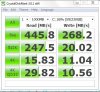
To continue on post 2100.. I've found the cause of the low scores of 5.9 on my machine. During the updates my AHCI Controller was updated to 10.5.0.1026 but this is actally a slower version than the older 9.2.0.1011.
So all you have to do is Rollback driver of the IDE ATA/ATAPI Controller in device manager.
I did various CDM tests to verify and here are the results:
for 10.5.0.1026
![[IMG]](images/storyImages/2e5urvd.jpg)
for 9.2.0.1011
![[IMG]](images/storyImages/r1lqqh.jpg)
Notice the different writing speeds at seq. -
Bad luck, I once had it with a Dell XPS and actually killed the Mobo with another Dell XPS charger with slightly more output (voltage was the same, only higher charging current). Hopefully you can make use of the warranty.
-
i would not normally use an aftermarket charger other than for the fact that asus dont yet sell the charger in the uk
-
Nice find. What was and what is your Windows Index?
-
what are the accessories that are bundled inside the box? In where I live the Asus distributor only sells i5 128GB Sandisk with Sentellic touchpad..and the stores here only have about 1-2 units..and no display unit..and they cannot show you the contents..because even them they haven't seen it..since box are sealed..
is the 128GB Sandisk really slow? (compared to other SSDs) This is just the one thing that is keeping me from buying it basing from the reviews..
Damn Asus from misleading customers..almost all sites that reviewed the UX31 uses the adata ssd.. -
On my 256GB Sandisk Zenbook the WEI was at 5.6 so I tried your "fix." It made absolutely no difference in the WEI - it remained at 5.6 I didn't test it beyond that so I can't comment on the test results you had. -
I think it is time for me to share my story and experience with my Zenbook.
I purchased my Zenbook from amazon.com on Nov 30th and recieved it on December 2nd. I really enjoyed my experience with my Zenbook, I loved how light and portable it was. I didn't have any of the issues that other people were having with the keyboard/mouse. I posted a 5 star review on amazon.com.
Fast-Forward to January 8th: After installing an ASUS update from live update and then trying to install Adobe reader, windows explore kept crashing. I wasn't able to install adobe reader so I tried a reboot. Upon rebooting I encountered a verbose amount of window errors and crashes. I decided to try to use the recovery partition to restore the Zenbook to factory settings only to be greated by an red ERROR message that spanned the entire screen top to bottom... after a lot of effort later trying various installs of windows I performed a memory test to find out that it appeared the memory or system board in my Zenbook went bad.
So I called ASUS and started an RMA process, and shipped my Zenbook to ASUS that same day. I was impressed by the turn-around time of my RMA, I got my RMA'd notebook back just over week after I shipped it to ASUS. HOWEVER the condition of the notebook I recieved is NOT statisfactory. I have a crack in the Screen Bezel near where the "Ux31 Series Ultra Slim" is written in a form of cursive writing. (See the pictures below)
I believe that they exchanged my notebook out with another notebook that had already been refurbished to speed up the RMA process. My Repair Summary stages that the system board was replaced AND the "Top and Bottom Cases" was also replaced. The zenbook that I shipped to ASUS was in near perfect condition (minus a small scratch on the bottom which I used as an identifying feature when I got this "other" one sent back to me).
I called the ASUS support line and they had me email them with pictures of my "damaged unit". Today I recieved a reply to my email stated that they attached the images to my case and to call a 1-800# and speak with a support agent. So I called the number and it seemed that the agent had NO IDEA what was going on, put me on hold for nearly 5 minutes then told me that my case was "under investigation". ASUS is investigating weither the damage occurred in shipping or at the repair facility and that I needed to wait for this investigation to finish. I asked him how long that would take and he told me to call back next week. I am getting rather impatient with ASUS and I want this issue resolved ASAP. I want to use this notebook for my school semester, and I'm afraid to even use it until this mess is resolved.
Does anyone know of a person I can contact to make sure I am taken care of in a timely manner and that everything is done "correctly" the second time around. This is turning into a nightmare. What do you guys think?
Thanks for reading,
![[IMG]](images/storyImages/Zenbook_Crack_TopView.jpg)
![[IMG]](images/storyImages/Zenbook_Crack_BottomView.jpg)
-
Hey guys,
I am needing some feedback here. I received my my second ux31e-dh53 from bestbuy and the touchpad is a Sentelic and the hard drive is an Sandisk. Because its from bestbuy I don't get the warranty offer so I was wondering if I should just return it and wait for the updated one. What do you think I should do?? -
I experienced the same thing!
-
Wow, did not know you got the first one and now it looks you got the second one as well? What happened to the first one?
I returned mine that I got from Best Buy and waiting for second/updated generation. My touchpad was bad.
If everything is working great then keep it. -
I've actually had a UX31 for two days now and it came with the SanDisk SSD. I've so far used it just for surfing the net, playing movies and downloading stuff - light usage. The battery option has been on "Power Saving" the whole time. I haven't seen anything that made me think it's slow, even though I was very disappointed when I noticed on the box that it came with the SanDisk. I'm very pleased with the machine.
-
Does anyone know what type of screndriver is needed to take the bottom of the ux31e. My T6 is too big.
-
thanks Jannet for the reply..at least I know someone who is content with the lappy even if its not Adata..if we have the same priviliges on consumer protection like in the US..I would have bought it in a heartbeat..if you bought one on our place..if you don't like it and didn't meet your expectations..then you just got to suck it up
-
I am using mine for business apps (MS Office) and when I get hme this weekend I'll pt CS5 on it. If it runs CS5 as good as it is supposed to I'll be even happier with it than I am now.
From a benchmark perspective, be it Adata or Sandisk, the machine has disappointing benchmarks but for a non-gaming computer I think it is just great.
I travel 45+ weeks a year and having a full featured laptop which weighs the same as my eePC is the biggest plus.
Bill -
Has anybody recongnized problems with the hinges? I've heard they lose their thightness relatively fast or even break.
-
Anyone experiencing the following issue with the new Elantech Touchpad driver 10.5.5.0?
- Two-Finger scrolling is messed up and unresponsive and constantly unable to detect upward scroll. When scrolling on a webpage the mouse pointer becomes a tiny circle behaving very differently than the 10.0.5.2 driver. I found that this can be fixed by going into C:/Program File/Elantech and run the EDTGesture.exe file to turn the scrolling functionality the same as previous driver. However, this resets after each reboots.
- In the Asus Smart Pad config settings, many items has been removed. Most noticeably Two-Finger Scrolling has been removed.
The lag responsive time that most user seems to be complaining about from the touchpad after period of idol time seems to have been fixed. I did not experience any lag time and the pointer moves as soon as I touch the pad. Not sure if this is casued by the touchpad driver update or BIOS 210. But I am happy with this fix. -
As far as the scrolling on the new Elantech driver it seems fine over here. They did remove a bunch of options from the settings, but it seems to have helped. Much less squirrely and odd behavior is really improved. No problems scrolling up on mine.
-
The first one went dead after flashing the BIOS from Rev.204 to Rev.210, it just did not want to power back up. I think what I did wrong was flashed the bios through the bios (F2) settings using a usb stick instead of using the win flash.
I don't mind the Sandisk but more concern about the touchpad. Isn't the Sentelic touchpad not that good compared to the Elantech? Even after updating drivers and bios I still got an overall rating of 5.6.
I can't believe you haven't got yours yet. I received my second one 1 week after returning my first. I just worry about the warranty issue not being coveted by asus because if buying through bby. -
The only thing I changed on my Elan pad was that I disabled the "tap" feature. I disable that feature on every touch pad I use. With the UX31 it's not a big deal because you can still tap, you just have to press harder to get the switch to switch.
When it comes to touch pads I have a lazy hand and I tend to do a lot of subconscious tapping and dragging so I'm much happier with the mechanical tap.
Bill -
Sorry to read that it didn't work out for the 256GB Sandisk. Maybe there's another way to get it faster, after all it's a sata 3 solid state drive... My WEI score with the newer driver is 5.9 and with the older it's 7.5. Anyone else had this benefit? It's a major difference in how the laptop behaves and the Adata is even quicker
-
So much for WEI, performance is essentially the same.
WEI 7.5

WEI 5.9
edit: WEI is 7.5 with Avast Real Time File Protection off, 5.9 with Avast protection on. -
Of the several components of the WEI score, the only one that improved after rolling back the driver was the gaming graphics item (by couple tenths of a point) - certainly not one I would have expected to improve with this change. But the overall score is based on the lowest component - the Aero performance in this case - and it remained at the same 5.6.
I turned off the Real Time scanning (in my case, the MS Security Essentials that came with the laptop,) per another post, to see what happens. It similarly makes no difference whatsoever in any of the components (which, quite frankly, I find rather surprising.) -
Hi guys,
Anyone here bought from xoticpc? They have a wide selection of UX31..and I don't what are their difference esp XH series.
ASUS UX31-XH71 (i7,128GB) - $1842.03
ASUS UX31-XH72 (i7,256GB) - $1973.95
ASUS UX31-DH72 (i7,256GB) - $1405.33
ASUS UX31-DH52 (i5,256GB) - $1066.03
ASUS UX31-XH51 (i5,128GB) - $1576.25
such wide variations in prices..don't know what are those XH series are and why they are expensive..for the same specs or lower.. -
HTML:I returned mine to Best Buy and have not requested a replacement. I am waiting for the second generation. The only reasn I returned it was the touchpad, I did not mind the sandisk drive.
-
He he, this really shows how unreliable the Windows Experience Index is.
-
Have anyone figured out how to switch the function keys? I hate having to press fn to change the volume or brightness.
-
I use keytweak to re assign keys, not sure if it works for FN keys but worth a try.
-
Just got my Asus UX31E-DH52 128GB. It has the SANDISK drive (thanks to the poster who mentioned the transparent sticker on the box). I've read thru a lot of the previous messages on both the touchpad and the ADATA vs SANDISK ssd, and I was hoping to get a summary.
Is there actually much of a difference between the ADATA and SANDISK drives? Some posts say yes and others say no, so it's not clear to me.
And how do I tell if it has the ELAN touchpad or the other one?
Thanks for any guidance. Nice forum... -
is anyone knows
did I have a 1 Year Accidental Damage Protection (ADP)
when I buy the ZENBOOK UX31 in the MICROSOFT STORE
thanks -
From all the posts, and all the benchmarks it seems that the adata is slower in sequential writes, but faster in 4k, 512k.
Not sure that any real world difference exists. -
That's sort of the impression I got from the posts. Thanks for the quick reply.
Still would like to know how I can tell which trackpad I have... -
easy, go to device manager
go to mice
go right button and properties on finger sensing pad.
the type is in one of the tabs. -
DUH! Thanks. I figured it would be something more complex like holding the computer facing magnetic north during a full moon while chanting ASUS ASUS ASUS.
I've had it getting to room temperature all day, so now I guess it's time to unwrap it, plug it in and get started... -
if I wanna open my ZENBOOK
where I can buy the specially screwdriver for torx screw
I cannot find it in office depot & low's
and if I bought the ZENBOOK in the microsoft store
Did I have 1 Year Accidental Damage Protection ? -
Yes, the ADP is an Asus warranty, you just need to register the Zen within like 30-60 days, cant remember which.
Asus UX31 Ultrabook
Discussion in 'Asus' started by pear-i, May 31, 2011.


