Problems? See this thread at archive.org.
hey does anyone know if dell will release this laptop with the new icore processors or an entire new model?
-
That interests me as well, I wanted to buy a SXPS 1340 with Core2Duo and Hybrid SLI, but after CES 2010 (where the smaller core I CPU equiped Alienware M11x was annuonced) I've delayed my purchase to see how dell would update the SXPS 1340.
I've searched the web a for infos about any update, found nothing, just pure speculaiton.
Others - as well as me - doubt Dell would have the Studio (with i5/i7 CPU) line stay more powerfull than the Studio XPS laptops for long, and I know the SXPS 1645/1647 are already equiped wit core i CPUs, I think Dell will apply them on the smaller model as well.
I personally hope they'll keep the 13" screen size, equip HM motherboard so switchable graphics would be supported - just like the freshly announced VAIO Z series -, and apply dedicated GPU (SLI is good, but poorly supported).
I also hope they refresh the SXPS 1340 till late february.
Seems like a wishlist.
-
i got my sxps in september and had some issues with the screen which dell tech replaced and formatted the drive. after this i installed windows 7 64-bit.
since then the backlit keyboard doesnt light up, ive read in threads that there might be a loose connection and am more than happy to check it out but does anyone have any advice on the best way to remove the keyboard ?
also its now not recognizing the graphics card, im pretty sure its the 256mb 9400. ive been going crazy trying to update drivers but now the dell download manager doesnt seem to allow me to on the official site ? -
When the tech came to replace my screen the backlight didnt work. He was to pretty much take the whole thing apart again. Unscrew the bottom panel, then work your way towards the keyboard connection.
-
Did you install dell quickset application?
If not, do it
Theres is instructions on the dell webpage otherwise how to disemble your laptop, dont know the location by hard but its somewhere over there. -
Hi guys, anyone tried replacing their thermal pad on the GPU with a better one (not the copper mod) and got a significant gain on lowering the GPU temp?
EDIT: I would also like to ask the size of the copper shim needed for copper mod.
Thanks in advance! -
Since the fan and heatpipe is the same for both gpu and cpu you would get some gains with a p-series cpu, rated att 25w compared to the 35w t-series.
And for the copper mod shim, best bet would be to remove the old one, measure it with high precsision (like 0.1mm or something).
Then scale of 10-20% of that and it will prob fit. I think the heatpipe connector got springs to even out the load on the core.
Good luck! -
Find a copper shim that is 10-20% thick of the thermal pad's thickness?
What kind of copper is best to use? -
Anyone see the new Alienware M11x laptop? Similarly configured as my 1340 it comes out cheaper and with a better graphics card. Now granted it is horrid to look at, but damn!
-
no, in that way i meant 90-80% of the pads thickness.
Thats since the pad itself are elastic but the copper isnt.
And for the choice of copper, go for copper.
The cleaner the better. But if you want the best, go for gold
-
yeah i installed dell quickset off the utilites disk and also got the dell driver for the graphics card 64bit vista off it aswell which at least lets me see the graphics card on my device manager
but when i try and download the correct up to date driver the download manager keeps telling me that there are no files to download, so im not currently getting any use from the card at all... -
Try downloading it without using the Dell download manager. I read somewhere that Dell dl manager sometimes sucks.
I used firefox browser to dl the drivers and it worked fine. -
The 1340 is no longer on the Dell site (at least on the Home/Home Office site). A few days ago they had something like "few units left" on the 1340 product page.
My bookmark to the Dell Home 1340 page now redirects to the Alienware M11x. -
Hope the new 13" comes out soon, along with nice spec's.
-
i just noticed that when i put a USB device into my eSATA/USB port... it doesn't respond to it... but the light from the usb disk lights up... no blinking (sign of activity).
so i tried to find the driver... but i can't find it... can anybody point me to the right direction? or do i need to reinstall win7 64?
pls advise -
i've just installed windows 7 ultimate 64 bit
but it's still froze
would you tell me what driver that i have to install on my dell studio xps13?
cause i'm really really frustrated with this issue
can someone help me please..?
i'm confuse bout nvidia and the chipset driver.
there's so many driver that i downloaded and installed but there's no one maked it better -
Just like someone said earlier, I also noticed that xps 1340 is gone from dell's home website!!! Is there a chance they are trying to build a new 13 inch model? I hope so, because studio 14 has an option for i5 processor and 512mb ati card. I hope they will at least give us an option for i5 with a better single gpu, and better looks!
-
can anyone comment on how the geforce 9500m fares against Modern Warfare 2? and if it plays better on the 9200 or the 9400?
I want to know before i get it. -
I finally got a new dvd drive for my 1340 and I thought I should warn anyone wanting to replace it. The broken drive was a hlds gs20n. I brought a gs21n assuming it would fit, it didnt. They are almost identical except for the top metal plate and the 21n wouldnt fit because of the keyboard. I 'modified' it by switching the metal plates but my advice to anyone replacing their dvd drives replace it with the exact same model. ps, its a 9.5mm drive, I almost brought a 12.7mm, watch that as well
-
You'd prob want to get a G210M if you want to play MW2 smoothly. -
Is there a new model coming out shortly?
The current one is no longer available... -
In Colombia, still is available!
-
Well ill be annoyed if there is a newer revision on this machine with a decent 512 card, then i probably sell this and get an alienware m11x but eh, this machine has such a sexy design.
-
Well, the Hybrid SLI will go with the Nvidia chipset, so it's unlikely they'll keep the G210M. In fact, they're not even limited to Nvidia cards anymore, so an ATi card is even a possibility. For me anyway, I'd love to see this machine with an entry level GeForce GT card.
I'm in a similar position to you, as I have to make a decision within the next two weeks between the SXPS 13 and M11x. The SXPS 13 has the better screen and considerably faster CPU's, but the M11x has the GT 335M. The fact the M11x is smaller doesn't give it an advantage as both of them are portable to me. Aesthetics wise, I agree, the SXPS 13 is a nicer looking machine.
We may even see the new SXPS 13 up on the U.S. website tomorrow. Fingers crossed! -
Sweet, I'm hoping they'd do a redesign of the heat vents plus hardware upgrades.
Cheers. -
Its very unlikely they will get the 210M, it was crap anyway still is crap, slightly better than the crappy 9400M! I also would love to see this machine with a gt 330 or so like that. It does look slightly sexier than the m11x but i do the fact dell decided too go back have the skull cap design, one of the reasons why i want that little alienware is the price, and the backlit keyboard, 16 different colors and also able to change other colors too. Both of them are the same weight just about, i got used to the weight of 1340 i just like to have a dvd drive with me all the time, hard to find something like this, this machine has the strongest hinges ever i have seen. ATI would be a nice option since it will having better gaming performance, nvidia has never been nice about a budget graphics card with good performance, ati is the opposite especially after i saw the benchmarks for the 80 dollar desktop card wow just wow. I hope they fix the vents man this thing gets hot at times.
-
Hi guys
I hope you delightful chaps can help me out here and I do really apologise profoundly if the info I'm requesting, is buried somewhere deep within this thread.
Anyway, my question is: do you know if there is any difference in DPC latency readings on the 1340, between motherboard revision B01 and B02?
I've had some troubles, so DELL changed my motherboard. But it's still revision B01 I have.
I have disabled several devices and the main culprits seem to be the ACPI battery and the wireless network card (DELL 1515 N if your wondering).
This seems to fit with what I've read about DPC problems on the 1340.
It would be nice to be able to check my battery status and surf using wireless
AND listen to music at the same time.
So if there is a difference with motherboard revision B02, I'll start pestering DELL about that specific board. Sooo, if you know anything about this or have had machines in your hands which had different motherboards, please tell.
Thanks. -
Damn you should really update your bios, a lot of those issues are gone now, in terms of the latency i will get back to you.
-
The first thing I did when I got the machine was update the BIOS to the very latest version (A11). The new motherboard came with A11 all ready installed.
I will shower you with eternal gratitude, if you have some info regarding possible difference in latency on the various motherboard revisions
Disabling the battery makes quite a difference... I would have thought it would be fixed by now, as everything I've read seems to indicate it. -
According to CPU-Z I have B01 with BIOS A11 and I don't have any latency issues.
-
Knowing the number of tomorrows I've spent browsing Dell's site waiting on any updates, I really wish You were right about "tomorrow".
-
Its a fact! that the refreshed model wont have the same chipset or (gpu) because i series processors dont support the chipset! So we will either see an ati card or a solo nvidia gpu
-
Absolutely Right!
-
Hmm. I'm thinking that perhaps I have a lower tolerance for latency than most.
If you feel like it, I would be very happy if you could take a screen dump of your machine running DPC Latency Checker, with all devices enabled. -
Okay, I have a request (kill me if it's all ready been done, plz):
Run DPC Latency Checker on your 1340 for app. 1-3 minutes with all devices ON right after booting up (so there's no programs/apps running). And take a screendump and post it here.
That way I should be able to determine if there really is something very wrong with my 1340 or if it's just the way the machine is regarding DPC latency.
I would be really, really happy if you could be bothered doing it. -
Quick question. Did anyone find a way to control the fan speeds in the 1340?
-
Haven't seen one from this thread, IIRC. Why do you want to control the fan speed anyway?
-
Just so i can make the laptop run a bit cooler, since i dont mind the fan noise and i always have music running
-
can you post your temps?
-
I use speedfan and this is at idle right now. with nothing buy firefox running.
G210M - 54
9400 - 61
core1 - 50
core2 - 50
this is also on a raised laptop with lots of airflow. -
Did you change the crappy thermal paste from Dell on your notebook yet? If no, I would suggest you to do the thermal compound replacement first before anything else.
IF you have the skills and knowledge.
Mine idles at the ff temp after thermal compound replacement:
core 1 - 40C - 44C
core 2 - 40C - 44C
9200M - 52C - 56C (will replace the thermal pad soon) -
pretty normal! I have mid 40's but i run p8600 proc, and single 9400mg copper modded! so ur temps are good trust me! no need for anything!
-
Can you post your temp readings when stressed?
-
I have actually replaced the thermal compound already. It has AS-5.
I followed the guide and left the thermal pad as is though. Not quite sure where i would really get the parts needed for the "Copper mod"
Stressed, my G210M has seen upwards of 80-85, again, thats with AS-5 and about an Inch lift on all 4 corners. -
I see. Since you already had the thermal compound replacement and still looking to lower your GPU temp, the next option is the copper mod (people who had the copper mod claimed they got good results though I haven't tried yet since I'm still on the warranty period).
Did you also apply thermal paste on your GPU thermal pads?
Just for an FYI: I got better result from OCZ over the AS5. (-2C to -4C)
Other thoughts: Peeling off the filters from the bottom plate is a better option than increasing your fan speed (will shorten your fan life) if you want more air flow. -
Wow, i've never even thought about peeling off the filters from the bottom plate. I think i'll do that. I assume that would increase dust collection and such..but regular cleaning should take care of that. The part that does worry me is shortening my fan life. By taking off the filter, would it not just improve the air being sucked up the fan vs making the fan speed higher?
I got AS-5 because it was available locally.
Also, i applied paste to one side of the pad, not the side that sticks to the heat sink. Is that right? or should i have pealed off the heat sink and applied to both sides of the pad? -
Yep. Peeling off the filter will increase dust collection so as the increasing of fan speed but not shortening your fan life.
Not sure if peeling the filters off wll improve a lot of air flow but worth a try, IMO.
The only thing I tried was taking off the bottom plate to see how the cooling system will improve and its was very impressive.
*The fan kicks in at 70C and shuts down at 35C or 38C. (sorry couldn't remember if 35C or 38C)
*I watch the temp while dropping from 70C to 30+ and it was fast
Reminder: Store your filters on a safe place after removing so you can put it back it if needed be.
Same here, only AS5 is available from my local shops so I got my OCZ off eBay.
Yep, I did the same on my thermal pad.
Not advisable to peel from heat sink to apply thermal paste because the thermal pad easily breaks. -
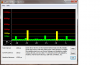
Don't see any problems with latency.
My other laptop was in the red a lot, this one mostly green with a yellow spike now & then.
This is running the stock Win7 64bit as installed by Dell without much else installed.Attached Files:
-
-
Well i'm still not anywhere near 30ish temps. haha
But i did peel off the mesh stuff. I just did a bit of gaming to test temps, and my GPU was up to 75max as of now. and after i close the game, GPU cools from 75 -> 50 in about 20secs. I Suppose i can deal with that.
Thanks for the heads up about the mesh, never thought about it. -
Oops! Sorry for the mix ups. What I was trying to say on my previous post is the temp drops faster and fan kicks in at 70C and shuts down at 30C+ but 30C+ is my CPU (GPU around 40C+) bottom plate not installed.
All these to support my idea on increasing the air flow.
Glad to be of help.
EDIT: Remember the fan kicks in at 70C so expect it to max no lower than 70C
--->The Official Studio XPS 1340 Owner's Thread<--- *Part 2*
Discussion in 'Dell XPS and Studio XPS' started by BatBoy, Oct 6, 2009.