 Problems? See this thread at archive.org.
I don't think so. I have set my XPS to stop charging at 80% and battery wear is still the same. My guess is windows checks actual voltage when battery reports 100%, not charge percent.
-
Can anyone confirm that the graphics driver is the cause of the coil whine?
-
It's not that easy. Yes, if you disable the graphics driver the coil whine does indeed stop. However, this could also indicate that the GPU/CPU is not using its full capacity, thus not producing the coil whine. The solution is not simply to fix the drivers, it is a result of poor engineering on the hardware. The whine is usually a result on different electrics working together.
-
FWIW, I did a clean install and I had the coil whine before windows found the realtek driver automatically. After which, I did a recovery using the recovery usb created when I first got the computer, I didn't have the coil whine. I then uninstalled (including deleting the driver) using device manager and the coil whine returned when the generic windows driver was used. So to me it seems clear the realtek driver got ride of the the whine, at least for this particular computer. 9350 16gb RAM 500GB SSD touchscreen.
-
Does anyone notice that it takes much longer for the computer to wake from sleep compared to the original factory image? Both are Windows 10.
-
For me it is around 3 seconds to wake. Not sure how much was on factory image (I did clean install pretty much immediately).
-
Thanks! hmm.. for me it is around 10 seconds, clean installed and with all drivers updated from Dell site.
-
Yes that is definitely too long. Do you have latest bios?
-
I did update the bios and followed this guide:
https://www.reddit.com/r/Dell/comments/3sr1jh/windows_10_clean_install_guide/
Maybe I should have done something differently? -
Hm, if you restore dell factory image does problem fix itself?
-
Restoring the factory image fixed itself, and that was also how I found out the realtek audio driver fixed the "coil whine" for me.
-
I'm still not sure exactly what you're asking. The adapter I linked to does not come with a case, but you can keep it in a standard sd card case when it is not in the computer. When it is in the computer it does not stick out at all - it fills up the sd card slot exactly to the edge - so there is nothing to put a protective case or bag on.
-
I think he means something more akin to a laptop sleeve, or a laptop case with a tight fit. aka will the sd card protrude and cause any issues/damage when you put it in a neoprene sleeve or something.
-
what do you mean by realtek audio driver fixed it? Did you uninstall it or?
-
Uninstalled realteck drive and I got the coil whine. Clean installed before windows found the realtek driver, I got it too. It stopped after realtec driver is installed. So I guess the realtek driver actually stops the noise.
-
Exactly. English is not my native language sorry. However I think from your answers it's fine, thank you.
-
This computer (6560u iris) is damn hot! 70-80C during typical desktop tasks. TS bench hits 91C instantly and it hits thermal ceiling (100C) in 5 seconds of stress testing. I have not undervolted or repasted yet.
-
Oh, please keep us updated regarding the thermals & performances! Would pull the trigger as per your feedback

-
That is pretty damn hot. My slightly undervolted (-60mV) i5 is typically 35-40°C, and never surpasses 85°C even during a stress test.
-
I'm sure I can work out my magic as far as the thermals are concerned, but if the combo 6560U/HD540 power throttles badly anyways (due to the 15w power limit), then it's definitely a no go
-
Ehi guys,
greetings from Italy.
Since a couple of days I'm the owner of a Dell XPS 13 with 16 GB of RAM, i7 processor and QHD+ display.
I did a clean Windows 10 install and I have a couple of questions:
- I tried all the tricks around, but my boot time is around 24 secs: any ways to reduce it (my "old" Asus N56VZ with SSD did it in 8 secs)?
- battery capacity is around 4 hours: how can I extend it (BIOS updated)?
Thanks!
-
Repaste dropped temps about 15C, but they're still high.
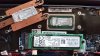
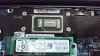
Idling about 50C.
redid paste with slightly less than in the 2nd pic, temps about sameLast edited: Mar 25, 2016 -
@Eason,
Hope you can enlighten us regarding the thermal/power throttle - I believe the latter triggers first. -
I have the i5 with 256 and qhd. The boot time is close to yours and almost 10 hours of battery. If battery was your concern like me then you chose wrong model.moaiamorfo likes this.
-
holy crap, that's a ton of thermal paste. Typical of laptop manufacturers, I guess.
Are there any startup programs that are eating up a lot of processing power? -
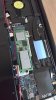
How does my repaste look? Not sure if I should try and use the spreader the Gelid came with to get a thinner film.
There are no cpu hog apps that I can tell. C3 is 85-89, which is lower than I'd like to see.
At 600 mhz idle it's still around 60c, after pasting and undervolt. Under load it maxes at 85c now, so the heat isn't an issue like before. However, it is constantly tdp throttling. The gpu almost never runs at 950, and the cpu can't maintain turbo either while the gpu is in use.
Highest fire strike score I've gotten is 1170, 3dmark 11 around 1900.
I'm about to buy some thermal pads for my 512 ssd and also put one between the heat sink and the back case to see if I can get the idle temp lower. The load temp is ok and the temp of the case isn't bad like the razer blade, but coming from the xps 15 with a 30C idle temp makes me more sensitive to such a high idle temp.
edit: down to 48-50C with the thermal pad on top of the spreaderLast edited: Mar 25, 2016 -
Ehy everyone,
did anyone find out this?
http://www.dell.com/support/home/us/en/19/Drivers/DriversDetails?driverId=513GY
This firmware update was released yesterday and it seems like it should fix the old Dynamic Brightess Control issue! -
Saw that. I figure battery life will be bad enough on the 6560u that it's better not to disable itFurien likes this.
-
Eason,you legend! Thanks for the repaste photos. My 6560u is running pretty hot and I was wondering if a repaste would do anything! 10degC is a a huge jump. Why is dell so careless when it comes to thermal paste.
Suggest you do a youtube video?! The dell service manual for the 9350 isnt the most detailed.Eason likes this. -
You posted a photo with the Heatsink back on. Cant see how nicely you have spread the paste.
Also would it be worth trying to put thermal pads on the heat pipe. That would transfer more heat to the case.
On another note. Im unsure why the 6560u CPU creates so much heat even when doing light processing tasks. -
@Eason
Your repaste looks good, do not try to spread the Gelid. At this stage, there isnt much else you can do thermals wise, but to counter the power throttle, can you check whether TS or XTU help ? -
Hi iatrou,
thanks for your reply.
Another question: after a Windows 10 clean install (via USB on boot), can I do a Dell factory reset (I didn't remove Dell's partitions)?
Thanks again. -
@Eason, what thickness thermal pads did you use.
Im thinking ill buy some top of the line thermal paste and pads and get this 6560u alot
cooler. -
They only had 1.5 mm. 2 mm is probably perfect
@pau1ow ts can't do anything about the throttling from tdp. In theory I could try a tdp clamp of 8 W which would give the gpu and cpu roughly equal power. That feature is a bit rough though.
Are you thinking of increasing the turbo power limit with xtu? I tried setting it to 20 but didn't notice any difference -
Hmm interesting idea about the heat pipe. Is it good to decrease the heat of the cpu at the expense of heating up the case that touches your legs?
I may give it a try.
I can't do a video but when you try to take the back off, pry at the two corners by the hinge first. Once you have them off a little bit, work on the front. You have to pull from the front corner to get it off; pulling from the back will flex the mobo.
Also, pull the heat sink off from the edge by the screws. DO NOT PULL ON THE PIPE. It is extremely flexible as it's thin copper and if you bend it you will screw the heat dissipation of your laptop.Furien likes this. -
@easton , so did you put the pads on the SSD and on top of heatsink? Maybe I'm confusing your photos a little. Also pads only come in 0.5,1,1.5mm thicknesses. So 2mm not possible
In regards, to pads on the heatpipe, the raised bumpers on the bottom of the case should protect you from extra heat. For now I think applying paste is most important thing. -
I put them on the chips of the ssd, yup. I didn't do heat sink yet because I've been restoring a partition the last hour+ :/
-
@Eason
Yes, increasing the long power limit is the only way to remove the power throttle, but i bet it can be done only from the firmware. I have seen many reviews of skylake u cpus and hd520, and when both are under 100 percent loads, they draw around 20 watts. Leaving the tdp to 15w and having a twice more power hungry iGPU becomes then too ambitious. -
I tried changing it from 15W to 25W in XTU, but I didn't see a change. It says it's active, though.
The CPU uses 11W at max speed while the GPU can use up to 16.7! Maybe I should go to 27W.Last edited: Mar 25, 2016 -
@Eason
On my SP3 i7, i recall that adjusting the TDP in XTU didn't do a thing so I assume it won't help with the XPS13 either. You can actually increase the sliders as high as you can but without any effects
-
Most of the reduced height SD card (adapters) seem to be designed for Macbooks, which appear to have a slightly shallower port (and so these cards would be hard to remove from the XPS 13's slightly deeper port).
However, Sandisk do one with a handy little bendy tab to pull it out. I have it and it works nicely: www.amazon.co.uk/gp/product/B00IAEMTNY -
Someone mentioned disabling the PL2 helped, I'll run some tests now.
Regarding thermal tape on the heat pipe: don't think it's a good idea. That pipe lines up directly with the air vent where cool air in sucked in. It would completely block the air flow on half of the case. -
If it can help here are my temps :
idle 46 - 50°C
Moderate usage : Netflix (windows 10 app) and/or chrome : 52°C - 60°C
4K video on chrome : 75°C
4k video on Edge : 62°C
I may repaste it using IC7 but for now I don't see the need.
My main problem with this laptop is the battery life, Dell kind of lied on the specs, i do indeed own a 4K i7 version, but macbook have retina displays (lower res but still) and still manage to reach ridiculously high battery life. So i'm waiting for the macbook air and pro 2016 before changing my dell. VERY disappointed on this point ! This is the main reason why I plan on selling it soon.
After several month :
- battery life not good, really the 4k version with latest bios (nvme fix) it's 3-4Hours with light usage and visual studio...not acceptable
- barebone : not comfortable : it gets hot, do not put it on your knees. The barebone reacts like a giant heatsink.
- This ultrabook runs HOT. Not a problem for me but i better warn.
- windows is NOT MADE FOR high dpi screens, sick of it, having to scale everything and even windows apps and tools are sometimes blurry !
- Keyboard/trackpad not on par with the price/range of this product, i was expecting a much more comfy trackpad...the keyboard is good but they should've expanded it more, like the macbook 12". It has a small form factor so the keyboard should be adapted to it.
![[IMG]](images/storyImages/12086-5647-150309-MacBook-1-l.jpg)
- Came with a corrupted windows that threw lot of BSODs. The last weeks it was BSOD-free SINCE i put a clean bloatware-free version of windows 10 and reset everything.
- Driver still unstable especially video drivers, I installed manually the latest intel GPU skylake drivers, and it's way better, i still have driver crash on software like Eclipse (IDE).
It's for me easily one of the best designed ultrabook out there, it's just that people buy those products usually for work and because they move a lot. A lot of developer (I sometimes program/design) use it too and it's not that ergonomic and easy to use, it has too many flaws to satisfy them...numero uno being, again i repeat myself, the battery life.
Let's see McbPro 2K16, according to that leak it's going to be awesome :
![[IMG]](images/storyImages/bruce-sewell.jpg) pau1ow likes this.
pau1ow likes this. -
Noted you have the 6500U.
-
This is frustrating. During benchmarks the CPU runs at 1.2 ghz while the gpu runs at 700-750mhz. There is so much more room for performance if there was some way of increasing the tdp.
-
My laptop dont run hot, but i did not order the qhd core I7, if you order the core I7 with qhd screen and iris gpu off course it will run damn hot and you can fry eggs on it.
Here are my temp with the fhd, core I5. This laptop is too small for more power!![[IMG]](images/storyImages/90237c550cbc0d406da64f882b4486e9.jpg)
Sent from my iPad using TapatalkLast edited: Mar 26, 2016 -
I have the i7 NON-iris (check my signature) and qhd, indeed the QHD screen stresses more the gpu but the i7U is a slightly overclocked i5 U
-
I now that you have the non iris but for this model i7+qhd its already too much and if you add iris to that combination its a very bad idea! Thats why i ordered the fhd i5 and i love it!
Sent from my iPad using Tapatalk -
Hey guys,
Sorry new in this forum, but I'd like to get a skylake xps 13 FHD model. The reviews are perfect but user opinions are terrible and there are several models on amazon that are supposed to be the same model but with different price like these two:
http://www.amazon.com/Dell-Infinity...id=1459005886&ref_=sr_1_25&s=pc&sr=1-25-spons
http://www.amazon.com/Dell-9350-134...s 13&qid=1459005886&ref_=sr_1_15&s=pc&sr=1-15
i am looking for i5 8gb ram 128gb ssd model, its what i can afford atm. Even their specs are not the same in amazon. So can you help me if these two are the same? and if i should get one?
Thanks in advance! -
They are exacly the same take the second one for 750 Bucks
Is cheaper sold and shipped by Amazon
Sent from my iPad using TapatalkEylem Akyurek likes this.
Dell XPS 13 2015 Skylake Infinity Display Owners Thread
Discussion in 'Dell XPS and Studio XPS' started by abd_97, Oct 12, 2015.


