Problems? See this thread at archive.org.
Ok, Mag, if you have an nhancer profile for NFS, that would be great. I messed around with the settings, but the images look like broken glass, lots of tearing and such...
-
Eleron,
just found my Inspector sli profile. Make your own in Nhancer with the same SLI bits, it should work.
plus it gives you AA
SLI compatibilty bits = 0x00400005
Antialiasing - SLI AA = AA_MODE_SELECTOR_SLIAA_ENABLED
Number of GPUs to use on SLI rendering mode = SLI_GPU_COUNT_TWO
Sli rendering mode = SLI_RENDERING_MODE_FORCE_AFR2
Predifined number GPUs = SLI_PREDIFINED_GPU_COUNT_FOUR
Predifined SLI mode = SLI_PREDIFINED_MODE_FORCE_AFR2
Also you can force AA
Antialiasing compatibility = 0x00000245
AA - Gamma = On
AA - Line gamma = OGL_AA_LINE_GAMMA_ENABLED
AA - Mode = Overide any application setting
AA - Setting = 4x [4x Multisampling] -
Ok, will do, when I get off from work.
Here's a problem for ya.
Mom is 21 yeas older than the Son. In 6 years, the son`s age, multiplied by five, will be mom`s age.
What age are they now?
-
Dunno lol i suck at maths.
If mom is 21 years old than the son, it must mean that the son is 21years old.
In 6 years he will be 27? 27*5 is 135 years old.
Damn rotten girl! lol.
I suck at math i told you. -
Mhm wait, 6*5+21 = 51.
So the mom should be 51 years old? The kid is 30 years old, as 51-21 is 30. -
Actually, mathematically speaking, the kid ends up being -3/4 years, or 9 months before.
So the funny bit is that the kid is just being conceived
-
So I`ve disabled EIST and now I`m running Throttlestop. I guess I`m at 2.5-2.6 Ghz now?
EDIT: apparently not. I`m running RMClock and it reports 2.39 still
EDIT: started dual IDA, not at 2.6 Ghz
-
I will help you with it eleron. However I just need to get XPS M1730 up and running again. When I got the notebook back from the technician there was a nasty virus infected my whole system.
So I have just reinstalled Win XP and will update Vista 64 to Windows 7 instead. -
Ok, I`ll wait until you have the beast operational again
-
Ok,
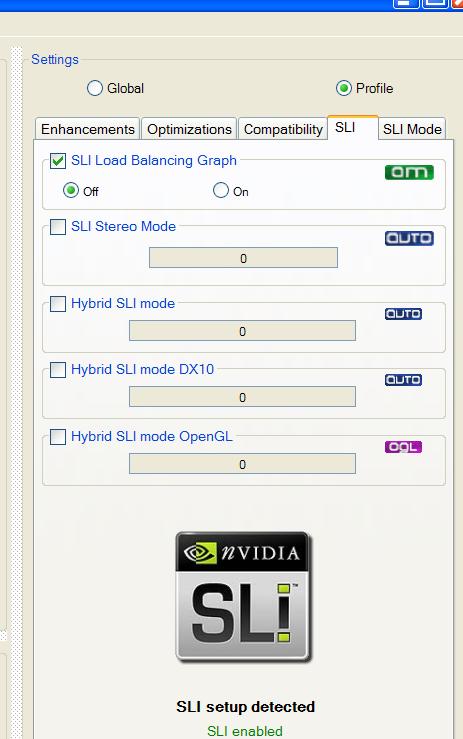
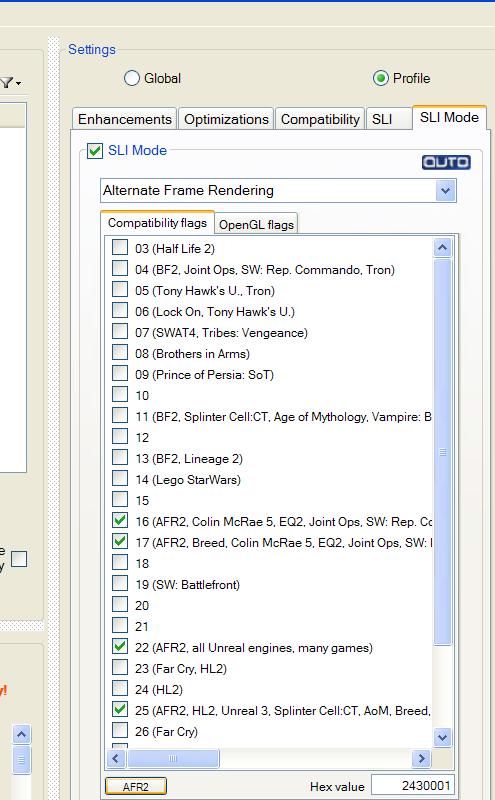
go to SLI MODE tab, you see there are a few profiles and in the corner a field called "hex value".
For NFSHP insert 0400005
Where it says Alternate frame Rendering, use alternate frame rendering 2 (AFR2)
In the SLI tab:
Select Hybrid Sli mode;
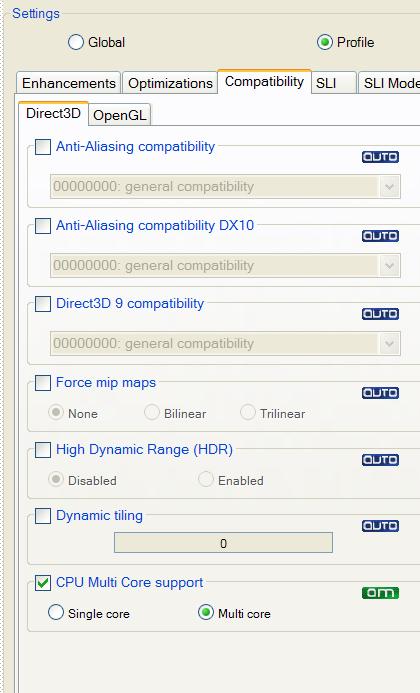
Then go to Anti Aliasing tab:
Where it says AntiAliasing Compatibility, manually use this value:
0x00000245
In the first tab, "Settings":
Untick "enhance in-game AA setting" as NFSHP doesnt have one;
Untick Anisotropic Filtering as the game already renders at 16x;
Enable Gamma Correction;
OPTIONAL - Enable Transaprency AA to SuperSampling;
In optimizations:
Untick Texture Filtering AND/OR put it to High Quality;
Prerendered Limit must be 3 or 4;
AA settings should apply now, althought it still not perfect.
Let me know. -
Wow, looks and runs better. Thanks dude
-
Youre welcome.
The trick is to force the GPU load.
Mag experienced something similar with HAWX 2: he was getting better AVG fps when pumping AA instead of not having it enabled.
Thats because AA increases gpu load forcing our older cards to run at max power and to use extensively the VRAM. -
Well, having 1Gb per card, I kinda need to force it
-
That,
But mainly its an nvidia driver fault. As i said both 266.35/265.90q fixed this issue at least under xp. -
Just curious,what fps have you got now?
-
Average 40-50s, dips in 15-20s at some points. Not as smooth as I`d like it, but consindering the CPU, I guess it`s reasonable.
-
It is.
With our x9000 @ 3,8ghz and 265.90q (same profile) i get 50fps average.
It dips to 35 in great presence of details, while it boosts to 60 when driving alone.
You can squeeze some more performance from it with other drivers im sure. Too bad that quadros doenst give you video output. -
Ah finally I managed to save my XP partition and it´s up to performance again and all games is working
Now it´s just Vista that needs to be replaced with Win 7. -
Blah, guess I am calling DELL again, seems I got the crappy old 8800m GTX SLI. Overheats after 20 minutes no matter driver when in-game.
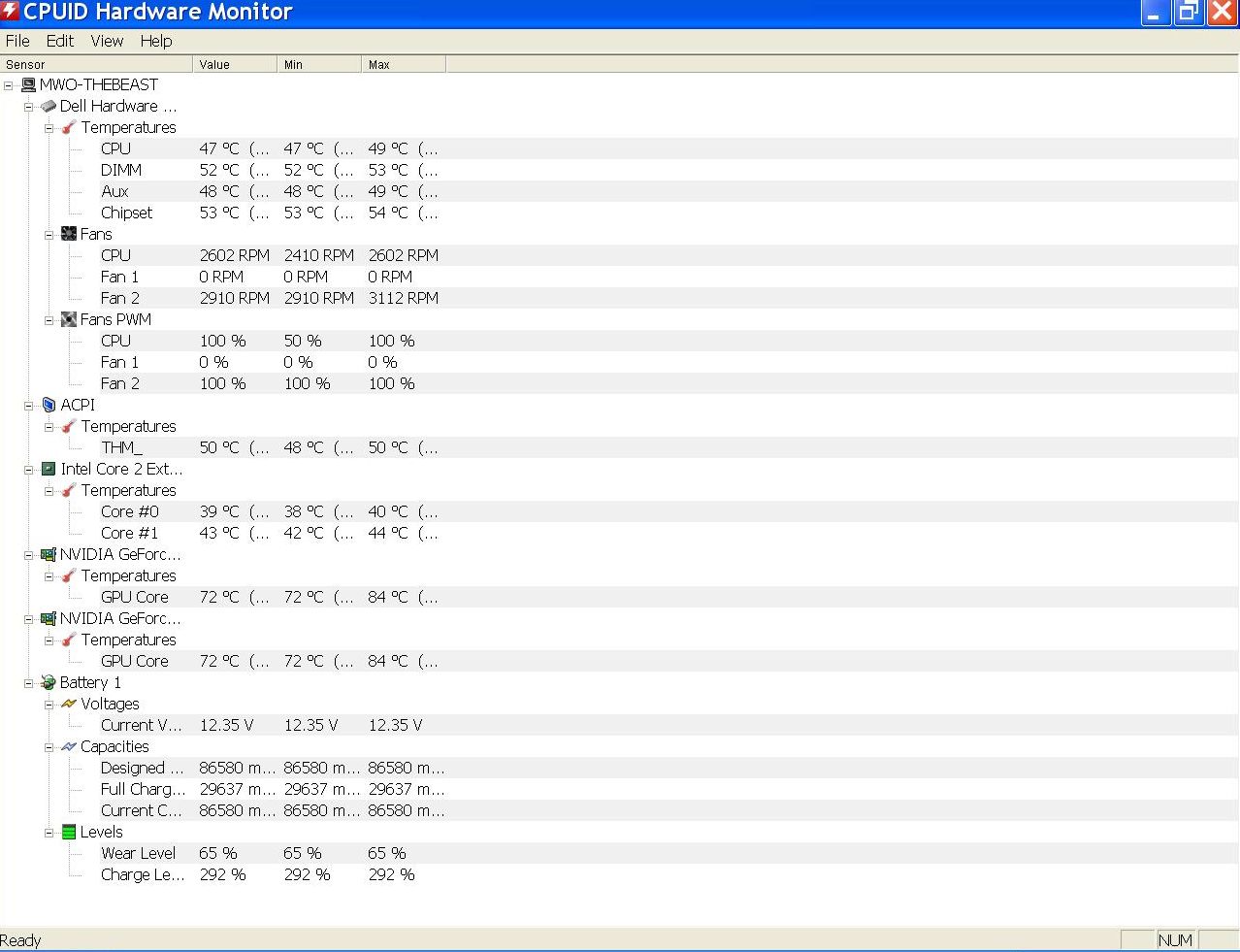
Edit; Just since I don't know. When I look in Hardware monitor I see only one fan for the SLI set, is that 'the way its supposed to be'? -
In an unrelated matter. Does anyone have a cheap graphics card that works in a m1730 for sale? Like 8700GS or 8700SLI or something? Just interested in reviving one for 'office' use and don't need any sort of hardcore graphics.
-
Dan nope you should be able to see all three fans, i confirm it as hwmonitor here shows three of them, cpu gpu0 gpu1.
I had the same problem with my 9800m gtx btw.
Turns out that the fans connector where loose a bit.
Grab a sheet of paper and with the laptop turned on at full blast stick it on the bottom of each fan. If the paper sticks to the fan then its working, if it falls then one fan isnt working..
Take apart the laptop,pull out the gpu, disconnect and reconnect firmly the fans. Unless theyre broken it should work now. -
No, I'd say your fan is gone. Post a screen pic of HWM so we can see for sure.
-
If he doesnt want to call in dell, he can do what i adviced, sometimes the fans connector get loose. I had the same problem with both my gpus before and after the upgrade...or in the worst of the cases one fan is dead.
-
Kingpinzero it was Danlar that had problem with overheating 8800m GTX´s
-
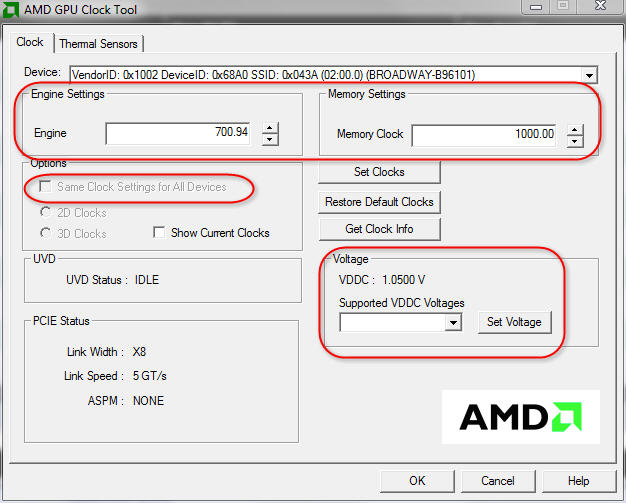
Well... also, for some reason, even with 197.15, when OCing with EVGA, I choose 600/1500/900, and on the chart on the left it show 648/13xx/900... I don`t get it, are those values messed up?
I don`t care which driver I use, as long as it looks and performs better than the previous ones... the 265.90q didn't really seem like an improvement. Or maybe I have some other driver issues.
I have the most recent chipset driver...so appart from that, I guess it`s all in the nHancer file.
Speaking of nHancer, mind giving NFS HP a tweak session?
-
Yeah, I run NFS HP in SLI Single mode and it rarely drops below 50 fps
So just make a new profile and set the SLI mode to single. -
The values of the clocks reported with evga and msi are wrong, so dont worry about it. What matters is the actual value near the sliders in the program.
About 265.90 performance, the most easy test you can do is to fresh install the drivers (cleaning everything else with driver sweeper before installing them), add NFSHP executable to the nvidia control panel, and run the game. Youll find that FPS are the same, maybe less stuttering and sluggish, without even messing with the profile in first place.
Then add sli AA as a bonus and your FPS will stay the same. I do play COD:BO alot and althought i used Mag COD profile with 197.15 it was nowhere near playable in multi, thing that 265.90q fixed.
Mag, sorry to say this but clearly theres a limitation with either the old driver youre using or the profile.
The game works perfectly fine with sli under xp with 265.90q without modifying anything; for the 197.15 thought i had to guide Eleron with a tweaked profile. Using one gpu only doesnt quite cut the whole SLI thing, plus you lose AA.
Remember what happened when i asked your COD:Bo profile, the game was reaching 60fps inside the buildings but was dropping to 45-50 outside and without AA ingame.
Using quadros 265.90 under xp im able to run the game with 8xAA,16xAF ingame maxing out every detail while averaging 70-75fps. I remember the performance because i tried the driver youre using but i found it a worse performer than newer ones, which are supposed to are more optimized.
That shows clearly that the older 197.15 is bottlenecking game performance, three games i tested so far and they run worse than quadros.
Just my 2 cent, maybe is time to put 197.15 to sleep
-
So could I just chalk it up to the CPU for being sluggish at times?
I mean, I am running a 2.6 compared to your 3.8... -
My bad, it was early in the morning and my iphone small screen doesnt help lol.
-
If this reassure you, even on my beast desktop which runs the game with 8xAA forced, it drops to 51 sometimes.
So is the game that is half broken...just be sure to have updated the game to 1.2. -
Yeah it´s in the drivers for sure, I will give the Quadros a try. However last time I tested them the performance was worse for me. It could be that my 197.15 works really great in conjunction with the chipset driver version I am running. Since NFS HP works really great in SLI single mode as did Black ops.
However I will try the quadros again.
Eleron yes your CPU doesn´t do those 9800m GTX SLI justice, it´s just too slow. If you had an X9000 you would be a huge difference in my opinion. Just as I did when I switched out my 2.4Ghz Core2Duo to the X9000. It was like night and day performance wise. -
Yep, super correct.
Eleron cpu is bottlenecking the GTX specially in sli, as its intended to use with a core 2 at least over 3ghz. It was the best configuration out there when the xps came in, x9000 factory oced to 3,4 and 9800m GTX sli.
Also, i noticed quite an improvement over my T9300 even using my old 8800m GTX. Then upgraded to X9000 and then to the 98k GTX sli.
Big performance gain. -
I know, but 300E for the CPU... too much for me, honestly. For that money I can get a decent desktop, faster than my whole system...
-
Eleron, how much would you want to spend on that CPU?
-
Well, considering that I`m upgrading my warranty for 270$ for 2 years, I guess a max 300$ shipped, no more...warranty included.
-
Well, warranty means you'd need it brand new, wouldn't you? Most of us here resort to resellers off of ebay.
-
Like i did, since my system was refurb and so not recognized by dell by any means (it even has missing id/serial).
So i took the risk and relied to ebay for my ES x9000. Turns out everything went good.
I advice ShirleyCpu. Great deals, awesome stuff. -
Eleron this might be interesting, price range is what you expect, plus is the same seller/cpu i got.
As i said shirley is awesome:
http://cgi.ebay.it/New-Intel-CORE2-...81?pt=CPUs&hash=item3cb4d2dbd9#ht_3629wt_1140 -
Right in price range indeed... I`ll have to check it out.
-
Yes very good price indeed. If I were you I would buy that CPU eleron.
-
This is a shot of Hardware monitor:
![[IMG]](images/storyImages/TrcXQ.png)
-
Indeed Dan one fan isnt working.
As we adviced take apart the laptop disconnect the fan and plug it back in.
Before doing so with the laptop turned on use a piece of paper on every fan to see if actually one is broken.
The gpu fans pull air in so the paper should stay stuck at the laptop bottom, its a method that doesnt fail really.
Otherwise if you will not go down to the DIY route call dell
-
Funny you should mention that. With the 197.15 I get the attached image, with the quadros everything was ok.
Attached Files:
-
-
Yep. They changed alot since 19x to 258/260 branch.
I can bear a few fps difference honestly, if there are any. As i said, speaking with mag, im not having a good performance with 197.15, instead they bottleneck the 98k GTX based on my tests.
Starting from 258.96 everything is fine. But the further we go, the lowest performance we have on older cards.
Based on my benchmarks, the best drivers out there performance/heat/optimizations are rather two, 265.90q (still the most used around, check guru3d, crazy performance in COD:BO and BC2) and 266.35.
266.58 WHQL is messed up in someway, even for desktop GTX4xx/5xx users. -
I dunno what to do at this point then...switch back to the quadros, or fiddle with these ones
Also, I can`t replicate any results, my CPU is a big obstacle in doing so... -
Mate use what you find the most suitable driver set for your needs, no need to stay on one side or the other.
Also why you cant replicate results? Something wrong?
What im suggesting here is to thoroughly test any driver you install running the same benchmarks at the same settings in order to have concrete proof.
Leaving aside placebo effects of some sorts, im happy that mag is fine with 197.15, but as i said theyre not giving me much juice. Dunno why thought. -
Meaning, I can`t get similar results to you or Mag, since my Cpu is holding me back. What is tweaked for your system to run smooth might behave differently in my case...
-
Yeah, every system acts differently. You know, even if me and mag have similar setups (aside for the gpu, thats it) i cant get the same results based on same drivers/chipset driver as well.
For some odd reason newer drivers give me an awesome performance, while he's able with his setup to almost keep on par with mine, althought with 197.15.
I tried 197.15 several times and as i said they degrade the performance a bit here.
I suspect after a bit of investigating that my ES cpu is in someway the culprit. Althought both cpus should be the same (his one is OEM, mine not) i think they perform a bit differently.
Otherwise theres no other explaination.
Just keep in account my Dirt 2 benchmark that i video'ed a few pages back: Mag is able to run it with 38 min fps, 45-48 avg. Im able to run it with 265.90q with 50 min fps, 60 avg. Quite a difference.
Speaking of crysis the difference is around 6-10 fps, while the gap between our benchmarks shorten when i use his tweaked autoexec.cfg (which is awesome btw).
So on. As i already said, Cod:bo and BC2 are good performers with stock profiles.
Who knows why. If i had to go with logic, using 197.15 i should receive a big boost, but its acting quite the opposite.
Thats why i incourage to do various benchmarks on your end, to see what performs better.
Our machines/setup/performance is not a rule, its purely individual. -
Could you please post the crysis autoexec.cfg? I can't get more than abaut 30 fps average with 1920x1200, and very high setings.
Thank you.
Dell XPS M1730 Owner's Lounge, *Part 3*
Discussion in 'Dell XPS and Studio XPS' started by BatBoy, Oct 6, 2009.