 Problems? See this thread at archive.org.
its a few pages back mate, let me check it.
http://forum.notebookreview.com/del...0-owners-lounge-part-3-a-137.html#post7088857
There you go.
These are my runs with Mag tweaked Autoexec.cfg:
http://forum.notebookreview.com/del...0-owners-lounge-part-3-a-138.html#post7091474
-
-
That's it, it runs absolutely horrible.
I need an nhancer file for NFS HP, I`m losing my temper here
20-30s on most races without OC.
I CAN'T PLAY LIKE THIS
Bare in mind this is with shadows on LOW
Attached Files:
-
-
Thank you dude, I missed that one.
I noticed VSYNC ON/OFF is almost the same in FPS, so what's wrong with this??
Thank you again.
[ps] this autoexec.cfg ROCKS! 44 average. -
Check this out. There was an option for High Resolution pack, disabled that, lookie here.
Unbelieveble...
Also, deleted the nHancer file. Seems to do worse with it.Attached Files:
-
-
Wow, eleron! There's a big difference between the quality of the previous screen shot and the one you posted here.
-
?
What kind of option are you talking about?
Also first screenshot seems to have SSAO enabled. -
44 average? Cool, how do you pull better average than me and mag?
Mind to post settings, drivers, or a screen of the benchmark?
Also vsync is known to kill GPU usage under certain conditions. With sli, even more. So to better bench a game or a gpu, its adviced to keep it off. -
Check out the Crysis 2 trailer. Looks awesome!
YouTube - Crysis 2 - Trailer Febrero 2011 -
First screen was with the nhancer file and the high resolution pack enabled, somewhere in the Display tab.
The second was without the enhancer, and with the HRP disabled. -
Ahhhhh you must mean High Quality in nhancer profile, thats an nvidia setting actually. The best is to leave everything as it is.
Well thats the speed you should get anyway, 50fps is good. In solo i do 60fps, but thats with my cpu thought.
I thought that HRP was a game setting that i missed, and i was sure i had checked every possible setting in game before benching it.
Still your not working with sli if you're not using Nhancer. -
That was impressive.
I found this on youtube and it really pushed my 5870 CrossFireX to good performance with reduced flickering.
YouTube - How to overclock M17x-R2 5870 Crossfire Cards
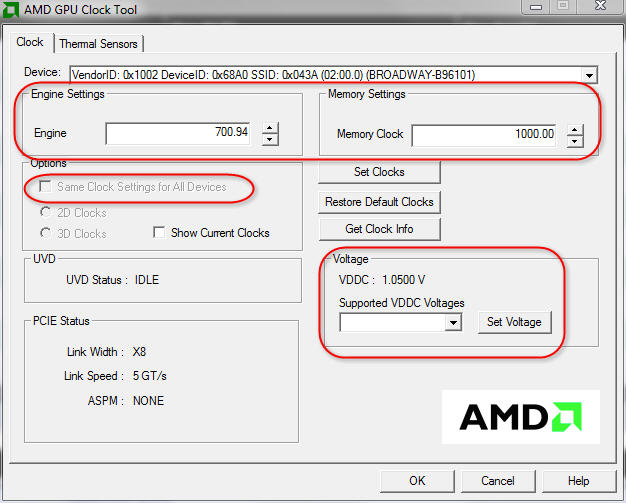
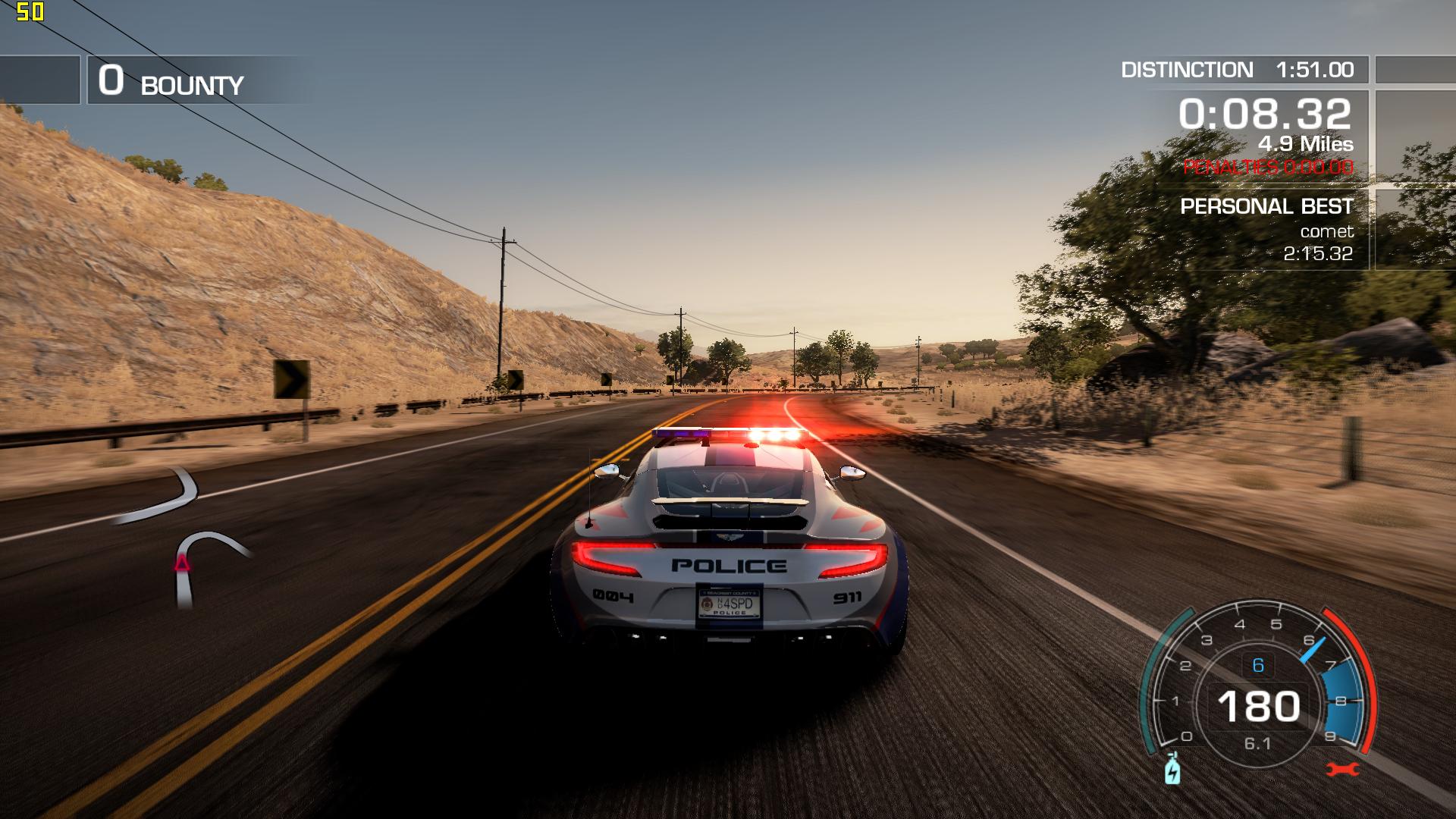
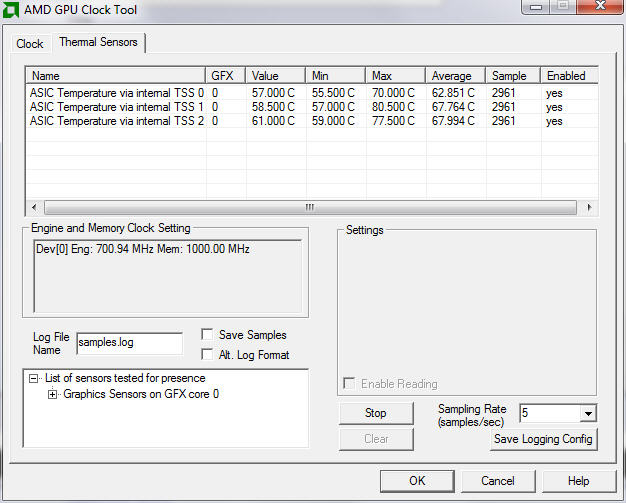
Here's my results with the new settings of 700.94 for Engine and 1000.00 for Memory Clocks. (These are defaults, not overclocked. All this did was effectively turned off the ability for the GPU to throttle back from it's highest default speeds.)
Not too shabby for my i7 Q720 CPU and no ThrottleStop... -
WAIT A SECOND.
Did you enabled HDR (High Dynamic Range) option with Nhancer? LOL MAN!
So i was right, you were using SSAO (HDR basically) in the first screen.
HDR is a powerful optimization that can even be a problem for high end desktop cards, and you were using it on our little xps hahaha §
Well glad you sorted out anyway!
I can recognize the filters/quality applied to a game just looking to a screenshot...man im getting old. -
Are you sure? I mean it shows 3 fans, just one 'under' the 8800 pair but still 3 as a whole.. -
Ok, thats good.
Are you sure, anyway, that all the three of them are working? Because theres another explaination to the overheating problem if thats not a fan issue.
Thats why i suggested to try with a piece of paper.
And FOX: great run mate
-
Kingpin I average 47 fps with my config for Crysis not below 44
I thought you average almost the same or more than 47 average in DX9 and with my config I think you mentioned that, but I saw not that was at DX10. Try DX9 which the config is optimized for and you´ll see at least 7+ fps
-
Ah!
Didnt tested DX9 thought. Ill give it a go.
I didnt meant to upset you man, i hope everything fine! -
Nah you can never upset me it´s good there is more hardcore XPS M1730 users here who tries to push the system to the extreme so to speak
I am installing Windows 7 64bit Ultimate as we speak. I hope I can get every driver up and running in Windows 7 too. My Vista operating system took a hard hit from that nasty virus I got. I couldn´t install any Video Driver at all no more so I hit the gas and install Windows 7 instead
-
Na dude, go into the Display Settings, or gameplay, should be some high resolution pack or option or whatever. I'm dead tired now, but I`ll post a screen tomorrow.
Also, don`t think I had HDR in the nHancer, I only turned on the options you said a few days ago
-
High Resolution textures is in the options menu for NFS HP 2010.
-
Just wanted to mention for anyone using a Logitech gaming keyboard with your M1730 that you shouldn't upgrade to the new Logitech Gaming Software v7.00.291 because it drops support for the M1730's integrated gaming LCD. I decided to upgrade because I use a Logitech G15 gaming keyboard, and now my M1730's gaming LCD is useless unless I downgrade to the legacy Logitech software.
-
Hunter im using latest game panel software on both xp and 7 x64 and works perfect.
The g15 software ia fine since its the same as the desktop version, whats wrong with it? Version is 7.xx something (new control panel).
I can make you a screen.
@Mag: now i see the setting,but i dont understand whats wrong.I have it enabled and im able to do 45-50fps with alot of cars while 60fps in solo.
Eleron is forced to disable it otherwise it doesnt run.
So its either the cpu who's killing the performance or the drivers.
Im more oriented to think its a driver related issue because that option relies on the gpu/driver and clearly something is wrong.
Our cpu can quite make a difference clocked @ 3,8ghz, but High Resolution Texture is a thing that need to be elaborated by the GPU, not the CPU.
It should possible the case that im running SLI 265.90q instead of his single card 197.15?
Eleron ill do some screens for you. -
Well this thopic runs fast...
Here you are, I should mention that I didn't updated my signature, but now I own 9800m GTX (replaced my faulty 8800m GTX, mentioned a few pages ago)
![[IMG]](images/storyImages/th_crysisbenchmark1920x1200veryhighdx10.jpg)
Very high settings, DX10, average 4380 - forceware 265.90 Quadro (crysis 32bit version)
Win 7 - 64 ( 9800m GTX 630 / 1575 / 930 X9000 @3,6Ghz)
Great autoexec file!
cheers. -
Great great run mate, awesome stuff.
I see that you're able to run the 98kGTX at 630/1575/930, im not able to do it, it crashes the driver if i try so.
It is overvolted, or standard volts?
thanks
-
Kingpin and eleron here you can see how smooth NFS HP runs for me in SLI Single mode on the 197.15 drivers.
YouTube - NFS 2010 1920x1200 Max Quality, XPS M1730, X9000 3.8GHz, 8800m GTX SLI@635/1587/930 -
Stock volts, but I must (obviously) do it with fans full blast. Anyway it is depending on the game itself. I can run crysis at these clocks but Dead Space make the driver crash, SC2 to. It's strange thing. I was thinking to tweak voltages, since temps are fine, but while I'm on warranty I would not like to mesh much with te VBIOS. I did with 8800m GTX but not performance noticed, do you?
Cheers! -
A screenshot would be great, thanks. For me it shows a picture of a G15 and works fine with the G15, but it seems to have no knowledge of the M1730's built-in Logitech gaming LCD because it doesn't show up in the Logitech Gaming Software app and the gaming LCD itself is blank.
Also, it would be cool if you could right-click the Logitech Gaming Software icon and select About and then let me know what the exact version number is that you have.
I should also mention that my M1730 is running 32-bit Vista in case that turns out to be the difference. -
Thats great, hovewer that confirms my doubts upon driver performance. Im able to run it in SLI (so no single gpu) while taking full advantage of anti aliasing and max texture resolution quality. Ill do some screenshots in an hour.
Sure thing man, no problem. Im using XP 32bit so the os is the same 32bit architecture as well the driver, ill post a pic for ya. -
Can I have the nHnacer file pls?
Also, major OC over there
-
@hunter: this is the LCD panel software im using actually.
![[IMG]](images/storyImages/logitecho.th.jpg)
@Eleron: this is how NFS runs here. The game is maxed out (check the settings screenshot) and it runs on SLI. Average 60fps, drops to 55 sometimes when alot of stuff goes on the screen.
STANDARD SLI PROFILE! Drivers 265.90q. So im not using my tweaked profile for AA.
![[IMG]](images/storyImages/nfs112011020721204669.th.jpg)
![[IMG]](images/storyImages/nfs112011020721250854.th.jpg)
-
I guess I`m gonna switch back to the 265.90q then...
-
Wait for Mag profile then do your considerations.
Mem that my cards are running in daily @ 630/1575/930.
Crysis benchmark with newer clocks in 20 minutes. -
Thought some of you might be interested. Selected titles are on 75% sale in THQ store, including Metro 2033.
http://www.desktopreview.com/default.asp?newsID=1346 -
New crysis benchmarks using Hunter's settings.
Crysis 32bit, DX10, Very High, Mag Autoexec.cfg:
==============================================================
TimeDemo Play Started , (Total Frames: 2000, Recorded Time: 111.86s)
!TimeDemo Run 0 Finished.
Play Time: 74.85s, Average FPS: 26.72
Min FPS: 26.94 at frame 145, Max FPS: 50.27 at frame 1757
Average Tri/Sec: -24299716, Tri/Frame: -909405
Recorded/Played Tris ratio: -1.01
!TimeDemo Run 1 Finished.
Play Time: 47.23s, Average FPS: 42.34
Min FPS: 26.94 at frame 145, Max FPS: 51.83 at frame 1007
Average Tri/Sec: -38271264, Tri/Frame: -903803
Recorded/Played Tris ratio: -1.01
!TimeDemo Run 2 Finished.
Play Time: 47.41s, Average FPS: 42.19
Min FPS: 26.94 at frame 145, Max FPS: 52.68 at frame 1010
Average Tri/Sec: -38079036, Tri/Frame: -902571
Recorded/Played Tris ratio: -1.02
TimeDemo Play Ended, (3 Runs Performed)
==============================================================
Completed All Tests
<><><><><><><><><><><><><>>--SUMMARY--<<><><><><><><><><><><><><>
07/02/2011 22:06:20 - Vista 64
Run #1- DX10 1920x1200 AA=No AA, 32 bit test, Quality: VeryHigh ~~ Overall Average FPS: 4226,5
The funny part is that i ran them with stock 3,4ghz. I have to try 3,8ghz. Ill report back. -
Ok, benchmark with the cpu @ 3,8Ghz. Still 32bit/DX10:
==============================================================
TimeDemo Play Started , (Total Frames: 2000, Recorded Time: 111.86s)
!TimeDemo Run 0 Finished.
Play Time: 70.99s, Average FPS: 28.17
Min FPS: 31.26 at frame 1959, Max FPS: 50.99 at frame 1007
Average Tri/Sec: -25618988, Tri/Frame: -909343
Recorded/Played Tris ratio: -1.01
!TimeDemo Run 1 Finished.
Play Time: 47.05s, Average FPS: 42.51
Min FPS: 31.00 at frame 1968, Max FPS: 53.59 at frame 1004
Average Tri/Sec: -38400184, Tri/Frame: -903283
Recorded/Played Tris ratio: -1.01
!TimeDemo Run 2 Finished.
Play Time: 46.99s, Average FPS: 42.57
Min FPS: 31.00 at frame 1968, Max FPS: 53.59 at frame 1004
Average Tri/Sec: -38412700, Tri/Frame: -902418
Recorded/Played Tris ratio: -1.02
TimeDemo Play Ended, (3 Runs Performed)
==============================================================
Completed All Tests
<><><><><><><><><><><><><>>--SUMMARY--<<><><><><><><><><><><><><>
07/02/2011 22:13:26 - Vista 64
Run #1- DX10 1920x1200 AA=No AA, 32 bit test, Quality: VeryHigh ~~ Overall Average FPS: 4254 -
Yep CPU speed doesn´t have lot of impact in Crysis when it comes to how the game runs.
-
Well, 265.90q have shown improvement, never dips below 35, with standard settings. Hmm. That is really weird. But both yours and my screenshots hold no candle against Mag's settings, his looks so much better and more realistic...
Speaking of, don`t you have a Warhead config? the game still looks way too shiny with the Crysis config..
Or I might just have to install Crysis again and test it myself at 2.6 ... -
Thanks for following up on that. You will be disappointed to know that you are using what Logitech is now calling their "legacy" software, which they intend to replace with the new Logitech Gaming Software that I'm having trouble with: New Logitech Gaming Software 7.0 | BLogitech
If anyone else is disappointed by the lack of M1730 gaming LCD support, I'd suggest posting both at that link and on the related Logitech forum thread at: New software available for G-Series keyboards - Logitech Forums
I'm still deciding whether or not to roll back to the old software. It's kind of nice having only one system tray icon for managing both the LCD and macro keys, but it burns me up that yet another part of my M1730 is becoming useless(*).
(* - I foolishly got the Ageia PhysX PPU with my M1730, which is no longer supported by nVidia's PhysX drivers) -
Oh i see, well thats explains why it works.
Well, it works, it sux tho that the latest software isnt working as it should.
About the ppu....well even if it was working, 128mb will not be enough nowadays... -
Yeah I figured the PPU was obsolete even if it did have driver support, which is why I don't bother to roll back my PhysX drivers. I've got 8700M GT SLI and usually leave SLI disabled (SLI either doesn't help or causes bugs in my experience), so the second GPU is available for PhysX anyways if I need it.
-
Yes eleron I have a warhead config. Will upload it soon.
-
Great.
In the meantime, NFS runs more than decent with the quadros.
I am totally confused now
-
It really has to be said. The activity on this thread is a testament to how excellent a machine the M1730 is.
-That is all!- -
That much is true. Hell, I purchased one just a few weeks ago. Very satisfied with the 3 year old tech for an excellent price. Hell, it still beats a lot of today's 'gaming laptops' hands down especially as a desktop replacement.
-
Of course, there`s not a single game that doesn`t run on high settings, and native res.
Sure, maybe not with AA all the time, but apart from that...
-
Totally missed this.
Great tip, thank you mate. -
I'm getting an error during boot that I wanted to put before this wise community.
During the POST when it flashes the screen with the Intel array (RAID 0) it lists the two drives with the green messages saying it's normal or whatever. Well today I noticed that the bottom drive is listed in red and says "an error occurred" and that screen takes longer before moving on. The Array stripe line is green and says its normal, but the physical disk shows one normal and one red abnormal.
So thinking I had a hard drive going out I ran a few tests: Dell diagnostics, Panterasoft's HDD Health, and HD Tune. These tests showed no problems. I then ran CHDISK to scan for errors/bad sectors and got none. My Beast seems to be running just fine otherwise. If the error wasn't there at boot I wouldn't know anything is wrong.
Anyone have any advice? Thanks in advance. -
Have you checked the s.m.a.r.t status of each drive?
A scan/check disc can report no problems physically on the disc, but it doesnt actually test the interface.
Are the driver in raid? If so try to invert the drives and see what it turns out.
If the primary disc,now in the second slot,reports the same problem, then it can be either the cable or in the worst of the cases the controller on the mobo.
Let us know. -
Woah I haven't been to this thread for ages. Glad to see our beasts still running fine and smooth.
-
Yo Som! Its been a while, how you doing mate
Yeah seems that my and Mag passion to further push the m1730 beyond is limits dragged quite the attention of the other users as well!
Man we literally brought this 3d on fire
Still this machine amazes me,no matter what you throw at it.. -
Yes I am tweaking this laptop every single day
Here is my run for Crysis DX10 Very High and with my config. That is Very High Cvars replaced the original ones.
!TimeDemo Run 3 Finished.
Play Time: 50.61s, Average FPS: 39.52
Min FPS: 6.53 at frame 1327, Max FPS: 48.39 at frame 66
Average Tri/Sec: -34680772, Tri/Frame: -877597
Recorded/Played Tris ratio: -1.04
TimeDemo Play Ended, (4 Runs Performed)
Dell XPS M1730 Owner's Lounge, *Part 3*
Discussion in 'Dell XPS and Studio XPS' started by BatBoy, Oct 6, 2009.





![[IMG]](http://s279.photobucket.com/albums/kk126/phoenon/?action=view¤t=crysisbenchmark1920x1200veryhighdx10.jpg)
![[IMG]](http://img25.imageshack.us/i/logitecho.jpg/)
![[IMG]](http://img43.imageshack.us/i/nfs112011020721204669.jpg/)
![[IMG]](http://img404.imageshack.us/i/nfs112011020721250854.jpg/)


