Problems? See this thread at archive.org.
Mind uploading the latest config? In the meantime I`m installing Crysis to run some tests myself...
-
Here is the cfg for Crysis eleron.
Attached Files:
-
-
So switch the drives around and see if the error moves up to the other drive slot?
For whatever reason SMART status doesn't show up in any of the tools I've used. It doesn't even show up in Speedfan's tab for SMART. But it never has - I figured it was because I was using RAID 0. Or maybe I'm not using the right tool? I could try booting off a live Linux CD and see if that will check it.
Also here's one more clue: I had Linux dual-booted on this machine and working fine for about a year. Coinciding with this error was the total corruption of my Linux partition. I've since deleted the partition but the error is still there. -
So I am looking to use the HDMI (DVI+active converter) to get a signal on my TV (working fine w the Quadro Drivers + Modded inf) my problem is:
How do I install the HDMI Audio Drivers for the 8800M GTX SLI without updating my display drivers with latest nVidia Driver? EG. Can I install the HD Audio driver Only to get sound over HDMI? -
@Dan, im not getting it. Are you trying to use hdmi audio output FROM 8800m gtx dvi connector?

Even if you install the hd audio, what you can do with it?
8/9x series doesnt have a builtin audio passthru,let alone an hdmi capable output interface, in fact they use dvi which transports only the digital signal and nothing more,no matter the adapter.
@cebalrai: mhm the fact that your linux partition corrupted and the fact that you cant check smart makes me wonder.
Try to sort the smart issue in first place, swap the drives (or just use one externally via usb,as an example,to conduct further tests off the raid) and repeat.
Im more prone to think that i was right in my first diagnosis, your hdd interface is going haywire. -
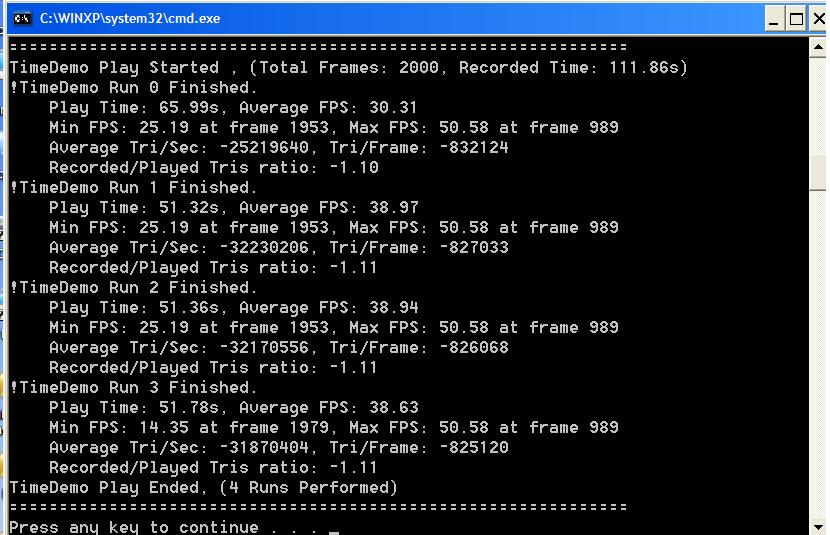
Ok, so with Mag's config I average around 38 fps without OC
I`m curios what the OC will do...
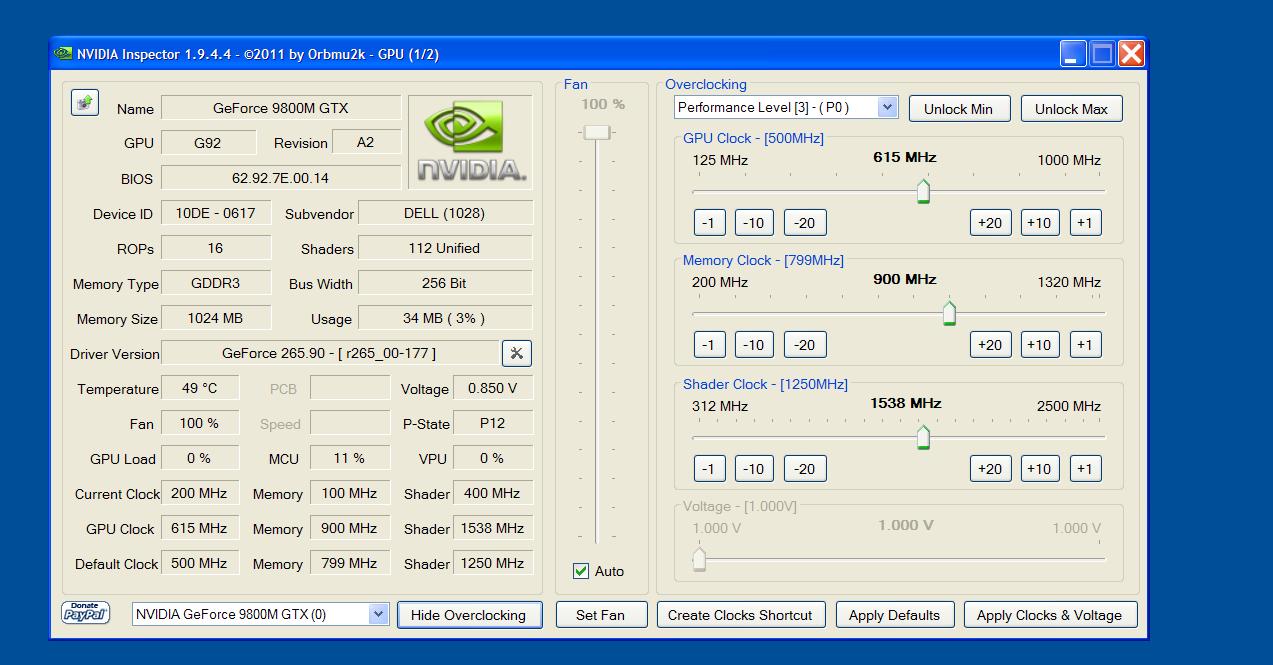
Yea...OCing at 600/1500/900 actually made the game worse, average 30 fps...
This is most confusing again...
-
I have a USB hdd interface. Do you know any free tools that will read SMART status through it though?
-
And now it averages 32 non OCed.
So weird...
And final run, closed Opera, it seems the browser has a big impact.
No tweaks on XP, no OC, CPU at 2.6.
I like
Attached Files:
-
-
Strange. When I installed the latest nVidia driver pack it installed HD-Audio for nVidia 8800 successfully and tied it to the 8800 SLI giving me volume control for the HDMI/DVI out..
-
I went ahead and switched the drives and the error followed, now showing the error in the top drive on the Intel array bootup screen. So this probably means I have one bad drive then, right?
Btw, the hdd tools I'm using say they don't support most RAID configurations so perhaps smart not showing up isn't abnormal. -
If you have the option you might want to consider backing up your data, breaking the array back up into individual drives, and restoring the data to the good drive to avoid data loss if the problem drive decides to die.
I gave up on RAID0 after having a flaky disk and then finding it out that in practice it really only gives around a 20% or so overall performance boost anyways. My current gaming desktop has a single fast GPU and a single fast system drive (plus a big slow secondary data storage drive). -
I've already backed up important data to my external hdd. For now the thing seems to be working perfectly, though I'm prepared for it to die at any moment. I might just push my luck, though the scary red message at boot is annoying.
I think I may put a Seagate Momentus XT in there as the primary drive and then use the remaining good drive for extra storage space. I feel like my Beast deserves better than just a normal hard drive lol. I have one of these drives on my desktop and it's quite snappy.
So I can just use the Windows 7 utility to create a system image, put it on my external drive, then swap in the new HDD... And then click and drag the image to the new drive, right? And it should just start right back up like nothing happened? -
RAID0 isn't about performance, but about write speeds.
I install games almost twice as fast as with a regular setup, and read times are in the 115MB/s range. -
@dan: just copy and paste the hdaudio folder from the newer driver into 265.90q installation folder,then run setup again,hit customized installation and install only the hd audio driver.It should work now.Still hdmi audio output is not supported via hardware by the laptop as its not capable of.In fact dell drivers didnt had the hdmi audio driver in first place.Anyway try like as i said.
@cebalrai: well as i said your smart interface is busted and is near to his end. Sice its a raid drive i suppose you dont have any data on it beside a mirror of your os primary partition? Pull out the drive and keep it external using an usb enclosure then do your tests.As long as it sits in the array theres no way to understand is problems. -
What's a smart interface? The fact that smart data isn't showing up on my hdd tools isn't a sign of a problem. These tools aren't meant to read smart info off of a RAID-0 setup.
It's RAID-0 so there is no "other drive" and there's no mirror. If I disconnect one drive it will not boot.
Using RAID-1 as a backup solution is a terrible idea.
- Is your system damaged by a new and insidious virus? Mirroring the virus isn't going to help.
- Did you delete the wrong file or accidentally uninstall a piece of software? Your mirror just deleted/uninstalled it too.
- Did your primary hdd suffer some disk corruption and damaged files? Your mirror will simply damage its good files in order to mimic the bad drive.
RAID 1 was made for use in servers and Media machines. In case one drive goes down the second one kicks in and there's no interruption of service. Trying to use it as your backup isn't a good idea at all. -
I didnt understand what kind of Raid you were using, so its 0.
The S.m.a.r.t interface is the acronym of Self-Monitoring, Analysis, and Reporting Technology and is basically what the name implies.
As an ex IT Systemist im used to drive failures and Raid setups, so unless the machine have a smart enabled interface under Bios (which i advice to check, have you checked it yet?) on Raid 0/1/5 - Striped or Mirrored - is impossible to actually enquiry the interface to know the status of the drive under windows, as raid setups cannot access it.
Many manufacturers uses their own smart implementation upon their drives, but any of them still stick to the standard rules, therefore if a bios supports it, you can read the values.
Smart interface can actually diagnose a drive and locate the problem. The most useful thing is when the interface itself warns you about a drive dieying soon, due to mechanical/electrical failure.
As your problem, i think that the problem the array shows itself upon boot is a kind of smart implementation. Its trying to warn you about a near death of one of your drives, in this case the second one, and to act immediatly.
I adviced to remove the failed driver and to use it externally via usb, i repeat, for diagnostic purpose. Use another pc to check the integrity of the drive itself using any tool like Seagate Tools or something similar, in this way youll be sure of the drive status before doing anything else.
Anyway better you backup your stuff fast. -
Sorry, I'm aware what SMART is but I wasn't aware that it was possible for its interface to break. I'll check on the BIOS. I've hardly had to go into the BIOS on my beast so I'm not familiar with activating SMART there.
[UPDATE:]
Unless I missed something there's nothing about SMART in the BIOS. Also, no hard drive utility I know of is able to check SMART status through USB.
I ran all the Seatools tests on the array and there were no errors.
Any advice from here?Last edited by a moderator: May 8, 2015 -
Nope, i dont have a clue. If even seatools says its fine, then something isnt adding up.
Remember that if you switch drives the error follows the drive right? So def something is wrong with the drive but we cant nail it down. -
Hrm. I went into the array manager software and saw that the error showed up there as well, thought it gave no more information than that. I clicked "mark as normal" and now the error is gone during boot. -
Lol even more strange. Any info on the error? Maybe the intel software took care of it, it may possible that it was something related to the raid system (crc,corrupted partition table,redundancy negative reports and so on).
It may happen sometimes, glad its fixed now. -
My sense is that it's not fixed but simply ignored. And the fact that my Linux partition died when the error started strongly suggests a real problem.
The array actually said that it was a read/write error. But that's a broad statement that doesn't really mean much of anything. -
Well, last thing you can do, since the array has been "fixed" in someway, is to run a thorough checkdisk and a defrag to see if the hdd is stable.
The linux partition could have been died due to a wrong partition table, a corrupt MBR, something like it. It can happen, not necessarily it indicates that a disk is dyeing.
I advice to do chdsk, but deep. Heres a breakdown of the commands:
Command Prompt Method:
Alternatively, you can use the command prompt to perform a scan on a drive letter of your choice by running "chkdsk x:" where x is your drive letter. The manual scan options are:
/F Fixes errors on the disk.
/V On FAT/FAT32: Displays the full path and name of every file on the disk. On NTFS: Displays cleanup messages if any.
/R Locates bad sectors and recovers readable information (implies /F).
/L:size NTFS only: Changes the log file size to the specified number of kilobytes. If size is not specified, displays current size.
/X Forces the volume to dismount first if necessary. All opened handles to the volume would then be invalid (implies /F).
/I NTFS only: Performs a less vigorous check of index entries.
/C NTFS only: Skips checking of cycles within the folder structure.
/B NTFS only: Re-evaluates bad clusters on the volume (implies /R)
"CHKDSK x: /F /R" would perform a full scan (including bad sectors) and attempt to fix them.
The /F /R formula usually is longer but it leads to a better results.
Otherwise man consider to change the drive if you suspect that its almost dead.
I cant help you further, this is as far as my knowledge goes. -
Dude, I simply don`t get it.
It runs super smooth on your laptop and not only that, it looks just so much better and realistic...
What exactly did you tweak? I need like a full list of enhancements you made... -
Mate thats due to the cam he used, its not the game itself. Look at Dead Space 2 Video as an example: its a steady 30fps because youtube doesnt support 60fps at all, thus the sense of smoothness is due to that effect (60fps recorded at 30, plus youtube compression rate, and so on).
Logically the colors are more realistic and less "plastic" than what you see on your screen, because of the room illumination, camera sensor, screen brightness.
Anyway ive discovered something today. Use this SLI Compatibility bits with NFS profile (assuming youre running quadros, use nvidia inspector) 0x02100005.
Tell me how it runs now. -
I'm on the quadros, yes, so I`ll give a test to your NFS inspector profile.
Errr, nVidia inspector is an OCing tool, or am I mistaken?
What gives, I seem to have a different inspector now?!Attached Files:
-
-
Nevermind, found it , haha.
I`m trying your NFS inspector config now.
Hats off to you, sir, now it runs smoother than before, and actually quite playable, being over 30 fps at all time. Thanks
-
Yes eleron the game is very smooth for me. That is run in Win XP and it rarely drops below 50 fps.
However my CPU at 3.8GHz really helps out here and GPU´s overclocked to 640/1600/950. -
This is so weird. I don`t understand it.
At some point, with default clocks, I have 47 fps, constant.
As soon as I OC the GPUs, it drops 3-4 frames, and instead of making it better, it makes it works.
And I`m talking about minor OCs, like 600/1500/900, nothing fancy
Definitely a CPU bottlenecking issue, other than that, I have no clue.
And I`m running it at 2.6 all the time, seems like it`s not enough lol. -
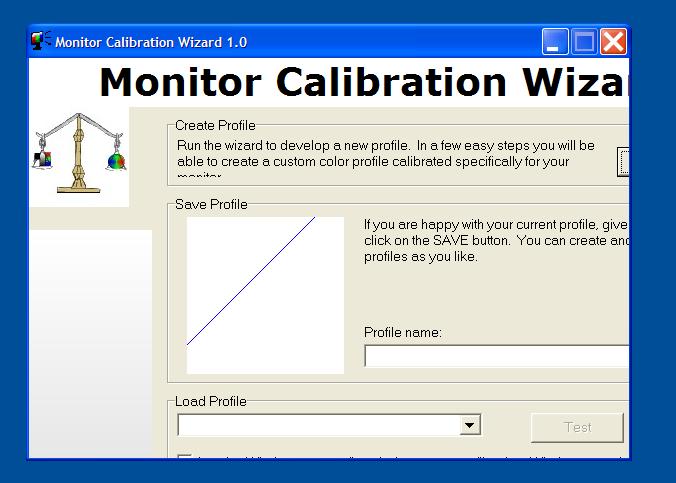
The reason the game looks so vibrant is because I am using a free monitor calibration tool where I have made a profile along with nvidia display settings where I have tweaked contrast, digital vibrance and so on
So what you see there on the youtube clip is exactly how it looks on my screen. -
Could you point me to that tool ?
-
Theres a way to overcome that. Simply decrease the prerendered frames in Nvidia Control Panel.
If you suspect that your cpu is bottlenecking the card, put them at 0 in order to let the whole frame rendering be handled to the gpu.
With fast cpus its quite the opposite; to avoid gpu bottlenecking you can increase the prerendered frames to 4 or 6 to gain a bit of advantage.
Also lowering the value gives you a better latency on controllers specially on FPSes.
Anyway i dont understand how it could bottleneck the cards oced. I had the t9300 DualIDA'ed @ 2,7 and my old 8800m GTX @ 640/1600/950 and i had quite an improvement.
If the problem is the cpu, probably is due to the lower L2 cache (3mb right?). The T9300 was a full penryn core with 6mb cache, maybe that explains why.
Also, other things helps, put the power mode in windows to max performance (always active in windows xp) and disable PowerMizer under NVCP (<- THIS IS IMPORTANT IN XP! Because it throttles the gpu when it reaches certains temperature!).
Then using NVispector, open the global profile and set the power management to Prefer Max Performance, it should be "Adaptive". -
eleron it is called Monito calibration wizard.
-
Yea, for some reason, when I open that MCW program, the full window doesn't show, so I can`t use it
Attached Files:
-
-
Hmm do you run it in XP or Win 7/Vista? I have only tested it in Win XP.
-
Xp only. I've tried reducing the DPI, same effect...
Also, NFS seems to have vertical sync forced no matter what?
EDIT : nevermind, after changing DPI it needed a restart
-
Thing is though, no matter what I do, the image ends up being foggy, so I`m sticking to default colors...
-
Hmm strange indeed.
-
Hmm, double post, the forum is acting up again...
Sometimes in tunnels it dips at 10-15 fps...
How in the world can I disable vertical sync? cause that`s the problem... -
Update : found a config in documents and settings/ user name / criterion games, where I can edit the vertical sync. However, the game doesn't take that into account.
I just can't believe how bad it runs on the quadros ...
Uhm, Kingpin or Magnus, with throttlestop it is possible to get the CPU at 2.6 Ghz,right? Or at least the standard 2.8. I`m curious if you could test the game at 2.6-2.8 Ghz speed and see how it runs then. If it`s still ok, then the issue is on my side and I need to reinstall it... -
Well I've lurked here for ages, posted a couple of times and had great help from you guys; now hoping for some more guidance now I've splashed-out for processor and graphics card upgrades. Currently my beast is very basic ([email protected] / 8700M GT SLI/4Gb RAM) but with almost 2 years warranty to run, I want to get more out of it in terms of gaming. Sooo, I'll shortly be swapping out the processor for an X9000 SLAZ3 (apparently genuine) and the graphics for a 9800M GTX SLI , used but with guarantee. Deal's done, money's spent, gulp! I'll install with arctic silver 5 paste and de-fluff the beast's innards again. Now to the stuff I'm not too confident about:
1. For games I have GTA IV and Ghost Recon as a start, but regularly use Flight sims like FSX and soon X-Plane. I need to ask about basic setup (autoexec and other startup / config files, etc). Am I right in assuming I need to boot specially for games rather than just selecting them from win7 as a normal program, so I get maximum resources allocated to the game? If so, where can I get guidance about these boot-files?
2. I am impressed and entertained by you guys discussing overclocking but have never had a system capable of these options. At what point do I consider stretching the capabilities of the machine? When I'm unhappy with frame rates or before? I'm OK with the concept that if you make a system work harder than designed, it becomes less reliable, so I want to avoid cooking my 'new' graphics on day one! Some guidance as to what basic utilities are needed for such tweaking would be helpful.
No doubt I'll have loads more dumb / newbie questions but anything you guys can advise I'll be grateful for. Once I get success with my flight sims and GTA 4 at good frame rates and graphics I'll venture more into your world of real gaming - can't wait!
Clearly, my new additions can't be Dell warranted so if I have problems I'll just have to substitute the old stuff. I really didn't want to pay Dell's prices for upgrade parts (even if they's sell them to me!)
Cheers, Andy -
Yo Andy, and welcome aboard.
Please enjoy our crazy overclockers company, as i said magnus and myself can be considered the most crazy ones lol.
As your questions:
1- You dont need anything in particular, beside installing the game and launching it as normal. This happens even if youre using a custom autoexec like the Crysis one were using for benchmark. Any mod usually needs to be placed in game directory in order to load it on boot, if the game supports it. Crysis does support it OTB, dunno about FSX or other games. Some games, as an example, require a few command line extensions (like GTAIV) to further tweak the game. Usually they require to modify the game shortcut to load some valid arguments (example of GTAIV.exe -norestrictions).
Keeping the OS light and fast without too much processes or heavy antivirus helps to keep an improved performance.
2- As for overclocking, you need to consider your items. X9000 is a cpu made for Overclock and it can lead to great performance while staying above the thermal max junction. Dell is well aware of this, in fact you have an option under bios to set the CPU @ 3,4ghz. This keeps the fans always on @ full bore, and this helps to keep your system performance high while extending the notebook life as it is always "cooler" due to the fans. Its loud, that's for sure, but is worth it.
After you did this, you can do some fine tweaking OC with Throttlestop. If your cpu is OEM, then you can run 3,8ghz with just v1.38 or 1.40. You can even push it further to 4ghz stable with 1,4750 while having an 83c under full load (and i mean EXTREME load, not average gaming/usage).
You can try CpuGenie64 to test any voltage/multiplier before using it. The short test of 3 minutes is enough to determine the system stability.
So the procedure is like (miniguide FTW!):
- Set the cpu @ 3,4ghz in the bios, FANS should be at full bore when it reboots
- Donwload ThrottleStop
- Download CpuGenie (64bit version available)
- Launch and turn ThrottleStop ON
- Click the ULK button (to unlock max tdp and multiplier)
- Uncheck EIST,C-States,Power Saving if checked
- Check Clock Modulation box (100%)
- Raise the voltage to 1,40 and hit SAVE
- Check and raise the multiplier until you get 3,8ghz (i think its above 11x iirc) hit SAVE
- Dont worry about the voltage, is fine, is just needed for cpugenie
- Close TS completely
- Run CpuGenie and test the 3,8ghz multiplier starting from 1,4v voltage. If it pass the 3min torture test, lower the voltage a notch (1,38 as an example) and re-run the 3min torture test. Do this until the system fails the test, you know that's the lower you can go. Raise one notch and youre sorted
2b- As for the GPU, the common problem of the whole 88xx/98xx/98xx GTX is that they are GREAT cards but only when Oced. As long as they stay @ stock clocks they performance is forgettable honestly.
Anyway another mini guide!
(little note: attempt to OC your GTXs only when your fans are @ full bore, achieved by setting the X9000 at 3,4ghz thru bios!)
- Get EVGA Precision from MajorGeeks.com
- Get Furmark from Ozone3d
- Open EVGA after you installed it
- You notice that the fan is stuck @ 30%, thats an error, because its supposed to stay in full bore as we tweaked the cpu already (at least @ 3,4ghz)
- Raise your clocks to Core 600 Shaders 1500 Memory 900
- Shaders clock should raise automatically as they are linked to core clock
- These are the most safe and stable clocks with no heat increase, nothing crazy
- Now hit APPLY and close the program
- Open Furmark, configure it as Stability Test, then run it for at least 5 minutes
- If the video driver doesnt crash or theres no glitches on the screen then you're ok
- Again the temperatures can be high (around 80c, maybe less) but thats due to the stress test. Probably you wont go higher than 72 in games
There you go, i hope it helps, have fun and dont worry if you have problems just post it here. -
For example, the regular 88/9800M GTX clocks are 500/1250/799.
600/1500/900 are perfectly ok 24/7, with Powermiser activated.
Also, Kingpin, might checking my previous post? -
eleron yes I can test the game with my CPU at 2.6Ghz.
-
Eleron sorry it slipped away.
Ill test it asap prolly tomorrow
And eleron remember that powermizer have to be disabled since it throttles the gpu way too much. -
How could it, the GPU never goes beyond 61C even OCed in this game...
-
It can, just do a quick google to find that powermizer blocks the card performance without a reason throttling it out of the blue.
Disable it man! Powermizer is a mess and your card downclocks fine without it. -
Wow, thanks, guys! Terrific reply from Kingpinzero; JUST the info I need, hopefully validating my (not insignificant) purchase decision. I was going to wait for the graphics card to arrive before doing both upgrades (it's currently in UK customs from the US), but your mini-guides make sense for me to get the processor installed, working and OC'd first (reliably), then go back in later to do the graphics.
I didn't mention I have 3dmark06 and will be looking for the scores once the graphics card is in place. I like the idea of these (yet to download) apps doing stress-tests so I can get a feel for what's possible and the temperatures resulting.
Again, many thanks for some excellent quidance.
Cheers, Andy -
Kingpin, I`ve monitored the usage on a graph in Rivatuner, and it didn`t downclock when it dipped at 15 fps...
Magnus, cool
-
Yes I have tested now with 2.6Ghz and the performance is the same as when I run with 3.8Ghz.
-
Ok, so there is something wrong with my setup. Or the driver.
Either one...
Dell XPS M1730 Owner's Lounge, *Part 3*
Discussion in 'Dell XPS and Studio XPS' started by BatBoy, Oct 6, 2009.