Problems? See this thread at archive.org.
Hi, does anyones SXPS 1645 do this: http://www.youtube.com/watch?v=legqLFgMKEo ?
Because my does, probably not as loud as on the video, but I can hear it in a silent environment... :-(
-
-
Wow, thats gotta be very annoying.
-
Got my 1645 dec 31st, system seems to lockup alot at the logon screen (1 in 10) whether booting up or when opening up from sleep. Have to do reset to do anything. Has done this with all BIOS A01-A07. Have disabled fast access and still have the problem.
Wondering if anyone else has had this problem and if so any fixes? -
@MP, in case no one has answered you, iI located the IR driver at Dells Drivers/downloads under the Studio 1535, look for the "ITE IT8512 CIR Receiver" driver under the "input devices" tab. Once I installed this my remote worked fine.
-
Many of us have experienced lockups. For me, the playing of short notification sounds would occasionally lock up the machine. I've been able to get rid of all of my lockups. Check out this thread (starting at the end and reading backwards is probably best):
http://forum.notebookreview.com/showthread.php?t=440493 -
Has anyone tried using HP's small remote(Media Remote Control that fits in Express Card slot) with Dell Studio XPS 16 IR? Any idea if it will work?
-
The same happened to me as well. I reformatted, tried a lot of stuff, but the only thing that seemed to work was uninstalling the Creative Sound Blaster software (Creative is being 'Non-Creative'
 .. The software is Creative Laptop Blaster????). Try uninstalling the software, the lock-ups should stop ..
-
Yes, I just as well uninstalled my Creative X-FI Laptop Blaster software and it seems to run a little better in general, and no more lock-ups. Like Semblance mine would lock-up when windows system sounds were played. The software itself only made a slight difference in sound quality overall so it wasn't even worth it. Then I was also having browser slow-downs while watching some videos. I installed flash 10.1 beta 2 and its fine. Creative really needs to update their software...and full release Flash 10.1 can't come out soon enough .
-
Headhunter, myself and a few other people on these forums had a similar problem. There is an easy solution that was shown to me.
Try opening up your control panel and navigating to the "Sound" window. You should see four tabs - "Playback", "Recording", "Sounds", "Communication". When you click on the "Recording" tab, does the whine immediately stop? If so, I'd guess its the same problem I was having before. Let me go look and find the older posts...need to remind myself of the series of steps to resolve it from there. -
No problem! Glad I could help.
-
Order status of my Laptop. As of today.... Shipped!!
-
Interesting point, after having updated to A07 and having the 130w psu. I ran the windows experience test again to see what happens and funny enough the WI of the process went up a couple points. Just thought i would share that with everyone.
-
Thanks to the both of you, uninstalled creative hope it works will update
-
Unbelievable, it really stops when I open recording tab !!!
I don't understand it...
EDIT: after some research I've found that setting "listen to this device" for microphone did the job, but I'm sure that it's because it causes some constant cpu load (check audiodg process), so it prevents cpu from entering some Cx state...so this is not a solution, but it tells us what the problem is... -
The dellstore in Europe (Germany) right now doesn't offer a 500 GB HD @ 7200RPM anymore but only 500GB or 640 GB @ 5400 RPM for the studio XPS 1645. Additionally there's no choice for the i7-720 QM. They just offer the i7-820 QM by default.
Though the i7-820 QM is a bit better performance-wise, I wonder if it's a good idea to have the 500 GB @ 5400 RPM built in ? I don't want to pay the premium of 350+ € for the SSD, though. Thank you for your comments in advance
Wolfgang -
640GB is definitely WD and those HDDs are very good, I'd rather have this WD instead of that 7200RPM 500GB Seagate... http://www.tomshardware.com/reviews/640gb-mobile-hdd,2451-3.html
-
I would love to have the 1tb drive mentioned in the review. 320gb isn't making the nut.
-
In about a year someone will be saying the same thing but replacing the "320gb" with "1tb." (heck I'm sure it's being said now) We humans always want more...I remember when I had a 40GB HDD in my Dell Inspiron 8600 and thought that that was too much...lol.
-
Question about watching youtube.
It's been happening lately that I can't watch videos on youtube, neither on explorer nor on chrome. It says "shockwave flash" plugin is not working properly. I have to restart the computer in order for it to work again. It's only been happening after I upgraded to A07. Any advise on this? Thanks. -
Hey guys,
I just want to share some experience with my SXPS 1645. Couple of weeks ago I got my screen replaced due to flickering issues. Now I am awaiting for my mobo to be replaced due to:
a) broken HDMI - not working
b) seen uploaded pictures
So far I experienced only problems with this machine
Nikolay -
Man you need to resize your pics.
-
Out of curiosity I have loaded Everest Ultimate to see some of the detail data as the laptop is running (i.e. processor temperature, speed, etc., I have to admit this stuff is interesting but I don't understand a lot of it).
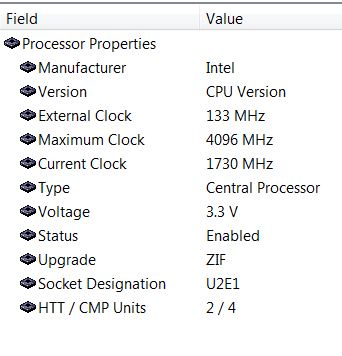
I have a question about several things but for now does anyone know the relevance of the Maximum Clock 4096 MHz?
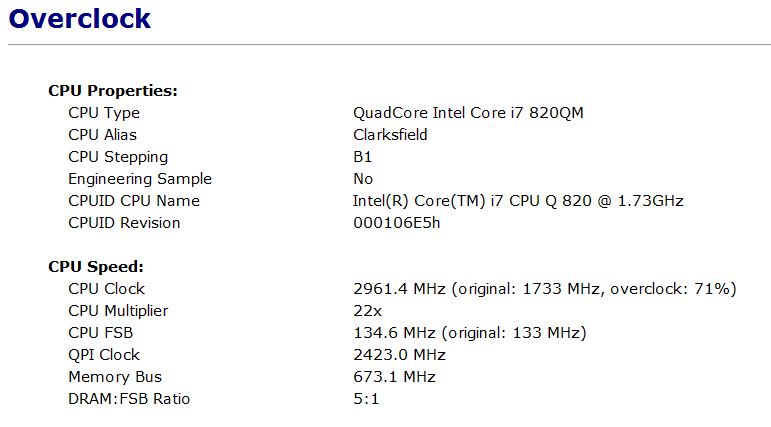
See attachment (obtained from Everest Ultimate, Computer > DMI > Processor > CPU Version > Maximum Clock 4096 MHz). I guess with 71% over clock equaling 2961 MHz then the 4096 MHz would be approximately equal to 100% over clock. I have seen my machine over clock above 3000 MHz but wonder how high it will actually go.
Oh yeah, I should mention I have not had a lock up (six days now) since I started using my new 130w power adapter (I also have my Creative Sound Blaster X-Fi MB fully enabled and working). My computer is a thing of beauty and a complete pleasure to use.Attached Files:
-
-
e ppl....screwed p te keboard... te kes aret workig... tie to call dell for keboard replaceet....
-
WOW...I didn't even know they made cameras that cost more than a premium laptop lmfao. I have been camera shopping and saw the model in your sig and googled it...whoa.
-
Hello everyone !
I realized that the only refresh rate available on my XPS1645 is 60Hertz. It is this a driver issue ? (like as I do not have the latest driver or Im using like a general driver not a specific one crafted for this machine) I wonder if is possible to change this to a higher rate like 75Hertz.
Thanks -
I have not seen any laptop screen support refresh rates greater than 60Hz... Its only in case of CRT screens that I have seen higher refresh rates... Its not the driver... If you connect your laptop to some CRT screens, you will get the option for much higher refresh rates...
-
Does anyone have any clue? Would appreciate some help here. Restarting the PC is the only that solves this but it gets annoying doing it so often.
-
I don't really have many ideas. If I was having the problem, I'd uninstall all versions of Adobe Flash (one for IE and probably one for Chrome and another for FireFox, I think, if you have FireFox), then reboot. Then try installing flash for one of the browsers to see if it works.
-
download the latest shockwave player from the Adobe website, worked for me
-
No problems for me with the latest Flash or Shockwave players from Adobe. However be carefull of all the bloat-ware Adobe is bundling with-in its downloads, such as, Yahoo or Google Tool bars and especially McAfee or Norton Security Scan tools. You will need to read and check the install screens and uncheck the additional software install option as required by your preference for these things.
Norton is a CPU Hog, and a pain to get rid of with out using the Norton Removal tools....... McAfee is just anoying (IMO)...... -
Have you even used Norton in the past two years? The Norton 2009/2010 tools were completely redesigned to utilize very low cpu and they do, in fact, uninstall cleanly. In my opinion and based on my experience, Norton does not really impact the use of the PC at all.
Can't speak for McAfee...I swore them off years ago and am perfectly happy recommending NAV 2010 to my clients. -
I've been using (forced to use) the Symantec Corp S/W, Symantec End Point Protection, which incorpoates the SAV 2009 AV technology / software and it is like dragging an anchor chain. Almost everybody including the IT guys in the company acknoweldge the problems with performance. I cannot speak for the Norton Security or Norton AV consumer 2010 stand alone products.
I used Norton 2008 consumer products on a personal machine for a while and vowed never to use them again due to poor performance reasons. That was when my employer made the decision to deploy SEP and that just about made my day....
I should add that it seems strange that the IT guys hate this suite but the company still uses it. The reason is that we use other Symantec tools that are really excellent. SEP was a bolt on to the contract for those other tools. Having a single vendor platform for the combined also made deployment easier. -
Norton AV 2010 is a whole new story. I recommend. Very light on resources and fast.
-
Just checked my tracking number, EDD today!
Currently at my local FedEx office. -
Norton 2010 isn't bad as it has improved, but it's still nowhere near as light as AVG or Avast! are. Both of them are definitely far more recommended than Norton any day.
-
AVG doesn't catch half the stuff Norton or Avast does. I have had to clean many machines that had AVG up to date on them and it didn't see all the viruses.
-
If we are speaking free stuff, then i prefer MSE over AVG. Just my 2 cents.
-
Bitdefender Internet Security 2010 anytime!!!
-
I use Vipre Antivirus which is very light on systems. I renew it every Black Friday when it is 1/2 price.
http://www.vipreantivirus.com/ -
We use End Point Protection 11. Works great with no slow downs at our office on any machines. I also have Norton AV 2009 at the house, and it works great and really do not notice any slow downs either.
-
Using SEP v11 as well and everybody here will curse SEP. With out question it is slowing the system in a big way from boot up to shut down. Un-install SEP and the performance improvement is immediate and noticeable.
-
Do we need to change the title of this thread ?
-
Sounds like a configuration problem. Like I mentioned we see now slowness. We tried Kaspersky Corp and left it because it did slow the machines way way down. Our Netbooks have SEP as well on them, and the staff said they work great and no loss in speed like when they had Kaspersky.
-
You may be correct. Configurations and System Policies had crossed our minds as well, but this is the setup our management have decided upon for corporate deployment. Right or wrong, they are not going to change it. At least not until one of them also gets fed up with the performance degradation.
Rule 1 - The boss is always right!
Rule 2 - If the boss is wrong, refer to rule 1 -
^^ LOL! So true.
-
Is there a model number I can look up for the bluetooth chip on ebay? The option was not available when I bought mine and I wouldnt mind adding it in. Is there any problems with having bluetooth on this laptop or was it just suppl shortage?
-
I use KASPERSKY INTERNET SECURITY 2010 and beleive me its the BEST!!!!!!!!!!!! just costs you 650 Rs. (INDIAN currency) (US$13)for 3user license for 1 year!!!!!!!!!!
-
MSE is by far the best AVS I've used...and it's free. Doesn't get much better than that. Lightweight, fast and updated frequently.
I've used Norton, McAfee and Kapersky, they all gave me problems at some point. -
I guess you could conclude that a badly configured application and especially security software and policies can be just as devasting as the throttling issues reported here and in other threads. Yet the same software on other systems has no noticeable impact. For sure we do not live in a perfect world but I do wish it was a little more consistent. For now I will have to sit and watch my i7 throw 20% of its resources at running SEP
At least I have not seen it throttle yet.....
-
Has anyone still had issues with the system randomly locking up after the A07 BIOS and 130W adapter update? When I say lockup, the screen freezes and the keyboard and mouse do not respond. You basically have to hold the power button until it powers down, and then power it back up.
**The Official Studio XPS 1645 Intel Core i7 "Owners Lounge"
Discussion in 'Dell XPS and Studio XPS' started by Cin', Nov 9, 2009.