Problems? See this thread at archive.org.
What graphics drivers are the newest available for the laptop? I have not been following any news in those regards and was wondering if there are any upgrades available over the stock drivers that came with the laptop?
-
10.3 Preview from strags.com
I'm using them on my 1647, stable. -
How do bad company 2 work for you guys ? , for me its lagging some when playing multiplayer at medium settings....
-
Andrew,
I strongly agree with E.D.U's, Headhunters comments, and would suggest you trade the higher spec 820QM for the 720QM and the SSD...... assuming you do not mind swapping drive capacity for speed, and reliability. The performance reduction between the 820QM and 720QM CPU's would be more than made up for by the improved specs of the SSD.
On a side note, choosing the SSD will also grant you some exclusivity and bragging rights in front of your mates. I still think it is a shame that Dell still supplies a 5400rpm Drive with these premium level machines. -
I do not have GPU acceleration. Options are all grayed out!
 I can't select anything, at all.
Yes, thank you very very much. Just seeing the first screenshot gives me hope. I'm sure I messed up the drives myself. Darn, time for a reformat...
Thank you all, very much. I hope to find a solution for the keyboard shortcuts. I have been alt/f/d-ing since my alt+ctrl+shft+s doesn't werk. -
Er, I'm almost positive that the HDD drives for the 1645 are 7200 RPM, not 5400. Not to mention, 5400vs7200 isn't quite so cut and dry; there's a couple of instances of 5400 drives performing better than 7200 if I remember correctly.
-
I think that you also have to factor the capacity into that equation. A 500GB 7200RPM will most definitely be faster than a 500GB 5400RPM. However, a 500GB 5400RPM has been seen to perform about the same as, for example, a 160GB 7200RPM. So the low speed, high capacity drives can perform at the same level as the high speed, low capacity drives. That might have been what you meant, but I just wanted to clarify a little .
But you're right, I don't think Dell supplies those 5400RPM HDDs in the 1645s. -
Capacity has nothing to do with performance. It's the number of platters (fewer = higher performance) which affect performance and platter count is *usually* related to capacity, but there are gems out there that have massive capacity and few platters. These "good" drives like the 160GB 7200RPM may be compromised of just a single platter and will beat out the 500GB 5400RPM which at the bare minimum has two platters. I think one 500GB drive has one platter, but I think it's just for desktops.
Just want to clear that up.
~Ibrahim~ -
Got our SPXS-1645 this week and I have to say it is wonderful machine.
Works great with all our applications and highly recommend it to anyone.
With Bill and Todd offering their support it was an easy to decision to buy.
Dell obviously values this computer.
The only issue was a single lock-up. (Disabled enhanced sound in SB X-Fi MB, as recommended in this forum, and never had another problem.)
Thanks to all the experts here a NBR!!!
You have made the lives of thousands of XPS-16 users so much easier. -
Bump guys!
-
Use this frnd : Link
-
Thanks. But this is the monitor ie the windows gadget. Im looking for the turbo boost driver.
-
There is no such driver. Its on my default. Log with throttlestop and it it goes more than 13 that means its working fine. There is an option in BIOS to disable Turbo Boost, check that and load bios to default
-
Hi Guys...in a serious dilemma here...
Does ANYONE here know when is DELL upgrading the video card to 5800 series, like HP and ASUS have already done soo.
I m ready to buy this but am waiting for the card upgrade.
Will it even be done on XPS 16?
Please share.
Thanks a ton. -
Probably but no guarantee.
Studio 15 has already got a low end 1GB 5000 series card now. -
hmmm..^^^dont see that on dell's site yet
-
In Dell's India site it does, Check this link
-
Make sure that you're going to the dwonload section where you have to create an accoutn with your service tag:
https://smartsource.dell.com
If you had FastAccess originally on your machine and you live in the US or Canada, then it should be there. If it isn't or if you live in another country, you may still request that they send you a replacement installation CD. If this fails, let me know (private message) and I would be happy to see what else I can do. -
Mmmm!!! so there is a driver for turbo boost only for the 1647(i5) cpus and not for the 1645(i7)?? becuase I can only find the 1647 driver. I didn't know that. From what I read is that turbo boost comes disabled on the xps and we have to enable it thru a driver.
-
if it " i5 "you are talkin about, then the drivers are for the embbeded GPU in the CPU.
Turbo boost can be disabled from bios or using 3rd party softwares. As you might know the turbo boost thing is actully called step-speed technology. So, step-speed can be enabled or disabled from bios.
But its highly doubtfull that it would came as disabled.It couldn't be disabled because thats what "i series" is all about stepspeed(turbo boost). -
Im taking about the i7 driver (1645). Is it enabled by default or I need a driver?
-
The utility I told you is kind of a driver. After you install it, if the bar goes above the core frequency simply means turbo boost is working.
-
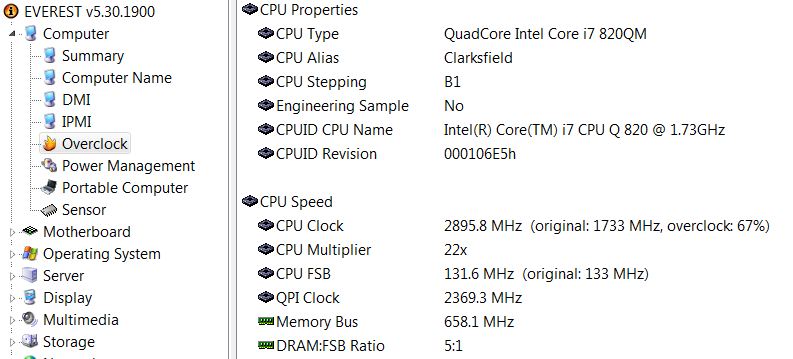
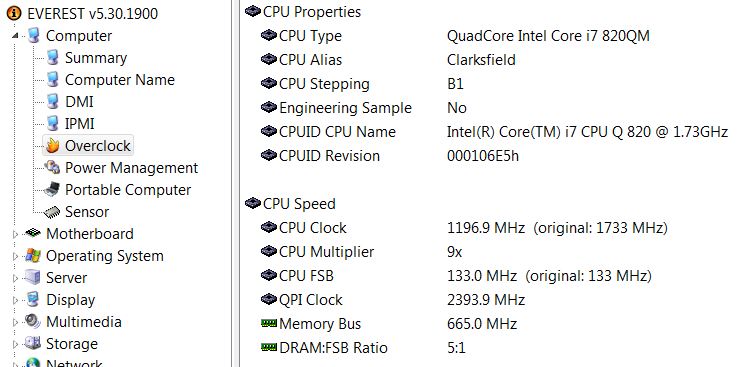
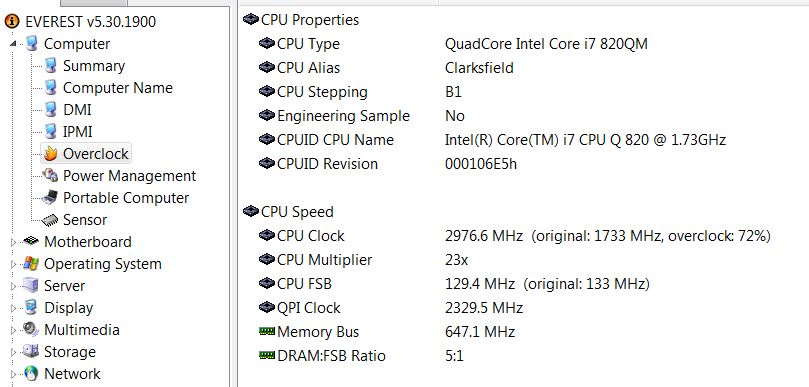
My 1645 came with turboboost enabled as default and is working fine. I use "Everest Ultimate V5.3" and can watch it Overclock (turbo boost) kick in and out. The change happens quickly and is hard to get a screen capture. The highest I have seen it go to is 74%. See screen shots:
Attached Files:
-
-
BUMP guys...any info on the video card upgrade would be appreciated.
It seems they are offering the 5400 series upgrade on studio 15, but I am interested in the 5800 series upgrade on studio xps 16.
Thanks again. -
what i meant was, there are no such things as drivers for turboboost for any "i series " processors .
The drivers you were talking about for "i5 " are to enable embeded graphic card.
Turbo boost is stepspeed and it is always enabled on all i series processors and doesn't need drivers to activate... but can be disabled from the bios.
and also, the integrated GPU needs H55 chipset.blah! -
I've used the ATI Catalyst driver 10.3 and run 3dmark06 for benchmarking. I'm rather worried at the result. I am got only 2917 marks, on a clean Win7.
Intel Core i7 720QM
4GB RAM
ATI 4670
RGB Screen
65 Watt Adapter / Battery (tried both, same result)
Does anyone have a clue why it is so low? Thanks. -
"65 Watt Adapter / Battery (tried both, same result)" this is the clue. This system needs 130watt + adapter to perform.
with 65 watt your system must be throttling like hell.
Are u sure it is 65 watt ?
Edit:
It's not "ATI Catalyst driver 10.3" , its "ATI Catalyst 10.3 beta". Before installing 10.3 beta previous version needs to be removed. -
Are you sure man?? It doesnt seem the case with the 1647, check post # 1
http://forum.notebookreview.com/showthread.php?t=452814
Thats why im saying that it needs a driver to enable it. -
Not true...laptop drives have either 1 or 2 platters, there's no room for more (well 750GB and 1TB WD's have 3, but those are also thicker and don't fit everywhere...). So the difference is density of data on that platter which makes it clear that the bigger the density (bigger storage) the better performance you get...the same also applies to 3.5" drives of course...
-
yep sure for sure i7 on p55 need no drivers to enable TurboBoost. To check if turbo boost engages use the trubo boost winget or throttle stop.
These are chipset drivers for H55, and i doubt they have any thing to do with turboboost. -
The widget is showing speeds going above 1.6GHz but never bear the 2.9Ghz as stated and thats why I thought I might be missing a driver.
-
well, if goes above 1.6 GHz then turbo boost is working. Any thing above base speed is due to turbo boost.
http://en.wikipedia.org/wiki/Intel_Turbo_Boost
It can't sustain 2.8 Ghz for long because other cores get activated(windows background serves etc). -
Screen capture at 2.976 GHz. It has gone above 3 GHz but hard to get a screen capture of the quick change in processor speed.
-
Thanks guys. Makes sense now. Weird is that on my other 1647 I have to install that turbo driver. i guess its a different architecture
-
Personally I doubt it for a little while yet considering 1647 just came out and it could've had 5000 series on it already but they chose not to do that (let alone use HM55 chipset).
Anyway, for Australia at least you can grab Studio 17 with 5650 and as AW still comes with 260M the card, I'd guess that XPS will at most be 5850 but probably be 5700 series. -
I just got the bluetooth adapter I ordered from ebay for my laptop. I popped it in and screwed it in (after looking all over for a screw that would fit) then I plugged in the little blue wire. Now the bluetooh light is lit up.. but don't I need drivers of some sort? I dont see any drivers listed on dells site..
Also when searching for bluetooth devices on my iphone it is not finding the laptop.. What am I missing?
aaandd there is nothing showing up in device manager that looks like bluetooth or unknown devices. -
im a supposed to be able to play badcompany 2 on high settings with my 1645? i have the 130w adapter and newest bios but im not satisfied with how the game runs , much lag etc... . Does throttlestop any good now when the new bios and 130w adapter is relesed ?....
Tnx Marcus / Sweden -
Ok. It was 65 watt, as the system told me off for plugging in a 65 watt adapter. And also i installed it from a clean version of windows. Do you have any idea why my score is so poor? Surely being on battery at least cant throttle that much, right?
-
Hey sackling, presuming you have the Dell wireless 370 bluetooth minicard, try installing these drivers. They worked for me pretty well, and make sure your bluetooth is on too (click the touch-sensitive wireless button up top), after you install it (which I'm sure you know to do anyway). Also your laptop should be set to be "discoverable/visible" if it's being searched for by another device. You can alter that through the bluetooth settings, but first install the driver.
-
Thanks EDU I found them on the U.S site the problem was tthey dont list them on the canadian site. working now.
-
All the Dell UK 1645 machines that show a 500GB drive by default are 5400rpm units. Specs showing 250GB and 320GByte options are 7200rpm units.
-
Bump , anyone ?
-
Just want to add my 10cents worth to the chatter here. I dont disagree with any of the comments on this topic so far, but moving away from the advanced topics of the number of platters and densities of data per platter, I would suggest that that the higher rotational speeds dramatically improve seek times and that has a direct bearing on drive R/W performance. The higher the rotational speeds also improve the speed at which the data is read from or written to the platter also directly improving sequential peformance. This higher data throughout usually demands a larger HDD Buffer CACHE memory. Larger CACHES also help performance by minimising the number of seek operations.
Dell UK is definetly showing 500GB 5400rpm units on most of its 1645 builds. -
Dell New Zealand has only a 640gb 5400rpm plus the solid states
-
OK....not sure what part you're referring to as untrue.....but thanks for the info on 1/2 platters in 2.5" drives at 9.5mm; those 12.5mm drives are the ones with three, then. And the SXPS 13/16 series have only room for the 9.5mm hard drives, but the optical drive slot (if replaced with a hard drive caddy) can take the 12.5mm drives.
~Ibrahim~ -
Hi all,
i want to know did anyone install 32bit wireless driver success..i use windows 7 x86 i found all driver its ok but wireless driver try it but i can not get it work.
when use quicset button and open wireless only bluetooh light is open.
could you help me please..
best regards -
Strange, the 500GB drive in mine is most definitely a 7200RPM drive. Bought in Canada.
-
Got mine 2 days ago. Love it, just a few annoying quirks that I'll probably adjust to...
For one, that damn CAPS LOCK ON/OFF and the Padlock that comes up to display when you toggle caps lock is rather annoying as it takes focus off whatever window I'm on until it disappears 3 seconds later or so. Is there any way I can get rid of the padlock (as I have gotten rid of the CAPS LOCK ON/OFF but the padlock still interupts me) to stop this happening APART from having to delete QuickSet? As without QuickSet the Eject button on the keyboard doesn't work.
Secondly, does anyone else have problems when they are dragging windows with the touchpad? For me it constantly lets go of the program when I'm holding the button down (not releasing slightly) and it's pretty annoying. It also randomly minimises the program behind it occasionally. Is this a problem with my touchpad?
edit: Also, is there a setting or program I can use to change the area on my touchpad used to scroll vertically? At the moment it's such a tiny area to the far right and if I move slightly to the left it doesn't do anything. It'd be nice to have it respond a bit further out to the left but I can't find any settings to help me with that.
Thanks in advance -
Are we supposed to be able too play bad company 2 with pretty good settings ? im very dissapointed with it . Can just play on low settings on it. I have the 130w plus new bios...
-
Did everybody get their 130PSU. Here in Eastern Europe haven't heard of the program yet and I am very frustrated
Nikolay
**The Official Studio XPS 1645 Intel Core i7 "Owners Lounge"
Discussion in 'Dell XPS and Studio XPS' started by Cin', Nov 9, 2009.