 Problems? See this thread at archive.org.
Hi there,
He is a possible solution for you. Go to Control Panel -> System and Security -> Administrative Tools-> Services and go and find Sensor Monitoring Service and right click it and select STOP. Also select its startup to DISABLED. This will make the display brightness normal again.
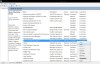
On the downside this will disable the Adaptive Brightness, but I haven't found a need for it and I like to be able to control my own screen brightness, rather than having a dim screen most of the time.
-
Thanks, I'll give this a try too.
-
I used a 10% off one I found, plus a military discount one. The latter can be used at any time with any other voucher. (They don't check if you're actually military)
-
Hi anyone understand how the Battery Meter in the XPS12 works in terms of the "Desktop mode" and "Longevity Mode"? Seems to me it would make sense to only be able to choose one or other, but oddly both can be enabled simultaneously...
-
I have EPP discount but it is only 50 bucks. Been trying to find coupons for weeks, no luck
Sent from my Nexus 7 using Tapatalk HD -
I just got mine today. Ordered on the 26th and came on the 18th. I was testing things out and I noticed that when I plug in my head phones, only the left on works. I hear only a faint sound coming from the right ear piece. My head phones are not broken as I immediately tested it on my mp3 player and also used other headphones. These IEM's don't have mics so its just the standard 3.5mm. I checked the settings to see if its a left/right balancing issue and its not. Even if I put the right on full blast I only hear faint music. I'm guessing its a hard ware error? Damn and I waited so freaking long for this.
-
Same thing happened to me when I first used headphones. Make sure they are fully in, on this laptop you have to press harder at the end to where they click in. If there is a gap push the headphones in harder until they click. If that doesn't solve it, you're probably gonna get a new motherboard from dell.
-
No, I am saying my screen is not dimming at all. It is on max brightness and I can't make it any dimmer.
I will try this and let you know.
Also worth mentioning that my screen DOESN'T dim even when I am in BIOS, which makes me think it's not even a driver / Windows issue...
UPDATE: Tried the service stoppage suggestion above, and it didn't work.
I am starting to think this is a hardware issue. I cannot change the dimming when booting, in boot-options mode, or any other mode out of windows. It is always maxed out.
*sigh* Not impressed with a brand-new machine. -
The i7, 8GB, 128GB SSD is only avaliable in certian countries, I'm guessing America.
UK gets i5, 4GB, 128GB SSD = £999
Or i5, 8GB, 256GB SSD = £1199
Or i7 8GB, 256GB SSD = 1299
And the middle option is now unavailable for ordering (as there is a big fat greyed out button for it)
Order still in pre-prepreduction. 63 days and counting since my order, exactly 9 weeks ago. Still going to have to wait another 24 days for it. Joke and a half. -
Bloody hell!! That's outrageous!
-
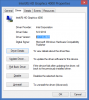
I had that issue after I did a clean install I had used intels driver the brightness would adjust outside windows but not in windows I ended up having to download dells driver for the 12 (I tried the 13 l322 as it was newer and didn't work for the 12) and then disconnected from the network and uninstalled the video card driver and then kept removing from device mgr (Make sure to check the deleate driver and once it either goes away or gives the generic intel 4000 wddmv 1.x driver then reboot and install the dell driver and brightness worked fine for me. (may not have to go through those lengths but that is what I did.)
My current driver is 9.17.10.2849
EDIT: I Mis read that i thought you said it could adjustin the bios. Have you tried loading defaults in bios and running diagnostics? -
Interesting. Just placed my order via corp sales....
i7, 8gb, 128ssd = $1200....
What crazy is to get 256 ssd, it is another $300. Lol crazy
Sent from my Nexus 7 using Tapatalk HD -
You didn't read the description have you?
"Desktop Mode" prevents battery charging to full when you are using like a Desktop, like having it plugged in and never using the battery. Keeping it charged to full is bad for the Li-Poly batteries, and the feature will help you save the battery, so few years down the road the battery won't be degraded and have 30 mins of life.
"Longevity Mode": I'm not sure if there's an advantage of doing this, because Li-Poly batteries only count FULL 100% discharge/charge as one cycle. But according to the description, they are saying that "frequent" charge/discharge cycles are bad. So this feature only lets it charge at certain percentages.
Honestly, I think people only need to have Desktop Mode for those that never use the Laptop as a portable. That has killed lots of laptop batteries. -
Got my XPS 12 replacement. I don't have physical issues like some have described, plus I got the Samsung PM830 SSD rather than the Micron. I got it 2 weeks from the time they said they'll send a replacement. And the support guys were awesome, even though they didn't get to find out the problem(I feel for Dell, I hope they find out).
Oh, and the battery life is 47730mW(47.73W) on the replacement rather than the 45450mW(45.45W) on the old one. So I get to have 12 minutes of more battery in 6 hour usage scenarios. :thumbsup:
HURRAY! -
I've tried that already. I also reinstalled drivers to latest. Went into numerous different settings and checked left/right balance. Also went into Dell Diagnostic systems and passed everything. Nothing seems to be wrong. So I decided to call Dell support. They will have a technician replace my motherboard in a few days. Oh well at least I don't have to return it and get it fixed from there....
-
Now that I finally purchase the XPS..it is a waiting game...while I wait...
Those who bought the 128 SSD and then replaced their...what SSD did you replaced with. 256 GB, 512 GB? Model, brand? -
Some countries don't have a choice I'm afraid. Dell Uk doesn't give us the option of the 128 SSD with the i7 processor and I haven't checked but UK probably isn't the only European country with a more limited option choice than the US - where I'm assuming you are from.
-
My video driver is the same as yours, and yes I tried resetting the BIOS to default settings and running the diagnostics. Nothing.
I think I may just simply have a physical problem. I might have to do the unthinkable and dial the 1-800 and lose my sanity over having to explain this. -
Who else has issues with the WiFi. It is driving me nuts. About 50% of the time when the laptop goes to sleep and wakes up, it cannot connect to the wifi again. I restart, the adapter is then always disabled. I already re-installed driver etc. Makes no difference. I have four other devices at home (Windows 8 Lenovo, Ipad, Iphone, Dell XPS 15 with windows 8 upgrade). They all work without any problems.
-
BIOS disable?
-
Try restarting the router, do a hard reset and/or firmware upgrade on it too.
-
Happens to me once in awhile.. even on my phone. What I do is enable Airplane mode and then unable it and it will reconnect. I assume its some sort of router issue with sleep.
-
If anyone is having screen-dimming issues (seems there was at least one of you), there is a possible solution through Intel Graphics properties on the Zenbook forum: http://forum.notebookreview.com/asu...ux21a-ux31a-ux32a-ux32vd-448.html#post9047226
-
Hello All,
I've had my Dell XPS for 12 days now and I wanted to share my experience. I waited over 3 weeks since the day I ordered to receive my XPS 12. I even contacted customer service to find out why it was taking so long. All I can say is that they were responsive. A couple days later, I got a confirmation that my order was shipped. When I recieved my ultrabook, I discovered some dead pixels in the lcd. I was a little disappointed since I paid over $1400 for this piece of hardware. I've never had dead pixels on less expensive laptops. I called Dell Customer Service and to my surprise they said they would order a replacement screen and send a tech over to me to fix it. I thought I was going to have to send it back. It took about 5 days total. The tech came and I got a new screen and no more dead pixels. I have to say that I have been impressed with Dell's customer service.
As for the XPS 12 itself, it has exceeded all my expectations. It is a beautiful device. My only complaint is that the screen doesn't have pressure-sensitivity (no wacom technology). But a third-party company that makes a bluetooth stylus for the iPad that incorporates pressure-sensitivity is working on a Windows 8 version. My trackpad works fine. The touchscreen works fine. On rare occasions, the screen won't respond to a swipe. But I think it has to do with my fingers being very dry (my hands get very dry in the winter). My wi-fi wouldn't connect after the tech replaced my lcd. I did a couple of full shut downs and now the issue is resolved. Battery-life is acceptable considering this is a touch-screen device. On battery-mode, I restricted the cpu to 80% to get a little more battery-life.
All-in-all, I have very happy with my XPS 12. It was worth the wait and money. All I need is a nice case and a stylus (going to try the Adonit Jot Classic). -
Does anyone know if the keyboard size is the same for the XPS 13 ultrabooks? I am looking online to buy a keyboard protector for my XPS 12 but could only find XPS 13 ones for cheaper and same price.
-
For comparison however, I ordered the UK i7 spec on 11 Dec and it arrived on 16 Jan (2 days ahead of EDD). Still a long wait I guess but something must have gone wrong with CoolHotCold's order. Worth a harsh call to complain?
-
Did you see the latest driver from the 15th? Drivers & Downloads | Dell United States
Driver Details | Dell United States
unfortunately I cant be much help as u am using a Killer 1202 and have had no issues since the swap. -
Thanks. I did read the descriptions, but what stumped me were the explanations under each radio button for turning on Desktop and Longevity modes:
Desktop mode (sic): Use this mode to maximize battery health. Battery will only charge between 50 and 100%.
Longevity Mode: Use this mode to protect your battery from frequent charge and discharge cycles. Battery will only charge between 88% and 100%.
So the question is: what happens when you turn on both? -
It looks like Crucial mSATA is recommended by Tomhardware team ( mSATA: Little Dimensions Can Still Mean Big Performance : Round-Up: 10 mSATA SSDs From Adata, Crucial, Mushkin, And OCZ)
-
Do you guys have any input on whether one should get the i5 or i7 version, battery and noise wise? Going to use it for fairly cpu intensive work (programming), but I remember reading someone speculating about the i7 being hotter and draining more battery life?
-
![[IMG]](images/storyImages/ScreenHunter_01Jan222101_zps191393ef.jpg)
I'm no programmer, just an average user. But after 7 weeks use, this is my stats. Screen is about 60%.
I have i7 265, 8 -
This is on 100% screen.
![[IMG]](images/storyImages/ScreenHunter_02Jan222106_zps172d89e6.jpg)
-
UPDATE 2: A quick history of the problem above. Bascially: screen doesn't dim. After a total of 2.5 hrs on the phone with customer service, a new screen is being sent out for replacement. I'm not quite sure that that will fix the problem, but at least I have gotten Dell to understand it is a hardware problem. I hope no one else has to go through this. I'll let everyone know how the repairs ago. Also, if you have the same problem with your XPS12 please share... -
Thanks, how about fan noise and heat when holding it as a tablet?
-
So, if I were to look for SSD replacement, as long as it is mSATA it should work with Dell XPS 12?
-
Btw can you guys recommend a lightweight sleeve and bag for the XPS 12?
-
Yes and Judging by your Signature you are ordering the 480GB Mushkin Atlas that works great in my computer nice and fast and after several recharges and days of use its like a 15Minute Drop or so on battery life during normal usage for me gaming its not a noticible diffrence (Then again its only 2.5-3hrs gaming if that)
-
Now that many of you had the XPS 12 for weeks, what's the verdict on the XPS 12 as a tablet?
-
I have a XPS 12 coming in the next few days. I am hoping that we could find a stylus that works with this. I already have a Wacom and Ntrig compatible stlii in hand. But i remember reading that they were already tried and do not work with XPS 12.
I saw this post that says XPS 12 uses an atmel touch screen chipset
Re: XPS Duo 12 - Wacom Digitizer Pens - New to the Community Forum - New to the Community - Dell Community
Using that information I found Atmel makes a stylus called MaxStylus which is supposed to work with many of their touch screens.
Atmel® maXStylus
What i am wondering is if we can find a MaxStylus somewhere to enable inking on this little machine.
Apparently HP Elitepad 900 also uses a MaxStylus.
HP Elitepad 900 with Atmel maXStylus pen - YouTube
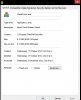
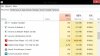
Can anyone confirm that xps 12 actually has a atmel touch screen? Also any additional info we can get from the driver? -
I don't know if this will help, as I can't specifically find anything in Device Manager relating to Amtel, but in Task Manager I find this:
-
Yea. Saw it your SIG you installed one. Debating to keep it or wait if Crucial M4 releases 512gb
Or stick with the 128gb for awhile. Either case the xps won't be shipped until mid next month anyhow
Sent from my Nexus 7 using Tapatalk HD -
from what I see the new ome will be m500 and sizes at
120GB, 240GB, 480GB mSATA 500 MB/s 130 MB/s, 250 MB/s, 400 MB/s 3.3V
Info here : Client SSD - Micron Technology, Inc. -
*Sigh*
You have to wonder what's going on at Dell.
If I buy a brand new XPS 12 now it will be delivered on the 7th (apparently).
If I wait on my replacement XPS 12 it will delivered on the 13th.
Still going to be 81 days since I originally ordered, it's already been 8 and a half weeks since I ordered it and it'll be another 3 weeks until I get the replacement. 81 days and I'll hopefully have a working unit, otherwise I might as well wait for the Lenovo/IBM Helix or the Surface Pro, and both look pretty attractive right now, probably better customer service too.
Dell failures, Promise £50 for delayed delivery back in December, refused to honour the £50 voucher, got a replacement ordered on the 2nd January and will get it after those who still haven't placed a order yet.
*Sigh* -
I do admire your patience mate. I would have thrown my toys out the cot a long time a go, calling every customer service person a c**t.
Hope you get some kind of compensation. You bloody well deserve it! -
It gets quite warm using as a tablet. But never uncomfortably hot. I have never had to move it because it was too hot.
As for fan noise. It is not something I am too bothered with, but you do notice when the fan kicks in. If you're sitting in a quite room you will definitely hear it, and I can see that getting annoying. But personally, I hardly notice when it comes on. -
Thanks. Anything in the USB devices section of the device manager?
-
Bump ... also interested in this.
-
Download Selector | Dell United States
New Cypress Touchpad driver for XPS 12! Download Selector | Dell United States -
Anybody else getting a File Not Found error for this file? It shows on Drivers & Downloads page but I can't get the file.
-
Anyone here got into the new SImCity Beta? How does it flare on the Dell XPS 12 engine? Is it playable?
XPS 12 Owners Lounge
Discussion in 'Dell XPS and Studio XPS' started by swenpro, Oct 21, 2012.


