 Problems? See this thread at archive.org.
Hi. I'm currently spending hours to re-install W8 and the whole drivers stack on my XPS for this next friday and the Dell wifi issue analysis. And now, I wonder if the grid issue doesn't come from Windows. My daily configuration is Ubuntu Gnome as my unique OS, and I never noticed any grid issue on the 4 screens I've had on the XPS (v1 + screen changed, v2 + screen changed, yes, 4 !). I've been running W8 for 3 days now with the daisy wallpaper and I see what I think is the grid issue. I see a grid larger than a pixel, I would say the grid is 3 or 4 pixels large, but just my feeling.
So, for people complaining about the grid issue, I would recommend to try a linux LiveCD and see if the problem also occurs on this OS too. Of course, this doesn't solve the issue, I won't be surprised it's software related.
-
Also I just remember how my xps15 doesnt close the lid all the way since the screen hits the keys and touchpad and does some crazy stuff when it is still on.
I just remembered the issue when I hooked it up to a monitor again to work with the lid closed. It zooms icons on the desktop, switches windows and god knows what else...
Elvis7 had the same problem and documented it pretty well. Not sure if there was a fix. Probably have to remove the keyboard and refit it or something. -
Would you care to elaborate on what you did with either? Thank you in advance!
I am assuming you also managed to alleviate the problems of throttling? -
If you really want to alleviate the hardware cooling problem, you have to:
1. Re-paste the heatsink with better compound (and not do a crappy job like Dell does)
2. Remove the DVD/Bluray drive completely
3. You can replace the Forceconn fan with the Adda fan like someone mentioned but it wasn't necessary for me
If you want to just make it a little better with software
1. Set the max cpu frequency in Windows Power settings to 99% to disable Turbo boost
2. Use Throttlestop if your on the older BIOS that throttles CPU as opposed to GPU when temperature gets too high
http://forum.notebookreview.com/har...arket-upgrades/531329-throttlestop-guide.html
Throttlestop lets you force the CPU to unthrottle
Or on the newer BIOS which throttles GPU when temperature gets too high, force the CPU into a lower ghz state so it outputs less heat; giving the GPU more thermal breathing room.
I would also say buy a laptop stand, like this and this. It elevates the bottom so hot air doesnt get trapped and the laptop has a easier time intaking and expelling air.
I tried using my Zalman NC2000 laptop pad but it actually isn't as good as just a good old stand. -
I had a Dell tech come out yesterday. He replaced the fan, heatsink, lcd screen, and swapped the Dell 1901 with the Killer. Unfortunately, my 2.4GHz performances is worse now. I am running the latest Killer beta driver. Anyone have suggestions?
-
What were the results of the wifi analysis? Are they sending you a different model ?
-
It was fun indeed. The guy took control of my XPS and my wife's 2006 Macbook Pro, and then started his testing with...speedtest.net and finally said "it works, I don't see any wifi problem". So I said "let's make another test, we're going to download a 500 MB file from my nas", and the XPS was 2 times slower than the old mac. The problem, in this testing, is the wifi seems to be very erratic, sometimes I get 28 Mb/s, sometimes it drops to 8 Mb/s, and I don't know why. I have to say I don't find these tech guys really good, I didn't look at the wifi settings, I could have cut the N mode or something similar.
I also had to take pictures of the "strokes" on this new screen, really difficult to illustrate on a photograph. Now the file is still "on going". I was told a Dell rep should have called yesterday, but I received no call. Maybe on monday. Let you know as soon as I've been called. -
Sounds like a pain in the butt. FYI Dell replaced my LCD without much fuss, but I was communicating with the Dellcares twitter team.
-
I did, and outlined basically what I did here: http://forum.notebookreview.com/dell-xps-studio-xps/673630-xps-15-l521x-owners-lounge-568.html#post9205627
Basically, I've been using Throttlestop 5 with PowerSaver (regulates CPU Voltage levels to help reduce heat) and BD PROCHOT settings ticked on, and my Windows power setting set to a maximum CPU level of 5%.
Then, I've been playing with nvidia inspector batch files and adjusting the MHZ of the GPU until the GPU temperature stabilises on or under 80C while gaming.
Using nvidia inspector is better than just limiting the CPU speed as it stops the GPU from throttling altogether (even when it reaches 80C). I've been able to maintain a stable temp with the GPU at 600MHZ playing Crysis 3 lately. -
Can anyone recommend a nice sleeve or bag for our laptop
-
ok so even after the killer n and new hinge switch I knew the wifi range wasn't great but the speed at close range and medium was great. it wasn't until yesterday that I truly realized how bad the range is.. My friend brought over his new 400$ acer laptop and just for fun we compared wifi range and networks.. well, his laptop could see 4 of my neigbhours's wifi networks and was able to see and connect to my house wifi from the driveway, while my 1600$ xps could not see anything other than my wifi from my basement and could not even see my wifi from the driveway. so im suppose to be traveling in a bit, I guess this will cause issues at airport's wifi?
 no official real fix yet?
Terry B was talking to me to see what could be done and updating me and fixes and etc but he hasn't replaied to me in about 2 months... Did dell fire him too for helping us out like they did the other dell employee or did he just give up on me?
-
I'm still bugging the twitter team about the wireless. I'll post if they come up with any solutions. It bothers me a lot that my wifi on the 2.4 GHz band is much worse now after the screen replacement and net adapter swap.
I noticed it is worse now as my 2011 MBP gets 7-8 megabits consistently through my 2.4 ghz extender, but the XPS 15 gets between 0.15 - 5 megabits. If the wireless was more consistent that would be helpful.
On a side note, after having the heat sink replaced and new thermal compound applied the gpu now maxes out at 74c and the cpu at 79/80c. Does this seem safe/stable temp to everyone or should I underclock the cpu and/or gpu? -
no known fixes reported.
my advice: get a USB adapter to take with, just in case. -
Those are fine temperatures, assuming you're doing something with it. I usually get 53C when just browsing internet, playing music etc, and about 75-80C while gaming.
I'm not a fan of underclocking, I mean, you paid hundreds of dollars for what is pretty new GPU and CPU technology, and you paid all that money for the performance each delivers. I personally leave the settings pumped up, and go about finding ways to ensure the cooling system can cope. The moment I have to underclock any of my computers to make sure they don't overheat is the day that machine goes back to the manufacturer.
I asked the Dell tech when he came around what the story is with temps and he said the official system emergency shutdown temp for these was 110C. I told him mine (before all the work) was getting 90C he seemed to think that was hunky dory, even though the heat bleed through the keyboard to a point where using the L side of the board was uncomfortable.
Having said that, new fan, new compound, no DVD and a cooler master pad means I can't actually get it hotter than 83C, even if I run everything I can think of. -
Ok so will a 5mm hdd and a 256gb ssd fit in the hdd space? If I do that would I be able to add a gpd mini card in the wwan/msata slot with flat antennas?
Also, is there someone we can email in dell that will listen to us nd the non working wifi.. I mean what about the dell guy or even the thats incharge of the ne xps 11 or someone, anyone! -
Breaking news ! I was called by a Dell rep and he told me the new Intel wifi driver fixes the issue, bla bla bla......
-
Did he claim the Killer Dell driver that was released on 5/30/13 resolves the issue? Or is there another driver being released soon? I'm using the Killer Beta driver at the moment. -
Ok, so after having 48 hours to research the wifi issue, the dell team sent me this tweet "Possible that you need to back up files and re-install windows. ^JA"
Has anyone done this? I don't have a method to do a full backup at the moment so I will have to wait to try. -
Thanks for this info, as I couldn't find the updated driver on the Dell web site, I asked the rep and he sent me the link of the Killer-N. The problem is my XPS runs an Intel 6235N, excellent !
-
I've had the machine about a year, it's one of the early models.
I've reinstalled windows twice, once with W7 and once with W8.
My machine came with the Intel 6235 card, I've tested a dell 1901 in it, and currently have the Killer-N 1202.
My home wifi originally was a DLink DIR-655 (single radio, 3 stream, 802.11b/g/n), currently I have an Asus RT-AC66U (dual radio 2.4 and 5 ghz, 3 streams each, 802.11a/b/g/n/ac).
Reinstalling windows *does not* make any difference. mostly.
As a totally wierd exception, on the fresh install of Win8 with only the default windows driver set and the intel 6235 on board, that got the best performance out of the 6235. Adding the "current" Intel drivers (HD video, chipset, wifi, sata) to the system destroyed the performance.
Removing the drivers did not restore performance.
W7 install did not do this - I don't recall it recognizing the 6235 though, but it's been a year so who knows?
The *most reliable* internal wifi has been by far the Killer-N. Best throughput and more reliable connections, period. Note that running the Killer-N "tuner" app *once* seems required to configure the device for best operation, it is not required to be run again afterwards (I remove it from the auto-start so it never runs unless I explicitly want it to).
The dell part was crap, IMO.
Range from my DIR-655 was crap with all of them, even if the Killer-N was best. By best I mean it functioned over 10 Mbit to about 50' (direct line of sight).
With the Asus router I get more like 100-150' range through two walls with 10 Mbit or more performance with the Killer-N, whether the 2.4 or 5 ghz band is better depends on factors beyond my control (such as the firmware of the router, still teething).
However.
When I was visiting my in-laws last Christmas, my notebook could not get a usable connection to save it's LIFE, with their router. Their router is an Apple Airport Extreme. This at a range of about 50' with direct line of sight.
I had to use my USB dongle - a Netgear WNDR 3100v2 which I gently badgered Dell for last fall when this while wifi thing kicked up.
Basically, all the wifi hardware is crapped on by the casing/design of the machine. That's really the only reasonable explanation if you ask me (me being a long time nerd with a history of building my own desktops and a 20+ year history of being a hobbyist tweaking my hardware and building software for various platforms). The only way that I can see Dell "fixing" the machine would be to put out a replacement lid and hinge that doesn't interfere with reception, and route the antenna leads in a shielded housing to prevent interference for signal generation on the motherboard.
In short, I don't think it's reasonable to expect. I just don't see where it's fiscally viable for Dell to pursue it in the current economic climate and their obvious stance leaning away from consumer goods.
If I was doing the purchase again, and I could have, I'd probably gone after a Lattitude. For my use the business class machines have been DRAMATICALLY better.
If the wifi performance was 20% more debilitating, or the heat management got in my way (which it doesn't simply because of my own usage patterns), I'd sell it at a loss and get a different machine just to not have to dell with the crap.
As it is, I don't deal with the crap. I use the wifi dongle if I need to, but at home I don't need to (my 3 Mbit DSL is the problem there, but I can't fix that). I don't travel enough for the dongle to be a pita. I don't play games so much any more so the heat isn't a factor, and cpu-heavy gpu-light work doesn't seem to stress the system no matter how hard I try.
And, with those two major things out of the way, the machine is in fact ideal for me, almost. I still tap the touchpad now and then while typing, but that's me being lazy and not holding my hands properly. -
Last update: if I believe the Dell rep who has just called me, there is Dell worldwide communication to install the Killer-N driver to fix the wifi issue, even if my XPS runs an Intel 6235N. Can you believe this ?????????????
-
i managed to pick up 1 of these laptops, but it has the Intel Core i5-3210M processor ........ will i be able to upgrade the processor to the i7 in the future?
-
The processor is not removable unfortunately, only if you buy the motherboard with i7.
-
that's kind of, well, dumb.
it'd be fascinating to try it and see that it magically makes your 6235 scream.
i wonder if it's the "app" that comes with it, and not the driver.
-
Just tried for the fun, it doesn't install, "No supported hardware found in your system." End of story.
Update: new call, a tech comes this friday to change to wifi card, again. But now, it will stays with me, to make some testing, comparison with my wife's old mac, while being in touch with the Dell support by phone. -
another example of the FINE, QUALITY, technical support and knowledge practiced by Dell these days.
-
Yes, it's a bit scary for the support to hear "yes install the driver, I don't care if you don't run this wifi card".
-
For those still interested in solving cooling issues; check your thermal paste.
It might seem a little thing, but have a read about it. Its highly important the paste forms a nice uniform THIN later across the top of the processor. Too thick, and it starts the insulate the processor, and doesn't transfer enough heat to the sink, and dissipates it across the mother board and frame, which is not good.
I was in PBTech the other day, and found some of the Arctic Silver 5 stuff, and thought I'd give it a go. Turns out, that was a good idea. My XPS usually idles around 50-55C, and when my friends Toshiba is at 32C, I started wondering why the difference was so large. Sure the XPS has case design issues, but that can't explain 10-15C by itself surely...
So I pulled it all apart, and the most ungodly of messes awaited. The thermal paste is only supposed to be on the shiny metal surface on top of each processor, as thats where the copper pad for the heat sink contacts. As you can see, the paste in this was everywhere.
It piled up beside the surfaces, and more still had been applied to the heatsink itself, causing a huge, counterproductive overspill, all cooked and full of air pockets. I'm no thermal engineer, but this didn't seem effective XD.
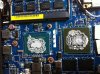
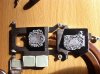
So I applied the Arctic Silver 5, no photos sorry, was too busy getting it all back together. Firstly, I removed most of the paste using a microfibre towel, and then dripped alcohol swab solution onto the surfaces and continued cleaning. (Recommendation for a cleaning solution is 70% to 100% pure isopropyl alcohol, or apparently meths works too. You need something that is going to evaporate off, and not leave conductive residue)
There are a few suggestions on how to apply AS-5, but most say to apply a tiny drop to the GPU (Square surface) and a thin line to the CPU (Rectangle surface). This way, its easy to spread out thin and even, I used an old credit card, and there isn't any over spill.
AS-5 instructions recommend a 'burn in' time of 200hrs, that is working the processors up to max temp, and then cooling back to ambient, and repeat. If you are a regular gamer/ data processor like me, this will happen in about 2 weeks, and longer if you don't stretch your laptop much.
Logging on and leaving the XPS to idle, with iTunes, Chrome, Skype etc, 20 mins later my temps still looked like this.
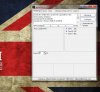
DISCLAIMER * I am NOT a computer expert, just an enthusiast, and if you want to do anything like this, make sure you've read the instructions, understand the risks etc. Its not a difficult process, but one that does need to be done right
-
I did this as well with my L521x 3 days after I got it. I have to I7 with the 640 as well.
Since then I have been gaming the odd time and no more throttling and max temps level off around 80c which is not that hot in the laptop world. idle between 30-40c on both CPU and GPU! I also used Arctic Silver 5 High-Density Polysynthetic Silver Thermal Compound. Makes a world of difference over the cheap thermal compound Dell used.. 10-15c difference.
Mine also looked like your picture when I took the heat pipe off. They had way, way to much paste on the CPU and GPU.
I received my L521x on the 5th of June.. No wifi issues at all and i'm not to close to the router. Transfers files just as fast as my m1530 over the network.
The XPS L521x is a great laptop.
-
I thought AS5 was conductive?
-
It is thats why you just put very little on!
-
AS-5 isn't conductive... Can you imagine what would happen if it was?
The silver is suspended in between this poly-synthetic oil, which insulates it. I think at worst, AS-5 could be slightly capacitive as a result.
More info on it here: Arctic Silver Incorporated - Céramique 2 -
Hi,
Is there any news on the wifi problems?
Thanks -
No, not really. Read thread for details. This question seems to be asked about weekly, or bi-weekly.
-
Wow, I'll get a torx screwdriver and will check how my thermal paste looks like.. My XPS14 Intel only only seems to have trouble sitting below the upper 50s degrees
-
Ok, so Ive had this computer for about 9 months and have to say I thought I was one of the lucky ones with no issues at all until today when I went to use it today and my gorilla glass had cracked right across the screen. The LED still works fine, its just the glass cover that has cracked. I have no idea how it has happened, because I didnt drop it or bump it, maybe the glass had a fault?
So I called dell to see what I could do and they said it wasnt covered by warranty and a replacement screen was $770 plus $169 installation! I laughed, but its not funny.
I dont know if any of the Dell reps are still on this thread that were here when the laptop was first released, and there where heaps of issues, but this is ridiculous, and I would like some help from a real dell rep who has some awareness of how insulting the service I have had is.
And to the other owners, has anyone had a similar issues, or does anyone know of a way to get some replacement gorilla glass. Im am happy to pay a reasonable amount to have it fixed (although I didnt cause the issue and think it should be addressed through the warranty) but $950 is a long way past reasonable, and should stand as a warning to all potential purchasers. -
No disrespect bud, but you must have done something to it =/
Gorilla Glass is the same company that supplies glass for iPhones, Apple knows its strong enough to make a case out of for the most abused bit of technology we carry around daily...
Unless it was hot, and cooled really quick somehow? But glass (any glass that I've heard of) doesn't just crack... Is there someone else living with you? They might have something to confess... -
Thanks for your opinion of how one gets a crack in gorilla glass, but I have one and I assure you I didnt do anything noteworthy to get it.
What I want is a solution! -
I would recommend to find a whole screen module as spare part. But it seems a bit difficult to find.
-
If you have accidental drop protection. Your screen is covered. It came with my computer when I got it 9 months ago but it doesnt come with new XPS15s
-
Hello,
My L521X running Windows 7 SP1 suddenly died yesterday during operation. No power, no battery life, no LEDs at all - totally dead. Dell came out today and replaced both the motherboard and battery.
Now the system boots, but it BSODs as soon as Windows begins starting.
I don't have a recovery disc for it (I don't *believe* it came with one), and Windows Startup Recovery does not detect the hard disk. I've tried installing the Intel Rapid Storage drivers but it still does not detect them.
Any suggestions please? Could really use some help!
Thanks,
Sam -
Hi guys,
Just bought the XPS 15, thought that I'd wait for an XPS 15 haswell refresh but with still no announcement + some good sales and me going overseas very soon thus being able to claim back a bit over a hundred dollars of GST at the airport, I thought why not. Hopefully there's no problems with wifi and since I don't play games all that much, hopefully the heat throttling won't be an issue for me.
Just some questions. Basically I bought a configuration that came with a 1TB HDD + 32gb mSATA SSD, and I also bought a 512gb Samsung 830 SSD from my local store to put on the laptop to replace the original HDD. I was basically planning on migrating data from the HDD to the SSD with Samsung's migration software and just replacing the HDD, store the HDD away in an external enclosure and be done with it though I was wondering if there was anything else that I needed to do? Is there any settings or something that I have to enable or disable. Is there any benefit of simply leaving the 32gb mSATA SSD in the laptop or I'm better off just taking it out. Sorry if these questions have been asked over and over again, I did some searching on google as well as searched in this thread and found some general talk about the matter but I can't seem to find any detailed step by step instructions or detailed explanations on the matter. -
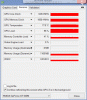 What I did is flip back the black plastic covering the cmos battery to give room for better air flow passing through the backside grill. Next I removed the heat sink and applied high heat conductive thermal compound (Gelid GC-Extreme: the most expensive one I can find) and applied it evenly on the contact surface of both GPU and CPU. Next, I boot up the computer and go into power options and changed the maximum processor state to 99% (disables Turbo boost) without the need of throttle stop or NVidia inspector. Overall my experience with this mod made Crysis 3 running 1600x900 low 45-50 fps v-syncff looked awesome. Temperatures ranged to about 75-77 Celsius @ 640-708Mhz gpu core. It is recommended to use dell's graphics driver because the GPU load of 99% remains the same as compared to Nvidia's driver that fluctuates quite often
-
I actually did the same thing but with a Crucial 512GB SSD. I used Acronis True Image to copy all the partitions over to the new disk (over USB enclosure) and swapped the HDD for the SSD. I also disabled the mSATA SSD caching in the BIOS first. Theres no benefit to having the mSATA SSD cache for the 512GB SSD. You can however use the 32GB mSATA SSD as additional storage if you wish.
-
This was most probably due to that you changed MB that the HDD boot option in BIOS changed. There are selections like AHCI, SATA etc that I cannnot rememer exactly but you can safely try each of them (only three in total) to see which one can boot up your Windows.
-
Dell is now clearing out stock on there XPS 15 L521x..
Found this out as I ordered a XPS 15 L521x last week but I got a call today saying it can't be built with the spec's I selected as they are not filling inventory on the L521x for parts now as new refresh 2013 refresh with intel's 4th Gen Haswell processors of the xps 15 will be out soon. I was told could be early as 2 weeks from now. but on the bright side of things I will be getting a $200 discount of the new XPS as I had a fastship order setup for the XPS 15 L521x and they had to moreless Cancel it.. and from what I was told is they are just clearing out the system that are already built. -
I have the same laptop, and plan on doing the same as you; SSD upgrade for the HDD.
I've been assured by other fine people on this site that there is no use having one SSD cache another, so really, the MSATA port can be just another storage space.
ETC *Gets Crucial M500 MSATA 256GB, replace the 32GB that came with it. OS/ Program files onto that, use the standard SATA for a larger SSD for file storage etc = Super speeds
Oh if only I had the money XD -
Please don't get me wrong, I'm just amazed as to how it happened (I shut my lid hard on a HDD in between the screen and keyboard, with no damage at all).
As said, the easiest thing to do is to get a new screen module, they are easy to install (2 wireless antenna cables, 1 screen cable and about 6 screws for the brackets).
As far as price goes, buying one from Dell is probably not going to be worth it. I'd try find someone who poured coffee eg through their XPS 15 on ebay, are parting the laptop out or selling the whole thing as it and recover the screen itself. And if it costs $100, well I'll bet that still huge savings.
For example, 2 mins on ebay turned this up, might be worth a look:
New Dell XPS 15z L521Z Complete Lid Screen Hinges Cables Assembly 6985X | eBay
Failing that, a laptop repair store might be able to sell you the part on the cheap.
All the best dude, let us know how you get on
-
Visited yesterday by a Dell rep for replacing the wifi card and the screen. He saw the strokes behind the glass, but he didn't come with a screen. I'm pretty sure as someone else said on this forum, the screen gets more strokes with time. I figure out if this doesn't simply come from dust entering the screen module.
I'm running now a Killer N wifi card. I did the same test of downloading a 500 MB from my nas at 5m from my router without any obstacle. With W8, the wifi systray gets one more bar than with the Intel N6235, but rate are exactly the same, far behind my wife's 2006 Mac.
Under Ubuntu, the Killer N works out of the box, but the rates are terrible, I'm looking now for some settings. -
Did you run the Killer app once to let it "optimize" settings?
I had to do that with mine to make the card work best.
I don't have the app running otherwise though, it's a run-once requirement. I assume there's some registry settings it's configuring but have not taken the time to investigate.
addendum: what router? I had very poor luck getting the Killer to work well with an AirportExtreme, but I didn't have the latitude to tweak the Airport.
XPS 15 (L521X) Owner's Lounge
Discussion in 'Dell XPS and Studio XPS' started by Muddy, Jun 28, 2012.


