Problems? See this thread at archive.org.
Interesting, I thought I had an XG4 in addition to the XG3, but I don't recall any temps like that. I did and do have all of my laptop NVMe drives sinked to the bottom of the case. I think the hottest drives I've had were the ADATA SX6000s, I couldn't keep them cool if my life depended on it.
-
-
Hello Guys,
I am a graphic designer and i have been experimenting some lagging and slowness using adobe programs, specially photoshop.
(mostly when i open big files (120 mb) and applying filters (like hue/Saturation) or when moving groups of layers on my xps 15 9570, these are my specs:
- 8th Gen Intel i7-8750H Processor (up to 4.1 GHz, 6 cores)
- 15.6" 4K touch display
- 512 PCIe Solid State Drive
- Nvidia GTX 1050Ti with 4GB GDDR5
- 16GB Memory
has anyone experimented a similar problem? (other apps like cinema 4d and games like fortnite or shadow of the tomb raider work just fine).
Some people recommend doing a clean windows install, but i am afraid my xps performance may drop if when i reinstall the drivers i left out anything relevant installed originally by dell(my xps is not too bad compared too other ones so i am afraid that may change)
Thanks for the help! -
@theraseus I have the same problem. As I see it, the 9570 with the UHD630 is not strong enough for 4k, at least with the current DPI scaling implementation of Windows 10. My 9570 becomes slower and slower, laggier and laggier, the more windows I have open. It kinda feels like every window adds up, and then with for example 10 Notepad windows, 20 Chrome tabs, some other, the 9570 becomes really lagg, even there is no CPU load. And then opening task menu has a 1 second lag and has slow animations.
Adobe programs are really complex and have lots of things to draw for the UI, so I can see it being laggy on a 4k display.
You could try to do a 1080 resolution, reboot, and test if it still lags with it, and then know it is a 4k issue.
Are you using the 1050ti for Photoshop? I actually noticed it doesnt really help much, because the 2d rendering of the window is still made via the Intel GPU. Are you using latest version of Photoshop or an older version?
Are you using latest Windows 10 1809? It got a bit better performance with with DPI scaling. Also using latest Intel drivers might help, so dont use the Dell drivers.
You can try to reduce video memory as much as possible, so deactivate every Windows 10 animations and transparency.Last edited: Dec 23, 2018 -
@maffle thanks for the reply.
I have tried lowering the resolution but i didnt restart afterwards, i will see f that changes anything.
and yes i am using the 1050ti, maybe using the intel gpu could help performance.
I dont think it should be a memory issue, but all your tips sound interesting to test around, i will do and post and update. thanks! -
Hi,
I bought a XPS 9570 i7-8750H 16GB 512GB 2 weeks ago. I like clean systems so I performed a clean installation of Windows 10 and I was looking around in my system just to see that all was ok so looking in Windows event viewer sometimes there are ( at cold boot ) some errors -> Kernel-boot (29) and Kernel-power (41) errors. Just for your information I have not system failures, no BSOD, no issues but my system works good. If I restart there are no these errors but sometimes after shutdown at next cold boot these errors appears in event viewer. If I switch off Windows fast startup in power management I have not these errors. Please can you tell me if you have any of these kernel-boot and kernel-power errors in event viewers or your 9570? My SSD is a Samsung PM981.
Thanks. -
My XPS is a 9560, but I get the same errors when fast startup is enabled. I suspect that those errors are a "Windows feature", and that, when fast startup is enabled, there is a delay in the starting of some components. The result is that the Event Viewer is checking for errors before the delayed components have started and that, then, the errors are recorded. I've now had the XPS 9560 for over a year, and none of those errors seem to result in any actual problems.
I can be quite OCD about having a "clean" Event Viewer. With the Windows 7 computers that I've owned, the Event Viewer was error free virtually all of the time, and, on the rare occasions when an error did show up, it was fairly easy to determine the source of the error and to fix it.
With Windows 10, that doesn't seem to be the case. Microsoft seems to be more interested in adding new apps to Windows 10 than they are in fixing the sources of errors. Typically, Microsoft's response to questions about those errors seems to be that "they can be safely ignored".
While it is difficult for me to control my OCD tendencies with regard to the Event Viewer, I really try not to pay much attention to errors unless they seem to be related to some other problem with the computer.Last edited: Dec 24, 2018 -
Thanks for your reply. I don't know why we have these errors but in my assembled PC with faststartup enabled I have not this kind of errors. There is something wrong with Dell Bios. Now I suppose that all 9560/9570 systems have these errors... And I'm completely agree with you about Microsoft.Last edited: Dec 24, 2018pressing likes this.
-
Hi, I was contemplating to buy this notebook after i have stumbled on this thread, has the error with usb connected devices coming from sleep (hybrid/modern) have been fixed? same with the gpu cutting off power after it reached 74C? Is the killer wifi card still needed replacement?
-
Hey guys,
I wanted to share some experience with @Endbringer and ask a question:
Question:
While gaming my machine gets very warm on the lower left side of the keyboard. Does anyone know which part is there and if this is concerning?
@Endbringer Experience:
My killer wifi card is actually really good, I can't believe I am saying this but it works through walls, floors and so far very reliable.Last edited: Jan 1, 2019Killer_Networking likes this. -
@Endbringer No, nothing fixed. Yes, still advised to change. Mostly depends on the access point. 2019 is close, I would wait for a 9580, maybe with a 1150. There are some reports of the 1150 being about 30-40% faster than the 1050.
@ DetailsMatter mostly the PCH. Check PCH temps via HwInfo. There were some reports it getting really hot around 80°C, normal is about 40-50°C under load. If you have an external monitor connected or using TB it gets way warmer though.Last edited: Dec 28, 2018 -
Question for you all. I am still running BIOS 1.2.2. I know there are Intel security updates in the new ones, but I been hesitant to install any new ones due to the lack of S3 sleep support and just overall issues. Everything seems to be working well enough, no serious usability issues. There are some weird quirks with TB16 dock (like can not use my external mouse and keyboard while my Brother scanner is scanning). I guess my question is, should I ever update?
Also, has anyone had issues where the left fan rattles? I called and having a tech come replace it. They wanted to go through the whole dog and pony show of updating software and firmware, but I kinda complained hard enough to skip right through it to the replacement. -
@CryoBolt The question doesnt make much sense to answer. You have to decide if you want to use broken S3 (bugged CPU) with your XPS. The security updates are no reason to update, you get the MC anyway forced by Windows and I have deactivated Specter and Meltdown mitigations. The Intel ME flaws are also not really relevant to you I guess. Fans can randomly start to begin to rattle, yes, I have seens reports on it before. It is just part of the cheap materials Dell uses on their "premium laptops".
-
Thanks @maffle will wait for a better laptop then
-
Just got it today. It just doesnt fit by 2cm in my slim messenger bag. Since i'm moving around a lot, i need something light and slim to easily carry it around
Of course no backpacks and bulky messenger bags. Somethings that fits as tight as possible -
Finally got my hands on my XPS 9570! Updated to the 1.6 BIOS without any problem and updated the rest of the software with dell updates, however I went ahead and installed Manjaro Linux as that is what I mostly use. I only use windows for some ocasional gaming.
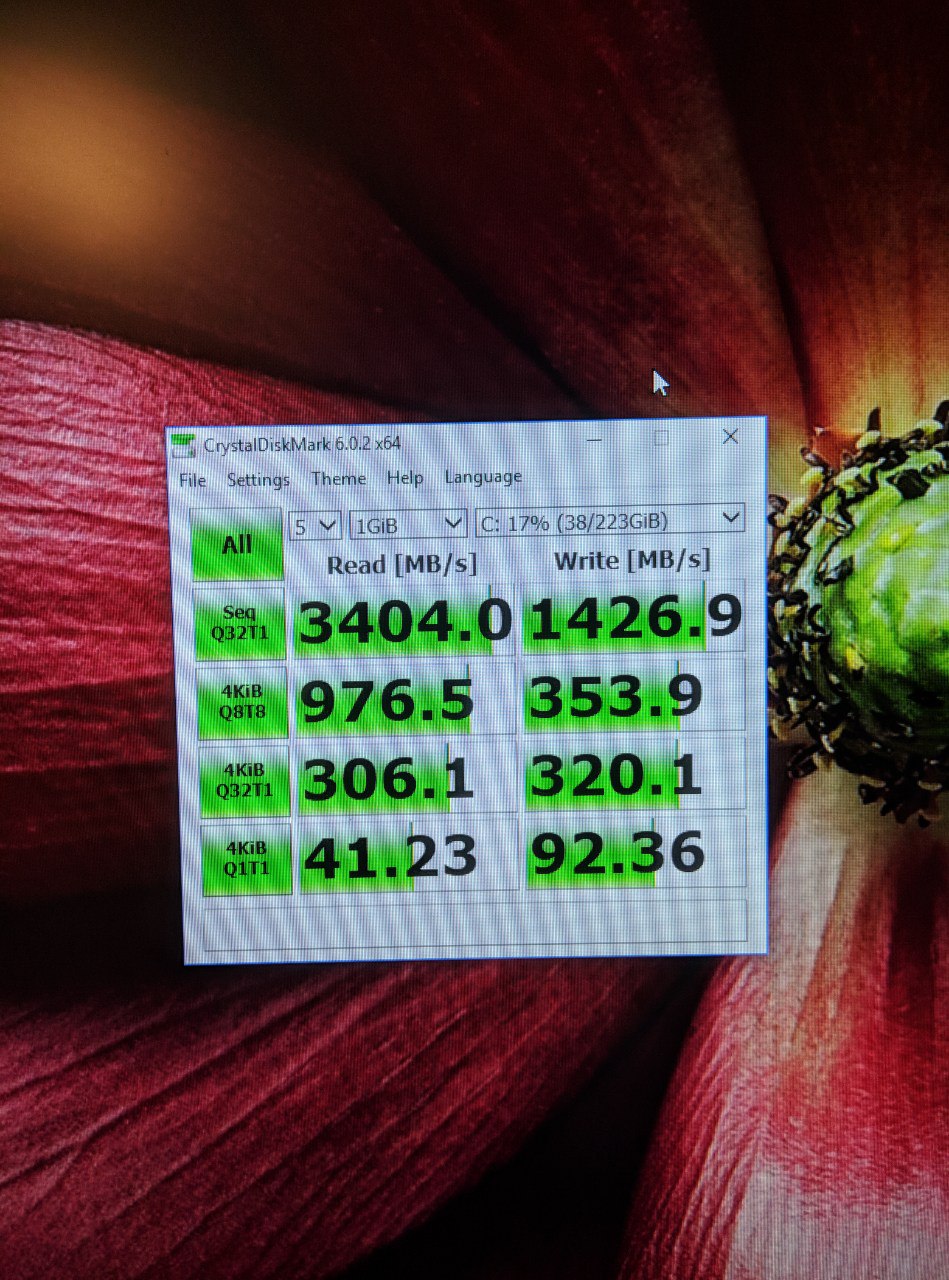
I was lucky and got the PM981 Samsung NVMe drive, which is pretty fast (results attatched).
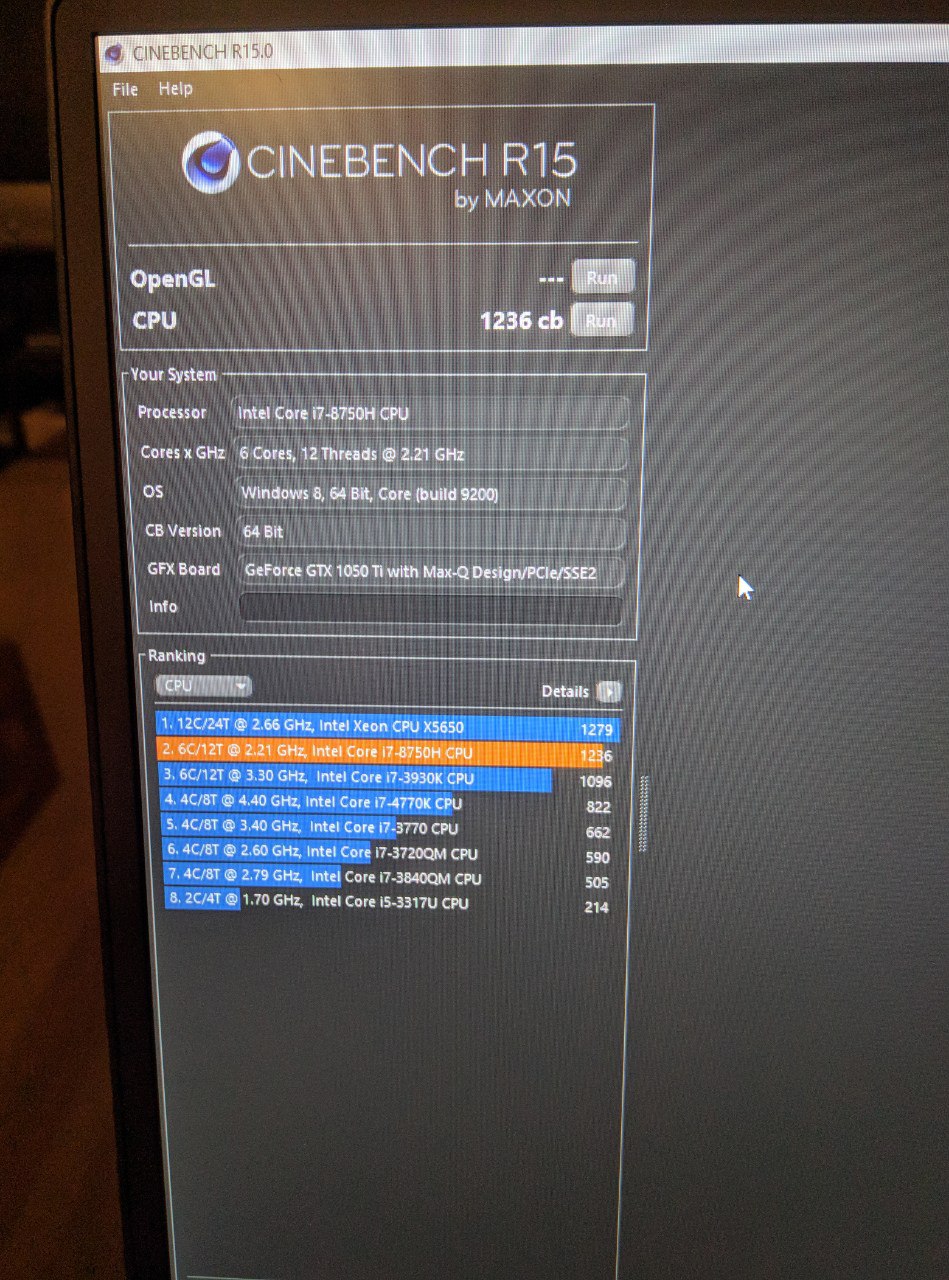
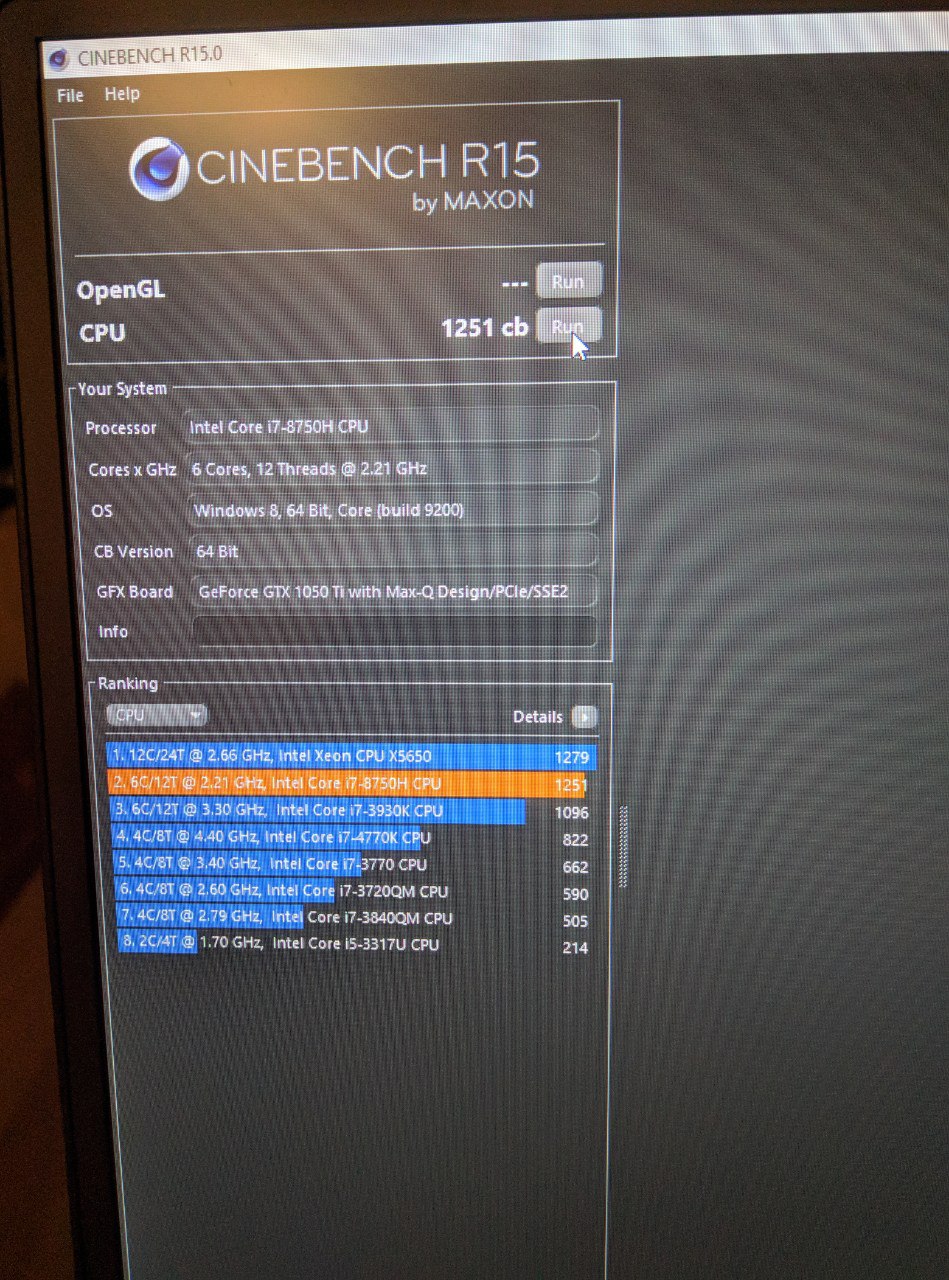
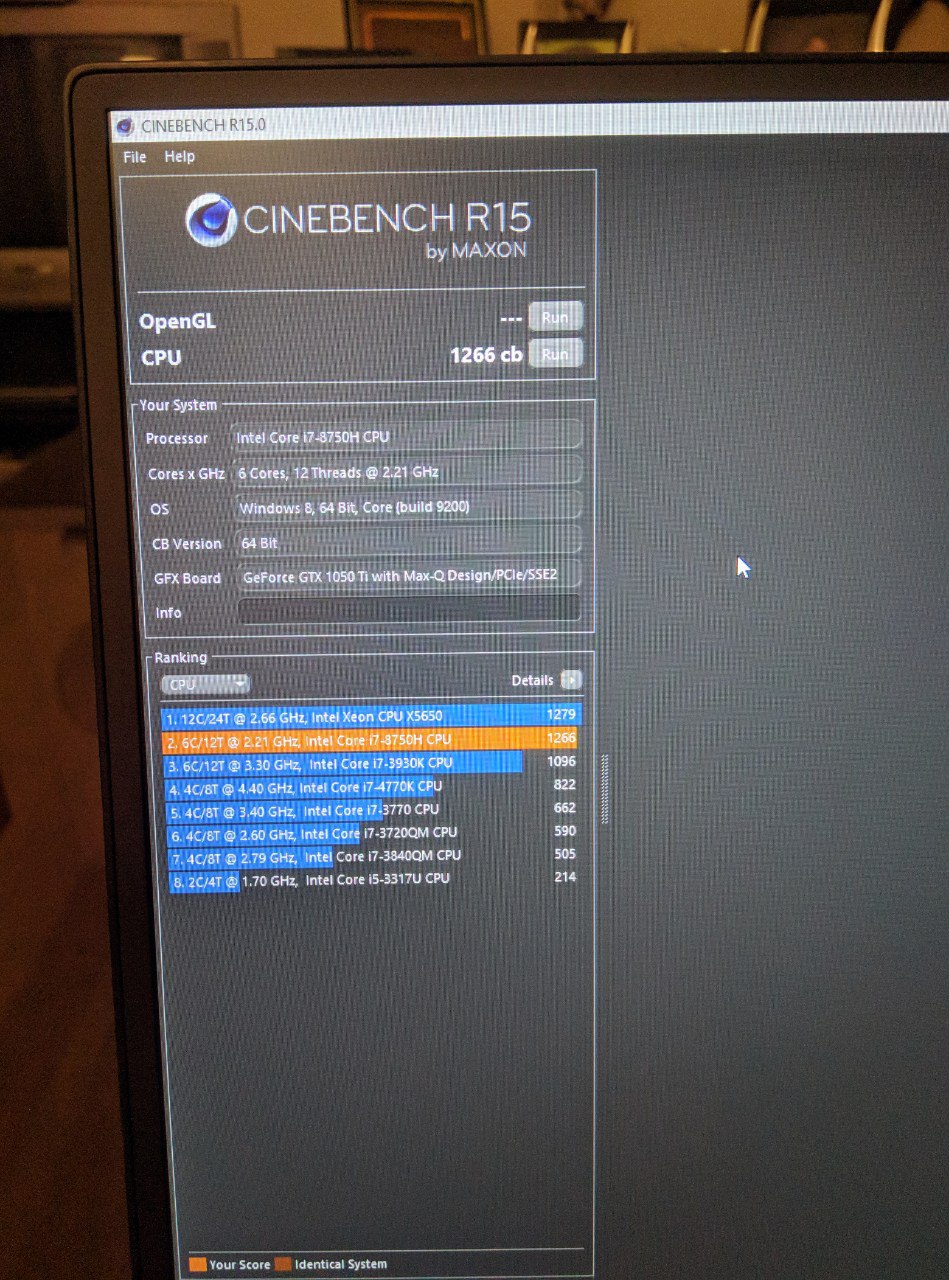
CB score was 1236 at score, 1251 undervolted, and 1266 with a little bit of higher power limits. No thermal throttling and didn't repaste.
Battery is amazing with the dGPU disabled on linux, getting more than 17 hours of life with the dGPU turned off and screen at 60% brightness (it's a really bright screen).
Any questions are welcome!Attached Files:
-
-
I see what you mean. I actually don't have forced S3 sleep and been using the default setting. It is usually shutdown when I am transporting it between home and the office. I think my core concern is that updating my BIOS is just going to introduce a problem or two. Some of the user reports of Dell's update does not fill me with confidence. When Windows hangs or something, I wonder if it is Dell, Windows, or a driver issue.
-
Guys i just got it ywsterday and im so exvited. Please tell me what to do first? Shoukd i update bios to latest and perform all windows updates up to 1809 ( now its pro 1803)
Also can i enable hardwqre level encryption on the m2 ssd and windows bitlocker
Sent from my SM-N950F using Tapatalk -
@therock003 I suggest to do a clean installation of Windows. I know that a lot of people with 4K display had color saturation with 1.6,0 Bios version so they still use 1.5.0. No issue with FHD display and 1.6.0 version.
@pilililo2 I think that you have the new version of MB with 4 VRMs instead of 3. The new MB version is 0D0T05, I also have this version.therock003 likes this. -
I got the FHD variant so go with 1.6? Why the clean installation?
Got a 1809 image from the net, Will the win existing key be erased by formating and installing this new image
Sent from my SM-N950F using Tapatalk -
Your Windows 10 Product key is embedded in the ACPI table of your system so you don’t need to insert any key. Download Windows 10 1809 from Microsoft and prepare a USB flash drive. After you can download the drivers from Dell website or use the Dell Command Update app.therock003 likes this.
-
Most important thing for me now is to enable hardware level disk encryption. Know anything about that?
Sent from my SM-N950F using Tapatalk -
@therock003 In my system TPM 2.0 was enabled by default with Windows 10 Bitlocker. If you check in the Bios you can see TPM 2 options.
After you reinstall Window 10 1809 if the Graphic Control Panels missing you can follow these steps to obtain a working control Panel in the System Tray ( both Nvidia and Intel):
- For 1050TI you can install the GeForce Experience from geforce website and it will update the driver with working Control Panel. From GeForce Experience app you can select to update drivers and during installation process you can choose custom and select clean installation.
-For Intel 630: Download from Dell the 630 drivers but do not install instead unzip it in a folder. After from device manager right click on 630 and select uninstall with delete option. Reboot the system and again from device manager choose for Microsoft standard adapter “update drivers” and select it from the unzipped folder.
Hope this helps you.therock003 likes this. -
Btw it tells me that windows is not activated? Arent oem computers supposed to come activated out of the box or do i have to perform fourther steps?
Finally you recommended installing the dell bundle but are dell programs usefull or bloatware
Sent from my SM-N950F using Tapatalk -
It tells you that Windows is Activated because the key is stored on the Bios so Windows 10 Installation Media will automatically find this key. You don't need to do anything, just press Install and follow the Instructions on the screen.

I don't use any Dell software, I like clean systems. -
Wait it tells me that Windows is NOT activated. i mean now on the current installation which is the one i got when i opened the system. I havent installed anything fresh yet
And i also notice that blurry thing you said even on FHD. At first i was like "am i running on smaller resilution do i need to install drivers" and then i recalled what you said previously
Sent from my SM-N950F using Tapatalk -
On FHD there are no issues, no blurry, no color saturation and I don't know why your copy is not activated. Mine was activated at first boot.
-
I see it at some dialogs mostly when installing things. Ill try to screenshot it or take mobile pic next time. BIOS is 1.2.2
Weird. I just pressed to troubleshoot and now it says we have activated this copy..
Sent from my SM-N950F using Tapatalk -
Its definitely blurry. Did a side by side comparison between this and my older laptop on an occasion that diaplays the blurry test and i am positive there is the issue
Sent from my SM-N950F using Tapatalk -
I noticed dpi scaling was set to 125% (recommended) by default. Turned it down to 100% and now it seems normal.
I dont know though if you mean its supposed to run at 125% and not look blurry
Sent from my SM-N950F using Tapatalk -
@maffle
Thanks for the advice with the PCH. If mine are getting so hot under load, does this mean I should get them replaced?
I haven't connected an external monitor or use TB, but I plan to do so in the future. -
After my recent re-install of windows, the windows power settings are once again gone, I could probably get them back though.
The worst problem is the sleep, it was broken before and now even more broken! It just won't sleep, the only thing it does is turning off the screen. It's running at full capacity like nothing. Fans are running 24/7 non stop- SUPER ANNOYING when you try to sleep in the same room. Only way to get it quiet is turning it off. Dell Power manager set to "quiet" won't help
I can't see this laptop lasting for long with fans running 24/7 365 days a year and never go to sleep....
-
So whats the situation with spectre and meltdown. How are we prone to these attacks and can the latest BIOS upgrafe guarantee us safety
Sent from my SM-N950F using Tapatalk -
No. I also have deactivated both protections because there is no real sense to use them, and it takes too much performance. The Retpoline kernel which will come in H1 2019 in Windows 10 might change this and make the performance issues way less though: https://www.zdnet.com/article/windows-10-will-banish-spectre-slowdowns-with-googles-retpoline-patch/
It is normal theyre gone with modern standby enabled. The rest of your problems is not so normal though. It shouldnt be too hard to find out whats causing it. -
Im on the latest BIOS and running Manjaro Budgie, and seems like everything is patched here. Don't know about Win10.Attached Files:
-
-
I dont know much about spectre/meltdown beside being a threat. Should i be worried about it in this system or in general?
I once saw a linus tech tips video saying every windows system is vulnerable and you may have it without knowing it. My questions
-How can you be infected
-How to protect
-Can you disgnose it or is this invisible
-What are the consequences. Previous article mentioned a 5-30% decrease of cpu power
Sent from my SM-N950F using Tapatalk -
Just to clear up a few things. Spectre and Meltdown (AKA, Spectre variant 3) are vulnerabilities inside the processor architecture, which if exploited correctly, can lead an attacker to access information even from just visiting a website that otherwhise he shouldn't have access to. This just like this sounds pretty intimidating, however we should take into account that it is extremely hard to implement a virus that efficiently exploits these vulnerabilities, because accessing data that you shouldn't have access to, using the Spectre vulnerabilities, is EXTREMELY slow, in the range of a few bytes per second.
From it being a processor vulnerability, every system is vulnerable (some AMD processors are known to be invulnerable to some variants of Spectre), independently of the operating system you're running. However this has already been patched long ago in the Linux kernel, even before the paper was published. I have no idea if windows has patched it, but I would imagine so.
So summing up, you shouldn't worry as it is almost surely patched in windows, it is a vulnerability that is extremely inefficient to exploit, and hard to do so. In linux as you can see in my screenshot you can check if your system is vulnerable with the package spectre-meltdown-checker. In windows there was a command line script that would do the same, but I forgot the name of it.
Some of the consequences of patching are a small decrease in performance in specially multithreaded applications, but the impact is way lower than expected with the first patches, so you shouldn't worry much.lefti696 likes this. -
The performance loss is about 50-60% in I/O workflow (the Retpoline kernel might dramatically make this better) or VM applications. In normal applications about 10%. Especially on tablets, this is catastrophic. The weaker the CPU the higher the loss you experience. I have deactivated the protections on all my devices, because there is no reason to have them, at least in my use scenario.Last edited: Jan 2, 2019pressing likes this.
-
The performance loss is caused by the virus, or the patch/updates, that force the slowdown as not to be affected by the virus?
You mean the unpatched computers that risk getting or are already infected dont experience that loss?
-For office use, i run VMs so this will slow down
Other than that my main use is gaming/emulators and cpu power there is never enough. Let alone have additional slowdowns is greatly unacceptable -
@therock003 There is no virus in classical meaning, you cant get infected by anything through this. You have to have malicious software running on your PC or inside your VM already or visit a malicious website (JS, Flash). Then the malicious software could, though very slowly, read (not write to) the entire memory of your PC, also from inside a VM. Unpatched PCs are as fast as unpatched obviously.
Last edited: Jan 3, 2019 -
So as long as you run antimalware to make aure youre clean and watch your network traffic you should be safe.
How can i measure the scale of the loss.
My Dell came with 1803 which i updated to 1809. I run InSpectre and it says yes to everything. Should i check the disable protection if i want better performance
Sent from my SM-N950F using Tapatalk -
Yes, but the buttons are bugged since 1809. You have to toggle them back and forth until it works and check again after reboot. You have to run as admin btw too to change. You can measure I/O for example with a HDD benchmark and notice a dramatical performance loss with protections enabled. But youre not really a user I guess who should worry about the issue and performance loss. Just let it activated. If you didnt know about the problems until today and dont know what performance scenarios it affects, then youre also not really affected by it.
-
Due to the nature of scaling non-vector graphics (or stuff that is not originally designed for scaling), unless its pixel doubling then there is going to be some blurriness for those legacy apps, regardless of how much anti-aliasing you throw at it. So basically unless its like 1080p scaled up to 4k (where you can just literally double the pixels) you're not going to get perfect pixel alignment and hence blurriness.
This is the double edged sword of windows, OSX long ago put the hammer down and everything is now scaling compliant using the appropriate frameworks. Meanwhile in Win 90% of software ignores the modern UI framework and hello to high DPI problems. battery life aside this is why I went FHD screen without a second thought - from my previous experience with high DPI screens, windows still has a fair way to go (OFC this will vary depending on the exact apps you like to use), and 1080p @ 15" looks plenty sharp to me - 146.86 PPI is perfectly fine at computer screen distances (not phone distance).pressing likes this. -
I always knew about it, i just didnt care. My previous ultrabook had an i5, and i got the first iteration of win 10 10240. So i wasnt going to upgrade and even if i did it was just office use.
Now that i got the dell with the intension of maximizing gaming performance, cpu power is never going to be enough. You can always enable a higher setting in the games menu and ask for more from the cpu.
Im just reading these now
https://www.eurogamer.net/articles/...-cpu-security-flaws-impact-gaming-performance
https://www.tomshardware.com/reviews/gaming-performance-meltdown-spectre-intel-amd,5457.html -
@therock003 ... Gaming performance is literally zero affected by Spectre and Meltdown protections and you can ignore these articles as a reference. Why? Because there is like zero I/O operations happening in games. As I said, you shouldnt really bother about it, as I see it from how you talk and what you link, youre doing nothing with your laptop, where disabling the protections have any use case for you. Worst case is for VMs (especially if you have to disable HT because of L1 Terminal Fault), databases, anything heavy I/O.
-
One last thing, Is console emulation going to be affected? RPCS3/PCSX2
Sent from my SM-N950F using Tapatalk -
@therock003 I doubt it.
-
So I got pretty uppity with Dell about the GPU issues in the bios. I am working with someone from the "product team group." Whatever that really means I'm not sure, but I'm hoping to make a little headway there.
-
Product Team Group
Last edited: Jan 4, 2019maffle, Papusan, pilililo2 and 1 other person like this. -
Here is what I got:
"We have received an update from product group team.. I would like to inform you that Dell's engineering department are aware of this behavior and are working to make some changes to the BIOS. The changes should enable the GPU clock ramp up to be more smoothly controlled. Its planned that these changes will be made to BIOS 1.7.0 which is due for final release in 2nd or 3rd week of January 2019"Dannemand, splus, Trader05 and 1 other person like this. -
@pilililo2: How did you managed to disable it? I am running Manjaro Cinnamon and i can max out 7h. Powertop is showing me in idle about 9W after i manually set NVIDIA to "Good" in powertop. Already tried https://github.com/Askannz/optimus-manager but with no really difference.
XPS 15 9570 Owners Thread
Discussion in 'Dell XPS and Studio XPS' started by el3ctronics, May 16, 2018.