 Problems? See this thread at archive.org.
Wow what a coincidence! All my Optimus goodies arrived yesterday; very excited ...
I've been eyeing Optimus for over a year. They did a small run of the cpu blocks last year, but it sold out fast and they took a year to come out with a bang with a spectacular product line.
For those that don't know, Optimus is a local company based out of Chicago...good ol' Made in the USA. I was really happy about being able to support this company and now that they are in full effect, game on... and it's great to be working together with them... stay tuned...
What makes them unique are the ultra fine fin design and the overall build quality... Optimus will surely give EK and others a run for their money. There are already early reports among users of the block outperforming other popular cpu blocks. I'll be doing a direct comparison vs EK EVO series blocks soon...
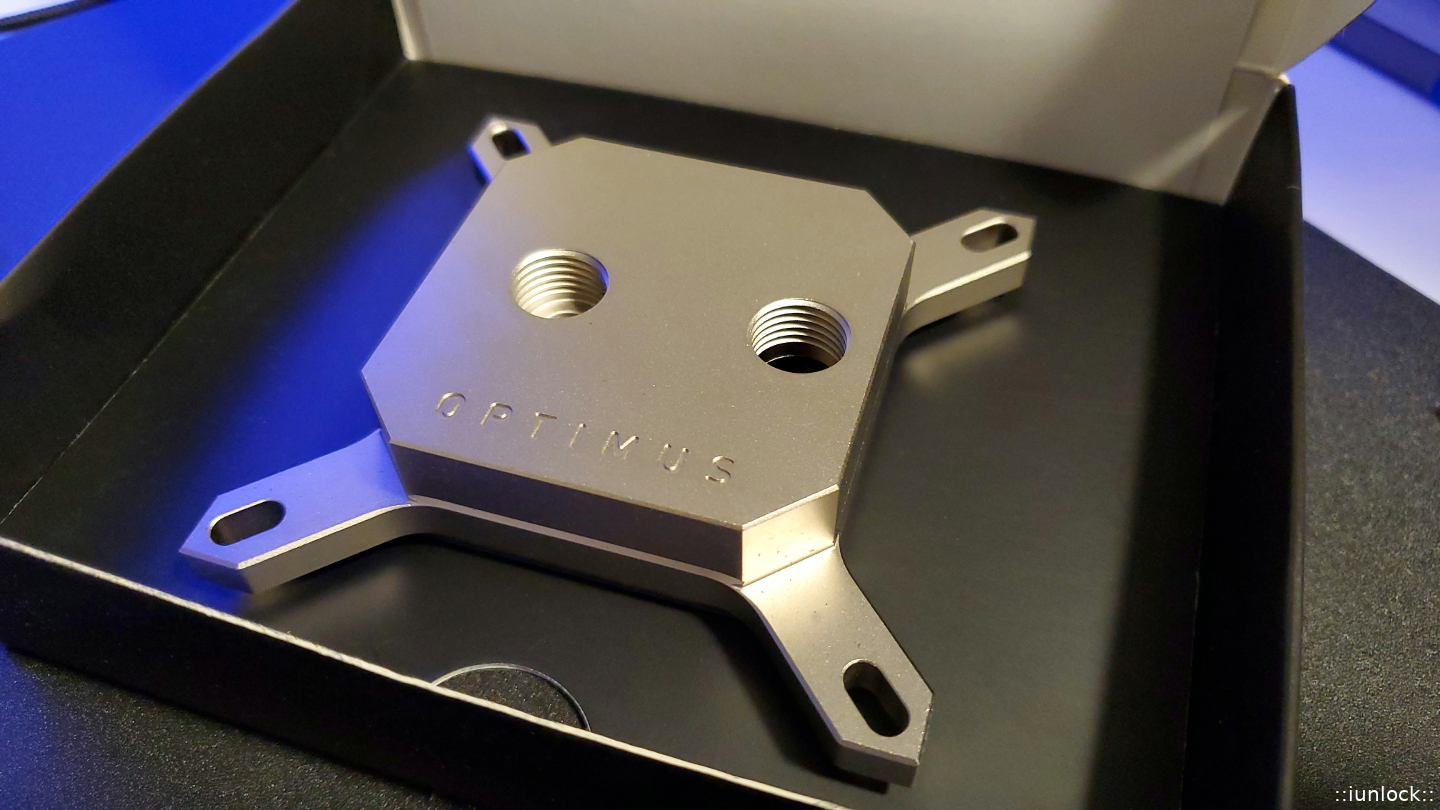
Here is a pic of the V2 Signature block... nice and heavy. - This bad boy is for the test bench.
![[IMG]](images/storyImages/image1345)
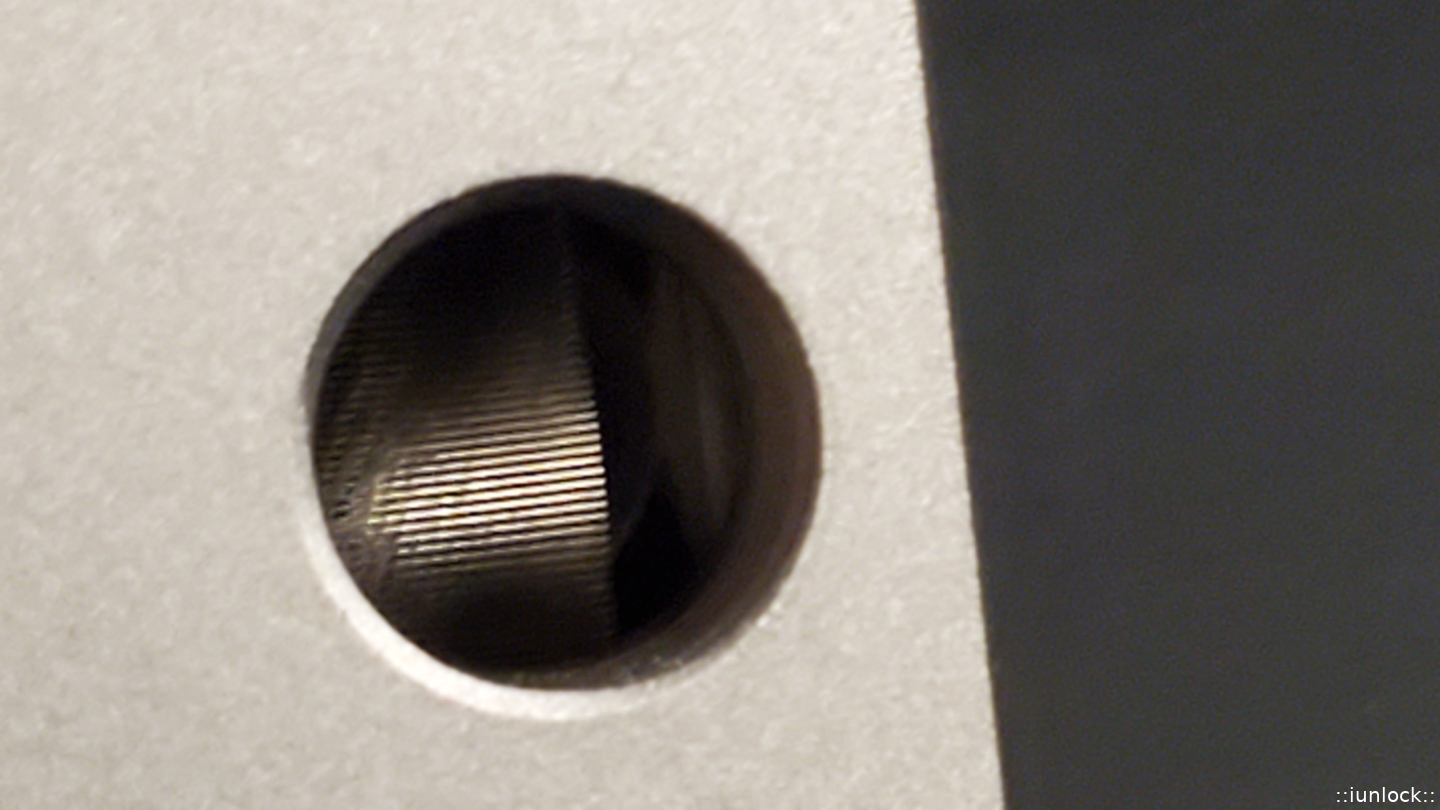
Here's a close up the ultra fine fins... more surface area = better cooling.
![[IMG]](images/storyImages/image1346)
With new great products like this, it really helps keep the spark in the game for us Enthusiasts... very grateful.
-
Attached Files:
Last edited: Jan 19, 2020 -
-
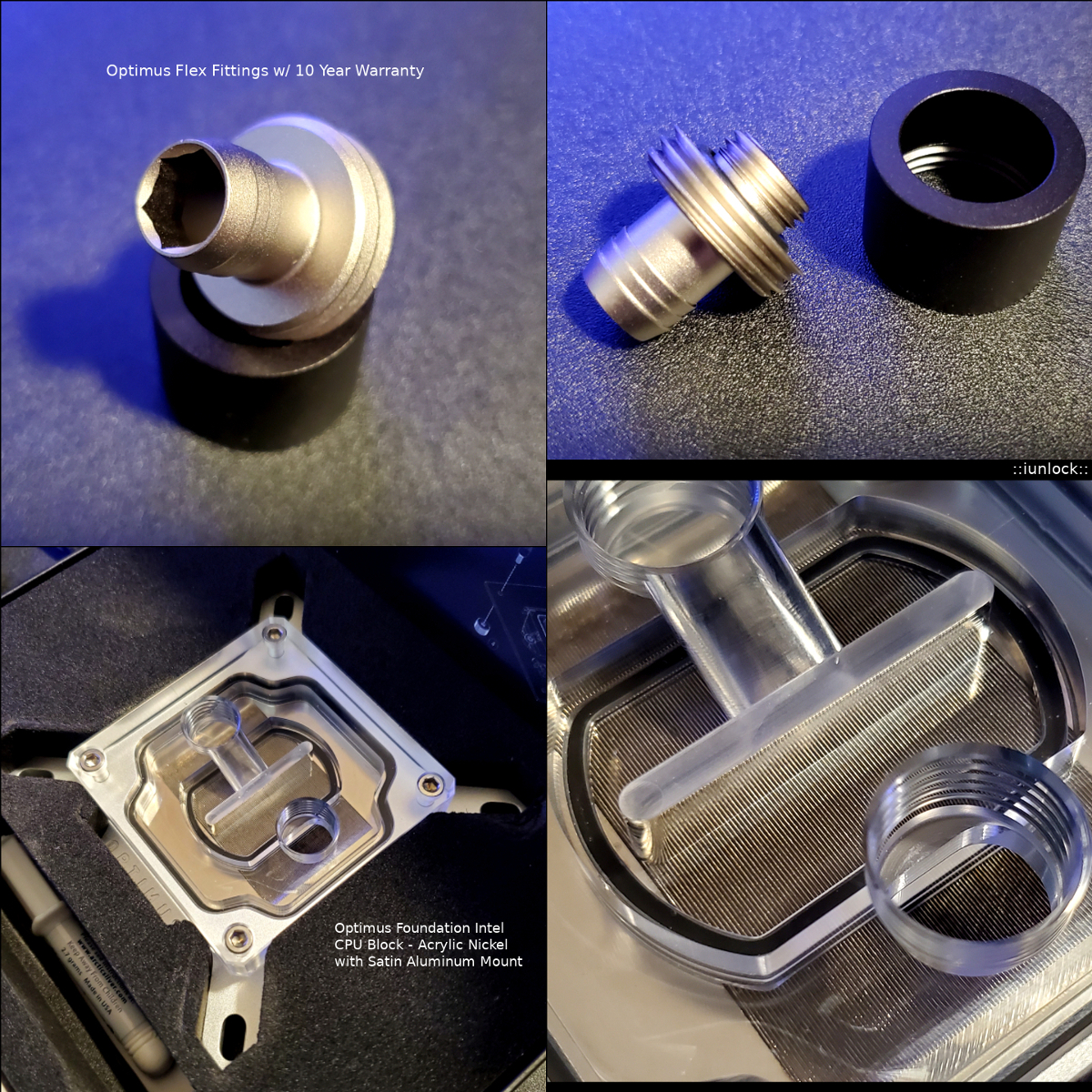
Here are the Optimus Fittings and the Acrylic version of the CPU block that's going into the main gaming desktop.
Here is the monster 70mm res/pump... Stunning and heavy! (note: Most reservoir tubing out there are only 60mm and thinner at 5mm. The Optimus is 6.4mm thick.)
Attached Files:
Last edited: Jan 19, 2020 -
-
I've just ordered one myself along with the threadripper block.
For my Intel systems, I have five different blocks. I am a bit skeptical about their marketing, because most companies will attempt to back up their marketing with independent testing. Anyway, I'll see how it compares to my EKWB and other waterblocks.Last edited: Jan 19, 2020 -
Nice. I think they are letting the product speak for itself as it is already doing among the users. (Notice their emphasis on: "Unbiased real world tests from around the web." - Not internal numbers.)
https://optimuspc.com/pages/reviews
I'm actually doing testing under very controlled environments comparing it to the popular EK blocks like the EVO line etc... This data will be used and it'll mean more than a Company releasing figures etc..
Ex. Look at AMD lol... Bubble gum numbers to entice the gamer crowed, while Enthusiasts chuckle.
Therefore, the approach with Optimus is pretty optimal, pun intended, given that the data will be real data since it is from organic sources by real users.
I'm pretty stoked about this Company and what they are doing... did you see their GPU water blocks? My goodness... drools.
https://optimuspc.com/products/absolute-gpu-block-rtx-2080-ti
I'm going to push for making one for the FTW3 cards along with KP. Last edited: Jan 19, 2020
 -
-
FYI - this is going to affect some folks that have frequently done what is no longer allowed... in particular, cropping screenshots instead of showing the entire desktop. And, submitting or resubmitting old scores (hiding or saving them until someone beats you, then submitting higher score you were holding back or saving for later) seems to also be no longer permitted. Feels like we are surrounded by Nazi control freaks at every turn. Sad that the control freaks are invading rare sanctuaries of sanity like HWBOT.
Effective January 8, 2020:
Updated rules for verification screenshots 2020 from 08/01/2020
I suspect maybe the entire desktop is required in the screenshot now so the date and time show you are not submitting or resubmitting an old score. Possibly the same is true of the CPU-Z version. Otherwise, I don't know why they would give a flying flip about what version of CPU-Z is being used. Why would they care?
Last edited: Jan 19, 2020Papusan, Rage Set, iunlock and 1 other person like this. -
Still using 1.88 on my laptop. There should be no reason, that I can think of, why the version of CPU-Z should make any sort of difference. I used to crop all my screenshots for the plain simple fact, I dont want everyone to see what I have on my desktop. Its not their business. Now I have to make sure shortcuts, or files that are on my desktop that I consider "sensitive", and easy to access, are hidden.Papusan likes this.
-
Haha yes indeed. Great minds do think alike. It'll be nice having more data to compare the performance of the block compared to our current ones. Thanks for the rep! Happy Sunday Brother.Wow that's just silly. Are they trying to push bench mate I wonder? I get the want of full desktop screen shots, but to micro-rule-control it to pieces raises a funny suspicion that there's an agenda behind this.I agree... Now I have to change the render scale of my desktop for everything to fit lol. Like with cinebench 20, the window only minimizes so much to where I can't fit all the cpuz windows without it overlapping into each other, due to the monitor being only a 24" display.
-
Those who try go for new records or better recors for themself with the new rules will loose vs. the all others who did the bench last year. Damn nice with such type new rules
 There is zero reasons for have to (forced) use Cpu-Z 1.91. This rules means it's not 100% fair competition. I could understand it if you can't validate or get no valid score with older version than 1.91 at CPU-Z Database.
Last edited: Jan 19, 2020 -
Unzip the attached file to any drive/folder that you want it, then place a shortcut to it on your taskbar. Click it, and viola... all icons are gone. That's why you never see any in my screenshots. Nifty tool. Brother @Johnksss introduced me to it a LOOOONG time ago. Click it again, and *BOOM* they're back.
It won't matter how big your display is if it it 1080p. You have to have at least 2560*1440 to get CBR20 and 3 CPU-Z windows open for a proper validation screenshot. I use 100% display scaling for literally everything, (don't like 125% or higher, even for 4K,) and even at 100% 1080p won't allow you to fit it all.
Well, the load for validation does kind of make sense. If someone can validate with an older version of CPU-Z and nobody can using the newer version due to the amount of stress, using the old version is sort of skewing things. I don't like the idea of being told I have to do something, even if I am already doing it. It makes me want to stop doing it for the sole purpose and satisfaction of defiance. I have no problem respecting authority, as long as it is an authority that I acknowledge. I'll gladly comply when it is an authority that I acknowledge, honor and respect. When it's not, then... well... we've got a bit of a problem.
It does present a problem for older validations. But, now that they have gone to the silly "seasons" and having to earn points and ranking new and all over again every year it may not matter so much. But, I still don't like the idea. It rubs me the wrong way.
Edit: @Raiderman - see attachmentAttached Files:
Last edited: Jan 19, 2020 -
-
Well, the "read" speed using these tighter timings is not as fast as the Ryzen DRAM Calculator settings, but the latency is a lot lower and the cache is definitely faster using these tighter timings. And, I like seeing "100% overclock" LOL.
Here's my best "read" benchmark on HWBOT.
Papusan, Robbo99999, Rage Set and 2 others like this. -
Papusan, Raiderman, iunlock and 1 other person like this.
-
I know Brother @Rage Set has two of these bad boys and loves them. I've got one on the way from Germany.
I'll probably sell both of my XSPC 360 radiators and Raystorm Pro water block. (In case anyone is interested, let me know and I will put them in the Marketplace for you to snag them.) They've been excellent, but I need to push this 7980XE harder and I'm just not liking 48x18 for my daily driver/gamer clocks (I spent way too long at 5.0GHz daily driver clocks to respect that) and doing 50x18 is just too toasty without the chiller.
Papusan, iunlock, Robbo99999 and 3 others like this. -
Did you order the 360 or the 420?
-
I ordered the 360 Pro.
Couldn't find these for sale anywhere in the US (performance-pcs.com out of stock) and Aquatuning web site wouldn't work (couldn't complete the checkout process due to something weird with their shipping) so I ordered it directly from the manufacturer. https://shop.watercool.de/epages/WatercooleK.sf/de_DE/?ObjectPath=/Shops/WatercooleK/Products/25020
Last edited: Jan 21, 2020 -
Wowsers, you won't need no bowsers! (except for filling it!)Mr. Fox likes this.
-
You're going to love it. Works well if you want to use it without turning on the fans. I am curious how far you can push yours without the chiller.
-
This arrived today. Man, this sucker is HEAVY. Check the postage scale weight, LOL. 1lb, 2.2 oz. Can you imagine the damage if you dropped this on the CPU, RAM or mobo PCB? That would be really bad.
![[IMG]](images/storyImages/Mx7TTFf.jpg)
![[IMG]](images/storyImages/Ka6ylz7.jpg)
![[IMG]](images/storyImages/wNTWI5O.jpg)
![[IMG]](images/storyImages/6K9Hqsp.jpg)
![[IMG]](images/storyImages/HysmBkx.jpg)
![[IMG]](images/storyImages/eJnPRy0.jpg)
![[IMG]](images/storyImages/OemSL31.jpg)
![[IMG]](images/storyImages/qcY4vKA.jpg) Last edited: Jan 21, 2020Robbo99999, Papusan, Raiderman and 2 others like this.
Last edited: Jan 21, 2020Robbo99999, Papusan, Raiderman and 2 others like this. -
Excellent! Yes they sure are heavy indeed. The build quality is superb.Mr. Fox likes this.
-
6c temp decrease reported on the Ryzen variant at load ...hmmmm
-
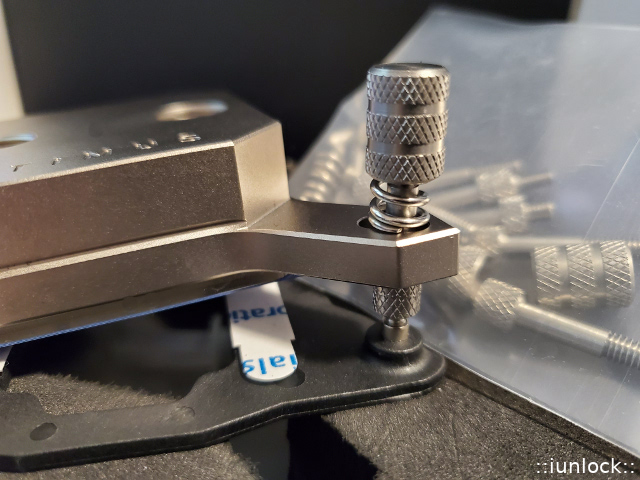
Seems like they sent me the wrong water block hardware installation kit. Either the standoff screws are too short, or the springs are too long. The springs are about 3mm taller than the top of the screws, and the springs are so stiff that I cannot compress them enough to start the threads on the nuts. I had to send an email to them to ask that they send me the correct hardware installation kit for this water block. As a temporary work-around, I used the metal and plastic washers that belong under the springs on my Raystorm Pro to shim the screw stand-offs on the end that screws into the motherboard back plate. Even after shimming, I had a very difficult time starting the threads on the nuts. Temps are still pretty horrible at 5.0GHz without the chiller (like thermal shutdown @ 109°C in Cinebench horrible). So far I am not seeing a thermal benefit to this new water block. But, it could be uneven mounting pressure, since I had a difficult time mounting it with the screws being too short. I will wait to pass judgment until that is addressed.
Last edited: Jan 22, 2020Rage Set likes this. -
The issue with standoffs and springs have been reported elsewhere as well. I'll compare the hardware between the different Optimus kits to see if there are any variations... They should be the same...
-
Well, since I was getting nowhere using this fancy new water block with the IHS in place, I went back to bare die to see how that fared, and it is working pretty well. Even with the IHS removed, the screws are still way too short. Adding a metal and nylon washer under them (where they screw into the die frame) raised them enough that my temps are under better control now. I was having to use an excessive amount of downward force to compress the springs far enough to get the nuts to engage the threads on the screws with the extra height of the IHS, and that was screwing things up with the fit. Optimus has no phone number on their web site or any correspondence I have received by email relating to my order, which kind of sucks. I have emailed them asking for proper installation hardware.
Tried using Kryosnaut with bare die and the temps were absolutely horrid. The water block came with a tube of Ceramique 2 and I never had anything but horrible results with that crap. I tried it for giggles and OMG... temps were far worse than Kryosnaut. Ceramique is garbage today, same as it was when I last tried it like 8 years ago, LOL. I don't understand why they are sending such a lousy thermal paste with such a nice water block. I also tried the ICD Graphite Pads that I received for testing a couple of years ago and they were worse than Kryosnaut. The graphite pads were almost as horrendous as temps as I saw with Ceramique 2. I tossed both the Ceramique 2 and the graphite pads into the trash, where they belong.
Anyhow, back to the liquid metal and things are as they should be. This stuff works as well as Conductonaut, spreads easier than Conductonaut, (doesn't try to ball up as much,) and it is less expensive. I have ordered another tube of it so I can have some extra on hand.
Thermalright Liquid Metal Thermal Paste, 79 W/mK High Performance, Silver King Heatsink Paste
Brother @Falkentyne recommended these for liquid metal application, and they are AWESOME. They work fantastic! Much better than brushes or cotton swabs. They also work nice for cleaning up old paste and reaching into tight places on the PC to remove dust. Buy some... you'll be glad you did.
100 PCS Disposable Lip Brushes Lip Gloss Applicators
Temporary Workaround (Shimmed Stand-Offs)
![[IMG]](images/storyImages/sABJhYw.jpg)
Kryosnaut versus Thermalright Liquid Metal Paste (Bare Die @ 5-Minute Stress Test)
![[IMG]](images/storyImages/hVn1i6E.jpg)
![[IMG]](images/storyImages/vfrFCjL.jpg) Last edited: Jan 22, 2020werdmonkey4321, Robbo99999, Convel and 5 others like this.
Last edited: Jan 22, 2020werdmonkey4321, Robbo99999, Convel and 5 others like this. -
Glad to see those swabs are working.
Fox, why don't you become a metallurgist like me and make your own liquid metal? I know you can afford the overpriced stuff, so maybe it's convenience... -
I have thought about it. It's definitely cheaper. I'm a cheapskate, and I'm by no means wealthy. It really boils down to two things... in this order. One: laziness. Two: What would I do with a 10-year supply of liquid metal?
Now that I am no longer helping @Prema with laptop firmware mod testing, and not taking apart laptops 1,000 times in two months, I don't need as much. My last tube of Conductonaut lasted me almost two years, LOL.
Related to the subject of liquid metal. Here is a perfect source of foam for making foam dams. Steal the foam from one of these.![[IMG]](images/storyImages/s-l1600.jpg) Last edited: Jan 22, 2020Prema, Falkentyne, iunlock and 2 others like this.
Last edited: Jan 22, 2020Prema, Falkentyne, iunlock and 2 others like this. -
Prema, sweepersc2, iunlock and 3 others like this.
-
I don't know why, but when I read my comment later it made me think of this HILARIOUS old TV commercial, LOL.
Robbo99999, iunlock, Papusan and 1 other person like this. -
So let me understand this a bit more clearly. Using the new Optimus waterblock on the standard mount (CPU with stock IHS), it is rather difficult to tighten the thumbcaps onto the screws? If this is the case, I am cancelling my order for both the Threadripper and Intel waterblocks.
-
Interesting indeed. I'll make sure to pass along the experience that you've had. As far as the thermal paste, yea that stuff is ancient and I guess it's just being included because it was cheap to get in bulk. Sometimes not including really bad stuff is better than including it, but on the other hand for those that may not have thermal paste on hand (which would be extremely rare for the niche crowd buying this block) or for doing a quick fitting test, the no-good Ceramique 2 is a great disposable paste since it's free.
The washers definitely does the trick. As I've mentioned the scenario with the tops, spring and studs have been experienced by some others as well, however, at the same time there are those who didn't have any issues... Perhaps it's just the first round of growing pains for Optimus, which I'm sure they'll address ...
Let's catch up tomorrow as I should have the block mounted on the mobo by then...
For some yes, but for others it has been just fine. From what I've gathered, the tolerance of the water block leg mount area (the part where the studs go though) can be very tight so it may require the water block to slide in evenly as possible since there's very little wiggle room. (Technically a good thing.) I'll have a more in depth answer with my experience in a day or two once I get around to installing the blocks on the different motherboards... I have 3x total so it'll provide some good data...
Attached Files:
Convel, Raiderman, Papusan and 1 other person like this. -
-
I see from their thread over at oc.net that the new AMD blocks have a solid mount design that does away with springs and washers. Looks interesting. And it looks like a superior design to the old tension spring method. They are planning to incorporate that into the Intel mounting hardware as well, but too many irons in the fire to do it now. They are focusing on new Ryzen and TR CPU blocks and GPU blocks. They are planning a K|INGP|N 2080 Ti GPU block soon.
The springs are CRAZY strong and too stiff to compress enough to get the threads on the nuts to engage the studs. If the studs were about 3mm longer or the springs about 3mm shorter it would be a breeze. And, the super-strong springs would be a blessing. What was happening is, if I was able to compress one spring enough to start to thread the nut in place the block was tilted on the IHS severely and it was difficult to hold it down to compress the spring on the opposing side. The slots in the arms are like a machined fit and once all four nuts were started, there was zero wiggle room to get the block pressure normalized equally at all four posts. (I hope this is worded well enough to create a clear mental picture.) This stuff is really well made. Everything is very tight tolerance. That is good except for the screw studs being too short or the springs too tall.
I was going to try the studs from the XSPC Raystorm Pro block and found the knurled thumb-nut portion between the stud that screws into the stock back plate and the top part of the stud that the block fits over is too wide for this block design and would hold the block off of the CPU. In other words the block would not move far enough down on the screw posts for the cold plate to touch the IHS. So, swapping in the longer stand-offs from the XSPC block was a no-go. My next thought was to try the springs from the Raystorm Pro hardware, but they were even taller. They were easier to compress, but would require too much compression and create the same scenario outlined above when using the CRAZY strong supplied springs.
Great. Thank you. Do you have direct contact with them? I am surprised neither of the messages that I sent has received a response. The first was early this morning. I know it is a small owner-operated company and he (the owner) is probably burning the candle at both ends. The first message I sent (total of 3) was yesterday. It was before I installed the block. I had a question to confirm the block inlet was the port where the fins are not visible, which channels the water into the center. That message got a swift reply confirming my impression was correct. That came from someone named Josh Ray.Last edited: Jan 22, 2020Robbo99999, iunlock and Raiderman like this. -
Are you guys purchasing, or have purchased the copper version, or the nickel? I am old school, and was always told that copper was the best at transferring the heat away from the cpu. Yet the nickel version is about $15 dollars more.
-
<Choose Pro-XE nickel for liquid metal direct die usage>. Even a good choice without direct die usage if you go with liquid metal. You get double choices with the nickel version, brother

Edit. You can excange/replace the cold plate https://optimuspc.com/products/optimus-individual-cold-platesLast edited: Jan 22, 2020 -
I went with the nickel since it is best for liquid metal. It costs more because it costs more to manufacture. For those with Intel CPUs, I would also say don't go with the extra flat version unless you are using a lapped IHS. The extra flat version does not work properly for direct die or stock IHS. The extra flat version may have contact interference issues with some die frames, since the die frame are close to the same height as the top of the CPU core.
Hmm. This is actually pretty good. Chiller is turned off. My office is 25°C (76°F). I forgot to switch from Balanced to High performance power profile before running the benchmark. It was like 105°C running CBR20 at 5.0GHz without the chiller before.
Convel, iunlock, Raiderman and 1 other person like this. -
-
If you are using the aftermarket copper IHS, or lapped stock IHS, the flat version is ideal for that.
Here's a repeat with High performance power plan. Still decent for 5.0GHz on all cores with the chiller being turned off considering this is pumping over 1KW of power through the CPU in my warm office.
iunlock, Rage Set, Raiderman and 1 other person like this. -
The son got the 1070 as you know. I ordered this ram kit (2x8) for the 3770K/1070. About $120
G.Skill ARES LP DDR3-2400 C11 DC - 16GB
https://www.gskill.com/product/165/...AresDDR3-2400MHz-CL11-13-13-1.65V16GB-(2x8GB)
The total will be $335 usd for the total upgrade. Can't get any new machine for this amount money. If he prefer buy a new setup at later time, I'm sure he can sell what he now will have (either in parts or the whole machine) and go break-even.Last edited: Jan 23, 2020iunlock, Rage Set, Mr. Fox and 1 other person like this. -
This showed 1201W on my Kill-a-Watt meter.
![[IMG]](images/storyImages/image_id_2295699.jpeg)
-
Yeah. Coupled my KPx cards with that CPU and I was constantly hitting 1500 on certain benchmarks. During a few I had to use my spare 1200w psu for the GPUs alone.
Bro, have you tried the KPx TIM yet? I am using it with normal ambient temperatures but it appears to be highly competitive with TG Kryonaut, if not better for temps that you encounter with your chiller. -
Very good forum, I wanted to ask you a question about radiator fans, I currently have 3 of these:
https://www.coolmod.com/ekwb-ek-var...ilador-14-cm-precio?virtuemart_category_id=12
and I want to put 3 of these
https://www.amazon.es/gp/product/B0...id=A1M4GND8EW21SL&psc=1&tag=links20b-21105-21
The latter are supposed to be better, won't they give me more performance but they work at less rpm and the air flow is greater ... what do you think?Mr. Fox likes this. -
Affirmative. I'll make sure to pass along the messages in detail. Like you've said it's a small owner-operated company with a little staff wearing multiple hats and it has been crazy busy for them with the products selling like hot cakes. Let's chat later today ...
* I've been really pushing them to make the KP block... things look promising...
I usually always go Nickel plated in case I do use the block for LM. As far as the difference in heat transfer, it's pretty much 1:1...extremely negligible to the point where it doesn't really register. I have used plenty of pure copper cold plate blocks vs ones that are Nickel plated and they have all been 1:1...
Great stuff! -
That's pulling some crazy power... I really need to upgrade my UPS battery back up lol, because it has beeped at me a few times on the test bench...
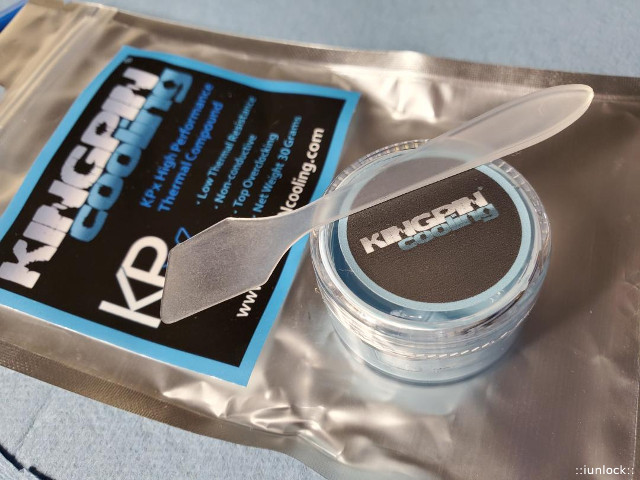
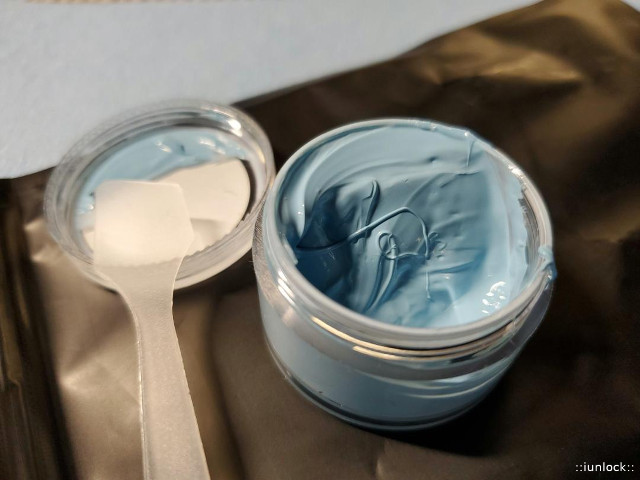
KPx is awesome. I've been using it on all my Delid's and test benches... it seems to be pretty on par with Kyronaut.
The viscosity is a tad lower than Kyronaut from what I can tell. @Mr. Fox What I like about the tub is that you can actually mix it, because I have tubes of Kyronaut that were "separated," which was a bit disappointing. (Like when a ketchup or mustard bottle sits too long and it separates...) well in this case the Kyronaut was oily at first then the paste followed after. This happened to two of my 11.1 gram tubes. Maybe it was the weather / temp etc...who knows... but from now on I'll be using KPx due to the tub alone.
As far as the thermal conductivity rating of KPx... iirc It's around 11w/mk? It's not printed anywhere on the packaging, but I think it was asked and Vince said something in a video...
At any rate... it's not to say KPx is better than Kyronaut as they both are great. A few independent tests by well known overclockers have shown the results to be within a margin of error between the two. -
I have had to replace the majority of my Vardar fans because they were defective. They were under warranty and EKWB did replace them but I have since switched to Noctua NF-F12 iPPC 3000 fans. These are server grade fans and they are loud, but I around servers all the time and their sound doesn't bother me.
Noctua does have new fans that are very high performant and quieter than most fans. I'm interested myself in getting some of the NF-A12x25 fans.Convel, Papusan, Mr. Fox and 1 other person like this. -
I have not tried it. I cannot see myself using anything but liquid metal at this point. Temps are way too high with Kryonaut and competing TIMs, so I would suspect they would be too high with anything else similar to Kryonaut. I have no doubt that it's an excellent product, and I cannot say the same for Kryonaut. At this point I don't plan to ever waste any more money on Kryonaut. Phobya Nanogrease Extreme and Mastergel Maker are both better products. But, even those cannot move the heat from my CPU to the water block fast enough to keep up. They seem to insulate rather than transfer the heat due to an inadequate thermal conductance capacity.
I am not familiar with those fans in your second link. The specs suggest they will be much quieter, but they seem to be very low CFM and lower static pressure compared to your Vardar fans. I am not so sure that you won't see a measurable downgrade in thermal performance.
Vardar CFM: 108 | Vardar Static Pressure: 3.15 mm H20
NB B14-3 CFM: 43 | NB B14-3 Static Pressure: 0.33 mm H20
The NB B14-3 fans seem similar to the Arctic F12 fans. I purchased the F12 fans in a 10 pack a couple of years ago and they were a waste of money. They don't move enough air to even bother with. The temps were barely any different with the F12s running full blast than they were when turned off. I think you need to be up to around 65 CFM for it to be effective.
Thanks. I got an email from Matt this morning and they are sending me a different hardware kit. If the hardware supplied is working correctly for most people, maybe there is something different about the backplate on the X299 Dark. Perhaps the posts with female threads that the screw stand-off posts screw into are slightly shorter which, in turn, makes the provided stand-offs too short. There has to be something different, otherwise everyone with an X299 system would be complaining about it. These would not work for anyone the way they are for me. It's working fine now with the die frame and the shimmed stand-offs, but it was basically unusable with the IHS and ILM configuration.
Looking at the springless retention system they are using for AMD, I think I could have gone to the hardware store and purchased 4 long screws and just bolted it down (gently, of course,) by carefully tightening them evenly in a criss-cross pattern until snug, and that would have worked fantastic. Sort of how a laptop heat sink is applied. In fact, had I thought of doing that I would have tested the idea first, before going back to bare die.Last edited: Jan 23, 2020Convel, iunlock, Papusan and 1 other person like this. -
Awesome, now you can have cold CPU temps and glossy lips, just like @Falkentyne !Falkentyne, iunlock and Mr. Fox like this.
-
I have the EK Vardar fans. Have 6 of them and all works (3 of them Furious). They will become +3 years this summer fall 2016 running 15V on the 3000rpm Furious model (2200rpm models is from spring 2016). EK optimized the fans and branded them with EVO naming late 2018 I think.
No point in the Noiseblocker B14-3 Computer Case Fans you posted in the link (too weak - 1,57 mmH2O). You have from before the standard EK Vardar fans who is decent. Want more cooling performance then go for the Furious series from EK. Even better airflow than the industrialPPC models from Noctua. Tested both brands.
EK fans is intended for liquid cooling systems. EK-Furious Vardar EVO 120 BB (750-3000rpm)
Edit... https://www.ekwb.com/blog/fans-for-liquid-cooling-what-you-need-to-know/Last edited: Jan 23, 2020Convel, iunlock, Mr. Fox and 1 other person like this. -
I'm still running my gentle typhoon 2150rpm fans for my d15, couldn't be happier since they were just pulled from my cooling pad.
-
This is what pisses me off about Asus. I clearly had a problem with the VRM's on the Asus Zenith II Extreme mobo and I have reviewed it as such on the newegg website. A couple months later, Asus rereleases the mobo with better VRMs. https://www.techpowerup.com/263216/...ii-extreme-alpha-motherboard-improved-cpu-vrm
That is a big middle finger to anyone that purchased this mobo for overclocking. Even if someone were to argue that the 70A power stages are more than enough for the 3960X/3970X, they [Asus] knew that this revision of the mobo wouldn't be able to take an overclocked 3990X. I am done with Asus. I wish EVGA made AMD mobos. -
Nice looking rig, bro. Great job.
Yeah, I am done with Asus as well. I had the fan controller fire on the Rampage. I had the firmware screw up my memory overclocking on the Maximus X Hero prior to that. @JoeT44 has had several (3 or 4) Rampage boards replaced under warranty due to the memory slots failing. Their Strix XOC GPUs are no longer show-stoppers. They just suck and there's no getting around that.
In contrast, I cannot find anything but good things to say about EVGA. They're awesome. It's a shame EVGA doesn't make a "Dark" version for Ryzen and TR CPUs for the AMD fans. That would be really sweet if they did.
*Official* NBR Desktop Overclocker's Lounge [laptop owners welcome, too]
Discussion in 'Desktop Hardware' started by Mr. Fox, Nov 5, 2017.





![[IMG]](images/storyImages/image_id_2294497.jpeg)




![[IMG]](images/storyImages/zFqL6BQ.jpg)