 Problems? See this thread at archive.org.
This time around I used KPx for the 7980XE delid. The only thing that kept me from using Conductonaut for the delid was due to the possibility of maybe experimenting with DICE as the rating for Conductonaut is for temps 8C+, ideally. I've used Conductonaut at temps lower than 8C and it did fine... maybe on the next oil change I'll LM it for giggles..
What's interesting is the Thermalright LM has a rating of -3C ... that tells me that it has more of one of the three elements in the mix to give it a lower temp rating than Conductonaut. Interesting eh?
CPU block wise I really do like the AMD block mounting design over the Intel spring design as well. The EK block that I have for the 3970x is extremely nice, straight forward and just solid with no fuss at all. I wonder why the Intel mounting design is so inferior ...
I also tend to like having the phillips screw divets on top of the Tops ..especially for the Dark boards where the screw/top is so close to the RAM that it gives little room to turn with your fingers. It's more problematic on the Z390 Dark... If it had a + on the top of the TOP to where I can lightly turn it most of the way, then hand tighten it at the end, that'd make like life so much easier lol. First world problems...
I've been using the cotton/plastic tips that came with the delid cleaning kit for LM applications and it has been great. It's in fact almost the exact same thing as the stuff on the jungle website. Really great stuff...works extremely well like what @Mr. Fox said.
Bro... uuggghhh... really Asus? - ... As I'm sitting here with the first batch of the Zenith II Extreme. I'm totally with you on the frustration...
I've been done with Asus (except this go around with the 3970x) since the Z370 days... I keep telling people that Asus is Not what they used to be....
I should have gone with my gut instinct and have went with the Aorus TRX40 Extreme from the start...
Indeed... The only thing Asus maybe has going for it is the bios, but that is realistically old news now as other vendors have really upped their game with their bios and have caught up.
Ex. Gigabyte bios used to be frowned upon due to it being the ugly duckling, but they've revamped it somewhat (taking some notes from Asus bios design and features) and now it's actually very decent...
I can navigate through my GB 390 Master bios just as fast as I can with the Asus Zenith II Extreme bios...
I blame some of these lazy YT'ers who made videos narking on GB's bios last year, which influenced the gamer boy crowd... this silly influence spread like wild fire and it had people who didn't even own a GB board having such strong opinions on something they didn't even have flight time with lol...
The GB bios is not difficult to navigate and it is extremely feature rich. In fact, there may be some features that even the Asus bios don't offer... maybe BZ will do a comparison one day...
EVGA wise... their Dark boards are the Golden Standard. Fantastic products and even at the >$500 price range it outclasses more expensive boards.... gosh it destroys the Asus ROG Strix boards and even the Zenith II Extreme that I have, build quality and overall quality wise...hands down...
Asus is not what they used to be. Those days are over... who knows maybe they'll turn things around again, but until then.... no more Asus.
-
Their web page say... " Useable Temperature Range". Use it at such low temps just means the liquid metal will become faster brittle and with shorter life span. And Liquid metal works better the higher temp. See also my last section in my post here http://forum.notebookreview.com/threads/liquid-metal-and-33-tape.829130/page-2#post-10985981
Edit.
For the records... Grizzly say the best heat dissipation in the temperature range of over 8 ° C while other places on their webpage 10 °C. The datasheet say 10 °C. All depends where you look
For you bro Fox https://www.hardwareinside.de/welche-paste-ist-die-beste-waermeleitpasten-test-2019-40359/ Yoo need swap back to your
good working Kryonaut
https://www.hardwareinside.de/welche-paste-ist-die-beste-waermeleitpasten-test-2019-40359/ Yoo need swap back to your
good working Kryonaut
Last edited: Jan 23, 2020iunlock likes this. -
Yup. The temp listed on the packaging on all my conductonaut says 10C.
I wonder if the formula changed? (now 8C on the website...) hmmm...
For exteme cold Temps Kyronaut or kpx is still best....
I also wonder if at such low Temps if the three main elements in LM lose its effectiveness due to it separating? -
Grizzly have always mixed the numbers.
Test of Coollaboratory Liquid Extreme from Luumi. He also confirmed as I the cooling advantage will start loose if temps go below 8-10C. And I don't talk about sub zero cooling.
I will continue with Conductonaut as this is what I can get here. I won't support Coollaboratory's greed and because they mix and match and even can change the formula without a warning. + I know the Conductonaut's longeivity... It's damn good. Also Silicon lottery tested it over a year before they switced over from Coollaboratory Liquid Ultra. The performance is about equal for all liquid metal so i'ts mostly about what you can get from your money. But you shouldn't hang you up in the different W/mK or C degrees numbers.
Numbers from 6.40
Last edited: Jan 23, 2020Robbo99999, Convel and Mr. Fox like this. -
Yes, the idea of using screws straight through to the back plate like a laptop heat sink seems great to me. Some nice looking stainless steel screws with allen or torx heads would also look nice. You could even use springs if you wanted to. I think if you were very deliberate and careful about the criss-cross tightening in small increments and not crazy about over-tightening things it would work super great. Now I am tempted to try it. One would need to be extra careful with bare die.
The liquid metal works great with the chiller. The water chiller seldom allows the CPU to drop below 10°C and when it does it's only at idle, on just some of the cores. The CPU package never gets that cold for more than a few seconds at a time here and there. As soon as you load the CPU it's much warmer than that. In my view, liquid metal is ideally suited for my use because I only use the chiller for benching. The rest of the time it is turned off. And, liquid metal is the only TIM that will work well enough 24/7 unless I lower the CPU clocks to the 4.7-4.8GHz range. Regular thermal paste is still inferior using the chiller. There is a good 20-25°C decrease in load temps using the water chiller with liquid metal compared to the regular thermal paste.
If I were ever going to use LN2 or DICE, the KPX paste would be my go-to product. It's unlikely I will ever use LN2 or DICE unless I do another benching party with Brother @Johnksss and he shared the equipment for it. I am not going to purchase the products needed for that, and unless it was happening for a special event and the camaraderie that goes with it, there is no way I am going to disassemble my system for that, then reassemble it a few hours later. Just way too much hassle. And, if I am totally honest I know the danger of my addictive personality well enough that it's probably in my own best interests to not even go there. I'm sure I'd be hooked after a few hours of 6.0GHz+ benching and that would really mess me up. Real bad mess me up, LOL. I'd want to run LN2 24/7 or phase change cooler forever after that and I would then totally hate my system running it at 5.0GHz as a daily driver. That's just how I am wired. It makes me feel like I am going to go crazy when I can't run at 5.0GHz for my daily driver clocks now, and I don't even want to turn my desktop on for email or web surfing if the CPU is running at stock clocks. I know that's goofy. I'm a goofy person in that way.Last edited: Jan 24, 2020 -
Yea I've seen his testing. A lot of it is within a margin of error in certain temp ranges.
I've never put too much stock in w/mk numbers as I know from going through thermal paste / LM like crazy from builds etc... that w/mk doesn't tell the whole story.
I also stopped usnig CLU a long time ago lol... I still have half a tube somewhere buried deep inside of the thermal paste drawer in the shop that'll likely never see the light of day again, unless I need some LM for some quick testing that can be disposed without feeling like I wasted anything. (Yes, I have dedicated Conductonaut syringes that I use to suck up puddles of LM for testing purposes as well.
What I've been doing now with my 11.1g Kyronaut tubes is mixing them into a small container with a lid and spreading it like I do with KPx...when it's mixed well it works great...
Oh speaking of Conductonaut's longevity I can also confirm that it lasts a long time... heck I still have LM in a 15R2 and some older laptops that have been flawless like day one...Raiderman, Convel, Papusan and 1 other person like this. -
Haha I completely understand. It sure is a ton of work all around and the pure nature of wanting to reach new heights is hard to manage for sure...
It'd be really interesting to see how the straight screws turn out... it should definitely work. As far as the mounting pressure over the bare-die, ultra sensitive pressure paper works great here where you could tighten down the tops until they naturally stop, then give it maybe a 1/4 turn, criss cross pattern, let it sit for a few seconds, then check the mounting pressure.
I did something similar with a laptop heat sink before, with using custom screws/studs to find the right pressure. Surprisingly it went really smoothly. Once you've got it lightly tightened down (enough for it to boot) then you could adjust from there with small turns to find the perfect turning ratio of the TOP's. (I usually mark a dot on the tops at 12 o clock once it reaches the stopping point of being lightly hand tightened.) From there as you adjust you'll find your optimal turn ratio... running a bench in the background and making little micro turns from 12 0 clock forward works really well. -
Yup, the overclocking addiction has totally ruined me. Life was simpler when it was all about gaming. Now I have my turdbook for work (doesn't need to be blistering fast... it's just a tool) and my desktop for overclocking. The thought of gaming doesn't even seem attractive to me anymore. The whole idea just bores me. When it is a title that I am really in love with, once I start it is hard to stop and I totally love it like I used to. Then, when I am finished with a binge session I am done for a long, long time. Even for the titles I totally love. But, I haven't been lured by the thought of playing computer games for a very long time. And, before I got addicted to overclocking I was as passionate about gaming as I am overclocking. I hardly ever play games now. Consequently, I rarely finish a game. If I cannot play it through from start to finish in one sitting, it's unlikely that I will go back to it and pick up where I left off and play it through. And, in the rare event that I do, it might be six months or a year later before I touch it again.
And, part of the reason for my lack of passion for gaming now is I don't like wearing headphones. I like my games loud and obnoxious, booming, captivating and immersive to the exclusion of everything else going on around me... exactly the way I like my heavy metal music. I want to feel the sound as much as I hear it. That requires solitude, which I very rarely have. If I game on my terms, everyone else in the house gets pissed off with the walls shaking and the windows rattling. They can't watch TV or have a conversation because of it. I very seldom listen to music now for exactly the same reason. (Playing background music for ambiance is simply annoying to me. We're either going to listen to music or we're going to talk, but not both.) If I can't do it on my terms, the way I like it, then I am just not interested in doing it. I'm a sick puppy, LOL.Last edited: Jan 24, 2020Raiderman, iunlock, Papusan and 1 other person like this. -
So wanted to see what it takes to beat the top FS overall score 2080 (MQ) as well as the top 2070 (MP) Desktop CPU results with just a locked 9750H and 2070 (xMQ).
It's tripping the 230W stock adapter limit during combined load test unless the adapter itself is cooled back down to room temp...
So yeah, it took quiet a bit and is driving the MAG 15 system right on the edge. But here you go:
https://www.3dmark.com/compare/fs/21616451/fs/21619803/fs/20338820Last edited: Jan 24, 2020 -
Ive been done with Asus since the T-bird days. I have not purchased one for a long time, because they are overpriced crap. The smaller companies are putting out better products, with more features, for less money. Ive been totally impressed with the Asrock purchases for the last two Ryzen builds I have done. I also wish EVGA would produce some AMD boards, as their customer service is second to none. I think they should get into AMD graphics cards also. I would be happy to purchase hardware directly from them.Papusan, iunlock, Rage Set and 1 other person like this.
-
Nice job. Great results, indeed.
Interesting and sad that the Area 51m struggles so much when pitted against more affordably priced products made by a company that so many people have never heard of. It is a testament to the quality of the lesser-known company and a serious black mark against the gigantic eunuch (Alienware) notebook manufacturer packing what would normally be more robust components.Papusan, iunlock, Raiderman and 1 other person like this. -
Yeah, funny to suddenly see A51M 2080Ti eGPU results from April 2019 poping up and blocking the top spot of the 2070 Notebook section right after they lost it to a slim and light Max-Q system...
If someone not familiar with the matter would look at those they would mistake them for honest A51M runs and not see that the 2070 was at 1350Mhz base clock and not even in use at all... -
Futuremark/UL needs to fix that problem. They haven't been recording eGPU benchmarks correctly since the beginning of time. It's pretty stupid that their Systeminfo bloatware crap cannot properly identify the GPU being utilized for 3D rendering.Papusan likes this.
-
Not only that. Those results from 2019 where not even there before until a few hours after posting a better score.
Same thing happened when we benched the 2080:
https://support.futuremark.com/futu...d-in-wrong-category-when-used-with-a-notebook
Easiest way to spot a 2080Ti eGPU in the wrong section is to look at the vRAM.
This 2070 apparently has 11GB:
https://www.3dmark.com/fs/19175472Last edited: Jan 24, 2020 -
-
This is taking a lot longer than I expected. Took 3 days to ship. (Order placed 1/21, shipped 1/24.) But, Performance PCs told me that they won't have any stock on the Watercool MO-RA3 radiators for at least another month, so ordering it from Germany is better than waiting another 4 to 6 weeks to buy it from a US distributor.
Papusan, Prema, iunlock and 1 other person like this. -
It's no surprise... the 2080MQ is such a flawed naming scheme from the start. As you can see it is at the level of a laptop Regular 2070.
Although the 2080MQ has a bit more cuda cores, the laptop 2070 has a faster mem speeds, stock.
The 2080MQ (flawed name that doesn't deserve to be called anything near twenty eighty lol.) is at the level of a regular laptop 1080.
I've always favored the xx70 series in laptops, especially in the thin and lights...
The 2070MQ for example is only about ~10% faster than a regular 2060...depending on the laptop, I'd be perfectly happy with the regular 2060 over the 2070MQ ...
They should just name the 2080MQ = 2070 Eco LOL. -
The 2070 which took the top spot in the MAG 15 is actually sold as a Max-Q or going by ASIC of Max-Q chips they should be called Low-Q.
Last edited: Jan 24, 2020Convel, Papusan, Mr. Fox and 1 other person like this.
-
The wally world gaming laptops (EVOO) and the rebrands are really putting a lot of pressure on the mainstream brands. There's a 17" / RTX2060 / 8-Core 9750H / 144Hz Display / 16GB RAM laptop on sale right now for $999. The value is incredible compared to the mainstream offerings. The 15"s are cheaper at the 500-600 range when on sale...
For the money it leaves very little room for criticism, whereas there is a lot to scrutinize for products that are literally 3-4x more...
I remember talking about this... it's so annoying that they don't categorize it better... It really can't be that hard. Those eGPU submissions are so misleading it's legitimately annoying.
Awesome rads... you're going to love it. With a push/pull config they are a hover craft. -
Uggh these naming schemes lol... yea LowQ would fit as well.
What I don't like about the 2080MQ and the flawed naming is that it is very misleading and dishonest.
You have all these gamer boys opting for a 2080MQ laptop, thinking that they have a 2080 when they really don't.Convel, Raiderman, Papusan and 1 other person like this. -
Not really an apples to apples, but here 2060 Vs. 2070MQ PRs:
https://www.3dmark.com/compare/fs/19132270/fs/21619803
Never had access to a 2080MQ...
Edit: Just for the giggles:
1660Ti Vs. 2060 Vs. 2070MQ Vs. 2080:
https://www.3dmark.com/compare/fs/20551630/fs/19132270/fs/21619803/fs/19358797
The 2070MQ is still a WIP (low ASIC of MQ core needs a lot of voltage and trips the stock PSU) the other GPUs are pretty much maxed out.Last edited: Jan 25, 2020Convel, Raiderman, Spartan@HIDevolution and 4 others like this. -
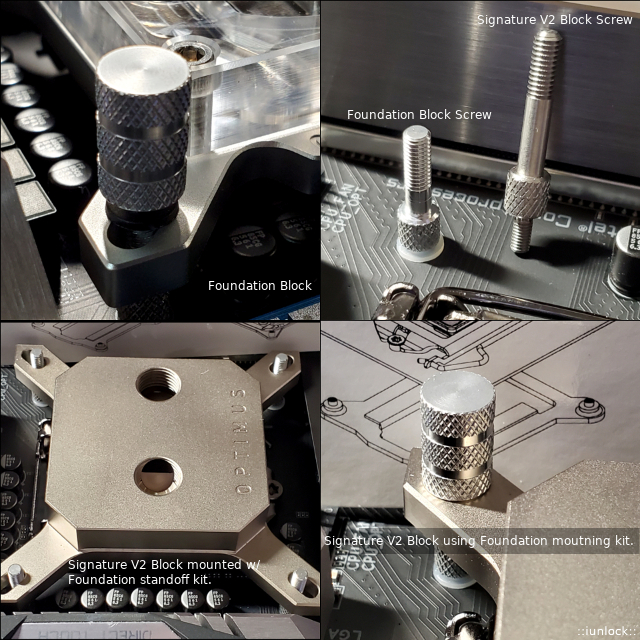
I was curious if the mounting kit of the Foundation Block (Clear acrylic) was the same as the Signature V2 and what you know...they're different.
At first I was looking for the springs in the Foundation Block's box, then realized that the kit doesn't use any (which I actually like). Then I noticed how much shorter the Foundation block's standoff screw was compared to the Signature V2's kit... so then...
I installed the Foundation block's standoff kit onto my Gigabyte Z390 Master board and test fitted the Signature V2 block (with no springs) and it works perfectly.
The Foundation block's standoff kits would do very well for bare die. It bottoms out great sitting nicely over the IHS/bare-die. I did use extra washers all around to protect the board and also to keep the TOP's from coming in direct contact with the cpu block's legs.
I much prefer being able to adjust the torque myself without the variable of a springs tension.
Ex. The EK EVO blocks that I have are meant to tighten until they stop, but I've always felt a little iffy about whether the torque on all four sides with this style of kit is actually accurate. Therefore, I've personally tested the contact pressure with all four sides all the way tightened with my 9900K + Custom lapped super flat IHS and sure enough the contact pressure was not even as we'd assume; trusting that tightening it until it stops would mean that there is even contact.
This is why I really favor the springless standoff kit of the Foundation block, because I can adjust the torque myself. I really like how the Optimus TOP's are long with a good grip.
@Mr. Fox I wonder if they'll be sending you the Foundation Block standoff kit? Or maybe that along with the modified Signature V2 screws? I'm curious now...
I'm going to request getting more of the Foundation Block standoff kit for both of the V2 as I really like that design a lot.
Optimus Signature V2 CPU Block w/ Foundation Block standoff kit.
Attached Files:
-
-
Well my Titan Xp died within seconds of doing a 3D load...
Seller did mention they had done a shunt mod or something before but removed it. Anyways few days later and I have a fresh Titan Xp from nVidia RMA.
https://www.3dmark.com/compare/fs/21575884/fs/21628051/fs/21628074
The one with a description was the original Xp that died after second FS run.
Haven't pushed the second one yet, wanted to make sure it works.
-
https://hwbot.org/submission/4337216_papusan_geekbench4___single_core_core_i7_3770k_5133_points
https://hwbot.org/submission/4337218_papusan_geekbench4___multi_core_core_i7_3770k_17969_points
![[IMG]](images/storyImages/2296665.jpg)
https://hwbot.org/submission/4337214_papusan_cinebench___r15_core_i7_3770k_897_cb
![[IMG]](images/storyImages/2296664.jpg)
https://hwbot.org/submission/4337213_papusan_cinebench___r11.5_core_i7_3770k_9.81_points
![[IMG]](images/storyImages/2296663.jpg)
https://hwbot.org/submission/4337210_papusan_winrar_core_i7_3770k_13276_kbs
![[IMG]](images/storyImages/2296661.jpg)
https://hwbot.org/submission/4337212_papusan_3dmark11_physics_core_i7_3770k_11659_points
![[IMG]](images/storyImages/2296662.jpg)
https://hwbot.org/submission/4337208_papusan_maxxmem_read_bandwidth_ddr3_sdram_28348_mbytesec.
![[IMG]](images/storyImages/2296660.jpg)
https://hwbot.org/submission/4337207_papusan_aida64___memory_read_ddr3_sdram_29476_mbs
![[IMG]](images/storyImages/2296659.jpg) Last edited: Jan 25, 2020
Last edited: Jan 25, 2020 -
Yes, Matt said they would be sending me a Foundation Block standoff kit. Did you try to install the Signature V2 kit to see the problem I ran into?
Wow, great work there. Nice scores all around.
Excellent. I am glad to hear that NVIDIA took care of you. I've heard they are excellent at warranty fulfillment like EVGA, but I have never purchased a GPU directly from NVIDIA.Last edited: Jan 25, 2020 -
Same cancer for the 10 years old 460M leaderboard.
BETTER BENCHMARKING WITH UL
UL the owner of Futuremark is a global certification company. That they struggle fix this is quite amuzing. But I expect they put more resources in making phone benchmarks tools than fix up old ongoing mess. -
@Rage Set
Do you have more time to play with the 9980HK system?
https://hwbot.org/submission/4336263_
What are your thoughts on the chip? -
Yes, it installs fine, but as expected the springs are very stiff. I even tried springs from two other blocks (different brands) and they worked a little easier.
The signature v2 stand off kit without the springs work perfectly fine. -
So wait... If you install the springs and standoffs included with the Signature V2, there are actually threads sticking out past the top of the springs where you can start the nuts without having to go berzerk trying to compress the springs enough to engage the threads? Mine were recessed about 3mm below the top of the uncompressed springs. If you were able to do that, then there is something dimensionally different (and wrong) about the standoffs and/or spring they sent with my kit. Or, was that a typo and you meant the Foundation kit screws and springs?
And, you used the supplied kit for the Signature V2 and simply left off the springs and the nuts were deep enough to not bottom out against the standoff post before tightening down the block? If that is the case, the problem is solved. Just use the parts provided and skip the springs. I am going to have to explore that idea. I didn't test that idea and assumed the nuts would not be able to thread down far enough on the standoffs to compress the block against the CPU without the springs there as spacers. Probably should let Matt know that the solution is to ditch the springs for X299 and update the graphic images in the instructional card they ship with the block.Last edited: Jan 25, 2020iunlock likes this. -
Just opened up the 3770K. The Intel paste was dry as ice. Most of the paste was sticky to the lid. The wimpy single 120mm AIO cooling need all the help it can get
ssj92, Convel, Robbo99999 and 4 others like this. -
Affirmative. I got confirmation this morning from Optimus that they might just ditch the springs all together and might even just ship the V2 blocks with the Foundation standoff kits. The springs are really not needed at all.
I ended up using the stock V2 mounting kit without the springs, with the addition of some washers and it works perfectly.
I could have also used the Foundation blocks mounting kit, but I needed that for the gaming rig... however, the V2 kit works perfectly fine without the springs.
As far as the V2 standoff screw with the block mounted and spring over the screw, it was definitely recessed under the spring about 2-3mm ... I had to hold down opposite ends and thread two at the same time. It's just way too much force that is completely unnecessary along with the springs... no need as the springs bring no benefit.
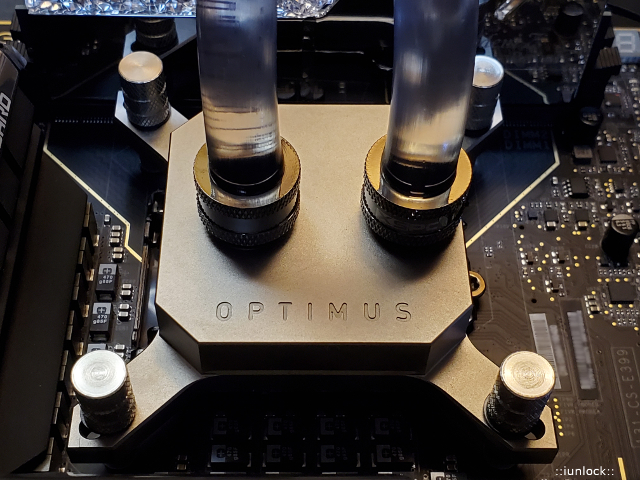
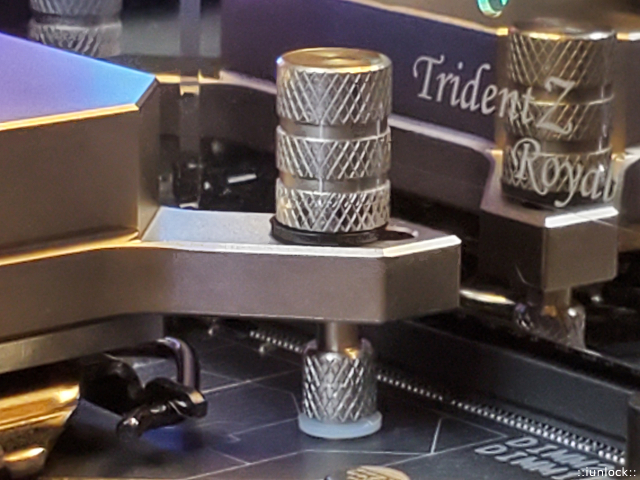
Here are the pics of my final mounting on the Z390 Dark with the addition of the washers, without the spring. Works like a charm.
Note: I hand tightened it lightly until the threads stopped then gave it a 1/4 turn (like an oil filter lol)...then I booted up, ran a looping bench and adjusted from there, which was very little as I think I only ended up going about half a turn at most all around and that was sufficient to give a nice even'ish core temp numbers across the board.
Signature V2 sitting very happy...
The white washer is the stock one that comes with the kit. The black one is the one that I added.
Attached Files:
-
-
This definitely does not work with the die frame. The nuts do bottom out before tightening the block against the CPU. But, there is only like a 1/16th inch air space, so with the IHS and ILM, I can see that it would most likely work fine. Or, I could stack up two or three washers and ditch the springs for bare die. One thick nylon washer might do the trick as well.Last edited: Jan 25, 2020Papusan likes this.
-
Ah yes...a very familiar look with Intel hard clay. A delid and a nice oil change is one of the most satisfying things isn't it?
-
Which die frame are you using? I have the rockit one and I'll test it on that as well later after I run some temp tests with its current configuration.Mr. Fox likes this.
-
I have the Der8auer Die Frame. There was no such thing as the Rockit Die Frame when I purchased this one. I'm glad to see that Rockit has them now.
-
Ah ok. Great stuff...
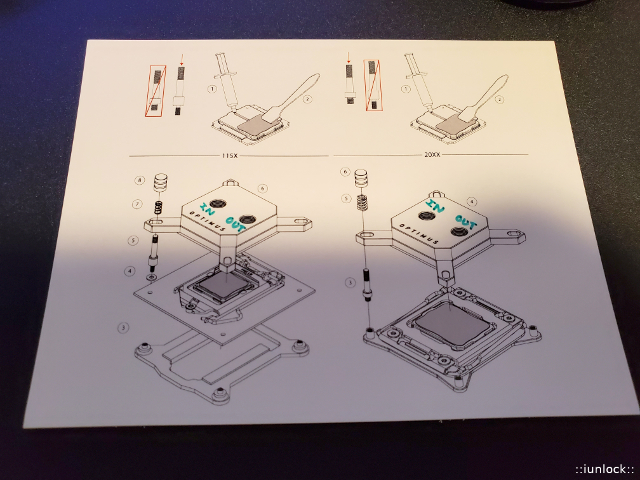
btw here's a response from Optimus regarding the springs:
Attached Files:
-
-
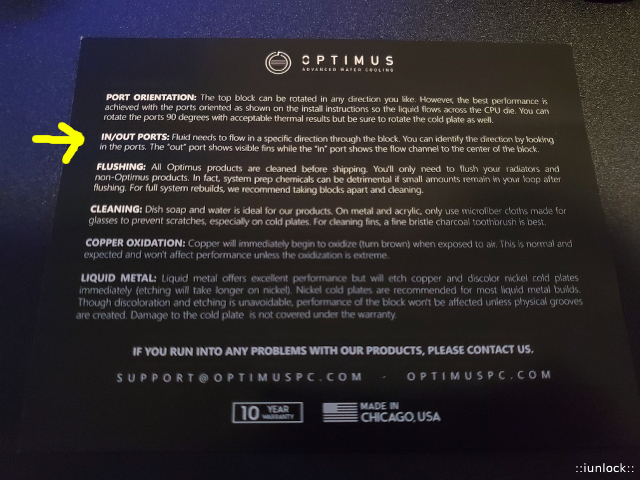
Nice! I suspect you were referring to the "IN" port? Since it was not marked anywhere on the block, and not identified in the graphical installation guide in the box, I emailed to confirm it was the port in the spot nearest to the center, where you cannot see any of the fins. After emailing, I found the answer in an FAQ page on their web site. They should put something in the box showing that. I am sure a lot of people want to know rather than guess since flow direction is important for water blocks.
FAQ is at the bottom of each water block page. Easy to miss, as it is not linked anywhere and you have to scroll all the way to the bottom (lots of scrolling, LOL). I think they would be better off having the FAQ on a stand-alone page and listed/linked in the site map. I went there looking for directions before I sent the email asking and assumed there was no information because it was not noticed at the bottom of the web page. I just stumbled onto the information later.
https://optimuspc.com/products/signature-cpu-block-intel
I'm pretty sure a thick nylon washer, or 2 or 3 thin metal washers, will allow it to work fine without springs using my die frame. I am going to give that a try and see how it works. I can also remove the shims I added where it screws into the die frame. In fact, simply removing those might eliminate the air space between the water block and nuts because it will make the standoffs shorter. If that is not enough all by itself, I can just remove the stacked metal and nylon washer and move them to the top, directly under the nut, like it shows in your photo. (I only had to shim the standoffs to correct the length problem using the springs.)Last edited: Jan 25, 2020iunlock likes this. -
-
-
Yeah I have time. It is quite power limited but overall I am happy with it since the repaste. Is there something you would like me to test?
-
Yes indeed that's correct. I've let them know to add IN and OUT on the diagram card as follows, which would easily solve the curiosity.
Interestingly enough the Foundation diagram card has info on the back of it...
Looking forward to your results with the direct-die mount! I have yet to install mine as I'm first testing the custom IHS's vs the EK EVO blocks... so far very promising... I'll post up the results once the testing is complete.Attached Files:
Mr. Fox likes this. -
-
What power limit are we looking at here?
Would like to see a 5Ghz all core CB15 run with the cache at 4.7Ghz and the RAM bumped up and tightened.Rage Set likes this. -
Wow this 9900KS .... Ambient temps guys with a single 360 Rad!
5.5GHz @ 1.35v (Fire Strike Extreme Combined Test Loop - I'll upload more later.)
https://valid.x86.fr/g3ibifAttached Files:
Prema, Robbo99999, Rage Set and 3 others like this. -
-
https://hwbot.org/submission/4338186_papusan_geekbench4___single_core_core_i7_3770k_5160_points
https://hwbot.org/submission/4338188_papusan_geekbench4___multi_core_core_i7_3770k_18095_points
![[IMG]](images/storyImages/2297241.jpg)
https://hwbot.org/submission/4338183_papusan_geekbench3___single_core_core_i7_3770k_4447_points
https://hwbot.org/submission/4338185_papusan_geekbench3___multi_core_core_i7_3770k_17801_points
![[IMG]](images/storyImages/2297238.jpg)
https://hwbot.org/submission/4338180_papusan_cinebench___2003_core_i7_3770k_4251_points
![[IMG]](images/storyImages/2297233.jpg)
https://hwbot.org/submission/4338181_papusan_cinebench___r15_core_i7_3770k_900_cb
![[IMG]](images/storyImages/2297234.jpg)
https://hwbot.org/submission/4338212_papusan_hwbot_prime_core_i7_3770k_6105.68_pps
![[IMG]](images/storyImages/2297258.jpg)
-
-
Nice, glad to hear that it's working out. How much of a turn from "12 o clock" did you give the TOP's? 1/2 turn past noon?Mr. Fox likes this.
-
Not that much. Maybe 1/4 turn. I figured the HEDT CPU is so much more rigid than a socket 115X CPU that it would not have any flex to speak of. So I just ran the nuts down until all four nuts were touching snugly, (just bottomed out without any real pressure,) then maybe 1/4 turn more for each one in a criss-cross pattern. I will check them again in a day or two to make sure they are still snug. But, I suppose if the temps stay the same I don't even need to check.
-
-
-
*Official* NBR Desktop Overclocker's Lounge [laptop owners welcome, too]
Discussion in 'Desktop Hardware' started by Mr. Fox, Nov 5, 2017.






![[IMG]](images/storyImages/CVosEQJ.jpg)
![[IMG]](images/storyImages/image_id_2297708.jpeg)
![[IMG]](images/storyImages/image_id_2297719.jpeg)
![[IMG]](images/storyImages/image_id_2297724.jpg)
![[IMG]](images/storyImages/image_id_2297721.jpeg)
![[IMG]](images/storyImages/image_id_2297729.jpg)