Problems? See this thread at archive.org.
So many. So I hope I got them all in hereNot easy compete in graphics bench with an old 4 core. It's what it is!
https://hwbot.org/submission/433908...en___basic_geforce_gtx_1070_6822.52_dx9_marks
![[IMG]](images/storyImages/2297739.jpg)
https://hwbot.org/submission/433908...___xtreme_geforce_gtx_1070_5524.88_dx11_marks
![[IMG]](images/storyImages/2297741.jpg)
https://hwbot.org/submission/4339085_papusan_cinebench___r15_core_i7_3770k_907_cb
![[IMG]](images/storyImages/2297738.jpg)
https://hwbot.org/submission/4339109_papusan_3dmark11_physics_core_i7_3770k_11662_points
![[IMG]](images/storyImages/2297763.jpg)
https://hwbot.org/submission/4339084_papusan_gpupi_v3.3_for_cpu___100m_core_i7_3770k_21sec_813ms
![[IMG]](images/storyImages/2297736.jpg)
-
-
https://hwbot.org/submission/4339093_papusan_3dmark___cloud_gate_geforce_gtx_1070_33288_marks
![[IMG]](images/storyImages/2297747.jpg)
https://hwbot.org/submission/4339091_papusan_3dmark___ice_storm_geforce_gtx_1070_190946_marks
![[IMG]](images/storyImages/2297746.jpg)
https://hwbot.org/submission/433909...e_storm_extreme_geforce_gtx_1070_183561_marks
![[IMG]](images/storyImages/2297745.jpg)
https://hwbot.org/submission/433908...storm_unlimited_geforce_gtx_1070_196950_marks
![[IMG]](images/storyImages/2297743.jpg)
https://hwbot.org/submission/4339082_papusan_gpupi_v3.3___1b_geforce_gtx_1070_17sec_720ms
![[IMG]](images/storyImages/2297734.jpg)
-
https://hwbot.org/submission/4339104_papusan_aquamark_geforce_gtx_1070_364738_marks
![[IMG]](images/storyImages/2297755.jpg)
https://hwbot.org/submission/4339098_papusan_3dmark___fire_strike_ultra_geforce_gtx_1070_4991_marks
![[IMG]](images/storyImages/2297752.jpg)
https://hwbot.org/submission/433909...re_strike_extreme_geforce_gtx_1070_9187_marks
![[IMG]](images/storyImages/2297750.jpg)
https://hwbot.org/submission/4339095_papusan_3dmark___fire_strike_geforce_gtx_1070_16799_marks
![[IMG]](images/storyImages/2297749.jpg)
https://hwbot.org/submission/4339094_papusan_3dmark___sky_diver_geforce_gtx_1070_37265_marks
![[IMG]](images/storyImages/2297748.jpg) Johnksss, Mr. Fox, Rage Set and 1 other person like this.
Johnksss, Mr. Fox, Rage Set and 1 other person like this. -
https://hwbot.org/submission/4339106_papusan_3dmark11___entry_geforce_gtx_1070_24424_marks
![[IMG]](images/storyImages/2297760.jpg)
https://hwbot.org/submission/4339107_papusan_3dmark11___performance_geforce_gtx_1070_20741_marks
![[IMG]](images/storyImages/2297762.jpg)
https://hwbot.org/submission/4339110_papusan_3dmark11___extreme_geforce_gtx_1070_9403_marks
![[IMG]](images/storyImages/2297764.jpg)
https://hwbot.org/submission/4339101_papusan_3dmark___time_spy_extreme_geforce_gtx_1070_2943_marks
![[IMG]](images/storyImages/2297754.jpg)
https://hwbot.org/submission/4339100_papusan_3dmark___time_spy_geforce_gtx_1070_6595_marks
![[IMG]](images/storyImages/2297753.jpg) Johnksss, Mr. Fox, Rage Set and 1 other person like this.
Johnksss, Mr. Fox, Rage Set and 1 other person like this. -
https://hwbot.org/submission/4339112_papusan_3dmark___night_raid_geforce_gtx_1070_33563_marks
![[IMG]](images/storyImages/2297765.jpg)
https://hwbot.org/submission/4329550_papusan_vrmark___orange_room_geforce_gtx_1070_9610_marks
![[IMG]](images/storyImages/2292196.jpg)
https://hwbot.org/submission/4329552_papusan_vrmark___cyan_room_geforce_gtx_1070_6054_marks
![[IMG]](images/storyImages/2292197.jpg)
The end for tonight!
![[IMG]](images/storyImages/giphy.gif_cid=790b761147bf0e8089f309f3093c599dd45fceb35af4d45f&rid=giphy.gif)
-
This is just by-the-by, I know some of you have the Sabrent Rocket 1TB NVMe drive, well there was a Sabrent Control Panel utility launched just this month:
https://www.sabrent.com/download/rocket-control-panel/
Allows firware upgrades, etc. It tripped the Virus warning on my Avira, but Malwarebytes didn't find anything on it...I added it to the ignore list of Avira but found that Avira needs to be disabled in order to run it sucessfully, even if on the ignore list. You might be able to use this Sabrent Control Panel to upgrade to the latest ECFM12.3 firmware. I upgraded using an unofficial tool a few months ago, ECFM12.3 provides more accurate temperature reporting I noticed, not really any performance difference that I can see. -
Nice. I'm still using the 2TB in one of the desktops and the 1TB in the laptop. Everything seems to be working fine so I've been debating if I wanted to mess with the control panel at all...
btw I picked up the 1TB pciE Gen. 4.0 sabrent NVMe...works pretty well.. .but HOT lol... as expected.
The Corsair MP600 runs pretty hot as well even with the stock heat sink ... I think I'll put a small fan to it, which should help.
Did you remember to register your sabrent on their website to up the warranty from 1 year to 5 years? Pretty good deal... I'm running the crap out of my sabrent's and driving them without worries knowing that if it does kick the bucket, it'll be covered.Robbo99999 and Mr. Fox like this. -
-
Thank you. Although I don't have a lot of money, I have health, spiritual wealth, the ability to think clearly, a great family and wonderful friends. And, those are more valuable. Plus, in the absence of money, I have RGB so I can make everything in my home office green when I need to.
![[IMG]](images/storyImages/zHe0Z1J.jpg) Last edited: Jan 27, 2020Johnksss, iunlock, Robbo99999 and 4 others like this.
Last edited: Jan 27, 2020Johnksss, iunlock, Robbo99999 and 4 others like this. -
Here is my 5.0 on CB15 - 1859cb. https://hwbot.org/submission/4339680_
Here is 5.0 on CB20 - 4191pts. https://hwbot.org/submission/4339682_
The Aero 15 OLED's BIOS are locked down, so there is no way for me to make adjustments to the RAM timings. Trust me, I wish. -
-
-
Is it locked for XTU or TS ? Could it hold 5.0GHz in the whole bench?Rage Set likes this.
-
Happy Birthday @Mr. Fox !
Thank you. Already looking a lot better!
from 1593 up to 1859 in CB15
XTU doesn't work for RAM?Last edited: Jan 27, 2020Johnksss, Mr. Fox, Rage Set and 1 other person like this. -
https://hwbot.org/submission/433982...cy_core_i7_3770k_5000.62_mhz?recalculate=true
![[IMG]](images/storyImages/2298146.jpg)
https://hwbot.org/submission/4339745_papusan_geekbench4___single_core_core_i7_3770k_5245_points
https://hwbot.org/submission/4339748_papusan_geekbench4___multi_core_core_i7_3770k_18434_points
![[IMG]](images/storyImages/2298092.jpg)
https://hwbot.org/submission/4339822_papusan_3dmark_vantage___extreme_geforce_gtx_1070_44037_marks
![[IMG]](images/storyImages/2298141.jpg)
https://hwbot.org/submission/433982...ge___performance_geforce_gtx_1070_53974_marks
![[IMG]](images/storyImages/2298139.jpg)
https://hwbot.org/submission/4339815_papusan_3dmark___fire_strike_geforce_gtx_1070_16865_marks
![[IMG]](images/storyImages/2298136.jpg)
-
Well the new firmware ECFM12.3 provides more accurate temperature reporting....instead of 14 degC idle temp (which was impossible) it's showing 26 degC idle temp...peak temperatures seem unaffected. I know you said your Sabrents ran hot, so praps the new firmware can somehow help with that for your 2TB drive (just by virtue that the firmware has changed something with temperature reporting).
Yep, I registered my Sabrent on their website to gain 5yr warranty, but I removed the sticker to fit a heatsink to it, so not sure if it's voided my warranty, but for a cheap NVMe drive I can live with the risk of a voided warranty, and I'm confident there won't be longevity issues with it - I don't hammer it and it doesn't get hot (like max 45 degC with heatsink).
I haven't bothered doing that, I have told them stuff before in relation to bugs...I remember when it was slowing down Windows 10 boot when Windows 10 first came out. I might tell them some time, but it's not an issue that causes me pain. -
A funny thing happened this morning. I spent a good 30 minutes trying to figure out why my CPU idle temps were suddenly way higher than normal. It was idling around 50°C instead of the normal 38-40°C. Then it dawned on me... all of my fans are turned off, LOL. I was using the chiller last night (obviously with the fans turned off) and forgot to turn them back on again. After turning them on, within 5 minutes the idle temps are 36°C.
![[IMG]](images/storyImages/implied-facepalm.jpg) Last edited: Jan 28, 2020
Last edited: Jan 28, 2020 -
I am going through what works and what doesn't. It doesn't quite hold 5.0 with some benchmarks but that is due to thermal throttling at this point. I took my cooler pad apart about a year ago, so I don't have that option anymore. I am going to have a bunch of benches soon.
Thanks. I'm still trying to extract as much performance out of it as I can. XTU doesn't work for RAM. Unfortunately, I haven't found anything to unlock RAM timings.Johnksss likes this. -
Well, user error go me last night. I dropped my 7980XE on it floor and tiny chip pieces when every where.... Needless to say....Chip is DOA. Right when I decide to get back to some benching.
So fired up the 9900K to see if it was still workable.
Prema, Papusan, Mr. Fox and 1 other person like this. -
Happy Birthday and amen to all of that. You have an abundance of true wealth as material things = nothing as you know.
We'll have to do a nice burn out in our muscle cars like the old days to celebrate, except in the form of benching, lol.
Let me put the slicks on and run a bench for you. 9900KS/2080ti...
-
-
My idle Temps report accurately and I've confirmed the hot times with my IR temp meter directly on the surface of the ssd. I wonder if the 1tb and 2tb weren't as affected with the temp error reporting?
All good as it happens to the best of us lol. A similar thing happened on the Z390 dark bench where the outer fan plugs disconnected from being loose on a push/pull configuration. Since the rear fans were working, it was turning the front fans making it look like they were working haha...
Ah those moments...Dohh... Sorry to hear man.Johnksss likes this. -
Yes, that is truly tragic, not to mention costly. I'd hate to see it happen to any part, but especially one that is so expensive.
Yes, indeed. Nice 9900K sample for sure.Johnksss likes this. -
So, I've been thinking about selling my 2080 TI Kingpin cards. Truth of the matter, I don't use them outside of overclocking and I haven't really been benching either. I've pushed them as far as I could on atypical water loops. Do you guys think I should keep them or get rid of them while I still can fetch something?
Robbo99999, Johnksss and Mr. Fox like this. -
That's a tough call. The question is, what could you replace them with that is better. Short answer: nothing. At least not yet.
But, logic dictates selling them while they are still the best GPU money can buy. As soon as the 3080 Ti shows up they aren't going to be worth nearly as much.electrosoft, Johnksss, iunlock and 2 others like this. -
If I go by the timeline for the 2080 TI and Kingpin versions, we will not see a 3080 TI Kingpin until Q1/Q2 of 2021. With that said, I rather they go to someone that is going to use them instead of sitting on my Dark unused. Thank you bro for your take on this.
-
Same boat bro... You're still in the green as far as the road map goes, but like @Mr. Fox said, once the 3080's even sprout with real news, the masses still start dumping their cards... I might rid mine before that happens...
They are excellent cards... Love them... But they can also become really expensive trophies lol. -
Hopefully that holds true over time.
Thanks. All I could do was shake my head at the time....
This is true....
Same here actually. My card is sitting here stocked up at the moment catching dust. I'm running my 1080 TI on water block that I never got rid of.
I wonder if he will go another round. I guess as long as Nvidia doesn't keep the leash on, then you are probably right.
Here is it's replacement. It should be here Friday. Anther 7980XE as I did not want a 10980XE and not ready to switch to AMD as that's about a 3K jump at the moment.
Last edited: Jan 29, 2020electrosoft, Mr. Fox, Papusan and 1 other person like this. -
I got the 1TB version, PCIe 3.0 not 4.0, and idle temperature reporting is wrong with ECFM12.2, but that's corrected with ECFM12.3. Like I said in an earlier post it was showing 14 degC idle temp whilst in a 21 degC room, so that's impossible. With the latest firmware (ECFM12.3) it's showing 26 degC in a 21 degC room, so I think I can assume this is the firmware for accurately reporting idle temps. Peak load temps don't seem to be affected/changed though.
Definitely sell them immediately if you're not using them and don't want them, the longer you leave it the less they are worth and the less people will want them. -
Good to see you around John!
Sucks on the 7980XE. Nice one on the 9900K. Proves once again P0 > R0jc_denton, electrosoft, Convel and 4 others like this. -
Welp... thanks to @canonkong at win-raid forum, I have the Windows 7 drivers for the NVIDIA RTX USB Type-C port that the NVIDIOTs dropped the ball on. As suspected, the lack of ability for Windows 7 to support it the same as Windows 10 supports it was an absolute load of crap from the Redmond Retards. So sick of their filthy lies and dishonest arm-twisting crap... effing losers. Nice not having to live with unknown devices in Device Manager. These drivers are "borrowed" from a Ryzen chipset driver package that canonkong modded to provide Windows 7 support because of more or less the same caliber of total nonsense lies and BS relating to Ryzen. I modded the INF files and changed "AMD" to "NVIDIA" just for the optics in Device Manager names.
Nobody actually "needs" Windows 10 except for the lying jackasses at Micro$lop trying to making a living feeding their digital feces to the rest of us.
Amen to that. It's like our "family" is complete again.Last edited: Jan 29, 2020 -
Thanks. Work had me quite tied up for a while.
Yeah, but will hope this "new to me" replacement will be at least the same.
Humm, not sure if this is the original from my laptop or not. (wondering what that revision is now) I threw the 2080 in and can't see the windows screen at the moment.
Nice! I wonder if any of that would work for the Gigabyte Aorus Extreme as I have no usb anything drivers so i can't even use a keyboard or mouse under Windows 7.Mr. Fox likes this. -
Got bored, so I played with the 780 Ti Classy for a few minutes. Nice having the dip switches to disable PCIe slot #1 instead of physically removing the 2080 Ti.
![[IMG]](images/storyImages/image_id_2298920.jpeg)
![[IMG]](images/storyImages/image_id_2298924.jpeg) Rage Set, Johnksss, Papusan and 1 other person like this.
Rage Set, Johnksss, Papusan and 1 other person like this. -
They certainly might. I'll zip it up and link it to you from my Google drive if you want to try it.
Even if you use the ASUS EZ-Install tool to make the USB thumb drive for Windows 7 you have no USB anything? That is what I have been using for a couple of years and it works great for my Clevo and HP laptops and X299 Dark motherboard to add USB 3/3.1 and NVMe driver support.
I also have some win-raid Fernando driver mods that I used with the Maximus X Hero that may also work with your Gigabyte board. I will link those to you as well.
Edit: OK Brother @Johnksss check your Gmail. I hope those will work for you. I just shared a folder with a bunch of other W7 Z370 driver stuff, along with that Ryzen chipset package.Last edited: Jan 29, 2020 -
Cool. Thanks!
This is the first board I have ever that I have had this problem. USB works and is installed during setup but once in windows, they are gone. I have tried using Windows 7 drives from other machines and still nothing. I only need it for a few benches I want to run, then out comes this board.
UGgggggggggg, Right now I'm going through every single score and enabling points. What a drag!!!!!!!!!!!!!!!!!!!!!!!!!!!!!!!!!!!!!!!!!!!!!!!!!!!!!!!
Edit:
Thanks Brother Fox.Last edited: Jan 29, 2020 -
You can try a first gen USB 3 or a USB 2 PCIE expansion card, or a PS/2 expansion card as well. As long as there are smart guys making drivers, I will continue to use Win 7. For the Ryzen USB's someone modified the 2000 series to work on the 3000 series. Works great. Still dont have a USB type C driver though.
-
Kind of sucks that Gigabyte is drinking the Windoze OS X Kool-Aid so hard and acting like Nazi control freaks. I really appreciate that ASUS and EVGA have gone to the trouble of making sure Windows 7 support continued for their desktop performance enthusiasts in spite of the wishes of the Redmond Retards to the contrary.
-
You may find a solution to your USB problem in this thread if the drivers I linked you to on my Google drive did not work.
[Solution] Win7 drivers for USB 3.0/3.1 Controllers of new Intel chipset systemsJohnksss likes this. -
https://www.3dmark.com/3dm/43525334?
Seems I get can get about 4.25Ghz across all cores without much effort. Max temp is 75c but I am pushing 1.43v and my fan curve is set up to where its pretty quiet until Im gaming or the like, I imagine that its just the polling taking longer than it should to correct the fans but its all good so far.
Im surprised to see I am getting similar scores to RTX 2080? Is that stock perhaps? I did tune the 5700xt a little bit but unless Im mistaken then I guess im pretty satisfied with my $400 5700 xt. I thought it was supposed to trade with the 2070, unless this is just in benchmarks against a potentially stock 2080?
What do you guys think?
https://www.3dmark.com/3dm/43529094? (FS)
EDIT: The above is after trying my hand at the MorePowerTool that was made to simplify overclocking past the limits AMD had set.
Graphics: 29k
Dont think I can hit 30k with this GPU.
https://www.3dmark.com/3dm/43529212? (FS Extreme)Last edited: Feb 1, 2020 -
Dialing in the 9900KS @ 54x (ambient temps) ... It can also run 55x just fine at ambient as well. ( https://valid.x86.fr/g3ibif) - I'm confident it'll do 56x etc.. on the chiller. Maybe more... which would be great.
Fire Strike - 31495
https://www.3dmark.com/3dm/43528870Attached Files:
-
-
Some R0's scale well with XOC scenarios, while others are flat out bleh. Luckily most of my chips are all P0 with the exception of a few newer ones; however the P0's are perfectly fine for regular usage as in gaming rigs etc...
My 9900KF that is a P0 scales very well... strong chip...same with both the 9900K's that are P0's.
Yea that makes no sense why GB would do that... Great current boards, but brain dead with legacy support.
Very nice mate... it's refreshing to see some AMD GPU benching... keep it up!
Shoot for 30K.
-
Hummmm, seems pretty low for combined and physics for 5.4Ghz? Maybe the chiller will change that. I'm guessing here though....
I totally agree.Last edited: Feb 1, 2020 -
Yea it gets wonky at higher clocks in ambient, plus it's likely due to the R0 stepping, which is a given.
I take it that your run was on a chiller? Monster physics score...very nice.
Johnksss likes this. -
Yes, but I can do 29+/13k+ physics with no chiller, but not trying to degrade the chip further than need be. My last round of benching a few months ago produced lousy numbers so I was thinking the chip was a dud, but I see I was wrong there.
Thanks. I still need to bring it back out and work on getting higher that 55X. That's where I stopped. and started back on the 7980XE, which is way off in scoring.
Edit, I wonder if it's because of the Memory? Some of these benchmarks want at least 4 sticks of ram.... Speculation of course.. -
Good stuff. yea I can't wait to get it on the chiller... R0's are funny... from the data that I've combed through they scale on par and sometimes better than P0 stepping with lower temps...ie... the good R0's are in the same league in terms of the lottery as P0's when chilled or colder...
Glad you're 7980XE is okay... what a relief! As for the memory, yes that definitely plays a role.Johnksss likes this. -
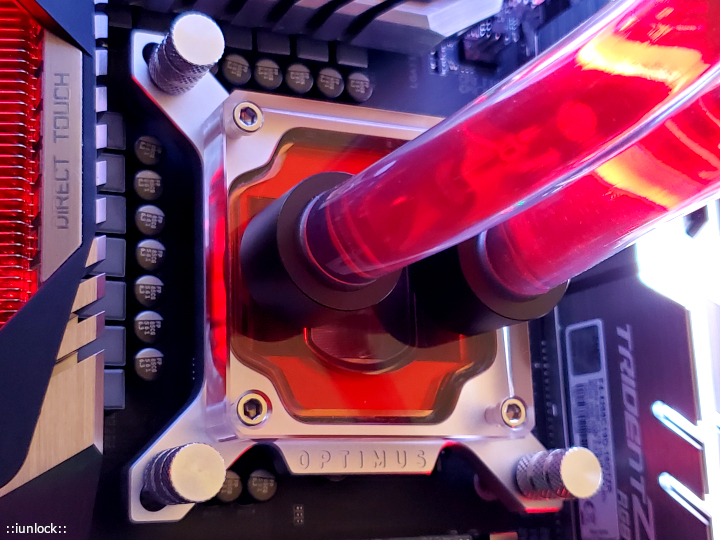
Finally! Just finished the new gaming rig build..phew.. that took a while.
Long story short... I can't help but to name this the Impossible Build lol.. there are a lot of intricate things that shouldn't have worked, but it did after pulling out some hairs...
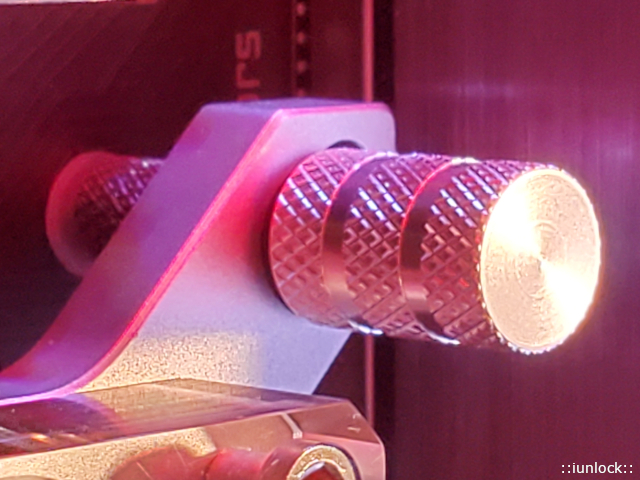
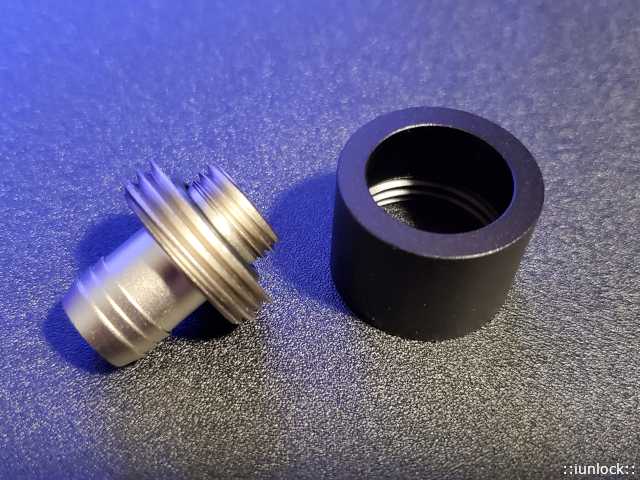
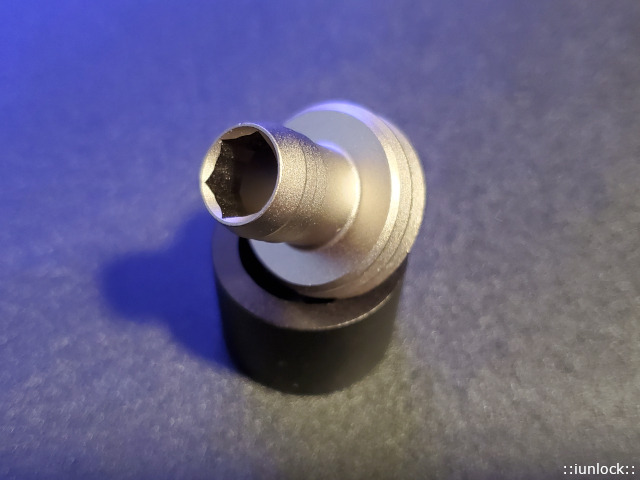
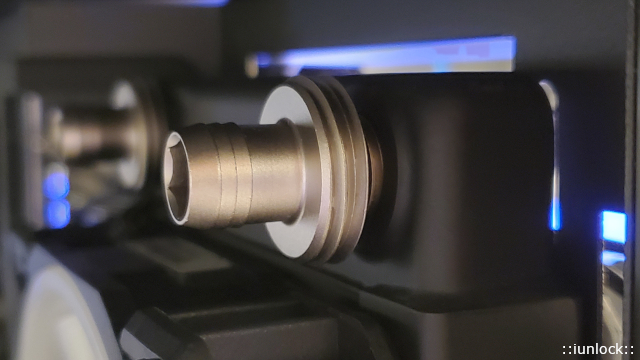
Photoshoot in progress... but here are some pics of the Optimus Foundation Block, Mounting and the Optimus Fittings which are fantastic IMO... I love the HEX inside and the overall design... very solid, strong, sturdy and overall just great.
Attached Files:
-
*Official* NBR Desktop Overclocker's Lounge [laptop owners welcome, too]
Discussion in 'Desktop Hardware' started by Mr. Fox, Nov 5, 2017.


![[IMG]](images/storyImages/giphy.gif_cid=790b7611d54689b22f6b9524ab4d60e2329209c606257c56&rid=giphy.gif)