Problems? See this thread at archive.org.
Interesting indeed. I saw some OC'ers disabling cores for some benches with great results while others, it didn't make a different. While it sucks you can't get the full performance out of all 18C/36T in this bench, you might be able to beat your old scores now with this "7960X"
-
-
I might. Should at least match it, if not beat it.
And, it seems like for 3DMark 11 maybe the sweet spot is 16C/32T... 14C/28T is just a little slower than 18C/32T. Really interesting. It's definitely all about the software and how many cores/threads it is capable of using efficiently. This is obvious in that the 7980XE trounces the 7960X in Cinebench.
Here is the result with 14C/28T.
Wow... we just broke 7500 posts in this thread. It has already been 2.25 years since I abandoned laptop crap and started this thread. Time flies when you're having fun.
Last edited: Feb 9, 2020 -
https://www.amazon.es/gp/product/B0725HP1J2/ref=ox_sc_saved_title_1?smid=A1AT7YVPFBWXBL&psc=1
very good I am to buy this device to control all the fans of the box in total 7 as I understand I can connect 2 per port, more than anything it is on a whim ..
I have a little doubt, I comment:
I have 3 corsair lm of 140 connected to the chafan1 and at the top they go to 1830rpm (should go to 2000) and 3 nosisebloker 14-3 to the cpufan at 1350 and peaks 1400 and low, and I have been testing and if I connect 2 fans to the cpufan they arrive until 1440 the noisebloker, with three impossible do not reach those rpm and tested different devices like these:
and nothing at all I returned because it remains the same, I want to catch the commander pro to know if this is solved and the fans go to top if I configure it to go full speed, it is connected by usb of the motherboard and molex ..
I think that when connected to the cpufan or chafan when seeing more than 2 fans connected, the rpm drops being connected by molex ,,,, I'll tellMr. Fox likes this. -
-
How many fans are connected to a single motherboard fan header? If you put them on separate fan headers for testing (one fan per header) will they go to 2000 RPM?
-
I use 3 fans on one header and they report around 2100ish at max
Using 3x gentle typhoons -
There is also the slight possibility that this can fry the header....
-
The question I have is that if with the commander pro I can reach 2000rpm with the corsair and 1440 rpm with the noiseblkers ... since the device is connected by molex and to the usb of the motherboard
-
Should be possible as long as the commander pro can accommodate the amp draw needed to run said fans at said max speeds.
-
I have 2 headers total, 3 if I remove the pch fan and split that
Its been running non stop for just shy of a month now.
Ive had worse results using molex adapters but right, its not like the risk is completely removed either. -
Mission Accomplished.
 (Even though the Physics score is a little less, got the GPU score up enough to compensate for it.)
https://hwbot.org/submission/4350075_ | https://www.3dmark.com/3dm11/13695642
![[IMG]](images/storyImages/image_id_2304003.jpeg)
-
This is only if you're using more than the header channel can provide.Last edited: Feb 9, 2020iunlock, Rage Set, Mr. Fox and 1 other person like this.
-
-
Thanks. Not far away from reaching 5th place in Norway

Convel, Raiderman, Robbo99999 and 3 others like this. -
-
Thanks, bro. It's your fault. Anything I do well with overclocking is either directly or indirectly a result of your influence in my life and I appreciate it.
That Vantage run above is just another example of that. Thanks for the tip.
You're already #1 in Norway as far as we're concerned. The other people just haven't figured it out yet. -
I'm going to have to agree with Brother Fox. You are #1 in our book!
Thanks, but i'm inclined to see that as a two way street! Thanks for all the tips and tricks you have shown me over years. It is greatly appreciated!
I have a new one for ya...Raiderman, Papusan, Rage Set and 1 other person like this. -
Brother @iunlock why don't you, Deexbish, zergslayer69 join the @Prema Team on HWBOT.org. We'd love to have the three of you join us. There's more power in numbers. If you decide you want to, let me know and I will send you the password.
iunlock, Papusan, Rage Set and 1 other person like this. -
Cool context menu. Here's one that I really like. FileMenu Tools | LopeSoft
Raiderman, Papusan, iunlock and 1 other person like this. -
It's portable, too. Install it to a data drive and save a local license file in the installation directory, then you can activate it on each OS in a multi-boot or after a clean install. As long as the location never changes, it will re-activate as often as you want.
-
Okay, so it basically looks like this. Still working on trying to get 05/06 working. Not sure what's going on there.
jc_denton, Papusan, iunlock and 1 other person like this. -
You two are too kind As I said in rep to bro Fox... "If it wasn't for you (always kind from the beginning), NBR + Prema Team I would still sit down home benching for me myself as I have done many years. Didn't dare post on the web before 2014. Was afraid people would laugh at my not the best English". Thanks
https://hwbot.org/submission/4350264_papusan_maxxmem_read_bandwidth_ddr4_sdram_29611_mbytesec./
![[IMG]](images/storyImages/2304105.jpg)
@PremaMod Team back to top 50th
https://hwbot.org/league/teams?offset=40Last edited: Feb 10, 2020 -
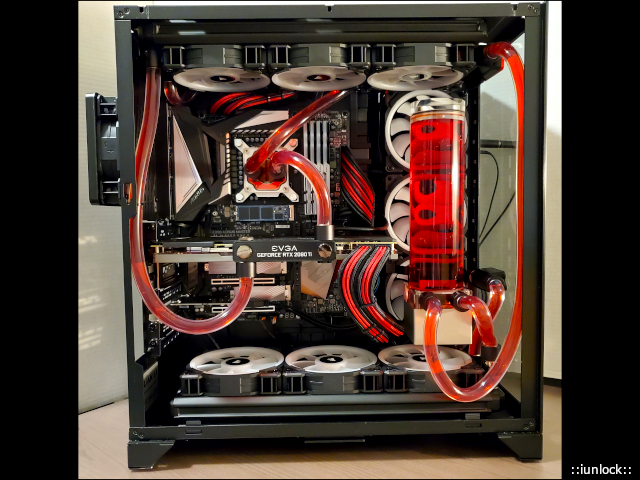
@makina69 I run 2x Commander Pro's in my gaming desktop + 2x Corsair Lighting HUB's and use a 6 port regular fan splitter on my test benches; both which are powered by SATA power.
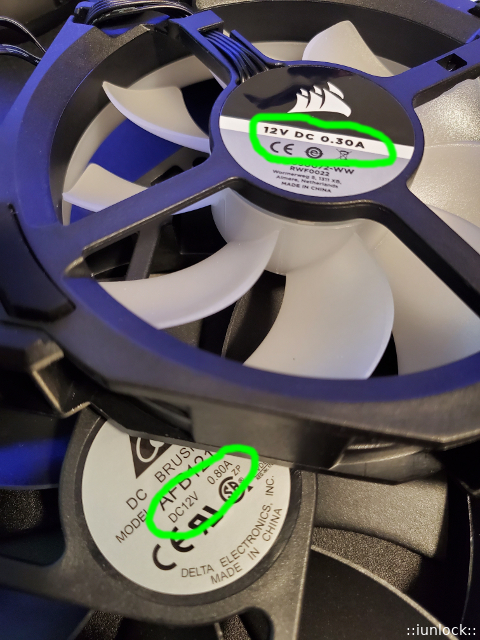
Like what @Johnksss said, it all boils down to the amperage. I have the LL120's in my gaming desktop and they are rated at 0.30A each.
The Commander Pro has 6x Fan ports and with 6x of the LL120's hooked up that = 1.8A, which the SATA power handles easily for power.
The fan headers on the motherboard are typically rated at only 1.0A (12V) so if you're using a splitter, it's important to stay under 1.0A combined.
Ex. That means if I were to use my LL120's on a single fan header, I could hook up 3x fans to it (0.30A x 3 = 0.9A) to stay within specs of the 1.0A Max. amperage.
Higher cfm fans and/or other strong fans with high static pressure can be ~0.8A, like what you see in the pic with my "meat grinder" ultra high static pressure fans that can levitate a hover board lol.
With those rated at 0.80A, I'd only be able to hook up one of those to one fan header, unless I'm using a fan hub that is powered by SATA Power; only then would I be able to hook up 6x, like what I have on my test benches.
Regarding the Commander Pro, it's an excellent HUB, but Corsair's iCUE software, although pretty, is far from perfect. It's buggy has heck, however I think with my case it is because I'm running 12x LL120 Fans in my desktop with temp probes hooked up etc...which is causing software confusion due to all the connections lol.
All the fans and the lightning work, but the "performance," tab within the iCUE software comes and goes and it often shows weird rpm numbers. The way that I confirm the rpm is by cross referencing the data hwinfo64 shows, which is pretty accurate for the most part.
Is the Commander Pro worth it? IF, you're wanting to adjust the lightening (which I assume you do since you have the LL series fans) then yes, the Commander Pro is the best option since it's an all in one and native HUB for the Corsair fans.
Since you're not running as many fans as I am, the iCUE software may work a lot better. For most running at or under 6x fans with one HUB (Commander Pro), they don't have any issues.
Hope that helps and good luck!
Ah Congrats! There ya go... it's a funny thing isn't it? It makes all the sense when considering the tastes buds of each software on what they like and don't like...
Thanks for the consideration. I remember brother @Prema sending me a message a long while ago with an invite. A little back story. At the time there were a handful of Overclockers that were wanting to form a team with LHz and we were going to get it going, however a competition had just started right at that time and a lot of them joined other teams to compete.
For a lot of them they were fulfilling promises to join the respected teams for certain tournaments. Naturally, they became acclimated to where they were and just ended up staying, which is understandable. Everything was very mutual with no hard feelings. It's just how it played out. - As for dee and zerg they are not overclockers at all and I don't mean that in a bad way as they are good people, just stating that they don't do what we do here. Back in the day we all had the same laptops and was testing them and since we were using 3DMark at the time, we were going to upload them also to hwbot; at the time. The reason they're still on there is because they've simply not got around to removing their handle off of the, "interim" team that never panned out for natural reasons. Great guys... there were a good bunch of us at the time, but those laptop days are over. -
Now fast forwarding to today, there were two teams overseas and a team domestically that wanted me to join all throughout last year and prior, however due to my work load I had to pass and just stayed independent, since most of them were really hoorah about everyone completing in the country cups etc... Just this past competition, US lost by a measly 13 points against Canada lol and even though I didn't have any obligations, I kind of felt responsible for that haha because I had darn near 100+ points that could have been submitted at the time. BUT, again... I wasn't expected to since I wasn't on their team who were the majority that accumulated the points for the US team.... very interesting stuff indeed. -
I may dissolve the past interium team and consider joining team Prema as I'm very "for" his positiveness. We actually have some history yea? @Prema ... good times...oh those laptop days lol. Perhaps the circle can soon be completed. @Mr. Fox perhaps we can chat tomorrow.Attached Files:
Last edited: Feb 10, 2020 -
-
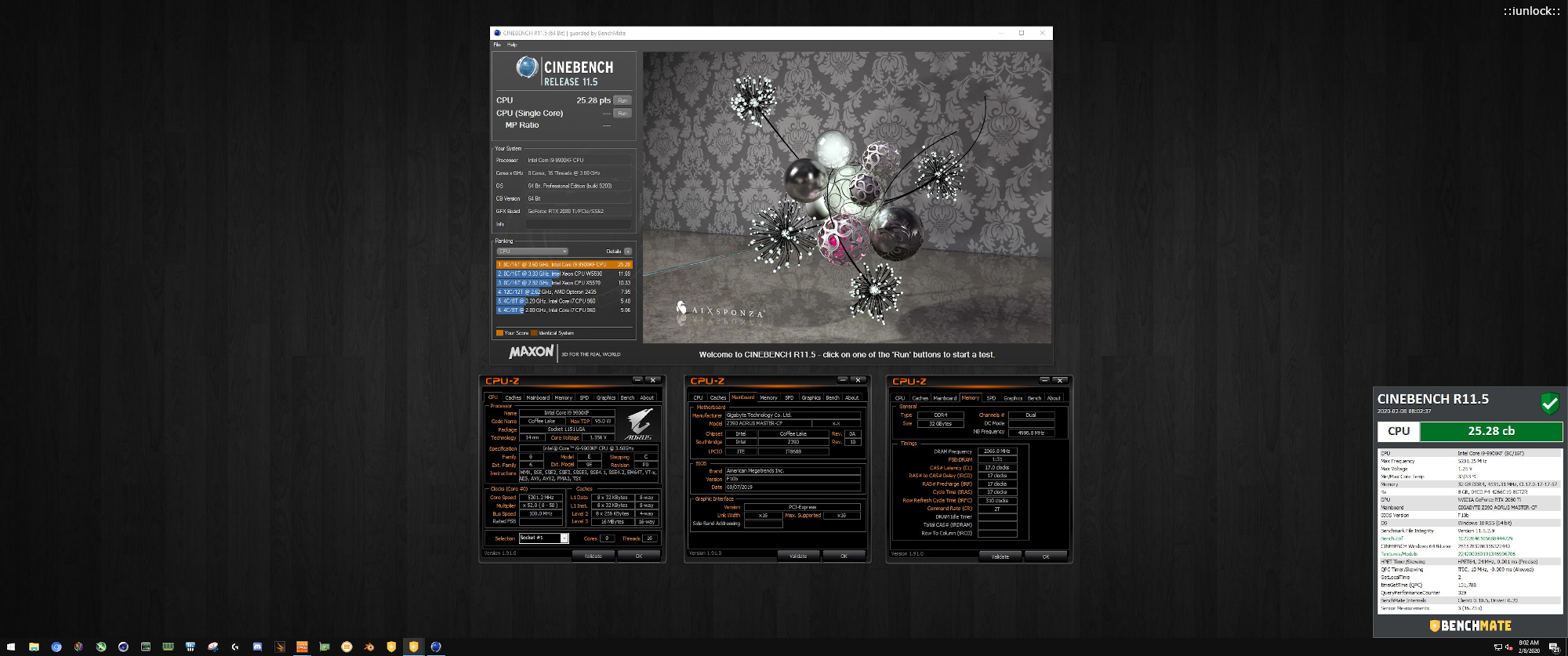
Cinebench R11.5: 25.28 pts
9900KF at 5.2GHz (Ambient) on the Gaming Desktop.
More surprises from the KF...
Attached Files:
Johnksss, Raiderman, Rage Set and 1 other person like this. -
-
iunlock
Above all I want to thank you for providing me with information, I am understanding that the speed of the fans is limiting the connectors on the motherboard because they have enough energy ... is what you want to say no?Johnksss, Mr. Fox, Rage Set and 1 other person like this. -
Correct, if you have too many fans connected to a fan header on the motherboard rated at 1.0A per fan header, then it's likely that your fans are under powered = slower rpm's due to not enough power.Johnksss likes this.
-
connect a 140mm lm corsair fan to the chafan1 socket of my motherboard, according to the manufacturer the fan rotates at 2000rpm but it does not exceed 1840 ... it is very rare isn't it?
Mr. Fox likes this. -
The manufacturers operate with +-5% variance in fan speed. Maybe test with another header.Johnksss, Mr. Fox, Rage Set and 1 other person like this.
-
In that case it's well within the margin of what @Papusan pointed out of +/- 5% ... not all fans run perfectly on the dot at the even number it advertises. You're good ... I don't think there's anything wrong. -5% of 2000rpm is 1900rpm ... all is green.
-
Provide 3 ekwb of 2000rpm and these if they turn to 2000rpm as the manufacturer says, could it be that the corsair is defective?
https://www.coolmod.com/ekwb-ek-var...ilador-14-cm-precio?virtuemart_category_id=12 -
Read specs highlighted in blue.
Mechanical and electrical specifications:
- Maximum speed: 2000RPM (+/- 10%)
- Rated Voltage: 12V DC
- Power Draw: 3.86W
- PWM Duty Cycle: 25-100% - ER (Extended Range)
- Connector: 4-pin PWM header
- Shaft bearing: Dual-Ball bearing
- Bearing durability: 50.000 hrs @ 40°C (MTBF)
- Dimensions: 140 x 140 x 25 mm
https://www.ekwb.com/shop/ek-vardar-evo-140er-black-bb-500-2000rpm
As I already have posted... Specs has tolerance levels.
This for the fan you referred to. But from my experience with EK Vardar fans, they all is on specs although specs sheet say up to -10% less rpm.
My son have 3000 rpm 140mm Noctua industrial fans... They max out at around 2700 rpm.Johnksss, Convel, iunlock and 1 other person like this. -
I agree with you, but at least the ek turns at 2000rpm instead the corsair stays much lower ...
what is not proven is one by one the corsair fans could there be some vague between the 3 ... xd -
It is working within spec. I would also venture a guess that might be accurate here is that a difference between CFM and static pressure with a variance of ~160 RPM is so slight that there would likely be no measurable difference in the effectiveness of the fan(s).
A difference in decibels would be more likely to be noticeable than a change in cooling performance. I notice this with my manual fan controller. A tiny difference in the dial position can be huge in terms of the amount of noise produced, but there is no measurable change in thermal performance.
One also has to wonder if the sensors are reporting fan RPMs with 100% accuracy. The sensors could be off by this small amount as well. The splitter could also affect the accuracy of the reading without having any effect on fan speed. -
Now that I am done porting a Windows 7 theme to make Windows 10 a little more palatable. First time). Im gonna try and find some time to do some more benching. I HAD to do something to keep the vomit from entering my mouth when starting 10.
-
Those look nice. Looking forward to your benching. Things are getting pretty busy at work, so I might not be doing much for another week or two. Maybe a little here, a little there.
Windows OS X vomit is the worst kind. It smells like deviled egg farts. -
Good points and likely the case here, especially when using a splitter. There definitely is an efficiency peak for sure with fans and cooling. Maxing out doesn't always yield the best performance. On my test bench #1 with a single 360 rad and 6x fans, it cools the same with the fans at about 75%-80% than if it was maxed out to 100%. As you've mentioned cranking it up only adds dBA's.Looks great. I didn't get one impression that it was windoze 10...Johnksss, makina69, Mr. Fox and 1 other person like this.
-
@Mr. Fox great news. Optimus has newly designed standoff's and caps. Just send them an email with your order number and they'll ship it out for free.
There are even black anodized ones and the nickel plated ones will be available next week!
The new stand-off's are shorter, however the caps are longer and don't have a groove for the springs so that it sits flush.... all springless now.
"The new (black) vs old (steel) mounting. The old cap is designed to hold the spring inside, while the new is obviously made for direct contact. Also, the new mounting unthreadded area is around 4mm while the bracket thickness for both foundation and signature is around 6mm.
And right now we have anodized silver and anodized black of the new mounting in stock. We're making nickel plated mounting to match the Signature that'll prob be available next week."Attached Files:
Last edited: Feb 12, 2020 -
-
good night and solve the issue of noisebloker speed:
It turns out that I have the 3 connected to the cpu fan through spliter and as we already know in the spliter connector there is always a PWM .... I gave each fan to test the splitter pwm connector 1 by 1 and it turns out that of the 4 fanes that I have one that has less rpm ... after the remaining 3 connect as if we were saying the most powerful to the PWM of the spliter and voila solved they reach 3 almost at 1500rpm and the other one put it behind it that spins to 1440rpm ... But well solved I hope this can serve someone in case it happens ...Johnksss, Robbo99999, Papusan and 1 other person like this. -
Thanks. I will send an email to them.
Edit: sent the requestLast edited: Feb 11, 2020Johnksss, Rage Set, makina69 and 1 other person like this. -
and discovered the problem of rpm ... it turns out that if I remove the top cover the fans reach 1450 but if I put the lid down to 1360/1400 I think that when I put the lid on it it rebuilds and slows the fans the radiator is almost hitting the lid that has holes for that ... but I think it stops and the radiator should go inside ...
![[IMG]](images/storyImages/tkKNUJg.jpg) Papusan, Johnksss, Rage Set and 1 other person like this.
Papusan, Johnksss, Rage Set and 1 other person like this. -
-
Well, my friend, I have tried it without and with a lid ... the lid is made of a grid, but since the radiator is almost attached to the radiator, it rebounds and brakes the fans ...
Mr. Fox likes this. -
The latest version of Linux Mint 19.3 was the easiest clean install I think I have ever done yet. Everything swiftly installed, it prompted me to launch Driver Manager, which presented me with the current proprietary GeForce driver or the previous as an option. Selected the latest, rebooted and everything is flawless. No other user intervention was needed for anything in terms of setup. Super-slick in every way.
System Report
Code:System: Host: Punisher Kernel: 5.0.0-32-generic x86_64 bits: 64 compiler: gcc v: 7.4.0 Desktop: Cinnamon 4.4.5 wm: muffin dm: LightDM Distro: Linux Mint 19.3 Tricia base: Ubuntu 18.04 bionic Machine: Type: Desktop Mobo: EVGA model: X299 DARK v: 1.0 serial: <filter> UEFI: American Megatrends v: 1.20 date: 12/04/2019 CPU: Topology: 18-Core model: Intel Core i9-7980XE bits: 64 type: MT MCP arch: Skylake rev: 4 L2 cache: 24.8 MiB flags: lm nx pae sse sse2 sse3 sse4_1 sse4_2 ssse3 vmx bogomips: 187200 Speed: 1200 MHz min/max: 1200/5000 MHz Core speeds (MHz): 1: 1200 2: 1200 3: 1201 4: 1201 5: 1201 6: 1201 7: 1201 8: 1602 9: 1472 10: 1200 11: 1202 12: 1201 13: 1617 14: 1792 15: 4999 16: 1200 17: 1202 18: 1201 19: 1201 20: 1201 21: 1201 22: 1200 23: 1201 24: 5000 25: 1200 26: 1200 27: 1201 28: 1601 29: 1416 30: 1200 31: 1201 32: 1200 33: 1201 34: 1201 35: 1201 36: 1200 Graphics: Device-1: NVIDIA GV102 driver: nvidia v: 435.21 bus ID: 65:00.0 chip ID: 10de:1e07 Display: x11 server: X.Org 1.20.4 driver: nvidia unloaded: fbdev,modesetting,nouveau,vesa tty: N/A OpenGL: renderer: GeForce RTX 2080 Ti/PCIe/SSE2 v: 4.6.0 NVIDIA 435.21 direct render: Yes Audio: Device-1: Intel 200 Series PCH HD Audio vendor: eVga.com. driver: snd_hda_intel v: kernel bus ID: 00:1f.3 chip ID: 8086:a2f0 Device-2: NVIDIA driver: snd_hda_intel v: kernel bus ID: 65:00.1 chip ID: 10de:10f7 Sound Server: ALSA v: k5.0.0-32-generic Network: Device-1: Intel Ethernet I219-V driver: e1000e v: 3.2.6-k port: 0580 bus ID: 00:1f.6 chip ID: 8086:15b8 IF: enp0s31f6 state: up speed: 1000 Mbps duplex: full mac: <filter> Device-2: Intel I210 Gigabit Network driver: igb v: 5.4.0-k port: 2000 bus ID: 05:00.0 chip ID: 8086:1533 IF: enp5s0 state: down mac: <filter> Drives: Local Storage: total: 10.44 TiB used: 121.46 GiB (1.1%) ID-1: /dev/nvme0n1 vendor: Samsung model: MZ1LV960HCJH-000MU size: 894.25 GiB speed: 31.6 Gb/s lanes: 4 serial: <filter> ID-2: /dev/nvme1n1 vendor: Samsung model: MZ1LV960HCJH-000MU size: 894.25 GiB speed: 31.6 Gb/s lanes: 4 serial: <filter> ID-3: /dev/nvme2n1 vendor: Samsung model: SSD 960 PRO 512GB size: 476.94 GiB speed: 31.6 Gb/s lanes: 4 serial: <filter> ID-4: /dev/nvme3n1 vendor: Samsung model: SSD 960 PRO 512GB size: 476.94 GiB speed: 31.6 Gb/s lanes: 4 serial: <filter> ID-5: /dev/nvme4n1 vendor: Samsung model: MZVLW256HEHP-000H1 size: 238.47 GiB speed: 31.6 Gb/s lanes: 4 serial: <filter> ID-6: /dev/sda vendor: Samsung model: SSD 840 EVO 1TB size: 931.51 GiB speed: 6.0 Gb/s serial: <filter> ID-7: /dev/sdb vendor: Samsung model: SSD 840 EVO 1TB size: 931.51 GiB speed: 6.0 Gb/s serial: <filter> ID-8: /dev/sdc vendor: Crucial model: CT1000MX500SSD4 size: 931.51 GiB speed: 6.0 Gb/s serial: <filter> ID-9: /dev/sdd vendor: Seagate model: ST2000DM006-2DM164 size: 1.82 TiB speed: 6.0 Gb/s serial: <filter> ID-10: /dev/sde vendor: Seagate model: ST4000LM016-1N2170 size: 3.64 TiB speed: 6.0 Gb/s serial: <filter> ID-11: /dev/sdf type: USB vendor: SanDisk model: SDSSDH3 1T00 size: 931.51 GiB serial: <filter> Partition: ID-1: / size: 232.28 GiB used: 6.39 GiB (2.8%) fs: ext4 dev: /dev/dm-0 ID-2: swap-1 size: 976.0 MiB used: 0 KiB (0.0%) fs: swap dev: /dev/dm-1 USB: Hub: 1-0:1 info: Full speed (or root) Hub ports: 16 rev: 2.0 chip ID: 1d6b:0002 Hub: 1-1:2 info: Genesys Logic Hub ports: 4 rev: 2.0 chip ID: 05e3:0608 Hub: 1-2:3 info: Genesys Logic Hub ports: 4 rev: 2.0 chip ID: 05e3:0608 Device-1: 1-7:4 info: Kingston type: Keyboard driver: hid-generic,usbhid rev: 2.0 chip ID: 0951:16dd Hub: 2-0:1 info: Full speed (or root) Hub ports: 10 rev: 3.0 chip ID: 1d6b:0003 Hub: 3-0:1 info: Full speed (or root) Hub ports: 2 rev: 2.0 chip ID: 1d6b:0002 Hub: 3-2:2 info: Genesys Logic 4-port hub ports: 4 rev: 2.1 chip ID: 05e3:0610 Device-2: 3-2.3:3 info: SteelSeries ApS type: HID,Mouse driver: hid-generic,usbhid rev: 1.1 chip ID: 1038:137e Device-3: 3-2.4:4 info: Corsair type: Mouse,HID driver: hid-generic,usbhid rev: 2.0 chip ID: 1b1c:1b2e Hub: 4-0:1 info: Full speed (or root) Hub ports: 2 rev: 3.0 chip ID: 1d6b:0003 Device-4: 4-1:2 info: ASMedia ASM1051E SATA 6Gb/s bridge ASM1053E SATA 6Gb/s bridge ASM1153 SATA 3Gb/s bridge type: Mass Storage driver: uas rev: 3.1 chip ID: 174c:55aa Hub: 4-2:3 info: Genesys Logic ports: 4 rev: 3.0 chip ID: 05e3:0612 Hub: 5-0:1 info: Full speed (or root) Hub ports: 2 rev: 2.0 chip ID: 1d6b:0002 Hub: 6-0:1 info: Full speed (or root) Hub ports: 4 rev: 3.1 chip ID: 1d6b:0003 Sensors: System Temperatures: cpu: 31.0 C mobo: N/A gpu: nvidia temp: 28 C Fan Speeds (RPM): N/A gpu: nvidia fan: 100% Repos: No active apt repos in: /etc/apt/sources.list Active apt repos in: /etc/apt/sources.list.d/official-package-repositories.list 1: deb http: //packages.linuxmint.com tricia main upstream import backport #id:linuxmint_main 2: deb http: //archive.ubuntu.com/ubuntu bionic main restricted universe multiverse 3: deb http: //archive.ubuntu.com/ubuntu bionic-updates main restricted universe multiverse 4: deb http: //archive.ubuntu.com/ubuntu bionic-backports main restricted universe multiverse 5: deb http: //security.ubuntu.com/ubuntu/ bionic-security main restricted universe multiverse 6: deb http: //archive.canonical.com/ubuntu/ bionic partner Info: Processes: 498 Uptime: 2m Memory: 31.10 GiB used: 1001.0 MiB (3.1%) Init: systemd v: 237 runlevel: 5 Compilers: gcc: 7.4.0 alt: 7 Client: Unknown python3.6 client inxi: 3.0.32 -
It's awesome indeed... I'm running it now on the daily driver. Have you tried using the app: Wine? - it makes you almost forget that you're using Linux.. Excellent app to use Linux like windows without M$ viruses.
-
Yes, I've been using it for a while now. But I haven't downloaded it yet what this clean install. That is what I have used for running Cinebench R11.5 and R15 on Linux. I could never get R20 to run though.iunlock likes this.
*Official* NBR Desktop Overclocker's Lounge [laptop owners welcome, too]
Discussion in 'Desktop Hardware' started by Mr. Fox, Nov 5, 2017.


![[IMG]](images/storyImages/2304007.jpg)
![[IMG]](images/storyImages/image_id_2304024.jpeg)